Introduction️
With the deployment of a virtual base station virtual and a mobile device with OsmocomBB software, it is now possible to analyze traffic generated when making a phone call or sending text messages using Wireshark.️
Starting the Wireshark tool.️
We start a new session of Wireshark, monitoring by -f UDP packets with the filter -Y gsmtap on the interface -i lo.️
wireshark -k -f udp -Y gsmtap -i lo
Start of the virtual base station.️
We are starting the virtual base station.️
bash ~/osmocom/osmocom.sh
Reception of messages will begin in Wireshark. Without any connection from the device, only System Information packets will be received.️
System Information 1
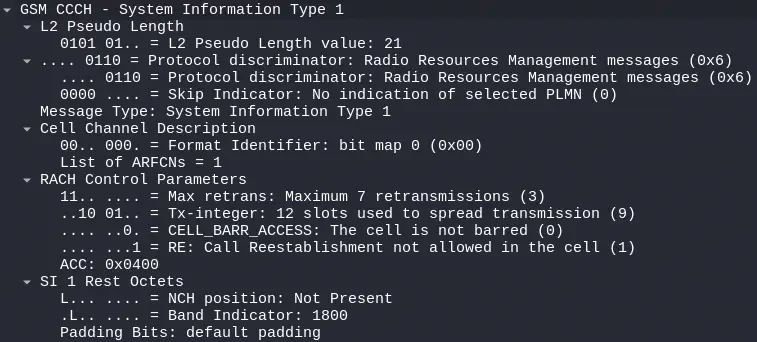
In the packages of type System Information 1, you receive the list of channels available to the cell, in this case only one, in Cell Channel Description.️
System Information 2
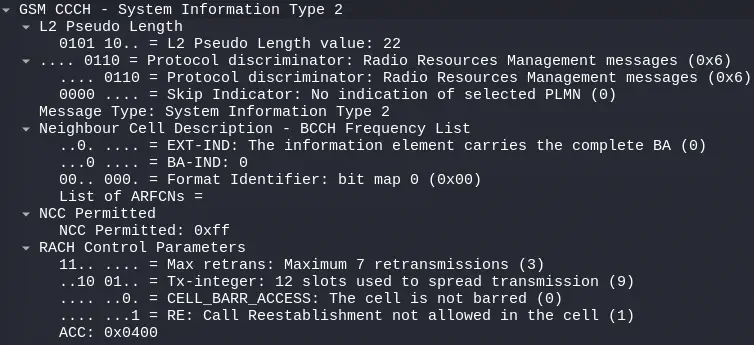
In the packages of type System Information 2, the list of nearby base stations that the cell has is received, in this case none, since there is only one deployed, in Neighbour Cell Description.️
System Information 3
 Here is the translation:
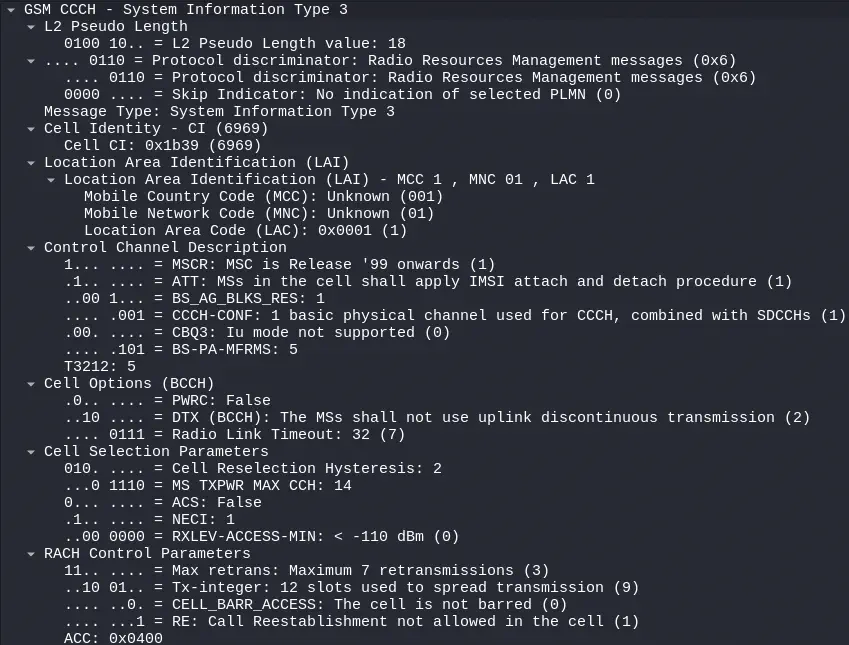
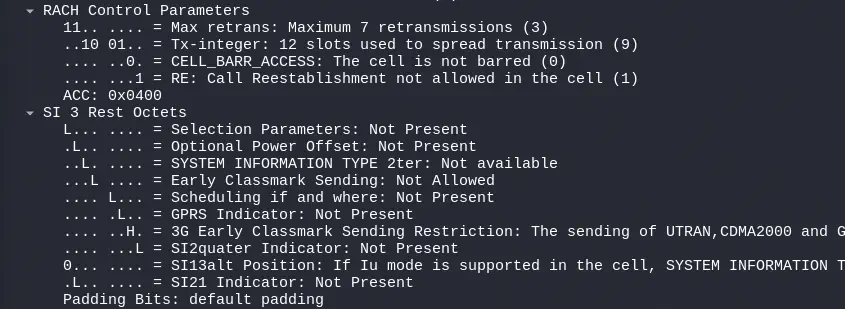
In packages of type System Information 3, information identifying the base station is displayed, such as its location with the LAI (Location Area Identification), which identifies an area where several base stations are deployed or the cell identifier Cell CI (Cell Identity). Other parameters related to network configuration are also found in RACH Control Parameters and those related to selecting the most optimal base station to connect to in Cell Selection Parameters.️
System Information 4
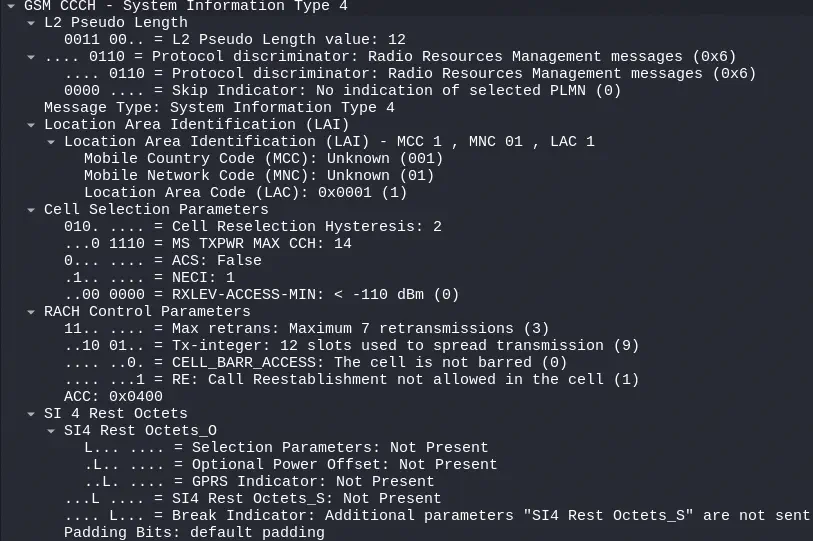 In the packages of type
 System Information 4, additional network configuration parameters can be specified, but in this case it shows the same data as the previous message type.️
Primera conexión del móvil a la estación base
After some seconds of initializing the mobile application, it will start searching for cells to connect to one of them. After some seconds, it connects.️
Channel Request
The communication between the mobile device and the base station begins with a message Channel Request sent by the mobile device on the RACH channel.️
 The channel request is made for the reason of sending a
 Location updating message, that is, to register in the cell, after having disconnected from another or for the first time, in Establishment Cause. A random reference 14 is mentioned, which the base station will mention in its response, in Random Reference.️
Immediate Assignment
The base station responds to the mobile device with a message Immediate Assignment, assigning it a channel.️
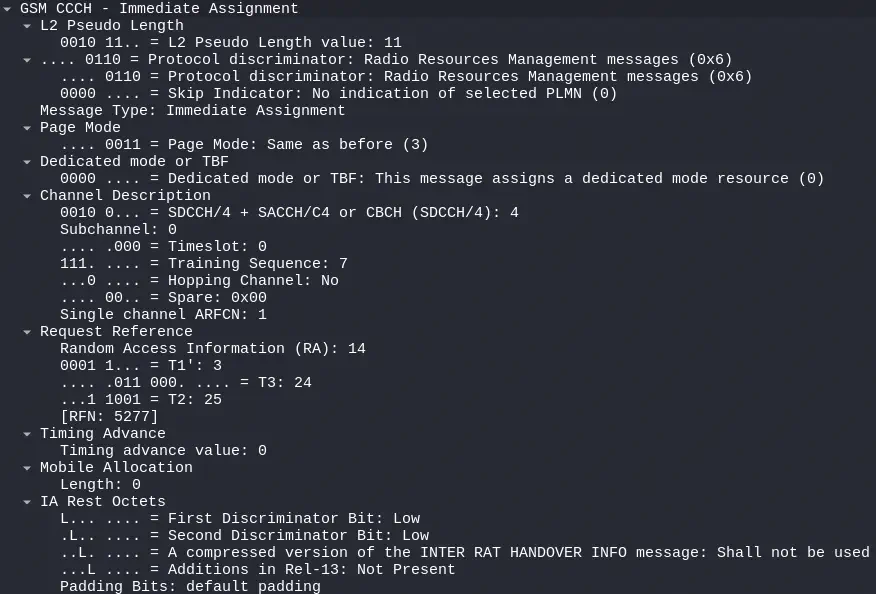 It mentions the reference in the field
 Random Access Information and assigns the channel SDCCH/4 using the timeslot 0 in Channel Description.️
System Information Type 6
The base station sends the mobile more information about the network using the message System Information Type 6.️
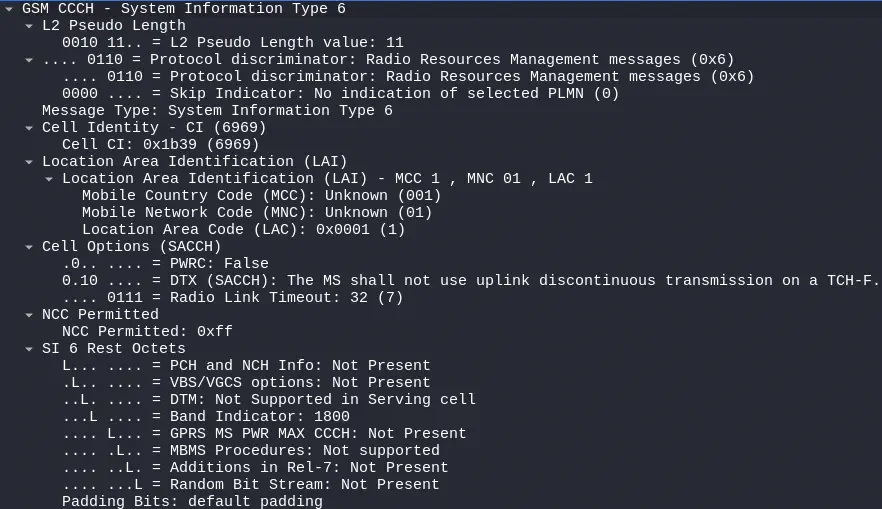
Location Updating Request
The device requests to join the network with the message Location Updating Request.️
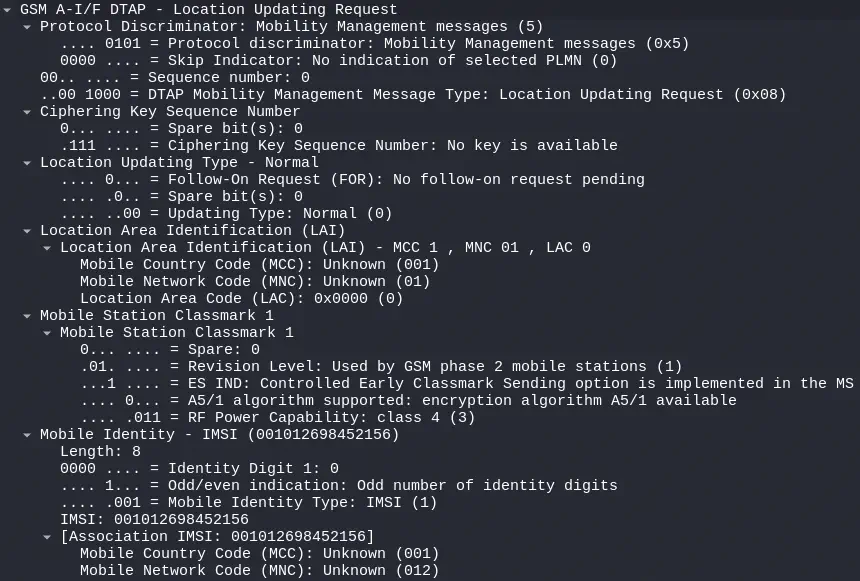 The device sends the identification data stored on the SIM card, such as the
 IMSI identifier in the Mobile Identity field and the Location Area Identification where it was previously located. It also informs the base station if it has the capability to encrypt communications using the A5/1 algorithm supported.️
Location Updating Accept
The base station allows the device to connect to the network with the message Location Updating Accept.
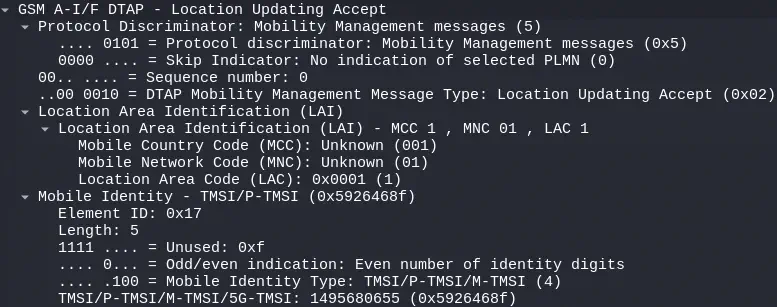 In the message a new identification is included, the TMSI (Temporary Mobile Subscriber Identity), in
 Mobile Identity. This identifier will replace the IMSI in successive communications, so that future actions related to the mobile device cannot be publicly associated since Location Update messages are not usually encrypted in the network.️
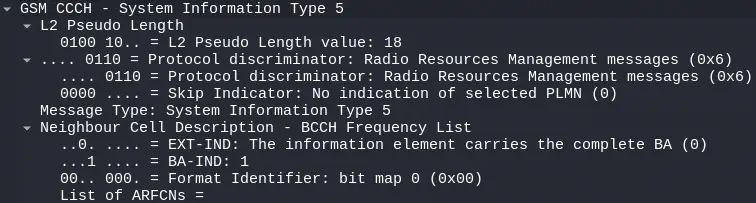
System Information Type 5
The base station sends more information about the network to the mobile using the message System Information Type 5.️
Measurement Report
The base station requests the mobile device to send measurements related to signal reception with the message, so the mobile sends this information in the message Measurement Report.️
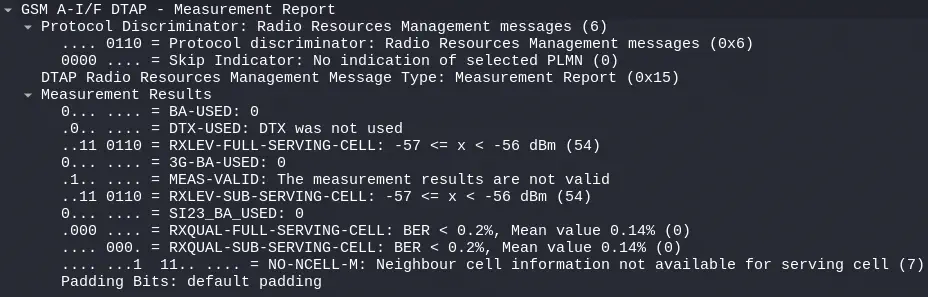 In the section
 Measurement Results, measurement details are listed.️
TMSI Reallocation Complete
The mobile device communicates to the base station that it has already configured the TMSI with the message TMSI Reallocation Complete.️

Channel Release
Upon registering the mobile device at the terminal, the base station notifies the release of the channel with the message Channel Release.️

Sending text message️
We will use the terminal vty of the application mobile to send the SMS. We need to configure the SMS center number (SMSC), which in this case is set to 12345. The message Mensaje De Prueba will be sent to MSISDN 154. As in previous procedures, the messages Channel Request, Immediate Assignment, System Information Type 5, Measurement Report, System Information Type 6, and Channel Release are also sent.️
$ telnet 127.0.0.1 4247
Trying 127.0.0.1...
Connected to 127.0.0.1.
Escape character is '^]'.
Welcome to the OsmocomBB(mobile) VTY interface

OsmocomBB(mobile)> ena
OsmocomBB(mobile)# config
OsmocomBB(mobile)(config)# ms 1
OsmocomBB(mobile)(ms)# sms-service-center 12345
OsmocomBB(mobile)(ms)# end
OsmocomBB(mobile)# sms 1 154 "Mensaje De Prueba"
CM Service Request
The device requests the service with the message CM Service Request.️
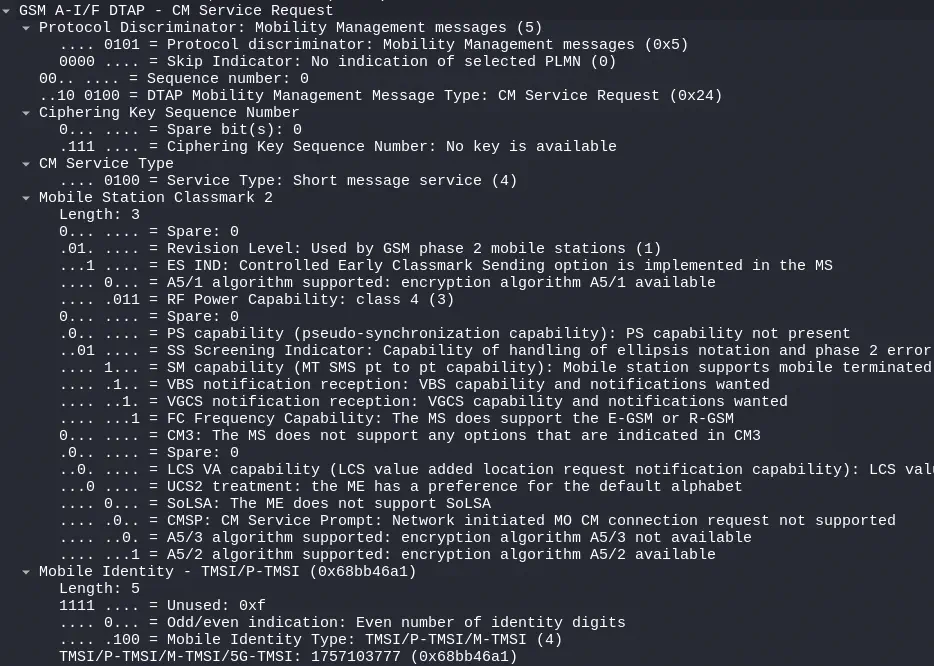 It specifies that it wants to use the
 Short Message Service (SMS) in CM Service Type. Mention the Temporary Mobile Subscriber Identity (TMSI), and the configuration as a client so that the station behaves according to its characteristics.
CM Service Accept
The base station accepts the service with the message CM Service Accept.️

(SMS) CP-DATA (RP) RP-DATA (MS to Network)
With the message (SMS) CP-DATA (RP) RP-DATA (MS to Network), the mobile sends a text message.️
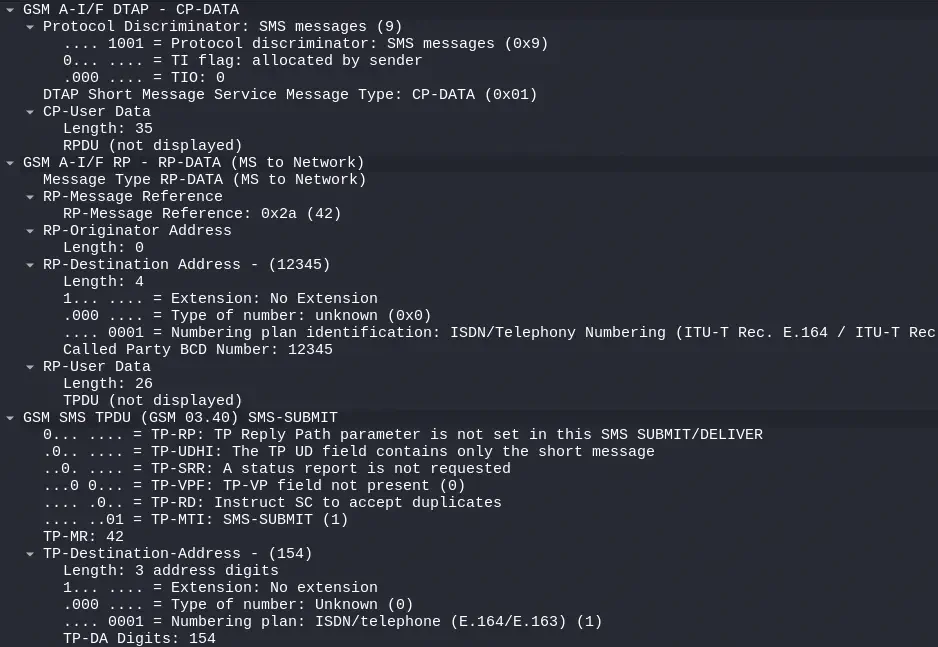
 In the
 RP-DATA section it is observed that the message text data are sent to the short message service center (SMSC) (12345). Next, in the payload of the message SMS TPDU SMS-SUBMIT it is observed the destination 154 in TP-Destination-Address and the text message in the TP-User-Data section.️
(SMS) CP-ACK
In the message (SMS) CP-ACK, the base station confirms receipt of the message.️

(SMS) CP-DATA (RP) RP-DATA (Network to MS)
In the message (SMS) CP-DATA (RP) RP-DATA (Network to MS) the base station confirms to the mobile device that the message has been sent.️
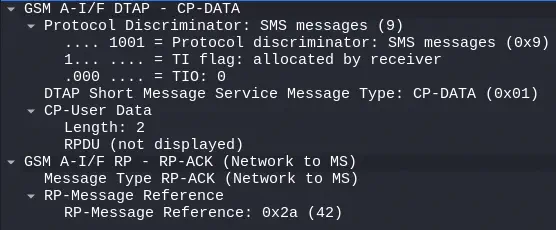
(SMS) CP-ACK
In the message (SMS) CP-ACK the mobile device confirms the reception of the message.️

Receipt of text message.️
After the message is sent from the mobile device, the base station initiates a procedure to send it to its destination. As in previous procedures, messages such as Channel Request, Immediate Assignment, CM Service Request System Information Type 5, Measurement Report, System Information Type 6, CP-ACK and Channel Release are sent.️
Paging Request Type 1
Paging Request Type 1 is sent by the base station with the objective that the mobile device wakes up and requests deployment of a channel for reception of the message.️
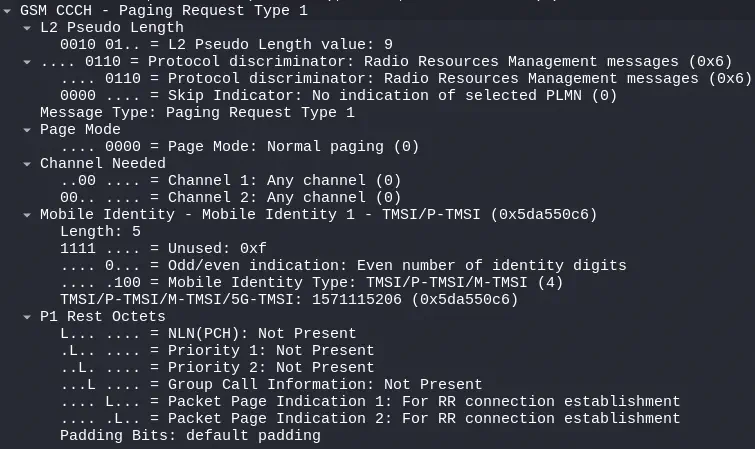 El TMSI a llamar se especifica en la sección
 Mobile Identity.
Paging Response
After entering the requested channel, the device sends the response to the Paging Request with a message Paging Response.️
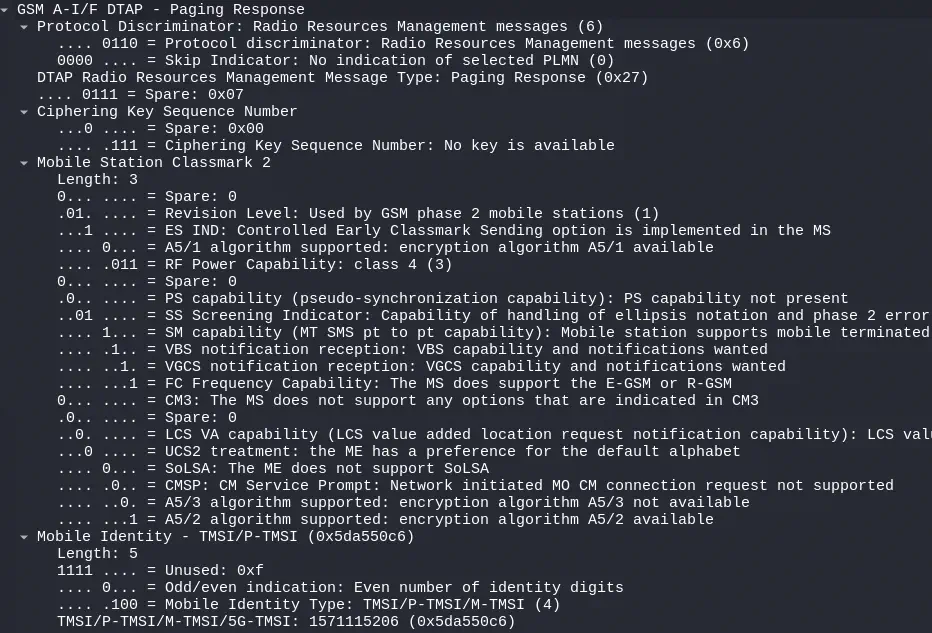 The mobile device specifies its technical characteristics in the section
 Mobile Station Classmark 2 and its TMSI in the section Mobile Identity.️
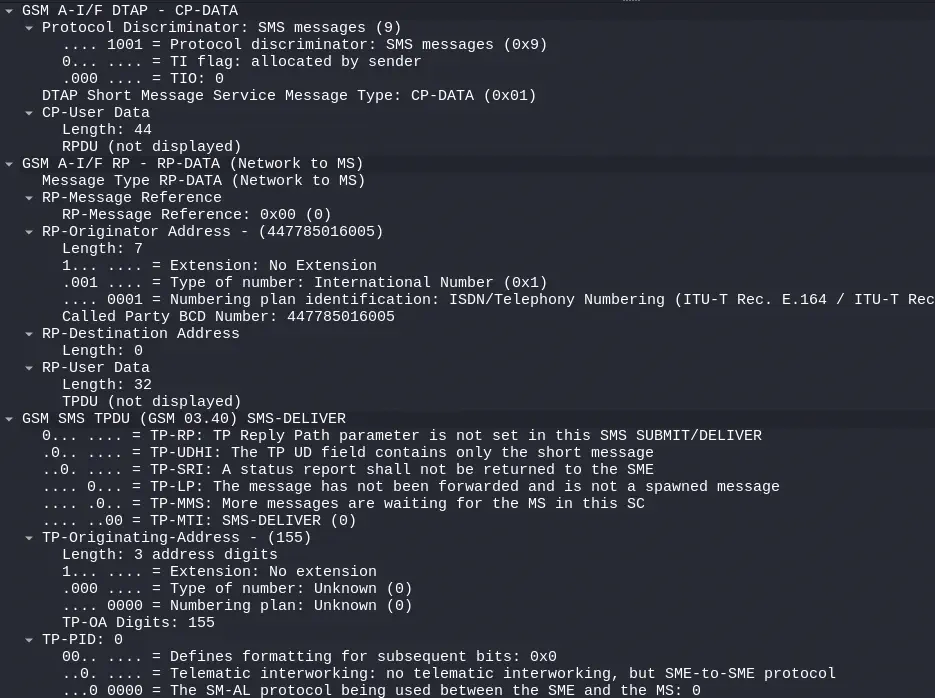
(SMS) CP-DATA (RP) RP-DATA (Network to MS)
With the message (SMS) CP-DATA (RP) RP-DATA (MS to Network) the base station sends the text message to the mobile phone.️
 Here is the translation of the text:
In the RP-DATA section, it can be observed that the message text data are received from the short message service center (SMSC) (447785016005). This is different from what we used previously (12345) since it is the default value in the OsmoBSC source code and cannot be changed. Subsequently, in the payload of the message SMS TPDU SMS-DELIVER, the origin 155 can be observed in TP-Originating-Address and the text message in the section TP-User-Data.️
Disconnection from the base station.️
As previosly the messages Channel Request, Immediate Assignment, System Information Type 6 and Channel Release are sent.️
IMSI Detach Indication
After the message System Information Type the mobile device sends the message IMSI Detach Indication in which it indicates that it disconnects from the network.️
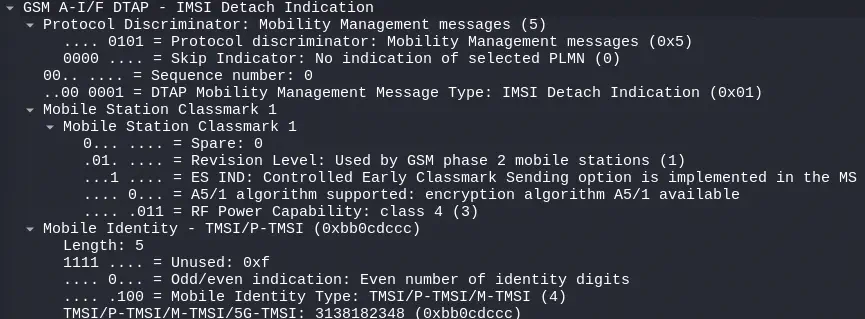 Specify the IMSI in the
 Mobile Identity section.️
Conclusion️
Osmocom will allow us to perform virtually any action of a GSM base station, which will enable us to inspect its internal functioning without affecting physical networks.️