Introduction
5G is the fifth generation of mobile networks, designed to surpass 4G significantly in speed, capacity, and latency. Its objective is not limited to just browsing the internet faster, but to enable entirely new applications, such as autonomous vehicles, augmented reality, real-time telemedicine, and millions of connected devices simultaneously in the Internet of Things (IoT).
In technical terms, 5G is characterized by three main pillars: eMBB (enhanced Mobile Broadband) for high-speed and large-capacity connections, URLLC (Ultra-Reliable Low Latency Communications) for critical communications with minimal latency, and mMTC (massive Machine-Type Communications) for efficiently connecting millions of IoT devices.
At the architecture level, 5G introduces a cloud-native core (5GC) that supports network segmentation (“network slicing”), dynamic traffic control, network function virtualization, and a clear separation between the control plane and the user plane. This allows different services to share the same physical infrastructure but operate as independent networks optimized for each case. In the radio access network, 5G uses the gNodeB as the base station and allows different configurations, either as standalone, where the entire network is pure 5G, or as non-standalone, where it relies on 4G components.
For those who wish to experiment with a real 5G core without the complexity of physical hardware, Open5GS is one of the most popular options. This open-source project implements the EPC/5GC core and allows deploying all the necessary components, such as AMF, SMF, UPF, and other fundamental elements of the control plane and user plane. Although Open5GS can be deployed manually, doing so through containers greatly simplifies the process, and this is where the project docker_open5gs, developed by herlesupreeth and available on GitHub, comes into play. Thanks to it, it is possible to start all the 5G core services in minutes using Docker and Docker Compose.
The deployment begins by preparing the container environment. Once the docker_open5gs repository is cloned, a series of docker-compose files and pre-designed configurations will be available, allowing each of the core modules to be started in independent containers. Before starting the containers, it is advisable to review the configuration parameters, especially those related to internal IP addresses and the MongoDB database that Open5GS uses to store subscriber profiles.
After running Docker Compose, the services start to come up and each component of the core becomes accessible. At this point, it is necessary to register one or several subscribers to simulate the behavior of real 5G devices. Open5GS facilitates this process through an embedded web interface in some deployments or through direct editing of the database.
When the simulated gNodeB is finally connected to the core, the exchange of registration and authentication messages begins, allowing the simulated device to attach to the network and establish data sessions. It is at this moment that the virtual 5G network comes to life and it is possible to measure its performance, generate traffic, and study its behavior.
Installation of Docker and Docker Compose
As operating system that will host the containers, it is recommended to use a recent Linux distribution (for example Ubuntu 22.04 or higher). The minimum requirements are Docker Engine (docker-ce) version 22.0.5 or higher and Docker Compose version 2.14 or higher. We proceed with its installation, in this case, on a recent version of Debian. The full deployment will require about 20-25 GB of storage on the hard disk.
$ sudo apt install docker.io docker-compose
$ sudo usermod -aG docker $USER
Download of Docker images
Next, the Docker images are downloaded, which will be deployed into containers later: docker_open5gs, IMS, srsRAN, UERANSIM, EUPF, Sigscale OCS, Osmo-edpg/Strongswan-epdg and SWu-IKEv2.
docker pull ghcr.io/herlesupreeth/docker_open5gs:master
docker tag ghcr.io/herlesupreeth/docker_open5gs:master docker_open5gs

docker pull ghcr.io/herlesupreeth/docker_grafana:master
docker tag ghcr.io/herlesupreeth/docker_grafana:master docker_grafana

docker pull ghcr.io/herlesupreeth/docker_metrics:master
docker tag ghcr.io/herlesupreeth/docker_metrics:master docker_metrics

docker pull ghcr.io/herlesupreeth/docker_osmohlr:master
docker tag ghcr.io/herlesupreeth/docker_osmohlr:master docker_osmohlr

docker pull ghcr.io/herlesupreeth/docker_osmomsc:master
docker tag ghcr.io/herlesupreeth/docker_osmomsc:master docker_osmomsc

docker pull ghcr.io/herlesupreeth/docker_pyhss:master
docker tag ghcr.io/herlesupreeth/docker_pyhss:master docker_pyhss

docker pull ghcr.io/herlesupreeth/docker_kamailio:master
docker tag ghcr.io/herlesupreeth/docker_kamailio:master docker_kamailio

docker pull ghcr.io/herlesupreeth/docker_mysql:master
docker tag ghcr.io/herlesupreeth/docker_mysql:master docker_mysql

docker pull ghcr.io/herlesupreeth/docker_opensips:master
docker tag ghcr.io/herlesupreeth/docker_opensips:master docker_opensips

docker pull ghcr.io/herlesupreeth/docker_srslte:master
docker tag ghcr.io/herlesupreeth/docker_srslte:master docker_srslte

docker pull ghcr.io/herlesupreeth/docker_srsran:master
docker tag ghcr.io/herlesupreeth/docker_srsran:master docker_srsran

docker pull ghcr.io/herlesupreeth/docker_ueransim:master
docker tag ghcr.io/herlesupreeth/docker_ueransim:master docker_ueransim

docker pull ghcr.io/herlesupreeth/docker_eupf:master
docker tag ghcr.io/herlesupreeth/docker_eupf:master docker_eupf

docker pull ghcr.io/herlesupreeth/docker_ocs:master
docker tag ghcr.io/herlesupreeth/docker_ocs:master docker_ocs

docker pull ghcr.io/herlesupreeth/docker_osmoepdg:master
docker tag ghcr.io/herlesupreeth/docker_osmoepdg:master docker_osmoepdg

docker pull ghcr.io/herlesupreeth/docker_swu_client:master
docker tag ghcr.io/herlesupreeth/docker_swu_client:master docker_swu_client
Environment Setup
For the configuration, we will use a single host configuration, where eNB/gNB and (EPC+IMS)/5GC are deployed on a single host machine. We start by cloning the repository docker_open5gs.
$ git clone https://github.com/herlesupreeth/docker_open5gs
$ cd docker_open5gs
We obtain the IP address of our host machine in Docker, by reading the IP address of the docker0 interface, 172.17.0.1.
$ ip a show docker0
3: docker0: <NO-CARRIER,BROADCAST,MULTICAST,UP> mtu 1500 qdisc noqueue state DOWN group default
    link/ether 02:42:0f:cb:00:c1 brd ff:ff:ff:ff:ff:ff
    inet 172.17.0.1/16 brd 172.17.255.255 scope global docker0
       valid_lft forever preferred_lft forever
We modify the environment variables from the .env file. We modify the country code (MCC) by the test code (999) and the mobile network code (MNC) by 01. We indicate the Docker IP address that we obtained earlier with the variable DOCKER_HOST_IP. Since we have changed the MCC and the MNC, we will also have to change the IMSI of the UE in the variable UE1_IMSI by replacing its beginning 00101 with 99901.
$ nano .env
Finally we set up a timezone file to synchronize it with the containers, since the file is not found in some cases.
$ sudo timedatectl set-timezone "Europe/Madrid"
$ echo "Europe/Madrid" | sudo tee /etc/timezone
Deployment of the environment
We deploy first with Docker Compose the 5G Core network. This will start the core components (AMF, SMF, UPF, database, etc.).
$ docker compose -f sa-deploy.yaml up
[+] Running 1/15
...
Attaching to amf, ausf, bsf, grafana, metrics, mongo, nrf, nssf, pcf, scp, smf, udm, udr, upf, webui
...
webui    | > Building page: /
webui    |  DONE  Compiled successfully in 6981ms
...
We wait a few minutes for all network functions to be deployed. The deployment will be complete when we can access the web terminal of Open5GS at the address http://127.0.0.1:9999 Next, we deploy the virtual gNB using UERANSIM gNB.
$ docker compose -f nr-gnb.yaml up -d && docker container attach nr_gnb
[+] Running 1/1
 ✔ Container nr_gnb  Started 0.2s
root@109836ec9ab8:/UERANSIM/build# UERANSIM v3.2.6
[sctp] [info] Trying to establish SCTP connection... (172.22.0.10:38412)
[sctp] [info] SCTP connection established (172.22.0.10:38412)
[sctp] [debug] SCTP association setup ascId[21]
[ngap] [debug] Sending NG Setup Request
[ngap] [debug] NG Setup Response received
[ngap] [info] NG Setup procedure is successful
Finally the virtual mobile device UE (User Equipment) using UERANSIM NR-UE.
$ docker compose -f nr-ue.yaml up -d && docker container attach nr_ue
[+] Running 1/1
 ✔ Container nr_ue  Started 0.2s
root@2f2d4eb66015:/UERANSIM/build# UERANSIM v3.2.6
[nas] [info] UE switches to state [MM-DEREGISTERED/PLMN-SEARCH]
[rrc] [debug] New signal detected for cell[1], total [1] cells in coverage
[nas] [info] Selected plmn[999/01]
[rrc] [warning] Suitable cell selection failed in [1] cells. [0] out of PLMN, [1] no SI, [0] reserved, [0] barred, ftai [0]
[rrc] [warning] Acceptable cell selection failed in [1] cells. [1] no SI, [0] reserved, [0] barred, ftai [0]
[rrc] [error] Cell selection failure, no suitable or acceptable cell found
[rrc] [info] Selected cell plmn[999/01] tac[1] category[SUITABLE]
[nas] [info] UE switches to state [MM-DEREGISTERED/PS]
[nas] [info] UE switches to state [MM-DEREGISTERED/NORMAL-SERVICE]
[nas] [debug] Initial registration required due to [MM-DEREG-NORMAL-SERVICE]
[nas] [debug] UAC access attempt is allowed for identity[0], category[MO_sig]
[nas] [debug] Sending Initial Registration
[nas] [info] UE switches to state [MM-REGISTER-INITIATED]
[rrc] [debug] Sending RRC Setup Request
[rrc] [info] RRC connection established
[rrc] [info] UE switches to state [RRC-CONNECTED]
[nas] [info] UE switches to state [CM-CONNECTED]
[rrc] [debug] RRC Release received
[nas] [error] Initial Registration failed [FIVEG_SERVICES_NOT_ALLOWED]
[nas] [info] UE switches to state [5U3-ROAMING-NOT-ALLOWED]
[nas] [info] UE switches to state [MM-DEREGISTERED/PS]
[nas] [info] UE switches to state [CM-IDLE]
[nas] [info] UE switches to state [MM-DEREGISTERED/NO-SUPI]
We check that the network has rejected the subscriber device and it has not been able to be registered. This is due to the subscriber data not being registered in the HSS.
Subscriber registration in the HSS database
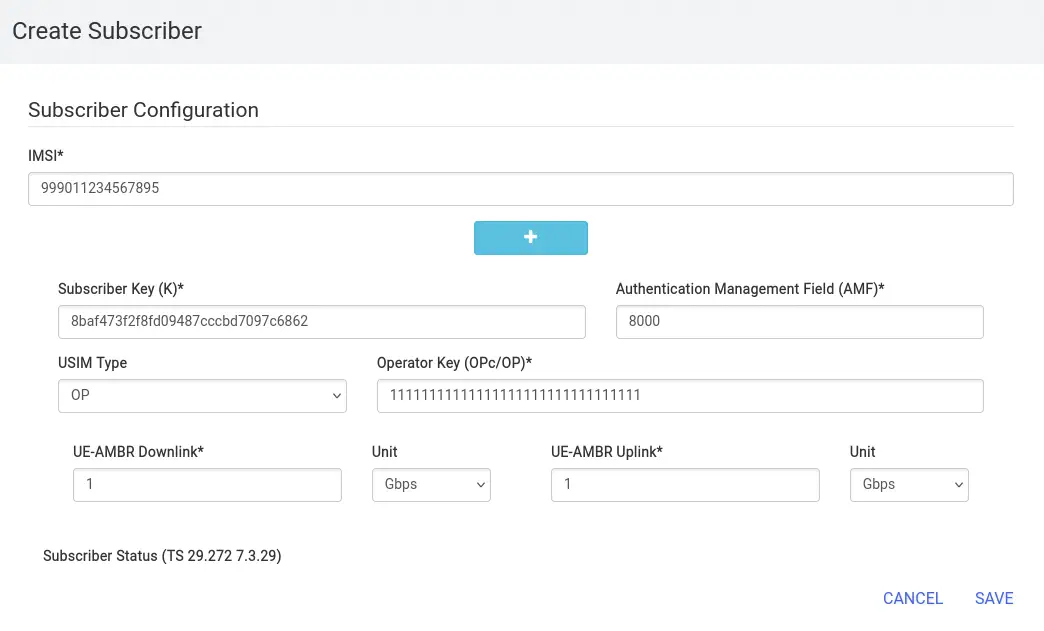
To allow a UE to register in the network, you need to create a “subscriber” in the Open5GS (HSS) database with details such as IMSI, MSISDN, authentication keys, and configure the APN. You access the web interface (by default http://127.0.0.1:9999), with credentials admin:1423. The data to add can be found already configured by default in the .env file and starts with UE.
$ grep "^UE" .env
UE1_IMEI=356938035643803
UE1_IMEISV=4370816125816151
UE1_IMSI=999011234567895
UE1_KI=8baf473f2f8fd09487cccbd7097c6862
UE1_OP=11111111111111111111111111111111
UE1_AMF=8000
UE_IPV4_INTERNET=192.168.100.0/24
UE_IPV4_IMS=192.168.101.0/24
We log in to the web panel and add the subscriber using the button ADD A SUBSCRIBER. We fill in the IMSI with UE1_IMEI, the Subscriber Key (K) with UE1_KI, the USIM Type with OP and the Operator Key (OPc/OP) with UE1_OP. We click on SAVE and redeploy the UE.
$ docker compose -f nr-ue.yaml up -d && docker container attach nr_ue
...
[nas] [debug] Selected integrity[2] ciphering[0]
[nas] [debug] Registration accept received
[nas] [info] UE switches to state [MM-REGISTERED/NORMAL-SERVICE]
[nas] [debug] Sending Registration Complete
[nas] [info] Initial Registration is successful
[nas] [debug] Sending PDU Session Establishment Request
[nas] [debug] UAC access attempt is allowed for identity[0], category[MO_sig]
[nas] [debug] Configuration Update Command received
[nas] [debug] PDU Session Establishment Accept received
[nas] [info] PDU Session establishment is successful PSI[1]
[app] [info] Connection setup for PDU session[1] is successful, TUN interface[uesimtun0, 192.168.100.2] is up.
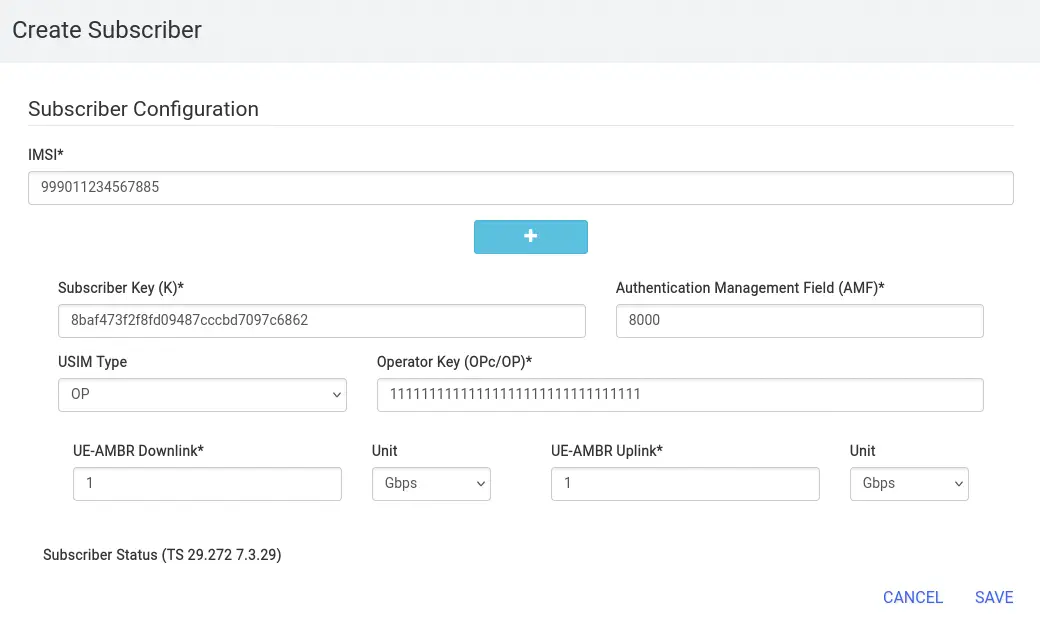
We check that the registration has been performed correctly and that the UE has obtained the IP address 192.168.100.2 through the interface uesimtun0 in the 5G network. We can deploy another UE by creating new files nr_ue.yaml and .env along with the addition of entries to the web interface. We edit the entries corresponding to the UE such as the IMEI, the IMSI, or the Docker container IP address.
$ mkdir nr-ue2
$ cd nr-ue2
$ cp ../nr-ue.yaml nr-ue2.yaml
$ sed -i 's/nr_ue/nr_ue2/g' nr-ue2.yaml
$ sed -i 's/\.\/ueransim/\.\.\/ueransim/g' nr-ue2.yaml
$ cp ../.env .env
$ sed -i 's/356938035643803/356938035643813/g' .env
$ sed -i 's/4370816125816151/4370816125816161/g' .env
$ sed -i 's/999011234567895/999011234567885/g' .env
$ sed -i 's/172.22.0.24/172.22.0.43/g' .env
$ docker compose -f nr-ue2.yaml up -d && docker container attach nr_ue2
...
[app] [info] Connection setup for PDU session[1] is successful, TUN interface[uesimtun0, 192.168.100.3] is up.
 The connection is correct. We can have connectivity with the other UE.
root@a3edf17323a4:/UERANSIM/build# ping -I uesimtun0 -c 1 192.168.100.2
PING 192.168.100.2 (192.168.100.2) from 192.168.100.3 uesimtun0: 56(84) bytes of data.
64 bytes from 192.168.100.2: icmp_seq=1 ttl=63 time=4.72 ms

--- 192.168.100.2 ping statistics ---
1 packets transmitted, 1 received, 0% packet loss, time 0ms
rtt min/avg/max/mdev = 4.716/4.716/4.716/0.000 ms
Conclusion
The combination of Open5GS and docker_open5gs represents a powerful tool for learning about modern 5G networks, allowing to recreate in a controlled environment what was previously reserved for specialized laboratories. This approach not only facilitates the understanding of the 5G core, but also prepares engineers, students, and enthusiasts to work with technologies that are transforming global connectivity.